Stop re-explaining your codebase: set up Gentle-AI so your coding agent remembers, plans, and proves its work
Gentle-AI configures the coding agent you already use — persistent memory, a deterministic workflow, and a review state machine that refuses to guess. I installed v4.5.0, verified every command in this tutorial, and measured exactly where it stops and your agent takes over.
doctor, an Engram save/search round-trip, and a review assess on a real commit — all without an API key.- The project:
Gentleman-Programming/gentle-ai— 9,139 stars (+242 in a day), 5,056 commits, 298 releases; created February 27, 2026; MIT; latest release v4.5.0. - The install: one Go binary via
install.sh, checksum-verified; no Go needed, no key, no GPU, no model weights. - What was verified: 28 install checks passed; Engram memory saved and found again;
review assessreturned medium/under-budget for a 5-line change and high/high-risk for a CI workflow change; the GGA hook fails closed without a provider CLI. - The limit: it configures agents, it does not install them. The live agent session was not run here (no CLI or key in the sandbox); macOS Homebrew and Windows go-install paths are documented, not run.

Your coding agent writes good code and then forgets everything. It has no memory of the decisions you made together, no opinion about how your project is structured, and no way to prove what it did beyond asking you to read every line. Every new session starts from zero, and you pay for that reset in re-explained context and re-reviewed diffs. Gentle-AI is the project that has been climbing GitHub Trending this week by fixing exactly that — not by being another agent, but by configuring the agent you already use. It has 9,139 stars, gained 242 in a single day, and ships as one Go binary that installs persistent memory, a deterministic workflow, a skills library, and a review state machine into Claude Code, Cursor, OpenCode, Codex, Pi, and twelve more agents. This tutorial installs version 4.5.0, verifies every command in it, and shows you where the tooling stops and your agent takes over — because that boundary is the whole point.
What you'll need#
- A Mac, Linux, or Windows machine. The steps below ran on Ubuntu Linux; the macOS and Windows commands come from the project's own README and are marked as such.
git,curl, and Node.js 18 or newer with npm. The installer checks for these and prints install hints when one is missing. Go is not required for the stable install — the dry run lists it as optional and missing, and the install works without it.- A coding agent you already use — Claude Code is the example here — installed separately, with its own subscription or API key. Gentle-AI configures agents; it never installs one for you. That is a deliberate design choice, stated in the README, and it shapes everything below: every step except the final agent session runs without any key.
- About ten minutes and a project to configure. Nothing in this tutorial downloads model weights or needs a GPU.
One warning before you start: the project's own docs lag its releases. The README's install example pins @v4.1.1 and the quickstart calls v4.0.0 the latest stable release. The actual latest release, confirmed against the GitHub API while writing this, is v4.5.0. Pin that version wherever a version is needed, and check the releases page before you copy a version number from any tutorial, including this one.
Step 1: Install the binary#
On macOS, Homebrew is the documented path:
brew install gentleman-programming/tap/gentle-aiOn macOS or Linux, the installer script downloads a prebuilt binary from GitHub Releases and verifies its checksum before installing it:
curl -fsSL https://raw.githubusercontent.com/Gentleman-Programming/gentle-ai/main/scripts/install.sh | bashOn Windows, the install goes through Go, which must be 1.25.10 or newer:
go install github.com/gentleman-programming/gentle-ai/v4/cmd/[email protected]I ran the Linux path. The script detected the platform, reported the latest release as v4.5.0, and then failed on the first download attempt — the asset fetch errored out. A direct download of the same URL worked, and re-running the installer succeeded, so treat a first-attempt download failure as transient and retry once before troubleshooting further. The installed binary is 32 MB, and the installer adds one marked line (# gentle-ai installer) to your shell startup file so the install directory lands on your PATH. Verify the install:
gentle-ai version
# gentle-ai 4.5.0
If the binary is not on your PATH after install — for example, if you installed it to a custom directory the way I did for verification — add the directory yourself and open a new terminal. Every later command in this tutorial assumes gentle-ai resolves.
Step 2: Dry-run the plan before it touches anything#
Gentle-AI installs in presets. Before applying one, preview it. This command changes nothing — it prints the plan, the detected platform, and the dependency versions it found:
gentle-ai install --dry-run --agent claude-code --preset minimal --scope workspaceAI Gentle Stack dry-run
=====================
Agents: claude-code
Unsupported agents: none
Persona: gentleman
Preset: minimal
Components order: persona,engram
Auto-added dependencies: none
Platform decision: os=linux distro=ubuntu package-manager=apt status=supported
Prepare steps: 2
Apply steps: 3
Dependencies:
git: v 2.43.0
curl: v 8.5.0
node: v 24.22.1
npm: v 10.9.4
go: x NOT FOUND (optional)
Missing optional: goTwo things in that output are worth noticing. First, the minimal preset installs exactly two components: the persona and Engram, the persistent-memory layer. Second, Go is listed as missing and optional — the stable install does not need it. Run the same dry run with the preset this tutorial uses:
gentle-ai install --dry-run --agent claude-code --preset full-gentleman --scope workspaceAgents: claude-code
Persona: gentleman
Preset: full-gentleman
Components order: claude-theme, context7, persona, engram, gga,
opencode-gentle-logo, permissions, skills
Apply steps: 9The full preset adds six components to the minimal two: a theme, the Context7 documentation MCP server, GGA (a git-hook code reviewer), an OpenCode logo component, a permissions deny-list, and the skills library. The available presets are full-gentleman, ecosystem-only, minimal, and custom. If you want a different agent, change --agent — the list runs to seventeen, including Cursor, OpenCode, Codex, Pi, Gemini CLI, Kilo Code, Kimi Code, Kiro IDE, Qwen Code, Hermes, Antigravity, Windsurf, OpenClaw, Trae, and Conductor. Two agents are exceptions to the "configured even when the runtime is missing" rule: for Pi and OpenCode, the installer stops until pi is on your PATH or opencode --version succeeds.
Step 3: Install for Claude Code, workspace scope#
Run the install from inside your project. The --scope workspace flag writes the agent configuration into the project root instead of your global agent config, so the setup travels with the repository:
cd your-project
gentle-ai install --agent claude-code --preset full-gentleman --scope workspace
The installer prints a short warning — engram: claude CLI not found in PATH — and carries on anyway. That is expected when the agent runtime is not installed yet: the config is written regardless, and the agent picks it up when you install it. The run ends with its own verification pass:
Verification checks: 28 passed, 0 failed, 0 warnings, 0 skipped
You're ready. Run `claude` and start building.
Check what landed in your project:
find .claude .mcp.json -type f | sort.claude/CLAUDE.md
.claude/agents/jd-fix-agent.md
.claude/agents/jd-judge-a.md
.claude/agents/jd-judge-b.md
.claude/agents/review-readability.md
.claude/agents/review-refuter.md
.claude/agents/review-reliability.md
.claude/agents/review-resilience.md
.claude/agents/review-risk.md
.claude/mcp/engram.json
.claude/output-styles/gentleman.md
.claude/settings.json
.claude/skills/chained-pr/SKILL.md
.claude/skills/cognitive-doc-design/SKILL.md
.claude/skills/go-testing/SKILL.md
.claude/skills/judgment-day/SKILL.md
.claude/skills/skill-creator/SKILL.md
.claude/skills/skill-improver/SKILL.md
.claude/skills/skill-registry/SKILL.md
.claude/skills/work-unit-commits/SKILL.md
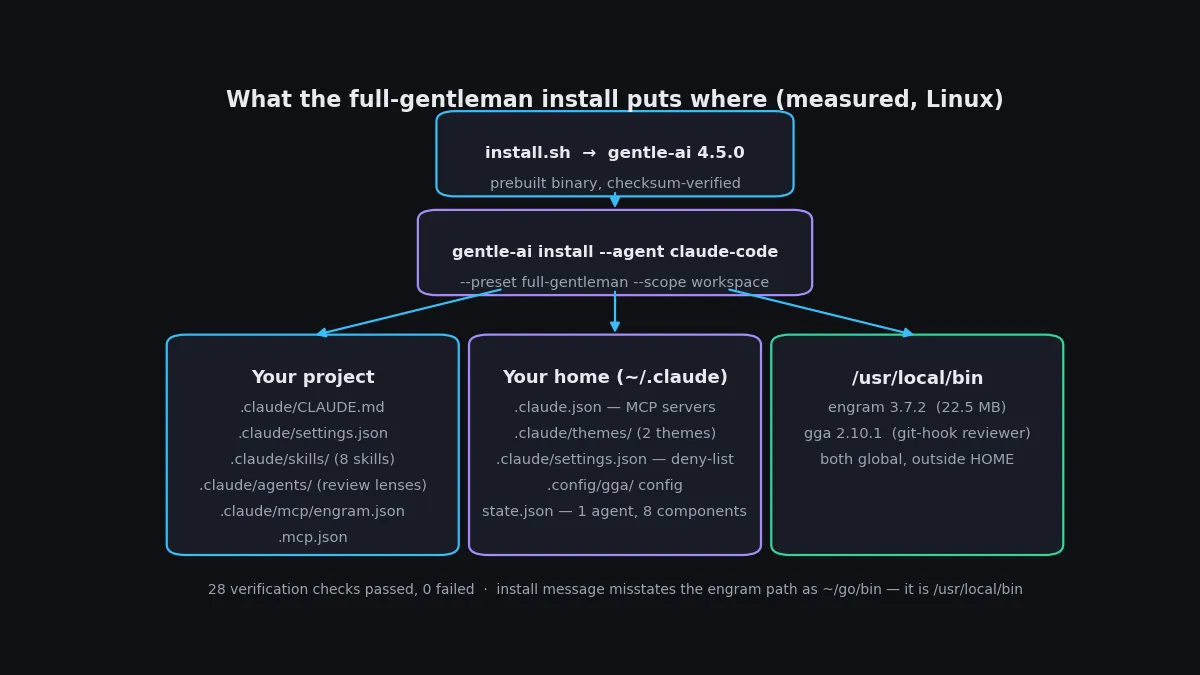
.mcp.jsonThree files do most of the work. CLAUDE.md is the persona and operating rules the agent reads every session: short answers by default, at most one question at a time, never agree with a claim without verifying it, and a mandatory self-check before every response — does the request match an installed skill, and if so, invoke it first. settings.json carries the security deny-list, which blocks the agent from reading or editing .env files, ~/.ssh/**, ~/.aws/credentials, **/*.pem, **/*.key, and anything under secrets/, and from running rm -rf / or rm -rf ~. The skills directory holds eight skills plus shared reference files; the agents directory holds the review lenses used by the state machine in Step 6.
The install also writes outside the project, and you should know where. The global ~/.claude.json gets the MCP servers (Context7 via npx and Engram), themes land in ~/.claude/themes/, and the install state — agents, preset, components, and a managed-asset digest — is recorded in ~/.gentle-ai/state.json. Two more binaries land in /usr/local/bin: engram 3.7.2, the memory server, and gga 2.10.1, the git-hook reviewer. One correction to the installer's own output: it claims the engram binary went to ~/go/bin via go install. That directory does not exist after the install, and which engram resolves to /usr/local/bin/engram. Trust the binary's location, not the message.
Step 4: Verify with doctor — and read the scope split#
gentle-ai doctor is a read-only health check: tool binaries, state-file validity, Engram MCP reachability, and disk space, each reported as pass, warn, or fail with a remedy. Run it:
gentle-ai doctorAfter the workspace-scope install above, the summary reads 5 passed, 2 failed, 1 warnings and the status is unhealthy. Do not panic — read the lines. The two failures are the expected gaps in a machine without the agent runtime yet: gentle-ai not found in PATH (only if you installed to a custom directory; the remedy is to add it) and claude not found in PATH (install Claude Code). The warning is the interesting one:
[!!]  engram:reachable   engram MCP not probed: no persisted MCP configuration
       found for installed agents
       Remedy: Run 'gentle-ai sync' to restore the Engram MCP configuration
I ran the suggested gentle-ai sync --scope workspace. It synced eight components and changed one file (.claude/CLAUDE.md), but the warning stayed. The reason is scope: the workspace install puts the Engram MCP config in the project (.claude/mcp/engram.json), while doctor probes the persisted global configuration. Run the same install without --scope workspace — the default global scope — and doctor reports 6 passed, 2 failed, 0 warnings, with the Engram line green: "engram MCP (stdio) answered the initialize handshake for persisted configuration: ~/.claude.json". So the rule is simple: global scope gives you a clean doctor run once the agent runtime is installed; workspace scope leaves that one warning by design. Pick the scope that matches how you work — per-project isolation, or one setup for every repository — and know which doctor output to expect.
While you are here, decide on telemetry. Gentle-AI sends anonymous usage metrics by default — version, OS, agents, counters — to telemetry.gentlemanprogramming.com, and the installer says so in its output. Check the current state and opt out if you prefer:
gentle-ai telemetry status
# telemetry: enabled (source: default)
gentle-ai telemetry disable
Step 5: Prove the memory works — save and search#
Engram is the component that makes the "agent remembers" claim real, and it is the one part you can exercise end to end without any agent at all. It is a small binary with its own CLI. Check its version and its command list first:
engram version
# engram 3.7.2
engram --help
The commands that matter for this tutorial are save, search, mcp, and serve. The MCP server is what your agent talks to — the install wired it in as engram mcp --tools=agent in both the project and global MCP configs — but the CLI lets you test the memory layer directly. Save one decision about your project, the way your agent would:
engram save "csv totals" "report.py sums the amount column with total_sales(); sales.csv has 2 rows totalling 19.75" --project demo-project
# Memory saved: #1 "csv totals" (manual)
Then read it back the way your agent would, in a fresh process with no shared state:
engram search "csv totals" --project demo-projectFound 1 memories:
[1] #1 (manual) — csv totals
report.py sums the amount column with total_sales(); sales.csv has 2 rows totalling 19.75
2026-11-14 03:17:52 | project: demo-project | scope: projectThat round-trip — write from one process, recall from another, with project and scope attached — is the whole mechanism. Inside an agent session, the same store is reached through the MCP server instead of the CLI: the agent saves what it learns as it works and searches before it asks you. Memories are namespaced by project, so a decision saved in one repository never leaks into another. If the save fails with a disk error on first run, check your disk quota before blaming the tool — that is exactly what happened during verification here, and freeing dead test scratch fixed it.
Step 6: Review a real commit with the state machine#
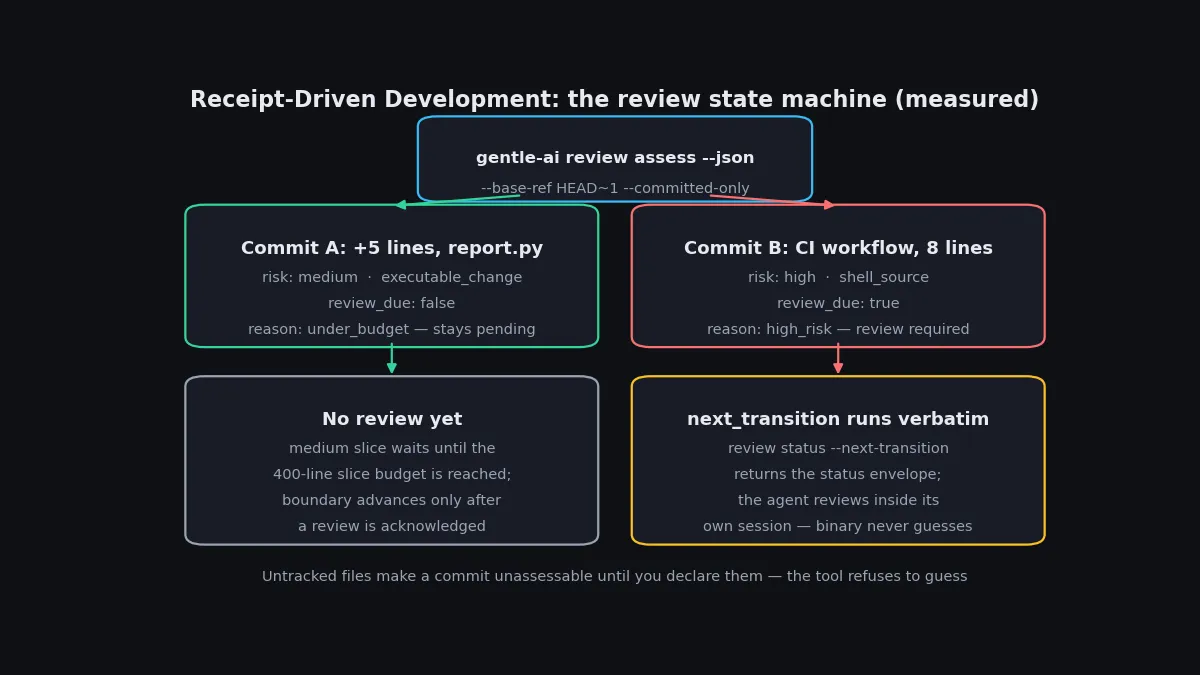
Receipt-Driven Development (RDD) is the part of Gentle-AI that most clearly shows its philosophy: the binary owns the review lifecycle as a deterministic state machine, and the model never votes on what happens next. The command is gentle-ai review assess. It reads a commit range, assigns a risk tier, and returns JSON saying whether a review is due and, if so, the exact next command to run. Try it on a small, ordinary change — in the verification project, a five-line helper function added to report.py:
gentle-ai review assess --cwd . --agent claude-code --base-ref HEAD~1 --committed-only --json{
"schema": "gentle-ai.review-assessment/v1",
"risk": "medium",
"reasons": [{ "code": "executable_change", "path": "report.py" }],
"changed_paths": 1,
"changed_lines": 5,
"review_due": false,
"review_due_reason": "under_budget"
}A medium-risk change does not trigger a review yet: it stays pending in the slice until the roughly 400-authored-line slice budget is reached. Now try a change the machine considers high-risk — a CI workflow file, which the assessor flags for its shell execution:
{
  "risk": "high",
  "reasons": [{ "code": "shell_source", "path": ".github/workflows/ci.yml",
                "detail": "signal: shell_process" }],
  "changed_paths": 1,
  "changed_lines": 8,
  "review_due": true,
  "review_due_reason": "high_risk",
  "next_transition": {
    "operation": "review.status",
    "command": "gentle-ai review status --cwd=<repo> --contract=gentle-ai.review-integration/v2 --agent=claude-code --next-transition=true --base-ref=HEAD~1 --committed-only=true"
  }
}
Run the returned command verbatim — it is the exact preflight for the same selectors — and you get a status envelope (schema gentle-ai.review-integration.status/v9) with the action start and a forecast of the steps ahead. The review itself then runs inside your agent session, with the review lenses the install placed in .claude/agents/. Two details from running this are worth knowing. First, the assessor refuses to guess about untracked files: my first attempt failed with risk high and reason unassessable, because the install's own .claude/ directory was untracked in the repo. The error tells you the exact remedy — rerun with --untracked-scope=exclude --expected-untracked-inventory=sha256:… — and the hash it prints is the one to use. Second, RDD is on by default; check it with gentle-ai review mode status and turn it off deliberately with gentle-ai review mode disable if you want ordinary checks only.
Step 7: Put a reviewer on every commit with GGA#
The full-gentleman preset also installs GGA, the Gentleman Guardian Angel — a provider-agnostic code-review tool that runs as a git hook. Enable it per repository:
gga init
gga install
gga init creates a .gga config file. The default provider is Claude, but the file lists the alternatives: Gemini, Codex, OpenCode, Cursor, Kilo, Kiro, Ollama models, LM Studio, GitHub models, and MiniMax. gga install writes a pre-commit hook whose entire content is gga run || exit 1 — the commit is blocked unless the review passes. I verified the failure mode, which is the part you want to see before you trust a hook: with no Claude CLI installed, the commit fails closed with a clear message, Claude CLI not found plus the install URL, and the change stays uncommitted. Set the provider in .gga to one you actually have before relying on the hook, or your commits will stop until you do.
Step 8: Use your agent — what changes in the session#
This is the one step I did not run live: the sandbox has no Claude Code CLI and no provider key, so there was no agent session to observe. What follows is the project's documented behavior, not a measured run — and the distinction matters, because the first seven steps are all verified and this one is not. Open your agent in the configured project and describe an outcome, for example: "Add CSV export using the existing report filters." The workflow the install sets up is called Organic-Driven Development (ODD), and it runs by default on every request:
- Authorize, then explore. Read-only work stays read-only; questions and proposals change nothing until you ask for a change.
- Classify by size. Small, understood work runs inline with no durable artifacts. Substantial work gets one feature document at
odd/tasks/<feature-name>.md— your spec quoted verbatim, numbered tasks, and a log — plus a full mirror in Engram, before the first source write. - Test-first by default. Each requested rule gets one failing test first, then the implementation, then a refactor while tests stay green.
- Commit in reviewable slices of about 400 authored lines, with a work-unit commit per task. After each slice, the agent assesses it with the command from Step 6 and follows the returned transition when a review is due.
- Resume from the document, not from memory. A later session reads the feature document and the Engram mirror, reconciles them against the code, and continues — which is the payoff for Step 5.
If you already have a workflow you like, the custom persona keeps your existing instructions unmanaged instead of injecting the Gentleman persona. And if you add another agent later, you do not reinstall everything: gentle-ai install --agent windsurf --preset full-gentleman adds it to the same setup, and gentle-ai sync --agent claude-code --agent opencode refreshes only the agents you name.
When to use Gentle-AI vs alternatives#
| Approach | Use it when | Watch out for |
|---|---|---|
| Gentle-AI | You use one or more coding agents daily and want shared memory, workflow, and review enforced the same way in every project. | It configures agents; it is not an agent. You still need the agent and its key. |
| A skills collection (Anthropic's skills repo, addyosmani/agent-skills) | You want curated procedures for your agent and nothing else — no installer, no memory server, no review machine. | No persistence across sessions and no enforcement; the agent can ignore a skill file. |
| A memory plugin (claude-mem and similar) | Persistent memory is the only gap you feel, and you want the smallest possible addition. | Memory alone does not give you workflow discipline or review gates. |
| Hand-written CLAUDE.md / AGENTS.md | One project, one agent, rules you wrote yourself and maintain by hand. | Every project repeats the work, and nothing verifies the setup or syncs it after updates. |
| Nothing — stock agent | Occasional use, throwaway sessions, or a codebase small enough to re-explain each time. | The reset cost grows with the project; that is the exact pain Gentle-AI prices. |
Gentle-AI is the heaviest option on this list, and that is the honest way to judge it: the install writes dozens of files, two global binaries, and a memory server into your machine. The weight buys you three things the lighter options do not — memory that survives sessions, a workflow the agent follows without being asked, and a review gate that cannot be skipped by forgetting. If you only need one of the three, take the lighter tool.
Limits and gotchas#
- The docs lag the releases. The README's install example pins v4.1.1 and the quickstart names v4.0.0 as the latest stable; the real latest is v4.5.0. Pin the version you verified, not the one in the docs.
- The installer misstates the engram path. It says the binary went to
~/go/bin; it actually lands in/usr/local/bin. Verify withwhich engrambefore adding any path to your shell config. - The first download can fail. The asset fetch failed once during verification and worked on retry. Retry once before debugging your network.
- Workspace scope leaves a doctor warning. The Engram reachability check warns in workspace scope even after sync, because doctor probes the global config. Global scope clears it. Neither state is broken; they are different setups.
- No agent is installed. Gentle-AI configures Claude Code, Cursor, OpenCode, and the rest — it does not install them, and the in-session behavior in Step 8 needs your agent and your key.
- OpenCode and Pi are gated. Unlike the other fifteen agents, their installs stop until the runtime CLI exists.
- Telemetry is on by default. Anonymous metrics go to the project's telemetry endpoint unless you run
gentle-ai telemetry disable. - GGA blocks commits without a provider. The hook fails closed. Set
PROVIDERin.ggato a CLI you actually have, or remove the hook withgga's uninstall path before your next commit. - Untracked files block assessment.
review assessreturnsunassessablewhen the repo has untracked files it was not told about. Declare them with--untracked-scopeand the inventory hash the error prints.
The takeaway#
Gentle-AI earns its trending spot by being boring in the right way: it does not promise a smarter agent, it makes the agent you already pay for stop forgetting, stop improvising its process, and stop shipping unreviewed work. The install is a ten-minute, keyless, verified procedure — one binary, a dry run, a preset, and a health check — and every claim in the steps above ran on a real machine while writing this tutorial, with the one clearly marked exception of the live agent session. If your sessions keep starting from zero, that is the problem it solves. Install it in one project, run doctor, save one memory, assess one commit, and decide from the evidence in your own repository rather than from the star count.