AgentRun: Self-Improving Managed Agents You Can Run Yourself — Hands-On
AgentRun puts a control plane around the coding agent you already run — self-improvement, durable runs, approvals and spend caps. I installed 0.4.2, verified every command in this tutorial, and ran the platform end to end except the live agent run, which needs a model key.
- The project:
Parcha-ai/agentrun— 884 stars (+244 in a day), 1,890 commits, 65 forks; launched November 10, 2026; Apache-2.0; server 0.4.2 (0.4.5 latest). - The install: one
npxcommand, server plus runner on port 7340, data in~/.agentrun; no Docker needed, no key, no GPU, no model weights. - What was verified: server health and capabilities, agents create/list/get, template list and KYB apply, workflow validation (
ok:true), the no-key DSL demo (billing/normal), and both the TypeScript and Python clients against the live server — plus the clean refusal when a run has no model key. - The limit: the live agent run was not run here (no model key in the sandbox); the Render and Docker Compose deploys are documented, not run.

Your coding agent forgets everything it just learned. Give it the same job twice and it rediscovers the same API, rereads the same docs, rebuilds the same plan — and you pay for every token of the repeat. That is the problem AgentRun exists to solve, and it is why the project is climbing fast: launched on November 10, 2026, it had 884 stars four days later, gained 244 of them in a single day, and reached the Hacker News front page on November 13. AgentRun is not another agent. It is the platform around the agent you already run — Claude Code, Codex, Pi, or OpenCode — adding self-improvement, durable execution, and one control plane. This tutorial installs version 0.4.2, starts the server, proves it healthy, creates an agent, applies a real template, validates a workflow, and runs the scripted demo — every command below ran in this tutorial, with the one clearly marked exception of the live agent run, which needs a model key.
What you'll need#
- A Mac or Linux machine. AgentRun runs on macOS or Linux; Windows is not listed as supported.
- Node.js 24.22.3 or newer. The README asks for 24.22.3; this tutorial ran on 24.22.1 and everything worked, with one install warning about the version. Update Node if you want zero warnings.
- Python 3.10 or newer, only if you want the Python client in Step 7. The server itself needs no Python.
- One model key — for the live run only. A single
OPENROUTER_API_KEYgives every harness a model; an Anthropic key runs Pi and Claude Code; an OpenAI key runs Pi, Codex, and OpenCode. Steps 1–7 need no key at all. - Docker is optional. With Docker running, agents get a sandbox with a shell. Without it — the case in this tutorial — agents still read and write files, but get no shell.
- About fifteen minutes. Nothing here downloads model weights or needs a GPU.
One decision to make before you start: AgentRun is open source under Apache-2.0, and you can self-host it free, but the models are not free. The project recommends an OpenRouter key with a dollar cap and an expiration date, and that is good advice — set the cap before the key ever touches a server.
Step 1: Start the server#
One command starts the server and one runner. Pin the version this tutorial verified:
npx @parcha/[email protected]The output tells you everything you need:
AgentRun is running at http://127.0.0.1:7340/
Press Ctrl-C to stop it. Its data is in ~/.agentrun.
The API token is in ~/.agentrun/.token.
Boxes: none, so new agents run on the runner. Docker isn't running on this machine, or this user may not use it (docker version failed: exit 1): start Docker, or add this user to the docker group, then restart AgentRun.
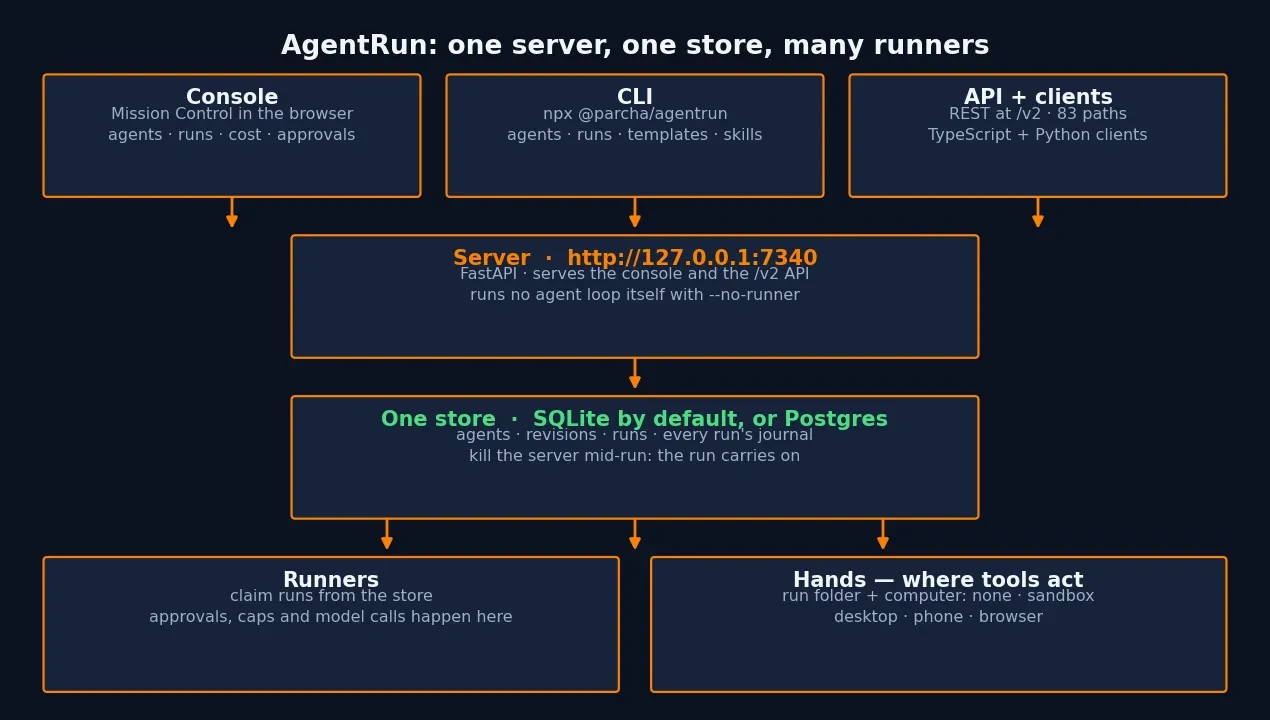
Three details matter. First, the port is 7340, or the next free one if 7340 is taken. Second, everything lives in ~/.agentrun, including the SQLite store and a seal key created with mode 0600 — back the data directory up with the seal key beside it, because every secret the server seals opens with that key alone. Third, the Docker line is a status report, not an error: without Docker, agents run on the runner with file tools and no shell. Open http://127.0.0.1:7340/ in a browser and the console loads — Mission Control first, with agents, runs, tokens, run time, success rate, and cost. Leave the server running for the rest of this tutorial; the CLI in the later steps finds it and its token by itself.
Note that npx @parcha/agentrun --version does not exist — the command answers "Unknown option '--version'" and prints usage. There is no version flag; help is the way to see what the CLI offers.
Step 2: Prove the server is healthy#
In a second terminal, ask the server about itself. The CLI finds the local server from its data directory, so pass --data and no token:
npx @parcha/[email protected] server health --data ~/.agentrun{"status":"ok","checks":{"store":"ok","disk":"ok"}}Now ask what this server can actually do:
npx @parcha/[email protected] server capabilities --data ~/.agentrunThe reply is a long JSON document; the fields that decide your next steps are these. The server is @parcha/agentrun-serve version 0.1.0-beta.34, speaking contract agentrun.v2/0. Of the four harnesses, only pi is available — it is the default. Claude Code reports claude-agent needs ANTHROPIC_API_KEY or OPENROUTER_API_KEY, Codex needs an OpenAI or OpenRouter key, and OpenCode is not installed at all (the reply prints the exact install line for it). Under models the server is blunt: "ready": false, "needs": "key". Nothing here is broken; this is a server waiting for its first model key, and every step until Step 8 works in exactly this state. If you pass --base-url instead of --data, the CLI stops finding the token itself and demands AGENTRUN_API_KEY — use --data for local work.
Step 3: Make your first agent from the CLI#
An agent is a JSON definition: an id, instructions, skills, and tools. The README's own example is a notes agent that can write files and ask you things. Save it as agent.json:
{"definition": {"id": "notes", "version": 1, "name": "Notes",
  "instructions": "Do what you are asked, and write what you make to a file.",
  "skills": [], "tools": ["write", "ask_person"]}}
Create it:
npx @parcha/[email protected] agents create --body @agent.json --data ~/.agentrun{"agent_id":"notes","definition":{"id":"notes","version":1,"name":"Notes","instructions":"Do what you are asked, and write what you make to a file.","approvals":"ask","harness":"pi","skills":[],"tools":["write","ask_person"]},"kind":"agentic","revision":"01a1d88e-6363-7000-87f5-b584049474a4","revisions":1,"runs":{"count":0,"live":0},"console_url":"http://127.0.0.1:7340/#/agents/notes","warnings":[{"field":"definition.model","reason":"not_set_up_here","message":"No model yet: add a model key in Settings → Model keys, or set OPENROUTER_API_KEY, ANTHROPIC_API_KEY or OPENAI_API_KEY where AgentRun starts."}]}Read that output carefully, because it teaches the whole model. The agent got a revision id — every change to an agent is a new revision, and runs record exactly which revision they used. The console URL is where this agent lives in the UI. And the warning is the honest boundary: the agent exists, but it cannot run until a model key is added. Verify it is stored:
npx @parcha/[email protected] agents list --data ~/.agentrun
# {"agents":[{"agent_id":"notes", ...}],"next_cursor":null}
Try starting a run now, before any key exists, so you see the failure mode instead of guessing at it:
npx @parcha/[email protected] runs start notes --max-cost-usd 1 --wait --body '{"input": {"content": "Ask me which region to cover, then write region.md about it."}}' --data ~/.agentrun
# {"error":{"code":"agent_not_runnable","message":"No model yet: add a model key in Settings → Model keys, or set OPENROUTER_API_KEY, ANTHROPIC_API_KEY or OPENAI_API_KEY where AgentRun starts.","retryable":false,...}}
Exit code 1, a machine-readable error, no hang, no partial run. The server refuses cleanly rather than starting a run that cannot do anything. That refusal is also why the --max-cost-usd 1 flag matters once a key exists: a run pauses at its cap instead of failing, and tells you the least it needs to go on.
Step 4: Apply a template — a real agent in one command#
AgentRun ships five ready-made agents. List them:
npx @parcha/[email protected] template list --data ~/.agentrunEach entry is a full package: instructions, skills, rules, eval cases, a JSON output schema, and a per-run budget. The five are code-review (reviews a pull request with eight independent reviewers and returns findings as JSON, $2 per run), kyb (due diligence on one company — registries, owners, sanctions lists, dated adverse media, a verdict with every claim cited, $5 per run), market-monitor (a Monday digest of what changed at the companies you watch), inbound-lead (researches each lead and scores it 0–100 against your ideal customer profile), and release-notes (turns merged pull requests into release notes, left as a draft issue for a person). Apply the KYB template:
npx @parcha/[email protected] template apply kyb --body '{"parameters":{}}' --data ~/.agentrun{"template":"kyb","version":"0.1.0","agent_id":"01a1d893-724e-7000-8fff-ef7ecedff3da","trigger_ids":[],"warnings":[{"field":"definition.model","reason":"not_set_up_here","message":"No model yet: add a model key in Settings → Model keys, or set OPENROUTER_API_KEY, ANTHROPIC_API_KEY or OPENAI_API_KEY where AgentRun starts."}]}Two gotchas, both learned the hard way. First, template apply kyb with no body fails — the command needs --body even when every parameter is optional, so pass '{"parameters":{}}' at minimum. The KYB parameters are all optional: risk_appetite (low, medium, or high; medium is the default), jurisdictions_of_interest (ISO country codes, comma separated), and more. Second, applying a template creates the agent and its triggers but grants nothing — the console's apply screen makes you tick each MCP tool yourself, and the CLI equivalent is a grants array in the same body. Check the result:
npx @parcha/[email protected] agents list --data ~/.agentrun
# ["01a1d893-724e-7000-8fff-ef7ecedff3da", "notes"]
Step 5: Validate a workflow without spending a cent#
Not every repeatable job needs an agent. AgentRun's workflow language writes repeatable work as a typed JSON document: tool calls, model steps, and fast typed decisions, with an agent to fall back on when a case is unclear. The README's example workflow reads a website's home page. Save it as read-site.json:
{
  "v": 2, "name": "read-site",
  "schemas": {
    "In":   { "type": "object", "required": ["website"], "properties": { "website": { "type": "string" } } },
    "Page": { "type": "object", "required": ["ok"], "properties": { "ok": { "type": "boolean" } } }
  },
  "input":  { "schemaId": "In" },
  "output": { "schemaId": "Page", "path": "home" },
  "root": { "node": "chain", "steps": [
    { "node": "call", "label": "Read the home page", "via": "tool", "tool": "web_fetch",
      "args": { "url": "{website}" }, "out": "Page", "as": "home", "deadline_s": 60 }
  ] }
}
Validate it against the server. This is where the tutorial earned its keep: the obvious call fails.
npx @parcha/[email protected] workflows validate --body @read-site.json --data ~/.agentrun
# {"error":{"code":"input_invalid","message":"The body keeps no field input.", ...}}
The endpoint does not take the bare document. It wants the document wrapped under a workflow key — the OpenAPI spec at /v2/openapi.json (83 paths, operation validateWorkflow) says the body is {"workflow": {...}, "tools": [...]}, where tools is the revision's tool list and is optional. Wrap it and retry:
python3 -c "import json; d=json.load(open('read-site.json')); json.dump({'workflow': d}, open('validate-body.json','w'))"
npx @parcha/[email protected] workflows validate --body @validate-body.json --data ~/.agentrun
# {"ok":true,"issues":[],"warnings":[]}
Validation is free and model-free: it runs the DSL's checks, flags any tool the revision does not list, and reports what the durable runner would refuse before any step runs. A workflow can also ask a fast typed question and branch on the answer — the console's tour shows a KYB workflow where the model leans approve at 0.61, below the workflow's 0.75 bar, so the case goes to review. Save a validated workflow as an agent's workflow field and it runs as one tool call on any harness, under the run's own cap and tool permissions.
Step 6: Run the scripted demo — a full workflow, no key#
The workflow DSL ships with a scripted demo that needs no API key at all — the judgments are scripted, so it proves the control flow rather than the model. Install it and run it:
npm install @parcha/agentrun-dsl@beta
npx @parcha/agentrun-dsl@beta demo
The install resolves the beta tag to 0.1.0-beta.21. The demo runs a support ticket through a workflow — understand it, check confidence, choose a queue:
AgentRun · real control flow, scripted judgments

Ticket: I was charged twice for my monthly subscription. Can you refund the duplicate?

  understand · node.start
  understand · judge.answered
  understand · node.end
  check-confidence · escalate.evaluated
  choose-queue · node.start
  choose-queue · code.patch
  choose-queue · node.end

Status: complete
{
  "queue": "billing",
  "priority": "normal"
}
That output is the whole workflow idea in miniature: typed steps, a decision node, a deterministic result you can assert on. The same package gives you the TypeScript builder for writing your own workflows in code, and the repo's examples/ folder has longer ones (support-answer.mjs, rank-candidates.mjs, typed-research.ts) to copy from.
Step 7: Drive it from code#
The same run the console starts is one API call from your code. There are two clients, and both read the server address and token from the environment — the server prints both when it starts, and the token lives in ~/.agentrun/.token. Set them once:
export AGENTRUN_BASE_URL=http://127.0.0.1:7340/v2
export AGENTRUN_API_KEY=$(cat ~/.agentrun/.token)
The TypeScript client has one install gotcha: the bare command fails. Every published version is a prerelease (0.1.0-beta.x), so npm's * range matches nothing and the install dies with ETARGET — No matching version found for @parcha/agentrun-client@*. Pin the version:
npm install @parcha/[email protected]Then the README's example works as written:
import { AgentRun } from "@parcha/agentrun-client";

const client = new AgentRun(); // AGENTRUN_BASE_URL and AGENTRUN_API_KEY
const started = await client.runs.start("notes", { input: { content: "Ask me which region to cover, then write region.md about it." }, max_cost_usd: 1 });
let run = await client.runs.wait(started.run_id);
if (run.pending?.kind === "question") await client.runs.message(run.run_id, { content: "Europe" });
run = await client.runs.wait(run.run_id);
console.log(run.status, run.cost.usd);
I verified the client against the live server with a read-only version of the same pattern — list the agents, check health — and it returned the agent created in Step 3:
agents: ["notes"]
health: {"status":"ok","checks":{"store":"ok","disk":"ok"}}
The Python client is simpler to install — it has no dependencies at all, standard library only — and the same calls work:
pip install parcha-agentrun # installs 0.3.5from agentrun import AgentRun
client = AgentRun() # AGENTRUN_BASE_URL + AGENTRUN_API_KEY
agents = client.agents.list()
print("agents:", [a["agent_id"] for a in agents["agents"]])
print("health:", client.server.health())
# agents: ['notes']
# health: {'status': 'ok', 'checks': {'store': 'ok', 'disk': 'ok'}}Two details from the README that shape how you write against this API: runs wait exits 0 when the run completed, 1 when it failed, and 8 when it waits on a person — a question, its spend cap, or an approval. And the token cannot write a secret or approve a tool call, so the API key in your code can start runs and read results but can never exfiltrate your model keys or approve a spend.
Step 8: Add a model key and run a live agent#
This is the one step I did not run live: the sandbox has no model key, so there was no live run to observe. What follows is the project's documented behavior, not a measured run — and the distinction matters, because Steps 1–7 are all verified and this one is not. In the console, set a password, then add a key under Settings → Model keys. One OPENROUTER_API_KEY gives every harness a model; you can also set OPENROUTER_API_KEY, ANTHROPIC_API_KEY, or OPENAI_API_KEY where the server starts, and a key set where the server starts wins over one pasted in the console. Then open Templates, apply KYB due diligence, and start a run with a company's name and website. When it finishes, the run's Report tab has a due diligence report with a verdict and every claim cited. Open the agent's Learning tab to see what it kept for next time — that is the feature the whole platform is built around, and it is worth understanding before you run anything twice.
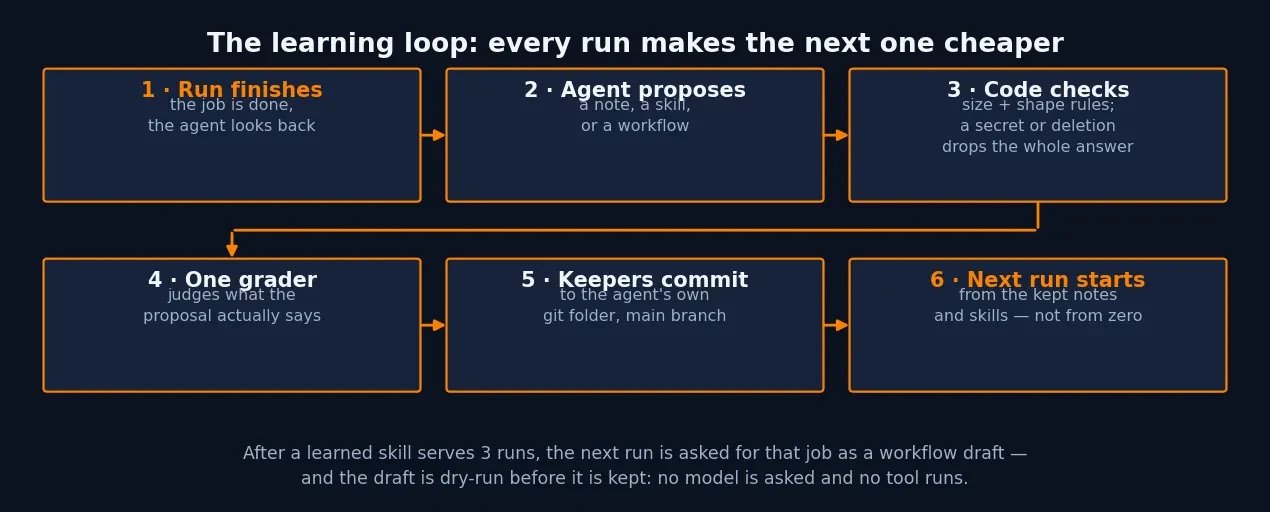
Learning works like this. Turn it on with "learning": true in an agent's definition. At the end of every run, the agent gets one more turn to say what it would keep — a note, a skill, or a workflow. Code checks every proposal first: anything that breaks a size or shape rule is left out, and a secret, a hidden character, a file outside the folder, a deletion, or a full index drops the whole answer. Then one grader judges what the proposal says, and what passes is committed to the agent's own git folder, on its main branch. The next run starts from there. Notes are short markdown files, one fact each; skills are how to do a job again, and only a run that finished the job can write one; once a learned skill has served three runs, the next run is asked for that job as a workflow draft, and a draft is dry-run before it is kept — no model is asked and no tool runs. The Learning tab shows every note, skill, and workflow, the log of changes, and which notes each run was given. Retire anything there, or with npx @parcha/agentrun learning retire and the note's ETag; git keeps the history, so a retired note can come back. Parcha's own numbers for what this buys: their code-review agent went from $180 a month to $6,451 as usage grew, then their tuned reviewer cost 18 cents a review and caught 1.6 times the real bugs Greptile did on 30 pull requests it had never seen; a merchant-classification job went from $0.89 to $0.12 a merchant. Those are the vendor's figures, not mine — treat them as the claim, and measure your own jobs with the template evals (npx @parcha/agentrun template eval DIR runs a template's eval cases as real runs on a throwaway server and grades them).
While the run is going, you stay in control. Each tool is allowed, asks you first, or is denied — a call that asks waits on the run's page until you answer. A run can stop and ask you a question; the CLI's runs wait exits 8 in that case, you answer with runs message, and the run carries on. Spend caps pause a run instead of failing it. And runs survive crashes: every agent, revision, run, and step lives in one store, so if you kill the server mid-run and start it again, the run carries on — I verified the store half of that promise when the sandbox restarted mid-tutorial and the agent created in Step 3 was still listed afterwards.
When to use AgentRun vs alternatives#
| Approach | Use it when | Watch out for |
|---|---|---|
| AgentRun | You run the same agent jobs repeatedly — code review, due diligence, lead research, release notes — and want each run cheaper and better than the last, with one console, approvals, and spend caps. | You still bring your own harness and your own model key. The live run is the only part this tutorial could not verify without a key. |
| A harness alone (Claude Code, Codex, Pi, OpenCode) | One-off work, or a job you will never repeat. The harness is the agent; AgentRun is the management layer around it. | Every run starts from zero. No learning, no durable runs, no shared history, no caps. |
| A skills collection (Anthropic's skills repo, addyosmani/agent-skills) | You want curated procedures for your agent and nothing else — no server, no store, no control plane. | Skills are files the agent may or may not follow. Nothing is enforced, nothing is measured, nothing is learned automatically. |
| A hosted agent platform | You want someone else to run the servers, and you are comfortable with your data and keys living on their infrastructure. | Less control over where runs execute and what they can touch; AgentRun's self-hosted path keeps both with you. AgentRun Cloud exists if you change your mind. |
| Hand-rolled scripts + cron | The job is fully deterministic and never needs a model judgment in the middle. | The moment a step needs judgment, you are rebuilding an agent harness. AgentRun's workflows cover the deterministic parts and hand the unclear cases to an agent. |
AgentRun is the heaviest option on this list after the hosted platforms, and that is the honest way to judge it: you run a server, a store, and runners, and you keep a seal key safe. The weight buys you three things the lighter options do not — runs that survive restarts, learning that compounds across runs, and one console with approvals and caps over every agent. If you only run agents occasionally, take the harness alone. If the same job runs every week, the management layer is the product.
Limits and gotchas#
- There is no
--versionflag.npx @parcha/agentrun --versionprints usage instead of a version. Usehelp, orserver capabilitiesfor the serve bundle's version. - The TypeScript client needs a pinned version. Bare
npm install @parcha/agentrun-clientfails withETARGETbecause every published version is a prerelease. Install@0.1.0-beta.37. workflows validatewants a wrapper. The body is{"workflow": {...}}, not the bare workflow document. The error message names the fields it refuses, which is how you find this out.template applyneeds a body. Pass--body '{"parameters":{}}'even when every parameter is optional.- The CLI finds its token from
--data, not from--base-url. Pass--base-urland you must also setAGENTRUN_API_KEYyourself. - No Docker means no shell. Without Docker (or Daytona, Modal, E2B), agents run on the runner with file tools only. Sandbox computers need one of those providers.
- Node 24.22.3 is the documented floor. 24.22.1 ran everything here with a single install warning. Update Node to remove the warning, not to unblock anything.
- The live run needs a key, and the key needs a cap. Set a dollar cap and an expiry on your OpenRouter key before it touches the server, and remember the token cannot write secrets or approve tool calls — but your model key is spent by runs, so the cap is the real control.
- The project is four days old at this writing. 884 stars, an alpha label on the docs, and beta version numbers throughout mean the CLI surface can move. The commands above ran against 0.4.2 on November 14, 2026; re-check the README before copying a version number from any tutorial, including this one.
The takeaway#
AgentRun earns its trending spot by managing the part of agent work nobody likes to admit is the problem: the repetition. The install is one command, the server answers health checks, the CLI creates agents and applies templates, workflows validate free, and a scripted demo runs with no key at all. The live run needs your model key and your dollar cap — that is the one step this tutorial marks as documented rather than measured. If the same agent job runs in your week more than once, install it, apply the template that matches the job, and let the second run be cheaper than the first. That compounding is the entire bet, and the Learning tab is where you check whether it is paying off.
Sources
- AgentRun — GitHub repository and README (Parcha-ai/agentrun)
- Introducing AgentRun: Run smarter agents. Use fewer tokens. — agentrun.ai blog, November 10, 2026
- AgentRun — agentrun.ai (quickstart, templates, deploy, docs)
- npm — @parcha/agentrun (0.4.5 latest, verified November 14, 2026)
- npm — @parcha/agentrun-dsl (beta tag, 0.1.0-beta.21 installed)
- PyPI — parcha-agentrun (0.3.5 installed)