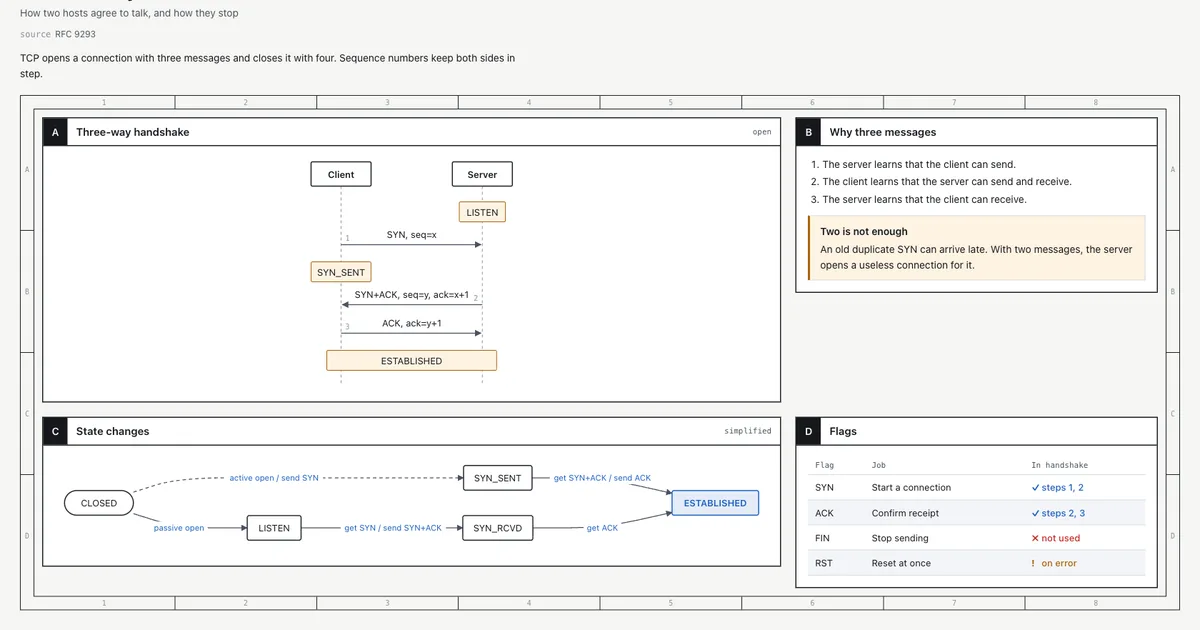
Ask your coding agent to explain the TCP three-way handshake and you get a wall of monospace text. Diagrams, if they appear at all, are ASCII art that falls apart on a narrow screen. Andrej Karpathy recently put it bluntly: as LLMs do more of the work, keeping up with their output becomes the hard part — and a page with a diagram is far easier to take in than a long block of text.
Answer me with HTML is an agent skill that fixes this at the source. Once installed, your agent answers hard questions with a real HTML page: sequence diagrams, flow charts, comparison tables, timelines, annotated text — the model writes only the content, and a bundled CLI does the layout, theming, and drawing. It's collected roughly 1,600 stars in its first couple of weeks, is MIT-licensed, and works with Claude Code, Codex, Cursor, OpenCode, and Pi. What you get at the end: explanations you can read in seconds instead of scrolling through terminal prose.
Why not just ask the agent for HTML directly? Because output tokens are what you sit and wait for. The project's own benchmark (medians over 3 topics × 3 runs on Claude Sonnet 5.5) measured 6.1× fewer output tokens (5,341 vs 870), 2.8× faster answers (33 s vs 12 s), and 27% cheaper per answer when the model writes a short Markdown draft and the CLI renders it, versus the model hand-typing every line of CSS and every SVG coordinate itself.
npm install step — the CLI ships bundled inside the skill.The fastest route works in any terminal:
npx skills add QingYunA/answer-me-with-htmlIt asks which agents to install into, then drops the skill in the right folder for each. If you'd rather have your agent do it — the README's recommended path — paste this into your agent:
Install Answer me with HTML: read https://raw.githubusercontent.com/QingYunA/answer-me-with-html/main/INSTALL.md and follow it.Claude Code users can install it as a plugin instead, from inside Claude Code:
/plugin marketplace add QingYunA/answer-me-with-html
/plugin install answer-me-with-html@answer-me-with-html
Prefer the manual route? Clone the repo and copy the skill folder to your agent's skill directory:
git clone --depth 1 https://github.com/QingYunA/answer-me-with-html.git /tmp/answer-me-with-html
cp -R /tmp/answer-me-with-html/skills/answer-me-with-html ~/.claude/skills/answer-me-with-html
Codex uses ~/.codex/skills/, Cursor ~/.cursor/skills/, OpenCode ~/.config/opencode/skill/. No setup is needed after install.
Nothing about your workflow changes. Ask questions the way you always do:
Explain the TCP three-way handshake
Map out how the modules in this repo fit together
Redis or Memcached for our cache?
The agent writes a short Markdown draft — content only, no CSS, no SVG coordinates — and hands it to the CLI. Roughly 50 milliseconds later you have a page. A one-line question still gets a one-line answer; the agent decides when a page is worth it, roughly when the topic has related concepts, multi-step flows, or multi-way comparisons.
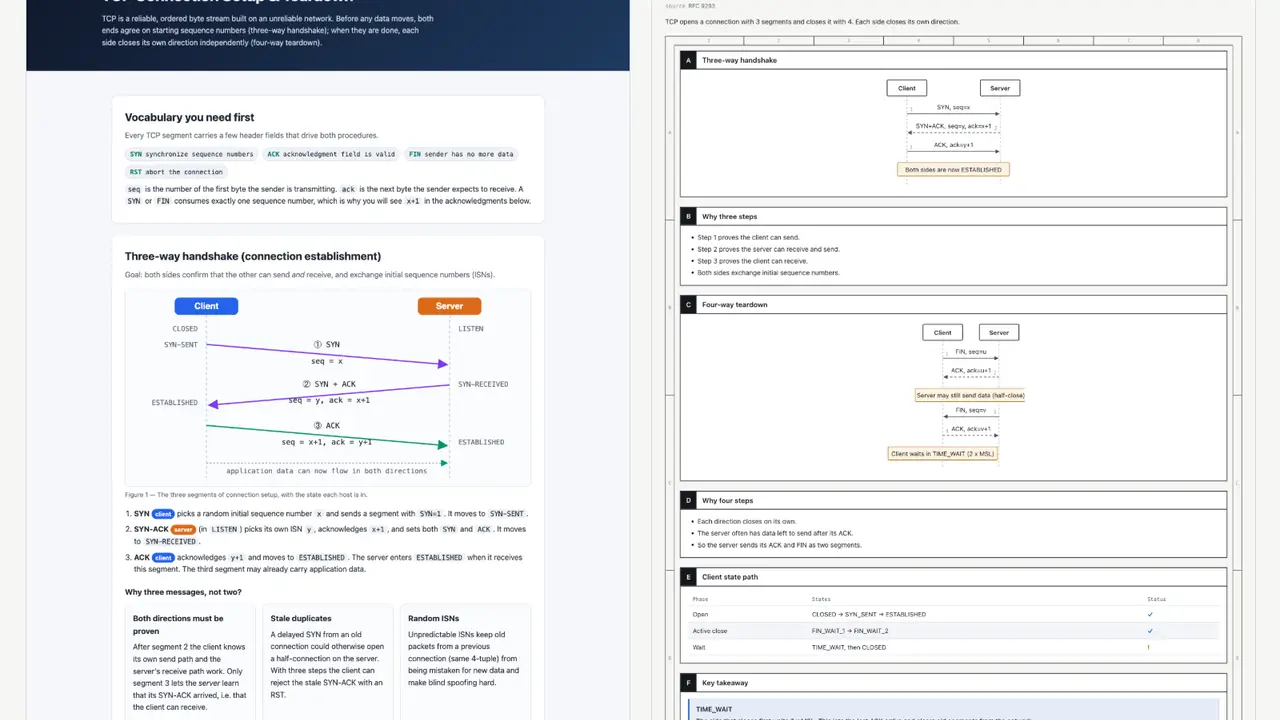
Pages are saved to ~/.answer-me-with-html/pages/. Each page has buttons in the top-right corner to switch theme and light/dark mode, and to copy the Markdown draft that produced it.
Under the hood, the draft is tiny. This is all the model wrote for the TCP page above:
---
title: TCP three-way handshake
---
## A Three-way handshake {span=2}
```sequence num
Client -> Server: SYN, seq=x
Server -> Client: SYN+ACK, seq=y, ack=x+1
Client -> Server: ACK, ack=y+1
note Client, Server: ESTABLISHED
```

## C State changes {span=2}
```flow LR
(CLOSED) -> LISTEN: passive open
LISTEN -> SYN_RCVD: get SYN / send SYN+ACK
SYN_RCVD -> *ESTABLISHED: get ACK
```
The CLI picks the template, places the panels, applies the theme, lays out the flow chart with dagre, and spaces the sequence diagram by label width. Diagrams the model would have botched — arrows pointing at nothing — just work.
Change settings with the am terminal command or a slash command. To view and change:
am config
am config set open off
The three settings most people touch first:
open (default on). Opens each page in the browser after it renders. Turn it off if pop-ups interrupt your flow.theme (default auto). auto picks paper for long text and blueprint for diagrams; or pin blueprint, shadcn, paper, or your own theme.style (default 80). A writing check: off, 80 (warn only), or strict (refuse to render).Settings live in ~/.answer-me-with-html/config.json; --open and --no-open override one run. The weekly update check only reads a version number from GitHub — it never updates by itself, and you can turn it off.
By default the agent makes a page only for questions that need one. Always-on mode flips that: every conclusion, summary, plan, comparison, or explanation gets a small page (2 to 4 panels), the path goes at the end of the reply, and pages never pop open. Casual chat stays untouched.
Add one rule to your agent's rules file (~/.claude/CLAUDE.md or AGENTS.md). Paste this to your agent and let it write the rule itself:
[answer-me-with-html always-on] Whenever a reply gives a conclusion, summary, plan, comparison, review or explanation, even a short one, also make a page with the answer-me-with-html skill (2 to 4 panels for routine answers), render it with --no-open before you write the reply, and end the reply with a file:// link to the page. Skip casual chat, one- or two-sentence replies with no conclusion, pure command output, and requests for plain text.
Pages pile up in ~/.answer-me-with-html/; clear them with am clean (preview with am clean --dry-run). To make the agent less proactive instead, the README offers two alternatives: a rule that says only render when asked, or disabling model invocation in the skill's frontmatter so pages appear only via slash command.
The skill's most surprising trick: ask for an explainer video — "make a 3b1b-style video on the TCP handshake" — and the agent writes the same kind of draft plus one line of narration per beat. am video turns it into a player page: diagrams build step by step as the narration plays, [Server] in the narration pushes the camera toward that node, and objects carry over between scenes instead of cutting.
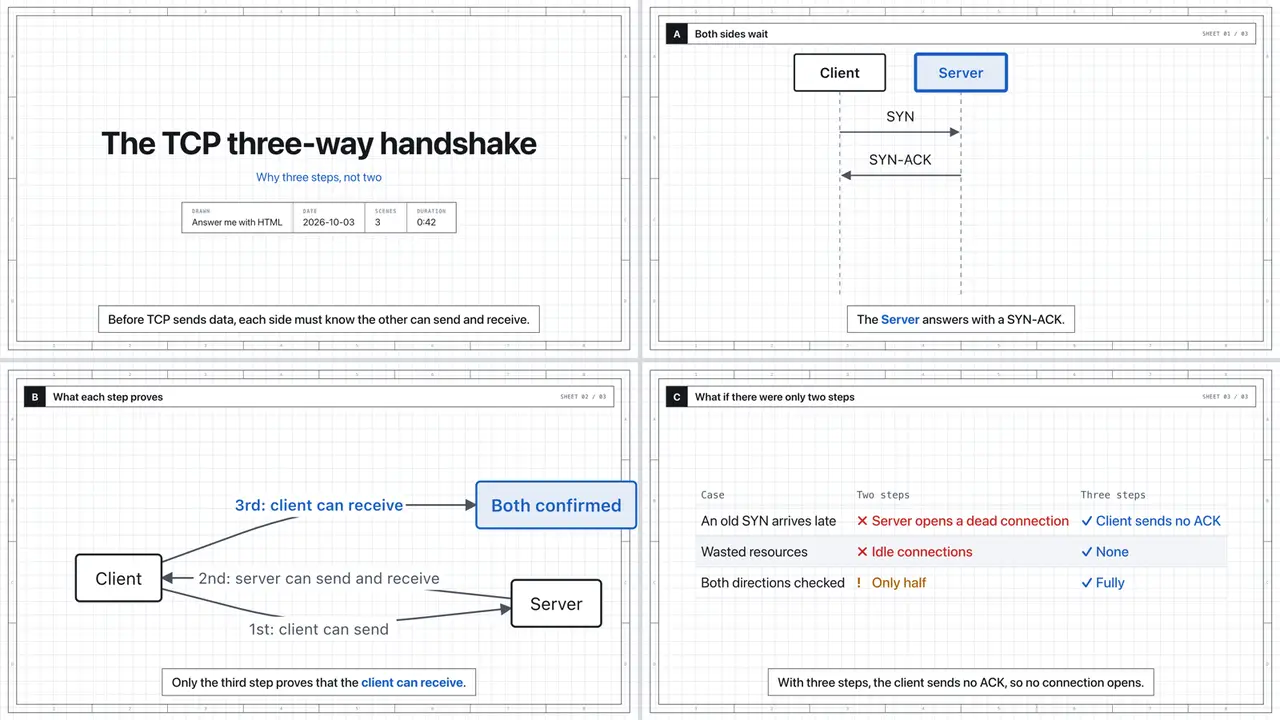
Narration uses ElevenLabs if ELEVENLABS_API_KEY is set, the system voice otherwise, and captions only if neither exists. Each beat lasts as long as its audio, so picture and voice stay in sync, and the page plays offline with the audio embedded. Add --mp4 for a 1080p video file — that needs Chrome, ffmpeg, and Node.js 22+ on your machine. Full syntax: am help video.
A reading layer for your coding agent. Explanations that used to be terminal walls arrive as pages with real diagrams, generated in a fraction of the time and tokens — plus optional narrated explainer videos — with one install command and zero configuration. The content pipeline is fully local: the model writes the draft, the CLI renders it, pages live on your disk.
npx skills update answer-me-with-html -y (or tell your agent to update it). The weekly check only notifies.--mp4 export requires Chrome, ffmpeg, and Node.js 22+.The skill itself is QingYunA/answer-me-with-html on GitHub, MIT-licensed. The full draft syntax, themes, and every am subcommand are in its reference docs.