Smolagents: the agent that thinks in Python code, running on a local model with no API key
Most agent frameworks make the model answer in JSON. Smolagents makes it answer in Python — and that changes what an agent can do, and what can go wrong. This guide builds a CodeAgent on a local model, with one tool you write yourself, and reports every stumble honestly.

Most agent frameworks ask you to describe what the agent should do in JSON: a tool name, a schema, a list of arguments. Smolagents, Hugging Face's agent library, asks for something else — Python code. The model writes a short program, the framework runs it, and the program itself calls your tools, does the arithmetic, and decides what to do next. That one design choice changes what an agent can express: loops, conditionals, and nested function calls come for free, because they are just code.
This guide builds a working smolagents CodeAgent that runs entirely on your own machine: a local model, one tool you write yourself, and two tasks that test the loop — a tool question the agent answers exactly, and an arithmetic question whose executed code is exact even when the finish is not. No API key, no account, no GPU. It also reports, in full, the four runs that did not work — because the most useful thing about a CodeAgent is learning exactly where small models break, and the fix turned out to be a bigger model plus explicit finishing instructions. Everything below was run on a 2-core Linux VM, and the timings and failures are reported exactly as they happened.
- Who: smolagents (huggingface/smolagents on GitHub), Hugging Face's agent library — Apache-2.0.
- What: a CodeAgent that writes and executes Python to solve tasks, powered here by a local model and one hand-written tool.
- When: versions verified in this guide are smolagents 1.26.0, transformers 5.21.0, torch 2.15.0+cpu, and accelerate 1.15.0, run October 28, 2026; the demo model is Qwen2.5-Coder-1.5B-Instruct (Apache-2.0). The failure experiments used Qwen2.5-0.5B-Instruct and Qwen2.5-Coder-0.5B-Instruct (both Apache-2.0).
- Requirements: Python 3.12, pip, and about 5 GB of free disk for the virtual environment plus the 3.1 GB model. No API key, no account, no GPU.
Why an agent that writes code is different
In a JSON tool-calling agent, every action is one tool call: the model picks a tool, fills in its arguments, waits for the result, and repeats. That works, but anything more complex than a straight line — a loop over a list, a branch on a value, a value computed from two tool results — has to be squeezed through repeated single calls, with the model holding the intermediate state in its head.
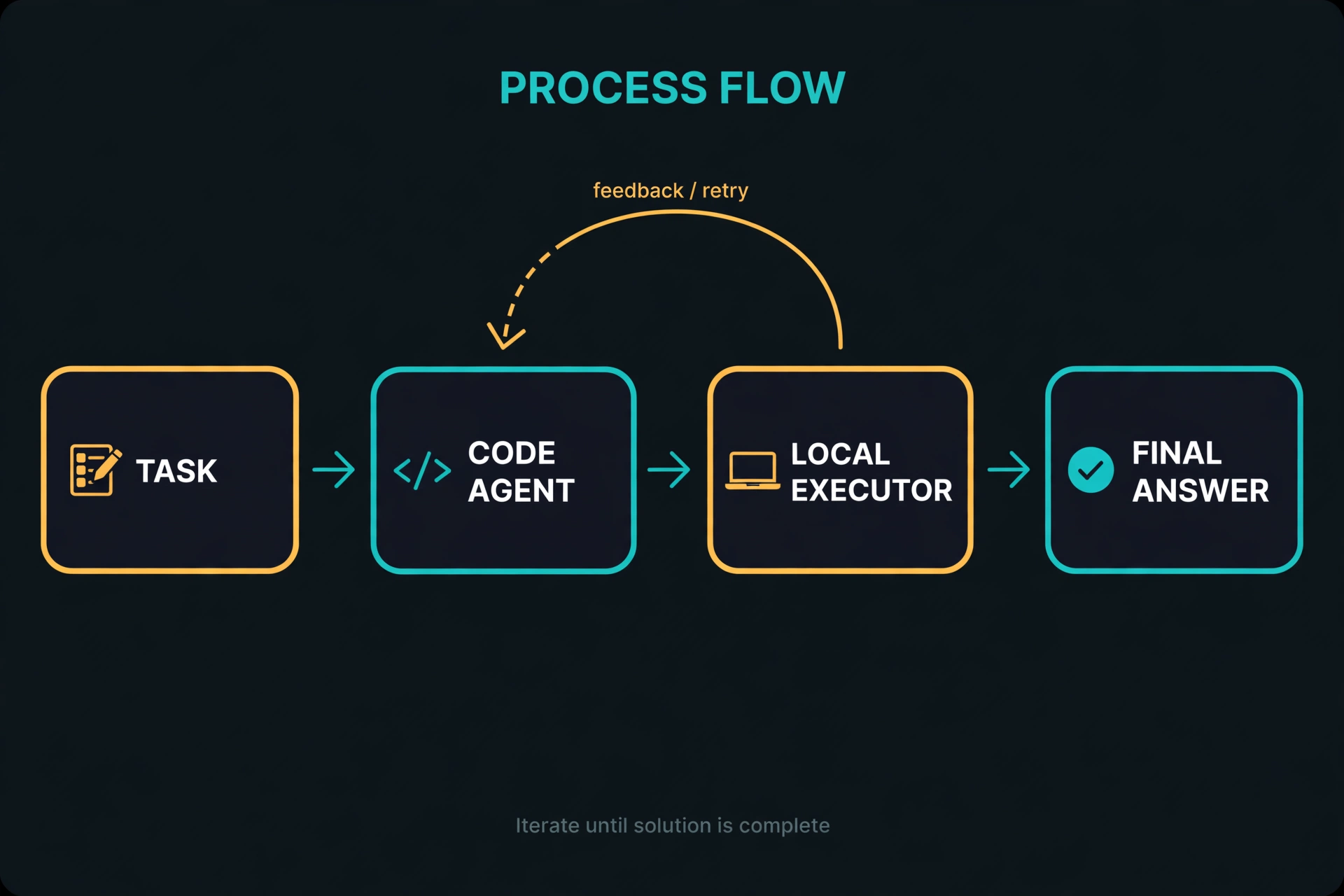
A CodeAgent removes that bottleneck. The model writes ordinary Python: it can call a tool inside a loop, store a result in a variable, compute with it, and pass it to another tool, all in one step. The framework executes that code in a sandboxed interpreter and hands the observations back. If the code fails, the error message goes back to the model and it tries again — the same feedback loop, but with the full expressiveness of a programming language in the middle.
The trade-off is real and this guide does not hide it. Generated code has to be syntactically valid, wrapped in the code-block format the framework parses, and limited to what the sandbox allows. A small model will write imperfect code, hit the sandbox's limits, and need retries. That is why the demo below starts with the wrong model on purpose: it shows both what the pattern buys you and where it strains, before showing the model that makes it work.
Step 1: Install the stack
Create a virtual environment first, so the tutorial's packages never touch your system Python. Then install CPU PyTorch from its own index, and smolagents, transformers, and accelerate together. The order matters for two reasons: the PyTorch CPU index keeps you from downloading a multi-gigabyte CUDA build you cannot use, and accelerate is not optional here — smolagents' TransformersModel passes a device map to transformers, and transformers 5.x refuses to do that without accelerate installed. That failure is easy to misread as a model problem; it is a missing-package problem, and this step prevents it.
python3 -m venv smolagents-env
source smolagents-env/bin/activate
pip install torch --index-url https://download.pytorch.org/whl/cpu
pip install smolagents transformers accelerate
Verify the install with the versions this guide was tested against:
python -c "import smolagents, transformers, torch, accelerate; print(smolagents.__version__, transformers.__version__, torch.__version__, accelerate.__version__)"Expected output:
1.26.0 5.21.0 2.15.0+cpu 1.15.0If your versions are newer, the API calls below should still work — smolagents' CodeAgent, TransformersModel, and @tool decorator are its stable surface — but pin the versions above if anything behaves differently.
Step 2: Load a local model and prove it answers
Before building any agent, prove the model itself works. The script below loads a local model from the Hugging Face cache (about 1 GB on first download for the coder model; set the offline flags if you want to guarantee no network use after that) and asks it one question. Note the message format: smolagents 1.26 expects each message's content as a list of parts, not a plain string. Passing a plain string raises TypeError: string indices must be integers, not 'str' deep inside the model wrapper — another error that looks like a model failure and is actually a format mismatch.
import os
os.environ["HF_HUB_OFFLINE"] = "1"
os.environ["TRANSFORMERS_OFFLINE"] = "1"
from smolagents import TransformersModel

model = TransformersModel(
    model_id="Qwen/Qwen2.5-Coder-1.5B-Instruct",
    max_new_tokens=256,
)
out = model([{"role": "user", "content": [
    {"type": "text", "text": "What is 17 times 38? Answer with just the number."}
]}])
print(out.content)
Run this as a load check, not as an arithmetic test. On the test machine the 1.5B model loaded in about 21 seconds. The guide's first probe of this kind, with the general-purpose chat model Qwen2.5-0.5B-Instruct, returned 596 for the same question. The correct answer is 646. A small model doing mental arithmetic is exactly as unreliable as it sounds, and that unreliability is the point of the next steps: the agent in this guide does not trust the model's arithmetic. It makes the model write code, and then it trusts the interpreter.
Step 3: Turn a Python function into a tool
Tools in smolagents are ordinary functions with a decorator. The docstring is not decoration: smolagents builds the tool's description and argument schema from the docstring and the type hints, and that generated description is what the model reads when it decides whether to call the tool. Write the docstring as if the model were your only reader, because it is. Verified on the test machine: this function's generated description is "Look up a short note by topic.", its input schema is topic as a string with the description from the Args section, and its output type is string.
from smolagents import tool

@tool
def lookup_note(topic: str) -> str:
    """Look up a short note by topic.

    Args:
        topic: the topic to look up, e.g. 'smolagents executor'.
    """
    notes = {
        "smolagents executor": "The local executor runs generated code in a sandboxed Python interpreter on your own machine.",
    }
    return notes.get(topic, "No note on that topic.")
Two rules make tools reliable. First, keep the function's contract narrow: one job, typed arguments, a string back. Second, never put a secret or a destructive action behind a tool you hand to an agent without thinking about what generated code could do with it — the agent will call the tool with whatever arguments it invents, including wrong ones. A lookup tool like this one is safe by construction: it can only read from a fixed dictionary.
Step 4: Build the CodeAgent
The agent itself is four arguments: the tools, the model, a step budget, and instructions. max_steps is your safety net — it caps how many code-and-execute rounds the agent may take before it must stop, which bounds both runtime and cost. add_base_tools=False keeps the demo honest: no web search, no bundled tools, just the one tool you wrote. instructions is the part most tutorials skip and this one does not: it is where you tell the agent how to behave, and the experiments in Step 5 show why it matters.
from smolagents import CodeAgent

INSTRUCTIONS = ("Use only the tools provided to you. To answer questions about notes, "
                "call lookup_note with the topic. Never import requests, BeautifulSoup, "
                "or any other library to search or scrape the web. Pass the tool's return "
                "value to final_answer EXACTLY as returned: do not paraphrase, shorten, "
                "or invent any part of it. When you have the answer, your next and last "
                "code block must contain ONLY one line: final_answer(<the answer>). "
                "Do not print the answer instead of calling final_answer. Never assign "
                "anything to a variable named final_answer.")

agent = CodeAgent(
    tools=[lookup_note],
    model=model,
    max_steps=6,
    add_base_tools=False,
    instructions=INSTRUCTIONS,
)
What happens on agent.run(task) is the loop in the diagram above: the model receives the task plus a system prompt describing your tools and the code format it must produce, writes a code block, and the local executor runs it. Tool calls inside the code resolve to your functions. Observations and errors return to the model for the next step, until the code calls final_answer(...) or the step budget runs out.
Step 5: The runs that did not work — and what each one taught
Before the working demo, here are the runs that did not work, because they teach more than a clean run would. All four used the same program shape as Step 4, with the same two tasks: quote the note about the smolagents executor exactly, and calculate 17 times 38.
Attempt 1 — chat model, no instructions. Powered by Qwen2.5-0.5B-Instruct with no instructions at all, the agent never reached the tool: twice the model wrote code importing requests and BeautifulSoup to scrape a web search for the note, and twice the sandboxed executor refused it — InterpreterError: Import of requests is not allowed. That refusal is the sandbox working as designed, and it is also a warning: a model that does not know your tool will invent its own way to answer.
Attempt 2 — chat model, use-the-tool instructions. Adding an instruction to use the provided tool fixed the tool use immediately. Step 1 of the notes task was perfect: note_about_executor = lookup_note('smolagents executor'), and the execution log printed the exact note. Then the model got stuck for five more steps: it repeatedly wrote note_about_executor.split('\n')[1] and print(final_answer) instead of calling final_answer(...) — trying to take the second line of a one-line note, and treating the finish function as a variable to print, which the system prompt explicitly forbids ("Don't name any new variable with the same name as a tool"). After 311.7 seconds and 7 steps, the run returned a serialised blob of its own thoughts and code, not a final answer. The arithmetic task went worse: all six steps were code-parsing errors, each one prose ending in "Final Answer: 606" — wrong, and in the wrong format. When the step budget ran out, the returned summary happened to say 646. That is not a computed answer; it is a guess that landed right at the end, and this guide does not count it.
Attempt 3 — coder model, same size. Qwen2.5-Coder-0.5B-Instruct was tidier — its notes-task step 1 was a clean tool call in 43 output tokens, and its arithmetic steps executed answer = 17 * 38; print(answer) with execution logs of 646 three times — but it never called final_answer either. Its notes run ended in empty code blocks; its arithmetic run returned '1684', the model's first-step guess, even though executed code had printed 646. Lesson: the returned value is not the executed result. If the model never calls final_answer, the run's return value is junk no matter what the code printed.
Attempt 4 — bigger coder model, original instructions. Qwen2.5-Coder-1.5B-Instruct could finish the format — its notes task called final_answer in step 3 — but with the wrong content: step 2 had invented a fake note ("a high-performance, multi-threaded executor…") and printed it instead of using the tool result from step 1, and step 3 finalised the invention. The lesson is precise: with small models, the CodeAgent loop works mechanically — tools execute, errors feed back — but the model cannot reliably follow the finish format and keep the tool result intact. Format compliance and result fidelity, not reasoning, are the bottlenecks.
Step 6: The working demo — bigger model plus explicit finishing instructions
The combination that worked was attempt 4's model with attempt 2's lesson written into the instructions: the Step 4 instructions above, which tell the agent to pass the tool's return value to final_answer exactly as returned, and to make its last code block contain only that call. Nothing else changed. Run the two tasks:
result = agent.run("Use the lookup_note tool to find what my note says about the "
                   "smolagents executor, then quote it exactly as your final answer.")
print(result)

agent2 = CodeAgent(tools=[], model=model, max_steps=6, add_base_tools=False)
result2 = agent2.run(
    "Calculate 17 times 38. Give only the number as your final answer.")
print(result2)
The notes task finished in 2 steps and 175.2 seconds. Step 1 (87.1 seconds, 17 output tokens) was a bare tool call, lookup_note("smolagents executor"), whose step output was the exact note. Step 2 (88.2 seconds, 43 tokens) was a single line:
final_answer("The local executor runs generated code in a sandboxed Python interpreter on your own machine.")And the returned value was exactly that string — the note, quoted verbatim, delivered through the finish call rather than printed. That is the whole demo in one trace: tool call, exact result, finish call, exact return.
The arithmetic task is reported with the same honesty. Its code executed 646 correctly — result = 17 * 38; print(result) printed 646 in steps 1 and 4 — but across 6 steps the model never called final_answer: steps 2 and 5 were prose parse errors, steps 3 and 6 were syntax errors from unterminated string literals, and the run ended at the step budget with the summary 'Final answer: 646'. The value is right and the code proved it, but the finish is a summary, not a call. The entire successful run's log contains exactly one final_answer( call — the notes task's step 2. So the practical rule for your own CodeAgent runs is: read the trace, not just the returned string. A correct returned value with no final_answer call in the trace is a summary, and a trace with the call is a finished run. Whenever a task has a part that a machine can compute exactly — arithmetic, sorting, counting, formatting — push that part into code and let the model orchestrate instead of calculate; and when a CodeAgent fails, check the model size and the finishing instructions before you rewrite the agent.
Step 7: Bound the agent before you trust it
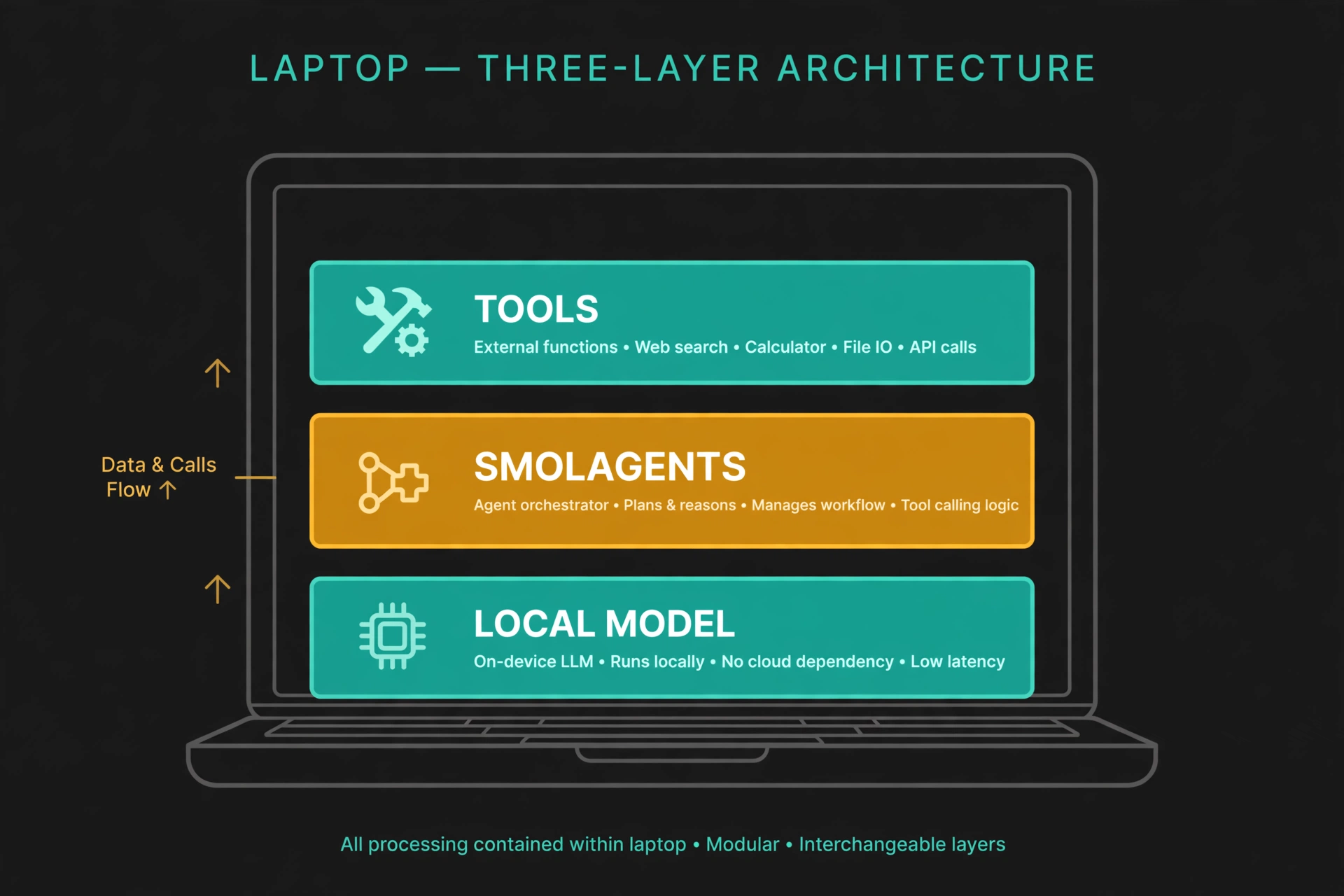
Three controls matter before a CodeAgent touches anything real. First, max_steps: every run in this guide used 6, and you should set it deliberately low while testing — a runaway agent burns time in proportion to its budget, and the failed chat-model runs above took about five minutes each. Second, the executor's import allowlist: generated code runs in a sandbox that permits only a fixed set of imports (time, re, math, datetime, statistics, collections, and a few others). During testing, a generated step tried import requests and the executor refused it. That refusal is the sandbox working as designed — but it also means code that needs a library you did not authorise will fail, so add imports explicitly with additional_authorized_imports when you genuinely need them, and never add a module that can touch the network or the filesystem casually.
Third, execution locality: the default executor runs code on your machine. Smolagents also offers remote executors (E2B, Modal, Docker, Blaxel) that move generated code off your machine entirely. For anything beyond a trusted demo, run generated code in one of those sandboxes or in a throwaway container — not in the same environment that holds your credentials. And keep tools narrow: a tool that can delete files or spend money should never be handed to an agent whose code you have not reviewed.
Which approach should you use?
Smolagents gives you two agent shapes. CodeAgent, used here, is the right default when tasks need control flow — loops, branches, computed values passed between tools. ToolCallingAgent is the JSON tool-calling shape: simpler to reason about and a better fit when your model already calls tools reliably and your tasks are single-tool lookups. If you need a visible, inspectable state machine with checkpoints and branching graphs, a graph framework is the better tool — see our LangGraph local tool-calling guide, which builds the same kind of local agent as an explicit graph. If you need typed, testable agents with structured outputs, see our Pydantic AI guide; for a multi-agent system with handoffs and guardrails, see our OpenAI Agents SDK guide.
The model choice follows the same logic as the agent choice. A tiny local model like the one here is perfect for learning the loop and for tasks where code execution carries the correctness. For production work, swap the model, not the agent code: InferenceClientModel for Hugging Face inference providers, LiteLLMModel for 100+ providers including a local Ollama server, or OpenAIServerModel for any OpenAI-compatible endpoint. Those swaps change one constructor; the tools and the agent stay the same. That portability is the practical payoff of a model-agnostic library.
The takeaway
A CodeAgent is not a smarter model — it is a model given a better instrument. The model still reasons, still makes mistakes, and still needs a step budget and a sandbox. What changes is where correctness comes from: tools answer what the model does not know, and executed code computes what the model cannot be trusted to calculate. Build the loop locally first, with a code-trained model big enough to follow the finish format and instructions explicit enough to demand it, and a tool you wrote yourself — and judge every run by its trace, not its returned string. The full demo program is the code in Steps 2–6, in order, in a single file — model, tool, agent, two tasks, no API key.