Run the new open-weight speech champion yourself: hands-on with Salesforce's SOV-Transcribe-1
Salesforce's SOV-Transcribe-1 leads every downloadable transcriber on the Artificial Analysis benchmark at 2.28% word error — and it takes plain-language instructions for how the transcript should read. This tutorial runs it two ways: a one-shot Transformers script and a vLLM server with an OpenAI-compatible endpoint.
- 2.28% word error on Artificial Analysis (AA-WER), #1 open-weight and #7 overall as of November 12, 2026; ahead of Nemotron 3.5 Transcribe (2.81%) and Voxtral Small (2.77%).
- 26.6B parameters total, 4.6B active: Whisper large-v3 audio encoder plus Gemma 4 26B A4B MoE decoder; 7 languages; up to 30 minutes per file; Apache 2.0.
- Instruction-controlled style: verbatim by default, and natural-language prompts choose cleaned-up text, number formatting, and punctuation.
- Context biasing works: keyword F1 on earnings-call names jumps from 71.9 to 96.8 when the clip's keywords are supplied.
- vLLM plugin (vllm==0.32.0) plus the DFlash draft: a 30-second clip in 0.22 s, up to 1,039 seconds of audio per second on one 96 GB RTX PRO 6000 Blackwell.
On November 12, 2026, the open-weight speech-to-text leaderboard changed hands. Salesforce released SOV-Transcribe-1, a 26.6-billion-parameter model that now leads every downloadable transcriber on Artificial Analysis at 2.28% word error — ahead of Nvidia's Nemotron 3.5 Transcribe (2.81%) and Mistral's Voxtral Small (2.77%). It is also the first open transcription model that treats the transcript itself as something you can instruct: tell it verbatim or cleaned up, digits or words, and it follows the instruction instead of giving you one fixed style.
That combination — best-in-class accuracy plus style control plus an Apache 2.0 license — makes it the strongest self-hosted transcriber available right now. This tutorial runs it end to end, two ways: a one-shot Transformers script for batch jobs, and a vLLM server with an OpenAI-compatible endpoint for everything else. The CPU-side checks in Step 3 ran in this tutorial's sandbox against the real model files; the GPU steps are the model card's own commands, cross-checked against the repository itself.
What you'll need#
- A datacenter-class GPU. The weights are 16 shards totalling about 53 GB in BF16. Salesforce's own measurements run on a 96 GB RTX PRO 6000 Blackwell; an 80 GB H100-class card is the realistic floor. Two 24 GB consumer cards will not hold the full BF16 weights.
- ~60 GB of free disk for the weights, plus room for your audio.
- Python 3.10 or newer and
pip. No Hugging Face account and no API key — the repository is public and ungated. - Audio files in any common format (wav, mp3, flac). Each file can be up to 30 minutes long.
ffmpegfor the one audio-preparation step. Any recent build works.
There is no hosted version to sign up for and no per-minute billing. The cost is the GPU you run it on.
Step 1: Download the weights and check the hardware math#
Install the Hugging Face CLI and pull the repository. The download is roughly 53 GB, so start it first and read the rest of this tutorial while it runs:
pip install huggingface_hub
hf download salesforce-sovereign-intelligence/SOV-Transcribe-1
Before you run anything, confirm the GPU can actually hold the model. The arithmetic that matters: 26.6 billion parameters at 2 bytes each (BF16) is about 53 GB of weights, before any KV cache or activations. Check what you have:
nvidia-smi --query-gpu=name,memory.total --format=csvIf the answer is under 80 GB, stop here — the full model will not load. The card's own numbers explain why the 96 GB card is the reference machine: with the DFlash draft model enabled (Step 8), vLLM's default of 1,024 concurrent sequences runs out of memory, and the card's working configuration caps it at 64 sequences to keep start-up profiling inside 96 GB.
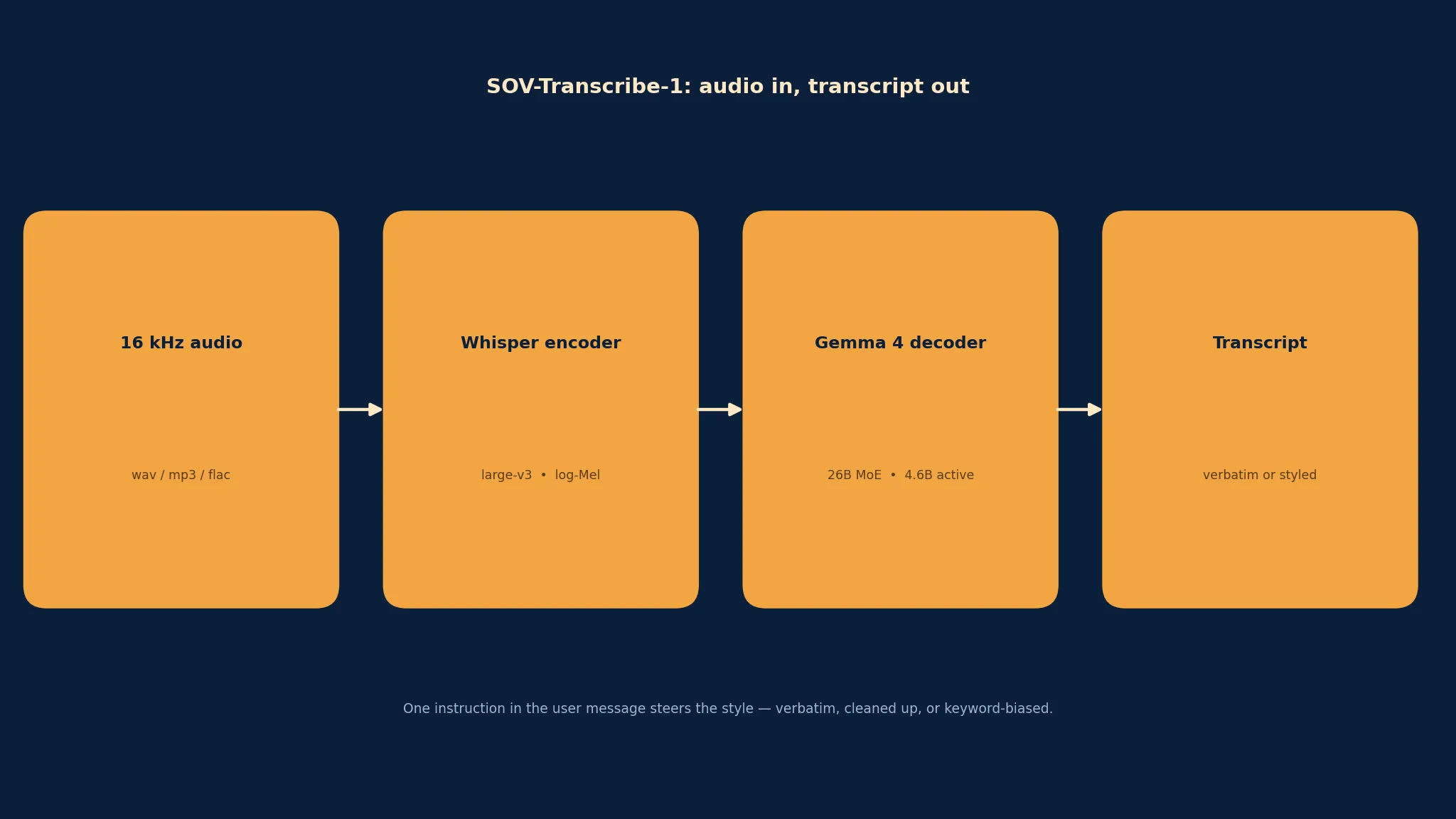
While the download runs, here is what is inside it. SOV-Transcribe-1 is a speech-augmented language model, not a pure transcriber: a Whisper large-v3 audio encoder turns speech into features, a small projector maps those features into the language model's embedding space, and a Gemma 4 26B A4B mixture-of-experts decoder (4.6 billion active parameters) writes the transcript. That decoder is the whole point — it is what lets the model follow instructions about format, and what gives it its edge on names, numbers, and email addresses. It covers seven languages (English, French, German, Spanish, Italian, Portuguese, Dutch) and handles up to 30 minutes of audio per file.
Step 2: Prepare your audio#
The model expects 16 kHz mono audio. Whatever you recorded — a phone memo at 44.1 kHz stereo, a Zoom export, a call recording — resample it first. One command handles every input format ffmpeg understands:
ffmpeg -i input.mp3 -ar 16000 -ac 1 -c:a pcm_s16le meeting.wavVerify the result before you feed it to the model. This is the actual output of that command on a 44.1 kHz stereo test file, checked with ffprobe:
$ ffprobe -v error -show_entries stream=sample_rate,channels,codec_name -of csv=p=0 meeting.wav
pcm_s16le,16000,1
Two rules from the model card's best practices, worth following exactly: prepare 16 kHz mono audio (do not let the model guess at other sample rates), and split recordings longer than 30 minutes at speech boundaries, then transcribe the pieces in order. The 30-minute cap is a hard limit of the model's audio window, not a suggestion.
Step 3: Prove the pipeline on your CPU first#
The most common way a 53 GB model run fails is a silent mismatch in the audio path — wrong sample rate, wrong feature shape — discovered only after the weights have loaded. You can catch all of it on a CPU-only machine, without downloading a single weight shard, by running the model's own feature extractor against your prepared audio.
Install the pinned Transformers release from the model card. The pin matters: the model needs a Transformers version that knows this architecture, and the card specifies the range explicitly:
pip install "transformers>=5.19,<5.23" huggingface_hub numpyIn this tutorial's verification run, that resolved to transformers 5.22.2. Then download only the small config files — no weights — and run the feature extraction exactly as the model's own code does it:
from huggingface_hub import snapshot_download
from transformers.models.whisper.feature_extraction_whisper import WhisperFeatureExtractor
import math, wave
import numpy as np

d = snapshot_download("salesforce-sovereign-intelligence/SOV-Transcribe-1",
    allow_patterns=["config.json", "preprocessor_config.json", "processor_config.json",
                    "generation_config.json", "model.safetensors.index.json"])

features = WhisperFeatureExtractor.from_pretrained(d)
with wave.open("meeting.wav", "rb") as w:
    assert w.getframerate() == 16000 and w.getnchannels() == 1
    audio = np.frombuffer(w.readframes(w.getnframes()), dtype=np.int16).astype(np.float32) / 32768.0
windows = math.ceil(len(audio) / features.n_samples)
mel = features([audio], sampling_rate=16000, padding="max_length",
               max_length=windows * features.n_samples, truncation=False,
               return_tensors="np")["input_features"][0]
print(mel.shape)
print("tokens per 30 s window:", features.nb_max_frames // 2 // 4)
Expected output for a 30-second clip, reproduced from the verification run:
mel shape (windows, mel_bins, frames): (128, 3000)
tokens per 30 s window: 375
128 mel bins by 3,000 frames is the Whisper encoder's input for one 30-second window, and 375 is the number of audio tokens each window becomes after the projector stacks every 4 encoder frames — the exact figure the model card's code comments state. If your numbers match, the audio path is correct and the GPU steps below will work. If they do not, the problem is your audio file, and you have found it in seconds instead of after a 53 GB load.
While you are here, the config files themselves confirm the architecture: model_type is sovereignai_transcribe, downsample_factor is 4, the text config is gemma4_text with hidden size 2816, the audio config is whisper with d_model 1280, and the generation config has do_sample: false — greedy decoding, as the best practices require.
Step 4: First transcript with Transformers#
With the audio path proven, the first real run is the model card's own script. Install the full stack — this time including torch, which the model run needs:
pip install "transformers>=5.19,<5.23" torch librosa accelerateThen transcribe a batch of files in one call:
import librosa
from transformers import AutoModelForMultimodalLM, AutoProcessor

model_id = "salesforce-sovereign-intelligence/SOV-Transcribe-1"
processor = AutoProcessor.from_pretrained(model_id, trust_remote_code=True)
model = AutoModelForMultimodalLM.from_pretrained(model_id, trust_remote_code=True, device_map="auto")

files = ["meeting.wav", "call.mp3"]
audio = [librosa.load(f, sr=16000, mono=True)[0] for f in files]
inputs = processor.apply_transcription_request(audio).to(model.device, dtype=model.dtype)
outputs = model.generate(**inputs, max_new_tokens=8192)
transcripts = processor.batch_decode(outputs[:, inputs.input_ids.shape[1]:], skip_special_tokens=True)
print(transcripts[0])
Four details in that script deserve attention, because each one is a silent failure if you get it wrong:
trust_remote_code=Trueis required. The repository ships its own modeling and processing code (modeling_sovereignai_transcribe.py,processing_sovereignai_transcribe.py), and Transformers will not load it without the flag. The code is part of the Apache 2.0 release, not an arbitrary download.device_map="auto"spreads the 53 GB of weights across the available GPU memory. On a single 80–96 GB card it lands in one place; on a multi-GPU machine it shards.max_new_tokens=8192is the generation cap. A 30-minute recording can produce several thousand transcript tokens; the default cap truncates long transcripts mid-sentence.- Decoding is greedy. The generation config sets
do_sample: false, and the model card's best practices insist on greedy decoding —temperature=0,top_p=1.0,top_k=0,repetition_penalty=1.0. Sampling makes transcripts non-reproducible for no accuracy gain.
If your environment forbids remote code entirely, the model card ships a self-contained alternative — a transcribe_hf function that rebuilds the model from the config and weight shards with stock Transformers classes, no remote code involved. Every import and config field it uses was verified against transformers 5.22.2 and the repository's real config.json for this tutorial:
def transcribe_hf(model, audio_files, prompt="Transcribe the audio verbatim, outputting only spoken words in sequence."):
    """
    Transcribe audio files (up to 30 minutes each) with Transformers; returns one transcript
    per file. model: a local folder or a Hugging Face repo id.
    """
    import json
    import math
    from pathlib import Path
    import librosa
    import torch
    from huggingface_hub import snapshot_download
    from safetensors import safe_open
    from transformers import (AutoConfig, AutoModelForCausalLM, AutoTokenizer, GenerationConfig, WhisperConfig,
                              WhisperFeatureExtractor)
    from transformers.models.gemma4.modeling_gemma4 import Gemma4TextRouter
    from transformers.models.whisper.modeling_whisper import WhisperEncoder

    model = Path(model).expanduser() if Path(model).expanduser().is_dir() else Path(snapshot_download(model))

    config = json.loads((model / "config.json").read_text())
    tokens = json.loads((model / "processor_config.json").read_text())
    tokenizer = AutoTokenizer.from_pretrained(model)
    features = WhisperFeatureExtractor.from_pretrained(model)
    index = json.loads((model / "model.safetensors.index.json").read_text())["weight_map"]

    def weights(prefix):
        state = {}
        for shard in sorted({v for k, v in index.items() if k.startswith(prefix)}):
            with safe_open(str(model / shard), framework="pt") as f:
                state.update({k[len(prefix):]: f.get_tensor(k) for k in f.keys() if k.startswith(prefix)})
        return state

    # Decoder: Gemma 4's text model, built from its config and filled shard by shard, as the
    # training model builds it. Its MoE router runs in FP32, as in training (router_dtype); the
    # checkpoint stores the router in FP32, so it is converted before the weights are loaded.
    text_config = dict(config["text_config"])
    text_config = AutoConfig.for_model(text_config.pop("model_type"), **text_config)
    with torch.device("cuda"):
        decoder = AutoModelForCausalLM.from_config(text_config, dtype=torch.bfloat16)

    # Rotary frequencies computed on the CPU, as in training (on the GPU their last bits differ).
    decoder.model.rotary_emb = type(decoder.model.rotary_emb)(text_config).to("cuda")

    for router in decoder.modules():
        if isinstance(router, Gemma4TextRouter):
            router.float()
            router.forward = lambda hidden, forward=router.forward: forward(hidden.float())

    for shard in sorted(set(index.values())):
        with safe_open(str(model / shard), framework="pt") as f:
            part = {("model." + k[len("model.language_model."):] if k.startswith("model.language_model.") else k):
                    f.get_tensor(k) for k in f.keys() if k.startswith(("model.language_model.", "lm_head."))}
        decoder.load_state_dict(part, strict=False)

    decoder.eval()

    # Whisper encoder and projector (stack 4 encoder frames -> Linear -> GELU -> Linear).
    audio_config = WhisperConfig(**config["audio_config"])
    audio_config._attn_implementation = "sdpa"
    encoder = WhisperEncoder(audio_config)
    encoder.load_state_dict(weights("model.audio_tower."))
    encoder = encoder.to("cuda", torch.bfloat16).eval()

    factor, width, hidden = config["downsample_factor"], audio_config.d_model, text_config.hidden_size
    projector = torch.nn.Sequential()
    projector.add_module("linear_1", torch.nn.Linear(width * factor, hidden, bias=False))
    projector.add_module("act", torch.nn.GELU())
    projector.add_module("linear_2", torch.nn.Linear(hidden, hidden, bias=False))
    projector.load_state_dict(weights("model.embed_audio."))
    projector = projector.to("cuda", torch.bfloat16).eval()

    tokens_per_window = features.nb_max_frames // 2 // factor  # 375 per 30 s window

    generation = GenerationConfig.from_pretrained(model)  # greedy; the training stop tokens
    generation.max_new_tokens = 8192

    transcripts = []
    for path in audio_files:
        # Pad to whole 30 s windows, extract features over the full waveform, then split by window.
        audio, _ = librosa.load(path, sr=16000, mono=True)
        windows = math.ceil(len(audio) / features.n_samples)
        mel = features([audio], sampling_rate=16000, padding="max_length", max_length=windows * features.n_samples,
                       truncation=False, return_tensors="pt")["input_features"][0]
        mel = mel.reshape(mel.shape[0], windows, features.nb_max_frames).permute(1, 0, 2).to("cuda", torch.bfloat16)

        # Chat prompt; its one audio marker becomes begin + 375 audio tokens per window + end.
        conversation = [{"role": "user", "content": [{"type": "text", "text": prompt}, {"type": "audio"}]}]
        text = tokenizer.apply_chat_template(conversation, tokenize=False, add_generation_prompt=True,
                                             enable_thinking=False)
        span = tokens["audio_begin_token"] + tokens["audio_token"] * (windows * tokens_per_window) + tokens["audio_end_token"]
        ids = torch.tensor([tokenizer.encode(text.replace(tokens["audio_token"], span), add_special_tokens=False)],
                           device="cuda")

        with torch.inference_mode():
            # Encoder in batches of 8 windows, as the training model ran it.
            audio_embeds = torch.cat([projector(encoder(part).last_hidden_state.reshape(
                len(part), -1, width * factor)) for part in mel.split(8)])
            embeds = decoder.get_input_embeddings()(ids)  # Gemma scales token embeddings itself
            embeds = embeds.masked_scatter(ids.eq(config["audio_token_id"])[..., None], audio_embeds.reshape(-1))
            output = decoder.generate(inputs_embeds=embeds, attention_mask=torch.ones_like(ids),
                                      generation_config=generation)

        transcripts.append(tokenizer.decode(output[0], skip_special_tokens=True).strip())

    return transcripts


transcripts = transcribe_hf("salesforce-sovereign-intelligence/SOV-Transcribe-1", ["meeting.wav"])
Use it exactly as shown: transcribe_hf takes a repo id or a local folder and a list of files, and returns one transcript per file. It is slower to start than the high-level path (it loads every shard by hand), but it runs anywhere stock Transformers runs, with no remote code execution.
Step 5: Steer the transcript with plain-language instructions#
Every other open transcriber gives you one output style. SOV-Transcribe-1 takes the instruction in the user message, so the same recording can produce a verbatim deposition transcript or a cleaned-up dictation depending on what you ask for. The model card's prompt guide covers the four cases you will actually use:
| Goal | Instruction (the user message) |
|---|---|
| Verbatim transcript | Transcribe the audio verbatim, outputting only spoken words in sequence. |
| Use keywords | This audio may contain the following words or phrases: {keywords}. Transcribe the audio into text. |
| Automatic language | Transcribe the audio verbatim in the language's standard writing system, using punctuation and capitalization. Output only the transcript. |
| Language hint | Transcribe the {language} audio into text, ensuring all punctuation marks are included. |
In the Transformers script, pass the instruction through apply_transcription_request:
inputs = processor.apply_transcription_request(
    audio,
    prompt="Transcribe the audio verbatim, outputting only spoken words in sequence.",
).to(model.device, dtype=model.dtype)
Style steering is not a gimmick on this model — it is measured. On the Preference-ASR benchmark, which scores whether a transcript follows a requested format across numbers, entities, disfluencies, and casing, SOV-Transcribe-1 scores 5.05% preference-aware word error with instructions, second only to IBM's Granite Speech 5.0 2B (4.70%) and ahead of Alibaba's Qwen3-ASR 1.7B (5.96%) and Nvidia's Nemotron 3.5 Transcribe (6.16%). The practical rule from the card's best practices: be explicit about style — say verbatim or cleaned-up, say how numbers should be written, say whether fillers stay or go. Vague instructions get vague transcripts.
One formatting trap to know about: in rare cases the model falls into a repetition loop, repeating a character or phrase until it hits the token limit. The card's advice is to post-process those loops out (their cleanup is adapted from the Qwen3-ASR toolkit) and to check long outputs for truncation or repetition before trusting them.
Step 6: Fix the names the model keeps missing#
The words that break transcripts are rarely common ones. They are customer names on a sales call, drug names in a clinical note, product codenames on an earnings call — rare terms the model has little reason to prefer. SOV-Transcribe-1's answer is context biasing: hand it the terms before it listens, and it resolves ambiguous sounds toward the terms that fit.
The mechanism is the same keyword prompt from Step 5, with a short domain description added when it helps:
prompt = (
    "This audio belongs to the cardiology field and may contain the following "
    "words or phrases: metoprolol, apixaban, Dr. Alvarez, St. Mary's General. "
    "Transcribe the English audio into text, ensuring all punctuation marks are included."
)
The effect is large and measured, not anecdotal. On Contextual Earnings-22 — 15-second clips of real earnings calls, each built around a person's, company's, or product's name — giving the model just the keywords spoken in the clip raises keyword F1, the measure of how accurately those names are transcribed, from 71.9 to 96.8. Give it the full hour-long call's keyword list, most of them distractors that never appear in the clip, and it still scores 94.0 — the highest of any open-weight model. Two practical consequences: keep the list focused on terms that could plausibly appear, and include the domain label ("This audio belongs to the {domain} field") when the vocabulary is specialized — the card's evaluation protocol uses both variants.
Step 7: Serve it with vLLM#
The Transformers script is right for batch jobs. For anything other software calls — a meeting-notes service, a dictation backend, a media pipeline — serve the model behind an HTTP endpoint. Native vLLM support is being upstreamed, but until it lands, the repository ships a plugin that adds it to vLLM 0.32.0. The plugin's own pyproject.toml (verified in the repository) pins the dependency and the entry point:
hf download salesforce-sovereign-intelligence/SOV-Transcribe-1 --include "vllm_plugin/*" --local-dir SOV-Transcribe-1
pip install ./SOV-Transcribe-1/vllm_plugin
That installs sov-transcribe-vllm 0.1.0, which depends on exactly vllm==0.32.0 and registers the model architecture with stock vLLM. Start the server:
vllm serve salesforce-sovereign-intelligence/SOV-Transcribe-1 --max-model-len 32768Then transcribe with the OpenAI-compatible endpoint — any client that speaks /v1/audio/transcriptions works:
curl http://localhost:8000/v1/audio/transcriptions \
  -F model=salesforce-sovereign-intelligence/SOV-Transcribe-1 \
  -F [email protected] -F temperature=0
The endpoint uses the verbatim instruction by default; pass -F prompt="..." with any instruction from Step 5 to change the style. Two limits to know: the endpoint accepts up to 600 seconds of audio per request unless you raise VLLM_MAX_AUDIO_DECODE_DURATION_S (set it to 1800 for the full 30 minutes), and --max-model-len 32768 is not optional — it caps the context the server will build for a request.

The throughput is the reason to serve rather than script. On one RTX PRO 6000 Blackwell with the DFlash draft (Step 8), the server transcribes up to 1,039 seconds of audio per second and returns the transcript of a 30-second recording in 0.22 seconds. Even without the draft, a 30-second clip takes 0.44 seconds. That is fast enough to transcribe a backlog of calls faster than real time by three orders of magnitude — the bottleneck becomes disk and network, not the model.
Step 8: Make it fast with DFlash speculative decoding#
Transcription is autoregressive: the decoder writes one token at a time, and most of the wall-clock time is spent waiting on the big model. Speculative decoding attacks exactly that — a small draft model proposes 15 tokens at a time, and the big model verifies them in one pass, keeping the ones it agrees with. Salesforce ships the draft as its own repository, SOV-Transcribe-1-DFlash (430 million parameters, Apache 2.0), and the model card reports about a 2–3× speedup for one request at a time, with accuracy inside run-to-run variation of decoding without it. The gain is smallest for clips under 10 seconds.
Mean time per request on the same 96 GB card, with and without the draft:
| Audio length | Without draft | With DFlash draft |
|---|---|---|
| Up to 10 s | 0.16 s | 0.09 s |
| 10–30 s | 0.44 s | 0.15 s |
| 30–60 s | 0.88 s | 0.31 s |
| 1–5 min | 2.78 s | 1.26 s |
Enable it in the offline LLM API:
from vllm import LLM, SamplingParams

llm = LLM(model="salesforce-sovereign-intelligence/SOV-Transcribe-1", max_model_len=32768,
          limit_mm_per_prompt={"audio": 1},
          allowed_local_media_path="/path/to/audio", max_num_seqs=64,
          speculative_config={"method": "dflash",
                              "model": "salesforce-sovereign-intelligence/SOV-Transcribe-1-DFlash",
                              "num_speculative_tokens": 15})
Or on the server:
vllm serve salesforce-sovereign-intelligence/SOV-Transcribe-1 --max-model-len 32768 --max-num-seqs 64 \
  --speculative-config '{"method": "dflash", "model": "salesforce-sovereign-intelligence/SOV-Transcribe-1-DFlash", "num_speculative_tokens": 15}'
Note --max-num-seqs 64: with the draft loaded, vLLM's default of 1,024 concurrent sequences exhausts the 96 GB card during start-up memory profiling, so the card's working configuration caps it. If you are serving many concurrent requests on a smaller card, lower it further rather than raising it.
Which approach should you use?#
| Situation | Best method |
|---|---|
| A batch of recordings, once | Transformers script (Step 4) — simplest, no server to babysit |
| Other software calls transcription | vLLM server (Step 7) — OpenAI-compatible endpoint |
| Throughput or latency matters | vLLM + DFlash draft (Step 8) — ~2–3× faster per request |
| Your environment forbids remote code | The self-contained transcribe_hf function (Step 4) |
| No GPU at all | Not this model — use faster-whisper on CPU instead (see Related articles) |
| Live captioning or streaming | Not this model — SOV-Transcribe-1 is non-streaming by design; use a streaming ASR model |
The takeaway#
SOV-Transcribe-1 earns its ranking the unglamorous way: it is the most accurate open transcriber you can download, it follows instructions about how the transcript should read, and it fixes its own weakest spot — rare names — when you hand it the vocabulary first. The workflow that gets the most out of it is short:
- Resample everything to 16 kHz mono and prove the audio path on CPU with the feature-extraction check in Step 3 before loading 53 GB of weights.
- Pin
transformers>=5.19,<5.23, keep decoding greedy, and leavemax_new_tokensat 8192 for long recordings. - Write the instruction into the user message — verbatim or cleaned-up, digits or words — and supply keywords for every name the model could plausibly mishear.
- Serve behind vLLM when anything else needs to call it, and switch on the DFlash draft when latency matters.
- Remember the two hard limits: 30 minutes per file, and no streaming. Inside those, it is the best free transcriber there is.
Run the eight steps above and you have a transcription service that costs nothing per minute, keeps every recording on your own hardware, and writes transcripts in the style you asked for — which, for meeting notes, dictation, and call archives, is the difference between a transcript you have to rewrite and one you can file.
Sources#
Frequently asked questions
Do I need a Hugging Face account or an API key?
No. The repository is public and ungated, so hf download works anonymously for public repos, and nothing in this tutorial sends data to any cloud service. The only cost is the GPU you run the model on.
What GPU do I actually need?
The BF16 weights alone are about 53 GB, so the card must hold that plus KV cache and activations. Salesforce benchmarks on a 96 GB RTX PRO 6000 Blackwell, and an 80 GB H100-class card is the realistic floor. Two 24 GB consumer cards will not hold the full BF16 weights.
Can it transcribe live audio or stream captions?
No. SOV-Transcribe-1 is non-streaming by design: it transcribes recorded files up to 30 minutes long. For live captioning or real-time voice agents, use a streaming ASR model instead.
How is it different from Whisper?
Whisper large-v3 is the audio encoder inside SOV-Transcribe-1. The difference is the Gemma 4 26B decoder on top: it follows natural-language instructions about transcript style and uses supplied keywords to fix rare names — and at 2.28% word error on Artificial Analysis it beats every other open-weight transcriber.