Run your game project like a real studio: hands-on with Claude Code Game Studios
A single AI session builds a game prototype fast, then loses the plot: hardcoded magic numbers, design docs that contradict the code, and nobody asking whether the game is fun. Claude Code Game Studios gives that session a studio hierarchy — and this guide clones it, counts it, and trips its commit gate by hand.
- Who: Claude Code Game Studios (Donchitos/Claude-Code-Game-Studios on GitHub), MIT license, 28,587 stars and 4,014 forks on October 29, 2026, on GitHub's daily Trending page.
- What: a template that organizes Claude Code into a game studio: 49 agents in three tiers, 74 skills, 15 registered hooks, 14 path-scoped rules, 62 document templates, and a studio-tests folder that checks the skills and agents themselves.
- When: release 1.2.0 (October 19, 2026), verified at commit 05ad7c8 on October 29, 2026.
- Requirement: Git, Python 3, and Bash for everything verified here. The full agent path needs a Claude Code plan or API billing; no GPU, no engine install for this guide.

Why a game studio, and why now
Ask a single AI coding session to build a game and you get a familiar arc: a fast first prototype, then magic numbers hardcoded somewhere, a design document that contradicts the code, and no one asking whether the thing is actually fun to play. Claude Code Game Studios exists to break that arc. It turns one Claude Code session into a small studio with a hierarchy: directors who guard the vision, department leads who own their domains, and specialists who do the hands-on work. Each agent has defined responsibilities, escalation paths, and quality gates, and the whole system is a template you clone, not a service you sign up for.
The numbers explain the attention. On October 29, 2026, Donchitos/Claude-Code-Game-Studios sat on GitHub's daily Trending page at 28,587 stars and 4,014 forks, under the MIT license, at release 1.2.0 (October 19, 2026). The repository description still says "72 workflow skills"; the README body and the actual folder count 74, and this guide counts everything it quotes rather than repeating the badge. What you get is 49 agents, 74 skills, 15 registered hooks, 14 path-scoped rules, and 62 document templates, plus a test folder that checks the skills and agents themselves.
The project's own measurement is the reason to take its process claims seriously — and to read them critically. The README reports building four games from one brief at different rigor levels and counting the documents each wrote before its first line of game code: the minimal path wrote one (the brief itself), the standard path wrote 30. Two blind reviewers and a human playtest then ranked the standard build last. The extra documents bought traceability, not a better game. That finding is why minimal is the default rigor here, and why this guide starts there instead of with the heaviest process.
What you'll need
Two tiers, stated plainly, because they decide what this guide can and cannot do for you:
- Everything verified in this guide: Git, Python 3, and Bash on Linux or macOS (on Windows, Git for Windows supplies Bash). No account, no API key, no GPU. Cloning the template, counting its parts, linting a skill, writing a setting, and tripping the commit gate all run locally and cost nothing.
- The full agent path: Claude Code, which needs an Anthropic plan or API billing. The 49 agents and 74 slash commands only run inside a Claude Code session. This guide does not run that path — there is no Claude Code subscription in the verification environment — so every agent-driven step below is described from the project's own docs and labeled as such, while every runnable step is quoted from actual runs.
- Recommended, not required:
jqfor hook validation. The README is explicit that hooks fail gracefully without optional tools, with one deliberate exception: a commit that stages a data JSON file is blocked when no Python is available to validate it. - Engine, only when you start a real game: Godot 4, Unity, or Unreal Engine 5. The template's engine references track Godot 4.7 and Unreal Engine 5.8 in release 1.2.0. You need none of them for this guide's verification steps.
Step 1 — Clone the template as your game project
Claude Code Game Studios is a template repository, so you clone it into the folder that becomes your game:
git clone https://github.com/Donchitos/Claude-Code-Game-Studios.git my-game
cd my-game
git log --oneline -1
Expected output, verified October 29, 2026:
05ad7c8 Release 1.2.0 — the main path, rebuilt and tested
Open Claude Code in this project root — the folder holding CLAUDE.md and project.yaml. The README warns that starting in a subfolder such as src/ skips the project's hooks, deny rules, and ask-first permission mode. That warning is load-bearing: the hooks resolve the project root from your working directory first, and only fall back to their own location.
What you just cloned, at the top level: .claude/ (agents, skills, hooks, rules, scripts, docs, and settings.json), design/, docs/, production/, src/, studio-tests/, and the single source of truth, project.yaml. Note what is not shipped: no game. The README is blunt that somebody else's game in your repo would be clutter, not evidence. You bring the game; the template brings the studio.
Step 2 — Inventory the studio before you trust it
Before running anything, count what the README claims. Every count below was produced by listing the cloned tree on October 29, 2026:
ls .claude/agents/*.md | wc -l      # 49
ls .claude/skills/ | wc -l           # 74
ls .claude/rules/ | wc -l            # 14
ls .claude/docs/templates/*.md | wc -l  # 62
The hooks need one extra step, because the folder holds 18 shell scripts but only 15 are registered. The registered set is what .claude/settings.json actually wires to lifecycle events, and counting distinct scripts named there gives 15, across eight events: SessionStart, PreToolUse, PostToolUse, Notification, PreCompact, Stop, SubagentStart, and SubagentStop. The remaining three files are helpers the registered hooks call — yaml-helper.sh, update-check.sh, and log-instructions.sh — not hooks themselves. The 62 templates likewise come with 8 more files of per-section guidance in a subdirectory, so "62 templates" is the top-level count, not the whole folder.
The hierarchy itself is three tiers. Tier 1, directors: creative-director, technical-director, producer. Tier 2, department leads: game-designer, lead-programmer, art-director, audio-director, narrative-director, qa-lead, release-manager, localization-lead. Tier 3, specialists: gameplay, engine, network, AI, tools, and UI programmers, systems, level, and economy designers, technical artist, sound designer, writer, world-builder, UX designer, prototyper, performance analyst, DevOps, analytics, security, QA, accessibility, live-ops, and community roles — plus engine specialists for Godot 4, Unity, and Unreal Engine 5. One detail matters for your bill: the three directors ask for Opus, the lead-programmer and fifteen specialists name Sonnet, and the remaining thirty inherit your session's model. Tiers are seniority of role, not a billing plan, and most of the studio runs on whatever model you already use.
Step 3 — Set the rigor before you write anything
The one setting that matters most is modes.rigor: minimal, standard, or full. It is a single front door over six knobs — workflow (which design-document sections are required), docs.density, qa.level, story_granularity, review_mode, and team.size. In Claude Code you would run /start, which asks where you are (no idea, vague concept, clear design, existing work) and writes modes.rigor and modes.automation into project.yaml for you. The template ships with no modes: block at all, and that absence is intentional.
Here is the trap the template guards against, and it is worth understanding before you touch the file: never seed the six knobs directly in project.yaml. A pinned knob shadows the rigor expansion, so the rigor /start infers and saves would stop changing anything. Per-developer overrides belong in the gitignored project.local.yaml instead, via /settings --local. The shipped project.yaml says this in a comment block, and the /settings skill enforces it.
You can watch the mechanism without Claude Code, because /settings is implemented by a script, .claude/scripts/config-set.sh. A dry run against a copy of the template prints every check the skill makes, and writes nothing:
bash .claude/scripts/config-set.sh modes.rigor minimal --dry-run --root my-game
Verified output:
file	 project.yaml	present
enum	 ok	minimal|standard|full
whitelist	locked	yaml-helper.sh _yaml_helper_locally_overridable
reserved	no	-
known	 yes	enum key
shadow	 no	-
current	-	project.yaml
edit	 added-block	29
Run it without --dry-run and it writes the block and reads it back:
bash .claude/scripts/config-set.sh modes.rigor minimal --root my-game
readback minimal project.yaml
The resulting project.yaml gains, at lines 29–30:
modes:
  rigor: minimal
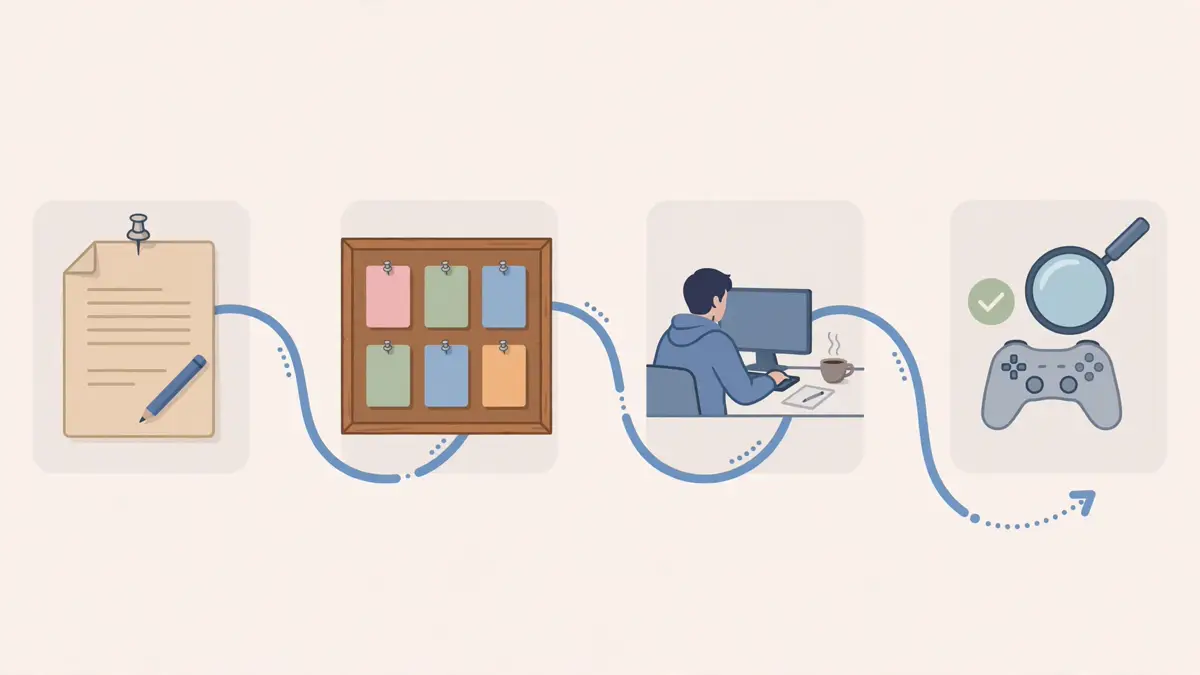
minimal means jam-game speed: no design documents required, terse docs, minimal QA evidence, solo review. The documented minimal path is /start → /setup-engine → /brainstorm (a one-page brief) → /create-stories → /dev-story ↔ /story-done. standard requires five design-document sections with balanced depth and lean review; full requires all eight sections, thorough evidence on every story type, and full director review. Raise rigor in one /settings call when the project grows — /help and /gate-check will suggest it when they see the signs — and use system_overrides to hold a single system, such as combat, to a higher standard than the rest.
Step 4 — Lint a skill the way the studio tests itself
The template ships its own QA folder, studio-tests/, and it is meant to stay in your project. Its catalog.yaml tracks all 74 skills and 49 agents, its quality-rubric.md defines per-category pass/fail metrics, and its skills/ and agents/ folders hold behavioral specs. The README states the cost of deleting it plainly: /skill-test static still works, /skill-test audit degrades, and /skill-test spec and /skill-test category break, because the specs and the rubric live there.
The static checks are runnable without any agent. .claude/scripts/skill-lint.sh performs checks 1–7 of /skill-test static by reading a skill's files: frontmatter fields, numbered phase headings, verdict words, whether it asks before writing, how it ends, whether it sets a fork context, and what its argument hint says. It prints observations, never verdicts — pass/fail stays with /skill-test. Run it on one skill:
bash .claude/scripts/skill-lint.sh brainstorm
Verified output (abridged to the check rows):
skills	1	.claude/skills
skill	brainstorm	files=2	lines=277
check1	brainstorm	frontmatter=ok	missing=-	name=match
check2	brainstorm	phases=8	h2=10	h2_total=10
check3	brainstorm	verdicts=CONCERNS:4,COMPLETE:2,PROCEED:1,PIVOT:1,HIGH:1	assessment_words=-
check4	brainstorm	may_i_write=2	before_writing=0	approval=1	ask_write_lines=7	write_tools=Write
check5	brainstorm	last_section=Lean Brief flow (`workflow: minimal`)	skills_named=create-stories,setup-engine,create-epics,sprint-plan,dev-story	next_phrases=5/1
check6	brainstorm	context_fork=no	phases=8	h2=10
check7	brainstorm	hint=[genre or theme hint, or 'open'] [--review full|lean|solo]	args_section=-
checked	1 of 1
Run it across the whole studio and it reads every skill:
bash .claude/scripts/skill-lint.sh all
Verified tail: checked 74 of 74, with all 74 skills reporting frontmatter=ok and none reported unread. That is the correct way to use this folder in your own project: edit a skill, add your own, retune an agent — then re-run the lint and the /skill-test modes to check that what you changed still holds up. A skill that was not linted never looks clean; the script prints NOT_READ for any folder it cannot read, and none appeared here.

Step 5 — Trip the commit gate, then clear it
The most concrete proof that the studio does something on its own is a hook you can fire by hand. .claude/hooks/validate-commit.sh is a PreToolUse hook on Bash commands: when the agent runs git commit, it inspects what is staged and blocks the commit — exit 2 — if a staged data file is not valid JSON. The check stays inside the asset roots (for example assets/data/, Unity's Assets/Data/ or Assets/Game/Data/), so an editor's JSON-with-comments file such as .vscode/settings.json never blocks. Everything else the hook does is advisory; this blocking check is, in the script's own comment, the entire reason the hook is registered.
Reproduce it in your project copy. Initialize a repository, stage a broken data file, and feed the hook the same JSON payload Claude Code would send it:
cd my-game && git init -q . && git config user.email [email protected] && git config user.name you
mkdir -p assets/data
printf '{broken json' > assets/data/items.json
git add assets/data/items.json
printf '%s' '{"tool_name":"Bash","tool_input":{"command":"git commit -m test"}}' \
  | bash .claude/hooks/validate-commit.sh
echo "exit=$?"
Verified output:
BLOCKED: assets/data/items.json is not valid JSON
exit=2
Fix the file and the same command passes:
printf '{"items": []}' > assets/data/items.json
git add assets/data/items.json
printf '%s' '{"tool_name":"Bash","tool_input":{"command":"git commit -m test"}}' \
  | bash .claude/hooks/validate-commit.sh
echo "exit=$?"
exit=0
Two things this experiment proves, and one it does not. It proves the hook parses the tool-call payload, scopes itself to your project, and enforces the data-JSON rule with a real exit code — all without Claude Code running. It does not prove the hook fires inside your Claude Code session; that depends on settings.json being loaded from your project root, which is exactly why Step 1 insists on starting Claude Code in the root folder. If the gate ever seems silent in a real session, check the working directory first.
Step 6 — The real run: one story, end to end, in Claude Code
With the scaffold verified, the agent-driven path — described here from the project's docs, not executed in this guide's environment — runs one story through the studio. Start in the project root and run /start, answer where you are, then /setup-engine godot 4.7 if Godot is your engine (Unity and Unreal Engine 5 have their own specialist sets). /brainstorm explores ideas from scratch and lands a one-page brief at minimal rigor. /create-epics and /create-stories break the brief into work; /dev-story implements one story with the relevant specialists; /story-done closes it.
The closing rule is the one to remember, because it is where this system differs from a bare agent loop: a story that changes anything the player sees is not closed until the game has been launched, observed, and a screenshot retained in production/qa/evidence/. A parse check is not a run, and a passing test says nothing about a menu drawn off-screen. That evidence rule holds at every rigor level, including minimal, where automated tests are waived but the look is not. Around the edges, the other hooks keep the process honest: writes and reads are validated against the registries, skill changes are checked, and the session lifecycle is logged for audit. And when a story is done, /gate-check reviews whether the project has outgrown its rigor before you scale up.
Other commands worth knowing once the loop is running: /design-system and /art-bible for the look of the game, /balance-check and /content-audit for reviews, /smoke-check, /soak-test, and /regression-suite for QA, /milestone-review and /retrospective for production, and the /team-* commands (/team-combat, /team-narrative, /team-ui, /team-release, /team-polish, /team-audio, /team-level, /team-live-ops, /team-qa) for coordinating several agents on one feature. All 74 are listed in the README's slash-command tables; the full list is in .claude/skills/.
When to use this vs alternatives
Use Claude Code Game Studios when you are building a game with Claude Code and the project has outgrown one chat session: multiple systems, assets, and a need for design docs, QA evidence, and review gates that survive across sessions. The template's value is structure plus enforcement — hooks that actually block bad commits, registries that track decisions, and a test folder for the process itself.
Use plain Claude Code when you are prototyping a mechanic or jamming: a single session, no design docs, no gates. The studio's own measurement argues for this — at minimal rigor it deliberately behaves almost like plain Claude Code, and its standard path produced more documents without a better game in its own test.
Use a general agent methodology instead when the project is not a game. Skills frameworks and harness builders cover software development broadly, but they know nothing about engines, art bibles, balance, or playtest evidence. Conversely, do not use this template for non-game software: its agents, rules, and templates are all game-shaped, and you would fight the structure on every story.
Watch the cost driver: the three directors ask for Opus. If every story routes through full director review at full rigor, model spend climbs with process, not with game size. Minimal rigor plus solo review is the economical default; raise review depth deliberately, per system, through system_overrides.
The takeaway
Claude Code Game Studios is not a game engine, a model, or a service. It is a cloned folder that gives a solo developer the org chart of a small studio — 49 agents, 74 skills, 15 hooks, 14 rules, 62 templates — with the unusual property that its enforcement is testable without the agent at all: this guide counted every part, linted all 74 skills, wrote a rigor setting through the settings script, and watched the commit gate block a broken data file and pass the fixed one. Start at minimal rigor, keep the studio-tests/ folder, never seed the six rigor knobs by hand, and let a story close only when you have looked at the running game. The studio does not make the game good. It makes the process that finds out whether it is good repeatable — and that, for a solo developer, is the whole point.
Sources: the Donchitos/Claude-Code-Game-Studios repository (README, project.yaml, .claude/settings.json, hook and helper scripts, studio-tests/ README, and CHANGELOG, read October 29, 2026), the release 1.2.0 tree cloned and run for this guide (counts, skill-lint outputs, config-set dry-run and write, and validate-commit block/pass outputs quoted exactly), and GitHub's daily Trending page and repo page for October 29, 2026 (28,587 stars, 4,014 forks). The four-game rigor measurement and the blind-reviewer ranking are the project README's own reported figures, not re-measured here; the agent-driven story loop in Step 6 is described from the project docs and was not executed here, because the verification environment has no Claude Code subscription.