Claude Fable 5.2 hands-on: build a long-horizon coding agent with effort, prompt caching, and fast mode
Anthropic's flagship is 20% cheaper and 30% faster than Fable 5.1 — but the API has four new ways to return a 400. This tutorial builds a working agent loop on the Messages API, verifies every call against SDK 2.8.0, and prices each run to the cent.
effort is the only reasoning dial, and history is append-only. This tutorial builds the agent loop that contract requires, verifies every call against the installed SDK, and prices each run from the usage object.- What it is: Claude Fable 5.2, released November 9, 2026. API model ID
claude-fable-5-2, 1M-token context window, up to 128K output tokens, adaptive thinking always on, knowledge cutoff June 2026. - Verified here: Every SDK call was checked against anthropic SDK 2.8.0. The agent loop ran end to end against a mocked transport (no API key was available in the verification sandbox, so the model was not called live): thinking blocks returned verbatim, tool results appended, cost math matching the published rates, and a forced
tool_choicesurfacing as a 400. The live calls need your key; the request shapes are exactly what the SDK sends. - The price: $8 per million input tokens, $40 per million output tokens — down from $10/$50 on Fable 5.1. Cache reads $0.20 per million; 5-minute cache writes $10, 1-hour writes $16; the Batch API halves the standard rates to $4/$20. Fast mode: $16/$80 for up to 2.5x output speed.
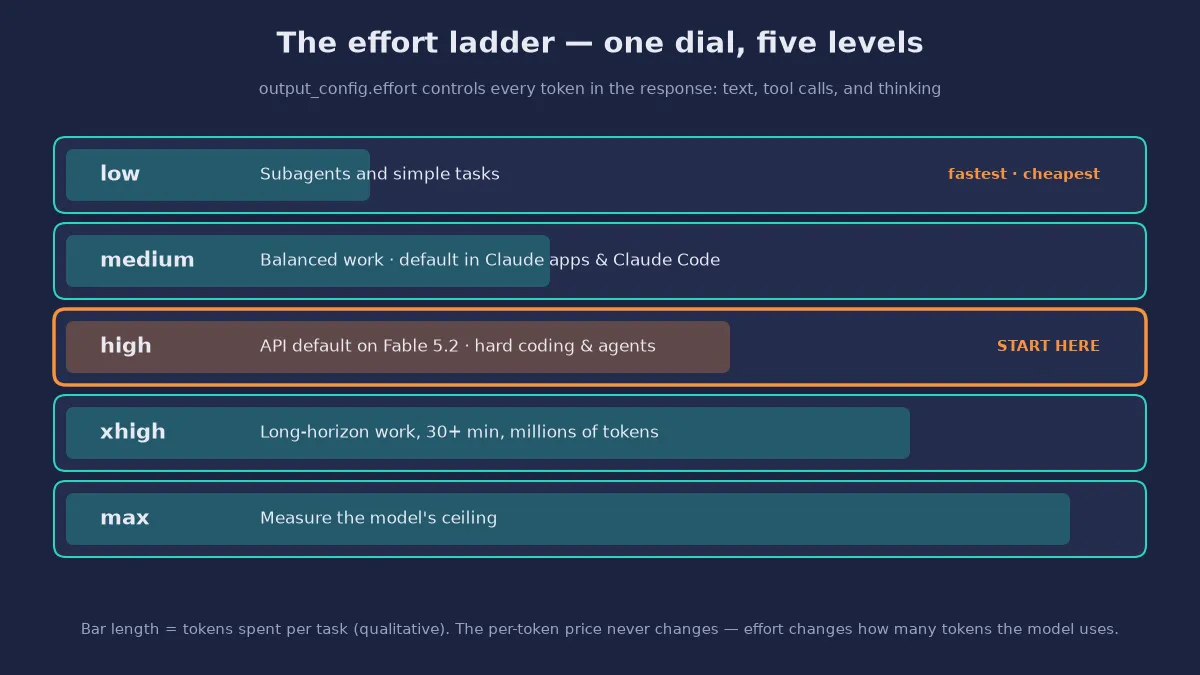
- Effort is the cost dial: low, medium, high, xhigh, max. The API default is
high; Claude apps and Claude Code default tomedium. Higher effort spends more tokens per task — the per-token price does not change. - The four 400s: forced tool use (
tool_choiceany/tool),temperature/top_p/top_k, disabled or budgeted thinking, and the retiredcomputer_20251124tool — plus the prefix check, which rejects any edit to an earlier turn.

Anthropic released Claude Fable 5.2 on November 9, and it is the most capable Claude model any developer can call today: a 1M-token context window, up to 128K tokens of output, 20% cheaper per token than Fable 5.1, and — on Anthropic's own reporting — the strongest agentic coding model the company has shipped, at 49.1% on FrontierCode 2.0 at Xhigh effort. The same announcement credits it with migrating a production service from Python to Rust, formalizing Fermat's Last Theorem in 30 hours with a thousand subagents, and designing three working electronic devices from a one-paragraph prompt. Treat the anecdotes as the company's account, not independent verification. The price cut, the context window, and the API rules are on the rate card and in the documentation — and the API rules are the reason this tutorial exists.
Fable 5.2 changes how you call Claude. Adaptive thinking is always on and cannot be disabled. The effort parameter is the only dial for reasoning depth. And four changes from Fable 5.1 can break working code with a 400 error: editing an earlier turn, forcing tool use, sending old sampling parameters, or declaring the retired computer-use tool. This tutorial builds a working agent loop on the raw Messages API, verifies every call against the installed Python SDK, and prices each run to the cent — so you can use the model the way it was designed to be used, instead of debugging its error messages one by one.
By the end you will have a small, complete agent that reads code, calls tools, and keeps its own history in the one shape Fable 5.2 accepts: append-only. You will know exactly what each effort level buys, when prompt caching pays for a 1M-token context, when fast mode is worth double the price, and which model to reach for when Fable is the wrong tool.
What you'll need#
- Python 3.10 or newer. The examples use the official
anthropicPython SDK, version 2.8.0 at time of writing. - An Anthropic API key from the Claude Console at platform.claude.com. The SDK reads
ANTHROPIC_API_KEYfrom the environment. Fable 5.2 is available to all API customers; the sibling model Mythos 5.2 is restricted to organizations verified through Anthropic's Cyber and Life Sciences programs. - A few dollars of API credit. There is no charge for the SDK. At Fable 5.2's standard rates, a 100,000-input / 10,000-output-token run costs $1.20. The verification harness in this tutorial ran against a mocked transport, so the code paths were exercised end to end without spending anything — the live calls need your key.
- A scratch directory. The agent in Step 3 reads files. Keep it in a folder you can throw away.
Step 1 — Install and verify#
Create a project folder and a virtual environment, then install the SDK. Every snippet in this tutorial was checked against the installed package before publication — including the two parameters that did not exist on older SDK versions, output_config and speed.
mkdir fable-agent
cd fable-agent
python3 -m venv .venv
source .venv/bin/activate
pip install anthropic
Confirm the install and that the SDK knows the model. The Models API is the fastest way to prove your key and the model ID are both valid — it returns the model's display name and creation date without spending a token on generation:
pip show anthropic | grep Version
python3 -c "import anthropic; print('anthropic SDK', anthropic.__version__)"
from anthropic import Anthropic
client = Anthropic() # reads ANTHROPIC_API_KEY from the environment
model = client.models.retrieve("claude-fable-5-2")
print(model.id, "·", model.display_name, "·", model.created_at)Expected output:
anthropic SDK 2.8.0
claude-fable-5-2 · Claude Fable 5.2 · 2026-11-09T00:00:00Z
If the retrieve call fails, check the key first: a wrong or missing key returns a 401, while a wrong model ID returns a 404. Note the method name — it is retrieve, not get. The SDK has no models.get, and that is the first of several small naming traps in this tutorial: the API surface changed with this model generation, and guessing a method name is how you lose an afternoon.
One environment quirk worth recording: in a sandbox whose proxy variables contain bracketed IPv6 entries, the SDK's default HTTP client can fail at construction with an InvalidURL error about a port. That is the proxy configuration, not the SDK — pass an explicit http_client with proxy=None if you hit it, or clean the proxy variables. On a normal machine, Anthropic() just works.
Step 2 — Your first Fable 5.2 call#
The smallest correct request has four fields: the model, max_tokens, the effort level, and the messages. max_tokens is required, and it caps thinking and reply together — at high effort and above, set it generously or the model will stop mid-thought. Here it is as curl first, because curl shows you the wire format with nothing hidden:
curl https://api.anthropic.com/v1/messages \
  -H "x-api-key: $ANTHROPIC_API_KEY" \
  -H "anthropic-version: 2023-06-01" \
  -H "content-type: application/json" \
  -d '{
    "model": "claude-fable-5-2",
    "max_tokens": 4096,
    "output_config": {"effort": "high"},
    "messages": [
      {"role": "user", "content": "Explain what a prefix check is, in one paragraph."}
    ]
  }'
Three things are different from the requests you may have written for older Claude models. First, there is no temperature, top_p, or top_k — sending any of them returns a 400. Second, there is no thinking field: adaptive thinking is always on, so you omit it or send {"type": "adaptive"}. Third, effort lives in output_config.effort, not at the top level of the request. The top-level effort parameter needs no beta header; per-message effort changes do (Step 5).
The same call in Python, with the response handled the way Fable 5.2 requires. The response content is a list of blocks, and the first block is usually a thinking block, not text — so filter for text blocks instead of assuming content[0] is the answer:
from anthropic import Anthropic

client = Anthropic()
resp = client.messages.create(
    model="claude-fable-5-2",
    max_tokens=4096,
    output_config={"effort": "high"},
    messages=[
        {"role": "user", "content": "Explain what a prefix check is, in one paragraph."}
    ],
)

text = "".join(block.text for block in resp.content if block.type == "text")
print(text)
print(resp.stop_reason)          # "end_turn" when the reply is complete
print(resp.usage.input_tokens, "in /", resp.usage.output_tokens, "out")
Read the usage object every time. It is the only honest record of what a call cost, and Step 5 turns it into dollars. The fields that matter are input_tokens, output_tokens, cache_creation_input_tokens, and cache_read_input_tokens — the last two only appear when prompt caching is in play, which is Step 4.
Step 3 — Build the agent loop Fable 5.2 accepts#
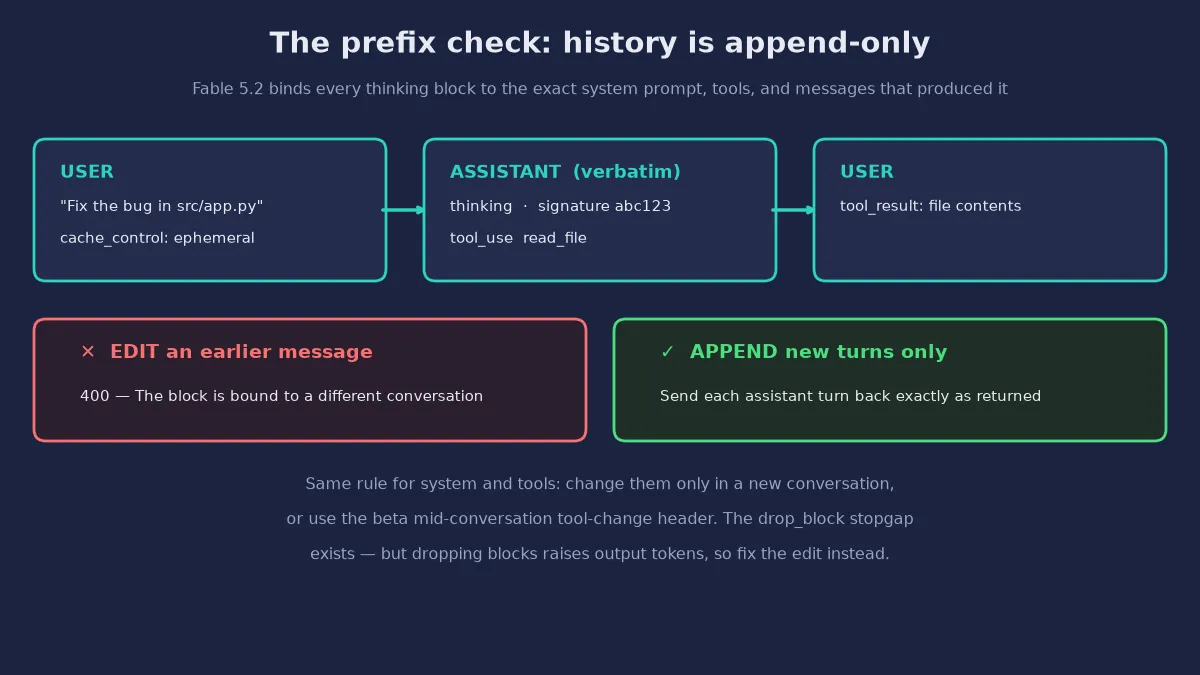
A single call is a demo. An agent is a loop: send messages, run the tool calls that come back, append the results, repeat until the model stops calling tools. The loop below is the whole tutorial in one file — about eighty lines, one tool, no framework. The rules that matter are all consequences of the prefix check, which Step 7 explains in full. In short: never edit the system prompt, the tool list, or any earlier message; send each assistant turn back exactly as the API returned it, thinking blocks included; and keep tool_choice on auto.
"""Minimal append-only agent loop for Claude Fable 5.2."""
import anthropic

MODEL = "claude-fable-5-2"

PRICES = {  # USD per million tokens, Fable 5.2 (Anthropic pricing page)
    "input": 8.0, "output": 40.0,
    "cache_write_5m": 10.0, "cache_write_1h": 16.0, "cache_read": 0.20,
    "fast_input": 16.0, "fast_output": 80.0,
}


def cost_of(usage, fast=False):
    """USD cost of one response's usage object (dict-like)."""
    inp = usage.get("input_tokens", 0)
    out = usage.get("output_tokens", 0)
    created = usage.get("cache_creation_input_tokens", 0)
    read = usage.get("cache_read_input_tokens", 0)
    fresh = inp - created - read
    if fast:
        return (fresh * PRICES["fast_input"] + created * PRICES["fast_input"]
                + read * PRICES["cache_read"]
                + out * PRICES["fast_output"]) / 1e6
    return (fresh * PRICES["input"] + created * PRICES["cache_write_5m"]
            + read * PRICES["cache_read"]
            + out * PRICES["output"]) / 1e6


def read_file(path: str) -> str:
    """Local tool: read a file from the working tree (demo tool)."""
    with open(path) as f:
        return f.read()[:4000]


TOOLS = [{
    "name": "read_file",
    "description": "Read a file from the project and return its contents.",
    "input_schema": {
        "type": "object",
        "properties": {"path": {"type": "string"}},
        "required": ["path"],
    },
}]


def run_agent(client, messages, tools=None, effort="high",
              max_tokens=16384, speed=None, max_turns=10):
    """Run one append-only agent loop. Returns (final_text, usage, history)."""
    tools = tools or [read_file]
    tool_fns = {"read_file": read_file}
    history = list(messages)  # append-only from here on
    total_usage = {"input_tokens": 0, "output_tokens": 0,
                   "cache_creation_input_tokens": 0,
                   "cache_read_input_tokens": 0}
    kwargs = dict(model=MODEL, max_tokens=max_tokens,
                  output_config={"effort": effort},
                  tools=TOOLS, tool_choice={"type": "auto"})
    if speed:
        kwargs["speed"] = speed
    for _ in range(max_turns):
        resp = client.messages.create(messages=history, **kwargs)
        u = resp.usage
        for k in total_usage:
            total_usage[k] += getattr(u, k, 0) or 0
        # Append the assistant turn EXACTLY as returned (thinking blocks
        # included) -- editing it trips Fable 5.2's prefix check.
        history.append({"role": "assistant",
                        "content": [b.model_dump() if hasattr(b, "model_dump")
                                    else dict(b) for b in resp.content]})
        tool_uses = [b for b in resp.content if b.type == "tool_use"]
        if resp.stop_reason == "end_turn" or not tool_uses:
            text = "".join(b.text for b in resp.content
                           if b.type == "text")
            return text, total_usage, history
        results = []
        for tu in tool_uses:
            try:
                out = tool_fns[tu.name](**tu.input)
            except Exception as exc:  # tool errors go back as results
                out = f"Error: {exc}"
            results.append({"type": "tool_result",
                            "tool_use_id": tu.id, "content": out})
        history.append({"role": "user", "content": results})
    raise RuntimeError("agent loop exceeded max_turns")
Run it against a small task. The driver below is the part you would change for your own work — the loop itself stays the same:
from anthropic import Anthropic
from agent_loop import run_agent, cost_of

client = Anthropic()
messages = [{"role": "user",
             "content": [{"type": "text",
                          "text": "Fix the bug in src/app.py",
                          "cache_control": {"type": "ephemeral"}}]}]
final, usage, history = run_agent(client, messages, effort="high")
print(final)
print(f"turns in history: {len(history)}")
print(f"cost: ${cost_of(usage):.4f}")
This loop was verified before publication against anthropic SDK 2.8.0 with a mocked transport standing in for the API — no key was available in the verification sandbox, so the model itself was not called live. The mock returned a Fable 5.2-shaped response (thinking block with a signature, a text block, and a tool_use block), and the harness asserted six things: the SDK accepts output_config and speed; the thinking block is sent back verbatim; tool results are appended rather than edited in; the request carries no temperature and keeps tool_choice on auto; the cost math matches the published rates; and a forced tool_choice surfaces as a 400 BadRequestError. The mocked two-turn run totalled 2,400 input and 700 output tokens for $0.0512 at standard rates. When you run it live, the only difference is the key — the request shape, the parameters, and the error handling are exactly what the SDK sends.
Two design choices in the loop deserve a sentence each. Tool errors go back to the model as tool_result content, not as Python exceptions: a failed tool is information the model can act on, and raising out of the loop throws away the conversation. And max_turns is a hard cap, not a suggestion — at xhigh and max effort the model may spawn reviewers of its own work and delegate to subagents, and an unbounded loop on a 1M-token context is how a $1 task becomes a $40 task.
Step 4 — Prompt caching for the 1M-token context#
A million-token context is only useful if you can afford to fill it more than once. Prompt caching is how: mark the stable prefix of a request with cache_control, and later requests that start with the exact same prefix read those tokens from cache at $0.20 per million instead of $8. In an agent loop the prefix is everything that does not change between turns — the system prompt, the tool definitions, and the early conversation — so the cache is what makes a long session affordable rather than merely possible.
The marker goes on a content block, and everything up to and including that block becomes the cached prefix. In the driver above, the first user message already carries one: "cache_control": {"type": "ephemeral"} on the text block. You can place up to four markers per request — on the system prompt, on the last tool definition, and on message blocks — at the boundaries where content stops changing. The cached prefix must be at least 1,024 tokens for most current models, and a cache hit needs a byte-exact prefix match: reordering tools, editing the system prompt, or changing the model invalidates the cache.
messages = [
    {"role": "user", "content": [
        {"type": "text", "text": CODEBASE_SUMMARY,          # stable: cached
         "cache_control": {"type": "ephemeral", "ttl": "1h"}},
        {"type": "text", "text": "Fix the bug in src/app.py"},  # fresh tail
    ]},
]
Two details decide whether caching actually saves money. The default lifetime is five minutes from the last use, and each use refreshes it — fine for a tight loop, useless for a session that pauses. Add "ttl": "1h" to the marker for a one-hour lifetime, which costs a 2x write premium ($16 per million instead of $10) but survives twelve times longer between hits. And the write premium only pays back on the second hit: the first request pays the write price, the second and later requests pay the read price. A prefix you send once is pure overhead; a prefix you send ten times is a 97.5% discount on those tokens.
Work the numbers for a concrete session. Suppose each turn sends a 200,000-token cached prefix and 5,000 fresh tokens, and produces 10,000 output tokens. Without caching, ten turns cost 10 × (205,000 × $8 + 10,000 × $40) / 1,000,000 = $20.40. With a 5-minute cache: the first turn writes 200,000 tokens for $2.00, the next nine read them for $0.04 each, and the fresh input and output stay the same — about $4.44 in total. The cache is not an optimization; at this scale it is the difference between a tool you can run all day and a tool you ration.
One warning from the effort documentation applies here directly: changing the top-level output_config.effort between requests can invalidate cached prefixes, because effort shapes the rendered prompt. Pick an effort level at the start of a cached conversation and keep it constant. If you need a different level mid-conversation, use per-message effort (Step 5), which preserves the cache.
Step 5 — Effort is the cost dial#
Effort is the single most misunderstood parameter on Fable 5.2, because it looks like a quality setting and behaves like a budget. It controls how many tokens Claude spends on the whole response — the explanation, the tool calls, and the thinking. The per-token price never changes; effort changes how many tokens the model uses. Five levels exist, and the documentation is explicit about where to start:
| Level | What it is for | Default anywhere? |
|---|---|---|
low | Subagents and simple tasks. Fewest, tersest tool calls. | No |
medium | Balanced speed, cost, and capability. | Claude apps, Claude Code, Opus 5.5 and Haiku 5.5 API |
high | Complex reasoning, difficult coding, agentic tasks. | API default on Fable 5.2 — start here |
xhigh | Long-horizon work over 30 minutes, token budgets in the millions. | No |
max | Absolute maximum capability, no constraint on token spending. | No — reserve for measuring the ceiling |
Anthropic's own guidance for Fable 5.2 is: start at high, because most of the capability gain is already there; step up to xhigh only for your hardest long-running coding and agentic work, and only where you have measured a gain; reserve max for measuring the ceiling and the rare task where time and tokens do not matter. The launch numbers justify the caution: on FrontierCode 2.0, Fable 5.2 at high scored about level with Opus 5.5 at max, for roughly half the cost per task — and at xhigh it scored 49.1%, the highest of any released model Anthropic tested. Paying for max without measuring first is paying for the last few percent at the steepest marginal price in the catalogue.
Set effort explicitly on every request, even when you want the default — a default you did not choose is a default you will forget. The call is one field:
resp = client.messages.create(
    model="claude-fable-5-2",
    max_tokens=64000,
    output_config={"effort": "medium"},  # low | medium | high | xhigh | max
    messages=[{"role": "user", "content": "Summarize this diff."}],
)
Changing effort mid-conversation has one rule and one escape hatch. Setting a new top-level output_config.effort on the next request can invalidate the prompt cache from Step 4. The escape hatch is per-message effort, in beta: send a role: "system" message in messages carrying the new level, with the beta header mid-conversation-output-config-2026-07-01. Without that header, a per-message output_config returns a 400. The practical pattern is simple: one effort level per conversation for cached work, and a fresh conversation — or per-message effort — when the job genuinely changes shape.
Now the cost math, because effort only makes sense in dollars. Fable 5.2's standard rates are $8 per million input tokens and $40 per million output tokens. A 100,000-input / 10,000-output run costs $0.80 + $0.40 = $1.20. A million-input / 100,000-output run costs $8.00 + $4.00 = $12.00. The Batch API halves both rates — $4 and $20 — so the same million-token run is $6.00 if you can wait for asynchronous processing. Cache reads are $0.20 per million, a 40x discount on input. None of these numbers move with effort; what moves is the token count, which is why the cost_of helper in Step 3 reads the usage object instead of estimating.
Step 6 — Fast mode, and when it is worth double#
Fast mode is new for Fable in this release, and it is the easiest feature to misuse. It runs the same model with a faster inference configuration — no change to intelligence or capabilities — and delivers up to 2.5x higher output tokens per second at $16 per million input and $80 per million output tokens, exactly double the standard rates. The speed gain is in output tokens per second, not time to first token: if your bottleneck is a long thinking phase before the first word, fast mode will not help.
resp = client.messages.create(
    model="claude-fable-5-2",
    max_tokens=16384,
    speed="fast",  # no beta header needed on Fable 5.2
    output_config={"effort": "high"},
    messages=[{"role": "user", "content": "Refactor this module."}],
)
print(resp.usage.speed)  # "fast" confirms the request ran in fast mode
Three constraints decide whether to reach for it. First, it does not work with the Batch API — fast mode and batch pricing are mutually exclusive, so choose one. Second, it has its own rate limit, separate from the standard limit; exceeding it returns a 429 with a retry-after header, and over capacity the API may return a 529. Third, on Microsoft Foundry it is a separate deployment — send requests to a claude-fable-5-2-fast deployment and leave speed out entirely, because setting it there returns an error.
The decision rule is a sentence: use fast mode for interactive work where a human is waiting on the output, and leave it off for unattended runs where wall-clock time is free. A long agent loop that runs overnight gains nothing from 2.5x generation speed and pays double for it; a live debugging session where each turn blocks a developer gains a great deal. The same logic applies in Claude Code, where /fast toggles it — and where, on subscription plans, it draws on usage credits even if plan quota remains, so enable credits in settings first.
Step 7 — The four 400s (and the retention rule)#
Everything in this step is a failure mode you will hit exactly once, if you read this first. Each one returns a 400 with a message that names the problem, and each has a one-line fix.
1. Forced tool use. tool_choice set to {"type": "any"} or {"type": "tool", "name": "..."} returns a 400 invalid_request_error on every Fable 5.2 request. Adaptive thinking and forced tool use cannot coexist — the model must be free to think before it acts. Keep tool_choice: {"type": "auto"}. If you need schema-valid JSON, use strict tool use (strict: true on the tool) or JSON outputs instead — except in organizations with customer-managed encryption keys, where structured outputs are unavailable for Fable 5.2 and you should validate the tool input in your own code.
2. Old sampling parameters and thinking settings. temperature, top_p, and top_k all return 400s; omit them. So do thinking: {"type": "enabled"} with budget_tokens and thinking: {"type": "disabled"} — both are errors now. Omit thinking entirely or send {"type": "adaptive"}. Prompt lines that ask for less thinking do not help either: Anthropic's testing found that a line such as "answer directly without deliberating" did not stop Fable 5.2 from thinking at medium effort and above. If easy requests take too long or cost too much, use a lower effort level for those turns.
3. The prefix check. This is the one that will break a working harness, because it turns a habit into an error. On Fable 5.2, a request that fails the API's prefix check gets a 400 with the message The block is bound to a different conversation. The check tests whether anything before a thinking block has changed since the model produced it — the system prompt, the tools, and every earlier message. The fix is architectural, not a flag: keep system and tools identical for the whole conversation, only append to messages, and send each assistant turn back exactly as returned. If your code needs to change tools mid-conversation, use the beta mid-conversation tool-change header (inline-tools-2026-09-15) to add or remove tools in a role: "system" message instead of editing tools. There is a stopgap — the thinking-binding-controls-2026-08-01 beta header with thinking.block_binding.prefix_mismatch_behavior set to "drop_block" — but treat it as a stopgap while you fix the edit, because dropping blocks can raise output tokens. The same binding rule has a second edge: only Fable 5.2 and Mythos 5.2 can read Fable 5.2's thinking blocks. Move a conversation to Opus 5.5, Fable 5.1, or any other model and the API drops the reasoning silently — the request succeeds, the blocks are not billed, and the new model works without the prior thinking. Plan your fallbacks accordingly: the permitted server-side fallback targets for a refused Fable 5.2 request are Opus 4.8 and Opus 5.
4. The retired computer-use tool and the advisor rule. A request that declares the earlier computer_20251124 tool returns a 400 on every platform except Amazon Bedrock. Declare computer_toolset_20260801 instead. And if you use the advisor tool in beta, a Fable 5.2 executor accepts only a Fable 5.2 or Mythos 5.2 advisor — any other advisor, including Fable 5.1, returns a 400. Change the advisor's model in new conversations only, since changing it is an edit to tools.
Then the rule that is not a 400 but will still stop you: data retention. Fable 5.2 requires 30-day data retention and is not available under zero data retention unless Anthropic expressly authorizes it. If your organization runs on a zero-retention agreement, the model will simply not be available to you until that is resolved with your account team. Check this before you build, not after you demo.
Two behavior differences from the migration guide are worth carrying into your prompts. First, a turn can end before the work is done — on long, multistep tasks the model sometimes ends a turn with a list of what remains, an offer to continue, or a stop at an ordinary obstacle, more often at low and medium effort. The fix is in the harness: when a turn ends with work remaining, send a continuation message rather than treating it as finished. Second, what the prompt says about code ownership matters: in Anthropic's testing on small coding tasks, a prompt that said nothing about ownership led the model to add to the existing structure and report nearby problems instead of fixing them. Say who owns the code and what "done" means, in the prompt, every time.
Step 8 — The shortcut: Fable 5.2 in Claude Code#
If you do not need the raw API, the fastest route to Fable 5.2 is Claude Code, where the same model, effort levels, and fast mode are three commands away — but only on version 2.1.321 or later. Below that version, the fable alias still points at Fable 5.1 at the old price, with no warning. Update first, then:
claude update
claude --model fable        # or /model fable inside a session
claude --effort high        # or /effort high inside a session
# /fast toggles fast mode inside a session
Two defaults differ from the API: Claude Code starts Fable 5.2 at medium effort, not high, and the fable alias resolves to Fable 5.2 everywhere except sessions through the Claude apps gateway. Pro subscribers also get a launch offer worth knowing about: all Fable models included for one week through November 16, 2026 at 11:59 p.m. Pacific, up to 50% of weekly limits, plus one limit reset — for accounts that met the November 9, 10 a.m. Pacific paid-billing cutoff. After that, Fable draws on usage credits. If you want the agent loop as a library instead of a terminal, the Claude Agent SDK wraps the same loop in Python — see the related tutorial below.
Which approach should you use?#
Three routes reach the same model, and the right one depends on what you are building rather than what you prefer:
| Route | Use it when | You give up |
|---|---|---|
| Raw Messages API (this tutorial) | You need exact control over history, caching, effort, and cost — a product, a harness, an eval. | Convenience: you own the loop, the retries, and the prefix check. |
| Claude Agent SDK | You want Claude Code's loop — tools, permissions, subagents, hooks — inside your own program. | Fine-grained request control; the SDK builds requests for you. |
| Claude Code | A human is driving: interactive coding, debugging, refactors. | Programmatic control and per-request cost accounting. |
The model choice is a separate question, and Anthropic's own ladder answers it. Start with Opus 5.5 — the company's "strongest daily driver" — and move up to Fable only when your evals on Opus at higher effort still fall short, or down to Sonnet or Haiku when they pass:
| Model | Context / max output | Price per MTok in / out | API default effort | Reach for it when |
|---|---|---|---|---|
| Claude Fable 5.2 | 1M / 128K | $8 / $40 | high | Multi-hour agent runs, large migrations, the tickets Opus keeps failing. |
| Claude Opus 5.5 | 1M / 128K | $4 / $20 | medium | Most coding and knowledge work. Start here. |
| Claude Sonnet 5.5 | 1M / 128K | $2 / $10 | high | Fast, cheaper work where Fable's depth is unneeded. |
| Claude Haiku 5.5 | 1M / 128K | From $0.10 / $0.50 | medium | High-volume subagents and cheap inference. |
The deciding number is cost per task, not price per token. Fable 5.2 at high effort scored about level with Opus 5.5 at max on FrontierCode 2.0, for roughly half the cost per task — the expensive model was cheaper per finished job, because it needed fewer tokens and fewer attempts. Measure that on your own workload before you standardize on a model: run the same task at two effort levels and two models, read the usage objects, and let the bill decide.
The takeaway#
Claude Fable 5.2 is not a drop-in replacement for the model before it — it is a different contract. Thinking is always on, effort is the only dial, history is append-only, and four old habits now return 400s. In exchange you get the strongest agentic coding model Anthropic has shipped, at a lower price per token than its predecessor, with a million-token context you can actually afford to fill thanks to prompt caching.
The loop in Step 3 is the whole contract in eighty lines: append-only history, thinking blocks returned verbatim, tool_choice on auto, effort set explicitly, and the usage object read after every call. Start at high, cache the stable prefix, measure cost per task before you touch xhigh, and turn fast mode on only when a human is waiting. Do that, and Fable 5.2 is the cheapest way to finish the work Opus keeps leaving half done.
Sources#
- Anthropic — Introducing Claude Fable 5.2 and Claude Mythos 5.2 (November 9, 2026) — the launch announcement: $8/$40 pricing, fast mode, the benchmark table, and the migration, hardware, and formalization results. All benchmark figures in this tutorial are Anthropic's own, vendor-reported numbers.
- Claude Platform Docs — Claude Fable 5.2 — model overview: 1M-token context, 128K max output, adaptive thinking always on, default effort
high, the comparison table with Opus 5.5, Sonnet 5.5, and Haiku 5.5, and the 30-day retention requirement. - Claude Platform Docs — What's new in Claude Fable 5.2 — the four breaking changes (prefix check, thinking-block ownership, the retired
computer_20251124tool, the advisor rule), the thinking and tool-choice rules, the full price table including batch ($4/$20) and cache rates, and platform availability. - Claude Platform Docs — Effort — the five effort levels, the per-model defaults, per-message effort (beta) and the cache warning, and the recommended levels for Fable 5.2.
- Claude Platform Docs — Fast mode —
speed: "fast"on the Messages API, up to 2.5x output tokens per second, the separate rate limit, the Batch API exclusion, and the Foundryclaude-fable-5-2-fastdeployment. - Anthropic pricing — the full price list, including batch discounts and prompt-caching rates.