
Every Claude Code session starts from zero. You explain the repo layout, the naming conventions, the bug you already fixed twice — and next week you explain it all again. claude-mem (thedotmack/claude-mem, ~98k GitHub stars, Apache-2.0) fixes that with hooks instead of discipline: five lifecycle hooks capture what happens in every session into a local SQLite database and vector store, and the next session wakes up already briefed. This walkthrough installs it, builds a few days of history in an afternoon, and shows you how to query that memory when you need it.
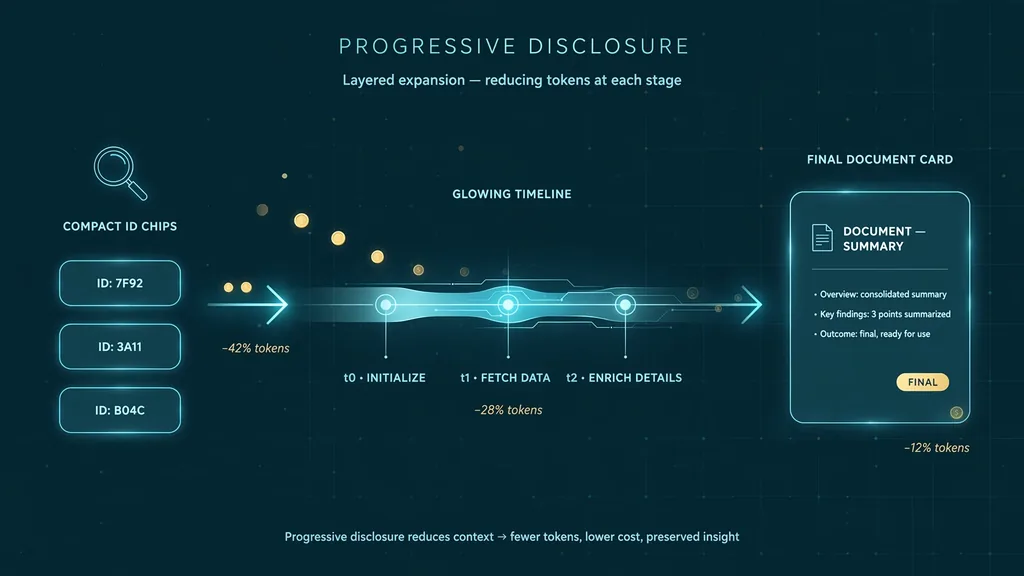
How it works, briefly: a SessionStart hook injects a summary of past sessions into the new session's context. While you work, PostToolUse captures tool observations. On SessionEnd the worker writes semantic summaries. Retrieval is hybrid — keyword plus vector search over a Chroma store — exposed through a mem-search skill and four MCP tools that follow a 3-layer pattern: search returns a compact index (~50–100 tokens per result), timeline adds chronological context, and get_observations fetches full details only for the IDs you picked. The README claims roughly 10x token savings from filtering before fetching, which matches the shape of the design.
uv are auto-installed if missing; SQLite ships bundled.Run the installer. It registers the plugin hooks and starts the worker service — the local HTTP API that stores and serves memory:
npx claude-mem installThe installer sets everything up first, then asks you to sign in in your browser with an email magic link (no card). That provisions a memory key and starts a 30-day free trial of the hosted observer — memory runs off-plan during the trial, so it doesn't burn your Anthropic usage. When the trial ends it falls back to your Anthropic plan automatically. Want no account at all? Pass an explicit --provider flag, set CLAUDE_MEM_ONLINE_OPTIN=false, or run in a non-interactive shell, and the installer finishes without any sign-in.
Two traps worth knowing: npm install -g claude-mem installs the SDK only — it does not register hooks or set up the worker. And if you prefer the plugin marketplace route, this is the documented equivalent:
/plugin marketplace add thedotmack/claude-mem

/plugin install claude-mem
Restart Claude Code after either path. Then confirm the hooks are live — /hooks inside Claude Code should list SessionStart, UserPromptSubmit, PostToolUse, Stop, and SessionEnd entries from claude-mem.
Memory with nothing in it is a party trick. Make a scratch project and do real work — the kind you'd want to recall later:
mkdir ~/cmem-demo && cd ~/cmem-demo
git init -q && echo "# demo" > README.md
In Claude Code, ask for something with decisions in it: a small CLI with a config file, a caching approach, an error-handling convention. When it proposes options, decide out loud — "go with the file-based cache, we don't need Redis yet" — because decisions are exactly what SessionEnd summaries preserve. Fix one bug deliberately and narrate the cause. The PostToolUse hook captures observations as you go; the summaries land when the session ends.
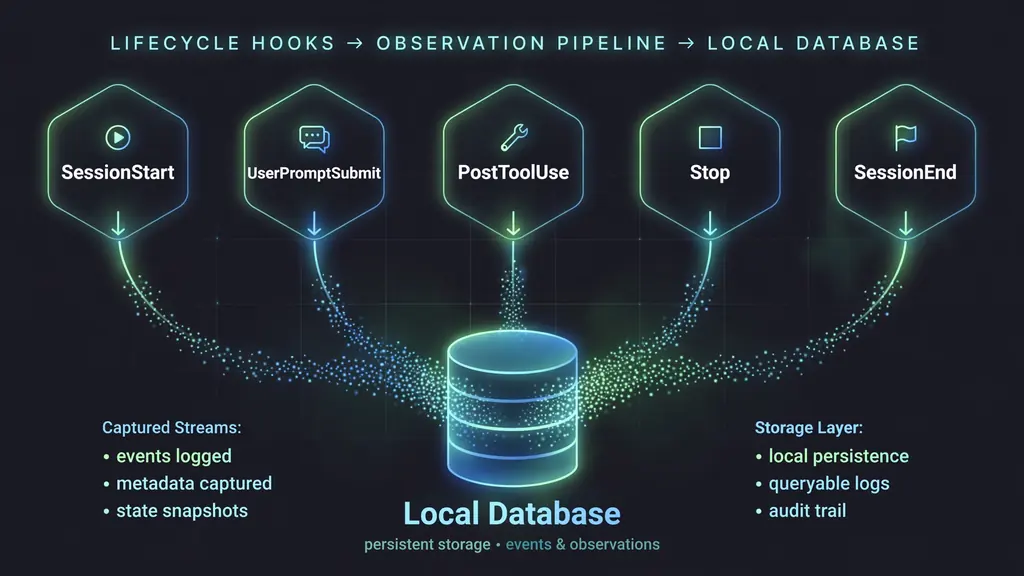
Close Claude Code completely and open a new session in the same directory. Before asking anything, watch the context: the SessionStart hook injects a compact summary of your earlier sessions. Now ask something only history could answer:
What did we decide about caching in this project, and why?If the summaries landed, the answer comes back with the reasoning, not a guess — no re-explanation needed. This is the whole product in one prompt. Try a second one with a time anchor ("what was the bug I fixed last session?") to feel where the boundary is: summaries compress, so exact code lines fade while decisions and causes survive.
SessionStart injection is automatic, but for deep recall use the search tools. Ask Claude in plain language — the mem-search skill handles the query, and under the hood the MCP tools run the 3-layer workflow the README documents:
// 1. search returns a compact index with IDs (~50-100 tokens/result)
search(query="caching decision", limit=10)

// 2. timeline adds chronological context around a hit
// 3. get_observations fetches full details only for the IDs you picked
get_observations(ids=[123, 456])
The discipline is the point: filter on the cheap index, fetch full text only for what survives. That is where the ~10x token saving comes from. You can also open the web viewer — the worker prints its URL at startup — to browse the raw memory stream and see every observation with its citation ID.
Memory that records everything will eventually record something it shouldn't. Wrap sensitive content in <private> tags in your prompts to exclude it from storage. For broader control, edit ~/.claude-mem/settings.json (auto-created with defaults on first run):
{
  "CLAUDE_MEM_MODE": "code",
  "CLAUDE_MEM_SESSION_START_INCLUDE_ALL_SOURCES": "false"
}
Modes control workflow behavior and the language of generated observations — code is the default English mode, code--zh and code--ja are built in (pattern: code--[lang]). The session-start flag decides whether a new session sees observations from every harness or only the current one; keep it false unless you want cross-tool memory. Restart Claude Code after changes.
A coding setup with continuity: lifecycle hooks that capture every session into a local SQLite database and Chroma vector store, automatic context injection at session start, a searchable memory stream in the web viewer, and a 3-layer retrieval pattern that keeps recall cheap in tokens. The working pattern generalizes beyond Claude Code too — the same installer supports OpenCode, T3 Code, Antigravity, and an OpenClaw gateway plugin, all writing to the same memory model.
<private> tags only help if you remember to use them. Assume anything you type in-session could be summarized.Still: the re-explanation tax is real, and it's paid in your most expensive resource — attention at the start of every session. A hook that quietly writes down what you decided, and a session that wakes up already briefed, is one of the few agent upgrades that compounds. Install it on a Friday, and Monday's first prompt is already shorter.