Extract structured data from receipts and PDFs with Cloudflare Clairic
Cloudflare’s Clairic turns receipts, invoices, and PDFs into typed values — merchant, total, line items — with a confidence score on every field. Here’s the full workflow, from your first API call to a batch script that processes a whole folder into a CSV.
- Two models:
@cf/cloudflare/clairic(27B) and@cf/cloudflare/clairic-flash(9B), both with a 65,536-token context window and zero data retention. Promotional pricing of $0.10 per million input tokens runs until December 1, 2026; after that Clairic is $0.24/M and flash stays at $0.10/M, with no output-token charge. - A request is a
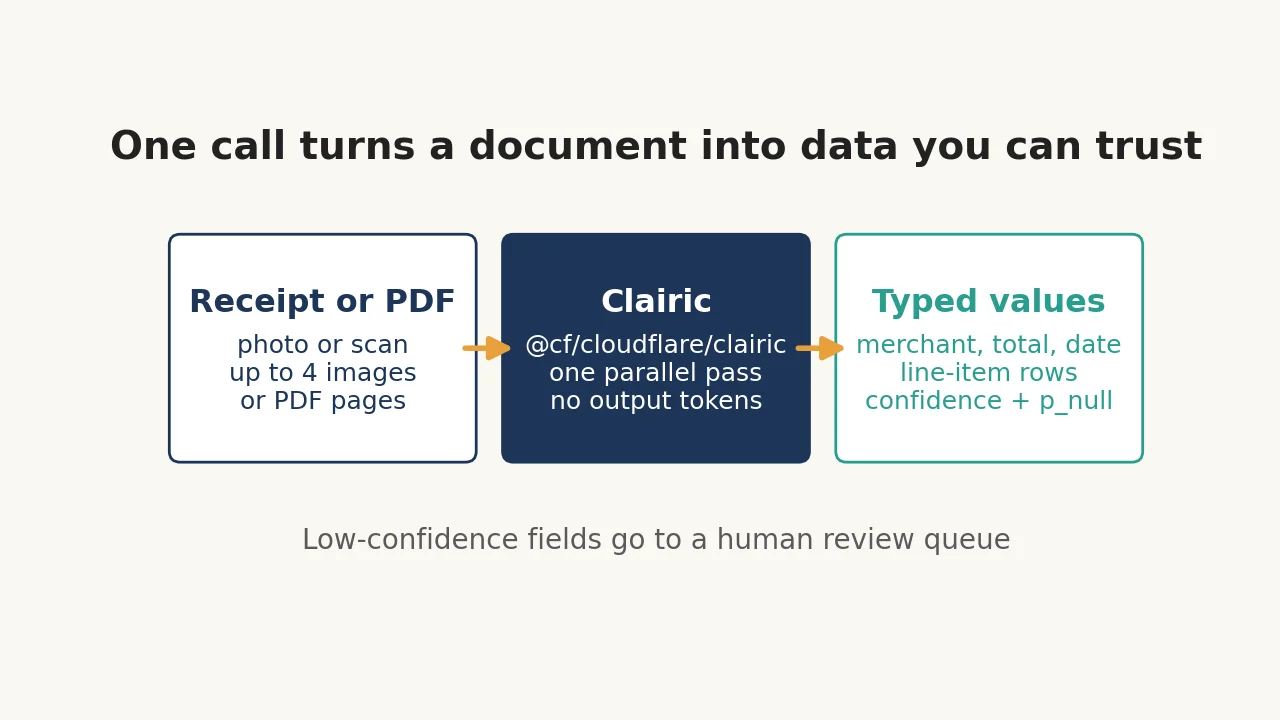
stateplus a map of typedfields— text, number, date, time, datetime, duration, list, estimate, forecast (plus boolean, enum, object, compute). Every scalar answer carriesvalue,confidence,p_null, and a character-offsetspan. - Up to four images or PDF pages per request; images go in as
data:URLs, PDFs as base64 objects indocuments. Each embedded input is limited to 4 MiB, 8 MiB combined; remote URLs are refused. - Line items come back as rows: a
listwhoseitemsis anobjectwith apropertiesmap keeps each description, quantity, and price together. - The batch script in step 6 was run offline against a stub shaped exactly like the documented API response; the live calls in this guide are verified against Cloudflare’s documentation, not a live account.
Receipts, invoices, and contracts are where most "AI extraction" projects quietly die. The usual approach — paste the document into a frontier model and ask for JSON — works until it doesn't: a digit gets misread while the model generates it, the output isn't valid JSON, a field comes back plausible but wrong, and there is no way to trace any value back to the page it came from. So teams build layers around the model: schema validation, retries, spot checks, and a human review queue for the cases they can catch.
Cloudflare's Clairic, which went open-weight on November 18, 2026, is built for exactly this job and nothing else. It is not a chat model. You hand it a state — text, up to four images, or PDF pages — plus a map of typed fields, and it returns one typed value per field: a span of the source text, a number with the decimals you asked for, a date in ISO form, a list, or an estimate with an 80% interval. Every answer carries a confidence score and a null probability, so you can decide mechanically which fields to trust and which ones need a human. It answers in a single parallel pass, typically in under a second, and it charges only for input tokens — there is no output-token bill at all.
This tutorial builds the whole workflow end to end: your first extraction call, a receipt photo with line items, a multi-page PDF, and a batch script that turns a folder of receipts into a CSV with a review queue for the fields that need a second look. Everything here is verified against Cloudflare's own documentation and model card; the code was run offline against a stub shaped exactly like the documented API response, and the one live fact you need — your own account credentials — is covered in step 1.
What you'll need#
- A free Cloudflare account. No credit card is needed for the free plan. Workers AI includes a daily free allowance of 10,000 Neurons, which covers experimentation; beyond that, Clairic costs $0.10 per million input tokens until December 1, 2026 (a promotional price — after that, Clairic is $0.24 per million and Clairic-flash stays at $0.10). Because there is no output-token charge, a typical invoice call costs a fraction of a cent: Cloudflare's own documented example uses 655 input tokens, which works out to roughly fifteen thousand such invoices per dollar at the promotional price.
- Your account ID and a Workers AI API token (step 1 shows where both live).
- Python 3.11 or later and the
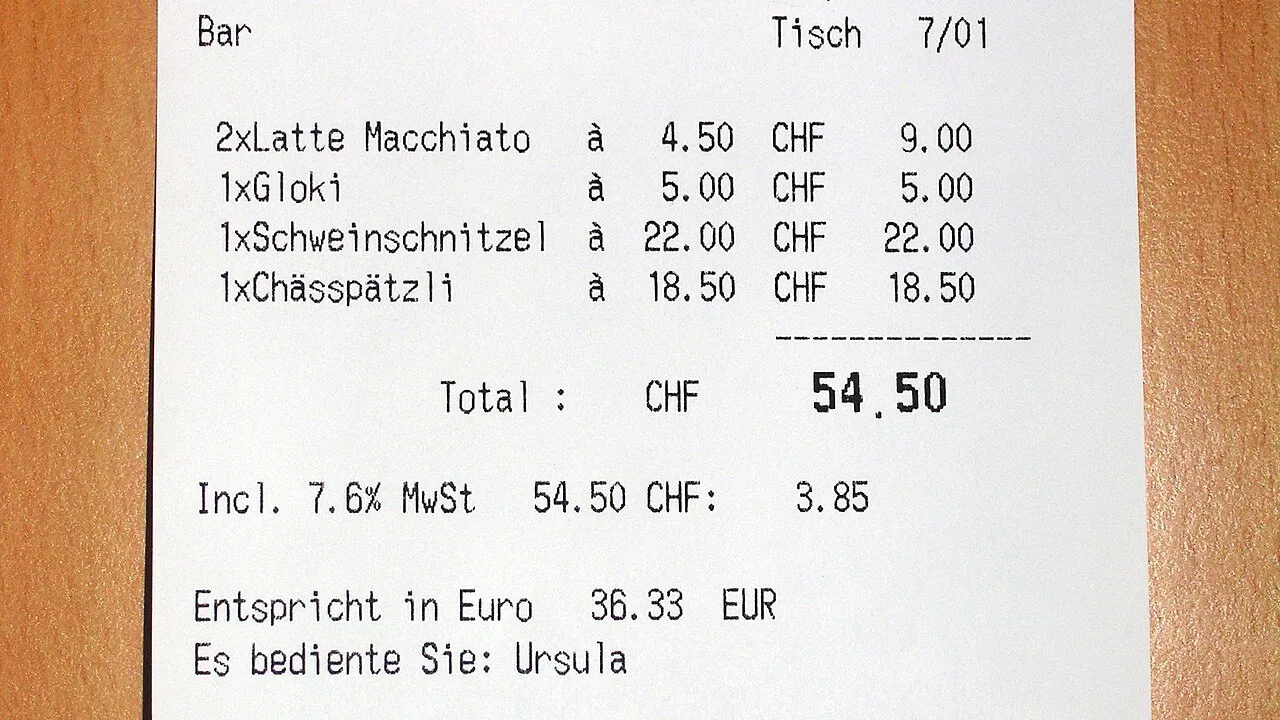
requestslibrary (pip install requests) for the batch script. The first two steps need nothing butcurl. - A receipt photo or a PDF to extract from. If you don't have one handy, the Swiss mountain-restaurant receipt in this tutorial's cover photo is a good test image: it is on Wikimedia Commons under CC BY-SA, and it is the same photo independent testers have run through Clairic — receipt number 4572, total CHF 54.50, VAT 7.6% (CHF 3.85), euro equivalent 36.33.
Two model IDs matter. Clairic (@cf/cloudflare/clairic) is the 27B flagship, built on Qwen3.8-27B; Clairic-flash (@cf/cloudflare/clairic-flash) is the 9B version. Both have a 65,536-token context window and zero data retention. On Cloudflare's own internal evals — self-reported, treat them as directional — the new Clairic got 335 of 336 fresh text fields right (the October preview got 295) and all 576 synthetic receipt fields (the preview got 369). Latency is sub-second: for fresh text fields Cloudflare measured p50/p95 of 358/736 ms for Clairic and 155/328 ms for Clairic-flash; for image fields, 453/976 ms and 305/605 ms.
1. Get your account ID and API token#
Sign in at dash.cloudflare.com, then open AI → Workers AI → Use REST API. That page shows your account ID and has a Create a Workers AI API Token button. The token is shown only once, so save it immediately. (The account ID is also the long string in the dashboard URL right after dash.cloudflare.com/.)
Export both into your shell — every example in this tutorial reads them from the environment, so the token never lands in a file or a shell history entry:
export CLOUDFLARE_ACCOUNT_ID="your-account-id"
export CLOUDFLARE_API_TOKEN="your-api-token"
If you build the token by hand instead of using the dashboard button, it needs both Workers AI - Read and Workers AI - Edit permissions. The dashboard button handles that for you.
2. Your first extraction: one curl call#
A Clairic request has three parts: a model, a state (the text to read), and a fields map (what to pull out of it). Each field names a type and, optionally, plain-language instructions that say what the value means. There is no prompt engineering here — the schema is the request.
This call reads a short invoice. The numbers are chosen so you can check the answers by hand: 12 reams at $6.40 is $76.80, plus $15.00 delivery is $91.80, and net-30 terms from November 3 land the due date on December 3.
curl https://api.cloudflare.com/client/v4/accounts/$CLOUDFLARE_ACCOUNT_ID/ai/run/@cf/cloudflare/clairic \
  -X POST \
  -H "Authorization: Bearer $CLOUDFLARE_API_TOKEN" \
  -d '{
    "model": "clairic",
    "state": "Invoice INV-88412 from Acme Paper Co., issued 2026-11-03, net 30. 12 reams at $6.40 each, delivery $15.00. Contact: Sam Okafor.",
    "fields": {
      "invoice_number": { "type": "text" },
      "due_date": { "type": "date", "instructions": "Issue date plus the net payment days" },
      "total": { "type": "number", "decimals": 2, "unit": "USD", "instructions": "Amount due including delivery" },
      "contacts": { "type": "list", "items": "text" },
      "po_number": { "type": "text", "instructions": "Purchase order number" }
    }
  }'
Swap @cf/cloudflare/clairic for @cf/cloudflare/clairic-flash (and "model": "clairic-flash" in the body) to run the 9B model instead. The response comes back under result.answers, one entry per field:
{
  "model": "clairic",
  "answers": {
    "invoice_number": {"type": "text", "p_null": 3.8e-10, "span": [8, 17],
                       "guess": "INV-88412", "confidence": 1, "value": "INV-88412"},
    "due_date": {"type": "date", "p_null": 1.9e-08, "guess": "2026-12-03",
                 "confidence": 0.9999, "value": "2026-12-03"},
    "total": {"type": "number", "p_null": 2.3e-08, "guess": 91.8,
              "confidence": 0.9999, "value": 91.8},
    "contacts": {"type": "list", "value": ["Sam Okafor"],
                 "spans": [[116, 126]], "confidence": 0.9999},
    "po_number": {"type": "text", "p_null": 1, "span": [8, 16],
                  "guess": "INV-88412", "confidence": 0.9995, "value": null}
  },
  "truncated": false,
  "usage": {"state_tokens": 61, "image_tokens": 0, "schema_tokens": 472,
            "input_tokens": 655, "output_tokens": 0, "passes": 3}
}
Three things to notice. First, total and due_date are computed, not copied: neither 91.80 nor 2026-12-03 appears anywhere in the invoice text — Clairic did the arithmetic and the date math in the same pass. Second, po_number comes back null instead of a plausible-looking guess, because the invoice has no PO number. Third, the usage block shows where the tokens go: in Cloudflare's documented example of this same shape of call, the state was 61 tokens but the schema was 472 — most of what you pay for is the field definitions, not the document. (Your own call reports its own counts; the answers and spans above are for the invoice in this tutorial.) Asking for thirty fields costs about the same as asking for three, so don't skimp on the schema.
If your app already runs on Cloudflare, the same call from inside a Worker needs no token at all — the AI binding handles auth:
export interface Env {
  AI: Ai;
}

export default {
  async fetch(request, env): Promise<Response> {
    const response = await env.AI.run("@cf/cloudflare/clairic", {
      model: "clairic",
      state: "Invoice INV-88412 from Acme Paper Co., issued 2026-11-03, net 30. 12 reams at $6.40 each, delivery $15.00. Contact: Sam Okafor.",
      fields: {
        invoice_number: { type: "text" },
        due_date: { type: "date", instructions: "Issue date plus the net payment days" },
        total: { type: "number", decimals: 2, unit: "USD", instructions: "Amount due including delivery" },
        contacts: { type: "list", items: "text" },
      },
    });
    return Response.json(response);
  },
} satisfies ExportedHandler<Env>;
3. Read the response like a skeptic#
Every scalar answer carries four things worth understanding before you trust it in production:
value— the answer, typed exactly as you declared it (a number with your decimals, a date in ISO form, ornull).confidence— the model's probability that the value is right. Treat it as a calibrated score, not a vibe: set a threshold (0.90 is a good starting point) and route everything below it to a human.p_null— the probability that the input doesn't determine the value at all. Whenp_nullis near 1, the field is genuinely absent, andvalueisnull.guessandspan— what the model would have picked, and the character offsets of the exact source text it came from. For text fields, the span lets you highlight the evidence in the original document — something an LLM's JSON output can never give you.
The po_number answer above is the case that matters most. Its guess is "INV-88412" with confidence 0.9995 — the model is very confident about that string — but p_null is 1, so value is null. Read value, never guess: the guess is what the model would say if forced, and the whole point of the null machinery is that it isn't forced.
Two more fields to check on every response: truncated (true means the input was cut to fit the 65,536-token context — split the document and retry) and usage.passes (how many parallel passes the server ran; fields that don't fit beside the state in one pass are split across passes that each see the whole input, then merged). If a field depends on the current date — "due in 30 days", "last Tuesday" — set reference_date to an ISO date, or add a line such as Today: 2026-11-21 to the state.
4. A receipt photo: line items as rows#
Text is the easy case. The interesting one is a photo: a crumpled receipt, a phone snapshot at an angle, faded print. Clairic takes up to four images per request, sent as data: URLs in an images array — raw base64 without the prefix is rejected, so include the data:image/jpeg;base64, header. Each embedded input is limited to 4 MiB, and all inputs together to 8 MiB; remote URLs are not accepted, so download the image first if it lives somewhere else.
Here is the same Swiss receipt from the cover photo, sent with a schema that asks for the header fields plus one row per line item. The line-item trick is a list whose items is an object with a properties map — Clairic returns one row per item, keeping each description, quantity, and price together:
import base64
import requests

ACCOUNT_ID = "your-account-id"
AUTH_TOKEN = "your-api-token"

with open("receipt.jpg", "rb") as f:
    data_url = "data:image/jpeg;base64," + base64.b64encode(f.read()).decode()

response = requests.post(
    f"https://api.cloudflare.com/client/v4/accounts/{ACCOUNT_ID}/ai/run/@cf/cloudflare/clairic",
    headers={"Authorization": f"Bearer {AUTH_TOKEN}"},
    json={
        "model": "clairic",
        "state": "Read the attached receipt.",
        "images": [data_url],
        "fields": {
            "merchant": {"type": "text", "instructions": "The merchant name."},
            "receipt_number": {"type": "text", "instructions": "The receipt number."},
            "purchased_at": {"type": "datetime", "instructions": "Date and time of purchase."},
            "total": {"type": "number", "decimals": 2, "instructions": "Total amount paid."},
            "tax": {"type": "number", "decimals": 2, "instructions": "VAT or sales tax amount."},
            "line_items": {
                "type": "list",
                "items": {"type": "object", "properties": {
                    "description": {"type": "text"},
                    "quantity": {"type": "number"},
                    "price": {"type": "number", "decimals": 2},
                }},
                "instructions": "One row per purchased item, in printed order.",
            },
        },
    },
    timeout=60,
)
print(response.json()["result"]["answers"])
When an independent tester ran this exact photo through Clairic, it returned the merchant (Berghotel Grosse Scheidegg), receipt number 4572, total CHF 54.50, VAT 7.6% and CHF 3.85, the euro equivalent of 36.33, both lattes as line items, and the date, time, and server's name — and correctly returned null for the tip, with p_null 0.991, because there is no tip on the bill. That was the October preview endpoint; the November model scores higher on the same kind of receipt fields in Cloudflare's own evals (576 of 576, up from 369).
Two practical notes. First, images and PDF pages share the four-item limit, so a four-page invoice costs the same budget as four photos. Second, if a photo comes out sideways, pass a rotation of 0, 90, 180, or 270 degrees clockwise (applied after EXIF orientation) rather than re-shooting it.
5. A multi-page PDF: one call#
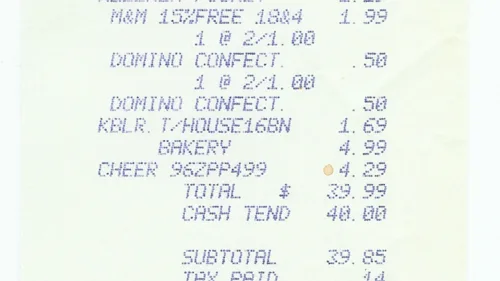
Since the November 18 update, Clairic reads PDFs too. A PDF goes in the documents array as a base64 object — the same shape as the images array, but for documents:
import base64
import requests

with open("invoice.pdf", "rb") as f:
    pdf_b64 = base64.b64encode(f.read()).decode()

response = requests.post(
    f"https://api.cloudflare.com/client/v4/accounts/{ACCOUNT_ID}/ai/run/@cf/cloudflare/clairic",
    headers={"Authorization": f"Bearer {AUTH_TOKEN}"},
    json={
        "model": "clairic",
        "state": "Read the attached invoice PDF.",
        "documents": [{"content_type": "application/pdf", "base64": pdf_b64}],
        "fields": {
            "vendor": {"type": "text", "instructions": "The invoice vendor."},
            "invoice_number": {"type": "text"},
            "issued": {"type": "date"},
            "total": {"type": "number", "decimals": 2},
            "line_items": {
                "type": "list",
                "items": {"type": "object", "properties": {
                    "description": {"type": "text"},
                    "quantity": {"type": "number"},
                    "price": {"type": "number", "decimals": 2},
                }},
                "instructions": "One row per line item, in printed order.",
            },
        },
    },
    timeout=60,
)
You can ask for the supplier, the line items, and the total in one request even when they appear on different pages — the model reads across pages. The four-item limit counts rendered PDF pages together with images, so a five-page PDF needs two calls (pages 1–4, then page 5), or a split beforehand. And the 4 MiB per-input limit applies to the PDF itself, so compress scanned PDFs before sending them; a phone scan at 150 dpi is usually plenty for printed text.
6. Batch a whole folder into a CSV#
One receipt at a time is a demo. The real workflow is a folder of receipts and a spreadsheet at the end, with a review queue for the fields that need a human. The script below does that: one Clairic call per file, values flattened into a CSV row, and anything below a confidence threshold — or returned as null — written to review.json instead of being silently trusted.
#!/usr/bin/env python3
"""Extract structured fields from a folder of receipts and PDFs with
Cloudflare Clairic (Workers AI).

Usage:
    export CLOUDFLARE_ACCOUNT_ID=...
    export CLOUDFLARE_API_TOKEN=...      # Workers AI API token
    python3 extract_receipts.py receipts/ --out results.csv

Each file gets one Clairic call. Images (.jpg/.jpeg/.png/.webp) go in the
`images` array as data URLs; PDFs go in the `documents` array as base64.
Fields below a confidence threshold (or returned as null) are flagged in
review.json instead of being silently trusted.
"""
import argparse
import base64
import csv
import json
import os
import sys
from pathlib import Path

import requests

MODEL_CLAIRIC = "@cf/cloudflare/clairic"
MODEL_FLASH = "@cf/cloudflare/clairic-flash"
MAX_BYTES = 4 * 1024 * 1024  # Clairic's per-input limit: 4 MiB

IMAGE_EXTS = {".jpg", ".jpeg", ".png", ".webp"}
PDF_EXTS = {".pdf"}

# The receipt schema: one typed field per fact. Clairic returns one typed
# value per field, plus a confidence score and a null probability.
RECEIPT_FIELDS = {
    "merchant": {"type": "text",
                 "instructions": "The merchant or business name."},
    "receipt_number": {"type": "text",
                       "instructions": "The receipt or invoice number."},
    "purchased_at": {"type": "datetime",
                     "instructions": "Date and time of the purchase."},
    "total": {"type": "number", "decimals": 2,
              "instructions": "Total amount paid, including tax."},
    "tax": {"type": "number", "decimals": 2,
            "instructions": "Sales tax or VAT amount."},
    "payment_method": {"type": "text",
                       "instructions": "How the purchase was paid."},
    "line_items": {
        "type": "list",
        "items": {"type": "object", "properties": {
            "description": {"type": "text"},
            "quantity": {"type": "number"},
            "price": {"type": "number", "decimals": 2},
        }},
        "instructions": "One row per purchased item, in printed order.",
    },
}


def build_payload(path: Path, fields: dict, reference_date: str | None) -> dict:
    """One Clairic request body for a single file."""
    raw = path.read_bytes()
    if len(raw) > MAX_BYTES:
        raise ValueError(f"{path.name} is {len(raw)} bytes, over Clairic's "
                         f"4 MiB per-input limit")
    payload: dict = {
        "model": "clairic",
        "state": f"Read the attached receipt ({path.name}).",
        "fields": fields,
    }
    if reference_date:
        payload["reference_date"] = reference_date
    suffix = path.suffix.lower()
    if suffix in IMAGE_EXTS:
        mime = {"jpg": "image/jpeg", "jpeg": "image/jpeg",
                "png": "image/png", "webp": "image/webp"}[suffix.lstrip(".")]
        data_url = f"data:{mime};base64," + base64.b64encode(raw).decode()
        payload["images"] = [data_url]
    elif suffix in PDF_EXTS:
        payload["documents"] = [{"content_type": "application/pdf",
                                 "base64": base64.b64encode(raw).decode()}]
    else:
        raise ValueError(f"unsupported file type: {path.suffix}")
    return payload


def extract(path: Path, account_id: str, token: str, model: str,
            fields: dict, reference_date: str | None) -> dict:
    url = (f"https://api.cloudflare.com/client/v4/accounts/{account_id}"
           f"/ai/run/{model}")
    resp = requests.post(
        url,
        headers={"Authorization": f"Bearer {token}"},
        json=build_payload(path, fields, reference_date),
        timeout=60,
    )
    resp.raise_for_status()
    body = resp.json()
    if not body.get("success", True):
        raise RuntimeError(f"Workers AI error: {body.get('errors')}")
    return body["result"]


def flatten(answers: dict, min_confidence: float) -> tuple[dict, list[str]]:
    """Pull plain values out of Clairic's answers; list fields that need
    a human look (low confidence, or null where a value was expected)."""
    row, needs_review = {}, []
    for name, ans in answers.items():
        value = ans.get("value")
        row[name] = json.dumps(value) if isinstance(value, (list, dict)) else value
        confidence = ans.get("confidence")
        if value is None:
            needs_review.append(f"{name}: null (p_null={ans.get('p_null')})")
        elif confidence is not None and confidence < min_confidence:
            needs_review.append(f"{name}: confidence {confidence:.2f} "
                                f"< {min_confidence}")
    return row, needs_review


def main() -> int:
    ap = argparse.ArgumentParser(description=__doc__)
    ap.add_argument("folder", type=Path,
                    help="folder of receipt images / PDFs")
    ap.add_argument("--out", default="results.csv",
                    help="CSV of extracted values (default: results.csv)")
    ap.add_argument("--review", default="review.json",
                    help="JSON of fields to check by hand")
    ap.add_argument("--model", default=MODEL_CLAIRIC,
                    choices=[MODEL_CLAIRIC, MODEL_FLASH],
                    help="Clairic (27B) or Clairic-flash (9B)")
    ap.add_argument("--fields", type=Path,
                    help="JSON file with a custom field schema")
    ap.add_argument("--min-confidence", type=float, default=0.90,
                    help="flag fields below this confidence (default 0.90)")
    ap.add_argument("--reference-date", default=None,
                    help="ISO date anchoring relative dates, e.g. 2026-11-21")
    args = ap.parse_args()

    account_id = os.environ.get("CLOUDFLARE_ACCOUNT_ID")
    token = os.environ.get("CLOUDFLARE_API_TOKEN")
    if not account_id or not token:
        print("Set CLOUDFLARE_ACCOUNT_ID and CLOUDFLARE_API_TOKEN first.",
              file=sys.stderr)
        return 2
    fields = (json.loads(args.fields.read_text()) if args.fields
              else RECEIPT_FIELDS)
    files = sorted(p for p in args.folder.iterdir()
                   if p.suffix.lower() in IMAGE_EXTS | PDF_EXTS)
    if not files:
        print(f"No receipt images or PDFs in {args.folder}", file=sys.stderr)
        return 1

    review: dict[str, list[str]] = {}
    rows, total_tokens = [], 0
    for path in files:
        try:
            result = extract(path, account_id, token, args.model,
                             fields, args.reference_date)
        except Exception as exc:  # noqa: BLE001 - keep the batch going
            print(f"{path.name}: FAILED ({exc})", file=sys.stderr)
            review[path.name] = [f"request failed: {exc}"]
            continue
        if result.get("truncated"):
            print(f"{path.name}: WARNING - input truncated", file=sys.stderr)
        row, flags = flatten(result["answers"], args.min_confidence)
        row["file"] = path.name
        rows.append(row)
        total_tokens += result.get("usage", {}).get("input_tokens", 0)
        if flags:
            review[path.name] = flags
        print(f"{path.name}: total={row.get('total')} "
              f"merchant={row.get('merchant')} "
              f"({'REVIEW' if flags else 'ok'})")

    fieldnames = ["file"] + list(fields)
    with open(args.out, "w", newline="") as f:
        w = csv.DictWriter(f, fieldnames=fieldnames)
        w.writeheader()
        w.writerows(rows)
    Path(args.review).write_text(json.dumps(review, indent=2))
    print(f"\n{len(rows)} files -> {args.out} "
          f"({total_tokens} input tokens, "
          f"${total_tokens * 0.10 / 1_000_000:.4f} at promo pricing)")
    print(f"{len(review)} file(s) need review -> {args.review}")
    return 0


if __name__ == "__main__":
    raise SystemExit(main())
Run it against a folder of receipt photos and PDFs:
export CLOUDFLARE_ACCOUNT_ID="your-account-id"
export CLOUDFLARE_API_TOKEN="your-api-token"
python3 extract_receipts.py receipts/ --out results.csv
python3 extract_receipts.py receipts/ --out results.csv --model @cf/cloudflare/clairic-flash --min-confidence 0.95
The second invocation shows the two knobs you will actually turn. --model switches to Clairic-flash, the 9B model: roughly twice as fast and, after the promotional period ends on December 1, less than half the price. --min-confidence raises the bar for what counts as trustworthy — 0.95 is the right setting once you have measured your own error rate on a sample you checked by hand.
Three design choices in the script are worth copying into your own pipeline. First, the 4 MiB check happens before the request, so an oversized scan fails fast with a clear message instead of a cryptic API error. Second, a failed file never kills the batch — it lands in the review queue with the error attached, and the run continues. Third, the script prints its token usage and cost at the end, so the price of a 500-receipt month is a number you have seen, not a surprise on the invoice.
7. Estimates and forecasts: when the answer isn't printed#
Extraction is the headline, but Clairic also answers questions the document doesn't state outright. An estimate field declares a range (min, max, step) and returns a distribution — a median with an 80% interval from p10 to p90. A forecast field adds a horizon and an interval and returns one estimate per future step. Both need bounds; that is what makes the answer a value instead of a guess.
response = requests.post(
    f"https://api.cloudflare.com/client/v4/accounts/{ACCOUNT_ID}/ai/run/@cf/cloudflare/clairic",
    headers={"Authorization": f"Bearer {AUTH_TOKEN}"},
    json={
        "model": "clairic",
        "state": "Daily demand for the last seven days: 120, 135, 128, 142, 150, 138, 145.",
        "fields": {
            "next_day": {"type": "estimate", "min": 0, "max": 300},
            "next_three_days": {
                "type": "forecast", "min": 0, "max": 300,
                "horizon": 3, "interval": "day",
            },
        },
        "options": {"include_quantiles": True},
    },
    timeout=60,
)
Use estimates for the questions that have no printed answer — how many days until this invoice is paid, what the repair will cost, how much traffic tomorrow brings — and read the interval, not just the median. A median of 30 days with a p10–p90 of 21–38 is a planning input; a median on its own is a false sense of precision. Forecasts are basic — one estimate per step, up to 64 steps — so treat them as a cheap baseline, not a forecasting system.
Which approach should you use?#
Four ways to get structured data out of a document, and the one-line rule for each:
| Approach | Use it when | Watch out for |
|---|---|---|
| Clairic (27B) | Accuracy matters most; receipts, invoices, contracts; you want spans and confidence scores | $0.24/M input tokens after Dec 1, 2026; ~2× the latency of flash |
| Clairic-flash (9B) | High volume or latency-sensitive work; most fields are easy to read | Slightly lower accuracy on hard fields; check your own error rate first |
| Frontier LLM in JSON mode | The document needs reasoning, not just reading — ambiguous terms, cross-references, judgment calls | Output tokens on every field; no spans; no calibrated confidence; digits can be misgenerated |
| OCR + regex/rules | One fixed form, thousands of identical copies, zero tolerance for model variance | Breaks on every layout change; no dates, no arithmetic, no estimates |
The honest default for most teams is a cascade, and it is the pattern Cloudflare itself suggests: Clairic pulls the typed values out, a decision model rules on them, and an LLM writes the reply only if words are needed. Run the easy 95% of documents through Clairic-flash, route the low-confidence fields to a human, and reserve the frontier model for the documents where the answer genuinely requires judgment. Measure the error rate on a hand-checked sample before you commit to any of the four — the confidence threshold that fits your documents is a number you find, not one you assume.
One more option, for teams that can't send documents to a hosted API at all: both models are open-weight on Hugging Face (Cloudflare/clairic and Cloudflare/clairic-flash, Apache-2.0) with a Python helper that runs the same request shape locally on a CUDA GPU. The API and the local path take the same state / fields input, so a schema you develop against Workers AI ports directly to a self-hosted deployment.
The takeaway#
Document extraction stops being a prompting problem the moment the model answers with typed values instead of text. Clairic's deal is simple: you declare the schema, it returns one typed value per field with a confidence score and a null probability, and it charges only for input tokens. The workflow that makes that useful in practice is not the API call — it is the review queue: a confidence threshold, a null check, and a human for the fields that fall below the bar. Build the schema once, batch the folder, read the review queue every morning, and the receipts take care of themselves.
Sources: the Cloudflare announcement (open-weight Clairic and Clairic-flash, November 18, 2026; pricing, latency, and eval tables), the Clairic model page and Clairic-flash model page (API schemas, REST and Worker examples, $0.10/M promotional pricing until December 1, 2026), the Clairic model card on Hugging Face (open weights, local run, image/PDF input format, field types), the preview announcement (typed-field semantics, estimate/forecast behavior), and an independent test of the preview endpoint on the Swiss receipt photo used in this tutorial. The batch script was run offline against a stub shaped exactly like the documented API response; the live API calls in this guide are verified against Cloudflare's documentation, not against a live account.