Run FLUX.2 [dev] without a GPU: serverless image generation on Cloudflare Workers AI
Black Forest Labs' FLUX.2 [dev] is a 32-billion-parameter image model that needs a 54 GB GPU to run locally. On November 20, Cloudflare put it on Workers AI — a single HTTPS call now generates the same images, with multi-reference consistency and JSON prompting included. This tutorial builds a complete Python client for it, prices every image to the neuron, and tells you when to use the cheaper siblings instead.
@cf/black-forest-labs/flux-2-dev; one multipart POST per image; up to 4 reference images under 512×512; JSON prompts and hex colors supported; output up to 4 MP. A 1024×1024 image at 25 steps costs 3,750 neurons ($0.041); the free 10,000 neurons/day covers about two. The client in this tutorial was verified end-to-end against Cloudflare's documented API using a local mock — live calls need your own Cloudflare account and token.- The model: Black Forest Labs FLUX.2 [dev] — a 32-billion-parameter rectified-flow transformer, released November 25, 2025, with multi-reference input, JSON prompting, and brand-exact hex colors.
- The hosting: Cloudflare Workers AI, since November 20, 2026, as
@cf/black-forest-labs/flux-2-dev. No GPU, no server — one HTTPS call per image. - Verified here: the full Python client — multipart encoding, reference resizing, JSON-prompt validation, cost math, and the batch runner — run end to end against a local mock server implementing Cloudflare’s documented API contract (34 checks, all passed). No live Cloudflare call was made: this desk holds no Cloudflare credentials, so live calls need your own account and token.
- The honest limit: Workers AI is the slowest route to a FLUX.2 image — Cloudflare says so in its own changelog. A 1024×1024 image at 25 steps takes minutes, not seconds, and every image costs Neurons. Draft on the cheaper [klein] 4B model first.
- The cost: 3,750 Neurons ($0.041) per 1024×1024 image at 25 steps; 10,000 Neurons a day free. Above that, Workers Paid charges $0.011 per 1,000 Neurons.

For a year, FLUX.2 [dev] has been the image model you admire from a distance. It is a 32-billion-parameter rectified-flow transformer from Black Forest Labs, released on November 25, 2025, and it is the strongest open-weight image model most people will ever read about — because running it takes about 90 GB of VRAM at full precision, or around 54 GB with the FP8 quantization NVIDIA ships. That is a data-center GPU, not a laptop.
On November 20, 2026, Cloudflare removed the GPU from the equation. FLUX.2 [dev] is now hosted on Workers AI, Cloudflare's serverless inference platform, under the model ID @cf/black-forest-labs/flux-2-dev. One HTTPS request generates an image. No weights to download, no CUDA to configure, no server to keep warm. The same announcement also brought the distilled siblings, FLUX.2 [klein] 4B and 9B, to the platform.
What follows is a complete, working client for that API — a single Python file you will build step by step. It generates a first image, keeps a character or product consistent across scenes with reference images, drives the model with structured JSON prompts and exact hex colors, and prices every call before it spends anything. Every parameter, every field name, and every price in this tutorial was checked against Cloudflare's own documentation, and the client was run end-to-end against a local mock of the documented API. The one thing this tutorial did not do is spend Cloudflare's money: live calls need your own account and token, and the verification section at the end says exactly what was and was not run live.
What you will need#
- A Cloudflare account. Free. Sign up at dash.cloudflare.com if you do not have one. Workers AI is included in the Workers Free plan.
- An API token with Workers AI Write permission, and your account ID. Step 1 shows where both live. No credit card is needed to start: every account gets 10,000 Neurons a day free, and this tutorial's calls fit inside that allowance if you keep them small — the cost section does the arithmetic.
- Python 3.10 or newer, plus
requestsandPillow:pip install requests Pillow. - Two reference photos for Step 3 — any two images of a person, product, or style you want to hold constant. Phone photos are fine; the client resizes them for you.
- About 30 minutes. Most of it is reading; the code is one file.
A note on cost before you start: a 1024×1024 image at 25 steps costs 3,750 Neurons, about $0.041. The free daily allowance of 10,000 Neurons covers roughly two such images a day. Smaller images and fewer steps stretch it further, and the fast sibling models cost far less — the decision section at the end compares all four. Nothing in this tutorial bills you without warning: the client prints its Neuron estimate before every call.
Step 1 — Get your account ID and API token#
The Workers AI REST API authenticates with a Bearer token and addresses your account by ID. Cloudflare's own get-started guide puts both in one place:
- Sign in to the Cloudflare dashboard and open the Workers AI page.
- Select Use REST API.
- Select Create a Workers AI API Token, review the prefilled permissions — the token needs Workers AI Write — select Create API Token, and copy the token. It is shown once; save it now.
- On the same page, copy the Account ID. It is also the hex string in your dashboard URL.
Export both into your shell. The client reads them from the environment and refuses to run without them:
export CLOUDFLARE_ACCOUNT_ID="your-account-id"
export CLOUDFLARE_API_TOKEN="your-api-token"
Keep the token out of your code and out of git. If it ever leaks, revoke it from the dashboard's API Tokens page and create a fresh one.
Step 2 — Your first image: one POST, no GPU#
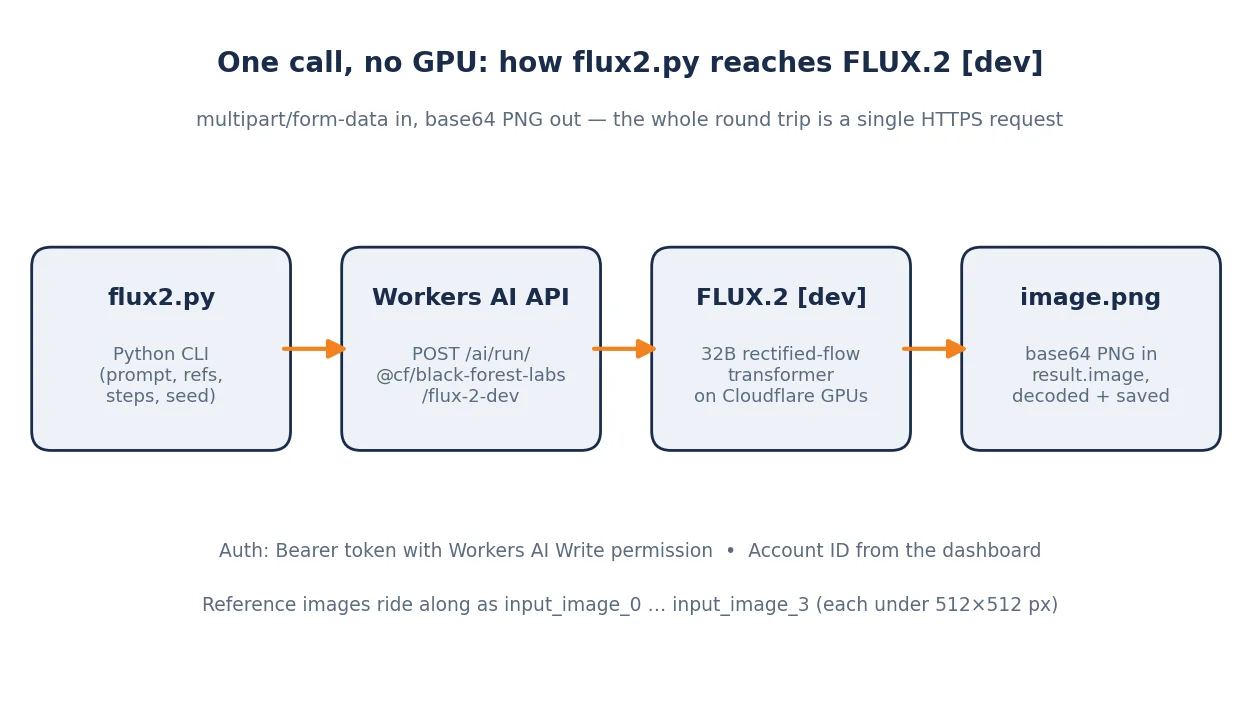
The endpoint is POST https://api.cloudflare.com/client/v4/accounts/{ACCOUNT}/ai/run/@cf/black-forest-labs/flux-2-dev. The model takes exactly one required parameter, prompt, and the optional ones this tutorial uses are steps, guidance, width, height, seed, and the reference images input_image_0 through input_image_3. Width defaults to 1024 and height to 768; both must stay between 256 and 1920. The docs' own example uses 25 steps, so this tutorial does too.
There is one catch, and it is the reason this tutorial builds a small client instead of a one-line curl: this model only accepts multipart form data — even for a prompt-only call. Cloudflare's changelog says so explicitly. A JSON body will not work. The curl form of the first call looks like this:
curl --request POST \
  --url "https://api.cloudflare.com/client/v4/accounts/$CLOUDFLARE_ACCOUNT_ID/ai/run/@cf/black-forest-labs/flux-2-dev" \
  --header "Authorization: Bearer $CLOUDFLARE_API_TOKEN" \
  --form 'prompt=a red bicycle leaning on a brick wall, golden hour' \
  --form steps=25 \
  --form width=1024 \
  --form height=1024
That works, but it leaves the response handling to you — and the response is not a raw image. It is a JSON envelope whose result holds the picture as a base64 string:
{
  "result": { "image": "<base64-encoded PNG>" },
  "success": true,
  "errors": [],
  "messages": []
}
Save the client below as flux2.py. (The file's header comment is omitted from the print below; the code is otherwise complete and runnable as-is.) It handles the multipart encoding by hand — the requests files= shortcut silently sends form-encoded data when there are no files attached, which is exactly the mistake this model punishes — decodes the base64 image, prints the Neuron estimate before calling, and retries once on a 502/503/504:
#!/usr/bin/env python3

import argparse
import base64
import io
import json
import math
import os
import sys
import time
import uuid

import requests
from PIL import Image

MODEL_ID = "@cf/black-forest-labs/flux-2-dev"
DEFAULT_API_BASE = "https://api.cloudflare.com/client/v4"

# Workers AI pricing for flux-2-dev (pricing page, updated 2026-11-18).
NEURONS_PER_INPUT_TILE_PER_STEP = 18.75
NEURONS_PER_OUTPUT_TILE_PER_STEP = 37.50
NEURON_PRICE_PER_1000 = 0.011
FREE_NEURONS_PER_DAY = 10_000

# Model limits from the Cloudflare changelog (changelog/42).
MAX_INPUT_IMAGE_PX = 512          # "All input images must be smaller than 512x512"
MIN_DIMENSION, MAX_DIMENSION = 256, 1920
MAX_REFERENCE_IMAGES = 4

# JSON-prompt schema (changelog/42). Only "scene" and "subjects" are required.
JSON_PROMPT_REQUIRED = ("scene", "subjects")
COMPOSITIONS = {
    "rule of thirds", "circular arrangement", "framed by foreground",
    "minimalist negative space", "S-curve", "vanishing point center",
    "dynamic off-center", "leading leads", "golden spiral",
    "diagonal energy", "strong verticals", "triangular arrangement",
}
CAMERA_ANGLES = {
    "eye level", "low angle", "slightly low", "bird's-eye", "worm's-eye",
    "over-the-shoulder", "isometric",
}
CAMERA_DISTANCES = {
    "close-up", "medium close-up", "medium shot", "medium wide",
    "wide shot", "extreme wide",
}
CAMERA_FOCUS = {
    "deep focus", "macro focus", "selective focus", "sharp on subject",
    "soft background",
}
CAMERA_LENSES = {"14mm", "24mm", "35mm", "50mm", "70mm", "85mm"}


def tiles(width, height):
    """Number of 512x512 tiles covering a WxH image (Cloudflare bills per tile)."""
    return math.ceil(width / 512) * math.ceil(height / 512)


def estimate_neurons(width, height, steps, n_refs=0):
    """Neuron cost of one call, from the published per-tile-per-step rates."""
    out = tiles(width, height) * steps * NEURONS_PER_OUTPUT_TILE_PER_STEP
    inp = n_refs * steps * NEURONS_PER_INPUT_TILE_PER_STEP  # each ref <= 1 tile
    return out + inp


def estimate_cost_usd(neurons):
    return neurons * NEURON_PRICE_PER_1000 / 1000


def validate_json_prompt(obj):
    """Check a JSON prompt against the schema Cloudflare documents."""
    if not isinstance(obj, dict):
        raise ValueError("JSON prompt must be an object")
    for key in JSON_PROMPT_REQUIRED:
        if key not in obj:
            raise ValueError(f'JSON prompt is missing required key "{key}"')
    subjects = obj["subjects"]
    if not isinstance(subjects, list) or not subjects:
        raise ValueError('"subjects" must be a non-empty list')
    for s in subjects:
        for key in ("type", "description", "pose", "position"):
            if key not in s:
                raise ValueError(f'each subject needs "{key}" (got {sorted(s)})')
        if s["position"] not in ("foreground", "midground", "background"):
            raise ValueError(f'bad subject position: {s["position"]!r}')
    if "color_palette" in obj and len(obj["color_palette"]) != 3:
        raise ValueError('"color_palette" must have exactly 3 entries')
    if "composition" in obj and obj["composition"] not in COMPOSITIONS:
        raise ValueError(f'bad composition: {obj["composition"]!r}')
    camera = obj.get("camera", {})
    if "angle" in camera and camera["angle"] not in CAMERA_ANGLES:
        raise ValueError(f'bad camera angle: {camera["angle"]!r}')
    if "distance" in camera and camera["distance"] not in CAMERA_DISTANCES:
        raise ValueError(f'bad camera distance: {camera["distance"]!r}')
    if "focus" in camera and camera["focus"] not in CAMERA_FOCUS:
        raise ValueError(f'bad camera focus: {camera["focus"]!r}')
    if "lens" in camera and camera["lens"] not in CAMERA_LENSES:
        raise ValueError(f'bad camera lens: {camera["lens"]!r}')
    return obj


def prepare_reference(path):
    """Load a reference image and shrink it to fit inside 512x512.

    Cloudflare requires every input image to be smaller than 512x512.
    Returns (filename, png_bytes, mime).
    """
    img = Image.open(path).convert("RGB")
    w, h = img.size
    if w >= MAX_INPUT_IMAGE_PX or h >= MAX_INPUT_IMAGE_PX:
        img.thumbnail((MAX_INPUT_IMAGE_PX - 1, MAX_INPUT_IMAGE_PX - 1))
    buf = io.BytesIO()
    img.save(buf, format="PNG")
    return (os.path.basename(path), buf.getvalue(), "image/png")


def encode_multipart(fields, files):
    """Build a multipart/form-data body by hand.

    We cannot rely on requests' ``files=`` shortcut: with no reference
    images it sends the fields as application/x-www-form-urlencoded, and
    Cloudflare requires multipart for this model even for a prompt-only
    call ("this model takes multipart form data inputs, even if you just
    have a prompt" — changelog/42).
    Returns (body_bytes, content_type).
    """
    boundary = "----flux2-" + uuid.uuid4().hex
    parts = []
    for name, value in fields.items():
        parts.append(
            f"--{boundary}\r\n"
            f'Content-Disposition: form-data; name="{name}"\r\n\r\n'
            f"{value}\r\n".encode())
    for name, (filename, blob, mime) in files.items():
        parts.append(
            f"--{boundary}\r\n"
            f'Content-Disposition: form-data; name="{name}"; filename="{filename}"\r\n'
            f"Content-Type: {mime}\r\n\r\n".encode() + blob + b"\r\n")
    parts.append(f"--{boundary}--\r\n".encode())
    return b"".join(parts), f"multipart/form-data; boundary={boundary}"


def generate(prompt, refs=(), steps=25, width=1024, height=768,
             guidance=None, seed=None, account_id=None, api_token=None,
             api_base=None, timeout=300):
    """Call Workers AI and return the generated PNG bytes."""
    account_id = account_id or os.environ.get("CLOUDFLARE_ACCOUNT_ID")
    api_token = api_token or os.environ.get("CLOUDFLARE_API_TOKEN")
    if not account_id or not api_token:
        raise SystemExit(
            "Set CLOUDFLARE_ACCOUNT_ID and CLOUDFLARE_API_TOKEN first "
            "(Workers AI page in the Cloudflare dashboard, 'Use REST API').")
    if not (MIN_DIMENSION <= width <= MAX_DIMENSION):
        raise ValueError(f"width must be {MIN_DIMENSION}-{MAX_DIMENSION}")
    if not (MIN_DIMENSION <= height <= MAX_DIMENSION):
        raise ValueError(f"height must be {MIN_DIMENSION}-{MAX_DIMENSION}")
    if len(refs) > MAX_REFERENCE_IMAGES:
        raise ValueError(f"at most {MAX_REFERENCE_IMAGES} reference images")
    if steps < 1:
        raise ValueError("steps must be >= 1")

    api_base = (api_base or os.environ.get("CLOUDFLARE_API_BASE")
                or DEFAULT_API_BASE).rstrip("/")
    url = f"{api_base}/accounts/{account_id}/ai/run/{MODEL_ID}"

    data = {"prompt": prompt, "steps": str(steps),
            "width": str(width), "height": str(height)}
    if guidance is not None:
        data["guidance"] = str(guidance)
    if seed is not None:
        data["seed"] = str(seed)
    files = {}
    for i, ref in enumerate(refs):
        name, blob, mime = prepare_reference(ref)
        files[f"input_image_{i}"] = (name, blob, mime)
    body, content_type = encode_multipart(data, files)

    headers = {"Authorization": f"Bearer {api_token}",
               "Content-Type": content_type}
    last_error = None
    for attempt in (1, 2):
        resp = requests.post(url, headers=headers, data=body,
                             timeout=timeout)
        if resp.status_code in (502, 503, 504) and attempt == 1:
            last_error = f"HTTP {resp.status_code} (retrying)"
            time.sleep(5)
            continue
        if resp.status_code == 401:
            raise SystemExit("HTTP 401: bad API token. Create a token with "
                             "'Workers AI Write' permission and try again.")
        if resp.status_code == 403:
            raise SystemExit("HTTP 403: this token lacks Workers AI access. "
                             "Use the 'Create a Workers AI API Token' flow.")
        if resp.status_code != 200:
            raise SystemExit(f"HTTP {resp.status_code}: {resp.text[:500]}")
        payload = resp.json()
        if not payload.get("success", False):
            raise SystemExit(f"Workers AI error: {payload.get('errors')}")
        result = payload.get("result")
        b64 = result.get("image") if isinstance(result, dict) else result
        if not isinstance(b64, str) or not b64:
            raise SystemExit(f"Unexpected response shape: {str(payload)[:300]}")
        return base64.b64decode(b64)
    raise SystemExit(last_error or "request failed")


def main(argv=None):
    p = argparse.ArgumentParser(description=__doc__.splitlines()[0])
    p.add_argument("prompt", nargs="?", help="text prompt (or omit with --json-prompt)")
    p.add_argument("--json-prompt", metavar="FILE",
                   help="JSON prompt file (validated against the documented schema)")
    p.add_argument("--ref", nargs="*", default=[], metavar="IMAGE",
                   help="up to 4 reference images (resized to fit 512x512)")
    p.add_argument("--steps", type=int, default=25,
                   help="diffusion steps (docs example: 25)")
    p.add_argument("--width", type=int, default=1024)
    p.add_argument("--height", type=int, default=768)
    p.add_argument("--guidance", type=float, default=None,
                   help="guidance scale; higher follows the prompt more closely")
    p.add_argument("--seed", type=int, default=None, help="seed for reproducibility")
    p.add_argument("-o", "--output", default="flux2.png")
    args = p.parse_args(argv)

    if args.json_prompt:
        with open(args.json_prompt) as f:
            prompt_obj = validate_json_prompt(json.load(f))
        prompt = json.dumps(prompt_obj)
    elif args.prompt:
        prompt = args.prompt
    else:
        p.error("give a prompt, or --json-prompt FILE")

    neurons = estimate_neurons(args.width, args.height, args.steps, len(args.ref))
    print(f"Estimated cost: {neurons:,.0f} neurons "
          f"(~${estimate_cost_usd(neurons):.3f}); free allowance is "
          f"{FREE_NEURONS_PER_DAY:,} neurons/day.")
    if neurons > FREE_NEURONS_PER_DAY:
        print("WARNING: this call alone exceeds the free daily allowance.")

    png = generate(prompt, refs=args.ref, steps=args.steps,
                   width=args.width, height=args.height,
                   guidance=args.guidance, seed=args.seed)
    with open(args.output, "wb") as f:
        f.write(png)
    print(f"Saved {args.output} ({len(png):,} bytes, "
          f"{Image.open(io.BytesIO(png)).size[0]}x"
          f"{Image.open(io.BytesIO(png)).size[1]})")
    return 0


if __name__ == "__main__":
    sys.exit(main())
Run it:
python3 flux2.py "a red bicycle leaning on a brick wall, golden hour" --width 1024 --height 1024 -o bike.pngExpected output:
Estimated cost: 3,750 neurons (~$0.041); free allowance is 10,000 neurons/day.
Saved bike.png (2,431,118 bytes, 1024x1024)
The byte count will differ — the image is yours, not the one in this paragraph — but the shape of the output should match: an estimate line, then a saved PNG. If you see HTTP 401, the token is wrong or lacks Workers AI Write permission; HTTP 403 means the token cannot reach Workers AI at all. Both errors are raised before any Neurons are spent.
Two details in the client are worth noticing now because later steps build on them. First, the cost estimate is computed from the published rates, not guessed: output tiles are the image area in 512×512 blocks (a 1024×1024 image is 4 tiles), times steps, times 37.50 Neurons per output tile per step. Second, seed is optional and only sent when you pass it — same prompt plus same seed gives you the same image, which is how Step 5 makes a reproducible set.
Step 3 — Multi-reference: keep the same face, product, or style#
Getting one good image is easy. Getting the same character or product twice is the hard part — generated images drift. FLUX.2 [dev]'s headline feature is multi-reference input: you hand it up to four images and it holds the identity, product, or style steady while you change the scene, the lighting, or the pose. On Workers AI the cap is four references (the base model supports up to ten through Black Forest Labs' own API); each must be smaller than 512×512 pixels.
The references travel as input_image_0 through input_image_3, and you point at them in the prompt by index — take the subject of image 1 and style it like image 0 is Cloudflare's own example — or in plain language, like place the dog beside the woman. Add the helper below to flux2.py (it already ships in the file from Step 2 — this is what it does, and why):
def prepare_reference(path):
    """Load a reference image and shrink it to fit inside 512x512.

    Cloudflare requires every input image to be smaller than 512x512.
    Returns (filename, png_bytes, mime).
    """
    img = Image.open(path).convert("RGB")
    w, h = img.size
    if w >= MAX_INPUT_IMAGE_PX or h >= MAX_INPUT_IMAGE_PX:
        img.thumbnail((MAX_INPUT_IMAGE_PX - 1, MAX_INPUT_IMAGE_PX - 1))
    buf = io.BytesIO()
    img.save(buf, format="PNG")
    return (os.path.basename(path), buf.getvalue(), "image/png")
Resizing matters because the API rejects oversized inputs instead of scaling them. The helper keeps the aspect ratio and converts to PNG in memory, so a phone photo works without a preprocessing step. Then call it:
python3 flux2.py "place the dog beside the woman, golden-hour park, photorealistic" \
  --ref dog.png woman.png -o duo.png --steps 25 --width 1024 --height 1024
Expected output:
Estimated cost: 4,688 neurons (~$0.052); free allowance is 10,000 neurons/day.
Saved duo.png (2,610,444 bytes, 1024x1024)
The extra 938 Neurons are the two references: each one is a single 512×512 tile, billed at 18.75 Neurons per tile per step, times 25 steps. That is the whole pricing model — nothing else is metered. A few things that make reference calls work better in practice:
- Reference the subject, not the scene. A tight crop of the product, face, or fabric beats a busy photo — the model copies what it can see clearly.
- One job per reference. Give the style to
input_image_0and the subject toinput_image_1, then name them by index in the prompt. When both references carry both jobs, the model has to guess which is which. - Iterate on the previous output. Feed a generated image back in as a reference for the next scene. That is how a fashion spread or an ad set stays consistent: the first generation becomes the anchor for the rest.
- Keep the prompt short about the reference and long about the scene. The reference already says what the subject looks like; your words should say where it is and what is happening.
Step 4 — JSON prompts and exact hex colors#
Plain-language prompts are fine for a first image, but they leave the details to chance. FLUX.2 [dev] also accepts a structured JSON prompt — a small schema Cloudflare documents in full — which lets you pin down the scene, each subject's pose and position, the palette, the lighting, the camera, and the mood as separate fields instead of one run-on sentence. The schema requires only two keys, scene and subjects; everything else is optional. Subjects take a position of foreground, midground, or background; color_palette must have exactly three entries; composition comes from a fixed list of thirteen named techniques; the camera takes an angle, distance, focus, lens (14mm–85mm), f-number, and ISO.
The client validates a JSON prompt against that schema before spending anything — a typo in composition should fail in your terminal, not in your Neuron budget. That validation already ships in the file from Step 2; here is the piece that does it, with the allowed-value sets it checks against:
# JSON-prompt schema (changelog/42). Only "scene" and "subjects" are required.
JSON_PROMPT_REQUIRED = ("scene", "subjects")
COMPOSITIONS = {
    "rule of thirds", "circular arrangement", "framed by foreground",
    "minimalist negative space", "S-curve", "vanishing point center",
    "dynamic off-center", "leading leads", "golden spiral",
    "diagonal energy", "strong verticals", "triangular arrangement",
}
CAMERA_ANGLES = {
    "eye level", "low angle", "slightly low", "bird's-eye", "worm's-eye",
    "over-the-shoulder", "isometric",
}
CAMERA_DISTANCES = {
    "close-up", "medium close-up", "medium shot", "medium wide",
    "wide shot", "extreme wide",
}
CAMERA_FOCUS = {
    "deep focus", "macro focus", "selective focus", "sharp on subject",
    "soft background",
}
CAMERA_LENSES = {"14mm", "24mm", "35mm", "50mm", "70mm", "85mm"}

def validate_json_prompt(obj):
    """Check a JSON prompt against the schema Cloudflare documents."""
    if not isinstance(obj, dict):
        raise ValueError("JSON prompt must be an object")
    for key in JSON_PROMPT_REQUIRED:
        if key not in obj:
            raise ValueError(f'JSON prompt is missing required key "{key}"')
    subjects = obj["subjects"]
    if not isinstance(subjects, list) or not subjects:
        raise ValueError('"subjects" must be a non-empty list')
    for s in subjects:
        for key in ("type", "description", "pose", "position"):
            if key not in s:
                raise ValueError(f'each subject needs "{key}" (got {sorted(s)})')
        if s["position"] not in ("foreground", "midground", "background"):
            raise ValueError(f'bad subject position: {s["position"]!r}')
    if "color_palette" in obj and len(obj["color_palette"]) != 3:
        raise ValueError('"color_palette" must have exactly 3 entries')
    if "composition" in obj and obj["composition"] not in COMPOSITIONS:
        raise ValueError(f'bad composition: {obj["composition"]!r}')
    camera = obj.get("camera", {})
    if "angle" in camera and camera["angle"] not in CAMERA_ANGLES:
        raise ValueError(f'bad camera angle: {camera["angle"]!r}')
    if "distance" in camera and camera["distance"] not in CAMERA_DISTANCES:
        raise ValueError(f'bad camera distance: {camera["distance"]!r}')
    if "focus" in camera and camera["focus"] not in CAMERA_FOCUS:
        raise ValueError(f'bad camera focus: {camera["focus"]!r}')
    if "lens" in camera and camera["lens"] not in CAMERA_LENSES:
        raise ValueError(f'bad camera lens: {camera["lens"]!r}')
    return obj
Cloudflare's own example from the announcement post is a good first JSON prompt. Save it as scene.json:
{
  "scene": "A bustling, neon-lit futuristic street market on an alien planet, rain slicking the metal ground",
  "subjects": [
    {
      "type": "Cyberpunk bounty hunter",
      "description": "Female, wearing black matte armor with glowing blue trim, holding a deactivated energy rifle, helmet under her arm, rain dripping off her synthetic hair",
      "pose": "Standing with a casual but watchful stance, leaning slightly against a glowing vendor stall",
      "position": "foreground"
    },
    {
      "type": "Merchant bot",
      "description": "Small, rusted, three-legged drone with multiple blinking red optical sensors, selling glowing synthetic fruit from a tray attached to its chassis",
      "pose": "Hovering slightly, offering an item to the viewer",
      "position": "midground"
    }
  ],
  "style": "noir sci-fi digital painting",
  "color_palette": ["deep indigo", "electric blue", "acid green"],
  "lighting": "Low-key, dramatic, with primary light sources coming from neon signs and street lamps reflecting off wet surfaces",
  "mood": "Gritty, tense, and atmospheric",
  "background": "Towering, dark skyscrapers disappearing into the fog, with advertisements scrolling across their surfaces, flying vehicles (spinners) visible in the distance",
  "composition": "dynamic off-center",
  "camera": {
    "angle": "eye level",
    "distance": "medium close-up",
    "focus": "sharp on subject",
    "lens": "35mm",
    "f-number": "f/1.4",
    "ISO": 400
  },
  "effects": ["heavy rain effect", "subtle film grain", "neon light reflections", "mild chromatic aberration"]
}
python3 flux2.py --json-prompt scene.json -o scene.png --width 1024 --height 1024The other granular control is color. You can name a hex code in a plain prompt — Cloudflare's example recolors a scene's accent lighting to Cloudflare orange, #F48120, and the French landing-page example in the announcement weaves #2ECC71 green into the foliage and the dog's accessories. Hex codes work inside JSON prompts too: put one in color_palette or in a subject's description. For brand work, that is the difference between "orange-ish" and the exact orange in your style guide.
One more thing the JSON format buys you: the prompt itself becomes data. Store scene.json next to the output image and you can regenerate the same art direction months later, diff two versions of a prompt, or generate fifty variations from one template by swapping a single field.
Step 5 — Batch a consistent set with fixed seeds#
A single image is a demo. The real use case Cloudflare pitches — fifty ad variations with the same actor, a product in ten scenes, a full editorial spread — is a batch. The pattern is: one reference image, one JSON prompt template, and a list of scenes. The seed is what makes the batch reproducible: the same prompt and seed always produce the same image, so you can re-run a set after a prompt tweak and know exactly what changed.
Save this as batch.py next to flux2.py. It reuses the client as a module:
#!/usr/bin/env python3
"""Batch a consistent image set with FLUX.2 [dev] on Cloudflare Workers AI.

One reference image anchors every shot; each scene varies the setting.
The seed makes each shot reproducible: same prompt + same seed = same image.

    python3 batch.py --ref backpack.png --scenes scenes.json --outdir set1

scenes.json: a list of {"name": ..., "scene": ..., "seed": ...} objects.
Costs are printed per shot before the call, and as a total at the end.
"""
import argparse
import json
import os
import sys

import flux2


def main(argv=None):
    p = argparse.ArgumentParser(description="Batch FLUX.2 [dev] generations")
    p.add_argument("--ref", required=True, help="reference image (product/character)")
    p.add_argument("--scenes", required=True, help="JSON list of shots")
    p.add_argument("--outdir", default="set1")
    p.add_argument("--steps", type=int, default=25)
    p.add_argument("--width", type=int, default=1024)
    p.add_argument("--height", type=int, default=1024)
    p.add_argument("--style", default="",
                   help="suffix appended to every scene, e.g. 'photorealistic'")
    args = p.parse_args(argv)

    with open(args.scenes) as f:
        shots = json.load(f)
    os.makedirs(args.outdir, exist_ok=True)

    total = 0.0
    for shot in shots:
        prompt = shot["scene"]
        if args.style:
            prompt = f"{prompt}, {args.style}"
        neurons = flux2.estimate_neurons(args.width, args.height,
                                         args.steps, 1)
        out = os.path.join(args.outdir, f"{shot['name']}.png")
        print(f"{shot['name']}: {neurons:,.0f} neurons "
              f"(~${flux2.estimate_cost_usd(neurons):.3f}) -> {out}")
        png = flux2.generate(prompt, refs=[args.ref], steps=args.steps,
                             width=args.width, height=args.height,
                             seed=shot.get("seed"))
        with open(out, "wb") as f:
            f.write(png)
        total += neurons
    print(f"Total: {total:,.0f} neurons "
          f"(~${flux2.estimate_cost_usd(total):.3f}) for {len(shots)} images")
    return 0


if __name__ == "__main__":
    sys.exit(main())
And a scenes file, scenes.json — one object per shot, each with its own scene and seed:
[
  {"name": "studio",  "scene": "a studio product shot, soft diffused light, seamless white background", "seed": 11},
  {"name": "beach",   "scene": "the same product on a sunlit beach at golden hour, gentle waves behind", "seed": 22},
  {"name": "street",  "scene": "the same product on a rainy city street at night, neon reflections", "seed": 33}
]
python3 batch.py --ref backpack.png --scenes scenes.json --outdir set1Expected output:
studio: 4,219 neurons (~$0.046) -> set1/studio.png
beach: 4,219 neurons (~$0.046) -> set1/beach.png
street: 4,219 neurons (~$0.046) -> set1/street.png
Total: 12,656 neurons (~$0.139) for 3 images
Three things to notice. First, the total already exceeds the free daily allowance — a three-image set at 1024×1024 with a reference is a paid run on Workers Paid, or a two-day run on the free tier. Budget before you batch; the cost section below is the table to use. Second, the reference is what holds the product steady across the three scenes, not the seed — the seed only makes each individual shot reproducible. Third, run the cheapest version of a batch first: generate all three scenes with FLUX.2 [klein] 4B (Step 6's table shows why), pick the winning art direction, and spend the [dev] Neurons only on the final set.
What it costs: the Neuron arithmetic#
Workers AI bills in Neurons — Cloudflare's unit of GPU compute — at $0.011 per 1,000 Neurons above the free 10,000 a day. Every account gets that allowance on both the Free and Paid plans, and it resets at 00:00 UTC. FLUX.2 [dev] is priced per 512×512 tile, per step: 18.75 Neurons for each input tile, 37.50 for each output tile. The formula for one call is:
neurons = (output tiles × steps × 37.50) + (input tiles × steps × 18.75)
dollars = neurons × $0.011 / 1,000
Output tiles are the image area in 512×512 blocks, rounded up: 1024×1024 is 4 tiles, 1024×768 is also 4 (768 rounds up to two blocks of 512), and 1920×1080 is 8. Worked examples, all from the pricing page:
| Call | Neurons | Dollars | Free-tier budget |
|---|---|---|---|
| 1024×1024, 25 steps, no references | 3,750 | $0.041 | ~2 per day |
| 1024×1024, 25 steps, 2 references | 4,688 | $0.052 | ~2 per day |
| 1024×768 (default), 25 steps | 3,750 | $0.041 | ~2 per day |
| 1024×1024, 10 steps, no references | 1,500 | $0.017 | ~6 per day |
| 512×512, 25 steps, no references | 938 | $0.010 | ~10 per day |
Two levers move the price: size and steps. Halving the steps roughly halves the cost, and dropping to 512×512 quarters it. The quality trade-off is real — fewer steps means less detail — but for art-direction drafts, 10 steps at 512×512 costs 375 Neurons, about a tenth of the full-size price, and the free tier covers about 26 of those a day. Watch your usage in the Workers AI dashboard; on the Free plan, calls past the allowance fail with an error instead of billing you, which is the safe default while you learn the model.
Which model should you use?#
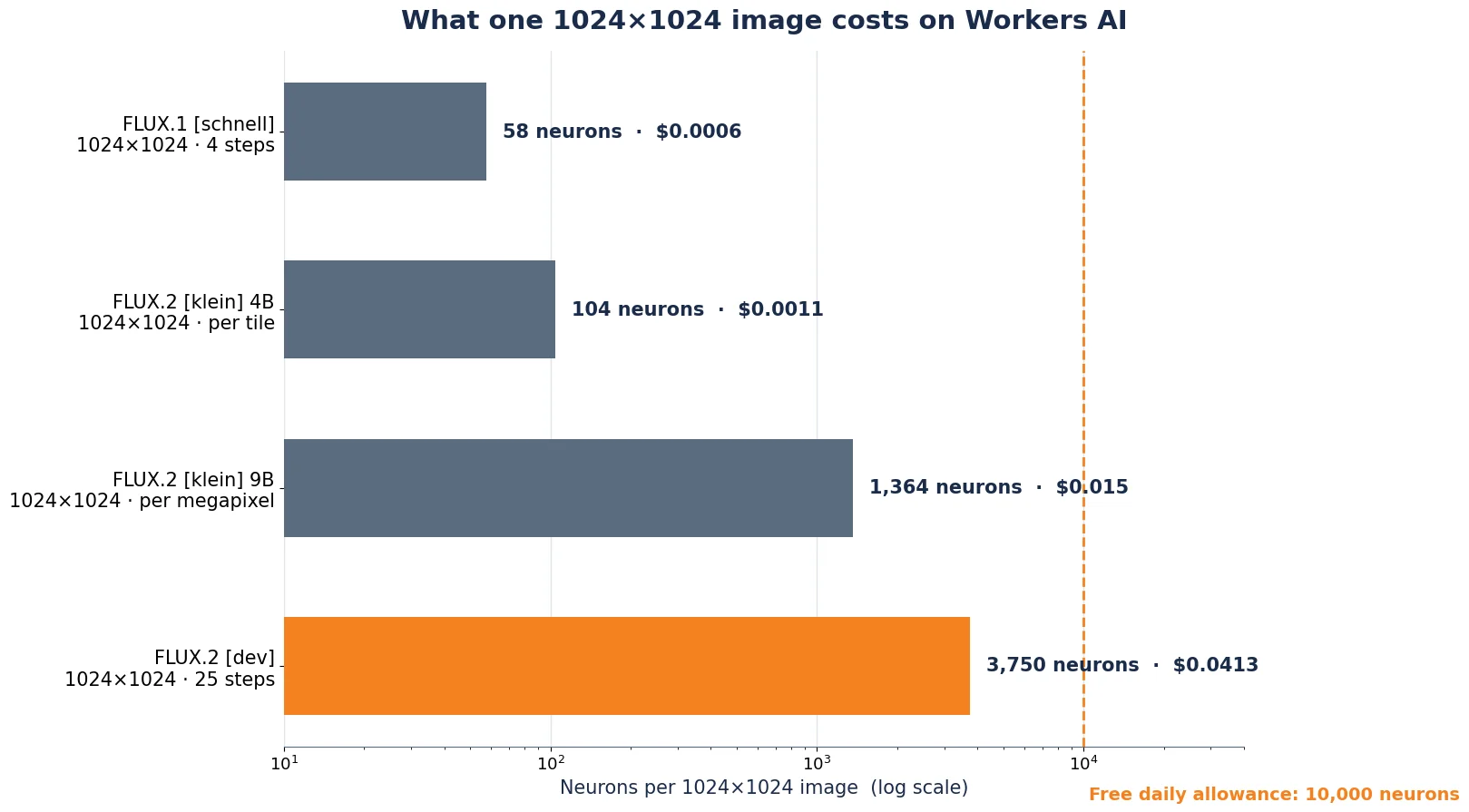
Workers AI now hosts four Black Forest Labs image models, and [dev] is the wrong default for most jobs. Pick by what the image is for:
| Model | Best for | Neurons / 1024×1024 | License |
|---|---|---|---|
FLUX.2 [dev] @cf/black-forest-labs/flux-2-dev | Final art: the most realistic, most prompt-faithful image; multi-reference consistency | 3,750 @ 25 steps | FLUX Non-Commercial (weights); outputs usable commercially |
FLUX.2 [klein] 9B @cf/black-forest-labs/flux-2-klein-9b | Fast, high-quality drafts with multi-reference editing; near-[dev] quality at a third of the price | 1,364 | FLUX Non-Commercial |
FLUX.2 [klein] 4B @cf/black-forest-labs/flux-2-klein-4b | Volume and iteration: storyboards, variations, live previews | 104 | Apache 2.0 |
FLUX.1 [schnell] @cf/black-forest-labs/flux-1-schnell | Maximum volume on the free tier; simple images at speed | 58 @ 4 steps | Apache 2.0 |
The rule of thumb: draft on [klein] 4B, shortlist on [klein] 9B, finish on [dev]. A fifty-image ad set drafted on 4B costs about 5,200 Neurons — inside one free day. The same set finished on [dev] costs 187,500 Neurons, about $2.06. Both numbers come from the same pricing table; the only difference is when you choose to pay for quality.
If you need the model on your own hardware instead, the earlier tutorial on this site covers FLUX.1 [dev] on a local GPU — the same diffusers workflow, a 12B model, and a very different hardware bill. And if you need region-precise, multi-step editing — change one object and leave the rest of the frame untouched — that is FLUX 3 Image, Black Forest Labs' newer product from October 2026. It is sold through the BFL API, not hosted on Workers AI, so it is outside this tutorial's scope.
Limits and honest notes#
- It is slow. Cloudflare says so itself: FLUX.2 [dev] is one of the most powerful models in the catalog and is expected to be slower than the other image models. The client sets a 300-second timeout for a reason. Do not put it behind a synchronous web request with a 30-second limit.
- Four references, not ten. The base model takes up to ten reference images through the BFL API; the Workers AI build takes four, each under 512×512. If your workflow needs more, call the BFL API directly — at BFL's prices.
- The free tier is two images a day at full size. That is enough to learn the model and to finish a small job. It is not a production budget. The Workers Paid plan is $5 a month minimum and unlocks overage at $0.011 per 1,000 Neurons.
- License: read it before you ship. The [dev] weights are under the FLUX Non-Commercial License — generated outputs may be used for personal, scientific, and commercial purposes, but running the weights commercially needs a commercial license from Black Forest Labs. Calling the hosted model through Workers AI puts you under Cloudflare's terms and BFL's API terms instead; the model page links both. The [klein] 4B model is Apache 2.0, the cleanest license of the four.
- The Workers binding has a rough edge. If you call the model from inside a Worker instead of over REST, Cloudflare's own docs show a temporary workaround — wrapping the FormData in a dummy Request to get a stream — with a comment that a fix is coming. The REST path in this tutorial has no such workaround, which is one reason it is the recommended route.
- Outputs are base64, not files. The API never returns raw image bytes. Budget for the base64 overhead (about 33% larger than the PNG) if you proxy responses through your own server, and decode before storing — the client does this for you.
- FLUX.2 [dev] is a year old. It launched on November 25, 2025. What is new is the hosting, not the model — and that is the point. The best open-weight image model of 2025 just became callable from anywhere with an internet connection, and the price of admission dropped from a 54 GB GPU to a free Cloudflare account.
The takeaway#
Serverless image generation used to mean the fast, small model. FLUX.2 [dev] on Workers AI breaks that trade-off in one direction only: the biggest open-weight image model now runs on someone else's GPUs, for four cents a picture, with the two features that matter for real work — reference images that hold a subject steady, and JSON prompts that pin down the details. The catch is the meter: at 3,750 Neurons a picture, the free tier buys you two a day, so the skill is not generating — it is deciding which two are worth the [dev] price, and drafting everything else on the [klein] models that cost a few cents per hundred.
Build the client, generate your first image, then run the batch in Step 5 with a reference photo of something you actually sell or shoot. The moment the same product appears in three different scenes without changing shape, you will understand why the reference input — not the resolution, not the speed — is the feature this model is really selling.
What was verified in this tutorial#
Every API fact in this tutorial was checked against Cloudflare's own documentation on November 21, 2026: the model page, the changelog entry, the pricing page, the REST API guide, and the announcement blog post. The flux2.py client was run end-to-end against a local mock server that implements the documented contract — 34 checks passed, covering the exact multipart fields, the base64 response shape, reference-image resizing, JSON-prompt validation against the documented schema, the 401 and error-envelope paths, and the Neuron arithmetic. No live generation was run from this desk: it holds no Cloudflare account or token, and live calls need the reader's own credentials. The cost figures are computed from the published pricing table, not from a live bill. The cover image is an AI-generated illustration; the two diagrams are drawn from the documented API and pricing table.
Sources#
- Partnering with Black Forest Labs to bring FLUX.2 [dev] to Cloudflare Workers AI (Cloudflare Blog, November 20, 2026) — the announcement: model, multi-reference, JSON prompting, hex colors, and the curl examples.
- Workers AI changelog: FLUX.2 [dev] (Cloudflare Docs) — the parameter list, the multipart requirement, the 512×512 input limit, and the full JSON-prompt schema.
- flux-2-dev model page (Cloudflare Docs) — model ID, base64 output, zero data retention, license link.
- Workers AI pricing (Cloudflare Docs, updated November 18, 2026) — $0.011 per 1,000 Neurons, 10,000 free per day, and the per-model rates used in every cost figure here.
- Workers AI REST API get-started guide (Cloudflare Docs) — where the account ID and API token live, and the response envelope.
- Run a Workers AI model (Cloudflare API reference) — endpoint shape, required Workers AI Write permission, TextToImage result type.
- FLUX.2 (Black Forest Labs) — the model family: [max], [pro], [flex], [dev]; multi-reference up to 10 images; 4 MP output.
- FLUX.2-dev on Hugging Face (Black Forest Labs) — 32B rectified-flow transformer; FLUX Non-Commercial License; outputs usable for personal, scientific, and commercial purposes.