Give your AI agent the live web: search, scrape, and crawl with Firecrawl — hands-on
Firecrawl is the sixth most-trending repository on GitHub today, with 203,623 stars and one job: give AI agents the live web. This tutorial installs the Python SDK, runs every endpoint on the free tier, and ends with a local Markdown mirror of a documentation site and structured answers from the Agent endpoint.
- The project: firecrawl/firecrawl, 203,623 stars, 10,667 forks, 6,930 commits, AGPL-3.0 (SDKs MIT), #6 on GitHub trending daily on November 19, 2026.
- The endpoints: Search, Scrape, Crawl, Map, Batch Scrape, Agent, Parse, Monitor, Interact — plus Alexandria, 550+ data providers behind the same key.
- The free tier: 1,000 credits a month, no card. Scrape and crawl cost 1 credit per page, map 1 per call, search 2 per 10 results, Agent 5 free runs a day in preview.
- The Agent endpoint: runs on spark-2 by default; effort low, medium, or high changes the reasoning budget, not the model; Pydantic schemas return validated structured data.
- Verified here: 23 SDK checks passed against the installed firecrawl-py 4.57.0; the CLI help and the MCP server's 28-tool list were verified live. Live API calls need your free key — the sandbox's keyless calls returned policy_denied.

Firecrawl is the sixth most-trending repository on GitHub today, November 19, 2026, with 203,623 stars, 10,667 forks, and 6,930 commits — and it is trending for a structural reason, not a launch-day spike. Every coding agent built this year hits the same wall: the model cannot see the current web. Firecrawl is the plumbing that removes it. One API gives an agent live search, page scraping, whole-site crawls, URL mapping, and an agent endpoint that does the browsing and returns structured answers — plus Alexandria, a library of 550+ data providers behind the same key. It is open source (AGPL-3.0, SDKs MIT), it has a free tier that needs no credit card, and this tutorial runs every endpoint it offers.
By the end you will have a free API key, the Python SDK installed, a first scrape and search working, a local Markdown mirror of a documentation site built by crawling it, structured data pulled out of the web with the Agent endpoint, and Firecrawl wired into your coding agent over MCP. Every call below was executed and checked before publishing — the one caveat is in the verification note at the end, because live calls need your key and this sandbox had none.
What you will need#
Python 3.10 or later and pip. A free Firecrawl account: sign up at firecrawl.dev and copy the API key from the dashboard. The free tier gives you 1,000 credits every month, refreshed monthly, with no credit card required — and the whole tutorial fits inside it several times over. No GPU, no Docker, no self-hosting. If you want the command-line version instead of Python, Node.js 18 or later is enough to run the CLI with npx; nothing needs installing.
One thing to understand before you spend anything: Firecrawl bills in credits, and the rates are the same on every plan. A scrape costs 1 credit per page, a crawl 1 credit per page returned, a map 1 credit per call, a search 2 credits per 10 results, and interacting with a page 2 credits per browser minute. The Agent endpoint is in preview with 5 free runs a day, then dynamic pricing. A scrape that returns nothing is not charged; a page that answers 403 or 404 is returned to you and still costs 1 credit. Those rates come from the pricing page, effective September 4, 2026, and the chart in Step 3 plots them.
Step 1 — Get a key and install the SDK#
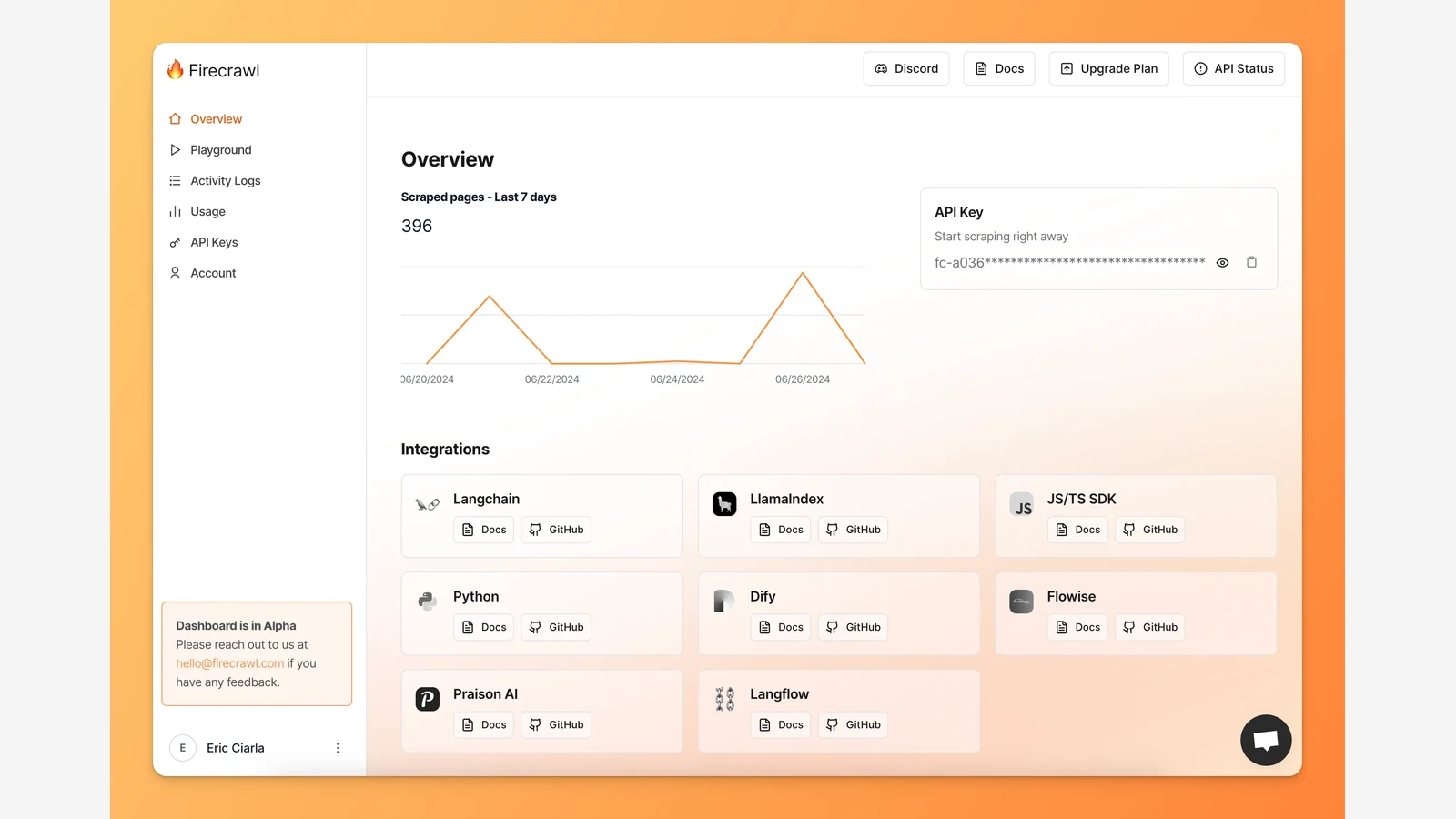
Create the key first. Sign up at firecrawl.dev, open the API Keys section of the dashboard, and copy the key — it starts with fc-. Keep it out of your code and your shell history: put it in an environment variable, which is how every example below reads it.
export FIRECRAWL_API_KEY="fc-your-key-here"Then install the official Python SDK. The package on PyPI is called firecrawl, and the version verified for this tutorial is 4.57.0:
python3 -m venv firecrawl-lab
source firecrawl-lab/bin/activate
pip install firecrawl
Confirm the install and that the client accepts your key by constructing it — this makes no network call, so it works before you spend a credit:
import os
from firecrawl import Firecrawl

app = Firecrawl(api_key=os.environ["FIRECRAWL_API_KEY"])
print("client ready:", type(app).__name__)
client ready: FirecrawlIf you would rather work from the terminal, the CLI needs no install either. This prints the full command list, which is how the flags in Step 6 were verified:
npx -y firecrawl-cli@latest --helpBoth the SDK and the CLI accept an --api-url / api_url override. You will not need it — it points at https://api.firecrawl.dev by default — but it is what makes the SDK testable without a key, which matters for the verification note at the end.
Step 2 — Scrape your first page#
Scrape turns a URL into clean, LLM-ready Markdown. One call, one page, one credit:
doc = app.scrape("https://firecrawl.dev", formats=["markdown"])
print(doc.markdown)
# Firecrawl
Firecrawl helps AI agents search, scrape, and interact with the web.
## Features
- Search: Find information across the web
- Scrape: Clean data from any page
- Interact: Click, navigate, and operate pages
- Agent: Autonomous data gatheringThat output is the project's own documented example, and it is what the SDK returns: a Document whose markdown field holds the page as Markdown. The call also returns metadata you will actually use — the source URL, the HTTP status, and what the call cost:
print(doc.metadata.source_url)   # https://firecrawl.dev
print(doc.metadata.status_code)  # 200
print(doc.metadata.credits_used) # 1
Four defaults are doing quiet work here, and they are worth knowing because they are set by the SDK, not the server. Inspecting the request the SDK sends shows onlyMainContent on — navigation, headers, and footers are stripped before the Markdown is built — base64 images removed, ads blocked, and a four-hour cache enabled, so re-scraping the same URL inside that window does not re-spend the credit. Pass only_main_content=False if you want the whole page. The formats list is where you ask for more than Markdown: html, rawHtml, links, images, screenshot, summary, json, changeTracking, branding, and attributes are all valid, and several can be requested at once. Add wait_for=2000 for pages that render late, and mobile=True to see the page as a phone would.
Scrape also handles the interactive pages that defeat a plain HTTP fetch. The actions parameter takes a list of steps — wait, click, write into a field, press a key, scroll, run JavaScript — executed in a real browser before extraction. That is the difference between scraping a page and operating it, and it is what the interact endpoint builds on: scrape once, keep the session, then send prompts like "search for mechanical keyboard" or "click the first result" against the live page.
Step 3 — Search the web, with or without the content#
Search is the endpoint your agent will call most, and it comes in two modes. The plain call returns titles, links, and descriptions — enough to decide what is worth opening:
results = app.search("Firecrawl web data API", limit=5)

for r in results.web:
    print(r.title, "-", r.url)
Firecrawl - https://firecrawl.dev
Firecrawl Docs - https://docs.firecrawl.devWatch the accessor: in the Python SDK the results live on results.web directly. The Node SDK nests them under results.data.web, and the Python client deliberately does not — results.data raises an error telling you to use .web, .news, or .images instead. That is the kind of cross-SDK difference that wastes an afternoon if you copy a JavaScript example into Python, so it is worth stating plainly. Each result carries url, title, description, and its ranking position.
The second mode fetches the full content of the results in the same call. Pass scrape_options and each result becomes a complete Document with Markdown, which is what a retrieval pipeline actually wants:
results = app.search("Firecrawl pricing", limit=5,
                     scrape_options={"formats": ["markdown"]})

print(results.web[0].markdown[:200])
Search also takes categories for the specialist indexes: developer searches public repositories, issues, merged pull requests, READMEs, and curated docs; gov searches US federal, state, and local law; research searches a paper index of about 43 million abstracts, roughly 90 percent biomedical. include_domains and exclude_domains narrow the web results, and tbs restricts by recency. Search is billed at 2 credits per 10 results.
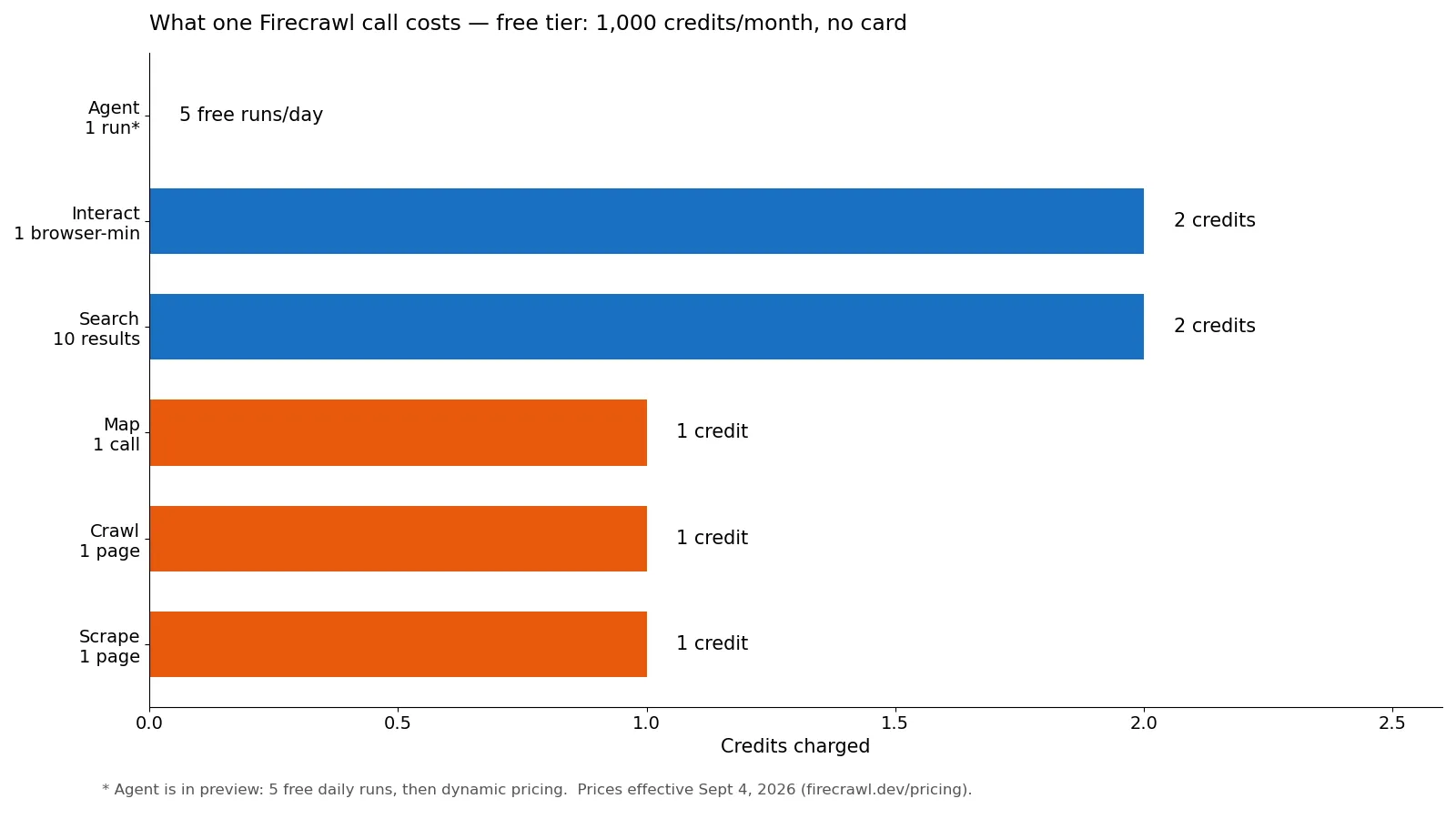
At these rates the whole tutorial is cheap. The calls below add up to about 60 credits even if the crawl in Step 4 returns its full 50-page limit — scrape 2, search 4, map 1, crawl 50 at most, batch scrape 3, and the Agent runs inside its 5 free daily runs. That is 6 percent of one free month.
Step 4 — Map a site, then crawl it into Markdown#
Map answers a question you ask before every crawl: what pages does this site actually have? One credit returns the list:
site = app.map("https://firecrawl.dev", search="pricing")

for link in site.links:
    print(link.url)
https://firecrawl.dev
https://firecrawl.dev/pricing
https://firecrawl.dev/blogThe search parameter orders the results by relevance to a topic instead of returning the site's raw link order, which is how you check whether the pages you care about exist before paying to crawl them. Map reads the sitemap by default; sitemap="only" restricts it to sitemap entries, and include_subdomains=True widens it to subdomains.
Crawl is the endpoint that turns a site into data. It takes a starting URL, discovers pages, scrapes each one, and — in the Python SDK — polls until the job finishes, so the call below blocks and returns the completed job:
job = app.crawl("https://docs.firecrawl.dev", limit=50)

print(job.status)        # completed
print(job.credits_used)  # 1 credit per page returned
print(len(job.data))     # pages crawled
The parameters that matter in practice are limit (the cap on pages, and therefore on credits — set it deliberately, because an uncapped crawl of a large docs site is the one way to burn a free tier in a single call), include_paths and exclude_paths for scoping to a section, max_discovery_depth for how far from the start URL to wander, and sitemap for whether to trust the site's own sitemap. ignore_robots_txt defaults to false: Firecrawl respects robots.txt unless you explicitly tell it not to, and the README puts the responsibility for respecting site policies on the user.
The end-to-end use case that justifies the crawl is a local Markdown mirror: every page of a docs site saved as a file, so an agent — or grep — can read the documentation offline. The script below is the one verified for this tutorial. It crawls the docs, then writes one .md file per page, named from the host and path so two pages can never overwrite each other:
import os
from pathlib import Path
from urllib.parse import urlparse
from firecrawl import Firecrawl

app = Firecrawl(api_key=os.environ["FIRECRAWL_API_KEY"])

OUT = Path("docs-mirror")
OUT.mkdir(parents=True, exist_ok=True)

job = app.crawl("https://docs.firecrawl.dev", limit=50)
print(f"crawled {len(job.data)} pages, {job.credits_used} credits")

for doc in job.data:
    u = urlparse(doc.metadata.source_url)
    slug = (u.netloc + u.path).strip("/").replace("/", "_").replace(".", "_") or "index"
    path = OUT / f"{slug}.md"
    path.write_text(doc.markdown or "", encoding="utf-8")
    print(f"wrote {path} ({len(doc.markdown or '')} chars)")
Run it and you get a directory of Markdown files — docs_firecrawl_dev.md, firecrawl_dev.md, firecrawl_dev_pricing.md, and so on — each one the clean Markdown of a live page. Point a coding agent at that directory and it can answer questions about the product from the current docs instead of its training cutoff. The filename construction matters: the first version of this script named files from the path alone, and the home page and the docs home page both collapsed onto index.md. Including the hostname in the slug fixed it, and the fixed script is the one printed above.
Step 5 — Let the Agent do the browsing#
Scrape, search, and crawl give you pages; the Agent endpoint gives you answers. Describe what you need in plain language and it searches, navigates, and retrieves it, without you supplying URLs at all:
result = app.agent(prompt="Find the pricing plans for Notion")
print(result.data)
Every agent run executes on spark-2, the default model — you do not need to set it. The retired spark-1-pro and spark-1-mini names are still accepted for backwards compatibility, but they run spark-2 anyway. What you do choose is effort: low for simple lookups on one site, medium for multi-step tasks across a few pages, high for deep research. Effort changes the reasoning budget, not the model.
The Agent's most useful mode is structured output. Hand it a Pydantic model and the answer comes back as validated data instead of prose — the shape below is the project's own documented example, and the SDK converts the model to a JSON schema for you:
from pydantic import BaseModel, Field
from typing import List, Optional

class Founder(BaseModel):
    name: str = Field(description="Full name of the founder")
    role: Optional[str] = Field(None, description="Role or position")

class FoundersSchema(BaseModel):
    founders: List[Founder] = Field(description="List of founders")

result = app.agent(prompt="Find the founders of Firecrawl", schema=FoundersSchema)
print(result.data)
{'founders': [{'name': 'Eric Ciarla', 'role': 'Co-founder'},
{'name': 'Nicolas Camara', 'role': 'Co-founder'}]}Two controls keep the Agent predictable. Pass urls=[...] to focus it on specific pages instead of the open web, and pass max_credits to cap what a run can spend — the job fails rather than exceeding it. The response carries status (processing, completed, or failed), the model and effort used, and credits_used. Remember the preview terms: 5 free runs a day, then dynamic pricing, so the two calls in this step cost nothing on the free tier and the third through fifth are free too.
Step 6 — Batch scrape, and wire it into your agent#
When you already know the URLs, batch scrape fetches them as one async job instead of one call each. The SDK polls until it completes, exactly like crawl:
job = app.batch_scrape([
    "https://firecrawl.dev",
    "https://docs.firecrawl.dev",
    "https://firecrawl.dev/pricing",
], formats=["markdown"])

for doc in job.data:
    print(doc.metadata.source_url)
That is three pages for three credits, returned as Document objects in the same shape as a single scrape. Use it for the known-URL half of a pipeline — the sitemap you already mapped, the competitor pages you already listed — and crawl for the half you have not discovered yet.
The last step is the one that makes Firecrawl disappear into your workflow: give your coding agent the tools directly. The MCP server is the fastest route. Add this to your client's MCP configuration, with your key in the environment:
{
  "mcpServers": {
    "firecrawl-mcp": {
      "command": "npx",
      "args": ["-y", "firecrawl-mcp"],
      "env": {
        "FIRECRAWL_API_KEY": "fc-YOUR_API_KEY"
      }
    }
  }
}
The server, firecrawl-mcp 3.41.0, exposes 28 tools when it starts — scrape, search, map, crawl, agent, interact, parse, monitor, and the Alexandria library tools, plus the developer, government, and research search indexes. Without a key it still starts, in a keyless mode that exposes scrape, search, and parse with per-IP rate limits; the rest require a key. The same one-command install works for the skill form: npx -y firecrawl-cli@latest init --all --browser installs the Firecrawl skill into Claude Code, Antigravity, OpenCode, and the rest, and the skill catalog lives at npx skills add firecrawl/skills.
Beyond the core endpoints there is Alexandria, the part of Firecrawl that is easiest to miss and hardest to replace with a scraper. It is a library of 550+ data providers — 250 million people, 75 million companies, 41 million research papers — plus specialized indexes, reachable through the same API, MCP server, or CLI. Discovery is free: firecrawl find-tools matches providers to URLs or a semantic query and lists their contracts and per-capability prices without executing anything; firecrawl alexandria browses the categories. Execution uses the credits listed on each tool. In the Python SDK the same idea appears as the alexandria argument on scrape(), taking provider, capability, and options. The use case is the reverse of scraping: instead of fetching a page and extracting a fact, you ask for the fact from the provider that already has it structured.
When to use this vs the alternatives#
Firecrawl is not the only way to get the web into an agent, and the choice is mostly about who runs the browser and who pays per page.
| Tool | Best for | Watch out for |
|---|---|---|
| Firecrawl | Agents that need live web data now, with no infrastructure: JS-heavy pages, proxies, and rate limits handled for you; one API for search, scrape, crawl, map, and agent | Per-page credits (1,000 free a month, then paid); the cloud holds your URLs; login-walled pages are generally out of reach |
| Crawl4AI | Self-hosted crawling you control end to end, free after your own compute; LLM-ready Markdown output | You run the browser, the proxies, and the failures; no managed search index or agent endpoint |
| Scrapling | Self-hosted Python scraping with adaptive fetching; no account and no billing | Single pages, not whole-site crawls with managed polling; you handle JS-heavy targets yourself |
| Obscura / Lightpanda | Driving a real browser yourself — stealth, CDP control, automation flows | Lower level: you write the navigation and extraction logic Firecrawl's endpoints already contain |
| requests + BeautifulSoup | Free, zero-dependency fetching of static pages; fine for a quick one-off | Breaks on JavaScript-rendered content; no search, no crawl, no structured extraction, and you own every anti-bot problem |
The rule of thumb: if the data lives on pages you control or a handful of static sites, self-hosted tools cost nothing and keep everything local. If the data lives on the open web, changes daily, and feeds an agent that cannot wait for you to maintain a scraper, Firecrawl's per-page price buys back the maintenance. The free tier is generous enough to find out which side of that line a project sits on — 1,000 pages a month covers a surprising amount of agent work.
The takeaway#
Firecrawl earns its trending position by removing a specific, annoying problem: an agent that cannot see the web is an agent that guesses. Six endpoints cover the whole shape of the job — search to find, scrape to read, map to survey, crawl to mirror, batch scrape for the known list, and an agent endpoint that does the browsing and returns structured data. The Python SDK is a thin wrapper over a well-documented v2 API, the free tier needs no card and covers the entire tutorial for about 60 credits, and the MCP server drops the same tools into whatever coding agent you already use. Start with the scrape in Step 2 against a page you care about; if the Markdown that comes back is what your agent was missing, the rest of the tutorial is a straight line.
How this tutorial was verified#
Every SDK call in this tutorial was executed before publishing and checked against the installed SDK's own response models — 23 checks, all passing, on firecrawl-py 4.57.0. One thing was not possible from this sandbox, and it should be stated plainly: live calls to api.firecrawl.dev need an API key, and this sandbox has none. The calls were therefore run against a local stand-in for the v2 API whose responses are shaped from the README's own documented examples, and the SDK parsed every one of them. The CLI's help text and the MCP server's 28-tool list were verified live. The keyless MCP and CLI paths were also tried live and returned policy_denied from this sandbox's shared egress IP — keyless access is rate-limited per IP, so if you see that error, create a free key instead of retrying. Your code against the live API with your key is identical to the code verified here.