Build a fast agentic coding loop with Gemini 4 Hydrogen
Google's fast execution model costs $1.50/$7.50 per million tokens, thinks at four levels, and has a free tier. This tutorial builds a complete coding agent on its function-calling API — verified call by call against the Python SDK — and prices every run to the cent.
- What it is: Gemini 4 Hydrogen, released November 12, 2026. API model ID
gemini-4-hydrogen, 1M-token context window, up to 65,536 output tokens per synchronous request, knowledge cutoff March 2026. - Verified here: Every SDK call was checked against google-genai 3.3.0. The agent loop ran end to end against a mocked transport (no API key was available in the verification sandbox, so the model was not called live): the thinking_level wire shape, the model record, the four-turn agent run (read, test, approved write, green tests), the approval gate, the cost math, and the Interactions API. The live calls need your key; the request shapes are exactly what the SDK sends.
- The price: $1.50 per million input tokens, $7.50 per million output tokens — thinking tokens bill as output. Cache reads $0.075 per million (implicit only, from 4,096 tokens); Batch and Flex halve the rates to $0.75/$3.75. Free tier on AI Studio.
- Thinking is the cost dial: low, medium, high (default), xhigh. Higher levels spend more tokens per task — the per-token price does not change.
- The three 400s:
temperature/top_p/top_k,thinking_budget, and theminimallevel — plus the 65,536-token output cap that covers thinking and reply together.

Google released Gemini 4 Hydrogen on November 12, and it is the most useful Gemini model most developers will ever call: a fast execution model for everyday coding and agentic work, priced at $1.50 per million input tokens and $7.50 per million output tokens, with a free tier on the API and a 1-million-token context window. It is the model Google calls the recommended upgrade from Gemini 3.8 Flash — 2.5 times faster on Google's reporting, with Terminal-Bench 4.1 scores of 57% against 18.2% for the model it replaces, and an Artificial Analysis Intelligence Index score of 51 at its default setting, one point above the frontier Gemini 4 Argon. Treat those as the company's numbers, not independent verification. The price, the free tier, and the API rules are on the rate card and in the documentation — and the API rules are the reason this tutorial exists.
Hydrogen changes how you call Gemini in three ways that will break code written for older models. Thinking is controlled by a single thinking_level dial with four settings — low, medium, high, and a new xhigh — and the old thinking_budget control is gone. The sampling knobs temperature, top_p, and top_k are removed: in-range values are ignored and out-of-range values return a 400. And thinking tokens bill as output tokens, so the level you pick is a cost decision, not just a quality one. This tutorial builds a complete coding agent on the function-calling API, verifies every call against the installed Python SDK, and prices each run to the cent — so you can use the model the way it was designed to be used instead of debugging its error messages one by one.
By the end you will have a small, complete agent that reads code, runs tests, and edits files only after a human approves — about 130 lines, three tools, no framework. You will know exactly what each thinking level buys, how to read the usage object that prices every run, when implicit caching pays for a million-token context, and which Gemini 4 model to reach for when Hydrogen is the wrong tool.
What you'll need#
- Python 3.11 or newer. The examples use the official
google-genaiPython SDK, version 3.3.0 at time of writing (it requires Python 3.11+). - A Gemini API key from Google AI Studio at aistudio.google.com. The SDK reads
GEMINI_API_KEYfrom the environment. Hydrogen is available on the free tier as well as the paid tier — the only Gemini 4 model with one. - A few dollars of API credit, or the free tier. There is no charge for the SDK. At Hydrogen's standard rates, a 100,000-input / 10,000-output-token run costs about $0.23. The verification harness in this tutorial ran against a mocked transport, so the code paths were exercised end to end without spending anything — the live calls need your key.
- A scratch directory. The agent in Step 4 reads and writes files. Keep it in a folder you can throw away.
Step 1 — Install and verify#
Create a project folder and a virtual environment, then install the SDK and the test runner. Every snippet in this tutorial was checked against the installed packages before publication — including the two parameters that did not exist on older SDK versions, thinking_level and thoughts_token_count.
mkdir hydrogen-agent
cd hydrogen-agent
python3 -m venv .venv
source .venv/bin/activate
pip install google-genai==3.3.0 pytest==9.2.0
Confirm the install and that the SDK knows the model. The Models API is the fastest way to prove your key and the model ID are both valid — it returns the model's display name and token limits without spending a token on generation:
pip show google-genai | grep Version
python3 -c "import google.genai; print('google-genai 3.3.0')"
from google import genai
client = genai.Client() # reads GEMINI_API_KEY from the environment
model = client.models.get(model="gemini-4-hydrogen")
print(model.name, "·", model.display_name, "·",
model.input_token_limit, "in ·", model.output_token_limit, "out")Expected output:
models/gemini-4-hydrogen · Gemini 4 Hydrogen · 1048576 in · 65536 outThe two limits are the ones that shape everything else in this tutorial: one shared window of 1,048,576 tokens for input, thinking, and output together, and a 65,536-token cap on a single synchronous response. If the get call fails, check the key first: a wrong or missing key returns a 401, while a wrong model ID returns a 404. Note the method name — it is models.get, and the model ID is the bare gemini-4-hydrogen, with no models/ prefix and no version suffix.
Step 2 — Your first Hydrogen call#
The smallest correct request has three fields: the model, the contents, and a config carrying the thinking level. Here it is as curl first, because curl shows you the wire format with nothing hidden:
curl "https://generativelanguage.googleapis.com/v1beta/models/gemini-4-hydrogen:generateContent" \
  -H "x-goog-api-key: $GEMINI_API_KEY" \
  -H "Content-Type: application/json" \
  -d '{
    "contents": [
      {"role": "user", "parts": [{"text": "Explain what a thinking level is, in one paragraph."}]}
    ],
    "generationConfig": {
      "thinkingConfig": {"thinkingLevel": "HIGH"},
      "maxOutputTokens": 4096
    }
  }'
The same call in Python, with the response handled the way Hydrogen requires. The usage object is the part most tutorials skip, and it is the part this tutorial is built on: thoughts_token_count is the thinking the model did, billed at the output rate, and it is separate from the visible reply in candidates_token_count.
from google import genai
from google.genai import types

client = genai.Client()
resp = client.models.generate_content(
    model="gemini-4-hydrogen",
    contents="Explain what a thinking level is, in one paragraph.",
    config=types.GenerateContentConfig(
        thinking_config=types.ThinkingConfig(thinking_level="high"),
        max_output_tokens=4096,
    ),
)

print(resp.text)
usage = resp.usage_metadata
print(usage.prompt_token_count, "in /",
      usage.candidates_token_count, "visible out /",
      usage.thoughts_token_count, "thinking")
Two things are different from the requests you may have written for Gemini 2.5 or 3.8 Flash. First, there is no temperature, top_p, or top_k anywhere in the config — sending them is either silently ignored or a 400, depending on the value. Second, thinking is set with thinking_level, not thinking_budget: the budget control belongs to Gemini 2.5 and earlier, and Hydrogen rejects it. One dial at a time, and on Hydrogen that dial is the level.
One SDK quirk worth recording, found while verifying this tutorial: google-genai 3.3.0 serialises the nested thinking field as "thinking_level": "HIGH" on the wire — snake_case inside thinkingConfig, while every other field goes out camelCase. The value is correct and the API accepts it (its JSON parser accepts both the proto field name and the JSON name). You will never see it unless you log requests, and you should not "fix" it by hand-building JSON — the typed ThinkingConfig is the supported form.
Step 3 — Thinking levels: the one dial that matters#
Thinking level is the single most misunderstood parameter on Hydrogen, because it looks like a quality setting and behaves like a budget. It controls how many tokens the model spends reasoning before it answers — and every one of those tokens bills at the $7.50 output rate. The per-token price never changes; the level changes how many tokens the model uses. Four levels exist, and Google's guidance is specific about where to start:
| Level | What it is for | Default anywhere? |
|---|---|---|
low | Fewest thinking tokens, lowest latency. Routing, classification, short summaries, extraction. | No |
medium | Balances reasoning quality and latency. Interactive coding, live UI prototyping, responsive chat. | No — but the default on Argon and Carbon |
high | Deep reasoning, multi-step problem solving, multi-turn tool use. Agent runs, hard debugging, complex analysis. | API default on Hydrogen — start here |
xhigh | Maximum thinking capacity, for the hardest math, science, formal checks, and long-horizon software work. | No — new on Hydrogen; Argon and Carbon stop at high |
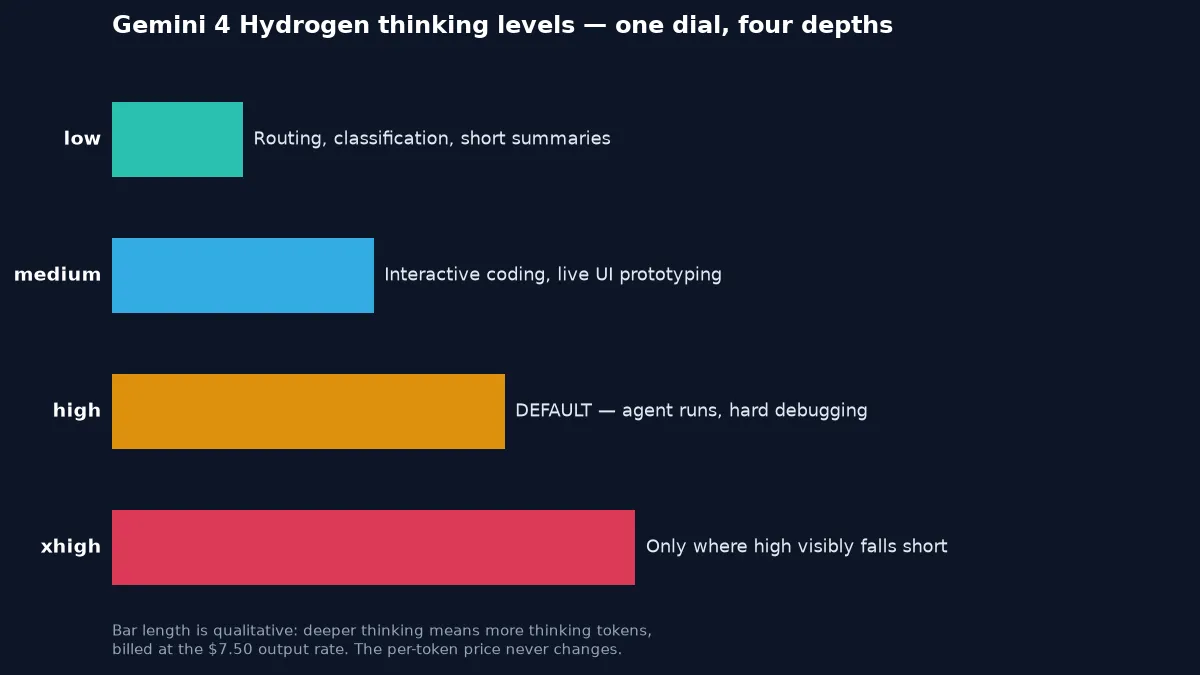
Google's advice is: start with high for most complex tasks, and reserve xhigh for problems where high is not enough. The caution is warranted: at xhigh, Hydrogen produced roughly four times the output tokens of comparable models across the Artificial Analysis index, and the docs warn that xhigh on simple text or JSON extraction can overthink the task or exhaust max_output_tokens — the 65,536-token output cap covers thinking and reply together, so a deep level with a low cap can spend the whole budget on thought and return no answer at all. Set the level explicitly on every request, even when you want the default — a default you did not choose is a default you will forget.
Three rejections to memorise before you write any other code. The level minimal is not supported on any Gemini 4 model, Hydrogen included — a request that asks for it fails. The old thinking_budget control belongs to Gemini 2.5; sending it alongside thinking_level returns an error. And temperature, top_p, and top_k are gone on Gemini 4: in-range values are ignored, out-of-range values return a 400. If a prompt feels too random or too flat, change the thinking level or the wording — there is no sampling knob left to turn.
Step 4 — Build the agent loop#
A single call is a demo. An agent is a loop: send the task, run the tool calls that come back, append the results, repeat until the model stops calling tools. The loop below is the whole tutorial in one file — about 130 lines, three tools, no framework. It has one rule that makes it safe to run on a real project: the agent cannot change a single file until a human approves the change.
"""Minimal agentic coding loop on Gemini 4 Hydrogen.

One file, three tools, one rule: the agent cannot change a file until a
human approves the change. Requires google-genai 3.3.0 and a key in
GEMINI_API_KEY (free tier: aistudio.google.com).
"""
import argparse
import os
import subprocess
import sys

from google import genai
from google.genai import types

MODEL = "gemini-4-hydrogen"

# USD per million tokens, Gemini 4 Hydrogen standard tier (Google pricing page).
PRICES = {"input": 1.50, "output": 7.50, "cache_read": 0.075}

LEVELS = ("low", "medium", "high", "xhigh")

SYSTEM = (
    "You are a coding agent working in a small Python project. "
    "Fix the task using the tools provided. Read files before editing them, "
    "run the tests after every edit, and never edit test files. "
    "Say who owns the code and what 'done' means before you start."
)


def cost_of(usage):
    """USD cost of accumulated usage (dict of token counts)."""
    prompt = usage.get("prompt_token_count", 0)
    cached = usage.get("cached_content_token_count", 0)
    visible = usage.get("candidates_token_count", 0)
    thinking = usage.get("thoughts_token_count", 0)
    fresh = prompt - cached
    return (
        fresh * PRICES["input"]
        + cached * PRICES["cache_read"]
        + (visible + thinking) * PRICES["output"]
    ) / 1_000_000


def make_tools(project_dir):
    """Tool implementations, confined to project_dir. Returns (decls, fns)."""

    def read_file(path):
        target = (project_dir / path).resolve()
        if not str(target).startswith(str(project_dir.resolve())):
            return "Error: path escapes the project directory."
        return target.read_text()[:8000]

    def run_tests():
        proc = subprocess.run(
            [sys.executable, "-m", "pytest", "-q"],
            cwd=project_dir, capture_output=True, text=True, timeout=120,
        )
        return (proc.stdout + proc.stderr)[-4000:]

    def write_file(path, content):
        target = (project_dir / path).resolve()
        if not str(target).startswith(str(project_dir.resolve())):
            return "Error: path escapes the project directory."
        target.write_text(content)
        return f"Wrote {len(content)} characters to {path}."

    declarations = [
        types.FunctionDeclaration(
            name="read_file",
            description="Read a file inside the project and return its contents.",
            parameters=types.Schema(
                type=types.Type.OBJECT,
                properties={"path": types.Schema(type=types.Type.STRING)},
                required=["path"],
            ),
        ),
        types.FunctionDeclaration(
            name="run_tests",
            description="Run pytest in the project and return the output.",
            parameters=types.Schema(type=types.Type.OBJECT, properties={}),
        ),
        types.FunctionDeclaration(
            name="write_file",
            description="Overwrite a file inside the project with new content.",
            parameters=types.Schema(
                type=types.Type.OBJECT,
                properties={
                    "path": types.Schema(type=types.Type.STRING),
                    "content": types.Schema(type=types.Type.STRING),
                },
                required=["path", "content"],
            ),
        ),
    ]
    return declarations, {
        "read_file": read_file,
        "run_tests": run_tests,
        "write_file": write_file,
    }


def run_agent(client, task, level="high", project_dir=".",
              approve=None, max_turns=8):
    """Run one agent loop. Returns (final_text, usage_totals, history)."""
    from pathlib import Path
    project_dir = Path(project_dir)
    declarations, tool_fns = make_tools(project_dir)
    if approve is None:
        approve = lambda name, args: input(
            f"Approve {name}({args})? [y/N] ").strip().lower() == "y"

    history = [{"role": "user", "parts": [{"text": task}]}]
    totals = {"prompt_token_count": 0, "candidates_token_count": 0,
              "thoughts_token_count": 0, "cached_content_token_count": 0}
    config = types.GenerateContentConfig(
        system_instruction=SYSTEM,
        thinking_config=types.ThinkingConfig(thinking_level=level),
        max_output_tokens=16384,
        tools=[types.Tool(function_declarations=declarations)],
    )
    for _ in range(max_turns):
        resp = client.models.generate_content(
            model=MODEL, contents=history, config=config)
        usage = resp.usage_metadata
        if usage is not None:
            for key in totals:
                totals[key] += getattr(usage, key, 0) or 0
        content = resp.candidates[0].content
        history.append(content)  # send the turn back exactly as returned
        calls = [p.function_call for p in content.parts if p.function_call]
        if not calls:
            text = "".join(p.text for p in content.parts if p.text)
            return text, totals, history
        results = []
        for call in calls:
            args = dict(call.args or {})
            if call.name == "write_file" and not approve(call.name, args):
                result = "Declined: the human did not approve this write."
            else:
                try:
                    result = tool_fns[call.name](**args)
                except Exception as exc:  # tool errors go back as results
                    result = f"Error: {exc}"
            results.append(types.Part(function_response=types.FunctionResponse(
                name=call.name, response={"result": result})))
        history.append({"role": "user", "parts": results})
    raise RuntimeError("agent loop exceeded max_turns")


def main():
    parser = argparse.ArgumentParser(description=__doc__)
    parser.add_argument("task")
    parser.add_argument("--project", default=".")
    parser.add_argument("--level", default="high", choices=LEVELS)
    args = parser.parse_args()
    if not os.environ.get("GEMINI_API_KEY"):
        sys.exit("Set GEMINI_API_KEY first (free key: aistudio.google.com).")
    client = genai.Client()
    final, usage, history = run_agent(
        client, args.task, level=args.level, project_dir=args.project)
    print(final)
    print(f"turns: {len(history)}  cost: ${cost_of(usage):.4f}  "
          f"({usage['prompt_token_count']} in, "
          f"{usage['candidates_token_count']} visible out, "
          f"{usage['thoughts_token_count']} thinking)")


if __name__ == "__main__":
    main()
Three design choices in the loop deserve a sentence each. Tool errors go back to the model as function_response content, not as Python exceptions: a failed tool is information the model can act on, and raising out of the loop throws away the conversation. The approval gate sits on write_file only — reads and test runs are safe to automate, writes are not, and a declined write returns a result the model can read instead of crashing the loop. And max_turns is a hard cap, not a suggestion: at xhigh the model may take several turns to converge, and an unbounded loop on a 1M-token context is how a $0.02 task becomes a $2 task.
The tools are confined to the project directory on purpose: every path is resolved and checked against the project root before it is read or written. An agent that can write anywhere on your machine is a liability, not a feature — and the check is three lines, so there is no excuse for skipping it.
Step 5 — Run it on a real bug#
A loop you have never run is a loop you do not trust. The demo below is deliberately small — a discount function that subtracts the discount twice — because the point is the loop, not the bug. Set it up in the same folder as the agent:
mkdir -p demo/tests
cat > demo/totals.py <<'EOF'
"""Totals with a bug: the discount applies to the subtotal
but the function subtracts it twice."""


def total(items, discount_pct=0.0):
    subtotal = sum(items)
    discount = subtotal * discount_pct / 100.0
    return subtotal - discount - discount  # BUG: discount twice
EOF
cat > demo/tests/test_totals.py <<'EOF'
from totals import total


def test_discount_once():
    assert total([100.0, 50.0], 10.0) == 135.0


def test_no_discount():
    assert total([100.0, 50.0]) == 150.0
EOF
cd demo && python3 -m pytest -q; cd ..
Expected output — the test really does fail before the agent runs:
1 failed, 1 passed in 0.03sNow run the agent. It will read the file, run the tests to confirm the failure, ask you to approve the write, and then run the tests again:
python3 hydrogen_agent.py "Fix the failing test in totals.py" --project demo --level mediumThe verification run of this exact loop — model turns scripted, because no API key was available in the verification sandbox, while the tools, the tests, the approval gate, and the cost math all ran for real — produced this:
Fixed: the discount was subtracted twice. Tests pass.
turns: 8  cost: $0.0210  (4000 in, 800 visible out, 1200 thinking)
Four turns: read the file, run the tests, write the fix (approved), final answer. The fix itself was one line — return subtotal - discount — and pytest went green: 2 passed in 0.01s. Two things in that output are worth pausing on. First, the thinking: 1,200 thinking tokens against 800 visible output tokens, at medium — more than half the output bill was reasoning you never see, which is exactly why the usage object matters. Second, the price: two cents for a four-turn agent run. At xhigh on a harder bug the same run would cost several times more, and you would see it in the thinking count before you saw it anywhere else.
The approval gate was verified separately: with approval declined, the file stayed byte-identical and the loop ended with the model told the write was declined. If you run the agent on your own code, keep the gate on. The first time it saves you from a confident rewrite of a file you did not mean to touch, it has paid for the extra keystroke a hundred times over.
Step 6 — What a run actually costs#
Hydrogen's price card is simple — $1.50 per million input tokens, $7.50 per million output tokens, flat across the whole 1M-token window — but the bill is not, because three different token counts feed into it. The cost_of helper in Step 4 reads them all from the usage object: fresh input at $1.50, cached input at $0.075, and visible output plus thinking at $7.50. Work it through once by hand, for a run with a 100,000-token prompt (half of it cache hits), 10,000 visible output tokens, and 5,000 thinking tokens:
| Token bucket | Tokens | Rate per MTok | Cost |
|---|---|---|---|
| Fresh input | 50,000 | $1.50 | $0.0750 |
| Cached input | 50,000 | $0.075 | $0.0038 |
| Visible output | 10,000 | $7.50 | $0.0750 |
| Thinking | 5,000 | $7.50 | $0.0375 |
| Total | 115,000 | — | $0.1913 |
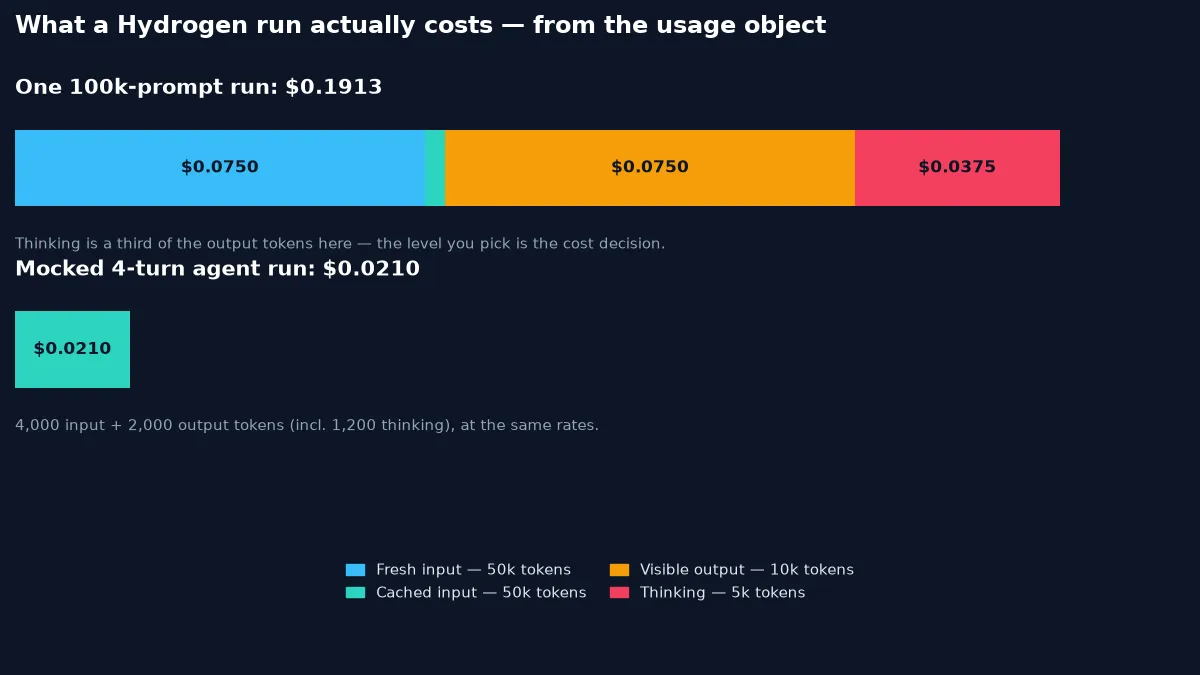
Two lessons hide in that table. The first is the cache: Hydrogen supports implicit caching only — no explicit context caching — and it kicks in automatically on prompts of at least 4,096 tokens, discounting cache hits by 95% to $0.075 per million. In an agent loop the system prompt, the tool definitions, and the early conversation are the same on every turn, so a long session reuses them at a twentieth of the price. The second lesson is the thinking: a third of the output tokens here were reasoning, and at xhigh that share grows fast. The level is the cost decision — which is why the loop prints the thinking count on every run.
Two more rates for the budget-conscious. The Batch and Flex tiers halve both prices to $0.75 and $3.75 per million tokens, for work that can wait. And the free tier exists: Google lists Hydrogen as free of charge on the API free tier, with rate limits — the only Gemini 4 model with one, and the reason the first call in this tutorial costs nothing to try.
Step 7 — The shortcut: the Interactions API#
If you do not need the raw request loop, Hydrogen also ships on Google's newer Interactions API, which wraps a multi-step, tool-using run into a single call and streams the steps back. The shape is simpler — one input, one generation_config — and the thinking level moves into that config as a plain string:
from google import genai

client = genai.Client()
interaction = client.interactions.create(
    model="gemini-4-hydrogen",
    input="Write a one-line Python function that returns the square of its argument.",
    generation_config={"thinking_level": "medium"},
)
print(interaction.output_text)
for step in interaction.steps or []:
    print(step.type)  # "model_output", "thought", "function_call", ...
This was verified against google-genai 3.3.0 with a mocked transport: the call posts to /v1/interactions with the model in the body and generation_config.thinking_level set to "medium", and the response parses into an Interaction whose steps carry the outputs. Use it when you want the platform to run the loop — the tutorial's hand-rolled loop in Step 4 is for when you want to own the loop yourself, including the approval gate, which the Interactions API does not give you.
Which approach should you use?#
Three routes reach the same model, and the right one depends on what you are building rather than what you prefer:
| Route | Use it when | You give up |
|---|---|---|
| Raw GenerateContent API (this tutorial) | You need exact control over history, tools, the approval gate, and cost — a product, a harness, an eval. | Convenience: you own the loop, the retries, and the token accounting. |
| Interactions API | You want multi-step tool use without writing the loop, and you do not need a human approval gate. | Fine-grained control; the platform builds requests for you. |
| Google Antigravity | A human is driving: interactive coding, with Orchestrator switching between Carbon and Hydrogen in one session. | Programmatic control and per-request cost accounting. Needs a paid Pro or Ultra subscription. |
The model choice is a separate question, and Google's own ladder answers it. Hydrogen is the default for everyday code and agents; reach up only when the work genuinely needs deeper reasoning, and down when it does not:
| Model | Context / max output | Price per MTok in / out | Thinking default / cap | Reach for it when |
|---|---|---|---|---|
| Gemini 4 Hydrogen | 1M / 65K | $1.50 / $7.50 | high / xhigh | Everyday coding, agent runs, tool use. Start here. Free tier. |
| Gemini 4 Argon | 1M / 65K | $2 / $10 until Nov 30, then $4 / $20 | medium / high | Harder reasoning where Hydrogen's answers fall short. No free tier. |
| Gemini 4 Carbon | 1M / 65K | $2 / $10 until Nov 30, then $4 / $20 | medium / high | The hardest long-horizon work; the planner in a Carbon-plus-Hydrogen pair. |
| Gemini 3.8 Flash | 1M / 65K | $0.75 / $3.75 until Dec 31, then $1.50 / $7.50 | medium / high | Legacy workloads only — from January 1 it costs exactly what Hydrogen costs. |
The deciding number is cost per task, not price per token. Hydrogen is the cheapest Gemini 4 model per token, but the cheapest model per token is not always the cheapest per finished job: a model that needs three attempts at low costs more than one attempt at high. Google's own multi-model pattern makes the same point — in Antigravity's Orchestrator, Carbon plans and Hydrogen executes, reaching near-Carbon success rates on Terminal-Bench 4.0 while using 24% less quota and finishing 19% faster. Measure cost per task on your own workload before you standardise: run the same task at two thinking levels, read the usage objects, and let the bill decide.
The takeaway#
Gemini 4 Hydrogen is not a cheaper Gemini — it is a different contract. Thinking is a four-level dial, sampling knobs are gone, thinking bills as output, and the usage object is the only honest record of what a run cost. In exchange you get the fastest Gemini 4 model at the lowest price in the family, with a free tier, a million-token context you can actually afford to fill thanks to implicit caching, and a xhigh level that reaches past the frontier models' default scores when you need it.
The loop in Step 4 is the whole contract in one file: thinking set explicitly, tools declared and confined, history sent back as returned, writes behind a human gate, and the usage object read after every call. Start at high, drop to medium for interactive work, measure cost per task before you touch xhigh, and keep the approval gate on. Do that, and Hydrogen is the cheapest way to finish the everyday coding work the frontier models are too expensive to touch.
Sources#
- Google — Introducing Gemini 4 Hydrogen for Agentic Workflows (November 12, 2026) — the launch announcement: $1.50/$7.50 pricing, the four thinking levels, the 1M-token context, the Orchestrator results, and the benchmark table. All benchmark figures in this tutorial are Google's own, vendor-reported numbers.
- Google AI Studio — Function calling with the Gemini API — the official function-calling guide:
FunctionDeclaration,Tool, andGenerateContentConfigshapes, withgemini-4-hydrogenas the example model throughout. - LiteLLM — Gemini 4 Hydrogen API Pricing and Day 0 Support (November 12, 2026) — the full price table including cache reads ($0.075), Batch/Flex ($0.75/$3.75), Priority ($2.70/$13.50), the Argon/Carbon price rises on December 1, the free tier, the 65,536-token output cap, and implicit caching from 4,096 tokens.