Log every LLM call: run llmtee, the self-hosted proxy that shows what your AI really costs
Your LLM bill arrives as a single number at the end of the month, and by then it is too late to do anything about it. llmtee is a single Go binary that sits between your code and the model, logging every request with tokens, cost, latency, and time to first token — and it can refuse a request the moment a key's budget is spent. This tutorial runs it end to end, free, in about twenty minutes.
- The project:
garritfra/llmtee— 3 stars, 21 commits, 1 release (v0.1.1); created November 8, 2026; front page of Hacker News November 13; Apache 2.0. - The install: 8.4 MB download, 22 MB binary; Linux, macOS, and Windows on amd64 and arm64; no Docker, no database server, no GPU.
- The free path: a local stand-in upstream proves the whole loop with no key and no spend. One gpt-4o-mini call logged $0.000045 — exact to the cent.
- The real setup: change one base URL —
OPENAI_BASE_URLorANTHROPIC_BASE_URL— or add Ollama atlocalhost:11434. No code changes. - The limit: five days old, 0.x, keys load at startup (restart after adding one), and it logs and caps only — no evals, routing, or fallbacks.

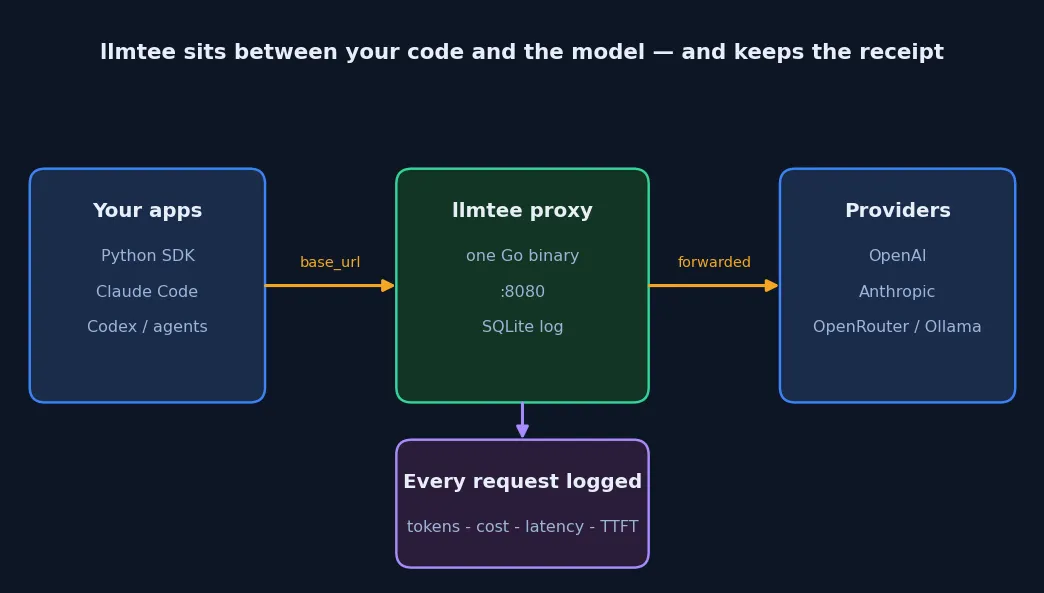
Your LLM bill arrives as a single number at the end of the month, and by then it is too late to do anything about it. The calls that produced it are scattered across SDKs, agents, and scripts, and none of them kept a receipt. llmtee fixes that by sitting in the one place every request already passes through: between your code and the model. Point your client at it instead of the provider, and it forwards each request unchanged while logging the tokens, the cost, the latency, and the time to first token — and it can refuse a request the moment a key's budget is spent.
The project is five days old. Garrit Franke published it on November 8, 2026, and it reached the Hacker News front page on November 13 with a Show HN post titled "Log every LLM call with tokens, cost, latency, and time to first token." At the time of writing it has 3 stars, 21 commits, and one release, v0.1.1, under an Apache 2.0 licence. That is small, and you should know it before you trust it with production traffic. But the reason it is getting attention is the packaging: where Helicone's self-hosted setup is in maintenance mode since March 2026, Langfuse needs a web service, a worker, Postgres, ClickHouse, Redis, and S3, and LiteLLM Proxy needs Postgres for spend tracking, llmtee is one 22 MB Go binary and a SQLite file. There is nothing else to run.
This tutorial runs the whole thing end to end. You will install the v0.1.1 binary, start it, prove the setup with a local stand-in upstream that costs nothing, point a real client at it, read the dashboard, and set a budget that actually blocks a request. Every command in Steps 1–3 and 5–7 was executed while writing this article, and the outputs shown are the real ones. Step 4 shows the real-provider configuration from the official README; the live model calls in that step need a provider key, which this sandbox does not have, and those commands are marked as such.
What you'll need#
- Linux, macOS, or Windows — prebuilt binaries ship for amd64 and arm64. This tutorial used Linux amd64.
- A terminal and about 20 minutes. The download is 8.4 MB; the binary is 22 MB.
- No Docker, no database server, no GPU. The proxy stores everything in a SQLite file it creates itself.
- No account and no API key for Steps 1–3. A small fake upstream stands in for a provider so you can see the logging work without spending anything. A real provider key is only needed for Step 4, and the same setup works with a local Ollama server if you prefer no key at all.
Step 1: Install the binary#
Download v0.1.1 from the releases page and extract it. Pin the version: the project is five days old and moving fast, and every command in this tutorial was verified against 0.1.1.
curl -sL -o llmtee.tar.gz https://github.com/garritfra/llmtee/releases/download/v0.1.1/llmtee_0.1.1_linux_amd64.tar.gz
tar xzf llmtee.tar.gz
./llmtee version
The last command prints llmtee 0.1.1 (9503b0e). The tarball also contains the README, the licence, and an examples/ folder with a sample YAML config and a sample prices file. If you are on macOS or Windows, or on arm64, take the matching asset from the same release page — the README lists Linux, macOS, and Windows builds on both architectures. There is a Docker image too, but you do not need it: the binary is the whole product.
Step 2: Start it and check health#
llmtee reads its settings from environment variables. Three matter for a first run: an admin password for the dashboard, a database location, and — for the free trial in Step 3 — a stand-in upstream. Start it like this:
LLMTEE_ADMIN_PASSWORD='choose-a-strong-password' \
  DATABASE_URL='sqlite://llmtee.db' \
  ./llmtee
The startup log tells you exactly what it loaded:
llmtee ready listen=:8080 database=sqlite prices=3690 log_bodies=true body_retention_days=30 keys=0Two details in that line are worth noting. prices=3690 is the embedded price table — 3,690 model prices from LiteLLM's table, baked into the binary and refreshed weekly at build time. log_bodies=true is the default: request and response bodies are stored for 30 days so you can inspect the exact prompt behind a cost. The server warns about this at startup, and it should: bodies can contain sensitive data. Turn it off with LLMTEE_LOG_BODIES=false if you do not want prompts on disk.
Check the health endpoint in a second terminal:
curl -s http://127.0.0.1:8080/healthzIt answers {"status":"ok"}. Keep this endpoint in mind: llmtee sits in your request path, so if it goes down, your LLM calls fail. Monitor /healthz and keep the provider's direct base URL at hand as a fallback.
Step 3: Try it free with a fake upstream#
Before you hand llmtee a real API key, prove the logging works against a stand-in. Save the following as fake_upstream.py. It answers like OpenAI's chat completions endpoint, always returning the same reply with fixed usage: 100 prompt tokens and 50 completion tokens for gpt-4o-mini.
import json
from http.server import BaseHTTPRequestHandler, ThreadingHTTPServer

USAGE = {"prompt_tokens": 100, "completion_tokens": 50, "total_tokens": 150}

class H(BaseHTTPRequestHandler):
    def log_message(self, *a):
        pass

    def do_POST(self):
        n = int(self.headers.get("Content-Length") or 0)
        body = json.loads(self.rfile.read(n) or b"{}")
        payload = {
            "id": "chatcmpl-fake123", "object": "chat.completion",
            "created": 1793000000, "model": body.get("model", "gpt-4o-mini"),
            "choices": [{"index": 0, "message": {"role": "assistant",
                "content": "The sky is blue because air molecules scatter short blue wavelengths."},
                "finish_reason": "stop"}],
            "usage": USAGE,
        }
        data = json.dumps(payload).encode()
        self.send_response(200)
        self.send_header("Content-Type", "application/json")
        self.send_header("Content-Length", str(len(data)))
        self.end_headers()
        self.wfile.write(data)

ThreadingHTTPServer(("127.0.0.1", 18001), H).serve_forever()
Start it, then restart llmtee with the fake registered as an upstream. Custom upstreams are served at /u/<name>/v1/...:
python3 fake_upstream.py &
LLMTEE_ADMIN_PASSWORD='choose-a-strong-password' \
  DATABASE_URL='sqlite://llmtee.db' \
  LLMTEE_UPSTREAM_FAKE='http://127.0.0.1:18001' \
  LLMTEE_UPSTREAM_FAKE_API_KEY='fake-key-for-verify' \
  ./llmtee
Now send a request through the proxy with curl, exactly as a client would:
curl -s http://127.0.0.1:8080/u/fake/v1/chat/completions \
  -H 'Content-Type: application/json' \
  -H 'Authorization: Bearer fake-provider-key-1' \
  -d '{"model": "gpt-4o-mini", "messages": [{"role": "user", "content": "Why is the sky blue?"}]}'
The reply comes back byte-identical to what the upstream sent, including the usage block. The interesting part is what llmtee recorded. Query the SQLite file it created:
sqlite3 llmtee.db "SELECT model, status, streamed, tokens_in, tokens_out, cost_usd, latency_ms, ttft_ms FROM requests;"This tutorial's run produced:
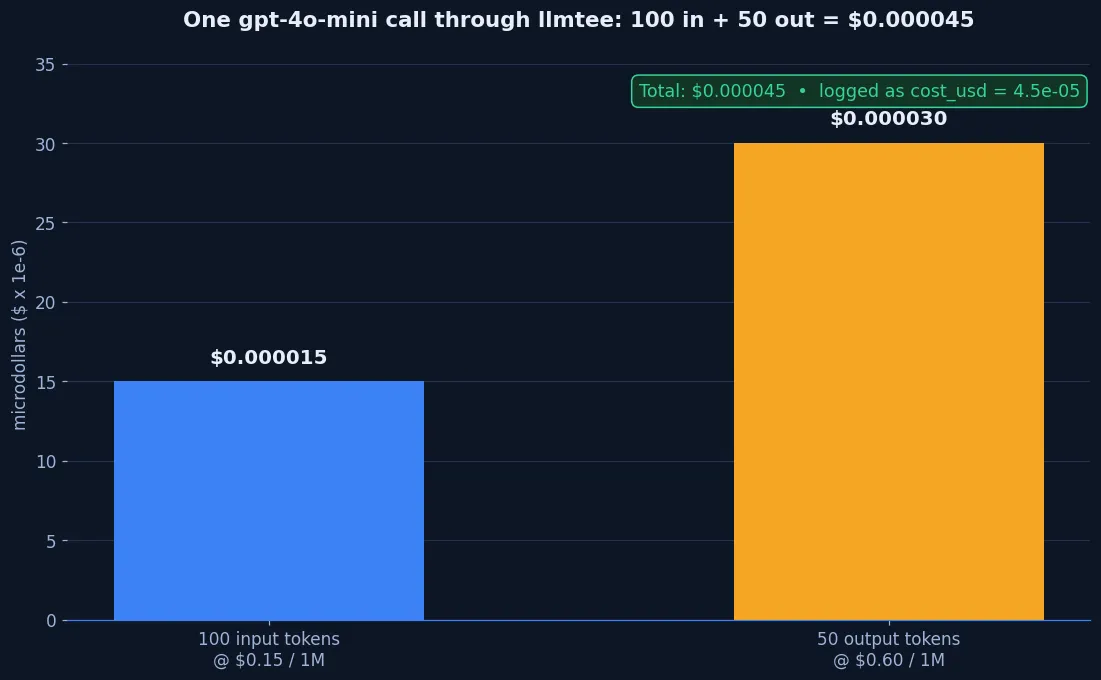
gpt-4o-mini|200|0|100|50|4.5e-05|8|That row is the whole product in miniature: model, HTTP status, token counts, cost, and latency. The cost is exact — 100 input tokens at $0.15 per million plus 50 output tokens at $0.60 per million is $0.000015 + $0.00003 = $0.000045, and llmtee logged 4.5e-05. A streamed request through the same proxy logged the same tokens and cost, plus ttft_ms=2 — time to first token, which only exists for streamed responses. Non-streamed rows leave it empty.
The same flow works with the real OpenAI SDK. Point it at the proxy instead of the provider — one line changes, nothing else:
from openai import OpenAI

client = OpenAI(base_url="http://127.0.0.1:8080/u/fake/v1", api_key="fake-provider-key-1")
response = client.chat.completions.create(
    model="gpt-4o-mini",
    messages=[{"role": "user", "content": "Why is the sky blue?"}],
)
print(response.choices[0].message.content)
print(response.usage.prompt_tokens, response.usage.completion_tokens)
Against the fake upstream this printed the canned sky-blue reply and 100 50 150, and the request appeared in the database with the same $0.000045 cost. The Anthropic side works the same way: a request to /anthropic/v1/messages with model claude-haiku-4-5-20251001 and usage of 80 input / 40 output tokens logged a cost of $0.00028 — $1 per million in, $5 per million out.
Step 4: Point a real client at it#
Once the logging is proven, swap the fake for a real provider. llmtee has built-in upstreams for OpenAI, Anthropic, and OpenRouter, and you can add any OpenAI-compatible endpoint as a custom upstream. The client side is a base-URL change — no code changes, no SDK swaps. The following is from the official README; the live model calls need a provider key, which this sandbox does not have, so run these with your own key.
export OPENAI_BASE_URL=http://localhost:8080/openai/v1
export ANTHROPIC_BASE_URL=http://localhost:8080/anthropic
With those set, the OpenAI and Anthropic SDKs, Claude Code, Codex, and automation tools send their traffic through llmtee, which forwards your provider key unchanged. The proxy's own Setup page in the web UI shows the same instructions for Claude Code, Codex, opencode, and Pi, with your instance's base URL filled in. For a local model with no key at all, add an Ollama upstream instead:
LLMTEE_UPSTREAM_OLLAMA=http://localhost:11434 ./llmteeThat serves Ollama at http://localhost:8080/u/ollama/v1, so local models show up in the same dashboard as hosted ones. A vLLM server or Groq works the same way — the sample config in the tarball shows both.
Step 5: Read the dashboard#
Open http://localhost:8080 and sign in with the admin password you set. The dashboard shows an Overview with spend today (UTC), a cost-per-day chart, and breakdowns by model, by key, by user, and by upstream, above a filterable request list where each row opens to the full request and response bodies.
If you have no real traffic yet, seed the dashboard with demo data — 50 requests over 7 days is enough to see the charts fill in:
LLMTEE_ADMIN_PASSWORD='choose-a-strong-password' \
  DATABASE_URL='sqlite://llmtee.db' \
  ./llmtee seed --days 7 --requests 50
This tutorial's seed run reported seeded 50 requests over 7 days and wrote 50 rows totalling $0.78515027, using realistic models. Delete the seeded rows by removing the database file before you start logging real traffic, or just point the server at a fresh file.
Step 6: Budgets and keys#
Logging tells you what you spent. Budgets stop the spending. llmtee has two kinds of key. A provider key is your OpenAI or Anthropic key, forwarded as usual; llmtee stores only its SHA-256 hash. A llmtee key replaces the provider key on the client side, and llmtee swaps in the real key from its environment — so teammates and agents never see it. Create one with a daily budget:
LLMTEE_ADMIN_PASSWORD='choose-a-strong-password' \
  DATABASE_URL='sqlite://llmtee.db' \
  ./llmtee keys create agent-team --budget-day 5 --budget-month 60
It prints a secret like llmtee-SbP5Li4EVk2z9FX3MOClIOPt7U5rWaBD and warns you to store it now — it is not shown again. Hand that key to the client instead of the provider key.
One gotcha, found the hard way while writing this tutorial: create keys before starting the server, or restart after adding one. llmtee loads keys into memory at startup — the startup log reports how many it found — and a key created while the server is running is rejected with 401 {"code":"authentication_error","message":"llmtee: invalid proxy key"} until the next restart. That is a rough edge in a five-day-old tool, and it is the kind of thing that wastes an evening if you do not know it.
When a key's budget is spent, the next request is refused with a 429 in the provider's own error format, and the refusal itself is logged. This tutorial verified it with a $0.00001 daily budget: the first request completed and cost $0.000045, and the second came back:
{"error": {"code": "budget_exceeded", "message": "llmtee: daily budget of $0.00 exceeded for this key (spent $0.0000); resets at the start of the next day (UTC)", "type": "budget_exceeded"}}Two honest details in that message. First, the request that crosses the limit completes — llmtee only knows the cost after the response arrives — so a key can overshoot by one request. Second, limits reset at the start of the next UTC day or month. To give an existing provider key a name and a budget without rotating it, use llmtee keys label NAME PROVIDER_KEY --budget-day 5 instead, and to attribute requests to a key alongside a provider key, send it in an Llmtee-Key header. Set LLMTEE_REQUIRE_PROXY_KEY=true to reject any request without a valid llmtee key.
Step 7: Export, metrics, and MCP#
The dashboard is not the only way out of the data. Export the request log as CSV:
LLMTEE_ADMIN_PASSWORD='choose-a-strong-password' \
  DATABASE_URL='sqlite://llmtee.db' \
  ./llmtee export --range 30d > requests.csv
This tutorial's export produced a header of id,time,upstream,path,model,key_id,key_name,user_id,session_id,status,streamed,tokens_in,tokens_out,... with one row per request — enough to build any report the dashboard does not. Prometheus metrics live at /metrics behind the admin password as a bearer token: an unauthenticated request gets a 401, and Authorization: Bearer <admin password> returns request, token, and cost counters, plus duration, time to first token, budget rejections, and dropped events. An MCP server at /mcp exposes get_spend, list_requests, and get_request — add it to Claude Code with the command from the README:
claude mcp add --transport http llmtee http://localhost:8080/mcp --header "Authorization: Bearer $LLMTEE_ADMIN_PASSWORD"That command is quoted from the README and was not executed here; the metrics endpoint it guards was verified directly. For a persistent setup, move the settings into a YAML config file — the tarball's examples/config.yaml shows the full shape, including alert webhooks at 80% and 100% of budget and a global daily and monthly cap — and run it as a service. A systemd unit and a Caddy-with-TLS example ship in the repo's docs.
When to use llmtee vs alternatives#
llmtee is the right tool when the question is "what did we spend, on what, and who spent it" and you want the answer with one binary and no extra services. The comparison in its own README is unusually candid about where it stops:
| Tool | What you run | Hard budgets | Best for |
|---|---|---|---|
| llmtee | 1 binary + SQLite | Yes, per key | Cost logging and caps for individuals and small teams |
| LiteLLM Proxy | Proxy + Postgres for spend tracking | Yes | Routing, fallbacks, and 100+ providers as a gateway |
| Helicone (self-hosted) | Several containers | Cost-based rate limits | Logging and analytics — in maintenance mode since March 2026 |
| Langfuse | Web, worker, Postgres, ClickHouse, Redis, S3 | No | Evals, prompt management, and tracing |
Use LiteLLM when you need routing, fallbacks, or load balancing across providers — llmtee deliberately has none of those, and its README says so. Use Langfuse when you need evals and prompt management. Use Agent Console, covered on this blog in October, when you want a local-first dashboard over your coding agents' token usage without putting a proxy in the request path at all. Use llmtee when you want the smallest possible thing that answers "what did that cost" and stops the bleeding when a key runs away — an agent in a loop, a shared team key, a script you forgot was running.
Limits and gotchas#
- It is five days old. One release, 21 commits, 3 stars. The core loop is verified and works, but expect rough edges — the keys-at-startup behaviour above is one — and configuration may still change between minor versions. The project says so itself: the current release is 0.x.
- It only logs and caps. No evals, no prompt management, no playground, no response caching, no load balancing, no fallbacks, no SSO, no multi-tenancy. If a feature would need a second service, llmtee skips it or offers an export instead.
- Native Gemini, Azure OpenAI, and AWS Bedrock APIs are not supported yet. Their OpenAI-compatible endpoints work; the native ones do not.
- Costs are as accurate as the price table. Prices come from LiteLLM's table embedded at build time. It does not model batch, flex, or priority pricing, and it never estimates tokens — a response with no usage is marked "usage unknown."
- Body logging is on by default. Request and response bodies are stored with 30-day retention. Turn it off with
LLMTEE_LOG_BODIES=false, or per request with theLlmtee-Omit-*headers, if prompts must not sit on disk.LLMTEE_REDACT_FIELDSreplaces named JSON fields before storage. - It is a single point of failure. llmtee sits in the request path, and if it is down your LLM calls fail. Monitor
/healthz, and keep the provider's direct base URL as a fallback. - An upstream outage becomes a 502. When the upstream was down during verification, the proxy answered 502 and logged the failed request with no tokens. That is the correct behaviour, but do not be surprised by it.
The takeaway#
llmtee does one job and does it with the smallest possible footprint: a single binary that forwards your LLM traffic unchanged, logs every request with tokens, cost, latency, and time to first token, and refuses requests once a key's budget is spent. The verification in this tutorial was done without spending a cent — a local stand-in upstream, an SDK pointed at the proxy, and a SQLite query — and the numbers came out exact: $0.000045 for a 100-in, 50-out gpt-4o-mini call, $0.00028 for an 80-in, 40-out Claude Haiku call, and a 429 the moment a $0.00001 budget was crossed.
If your LLM spend is a monthly surprise, install it, point one client at it, and look at the dashboard after a day. The surprise is usually not the total. It is which key, which model, and which agent produced it — and that is exactly what llmtee shows you.