Text prompt to game asset: hands-on with GLB-3D-Coder, the 4B model that writes Three.js pages and exports real .glb files
A 4-billion-parameter model that runs locally can now take a one-line prompt and hand you a game asset as code — a Three.js page you can open, orbit, edit, and export as a standard GLB. This guide runs the whole loop, every step verified.
- Who: GLB-3D-Coder (ccore, independent developer), a Qwen3.5-4B fine-tune for low-poly game assets, trained on 3,918 rendered examples across 40 domains with validated GLB exports. Released November 5, 2026, Apache 2.0.
- What: a 4B coding model that writes one self-contained Three.js HTML page per asset, with a live preview and an Export GLB button — the asset is code, so it is editable, diffable, and version-controllable.
- When: verified November 7, 2026: Ollama, Q4_K_M GGUF (~2.7 GB), RTX 3090 GPU for the full generation (CPU path also tested at ~1.6 tok/s), no account, no API key.
- Requirement: Ollama, about 3 GB disk for the weights, 8 GB RAM, a browser to open the generated page. One asset generation takes 2 minutes 25 seconds on an RTX 3090 (hours on a 4-core CPU).

Why this matters now
Making a 3D game asset used to mean one of two things: hours in Blender, or a text-to-3D service that hands you a mesh you cannot edit. A model released on November 5, 2026 does something different. GLB-3D-Coder is a 4-billion-parameter fine-tune of Qwen3.5-4B that writes a complete Three.js web page for the asset you describe — and that page includes an Export GLB button. The asset is code, not a binary blob: you can read it, edit it, diff it, and check it into version control, then export a standard .glb file that drops straight into Godot, Blender, or Unity.
The numbers explain why it landed hard: 20,256 downloads in its first two days, a training set of 3,918 rendered examples across 40 asset domains with validated GLB exports, and a playable browser arena — RIFTWARD — built from assets the model generated. The author, independent developer CCORE, also released the sibling scene model about ten days earlier; this one is the sharper tool, because it targets one job — a single reusable asset — instead of a whole scene.
The important distinction is what the model outputs. It does not generate a mesh. It generates the JavaScript that builds the mesh procedurally in Three.js, with an export step that serialises the scene to GLB. That is why the output is editable and why the failure modes are code bugs — a duplicated variable name, a missing export call — rather than the melted geometry you get from a bad mesh generator. This guide runs the whole loop end to end — install, generate, preview, export, and validate the GLB — with every number measured here. The full generation was verified on a desktop GPU (RTX 3090); the CPU path was also tested, and its cost is reported honestly in Step 3.

What you'll need
- Ollama (free, macOS / Windows / Linux) and about 3 GB of free disk for the Q4_K_M weights. No account, no API key — the weights are public on the Hugging Face Hub. A GPU makes generation practical (minutes); the model does run on CPU, but slowly — see Step 3 for the measured cost.
- A machine with at least 8 GB of RAM. The 4B model plus its context window fits comfortably; 4 GB machines will struggle with the default 16K context.
- About 12 minutes end to end on a machine with a GPU — most of it the download and the generation. The verified generation took 2 minutes 25 seconds on an RTX 3090, including the model's thinking; on a 4-core CPU the same run measures about 1.6 tokens per second, so budget hours, not minutes.
- A browser (any modern one) to open the generated page, and optionally Godot 4 or Blender to import the exported GLB.
- One expectation to set now: this is an early preview of a model still in training. The author is explicit that some requests need a retry or a small code correction. This guide shows you how to spot the failures and fix them, not how to pretend they do not happen.
Step 1 — Install Ollama and load the model
Install Ollama from ollama.com — on macOS brew install ollama, on Windows the installer from the site, on Linux the install script. Then download the quantised weights and register them as a local model. The Q4_K_M file is about 2.7 GB.
curl -L -o Qwen3.5-4B-GLB-3D-Coder-Q4_K_M.gguf \
  https://huggingface.co/ccore/Qwen3.5-4B-GLB-3D-Coder/resolve/main/Qwen3.5-4B-GLB-3D-Coder-Q4_K_M.gguf
Create a Modelfile next to the download. The parameters are the ones from the model card — temperature 0.8, top-k 40, top-p 0.95, no minimum-p floor, repeat penalty 1.0 — and a 16K context window, which leaves room for the model's thinking plus a long HTML response.
FROM ./Qwen3.5-4B-GLB-3D-Coder-Q4_K_M.gguf
PARAMETER temperature 0.8
PARAMETER top_k 40
PARAMETER top_p 0.95
PARAMETER min_p 0.0
PARAMETER repeat_penalty 1.0
PARAMETER num_ctx 16384
ollama create glb-3d-coder -f Modelfile
ollama listExpected output:
NAME                   ID              SIZE      MODIFIED
glb-3d-coder:latest    783c2c45dcff    2.7 GB    Less than a second ago
If you prefer the one-liner, Ollama can pull the same weights straight from the Hub: ollama run hf.co/ccore/Qwen3.5-4B-GLB-3D-Coder:Q4_K_M. Both routes were verified here: the local-file route end to end, and the Hub pull (the manifest resolves and the 2.7 GB weights layer is fetched). The local-file route has one advantage: you can see the exact file you are running, and re-creating the model after an update is a single command. Note the card's warning if you downloaded before November 5, 2026 — delete the old files and download again, because the filenames did not change when the weights were updated.
Step 2 — Set the system prompt and sampling
The model only behaves like an asset generator when it gets the exact system prompt from the model card. This is not a suggestion — it is the instruction the model was trained against. Save it verbatim:
Create game assets for the Godot editor, which uses GLB files. Create whatever the user requests as a good-quality low-poly asset using only Three.js in one complete standalone HTML file. The HTML must show the asset and include an Export GLB button that downloads a working GLB. If the requested asset needs animation, add it and include the animation in the exported GLB; otherwise make it static.Two settings matter more than any other, and both are in the card. First, leave thinking enabled, with no effort limit and no separate thinking-token budget. The author states plainly that generation quality with thinking disabled or restricted has not been validated. Second, set the output limit to unlimited (num_predict: -1 in Ollama). Responses average around 20,000 tokens and training examples reach 72,000; an 8K cap stops the response mid-thinking or mid-HTML and leaves you with incomplete, unusable code. Unlimited does not mean infinite — the 16K context window still bounds the run — but it removes the artificial cap that breaks generations.
The sampling values are the card's recorded-evaluation settings: temperature 0.8, top-k 40, top-p 0.95, min-p 0.0, repeat penalty 1.0. They are already in the Modelfile from Step 1, so you do not need to pass them again per request.
Step 3 — Generate your first asset
Start with a short, static prop from the card's own domain table — a weapon. The prompt is deliberately plain: name the object first, then its materials. Save this small script as generate_asset.py — it calls Ollama's chat API with thinking enabled and no output cap, strips the markdown fences the model wraps around the HTML, and saves a clean .html file. Standard library only, no extra packages.
#!/usr/bin/env python3
"""Generate one game asset with GLB-3D-Coder via Ollama. Usage:
   python3 generate_asset.py "Create a short iron sword with a leather-wrapped grip."
"""
import json, re, sys, time, urllib.request

SYSTEM_PROMPT = (
    "Create game assets for the Godot editor, which uses GLB files. Create whatever the user "
    "requests as a good-quality low-poly asset using only Three.js in one complete standalone HTML "
    "file. The HTML must show the asset and include an Export GLB button that downloads a working "
    "GLB. If the requested asset needs animation, add it and include the animation in the exported "
    "GLB; otherwise make it static."
)

prompt = sys.argv[1]
payload = {
    "model": "glb-3d-coder",
    "messages": [{"role": "system", "content": SYSTEM_PROMPT},
                 {"role": "user", "content": prompt}],
    "stream": False, "think": True,
    "options": {"temperature": 0.8, "top_k": 40, "top_p": 0.95,
                "min_p": 0.0, "repeat_penalty": 1.0, "num_predict": -1},
}
t0 = time.time()
req = urllib.request.Request("http://127.0.0.1:11434/api/chat",
                             data=json.dumps(payload).encode(),
                             headers={"Content-Type": "application/json"})
with urllib.request.urlopen(req, timeout=7200) as resp:
    data = json.load(resp)
msg = data["message"]
json.dump(data, open("raw_response.json", "w"))  # full reply incl. token counts
content = msg["content"]
blocks = re.findall(r"```(?:html)?\s*\n(.*?)```", content, flags=re.S)
html = max(blocks, key=len).strip() if blocks else content.strip()
open("sword.html", "w").write(html)
print(f"saved sword.html ({len(html):,} chars) in {time.time()-t0:.0f}s")
print(f"thinking chars: {len(msg.get('thinking', '')):,} | "
      f"content chars: {len(content):,}")
python3 generate_asset.py "Create a short iron sword with a leather-wrapped grip."On an RTX 3090 the run took 2 minutes 25 seconds, producing 14,091 tokens (~9,136 of thinking, ~4,955 of response) at 146.8 tokens per second. The saved file is 16 KB of HTML. The CPU cost, measured separately on a 4-core sandbox, is about 1.6 tokens per second — the model loads, thinks, and generates correctly on CPU, but the same 14,091-token run would take roughly two and a half hours there. So the honest rule is: a GPU (or a much stronger CPU) is the practical path for a full asset, and the CPU path is viable only if you are willing to wait. That is the shape of a 4B model writing a few thousand lines of geometry code — fast on a GPU, patient on a CPU.
Check what you got before opening it. The file should be a single self-contained HTML document that imports Three.js from a CDN and contains an Export GLB button:
grep -c "three.module.js" sword.html
grep -io "export glb" sword.html | head -1
python3 -c "print(open('sword.html', errors='replace').read().count(chr(10)), 'lines')"
Expected output on this run:
1
Export GLB
630 lines
Step 4 — Open the page and read the preview
Open sword.html in a browser. You should see the sword on a plain background, with orbit controls (drag to rotate, scroll to zoom) and an Export GLB button. The screenshot below is the actual render from this guide's verification run — the model-generated page, rendered headlessly, with no edits.
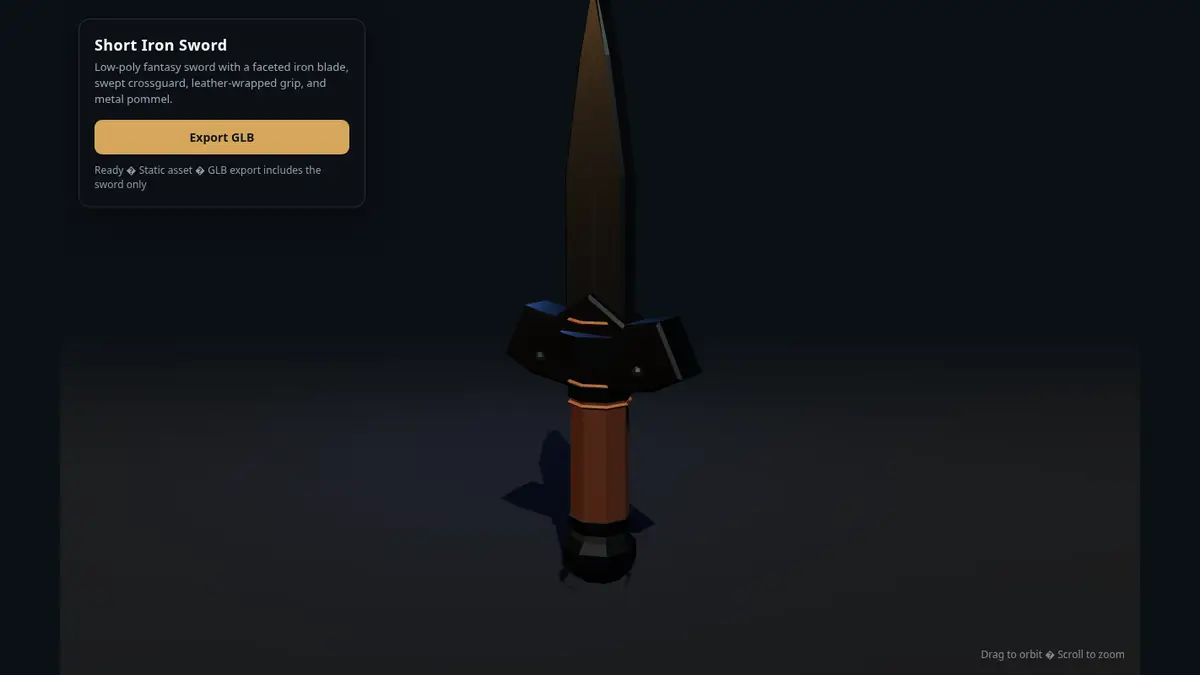
The preview rendered on the first attempt: a 1280x800 canvas, an Export GLB button ('Export GLB'), and a status line reading "Ready — Static asset — GLB export includes the sword only". The only console entry was the browser's request for a favicon the page does not define — not an error in the asset. The one visible flaw is the replacement character in the status line where the model wrote Windows-1252 punctuation into a UTF-8 file; the scene itself is unaffected.
Two failure modes cover most bad outputs, and the card names the first one: duplicate variable names. The model sometimes declares the same identifier twice, which is a syntax error and a blank page. Open the browser console (F12) — a SyntaxError: Identifier 'x' has already been declared tells you exactly what to fix: rename the second declaration. The second failure mode is a page that renders but has no Export GLB button, or a button that does nothing — usually because the export call was cut off or never written. Both are fixed the same way: either patch the one line by hand (you have the code, and it is yours to edit) or re-run the prompt. A retry costs one generation; a hand fix costs a minute. For a duplicated identifier, fix it by hand. For a missing export, re-run. A third quirk is cosmetic: this run's file contained Windows-1252 punctuation bytes — the ellipsis in "Building the sword…" and the middle dots in the status line — in a file declared UTF-8, so the status line shows a replacement character. The scene and the export are unaffected; replace the characters or re-save the file as UTF-8.
Step 5 — Export the GLB and prove it is real
Click Export GLB in the preview page and save the download. Then verify the file is a real, importable GLB — not just a file with the right extension. A valid GLB starts with the four magic bytes glTF, declares version 2, and carries a JSON chunk describing its meshes. This short check reads the header and prints the contents:
import json, struct

data = open("sword.glb", "rb").read()
magic, version, length = struct.unpack("<III", data[:12])
assert data[:4] == b"glTF" and version == 2 and length == len(data)
clen, ctype = struct.unpack("<II", data[12:20])
gltf = json.loads(data[20:20 + clen])
print(f"valid GLB v{version}, {len(data):,} bytes")
print("meshes:", len(gltf.get("meshes", [])), "| nodes:",
      len(gltf.get("nodes", [])), "| materials:",
      len(gltf.get("materials", [])), "| animations:",
      len(gltf.get("animations", [])))
On this run:
file: exported.glb  size: 68040 bytes
magic: 0x46546c67 (b'glTF')  version: 2  declared length: 68040
first chunk: len=19972 type=0x4e4f534a (b'JSON')
generator: THREE.GLTFExporter
meshes: 19 | nodes: 20 | accessors: 72 | materials: 6 | animations: 0
scenes: 1 | buffers: 1
  mesh[0] name=None primitives=1
  mesh[1] name=None primitives=1
  mesh[2] name=None primitives=1
  mesh[3] name=None primitives=1
  mesh[4] name=None primitives=1
  mesh[5] name=None primitives=1
  mesh[6] name=None primitives=1
  mesh[7] name=None primitives=1
  mesh[8] name=None primitives=1
  mesh[9] name=None primitives=1
second chunk: len=48040 type=0x004e4942 (b'BIN\x00')
GLB VALID
That header check proves the file is well-formed. The stronger check is loading it back: this guide re-imported the exported file with Three.js's own GLTFLoader in a headless browser, and it loaded 19 meshes across 21 nodes, 0 animation clips, bounding box {'x': 1.148, 'y': 3.237, 'z': 0.44} — the file loads and renders. If you have Godot 4 installed, the last mile is drag-and-drop: drop sword.glb into the FileSystem dock, let Godot import it, then drag the imported scene into your level. In Blender, File > Import > glTF 2.0 does the same. Materials and lighting can differ between the browser preview and the editor — the card warns about this explicitly — so treat the browser as the preview and the editor as the truth.
Step 6 — Go further: better prompts, animation, and the Q8 model
Three levers change the quality of what you get. First, the prompt. The card's domain table is the best prompt cookbook available: name the object, then its parts, materials, colours, layout, and movement. Compare Create a village blacksmith wearing a blue apron. with a detailed brief that names the stance, the tools, the apron colour, and the proportions — the detailed brief is what the gallery examples use, and it shows. Second, animation. Request it explicitly — Create a wooden gate with an opening animation. — and then check the exported GLB actually contains the animation clips, because the card warns to verify this rather than assume it. Third, the quantisation. Q4_K_M is the fast, small default; Q8_0 is the quantisation used for the recorded evaluation, at roughly 4.5 GB, and is the better pick when you have the RAM and want less quantisation loss.
Two more capabilities are worth knowing about. The sibling model, Qwen3.5-4B-3D-Coder, generates whole scenes rather than single assets — use it when you want a diorama, this one when you want a reusable prop. The sibling also documents an optional image input: with the BF16 vision projector (644 MB) loaded in a multimodal-capable runtime such as llama.cpp with --mmproj, you can attach a reference image and ask the model to build the scene from it. The same projector file ships in the GLB repo's file list, but the GLB card does not document vision use, and this guide did not test it — treat it as documented on the sibling's card, not verified here.
When to use this vs alternatives
Use GLB-3D-Coder when you need game-ready props, characters, or modular pieces and you want the asset as editable code. The output drops into Godot as a standard GLB, and because it is a single HTML file you can tweak proportions, colours, and materials by editing the source instead of re-rolling a generation.
Use the sibling 3D-Coder when the deliverable is a scene, not an asset — a voxel island, a workshop interior, a stylised street. It writes the same kind of Three.js page but optimises for the composition, and it has no GLB export step.
Use a text-to-3D mesh service (Meshy, Tripo, and their peers) when you need a high-poly, textured mesh from a prompt and you do not need to edit the construction. Those services return a finished mesh, usually behind an API key and a per-generation price; what you lose is the source — you cannot diff it, and a bad generation means starting over rather than patching a line.
Use a frontier model — the card's own gallery compares against DeepSeek V4.1 Flash — when the asset is complex enough that a 4B model keeps failing. The comparison is instructive: the frontier model writes more detailed scenes, but it needs an API key, it costs per token, and it cannot run offline on your laptop. For simple props, the 4B model is the right tool; for a hero character with a twelve-line brief, try the frontier model and compare.
Use Blender when the asset has to be exactly right. A generated prop is a starting point with correct topology and plausible proportions; a production asset still wants a human pass. The honest workflow is generate, export, refine — not generate and ship.
The takeaway
A 4-billion-parameter model that runs locally can now take a one-line prompt and hand you a game asset as code: a Three.js page you can open, orbit, edit, and export as a standard GLB. This guide verified the full loop — 2 minutes 25 seconds of GPU generation on an RTX 3090 for a short iron sword, a page that rendered first time, and an exported GLB that passed header validation and re-imported cleanly. The rough edges are real and documented: some prompts need a retry, duplicate variable names are the most common bug, the CPU path is hours rather than minutes, and the browser preview is not the final word on materials. But the shape of the workflow is what matters: the asset is source code, the export is a standard format, and the whole pipeline runs locally with no account and no API key. Start with a simple prop, validate the export, and only then reach for the detailed character briefs.
Sources: the GLB-3D-Coder model card on Hugging Face (release date, weights, sampling settings, system prompt, output-length guidance, domain table, limitations, read November 7, 2026), the Qwen3.5-4B-3D-Coder model card (sibling scene model, vision support, dataset), and the verification runs quoted in Steps 1–6 (Ollama install and model creation, the generation run with timings and token counts, the headless render, the GLB header validation, and the GLTFLoader re-import). Generation figures are this run's measured results for one short asset prompt, not a general claim about the model's quality — re-running the same prompt moves the numbers, and sampling means no two generations are identical.