GLM-5.4 hands-on: run Z.ai's new vision coding model inside Claude Code
Z.ai's flagship coding model can finally see. GLM-5.4 rolled out to every GLM Coding Plan subscriber on November 23 with vision input, a million-token context, and 50% more weekly quota — while costing fewer credits per token than its predecessor. Here's the full setup, verified against Z.ai's own docs.
- Vision is new. GLM-5.3 was a text-only flagship; GLM-5.4 takes images alongside code — screenshots of bugs, UI mockups, whiteboard photos.
- 1M context. Select
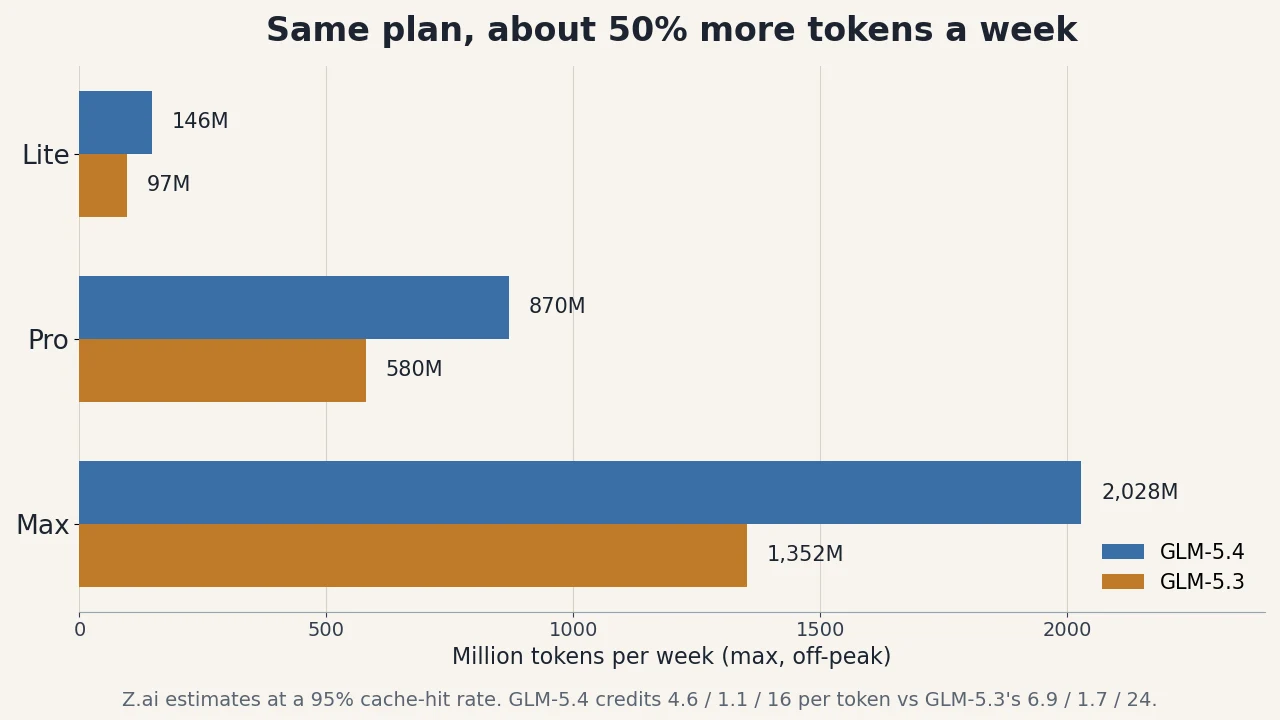
glm-5.4[1m]in Claude Code (glm-5.4elsewhere) and setCLAUDE_CODE_AUTO_COMPACT_WINDOWto 1000000, or sessions compact early. - Cheaper credits. GLM-5.4 costs 4.6 / 1.1 / 16 credits per token against GLM-5.3's 6.9 / 1.7 / 24 — the same plan buys about 50% more tokens a week.
- Two endpoints, not one. Claude Code needs
api.z.ai/api/anthropic; OpenAI-compatible tools useapi.z.ai/api/coding/paas/v4. The wrong one fails, or never draws down your quota. - Cautious, not fast. The first independent benchmark (KingBench 4) scored it 55.3% — 7th of 19, highest open model — but the run took 431 minutes. Best used as a reviewer or planner.
- Not disclosed yet. No official benchmarks, parameter count, pay-as-you-go price, or open-weight schedule as of November 23. A ~700B parameter figure is unconfirmed.

Z.ai's flagship coding model can finally see. GLM-5.4 rolled out to every GLM Coding Plan subscriber on November 23, and it changes the deal in three concrete ways: the flagship now takes images alongside code, it runs with a million-token context window, and weekly quotas rise 50% over GLM-5.3 — while costing fewer credits per token than its predecessor. This tutorial gets you from zero to a working GLM-5.4 setup inside Claude Code, then shows you how to use the two features that actually matter: vision and the million-token window.
Everything below is verified against Z.ai's own developer documentation as it stood on November 23, 2026 — the model-switch guide, the quick-start, the plan overview, and the Vision MCP server docs. Where the docs lag the launch (and in one place they do), this tutorial says so instead of papering over it.
What you'll need#
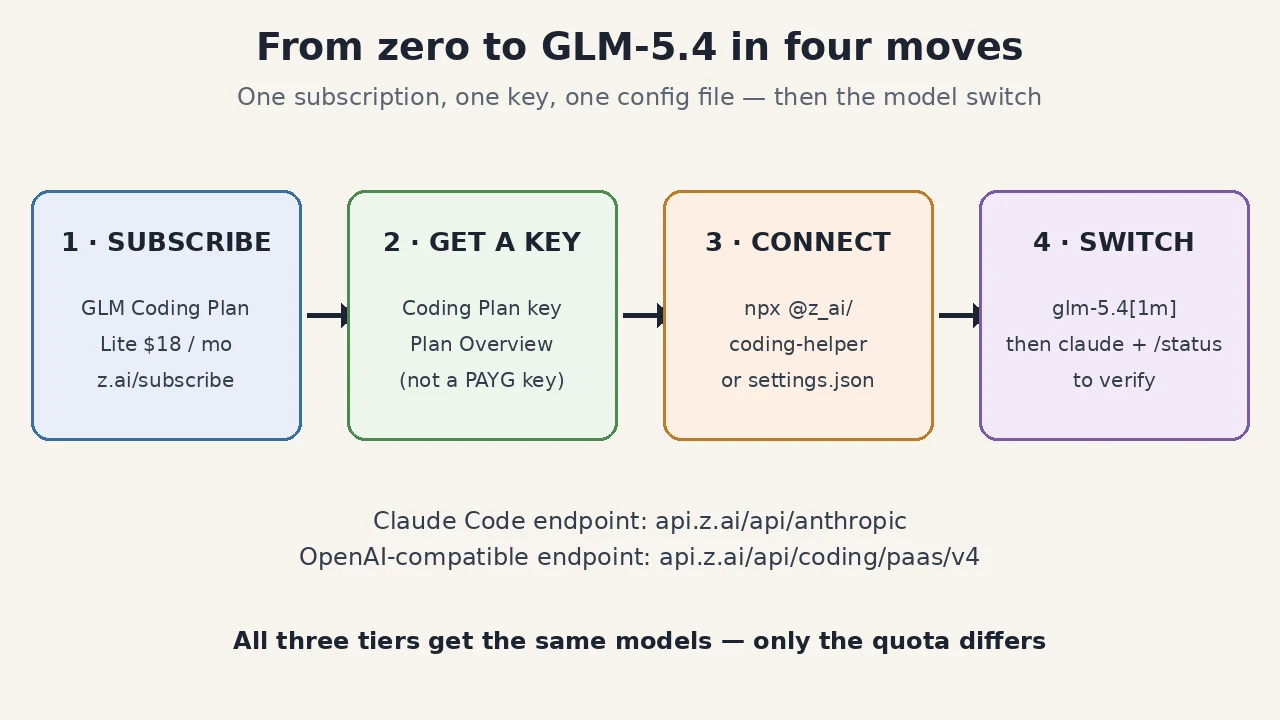
- A GLM Coding Plan subscription. Lite is $18 a month, Pro $80, Max $168. All three tiers get the same models — GLM-5.4, GLM-5.3 and GLM-5.3-Flash — only the quota differs. There is no free tier for the plan, and no pay-as-you-go price for GLM-5.4 has been published yet.
- Node.js 18 or newer for Claude Code. The Vision MCP server in Step 5 needs Node.js 22 or newer.
- Claude Code, installed globally with npm. No Anthropic subscription is needed — the plan replaces Anthropic's backend entirely.
- A project to work on. Any repo with real code will do; the vision and long-context steps work best on something you already know, so you can judge the output.
Budget about 30 minutes for setup and the first task. No GPU, no model download, no Hugging Face account: GLM-5.4 is API-only as of today, with no published open weights.
1. Subscribe and get your Coding Plan key#
Register or log in at z.ai/model-api, then subscribe at z.ai/subscribe. Pick the tier by quota, not by model access — every tier runs GLM-5.4. Lite gives you 2,000 credits per 5 hours and 10,000 per week; Pro gives 12,000 and 60,000; Max gives 28,000 and 140,000. The credit math is in the costing section below, but as a rough guide, Lite covers serious evening-and-weekend use and Pro covers daily professional use.
Once subscribed, create your API key under Personal Coding Plan > Plan Overview (individual plans) or Team Coding Plan > My Plan (team plans), at z.ai/manage-apikey/apikey-list. Copy it once and store it like a password.
The detail that trips people up: Z.ai now manages three key types separately — Individual Plan, Team Plan, and the standard pay-as-you-go model API — and they are not interchangeable. A pay-as-you-go key will not draw down your plan quota, and a plan key will not work against the standard API. If a call fails with an auth error, check which key you pasted before anything else. Z.ai subscriptions are non-refundable once purchased, so start on Lite unless you already know your usage.
2. Install Claude Code and point it at Z.ai#
Install Claude Code globally, then move into your project:
# Install Claude Code (Node.js 18+; macOS users should install Node via nvm
# to avoid permission problems)
npm install -g @anthropic-ai/claude-code

# Navigate to your project
cd your-awesome-project
Now point Claude Code at Z.ai instead of Anthropic. The fastest route is Z.ai's own guided helper, which installs the tool, writes the config, and sets up the MCP servers for you:
npx @z_ai/coding-helperFollow the on-screen prompts and paste your Coding Plan key when asked. The helper is the route Z.ai recommends, and it removes the one real footgun in this setup: the endpoint. Claude Code speaks the Anthropic protocol, so it needs the Anthropic-compatible endpoint, https://api.z.ai/api/anthropic — not the OpenAI-compatible one. Paste the wrong endpoint and the tool either fails opaquely or, worse, works without drawing down your plan quota.
If you prefer to wire it by hand, the three endpoints are:
| Protocol | Base URL | Used by |
|---|---|---|
| Anthropic Messages | https://api.z.ai/api/anthropic | Claude Code, Goose |
| OpenAI Chat Completions | https://api.z.ai/api/coding/paas/v4 | Cline, Roo Code, Kilo Code, OpenAI clients |
| OpenAI Responses | https://api.z.ai/api/v1 | Codex |
On first launch, Claude Code asks whether to use your API key — say yes — then asks for permission to access the files in your folder. Grant it. You are now running Claude Code with GLM as the engine, with the same terminal UI, tools, and permission system as the Anthropic version.
3. Switch to GLM-5.4[1m] and verify it#
Depending on when you set up, your config may still point at GLM-5.3-Flash — Z.ai's Claude Code tool page still lists it as the default, and the model-switch page is the newer authority. Set the model explicitly. Open ~/.claude/settings.json and add or replace the env block:
{
  "env": {
    "CLAUDE_CODE_AUTO_COMPACT_WINDOW": "1000000",
    "ANTHROPIC_DEFAULT_HAIKU_MODEL": "glm-5.4[1m]",
    "ANTHROPIC_DEFAULT_SONNET_MODEL": "glm-5.4[1m]",
    "ANTHROPIC_DEFAULT_OPUS_MODEL": "glm-5.4[1m]"
  }
}
Do not replace the whole file if it already has other fields — only add or update these keys. The three model slots all take the same value because GLM-5.4 is a single model; the Haiku/Sonnet/Opus split is Claude Code's way of asking for fast, standard, and heavy work, and Z.ai maps all three to the flagship. The [1m] suffix selects the million-token variant, and CLAUDE_CODE_AUTO_COMPACT_WINDOW tells Claude Code to compact the conversation at a million tokens instead of its much smaller default. Without that line, the long context is available but the session still compacts early.
Verify the switch before doing real work:
claudeThen type /status inside the session and check two things: the settings source shows your ~/.claude/settings.json, and the model shows glm-5.4 or glm-5.4[1m]. If the model still shows a 5.3 variant, close every Claude Code window, open a fresh terminal, and relaunch — a stale session is the usual cause. If Claude Code reports that the model with the [1m] suffix does not exist, upgrade Claude Code to the latest version (claude update; Z.ai has verified compatibility with 2.0.14) and try again.
4. Your first real task#
Start with something small and checkable, so you learn the model's character before trusting it with anything big. Z.ai's own quick-start suggests a login form; use it as the shakedown task:
Please create a React component containing a user login formThen, in the same session, ask for the two things that separate a demo from a deliverable:
Now add validation for the email and password fields, and write a test
that covers the empty-email, invalid-email, and wrong-password cases.
Run the tests and fix anything that fails.
Read the diff before accepting it — this is the habit the whole tutorial assumes. Then try the second shape of real work, debugging, with a concrete error instead of a vague complaint:
My API request returns a 404 error. Please help me check the code.Two things to notice on this first run. First, GLM-5.4 is thorough to a fault: the first independent benchmark run, KingBench 4, scored it 55.3% — seventh of 19 models, and the highest-placed open model — but the run took 431 minutes and 1,128 steps, against 109 minutes for Gemini 4 Neon, burning about 1.04 million tokens. The benchmarker called it "the most cautious model I have ever used": it checks and re-checks its work and catches bugs and security flaws other models miss. Expect longer, more deliberate sessions than you get from a faster model, and treat that as a feature when the work is a review or a plan, not a race. Second, the model defaults to maximum thinking effort, which is the next step's subject.
5. Use the vision: screenshots to code#
Vision is the headline change: GLM-5.3 shipped as a text-only flagship while its lighter sibling already accepted images, so a screenshot of a bug, a sketch of an interface, or a photo of a whiteboard had nowhere to go. GLM-5.4 closes that gap, and there are two ways to use it.
The direct way. In Claude Code, paste or attach the image and describe what you want. A broken layout is the canonical case: take a screenshot of the page, save it into your project directory, and ask:
This screenshot shows our checkout page on a 390px-wide phone. The
payment button overlaps the order summary. Find the CSS causing it and
fix it, then tell me what changed and why.
The MCP way. The Coding Plan also ships a Vision MCP Server — an exclusive local MCP server that gives any MCP-compatible client seven vision tools: ui_to_artifact (turn UI screenshots into code, prompts, or specs), extract_text_from_screenshot, diagnose_error_screenshot, understand_technical_diagram, analyze_data_visualization, ui_diff_check (compare two UI shots for drift), and image_analysis, plus video_analysis for local or remote clips up to 8 MB in MP4, MOV, or M4V. Install it with one command (Node.js 22 or newer required):
claude mcp add -s user zai-mcp-server --env Z_AI_API_KEY= Z_AI_MODE=ZAI Replace the placeholder with your Coding Plan key. If you already have an older version installed, clear the npx cache or append @latest to @z_ai/mcp-server to force the newest version — the docs call out version 0.1.2 or newer for the current vision capability.
One quirk worth knowing: in Claude Code, pasting an image directly into the client does not call the MCP server — the client transcodes the image and calls the model interface directly. The documented best practice is to place the image in a local directory and invoke the server by name or path in the conversation, for example What does demo.png describe? or, for the screenshot-to-code flow, Turn login-mock.png into a React component using ui_to_artifact. The MCP tools also cost credits — each call is charged at the MCP output multiplier — so prefer the direct paste for one-off looks and the MCP tools for repeatable jobs like UI diff checks and error diagnosis.
6. Work the million-token context#
The [1m] variant exists for one job: holding a whole repository in a single session. Use it for the tasks that used to force you to paste files in by hand:
Map this codebase for me: list every module, what it depends on, and
which three files I would need to change to add a new payment provider.
Do not edit anything yet — just the map.
Then keep the same session going and ask the follow-up that only works with the full context loaded:
Now implement the new payment provider following the pattern you found,
and show me the exact places where the existing code assumes there is
only one provider.
A million-token window only helps if the model can find what matters inside it, and long-context retrieval is exactly where GLM-5.4 is least proven — there are no official benchmarks yet, and the KingBench run suggests the model compensates for uncertainty by re-checking its work, which is slow and token-hungry at this scale. Two habits keep it honest: ask for the map before the implementation, so you can see what it actually found, and keep the auto-compact window at 1,000,000 (Step 3) so a long session does not silently summarize away the context you loaded.
7. Dial the effort with /effort#
GLM-5.4 defaults to maximum thinking effort inside Claude Code — deep reasoning on every request, which is why the benchmark runs were so slow. Type /effort in a session to switch levels. The mapping, from Z.ai's docs:
| What you set | Actual level | When to use it |
|---|---|---|
| Default (nothing set) | max | Complex features, architecture, security review |
reasoning_effort medium / high | high | Ordinary feature work — the balance point |
reasoning_effort minimal / light / low | low | Trivial edits, renames, formatting |
| Thinking disabled | low | Still performs lightweight thinking; not a different model |
The independent KingBench run found High to be the balance point for this model, and its caution has a sharp edge at the top end: on High and Max settings, one security test hit a 180-second timeout, against 95 seconds on Medium. Practical rule: leave max on for planning, reviews, and anything you cannot easily verify yourself; drop to high for the bulk of feature work; drop to low only for mechanical edits where the diff is trivially checkable. Explicit effort beats the thinking toggle, which beats the default — so set it per task, not once and forever.
8. Call GLM-5.4 from Python#
Not every job belongs in an agent harness. For scripts, batch jobs, and your own tooling, call the model directly through the OpenAI-compatible coding endpoint — the same endpoint Cline uses. The pattern is Z.ai's documented OpenAI SDK pattern with the new model name:
from openai import OpenAI

client = OpenAI(
    base_url="https://api.z.ai/api/coding/paas/v4",
    api_key="YOUR_CODING_PLAN_KEY",  # Coding Plan key, not a pay-as-you-go key
)

response = client.chat.completions.create(
    model="glm-5.4",
    messages=[
        {"role": "user", "content": "Write a Python function that parses a CSV of "
         "server logs and returns the five most frequent 5xx error paths."}
    ],
)
print(response.choices[0].message.content)
Vision works the same way — the chat-completion API accepts multimodal input, so pass the image as a base64 data URL alongside the text:
import base64
from openai import OpenAI

client = OpenAI(
    base_url="https://api.z.ai/api/coding/paas/v4",
    api_key="YOUR_CODING_PLAN_KEY",
)

with open("broken-layout.png", "rb") as f:
    image_b64 = base64.b64encode(f.read()).decode()

response = client.chat.completions.create(
    model="glm-5.4",
    messages=[{
        "role": "user",
        "content": [
            {"type": "text", "text": "What is wrong with this page layout, "
             "and which CSS rule causes it?"},
            {"type": "image_url", "image_url": {
                "url": f"data:image/png;base64,{image_b64}"}},
        ],
    }],
)
print(response.choices[0].message.content)
Keep the key out of the code — read it from an environment variable in anything you commit. And remember the key-type rule from Step 1: this endpoint expects the Coding Plan key; the standard pay-as-you-go key belongs to the general API at https://api.z.ai/api/paas/v4/.
What it actually costs#
The plan charges credits, not dollars per token. The formula for GLM-5.4, from the plan overview:
credits = (input tokens x 4.6 + cached input tokens x 1.1
           + output tokens x 16) / 10,000
That is the quiet reason the "50% more quota" claim is real: GLM-5.3 cost 6.9 / 1.7 / 24 on the same formula, so every token of GLM-5.4 is about a third cheaper in credits. Worked example — one long session with 100,000 uncached input tokens, 900,000 cached input tokens (your repo, re-read across turns), and 50,000 output tokens:
(100,000 x 4.6 + 900,000 x 1.1 + 50,000 x 16) / 10,000
= (460,000 + 990,000 + 800,000) / 10,000
= 225 credits
On Lite's 10,000 weekly credits that is roughly 44 such sessions a week; on Pro's 60,000 it is roughly 266. Two multipliers matter in practice. First, the cache: at a 95% cache-hit rate Z.ai estimates Lite at 72–146 million tokens a week for GLM-5.4, against 48–97 million for GLM-5.3 — the 1.5x ratio is the quota increase, stated in tokens. Second, off-peak hours cost half the standard credit rate; peak hours are Monday to Friday, 14:00–18:00 Singapore time (UTC+8). Long sessions scheduled outside that window effectively double your quota.
Which approach should you use?#
Claude Code or Cline? Claude Code is the default: the Anthropic-compatible endpoint, the [1m] model name, the /effort control, and the Vision MCP server all assume it. Use Cline (or Roo Code, Kilo Code) if you live in VS Code and want the agent beside your editor — same plan, same key, the OpenAI-compatible endpoint, model glm-5.4, "Support Images" checked, context window set to 1,000,000. Use the direct Python API when the job is a script, not a session.
GLM-5.4 or GLM-5.3-Flash? The Flash model is cheaper per token (2.3 / 0.56 / 8 credits) and already had vision. Reach for it for high-volume, low-stakes work — bulk refactors, doc generation, first drafts. Reach for GLM-5.4 when the task needs judgment: architecture, debugging, security review, and anything where a missed bug costs more than the tokens saved.
GLM-5.4 or Claude Sonnet 5.5? On the evidence available today, Sonnet 5.5 is the stronger all-round coder and the one to use when your time is the expensive input — but it costs real money per token, while the GLM plan is a flat $18 a month. The honest setup for most developers is both: Sonnet for the work that needs the best judgment, GLM-5.4 as the high-volume lane for implementation, review passes, and long-context repo work. The KingBench result points the same way — GLM-5.4's caution makes it a natural reviewer and planner, the roles where checking twice is the job.
What Z.ai hasn't told you yet#
The gaps in the launch are as notable as the features, and they decide whether you should commit to this model or just try it. Z.ai has published no technical introduction, no parameter count, no official benchmark scores, no pay-as-you-go API price, and no open-weight schedule for GLM-5.4. A figure of roughly 700 billion parameters is circulating in secondary coverage, traced to a Morgan Stanley report — Z.ai has not confirmed it, and it should be treated as an unconfirmed report, not a specification. The same applies to the rumored GLM-5.5, described in some coverage as a much larger model due in mid-December: a rumor, not a roadmap.
The docs themselves are mid-catch-up: the release-notes page still lists GLM-5.3-Flash (August 26) as the newest model, while the model-switch page and the docs index already list GLM-5.4. If a page contradicts this tutorial, trust the model-switch page — it is the one Z.ai updated for the launch — and re-check the release notes in a week. If you need the model outside the plan, the only priced route found at launch was third-party gateways: AIHubMix serves it as coding-glm-5.4 at $0.06 per million uncached input tokens, $0.015 cached, and $0.22 output. Those are gateway prices, not Z.ai's, and they say nothing about what Z.ai will eventually charge directly.
The takeaway#
GLM-5.4 is not a new kind of model — it is the same Coding Plan deal with the two missing pieces filled in. Vision turns the plan into something you can point at a broken page; the million-token context turns it into something you can point at a whole repo; and the cheaper credit multipliers turn the same $18 into half as much again. Set it up with the coding helper, switch the model explicitly to glm-5.4[1m], verify with /status, and give it a review or a plan first — the job its cautious character is best at. The benchmarks and the open weights can wait; the workflow works today.
Sources: Z.ai — How to Switch Models (GLM-5.4); Z.ai — GLM Coding Plan Quick Start; Z.ai — GLM Coding Plan Overview (credits and pricing); Z.ai — Claude Code setup; Z.ai — Vision MCP Server; Z.ai — Release notes; our coverage of the GLM-5.4 launch.