Teach your agent to rewire itself: a hands-on guide to Google's Harness²
Google's Harness² is a plug-and-play framework that recursively improves the system around a model — prompts, tools, memory, skills — while the weights stay fixed. This guide runs its credential-free local demo, then a real benchmark task end to end.
- What: Harness² (“Recursive Agent Harnessing for an Open World”), a plug-and-play framework that optimizes the system around a model instead of the weights.
- Who/when: released by google-research on 2026-10-06 with an arXiv paper (2610.14224); roughly 11,000 GitHub stars by 2026-10-19; Apache-2.0 licensed.
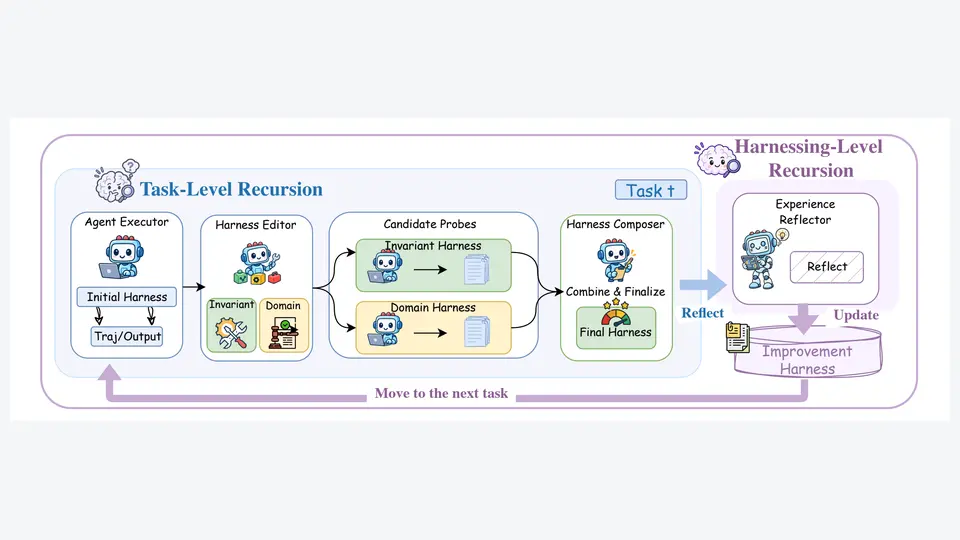
- Two recursion levels: task-level recursion (executor → harness editor → candidate probes → harness composer) and harnessing-level recursion (an experience reflector keeps an improvement harness with evidence-supported lessons).
- Eight editable harness components: system prompt, guardrails, memory, tool guidance, subagents, skills, scripts, and plugins.
- Reported gains: up to +11.5 points on WorkBuddy-Bench, +4.5 points on JobBench, +11.8 percentage points on LAB partial pass rate (GLM-5 and Gemini 3.5 Flash over base harnesses).
- Free starting point:
harness2-demo --output runs/demo --k 2runs both recursion modes with deterministic editors and real Python executions, no model credentials needed.
Everyone optimizes the model. Harness² optimizes everything around it — the system prompt, the tools, the memory, the orchestration that turns a language model into an agent. A harness, in the project's words, is the system around a model that enables it to act as an agent: prompts, tools, memory, skills, orchestration, and more. Harnessing is the process of optimizing that system.
Released by google-research with an arXiv paper, Harness² picked up roughly 11,000 GitHub stars in under two weeks — one of the fastest climbs in AI open source this month. It's Apache-2.0, it keeps model weights fixed, and it ships with a credential-free local demo so you can watch recursive self-improvement happen on your own machine before spending a cent on API calls.
What you'll need
- Linux with Python 3.12 and uv installed
- A clone of
google-research/harness2 - For model-backed benchmarks: Node.js 20+, the Google Cloud CLI, and a Vertex AI project — plus Pandoc and Poppler for LAB, or Docker for WorkBuddy-Bench
- About 20 minutes and no API key for the demo
Step 1 — Install the framework
From the repository root, create a Python 3.12 environment and install the package in editable mode with the render extras:
uv venv --python 3.12 .venv
source .venv/bin/activate
uv pip install -e '.[render]'
Step 2 — Run the credential-free demo
The local demo runs both recursion modes with deterministic editors and real Python executions. It requires no model credentials:
harness2-demo --output runs/demo --k 2Watch the output: you'll see an agent executor run an initial harness, a harness editor propose edits, candidate probes execute them, and a composer fold the evidence into a refined harness. That's one Propose–Probe–Compose step, twice.
Step 3 — Read what the demo built
Harness² connects two levels of recursion while keeping model weights fixed:
- Task-level recursion refines the execution harness: an agent executor runs the initial harness, a harness editor proposes invariant and domain edits, candidate probes execute them, and a harness composer combines them into the final harness.
- Harnessing-level recursion updates a persistent improvement harness: an experience reflector reflects on the step and carries adopted harnesses and evidence-supported lessons into the next task.
The framework exposes eight editable components around the model: system prompt, guardrails, memory, tool guidance, subagents, skills, scripts, and plugins. The first group constructs context; tool guidance and scripts define the tool interface; subagents orchestrate delegated work; plugins control middleware.
Step 4 — Set up a model-backed benchmark
When you're ready to spend API budget, configure your models and install a benchmark. Copy the example environment, add your Vertex AI project and model IDs, then authenticate:
cp .env.example .env
# Edit .env with your Vertex AI project and model IDs.
gcloud auth application-default login
Then install and sanity-check a benchmark — here, LAB, the legal-work benchmark:
harness2-setup lab
harness2-check --bench lab
The setup guide in docs/SETUP.md covers authentication alternatives and the Codex executor. JobBench (harness2-setup jb) covers professional work; WorkBuddy-Bench (harness2-setup wb) covers office, web, and code with --subset office, --subset web, or --subset code.
Step 5 — Run, judge, and report one task
Run one task, then evaluate and report its result. Keep the flags identical across all three commands — judging and reporting must use the same benchmark, executor, subset, --k, --mode, and seed as the refinement run:
harness2 --bench lab --k 1 --mode parallel \
  --only-domains antitrust-competition --max-tasks 1
harness2-judge --bench lab --k 1 --mode parallel
harness2-report --bench lab --k 1 --mode parallel
Start with a small task selection: model-backed runs incur API costs. Add --dry-run to harness2 to preview task selection without any model calls.
Step 6 — Scale the recursion budget and resume runs
Scale task-level recursion two ways:
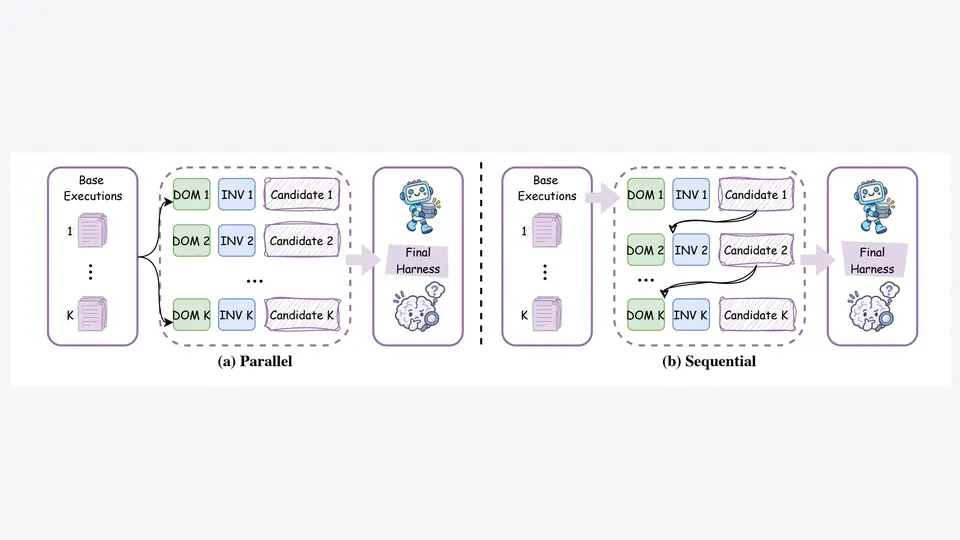
- Parallel (
--k 2 --mode parallel): probe K general and K domain-specific candidate harnesses, then produce K compositions from the shared evidence. Explores wider. - Sequential (
--k 2 --mode sequential): carry the refined harness and accumulated evidence through K successive Propose–Probe–Compose steps. Refines deeper.
Use --substrate cx to run the Codex executor instead of the default OpenCode one. Results land under runs/, organized by benchmark and subset — task summaries, deliverables, adopted harnesses, reflection notes, and evaluation results. Repeat the same command to resume; set a new HARNESS2_RUNS_DIR when changing models or task selection.
What you built
A working recursive-harnessing loop: a demo harness that rewrote itself through Propose–Probe–Compose cycles, plus the full model-backed pipeline — setup, single-task run, judging, reporting — against a professional benchmark. The harness that improved wasn't your prompt; it was the system around the model, and the lessons it learned persist into the next task.
Honest limitations
- API costs are real. The demo is free, but every model-backed benchmark task burns tokens on two models' worth of work: the agent executor and the harness editor. Start with
--max-tasks 1and--dry-run. - Reported gains are the paper's, on specific setups. Up to 11.5 points on WorkBuddy-Bench, 4.5 points on JobBench, and 11.8 percentage points on LAB's partial pass rate — measured across three benchmarks and four model–harness configurations, improving GLM-5 and Gemini 3.5 Flash over their base harnesses. Your base harness and model may differ.
- Mind the web access. Executor network access is unrestricted and Codex runs with its sandbox disabled; public benchmark rubrics may be reachable online. Configure the network restrictions documented in
docs/EXPERIMENTS.mdbefore evaluation, or the agent can read benchmark answers and grading criteria. - Not an officially supported Google product. The README's disclaimer says so explicitly — and the project isn't eligible for Google's open-source vulnerability rewards program. Treat it as research code, Apache-2.0 licensed.
Frequently asked questions
Do I need API credentials to try Harness²?
No. The local demo (harness2-demo --output runs/demo --k 2) runs both recursion modes with deterministic editors and real Python executions and requires no model credentials. Credentials — a Vertex AI project plus gcloud auth application-default login — are only needed for model-backed benchmark runs.
Does Harness² fine-tune the model?
No. Model weights stay fixed throughout. Harness² optimizes the harness around the model — the system prompt, guardrails, memory, tool guidance, subagents, skills, scripts, and plugins — and carries the adopted harness and its lessons into the next task.
Which models and benchmarks does it support?
Two executors: OpenCode (the default) and Codex via --substrate cx. Three benchmarks: JobBench for professional work, LAB for legal work, and WorkBuddy-Bench for office, web, and code (with --subset office, --subset web, or --subset code).