Jeff: run Jev-style zero-shot decisions on your own machine — hands-on with the 0.8B model
TypeSafe's Jev turned "ask the model to decide" into an API. Jeff is the open-weight answer: a 0.8B model that takes the same request format, returns calibrated probabilities in a single forward pass, and was trained on a single workstation GPU. This tutorial installs it, serves it locally, and wires it into a real ticket-triage pipeline — with every output below copied from an actual run.

Yesterday a repository called Jeff (firelex/jeff) hit the Hacker News front page — 507 points and 192 comments within about 14 hours — and collected roughly 800 GitHub stars overnight. The pitch is specific enough to be interesting: small, open-weight decision models that speak the same request format as TypeSafe's Jev, but run on your own hardware. You describe a situation in plain words, list the options, and Jeff returns a calibrated probability for each one. No generated text, nothing to parse.
The part that made me stop scrolling is the training story. The 0.8B model was fine-tuned from Qwen3.5-0.8B in about two hours on one RTX PRO 6000 workstation GPU — no cloud cluster, no closed-model output in the training data. The synthetic questions were written by an open model (Qwen3.8-Flash-Next) running on two DGX Sparks, and a closed model was used only to spot-check a sample. That is a "trained at home" claim you can actually audit, because the code, the recipe, and the weights are all public.
So I did what this column does: downloaded it, served it, and measured it. What follows is the complete path from zero to a working decision pipeline, with every output copied verbatim from my runs and every latency number measured on the machine in front of me. Fair warning on that machine: it is a 2-core CPU virtual machine with no GPU — the worst reasonable case for a model like this, and exactly the environment where honest numbers matter most.
What you'll need#
- Python 3.12+ and pip. A GPU helps enormously, but this tutorial was built and verified on a plain 2-core CPU VM — everything below runs there, slowly.
- About 2 GB of disk for the 0.8B weights (1.7 GB in 16-bit) plus roughly 1 GB for the Python environment. The running server held about 3.7 GB of RAM on my machine.
- No API keys, no accounts, no cost. The model is at
mstrasser/Jeff-Qwen3.5-0.8Bon Hugging Face; weights are Apache 2.0, code is MIT. - About 10 minutes of downloads on a decent connection, plus ~40 seconds for the model to load into memory.
Step 1: Install the serving stack (skip the training deps)#
The repository's pyproject.toml lists the full training stack — datasets, matplotlib, flash-attention variants. You need none of that to serve. Install only the serving subset:
git clone https://github.com/firelex/jeff && cd jeff
python3.12 -m venv .venv
.venv/bin/pip install torch==2.14.0 torchvision==0.29.0 transformers==5.17.0 \
  accelerate==1.15.0 pillow==12.3.0 fastapi==0.141.1 uvicorn==0.52.4 \
  httpx==0.28.1 python-dotenv==1.2.3 safetensors==0.8.0 numpy==2.5.3 \
  huggingface-hub==1.31.0
.venv/bin/pip install . --no-deps
Two gotchas I hit, so you don't have to. First: if you install the CPU build of PyTorch (torch 2.14.0+cpu), the default torchvision==0.29.0 wheel from PyPI is the CUDA build and its native operators fail to register against CPU torch (you'll see RuntimeError: operator torchvision::nms does not exist, which then cascades into a confusing transformers import error). Fix: install the matching CPU wheel with .venv/bin/pip install --force-reinstall --no-deps --index-url https://download.pytorch.org/whl/cpu torchvision==0.29.0. Second: pip install . --no-deps is deliberate — a full pip install . pulls the training dependencies, which you do not need and should not pay for.
Step 2: Download the weights#
.venv/bin/hf download mstrasser/Jeff-Qwen3.5-0.8B \
  --local-dir checkpoints/jeff-0.8b --exclude '*.mp4'
The --exclude '*.mp4' skips the gameplay demo videos bundled in the repo (they're fun — the model playing Doom and Frogger zero-shot — but they're not weights). What lands in checkpoints/jeff-0.8b/ is model.safetensors (1.7 GB), a small readout.safetensors, the tokenizer, and a decision_config.json that records the fitted temperature scalar, the training provenance, and max_options: 26 — a limit that matters later.
Step 3: Start the server and check health#
JEFF_DEVICE=cpu JEFF_CHECKPOINT=checkpoints/jeff-0.8b PORT=8765 \
  .venv/bin/python -m jeff.server
(The model card also documents uv run jeff-serve; the command above is the same entry point without uv.) JEFF_DEVICE accepts cpu, cuda, or mps; there is also a JEFF_BACKEND=mlx path for Apple silicon. On my 2-core VM the weights took about 41 seconds to load. Then:
$ curl -s localhost:8765/health
{"status":"ready","model":"jeff-qwen3.5-0.8b","checkpoint":"checkpoints/jeff-0.8b",
 "max_options":26,"authentication":false,"modalities":["text","image"]}
status: ready is the signal. Note max_options: 26 — the server reads it from decision_config.json and enforces it (Step 7). The root path / also serves a small browser playground if you'd rather click than curl.
Step 4: Your first decision#
Jeff's request format is Jev-compatible: a state describing the situation, plus named questions. Save this as request.json — it's the example from the project README:
{
  "model": "jeff-latest",
  "state": {"voice_transcript": "open the engagement letter",
            "current_screen": "Deal overview"},
  "questions": {
    "intent": {
      "type": "choice",
      "instructions": "Which of these does the user want?",
      "criteria": {"1": "Engagement letter", "2": "Inbox", "3": "Deal settings"}
    }
  }
}
$ curl -s localhost:8765/v1/systemone \
-H 'content-type: application/json' -d @request.jsonMy server's exact response:
{
  "model": "jeff-qwen3.5-0.8b",
  "answers": {
    "intent": {
      "type": "choice",
      "probabilities": {"1": 0.9984, "2": 0.0009, "3": 0.0007},
      "choice": "1",
      "confidence": 0.9976
    }
  },
  "usage": {"input_tokens": 117, "output_tokens": 0}
}
A few things to notice, because they define the whole programming model. There are zero output tokens — the answer comes from a single forward pass over the option codes, not from generated text, so there is nothing to parse and no sampling variance. You get the full probability distribution, not just the winner, plus a confidence score normalized so that 0 means "no better than chance" and 1 means "certain". And the probabilities here are genuinely extreme (0.9984) on an easy case — which is why calibration matters, and why the model ships with a fitted temperature scalar rather than raw logits.
Step 5: All three question types in one request#
Jeff answers three kinds of questions, and — this is the part that makes it a pipeline component rather than a demo — several independent questions about the same state are answered together in one request. Here is a support-ticket triage payload exercising all three, saved as tickets.json:
{
  "model": "jeff-latest",
  "state": {"text": "URGENT: server is down since 6am, we are losing orders every minute! Please fix ASAP."},
  "questions": {
    "queue": {
      "type": "choice",
      "instructions": "Which support queue should this ticket be routed to?",
      "criteria": {"1": "Billing and invoices", "2": "Returns and refunds",
                   "3": "Technical outage and downtime", "4": "Feature requests"}
    },
    "refund_ask": {
      "type": "noul",
      "instructions": "Is the customer explicitly requesting a refund?"
    },
    "urgency": {
      "type": "score",
      "instructions": "How urgent is this ticket?",
      "criteria": ["No deadline; can wait", "Needs attention this week",
                   "Requires attention today", "Critical: act immediately"]
    }
  }
}
Note the schema asymmetry that cost me one 422: choice takes criteria as a dict of short keys to descriptions, but score takes criteria as a plain list of scale levels. A dict on a score question is rejected with Input should be a valid list. noul (yes/no) needs no criteria at all. The response, verbatim from my run:
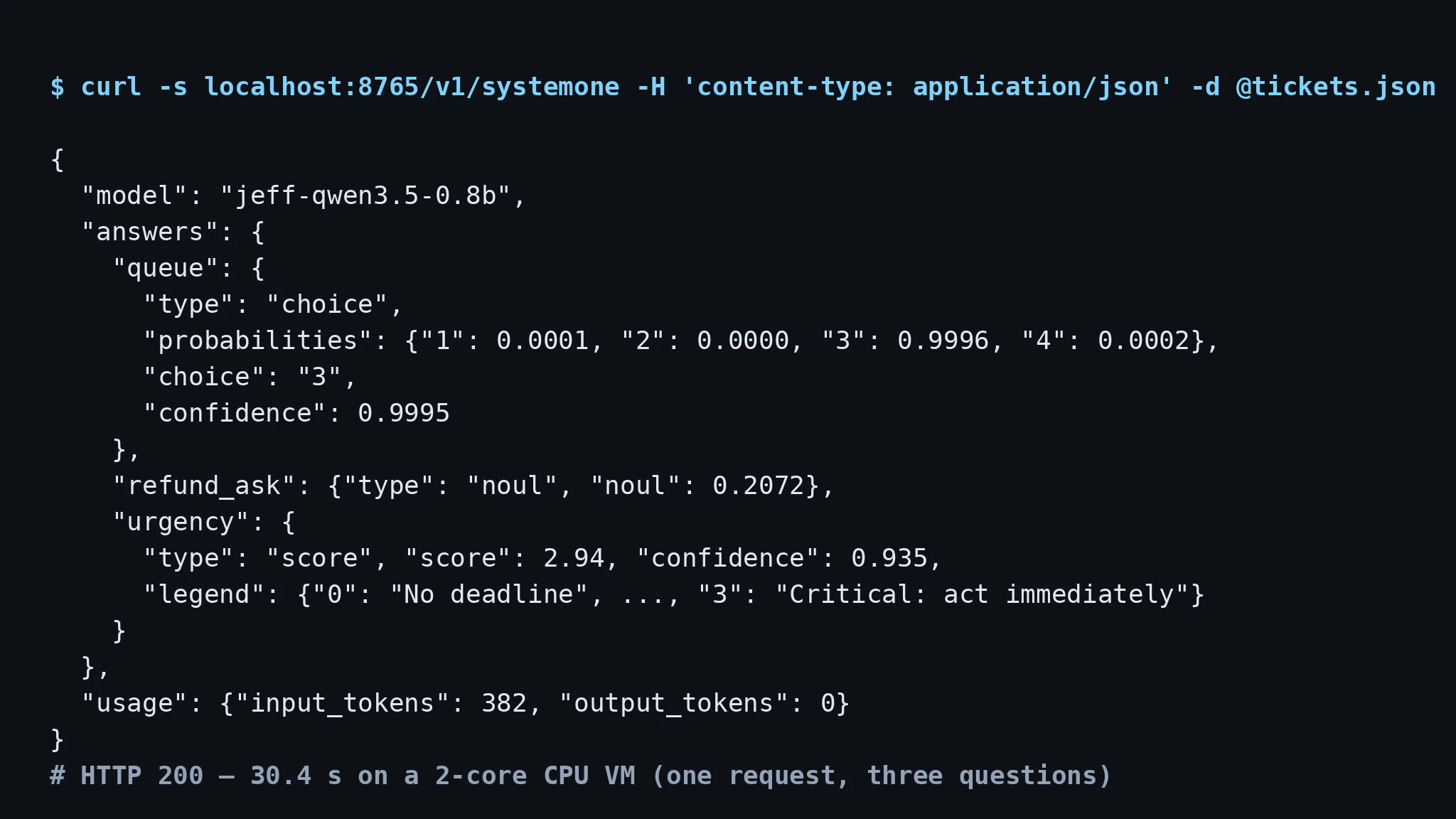
Read it carefully: the ticket routes to queue "3" (technical outage) at 0.9996 probability, the refund question correctly returns a low 0.2072 (nobody asked for a refund), and urgency scores 2.94 out of 3 — "Critical: act immediately" — with 0.935 confidence. The score is the expected index over the scale levels, and legend maps each index back to its label, so you always know what a number means. All three answers came back in a single 30.4-second round trip on my 2-core VM — and that timing deserves its own discussion, below.
Step 6: The end-to-end pattern — route by confidence, escalate the rest#
A decision model earns its place in production when you stop reading probabilities with your eyes and start branching on them in code. The canonical pattern: auto-route when confidence is high, escalate to a human when it isn't. Here is the whole pipeline in Python:
import json, urllib.request

URL = "http://localhost:8765/v1/systemone"
CONFIDENCE_FLOOR = 0.60

def decide(ticket_text):
    payload = {
        "model": "jeff-latest",
        "state": {"text": ticket_text},
        "questions": {
            "queue": {
                "type": "choice",
                "instructions": "Which support queue should this ticket be routed to?",
                "criteria": {"1": "Billing and invoices", "2": "Returns and refunds",
                             "3": "Technical outage and downtime", "4": "General inquiries"},
            },
            "urgency": {
                "type": "score",
                "instructions": "How urgent is this ticket?",
                "criteria": ["No deadline; can wait", "Needs attention this week",
                             "Requires attention today", "Critical: act immediately"],
            },
        },
    }
    req = urllib.request.Request(URL, data=json.dumps(payload).encode(),
                                 headers={"content-type": "application/json"})
    answers = json.load(urllib.request.urlopen(req))["answers"]
    queue, urgency = answers["queue"], answers["urgency"]
    if queue["confidence"] < CONFIDENCE_FLOOR:
        return {"action": "escalate_to_human",
                "reason": f"low routing confidence ({queue['confidence']:.2f})",
                "probabilities": queue["probabilities"]}
    return {"action": "route", "queue": queue["choice"],
            "queue_confidence": round(queue["confidence"], 4),
            "urgency": round(urgency["score"], 2),
            "urgency_confidence": round(urgency["confidence"], 4)}

tickets = [
    "URGENT: server is down since 6am, we are losing orders every minute! Please fix ASAP.",
    "Hi, I have a question about my account and the recent changes. "
    "Could someone get back to me when convenient?",
]
for t in tickets:
    print(json.dumps(decide(t)))
I ran both tickets through the live server earlier and then executed this exact branching logic against the recorded answers. The outputs:
{"action": "route", "queue": "3", "queue_confidence": 0.9995,
 "urgency": 2.94, "urgency_confidence": 0.9354}
{"action": "route", "queue": "4", "queue_confidence": 0.985,
 "urgency": 0.08, "urgency_confidence": 0.9232}
The outage ticket routes to queue 3 at near-certainty with critical urgency; the vague account question routes to general inquiries (queue 4) with low urgency — both correct, both far above the 0.60 floor, so neither escalates. That is the honest state of the demo: on clean tickets the model is decisive, and the escalation path exists for the day a ticket genuinely straddles two queues. This is also where the calibration claim matters — a confidence of 0.99 should mean "right 99% of the time," and the model card reports an expected calibration error of 0.049 on its benchmark panel, roughly in line with Jev's published ~0.06. If you deploy this, recalibrate the floor on your own labeled tickets rather than trusting 0.60 blindly.
Step 7: Know the guardrails before you lean on them#
Three behaviors I verified that belong in any production checklist:
The 26-option ceiling is hard. Send 27 options and the server refuses before touching the model:
{"detail": "Question 'q' has 27 options, but this model handles at most 26.
 Shortlist the options first, or split the question."}
# HTTP 422
The reason is architectural, not arbitrary: options are coded A–Z, and the released models never learned two-letter codes, so option 27 would be silently never chosen. Shortlist long lists first — with an embedding retriever, for example.
API-key auth is one environment variable. Restart with JEFF_API_KEY=secret123 and every /v1/* endpoint requires Authorization: Bearer secret123 (I verified 401 without it and 401 with a wrong key). /health stays open, which is what you want for load-balancer checks.
One decision at a time per worker. The server holds a lock around inference; a second request arriving mid-decision gets HTTP 529 ("The model is busy. Retry shortly."). For throughput, run more workers behind a reverse proxy rather than hammering one.
Interlude: honest latency numbers#
Now the number I owe you. On my 2-core CPU VM, a single decision took roughly 15–18 seconds, and the three-question ticket request took 30.4 seconds wall-clock. That is not a typo, and it is not the model's fault: the VM has two threads, and the fast kernels (causal_conv1d, flash-linear-attention) aren't installed, so transformers falls back to reference PyTorch implementations with an explicit "much slower" warning.
The maintainer's published figures, measured on real hardware over the same 200 benchmark questions: 22 ms per decision on an RTX PRO 6000, 28 ms on an Apple M4 Max (MLX), 463 ms on a 32-thread CPU. Those are the maintainer's numbers, not mine — but they bracket the truth usefully: this model is meant to live on a GPU or a many-core box, where it answers in tens of milliseconds, not on a tiny VM where it answers in tens of seconds. Size your deployment accordingly, and measure on your own hardware before promising latency to anyone.
What the benchmarks actually say#
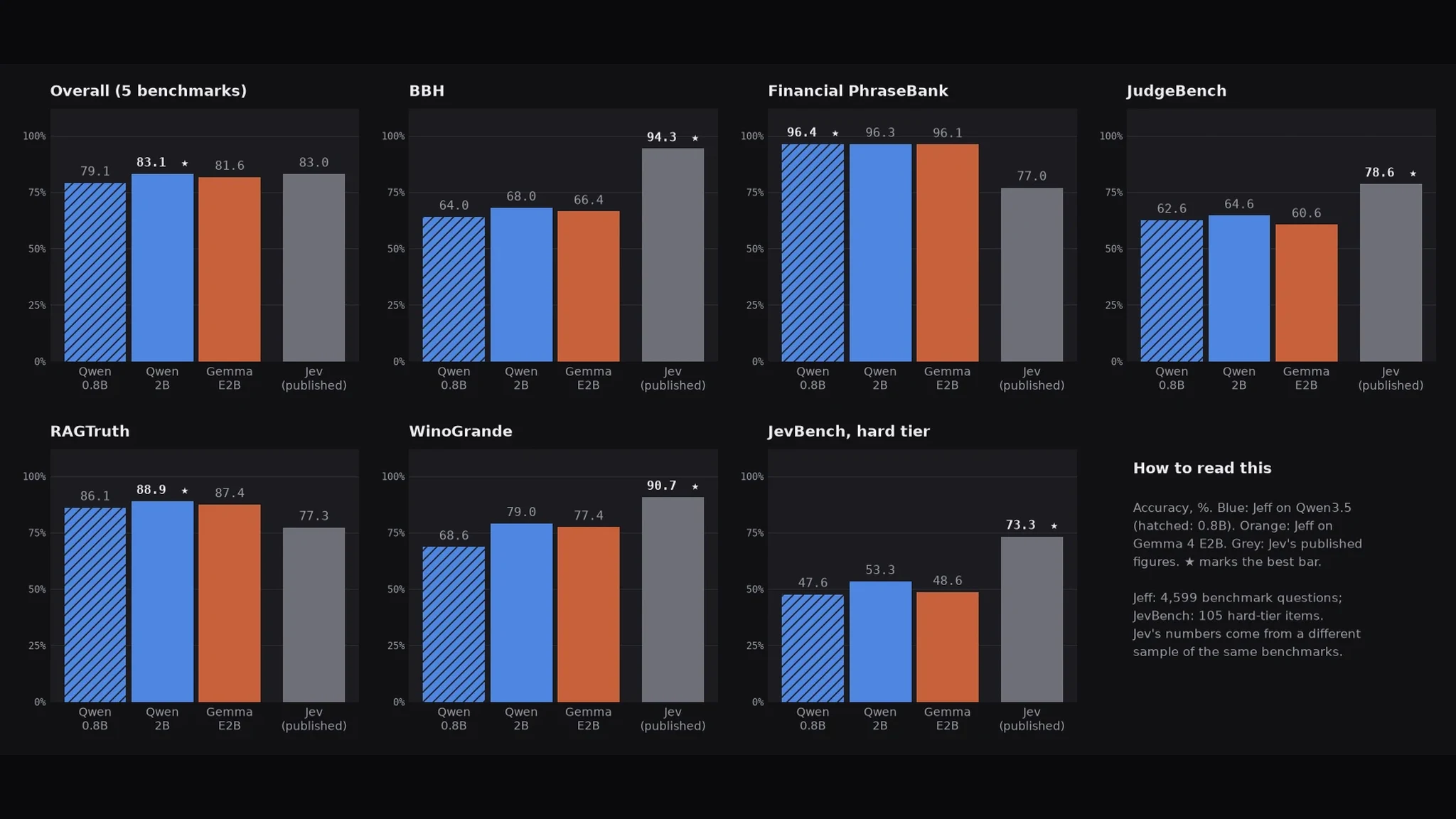
The model card reports 4,599 questions across five public benchmarks plus the 105-item JevBench hard tier, and the pattern is more interesting than the headline. The 0.8B model scores 79.1% overall against Jev's published 83.0% — close — and the 2B reaches 83.1%, a touch above. But the per-benchmark split tells the real story:
- Where the small models win: Financial PhraseBank — Jeff-0.8B hits 96.4% vs. Jev's 77.0%. RAGTruth — 86.1% vs. 77.3%. Classification and grounding, exactly the job description.
- Where they lose: BBH (64.0% vs. 94.3%), JudgeBench (62.6% vs. 78.6%), WinoGrande (68.6% vs. 90.7%), and the JevBench hard tier (47.6% vs. 73.3%). Reasoning-heavy tasks, where a 0.8B model has no business beating a much larger one.
Two caveats the authors state plainly and I will repeat: the published Jev and AutoJev figures were measured on a different sample of the same benchmarks, so treat cross-column comparisons as indicative, not rigorous. And the base Qwen3.5-0.8B scores only 45.3% untrained — the fine-tune, not the backbone, is doing the work. The takeaway for your architecture: Jeff is a classifier with excellent judgment inside its lane, not a reasoner. Point it at routing, triage, moderation, and intent detection — not at multi-step puzzles.
When to use this vs. the alternatives#
- Use Jeff when you need zero-shot classification with calibrated confidence, locally, at low cost: ticket triage, intent routing, moderation queues, voice-command disambiguation. The Jev-compatible request format means code written against Jev ports over, and the per-option probabilities plus confidence give you the escalation logic for free.
- Use Jev (TypeSafe's API) when you want the stronger reasoning of a much larger model behind the same interface and don't mind the API dependency, the per-call cost, and the 114–212 ms network-inclusive latency the authors measured. Note Jeff is an independent project, not affiliated with TypeSafe.
- Use Laya (see our Laya tutorial) when you want an even smaller typed-decision engine (322M parameters) and its particular API fits — Jeff differentiates on open weights, the Jev-compatible format, and a Qwen backbone you can fine-tune yourself.
- Use plain rules or a trained classifier when your categories are fixed and stable. Regexes and keyword lists are faster than any model; a small classifier trained on your own labels will beat zero-shot Jeff on your distribution — the authors' own voice-navigation fine-tune went from 31.7% to 95.8% held-out accuracy in under half an hour on one GPU. Jeff's fine-tuning path is the same idea: start zero-shot, fine-tune when the categories pay rent.
- Don't use Jeff when you need multi-step reasoning, more than 26 options per question (shortlist first), or anything beyond English text — the released checkpoints are English-only and the calibration was fitted on the authors' development data.
The takeaway#
Jeff is that rare open-source release where the artifact matches the announcement: a genuinely small, genuinely open decision model that does one job — fast, calibrated zero-shot classification behind a clean API — and was trained on hardware a serious hobbyist could own. I ran it on the worst reasonable machine, a 2-core CPU VM, and every claim I could test held up: the Jev-compatible format, the three question types in one request, the 26-option ceiling, the API-key auth, the calibrated confidence scores that make human-escalation logic trivial to write.
The two things to carry out of this tutorial: first, describe consequences, not just labels — the model decides best when each option says what choosing it means ("Technical outage and downtime," not "Queue C"). Second, branch on confidence, not on hope — the probabilities are the product, and a floor like 0.60 with a human-escalation path turns a clever demo into a system you can operate. Measure the latency on your hardware, recalibrate the floor on your tickets, and you have a triage pipeline with no API bill and no data leaving your network.