Speculative decoding with llama.cpp: measured end-to-end on a CPU — when it helps, when it hurts
Speculative decoding promises free speed for local LLMs: a tiny draft model guesses tokens, the big model verifies them in bulk. We set it up in llama.cpp b11243, measured it end-to-end on two CPU threads — and it made generation 2x slower. Here is the honest breakdown: the setup, the numbers, the acceptance rates, and the break-even math that tells you when it actually pays off.

Every speculative-decoding explainer shows the same diagram and quotes someone else's speedup chart. This tutorial is different: we ran it. Target model: Qwen2.5-1.5B-Instruct Q4_K_M. Draft model: Qwen2.5-0.5B-Instruct Q4_K_M. Hardware: two CPU threads, no GPU, llama.cpp release b11243. Result: speculative decoding made generation 1.5–2.5× slower than the baseline.
That is not a failed experiment — it is the most useful possible outcome. A speedup chart tells you that it can work. A measured slowdown with the acceptance rates and the arithmetic attached tells you exactly where the break-even point is — which is what you need before spending an afternoon setting this up on your own machine.
The idea in 60 seconds #
Normal decoding is stubbornly serial: one token costs one full forward pass of the big model, and on a CPU each pass is memory-bandwidth-bound — you drag gigabytes of weights through RAM to produce a single token. Speculative decoding (Leviathan et al., Fast Inference from Transformers via Speculative Decoding, ICML 2023; Chen et al., Accelerating Large Language Model Decoding with Speculative Sampling, 2023) breaks the serial chain without changing what the model says:
- A small, fast draft model guesses the next K tokens (K cheap forward passes).
- The big target model verifies all K guesses in a single forward pass — verification parallelizes, so it costs roughly one to two normal passes.
- Tokens the target agrees with are kept; the first disagreement is corrected with the target's own token; everything after it is discarded.
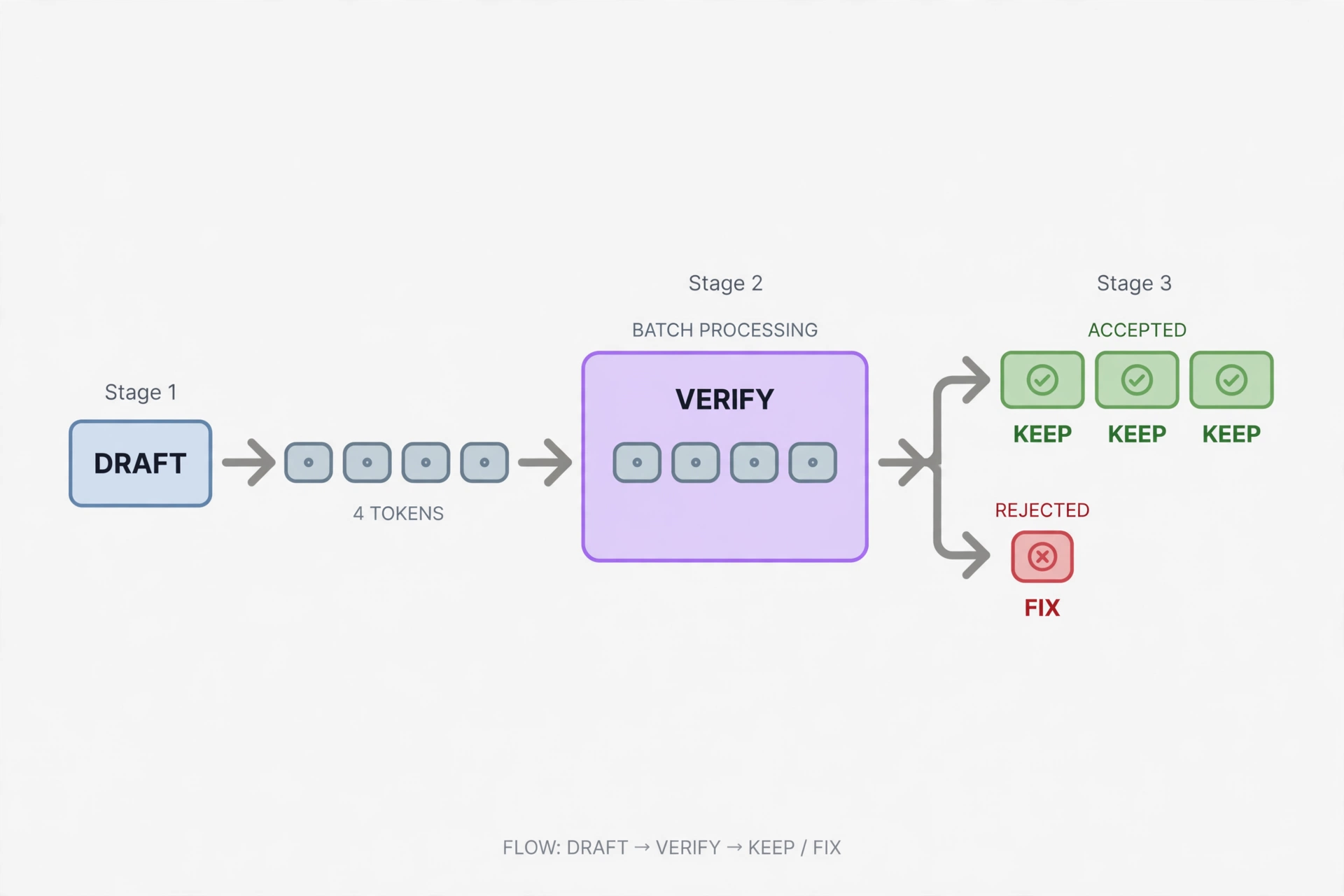
The critical property: speculative sampling preserves the target's output distribution exactly. This is not an approximation or a distillation — the text you get is statistically identical to running the target alone. When the draft guesses well, the speedup approaches K+1. When it guesses badly, you pay the draft's compute for nothing and can end up slower than baseline. Both outcomes are on the table, which is why you measure.
What you’ll need #
- llama.cpp b11243 (released September 29, 2026) — the prebuilt
llama-b11243-ubuntu-x64.zip. This tutorial usesllama-serverthroughout, because its/completionendpoint returns per-requesttimingsas JSON — exactly the instrument you need. (One environment note: in b11243, thellama-cliwrapper's embedded server failed to load the CPU backend on our machine —no backends are loaded— whilellama-serverrun directly worked fine. If you hit that, use the server.) - Two GGUF models from the same family, sharing a tokenizer: target
Qwen/Qwen2.5-1.5B-Instruct-GGUF(qwen2.5-1.5b-instruct-q4_k_m.gguf, 1,117,320,736 bytes) and draftQwen/Qwen2.5-0.5B-Instruct-GGUF(qwen2.5-0.5b-instruct-q4_k_m.gguf, 491,400,032 bytes). - A CPU. Ours: 2 threads on an AMD EPYC VM. No GPU needed — and CPU inference is where this technique is most interesting, because per-token generation is memory-bound.
- ~1.6 GB of disk. Total cost: $0 — open weights, open source.
Same family and same tokenizer is non-negotiable. The draft must “think” in the target's token space; a draft from another family is guessing in a different dialect and gets rejected constantly.
Step 1 — Get llama.cpp and verify the flags #
$ curl -sL -o llama-b11243.zip \
    https://github.com/ggml-org/llama.cpp/releases/download/b11243/llama-b11243-ubuntu-x64.zip
$ unzip -q llama-b11243.zip -d llama-b11243 && cd llama-b11243
$ ./llama-server --version
version: 0.5.0-dev (build 11243, commit fc07d781e)
Keep the whole extracted directory: llama-server loads its CPU backend (libggml-cpu-*.so — it picked libggml-cpu-zen4.so on our EPYC) from its own folder at startup. Speculative-decoding flags move between releases, so verify them against your binary rather than trusting any tutorial:
$ ./llama-server --help | grep -E "spec-type|spec-draft-model|spec-draft-n-max"
--spec-type ...
--spec-draft-model, -md FNAME ...
--spec-draft-n-max, --draft-n-max N ...
Verified in b11243: --spec-type accepts draft-simple, draft-eagle3, draft-mtp, n-gram variants, and more. --spec-draft-n-max defaults to 3. Related knobs: --spec-draft-n-min (default 0), --spec-draft-p-min (default 0.00), --spec-draft-device (run the draft on a different device than the target), and --spec-draft-threads (defaults to --threads).
Step 2 — Download and verify the model pair #
$ mkdir models
$ curl -sL -o models/target-qwen2.5-1.5b-q4_k_m.gguf \
    https://huggingface.co/Qwen/Qwen2.5-1.5B-Instruct-GGUF/resolve/main/qwen2.5-1.5b-instruct-q4_k_m.gguf
$ curl -sL -o models/draft-qwen2.5-0.5b-q4_k_m.gguf \
    https://huggingface.co/Qwen/Qwen2.5-0.5B-Instruct-GGUF/resolve/main/qwen2.5-0.5b-instruct-q4_k_m.gguf
$ ls -la models/
1117320736 target-qwen2.5-1.5b-q4_k_m.gguf
 491400032 draft-qwen2.5-0.5b-q4_k_m.gguf
Match the byte sizes — truncated downloads are the number-one cause of cryptic load failures — and confirm both files begin with the GGUF magic bytes before you go further.
Step 3 — Baseline: measure the target alone #
$ ./llama-server -m models/target-qwen2.5-1.5b-q4_k_m.gguf \
    --port 8080 -t 2 -c 4096 --no-webui
Send a fixed, reproducible request — fixed seed and temperature, prompt cache enabled. The timings object in the response is the whole game: prompt_ms covers the parallel part (speculation cannot help there), predicted_ms covers the serial generation (the part we are trying to accelerate):
$ curl -s http://127.0.0.1:8080/completion -H 'Content-Type: application/json' \
  -d '{"prompt":"Write a Python function that computes the nth Fibonacci number with memoization, then explain its time complexity in one sentence.",
       "n_predict":150,"seed":42,"temperature":0.7,"cache_prompt":true}' \
  | python3 -c "import json,sys; t=json.load(sys.stdin)['timings'];
print(round(t['predicted_per_second'],2), 'tok/s')"
Our baseline on 2 threads, warm KV cache, 150 generated tokens:
- Code prompt: 1.13 tok/s.
- Prose prompt (“Explain why the sky is blue in exactly three sentences, suitable for a curious ten-year-old.”): 1.08 tok/s.
Slow in absolute terms — this is a small, busy VM — but it is our reference line. Everything below is measured against it, on the same machine, minutes apart.
Step 4 — Turn on speculative decoding #
Stop the server and restart it with three added flags:
$ ./llama-server -m models/target-qwen2.5-1.5b-q4_k_m.gguf \
    --port 8080 -t 2 -c 4096 --no-webui \
    --spec-type draft-simple \
    --spec-draft-model models/draft-qwen2.5-0.5b-q4_k_m.gguf \
    --spec-draft-n-max 3
draft-simple is the classic draft-model strategy (as opposed to EAGLE-style learned heads or n-gram guessing). --spec-draft-n-max 3 drafts up to three tokens per verification pass — the default, and the conservative starting point.
Send the identical requests — same prompts, same seed, same temperature. The output text is statistically equivalent (speculation preserves the target distribution), but the server log now prints the single most informative line in this whole tutorial after every request:
draft acceptance = 0.69930 ( 100 accepted / 143 generated), mean len = 3.08Our measured results, same machine, same prompts:
| Baseline (1.5B only) | Speculative (0.5B draft, n-max 3) | Acceptance | |
|---|---|---|---|
| Code prompt | 1.13 tok/s | 0.45 tok/s | 69.9%, mean len 3.08 |
| Prose prompt | 1.08 tok/s | 0.73 tok/s | 39.2%, mean len 2.18 |
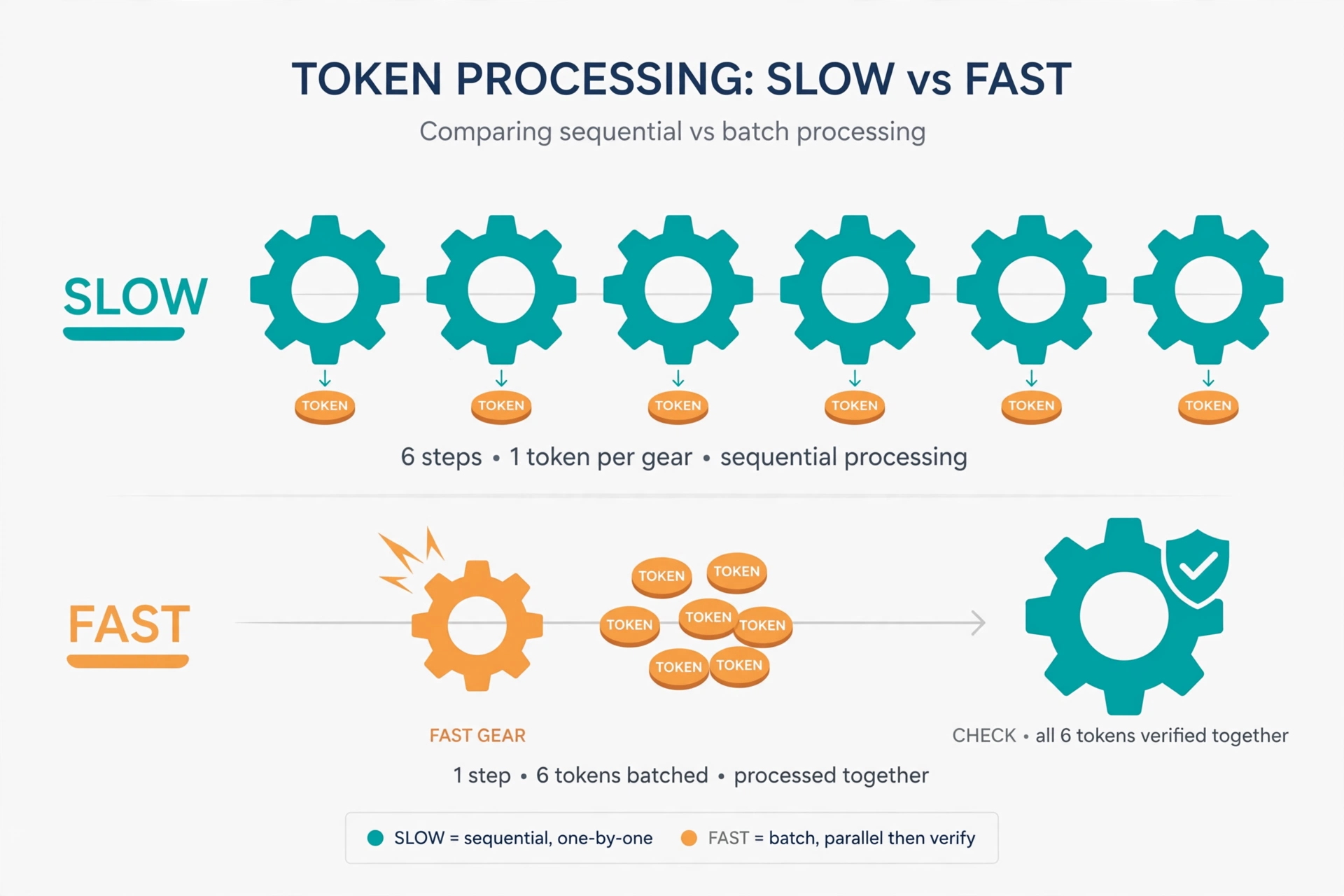
Read that table twice: speculation made generation 1.5–2.5× slower. And now read the acceptance column: the draft guesses well — 70% of its code tokens accepted, about three tokens kept per verification step. The mechanism works exactly as advertised. The economics do not. That distinction is the entire lesson.
Step 5 — Why it slowed down: the break-even math #
We measured the draft model running alone: 2.07 tok/s — only 1.9× faster than the target's 1.1 tok/s. Now do the per-step arithmetic with a draft length of 3:
- Draft cost: 3 tokens × ~0.48s ≈ 1.45s
- Verification cost: one target pass ≈ 0.91s
- Total per step: ~2.36s for ~3.08 accepted tokens → ~1.3 tok/s in theory
We measured 0.45–0.73 tok/s — worse than theory, because on two threads both models' weights stream through the same starved memory bus, and the draft must also process the prompt (prompt evaluation ran ~2× slower with speculation enabled: 389ms/token vs 197ms/token).
The general rule this falls out of: speculation wins when draft_time ≪ target_time. As a rule of thumb you want the draft to be roughly 4–5× faster per token than the target before the overhead pays off. A 0.5B draft for a 1.5B target — 3× smaller — does not clear the bar on a CPU. A 7B draft for a 70B target does, which is the classic deployment and a large part of why datacenter GPUs love this technique: there, the target is brutally memory-bound and the draft looks nearly free by comparison.
Three conditions must all hold:
- The draft is dramatically faster than the target — think 5–10× size ratio, not 3×.
- Acceptance is high — same family, same tokenizer, and tasks where the target is predictable (our 40–70% was decent, just not enough to overcome condition 1).
- Serial decoding is actually your bottleneck — not prompt processing, not batch saturation.
Step 6 — When to use it, and when to skip it #
Use speculative decoding when your target is large (7B+) and memory-bandwidth-bound, you have a same-family small model (Qwen2.5-0.5B for a Qwen2.5-7B/14B/32B target, Llama-3.2-1B for Llama-3.1-8B, and so on), and you care about single-stream latency — interactive chat, not batch throughput.
Skip it when your target is already small (1–3B) — the draft cannot be enough faster to matter, and this tutorial is the receipt. Skip it when prompt processing dominates (long context, short answers): speculation only accelerates generation. Skip it when batch-serving: saturated hardware gains nothing and you inherit scheduling complexity. And skip it if the draft needs a different tokenizer — acceptance collapses and you are paying for rejected guesses.
Which approach should you use? #
draft-simple+ a same-family small model (this tutorial): the reliable default. Works everywhere, no extra training, and the failure mode is honest — you will see it in the acceptance line.- EAGLE-style heads (
--spec-type draft-eagle3): a tiny learned draft head trained specifically for your target. Higher acceptance than a generic small model, but you need a published head for your exact target. - N-gram speculation: no draft model at all — guesses come from recently seen n-grams. Zero extra memory, helps with repetitive text, weaker in general.
- None of the above: sometimes the right answer is quantization, a smaller target, or more threads. Optimization starts with measurement, and the
timingsobject is free.
The takeaway #
Speculative decoding is not magic; it is an exchange rate. You trade cheap draft tokens for expensive target passes, and the trade is only profitable when the draft is dramatically cheaper. On our 2-thread CPU with a 1.5B target and a 0.5B draft, the exchange lost money — 0.45 tok/s against a 1.13 baseline — despite 70% acceptance on code. The setup itself is three flags and a second GGUF file; the judgment is the break-even math. Run the baseline, flip the three flags, compare predicted_per_second. If it goes up, keep it. Ours did not — and now you know exactly why, and exactly when yours will.
Exact commands reference #
# baseline server
./llama-server -m models/target-qwen2.5-1.5b-q4_k_m.gguf --port 8080 -t 2 -c 4096 --no-webui
# speculative server: add these three flags
--spec-type draft-simple \
--spec-draft-model models/draft-qwen2.5-0.5b-q4_k_m.gguf \
--spec-draft-n-max 3
# benchmark request (timings -> predicted_per_second)
curl -s http://127.0.0.1:8080/completion -H 'Content-Type: application/json' \
  -d '{"prompt":"<your prompt>","n_predict":150,"seed":42,"temperature":0.7,"cache_prompt":true}'