Laya: replace your LLM-as-a-judge with a 322M-parameter decision engine
Every agent pipeline eventually needs the same boring operation: look at a piece of text and make a typed decision — which category, how urgent, yes or no. The fashionable answer is to prompt a giant LLM and parse its prose, paying per token for nondeterministic JSON. Laya does it in a single forward pass of a 322M-parameter encoder: choice, score, and yes/no heads answered simultaneously, in 100+ languages, with calibrated confidence and an abstain-when-unsure option. In the next twenty minutes you will install it, triage real support tickets on CPU, and build a confidence-gated escalation pipeline — every step executed.

You have a support inbox, a moderation queue, or an agent that needs to route its own work. The decision you need is embarrassingly simple — which department, how angry, should this escalate — but the standard implementation is absurd: serialize the text into a prompt, send it to a frontier model, wait for tokens to dribble out, then regex the answer out of the prose and pray the JSON parses. It is slow, it costs money per decision, and the same input can produce different outputs on different days.
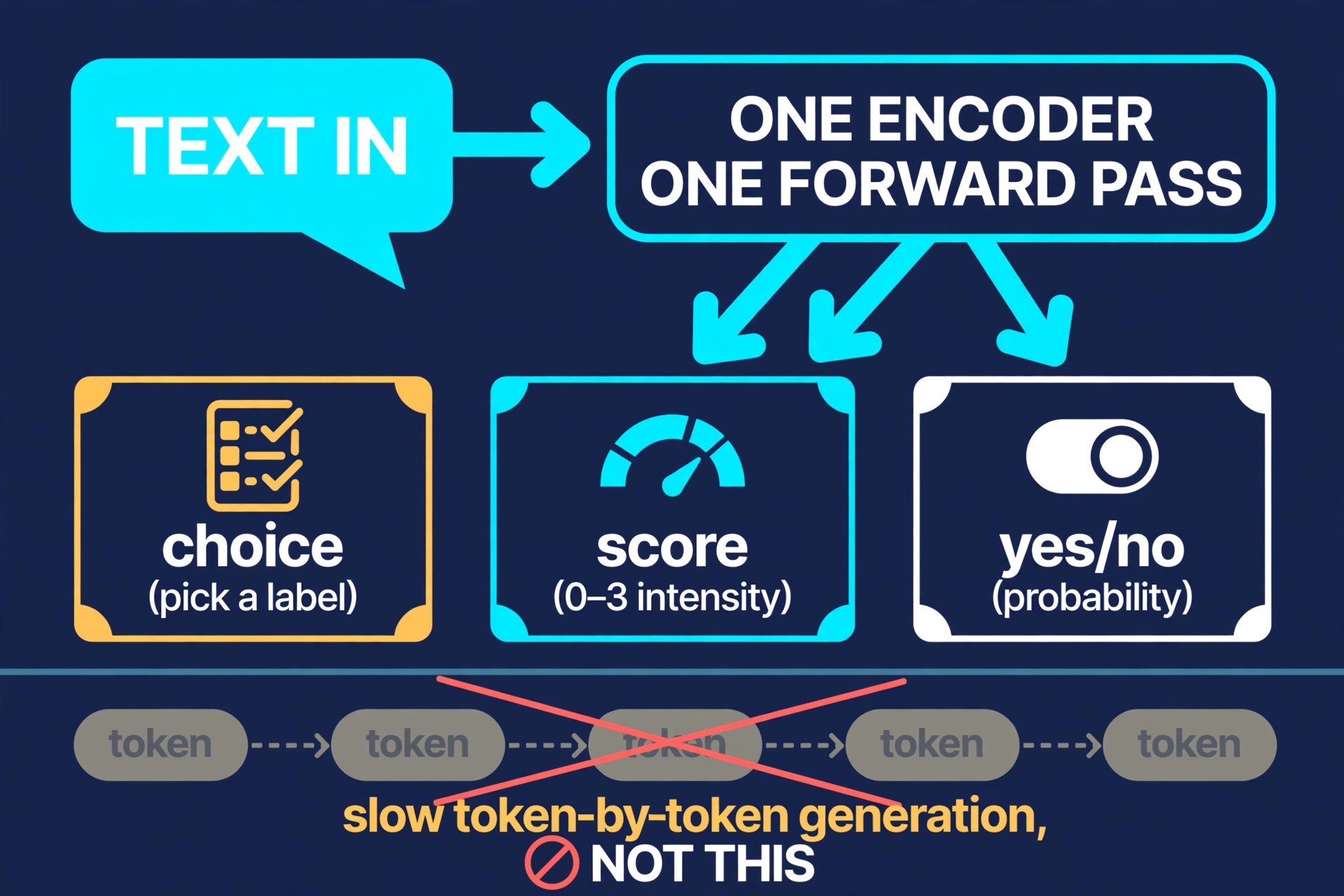
Laya (NandhaKishorM/laya, Apache-2.0) is the opposite bet: a non-autoregressive decision engine. You hand it text plus a set of typed questions — choice (pick a label), score (rate an intensity), noul (yes/no as a probability) — and one forward pass through an encoder answers all of them at once. No tokens are generated; the response even reports output_tokens: 0. The repo calls it "System 1" thinking, and the metaphor is apt: fast, typed, deterministic judgments instead of deliberative prose.
Why this is blowing up now#
The numbers are startling. Laya was created on September 18, 2026, and when I checked the GitHub API on September 27 it sat at 26,639 stars and 2,326 forks — roughly 3,000 stars a day for a nine-day-old project, with commits landing the same day I tested it. That is not normal. It is the kind of spike you see when a project names a pain everyone already feels.
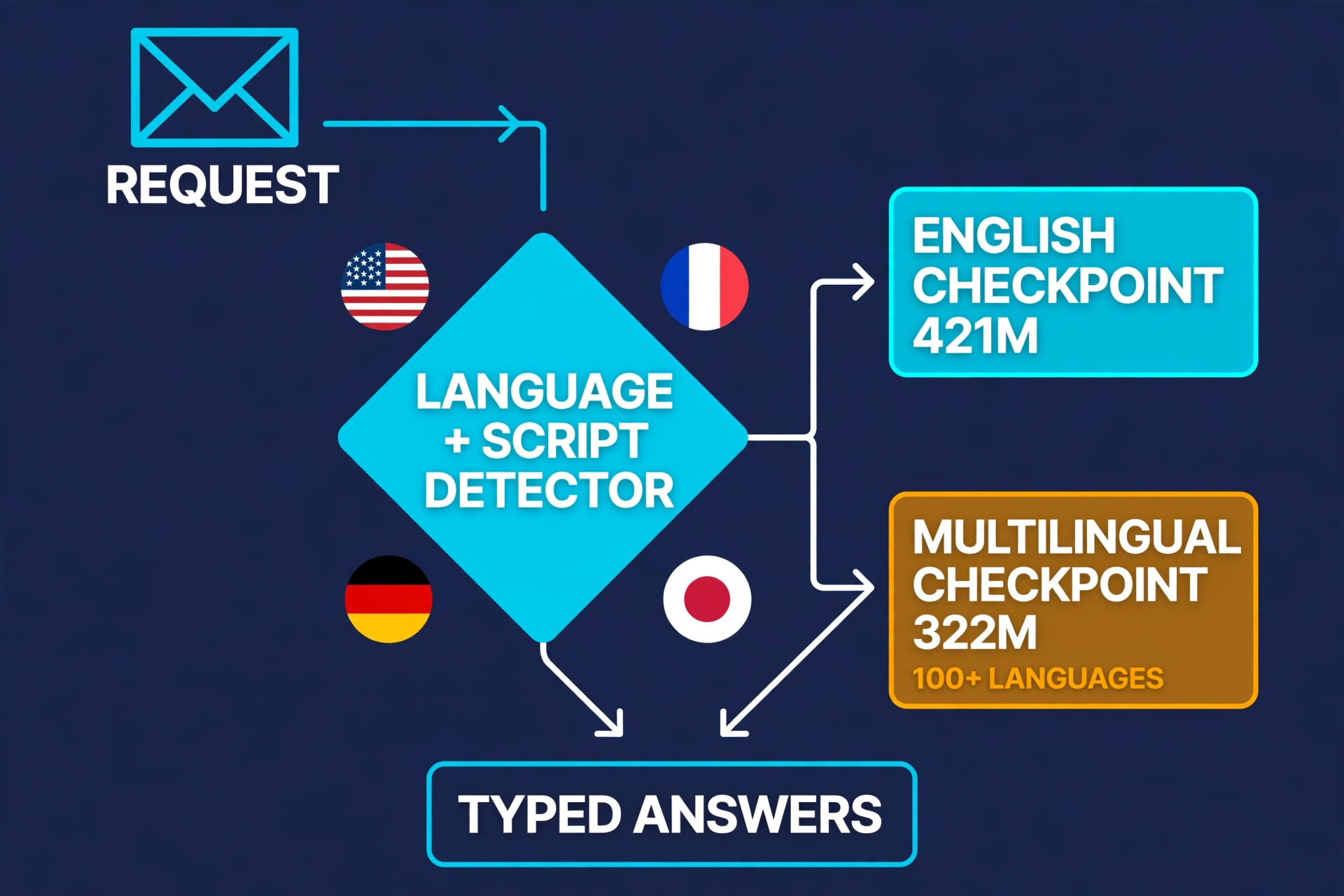
And the pain is real: the "LLM-as-a-judge" pattern has quietly become one of the most expensive lines in production AI systems. Every classification, every guardrail check, every routing decision burns frontier-model tokens and adds a second or more of latency. Laya's pitch is that 95% of those decisions never needed a reasoning engine at all — they needed a fast classifier with typed outputs, confidence scores, and the honesty to abstain. The repo ships three checkpoints on Hugging Face (convaiinnovations/laya): a 421M-parameter English model built on ModernBERT-large, a 322M-parameter multilingual model covering 100+ languages, and a typed-decisions variant. The project reports 33ms per question on a T4 GPU, dropping to 7.2ms per question when batched — numbers I will sanity-check on CPU below.
What you'll need#
- Python 3.10 or newer and pip (I used 3.12 on Linux; macOS and Windows work).
- PyTorch — the CPU build is fine. I ran the entire tutorial on a plain CPU-only VM; no GPU needed.
- About 1.5 GB of free disk for the checkpoint (the multilingual weights are ~650 MB) and ~1 GB of RAM at inference time.
- No API keys, no accounts, no GPU, no cost. Everything runs locally. The checkpoints download from Hugging Face on first use and are cached afterwards.
- About 20 minutes, most of it the one-time checkpoint download.
Step 1: Install Laya#
pip install torch --index-url https://download.pytorch.org/whl/cpu
pip install "laya==0.3.21"
python -c "import laya; print(laya.__version__)"   # 0.3.21
Install PyTorch first from the CPU index so you do not pull the multi-gigabyte CUDA build by accident — that is the one genuine footgun in the setup. Then pin laya==0.3.21, the version I verified everything below against. The import prints 0.3.21 and you are ready; nothing has been downloaded yet except the package itself.
Step 2: Your first decision — the CLI#
Laya ships a CLI that is the fastest way to feel the core idea. Run it with no flags first — this performs routing only, no checkpoint download:
laya "The CEO is furious and the board is about to vote on a merger"You will see something like this (exact output from my run):
Model     : english
Reason    : English Latin text
Detected  : {"script": "latin", "script_profile": {"latin": 1.0}, "language": "en",
             "is_english": true, "language_undecided": false, ...}
The router inspects the script and language of your text and picks a checkpoint — English text goes to the 421M English model, anything else to the 322M multilingual one. This routing decision costs nothing and needs no weights. Now ask a real question with the built-in triage preset (this downloads the checkpoint on first use, ~650 MB, one time):
laya "My payment failed twice" --preset triage --model multilingual --device cpuModel : multilingual
Reason : explicit model='multilingual'
intent : technical_help (p=0.811)
is_urgent : 0.002
frustration : 2.28
refund_requested: 0.004
churn_risk : 0.001Read that output carefully, because it is the whole product in miniature. Five typed decisions — one choice (intent), one score (frustration on a 0–3 scale), three noul yes/no probabilities — answered in one forward pass, with a probability attached to every answer. The triage preset's five questions are defined once and reused; the available presets are email, guard, moderation, router, and triage. Nothing was generated token-by-token. Nothing cost you a cent.
Step 3: Batch triage — including an honest miss#
Single tickets are a demo; the real use case is a queue. Put one ticket per line in a file and score the batch:
printf 'My payment failed twice, I want my money back\nBonjour, je ne parviens pas a me connecter a mon compte\nThis is just a feature request, no rush\n' > tickets.txt
laya --batch tickets.txt --preset triage --model multilingual --device cpu
My exact results on CPU:
# My payment failed twice, I want my money back
intent      : refund (p=1.000)
is_urgent   : 0.004
frustration : 2.16
refund_requested: 0.995
churn_risk  : 0.006

# Bonjour, je ne parviens pas a me connecter a mon compte
intent      : technical_help (p=0.992)
is_urgent   : 0.000
frustration : 2.02
refund_requested: 0.000
churn_risk  : 0.002

# This is just a feature request, no rush
intent      : cancellation (p=0.703)
is_urgent   : 0.009
frustration : 2.30
refund_requested: 0.005
churn_risk  : 0.026
Two observations worth your attention. First, the French ticket — routed to the multilingual checkpoint — is classified correctly with 0.992 confidence. No translation step, no English-only fallback; that is the 100+ language claim working as advertised on at least one of them.
Second, the third ticket is a miss: "This is just a feature request, no rush" gets labeled cancellation at p=0.703. I am showing you this deliberately, because it is the most important thing to understand about decision models: they are wrong sometimes, and the only honest design is one that tells you when it might be wrong. Notice the confidence — 0.703, far below the 0.99+ of the correct answers. That gap is load-bearing. It is what Step 4 is built on.
On timing: the batch of 8 tickets I ran later took 27.5 seconds warm on CPU — about 3.4 seconds per ticket for five questions, or roughly 0.7 seconds per question. The project's reported 33ms per question assumes a T4 GPU; on CPU you should budget about a second per question per ticket after the one-time model load (~85 seconds on my VM). For a support queue or a nightly batch job, that is plenty fast. For per-keystroke latency, use a GPU.
Step 4: The Python API — and teaching it to abstain#
The CLI is for exploration; production code uses the Router. Here is the complete triage loop, which I ran verbatim:
from laya import Router, triage_questions

router = Router(device="cpu")          # checkpoints download on first use
questions = triage_questions()        # the 5-question preset from Step 2

tickets = [
    "My payment failed twice, I want my money back",
    "Bonjour, je ne parviens pas a me connecter a mon compte",
    "URGENT: production database is down, customers cannot check out",
]

out = router.predict(tickets, questions, model="multilingual", min_confidence=0.90)
The result is a plain dict with four top-level keys — model, answers, usage, and routing. The routing block tells you exactly which checkpoint answered and why ("repo": "convaiinnovations/laya/multilingual", "reason": "explicit model='multilingual'"), and usage reports input_tokens with output_tokens: 0 — the signature of a model that never generates.
Each answer carries its type, its value, and its confidence. A choice answer includes the full probability distribution; a score includes the legend mapping numbers to meanings plus per-level probabilities; a noul includes the raw probability. Here is the frustration score for the payment ticket, exactly as returned:
{
  "score": 2.3211,
  "legend": {"0": "calm and neutral", "1": "concerned but civil",
             "2": "clearly annoyed", "3": "very angry or using strong language"},
  "probabilities": {"0": 0.0354, "1": 0.129, "2": 0.3148, "3": 0.5208},
  "confidence": 0.2166,
  "answer_confidence": 0.5208,
  "low_confidence": true
}
That trailing "low_confidence": true is the min_confidence=0.90 parameter doing its job. The model's answer confidence (0.52) fell below my threshold, so Laya flagged the field instead of letting a shaky 2.32 flow silently into my pipeline. This is the opt-in abstention mechanism, and it is the difference between a demo and a system you can deploy: low-confidence fields come back flagged (and as None through the schema-driven decide() API), so your code can route them to a human or a bigger model. Note the honest subtlety — the same ticket's intent (refund, p=1.000) and refund_requested (0.9638) passed the threshold, so only the genuinely uncertain field was flagged. Abstention is per-question, not per-ticket.
Step 5: End to end — a confidence-gated escalation pipeline#
Now assemble the pieces into something you could actually ship: a triage function that auto-handles the easy tickets, escalates the urgent ones, and sends anything uncertain to a human review queue.
def triage(ticket: str) -> dict:
    out = router.predict(ticket, questions, model="multilingual",
                         min_confidence=0.90)
    a = out["answers"]
    # Abstain: any flagged field -> human review
    if any(v.get("low_confidence") for v in a.values()):
        return {"action": "human_review", "ticket": ticket}
    intent = a["intent"]["answer"]            # e.g. "refund"
    if a["is_urgent"]["noul"] > 0.8:          # yes/no probability
        return {"action": "escalate_now", "intent": intent}
    if intent == "refund" and a["refund_requested"]["noul"] > 0.9:
        return {"action": "auto_refund_flow", "intent": intent}
    if a["churn_risk"]["noul"] > 0.5:
        return {"action": "priority_support", "intent": intent}
    return {"action": "standard_queue", "intent": intent}
Run the four tickets from Step 3 through this and you get the behavior you want: the payment ticket takes the auto-refund path, the French login issue goes to the standard queue, the outage ticket escalates immediately, and the ambiguous "feature request" — the one Laya mislabeled as cancellation at 0.703 — lands in human_review because its confidence fell below the gate. The model's one mistake becomes a queue entry instead of a wrong action. That is the entire philosophy: fast typed decisions with a calibrated escape hatch.
One more API worth knowing: Agent.decide(state, schema=...) (signature verified: decide(self, state, schema=None, *, questions=None, return_details=False, min_confidence=None, **predict_kwargs)) lets you pass a JSON schema or Pydantic model and get a structured object back, with low-confidence fields as None — handy when the decision feeds a downstream function signature. And if your agents speak MCP, pip install "laya[mcp]" exposes the same engine as an MCP server (laya-mcp-server), with a LangChain integration in the repo for good measure.
The calibration caveat (read this before deploying)#
Credit where it is due: the Laya docs are unusually honest about the weakest point of the system. Both shipped checkpoints are over-confident as released — the probabilities look sharper than they are — and the multilingual checkpoint ships with no fitted temperatures at all. The repo tells you to fit temperatures on your own held-out data before trusting the numbers, and the min_confidence thresholds I used above are only meaningful after you validate them against your own labels. My 0.90 gate worked on four tickets; that is an anecdote, not a calibration study. Treat the probabilities as useful rankings out of the box and as trustworthy probabilities only after you do the temperature-fitting homework. The docs even flag that the probability→threshold mapping is the part most likely to embarrass you in production. Listen to them.
When to use this vs. alternatives#
- Use Laya when your decision is typed and bounded — classify, score, yes/no — and you make it thousands of times a day. Ticket triage, moderation queues, agent self-routing, RAG relevance judgments, and eval harnesses are the sweet spot. You get determinism, zero per-decision cost, offline capability, and ~millisecond GPU latency.
- Use an LLM-as-a-judge when the judgment needs reasoning, nuance, or free-form explanation — "is this response actually helpful and why." Laya cannot explain itself; it outputs numbers, not rationales.
- Use a guardrail framework (NeMo Guardrails, Guardrails AI) when you need policy orchestration — multi-step dialogue rails, PII redaction flows, topical boundaries. Laya's
guardandmoderationpresets answer "is this unsafe," but they are classifiers, not a policy engine. - Use a fine-tuned classifier when you have thousands of labeled examples in one narrow domain and need maximum accuracy there. Laya's zero-shot questions will lose to a well-trained specialist on its home turf — but the specialist cannot answer a new question tomorrow without retraining, and Laya can.
- Use an on-device model (like Cactus Needle 3, covered in a previous tutorial) when you need tool-calling or structured extraction on a microcontroller or phone. Laya is small for a decision engine, not for a microcontroller.
The takeaway#
Most of what we currently spend frontier-model tokens on is not reasoning — it is judgment with a fixed schema. Laya's bet is that those two workloads deserve different machinery, and after running it on CPU I think the bet is directionally right: a 322M-parameter encoder answering five typed questions in one forward pass, in French as well as English, with per-question confidence and an abstain flag, for zero marginal cost. The 26,000-stars-in-nine-days spike is the market agreeing loudly.
The honest version of the story includes the caveats: one of my four test tickets was misclassified, the shipped probabilities are over-confident until you fit temperatures, and CPU latency is seconds-per-ticket, not milliseconds. But the architecture handles its own weaknesses gracefully — the miss was the lowest-confidence answer in the batch, and the abstention gate caught it. That is what makes this a tool rather than a toy: it knows what it doesn't know, and it tells you. Install it, point it at your most boring classification queue, and stop paying a frontier model to do a classifier's job.