Turn your coding agent into a marketer: hands-on with marketingskills' 53 skills
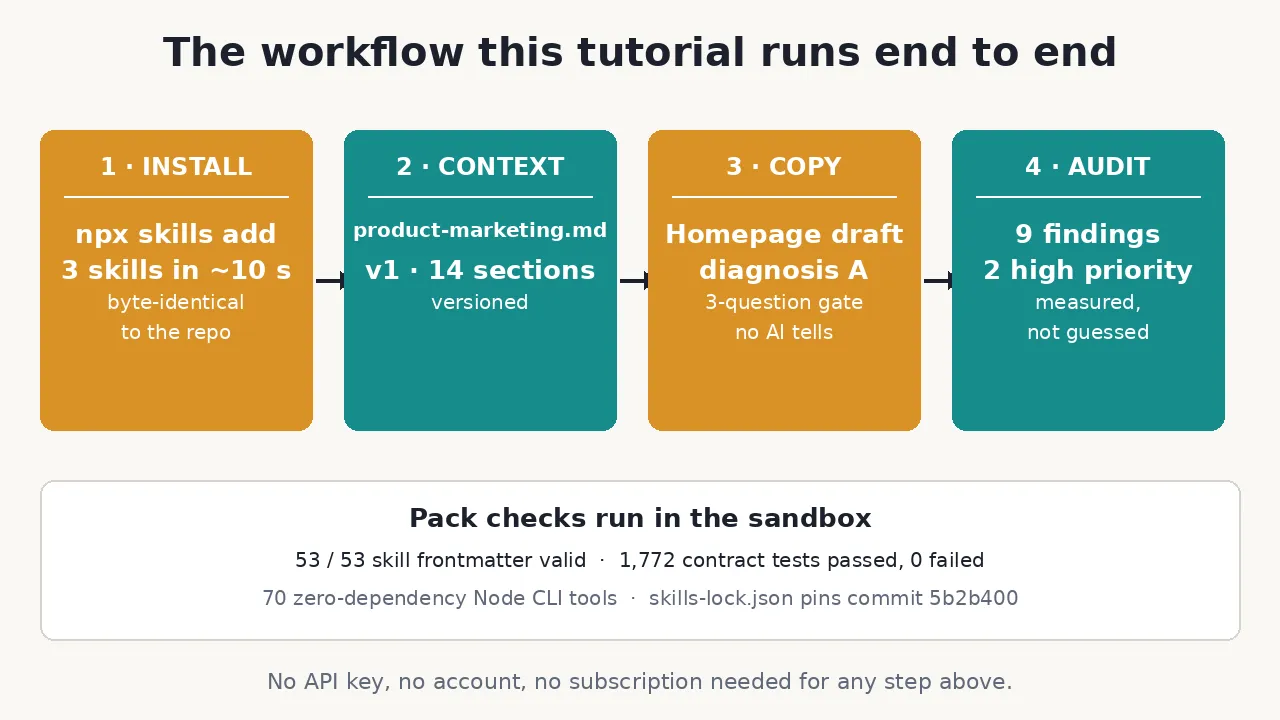
marketingskills packs 53 marketing skills — copywriting, SEO, CRO, analytics — into one MIT collection that installs into Claude Code, Codex and Cursor with a single command. This tutorial installs three of them and runs a full marketing workflow on a fictional SaaS, end to end, with no API key.
- Verified versions:
coreyhaines31/marketingskillsat commit5b2b400(pluginmarketing-skills2.14.25),skillsCLI vianpx, Node 24.22.1, Python 3.12.3. - Counts checked against the clone, not the README: 53 skill directories, 16,684 lines of skill instructions, 70 CLI tools — all matching the README.
- The core loop ran end to end with zero API keys: install three skills, write the product-marketing context, draft homepage copy, audit a local page. No account, no key, no cost.
- Honest scope: no live Claude Code or Codex session was run here — there is no agent subscription on this machine — so the plugin-install commands are verified against the README and the marketplace manifest, not executed. The demo product (Loop) is fictional, invented for this tutorial.
- Why now: the repo is at 62,199 stars and 9,088 forks, and number two on GitHub's JavaScript weekly trending list — the agent-skills wave has reached marketing, the discipline most developers put off longest.

Marketing is the part of running a small software business that most developers put off until it is too late — and the part where an AI coding agent is least useful out of the box. Ask a bare model to write your homepage and you get confident, generic copy with invented statistics. Ask it to audit your SEO and you get a checklist it cannot apply. The missing piece is not a better model. It is instructions: what good copy looks like, what a real audit checks, and what your product actually is, in a form the agent can read before it starts.
marketingskills is that missing piece, packaged as 53 agent skills by Corey Haines, a conversion consultant who has spent years doing this work for clients. It covers copywriting, SEO, conversion optimization, analytics, ads, pricing, launches, and the rest of the marketing job — each skill a Markdown file with a workflow, quality checks, and references, written for Claude Code, Codex, Cursor, Windsurf, and any agent that follows the Agent Skills spec. It is MIT-licensed, it needs no account, and it is having a moment: 62,199 stars and 9,088 forks on GitHub, 1,670 commits, and the number-two spot on GitHub's JavaScript weekly trending list this week. This tutorial opens it up, installs three of its skills with one command, and runs a complete marketing workflow — positioning, homepage copy, SEO audit — on a fictional SaaS, end to end, with no API key and no subscription.
Why a marketing department fits in a Markdown file#
An agent skill is not software. It is a SKILL.md file: a name, a one-paragraph description that tells the agent when to load it, and a body of instructions the agent follows. That is the whole mechanism, and it is why a marketing skill pack can be genuinely useful where a generic prompt is not. A prompt is written once and forgotten; a skill carries the checklists, the failure modes, and the quality gates that a practitioner would apply — and it stays in the project, versioned, where every future session can use it.
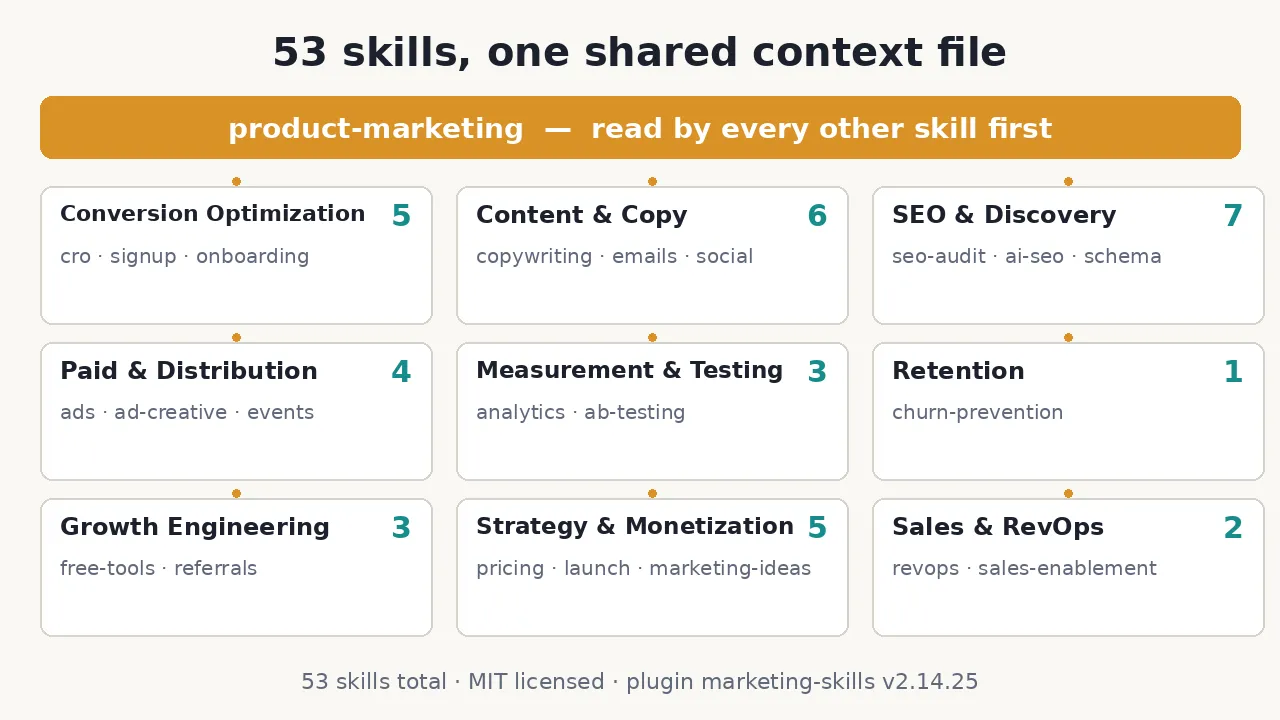
What makes this collection different from the dozens of skill packs that appeared this year is the structure underneath it. The 53 skills are not 53 disconnected prompts. They share one foundation: the product-marketing skill, which writes a single context file — .agents/product-marketing.md — capturing positioning, audience, competitors, customer language, and brand voice. Every other skill reads that file first, so you explain your product once and every skill after that works from the same facts. The collection also ships the things a serious pack needs and most do not: 70 zero-dependency Node.js CLI tools for the marketing APIs the skills reference, 1,772 contract tests for those tools, per-skill versions with a changelog, and an update check the agent runs once per session. The repo enforces its own rules in CI — skill descriptions capped at 500 characters, the whole pack under 24,000 characters so Claude Code's skill listing never truncates them, and every skill under 500 lines.
One thing to know before you install: the project is funded by five verified partners (Converly, Ploy, AIsa, Omnia, Livestorm), disclosed in a partners block at the top of the README, with the rules in tools/PARTNERS.md. Partner tools appear in the registry alongside neutral options, and the README states they never influence what the core skills recommend. The skills themselves are MIT-licensed and free; the partners pay for the maintenance. That is a reasonable deal, and it is disclosed in the open — but if you run a skill that suggests a tool, check whether the suggestion is the neutral option or a partner one. The registry lists both.
What you'll need#
- Node.js 18 or newer. This walkthrough used Node 24.22.1 with npm 10.9.4. The install runs through the
skillsCLI from Vercel Labs; check yours withnode --version. - No accounts, no API keys, no credit card. Everything in the core loop — listing, installing, writing the context file, drafting copy, auditing a local page — is local. A model key only enters the picture when you run an agent that uses a skill, and the marketing-tool CLIs only need keys when you connect a real account.
- Optionally, one coding agent — Claude Code, Codex, Cursor, or Windsurf — for the plugin route in step 6 and for running the skills as intended. This tutorial verifies those commands against the README and the marketplace manifest; running them needs the agent itself, and no live agent session was run on this machine.
- A project to market. The demo uses a fictional SaaS invented for this tutorial — Loop, a shared habit tracker for remote teams — so every number and quote in the demo is labeled fictional. Substitute your own product and the workflow is identical.
Step 1: Look inside the collection#
Before installing anything, look at what you are installing. The repo is small for what it contains — a shallow clone is a few megabytes, mostly Markdown — so clone it and count:
git clone --depth 1 https://github.com/coreyhaines31/marketingskills.git
cd marketingskills
ls skills | wc -l
# 53
wc -l skills/*/SKILL.md | tail -1
# 16684 total
ls tools/clis | wc -l
# 70
53 skill directories, 16,684 lines of skill instructions, 70 CLI tools. The counts match the README exactly, which is the first check that the catalog is what it claims to be. The second check is the contract every skill makes with the agent: its YAML frontmatter. A small script validates all 53 — name matches directory, description between 1 and 500 characters, body under 500 lines:
python3 - <<'EOF'
import os, re
base = 'skills'
for d in sorted(os.listdir(base)):
    txt = open(os.path.join(base, d, 'SKILL.md')).read()
    fm = re.match(r'---\n(.*?)\n---\n', txt, re.S).group(1)
    name = re.search(r'^name:\s*(\S+)', fm, re.M).group(1)
    desc = re.search(r'^description:\s*"(.*)"', fm, re.M).group(1)
    assert name == d and 1 <= len(desc) <= 500, d
    assert txt.count('\n') < 500, d
print('53/53 frontmatter valid')
EOF
# 53/53 frontmatter valid
That script ran clean on all 53 skills, with one nit worth knowing: ai-seo's SKILL.md is 501 lines, one line over the repo's own under-500 guideline. It is a guideline, not a spec limit, and one line over a 500-line cap changes nothing — but it is the kind of detail a pack that enforces its own rules in CI would normally catch, and it tells you the validation is real rather than ceremonial. Total description text across the pack is 18,690 characters, under the 24,000-character cap the repo enforces so Claude Code never truncates a skill's description out of the listing it sends the model.
The nine categories in the README tell you what the pack covers: Conversion Optimization (5 skills), Content & Copy (6), SEO & Discovery (7), Paid & Distribution (4), Measurement & Testing (3), Retention (1), Growth Engineering (3), Strategy & Monetization (5), and Sales & RevOps (2). The other 18 skills — aso, attribution, community-marketing, customer-research, prospecting, video, and the rest — sit outside the category lists but in the same pack. The hub is product-marketing: every other skill checks for its context file first.
Step 2: Install three skills, no plugin required#
You do not need a plugin to use a skill from this collection. The skills CLI installs individual skills from any GitHub repo, and it is the lightest way in: no agent, no marketplace, no clone. This tutorial installs three skills — the foundation and the two it will demo — for Claude Code:
mkdir mktg-demo && cd mktg-demo
npx skills add coreyhaines31/marketingskills --skill product-marketing copywriting seo-audit -a claude-code --yes
◇ Repository cloned
◇ Found 53 skills
● Selected 3 skills: copywriting, product-marketing, seo-audit
◇ Installation complete
│ ✓ seo-audit (copied)
│ → ./.claude/skills/seo-audit
└ Done! Review skills before use; they run with full agent permissions.The whole install took about 10 seconds. Two things in that output deserve attention. First, the --yes flag is not optional in practice: without it, the CLI stops at an interactive "Installation scope" prompt (Project or Global), and in a non-interactive shell it waits there until the command times out — the first install attempt in this tutorial's sandbox did exactly that and installed nothing. The README's own tip says to use --yes (and --global for a personal install), so pass it. Second, the closing line is a genuine warning, not boilerplate: a skill runs with your agent's full permissions, so read it before your agent does — and read the trust scan the CLI prints at install time.
Verify what landed. The skills are real files in .claude/skills/, byte-identical to the repo clone — diff -r against the clone reports no differences — and skills-lock.json records the source, the exact commit, and a hash of what was installed:
find . -type f | sort
# ./.claude/skills/copywriting/SKILL.md
# ./.claude/skills/copywriting/references/ai-tells.md
# ./.claude/skills/copywriting/references/copy-frameworks.md
# ./.claude/skills/copywriting/references/natural-transitions.md
# ./.claude/skills/product-marketing/SKILL.md
# ./.claude/skills/product-marketing/references/brand-voice.md
# ./.claude/skills/seo-audit/SKILL.md
# ./.claude/skills/seo-audit/references/ai-writing-detection.md
# ... (references for seo-audit) ...
# ./skills-lock.json
{
"version": 2,
"skills": {
"copywriting": {
"source": "coreyhaines31/marketingskills",
"commit": "5b2b400eec1e7e1cec76245a715d0b0d4fd2a9c1",
"sourceType": "github",
"skillPath": "skills/copywriting/SKILL.md",
"computedHash": "6b86be15d7e8397c27d339fbcbf72718854f96f096ca617889e45b5b8174c393"
}
}
}That commit hash matches the repo's current HEAD on GitHub, and the hash is what makes the install reproducible: skills check compares your installed copies against upstream, skills update pulls new versions, and a teammate can restore exactly these skills from the lock file. Commit it. To install all 53 skills instead of three, drop the --skill flag; to see the full list first, run npx skills add coreyhaines31/marketingskills --list.
Step 3: Write the product-marketing context#
Every skill in the pack starts the same way: check whether .agents/product-marketing.md exists, and read it before asking questions. The product-marketing skill exists to create that file, and it is the step most people skip — then wonder why the copywriting skill asks them the same positioning questions the SEO skill asked five minutes earlier. Write it once, and the rest of the pack works from it.
The skill offers two paths: auto-draft from the codebase (it reads the README, landing pages, and package.json and drafts a first version for review) or walk through the sections conversationally. Either way the output is the same fixed template: 14 sections — product overview, target audience, personas, problems and pain points, competitive landscape, differentiation, objections and anti-personas, switching dynamics, customer language, brand voice, proof points, goals, paid ads, and learnings — with a version number and a changelog at the bottom. Every substantive edit bumps the version and adds one changelog line naming what changed and why, so the file is a dated record of how your positioning evolved, not a document that silently drifts.
For the demo, the context file describes Loop, a fictional SaaS invented for this tutorial: a shared habit tracker for remote teams, $8 per user per month, 14-day free trial, no card required. The file was written following the skill's template exactly, with the invented details filled in and the unproven ones marked rather than invented — the skill is explicit that claims must be supportable, so metrics, customers, and testimonials carry [NEED: ...] markers naming the evidence that would unlock them:
# Product Marketing Context

**Document version:** v1
**Last updated:** 2026-11-23

## Product Overview
**One-liner:** Loop is a shared habit tracker that helps remote teams
build one good habit at a time, together.
**Product category:** team habit tracking / employee engagement software
**Product type:** SaaS
**Business model:** $8 per user per month. 14-day free trial, no card required.

## Target Audience
**Target companies:** Remote-first companies, 10–200 people, that already run on Slack.
**Decision-makers:** Heads of People / Operations, team leads.
**Primary use case:** Getting a distributed team to stick to one shared habit
without nagging.

## Differentiation
**Key differentiators:**
- Team-visible streaks, not private counters
- One check-in per day, 10 seconds, no feed to scroll
- A single weekly report for managers — no dashboard to babysit
**Why that's better:** One shared habit is a ritual. Thirty private habits
are a to-do list.

## Objections
| Objection | Response |
|-----------|----------|
| "It's another app to check." | One check-in a day, 10 seconds, inside Slack — there is no app to open. |
| "Habits are personal." | The team picks one shared work habit together; personal habits stay private. |
| "We tried this in a spreadsheet." | The spreadsheet needed a maintainer. Loop's streaks update themselves. |

## Proof Points
**Metrics:** [NEED: trial-to-paid rate, median streak length — no invented numbers]

## Changelog
- v1 (2026-11-23) — Initial context.
Two details in that file do more work than they look like. First, the customer language section captures verbatim phrases — "We tried that, it doesn't work here" — because the skill insists exact customer words beat polished descriptions; the copywriting skill will mirror them later. Second, the [NEED: ...] markers are the skill's honesty mechanism: a declined claim names the evidence that would unlock it, so an empty proof section becomes a to-do list instead of a fabrication. When the context file exists, the other skills stop asking positioning questions and start from it — that is the whole point of the hub.
Step 4: Draft homepage copy with the copywriting skill#
With the context file in place, the copywriting skill reads it before asking anything — that is the first line of its instructions — and checks the Learnings section so it does not re-propose angles already tested. Then it diagnoses the situation before writing a word. There are three: A, a blank brief or generic company-speak; B, a real draft with a voice worth restoring; C, a point edit. The diagnosis sets how much the skill is allowed to change, because most bad AI copy comes from imposing the model's taste on a marketer who already made good choices.
The Loop demo is situation A — a one-line ask, no existing draft — so the skill builds the argument from the brief and the context file, with latitude on angle and none on facts. Its drafting protocol is the part worth stealing even if you never install the skill: decompose the page into named units (headline, subhead, CTA, each section), draft two or three candidates per unit, keep the best, fix its worst flaw, and lock it. Then run every kept line through a three-question gate: can the reader picture it, can it be proven true or false, and could a competitor write this exact sentence? Three passes and the line stays; one or none and it gets rewritten from the facts or flagged [NEED: ...].
Following that protocol for Loop produced this hero:
Headline: The habit tracker your team can see
Subheadline: Loop gives your team one shared habit, one 10-second
check-in a day, and a streak everyone can see. When the streak is
visible, the habit survives week two.
Primary CTA: Start your team's first streak
Microcopy: 14-day free trial. No card required.
Run the gate on the headline. Can the reader picture it? Yes — a team looking at one shared streak. Can it be proven true or false? Yes — team-visible streaks exist or they do not. Could a competitor write this exact sentence? No — an individual habit app cannot, and that is the point: the differentiator is the sentence. The rejected alternative, "One habit your whole team keeps," leads with the outcome instead of the mechanism, and a personal habit app could plausibly write it. The skill also runs an AI-tells check before delivering: no "it's not X, it's Y" contrast reveals, no negation lists, no em dashes in short copy, no stock openers, and at most one fragment per section. The one real absence — "No card required" — appears once, next to the CTA, which the skill explicitly allows. The full draft, with annotations and alternatives for every section, is in the demo files; no statistics, customers, or testimonials appear anywhere in it, because the context file has none yet.
Step 5: Audit the page with seo-audit#
The seo-audit skill works from the same context file — same audience, same conversion action — and audits in a fixed priority order: crawlability and indexation first, then technical foundations, on-page optimization, content quality, and authority. Its output format is fixed too: executive summary, findings with issue, impact, evidence, fix, and priority, then a prioritized action plan. The demo audited a deliberately flawed Loop homepage (a single static HTML file), and every finding below was measured from the file, not asserted:
| # | Finding | Evidence (measured) | Priority |
|---|---|---|---|
| 1 | Title tag is 101 characters | 101 chars vs the skill's 50–60 guidance; the tail is cut off in results | High |
| 2 | No meta description | name="description" absent from the file | High |
| 3 | Two H1s, skipped heading level | Heading order H1, H1, H3, H2 | Medium |
| 4 | Image has no alt text | 1 <img> without alt | Low |
| 5 | No canonical tag | rel="canonical" absent | Medium |
| 6 | Primary keyword phrase never appears | "habit tracker for teams" absent; "habit" and "tracker" appear separately | Medium |
| 7 | Vague anchor text | Signup link reads "Click here" | Low |
| 8 | No structured data | No JSON-LD in the static HTML (file has no scripts at all) | Low |
| 9 | Mobile viewport — pass | width=device-width, initial-scale=1 present | — |
Two of those findings are worth a closer look, because they show how the skill thinks. The title fix is not "write a better title" — it is the title the copywriting skill already drafted in step 4: "Loop — the habit tracker your team can see", 49 characters, keyword near the front. The meta description fix is the same story: the copywriting skill's 149-character draft drops straight in. That is the hub working as designed: the audit does not invent new copy, it points at the copy the pack already produced. The keyword finding is the subtler one: "habit" and "tracker" both appear on the page, so a naive check passes it — but the exact target phrase never appears, and the skill flags the misalignment between title, H1, and body rather than counting words.
Honest scope, as the skill itself states it: site-level checks — robots.txt, sitemap, Search Console coverage, Core Web Vitals field data — need a deployed site, and a single local file cannot verify them. They are listed in the audit as not run, not as passing. The skill also warns that curl and fetch-based tools cannot reliably detect schema markup injected by JavaScript, so "no schema found" from a static read is a false finding on a JavaScript-rendered page — on this demo file, which has no scripts at all, the finding stands.
Step 6: The rest of the toolkit#
Three skills are the demo, not the pack. The rest of it is what makes the collection worth keeping installed rather than copying one skill and moving on.
The CLI tools. tools/clis/ holds 70 zero-dependency Node.js scripts — one per marketing API the skills reference, from GA4 and Ahrefs to Mailchimp, Stripe, and HubSpot — each with a --dry-run mode that previews the request without sending it. They syntax-check clean (node --check on the three sampled), print usage with no arguments, and fail honestly without credentials: the Ahrefs tool reports that AHREFS_API_KEY is required instead of calling anything. The repo's own contract tests — 163 test files, 1,772 tests, all with mocked fetch and no live calls — passed 1,772 to 0 in about four minutes in this tutorial's sandbox. That is a real test suite for a skills pack, and it is rare.
Updates. The agent checks for updates once per session by fetching VERSIONS.md from GitHub and comparing it against the installed skills' versions, and only prompts when two or more skills have updates or any skill has a major bump. skills check and skills update do the same from the command line, using the lock file's hashes. If you installed the v1.x skills, note the v2.0 rename map — 17 skills renamed, page-cro and form-cro merged into cro — and clean up the stale old-name folders after upgrading, or you will have both cro/ and page-cro/ installed at once.
Connecting real accounts. tools/SETUP.md is the guided workflow for letting an agent read your marketing accounts: check the environment, configure only the tools you choose, keep secrets local, and verify a read-only result before proposing broader work. The registry lists MCP-enabled tools (GA4, Stripe, Mailchimp, Google Ads, Meta Ads, HubSpot, and dozens more) and Composio as the integration layer for OAuth-heavy tools without native MCP servers. The discipline here is the point: the skill asks for a scoped credential and a first read-only result, not your keys pasted into a chat.
The plugin route. If you want all 53 skills as one unit inside an agent, the repo is also a Claude Code plugin marketplace (.claude-plugin/marketplace.json, plugin marketing-skills v2.14.25) and a Codex plugin. The commands are verified against the README and the manifest, not executed in this tutorial — they need the agent and its subscription:
claude plugin marketplace add coreyhaines31/marketingskills
claude plugin install marketing-skills@marketingskills
codex plugin marketplace add coreyhaines31/marketingskills
# then browse and install from inside a Codex sessionThere are nine install options in total, including clone-and-copy, a git submodule, SkillKit for multi-agent installs, and per-skill ZIPs for Claude Web and Perplexity Computer. The CLI route in step 2 is the recommended one, and for most people it is the only one they need.
When to use this vs alternatives#
There are four honest ways to get marketing work out of an AI agent, and the collection is not always the answer.
| Approach | Best when | Watch out for |
|---|---|---|
| marketingskills | You market a product yourself, or with a small team, and want one maintained pack that covers the whole job from positioning to audit | Skills are instructions, not a model: output quality still depends on the agent and on the context file being honest |
| Single-purpose skill packs | You need one discipline done deeply — e.g. a dedicated SEO or CRO pack — and nothing else | No shared context file: every skill re-asks your positioning, and the packs drift apart |
| Bare-model prompting | A one-off task, or a draft you will heavily rewrite yourself | No checklists, no quality gates, no memory of your positioning; invented statistics are the default failure mode |
| Hiring or an agency | The work is the business — a launch, a rebrand, a paid program at real spend | Cost, and the same context problem in human form: a good agency asks for the same positioning document first |
The deciding factor is whether you will do this work more than once. A single homepage draft: prompt the model, rewrite it yourself, move on. A product you will keep marketing for a year — copy, then an audit, then emails, then a launch, then pricing — is where the pack pays: the context file compounds, the learnings section accumulates what actually worked, and the lock file turns "the skills I happen to have installed" into a checked-in part of the repo. The price is the discipline of keeping that context file honest — versioned, with [NEED: ...] markers where proof does not exist yet — because every skill downstream will treat it as fact.
The takeaway#
marketingskills is the most complete answer yet to a simple problem: a coding agent knows how to write code, and nothing about how to market the thing it just built. The pack's answer is not a smarter model but a better brief — 53 skills that share one context file, quality gates that refuse to invent proof, and a lock file that makes the whole setup reproducible. The numbers hold up: 53 skills counted in the clone, 53 of 53 frontmatter valid, 1,772 contract tests passing, and a three-skill install that took 10 seconds and landed byte-identical. Start there. Install product-marketing, copywriting, and seo-audit, write the context file for your own product, and run the loop once — positioning, copy, audit — before deciding whether the other 50 skills earn their place. If you adopt it, commit the lock file, fill in the proof points before you publish anything the skills wrote, and read the registry before you trust a tool suggestion. The skills will do the marketing work. The judgment about what is true is still yours.