Turn any document into an AI classroom: hands-on with OpenMAIC
OpenMAIC turns a topic or a PDF into a full interactive classroom — AI teachers, classmates, a whiteboard, and quizzes — running on your own machine. This guide installs it with Docker, wires up a model, and generates your first lesson.
openmaic.yml, generates a first classroom, and exports it as PPTX, offline HTML, or a ZIP.- What:
THU-MAIC/OpenMAIC— Open Multi-Agent Interactive Classroom, MIT-licensed, from Tsinghua University’s MAIC lab. - Scale: 42,969 stars and 6,613 forks on GitHub (November 8, 2026); created March 11, 2026.
- Version: v1.4.1 (November 5, 2026); PBL v3 project-based learning arrived in v1.4.0.
- Requirements: Node.js 22.19+, pnpm 10+, PostgreSQL 16 — or Docker, which supplies both; one LLM API key (DeepSeek token plan recommended) or local models via Ollama/Lemonade.
- Cost: free and open source; usage is billed by your model provider, or zero per token with local models.
- Exports: editable PPTX, single-file offline HTML, classroom ZIP; MP4 via the opt-in render-service profile.
A PDF is a terrible teacher. It sits there, all 40 pages of it, while you do the hard part yourself: deciding what matters, in what order, and whether you actually understood any of it. A lecture is better — someone explains, you ask questions, a classmate argues back — but lectures don't scale to every document you need to learn from.
OpenMAIC is the attempt to get the lecture without the lecturer. It is an open-source platform from Tsinghua University's MAIC lab that turns a topic or a document into a full interactive classroom: AI teachers and AI classmates who lecture, discuss, draw on a whiteboard, and quiz you, delivered as slides, interactive simulations, and project-based learning. It has 42,969 stars on GitHub, it is MIT-licensed, and it runs on your own machine. This guide installs it with Docker, wires up a model, and generates your first classroom — every command and flag taken from the project's own README and docs for version 1.4.1.
What you'll need#
- Docker (the easy path) — or Node.js 22.19+, pnpm 10+, and PostgreSQL 16 if you prefer the development install.
- One LLM API key. The README recommends a fast long-context model such as DeepSeek's
deepseek-v4.1-flashas the default. OpenAI, Anthropic, Kimi, Qwen, and others work too — or run fully local models through Ollama or Lemonade, no key required. - A document or a topic you want to learn — a PDF, a paper, a manual, or just a subject line.
- About 30 minutes, most of it waiting on the first classroom to generate.
Step 1: Install with Docker#
Clone the repo, copy the example environment file, and bring the stack up. The Compose stack is two containers — the app and PostgreSQL — and your courses, generated media, and sessions live in the named volumes openmaic-postgres and openmaic-data, which survive restarts and rebuilds.
git clone https://github.com/THU-MAIC/OpenMAIC.git
cd OpenMAIC
cp .env.example .env.local
docker compose up --build
Open http://localhost:3000. That is the whole install. The Compose setup is a personal installation: it runs in single-user mode and listens on 127.0.0.1:3000 only, so nobody else on your network can reach it. If you later publish it — OPENMAIC_PUBLISH_ADDRESS=0.0.0.0 docker compose up -d --build — set a long random ACCESS_CODE in .env.local first (at least 16 characters). Without it, anyone who can reach the port owns, edits, and can delete the whole library.
Prefer the development path instead? Same repo, same config files, then a database and a dev server:
pnpm install
cp .env.example .env.local
cp openmaic.example.yml openmaic.yml
pnpm db:up     # starts a dev PostgreSQL 16 in Docker
pnpm dev       # http://localhost:3000
One hard requirement either way: DATABASE_URL. OpenMAIC keeps courses on the server in PostgreSQL, and without a database URL the server prints the fix and exits with code 1. Compose sets it for you; the dev path gets it from pnpm db:up plus the uncommented local DATABASE_URL line in .env.local.
Step 2: Point it at a model#
OpenMAIC configures models once, in openmaic.yml, as providers plus slots. A provider is an account the server can call; a slot is a use of AI — the outline, the slide content, text-to-speech, web search, and so on. Keys stay in .env.local and are referenced as ${VAR}. The cheapest full-featured setup is a DeepSeek token plan: one key lights up chat, image, video, TTS, and web search.
# openmaic.yml — one DeepSeek key for everything
providers:
  deepseek:
    preset: deepseek
    apiKey: ${DEEPSEEK_API_KEY}

slots:
  llm: deepseek:deepseek-v4.1-flash
  image: deepseek
  video: deepseek
  tts: deepseek
  webSearch: deepseek
Put DEEPSEEK_API_KEY=sk-... in .env.local and restart the stack. If you would rather use OpenAI, the same shape works with preset: openai and llm: openai:gpt-5.5. The README's own tip: OpenMAIC is at its best with every modality turned on — generated illustrations, narration, video clips, web search, and web fetch — and a token plan configures all of them with one key.
Going fully local is also a real option. OpenMAIC supports Lemonade as a local, OpenAI-compatible provider for LLMs, image generation, TTS, and ASR — no API key required — pointed at http://localhost:13305/v1. Ollama is a listed provider too, and FunASR can transcribe locally with no key. Local models trade quality for privacy and zero per-token cost; the hosted token plans are the faster path to a good first classroom. If you already run a local model server, the Ollama hands-on guide covers getting one running first.
Step 3: Generate your first classroom#
At http://localhost:3000, start a new classroom two ways: describe a topic in one line, or attach your materials — a PDF, slides, or a document — and let the agents build from that. The multi-agent pipeline writes an outline, then slide content, then illustrations and narration, then quizzes and interactive scenes. Generation runs on the server and survives closed tabs and restarts, so you can start a classroom, close the browser, and come back to it finished.
Pick a real document for your first run, not a toy topic. A 20-page paper or a product manual is where the difference shows: the agents have to decide what the document actually says, in what order, and what is worth a quiz. Give it a few minutes — a full lesson with narration and images is several model calls, and the first build is the slowest.
Step 4: Attend the lesson#
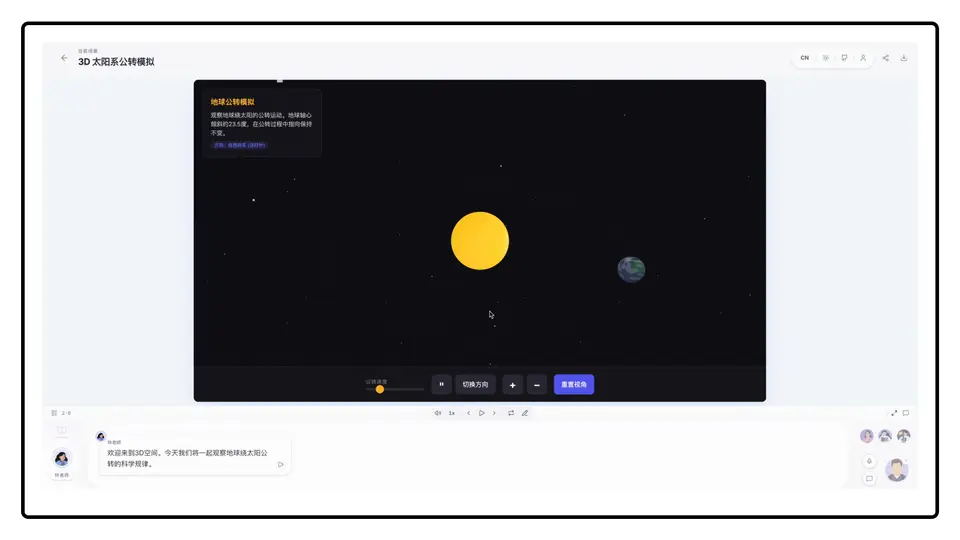
A generated classroom is not a slide deck you click through. It is a room with a cast:
- AI teachers lecture each scene, draw diagrams and formulas on the whiteboard, and narrate out loud with text-to-speech.
- AI classmates ask the questions you were about to ask, and argue with the teacher — the discussion is the point, not decoration.
- Classroom chat lets you ask about any slide element, interactive, or whiteboard drawing mid-lesson, and get an answer in context.
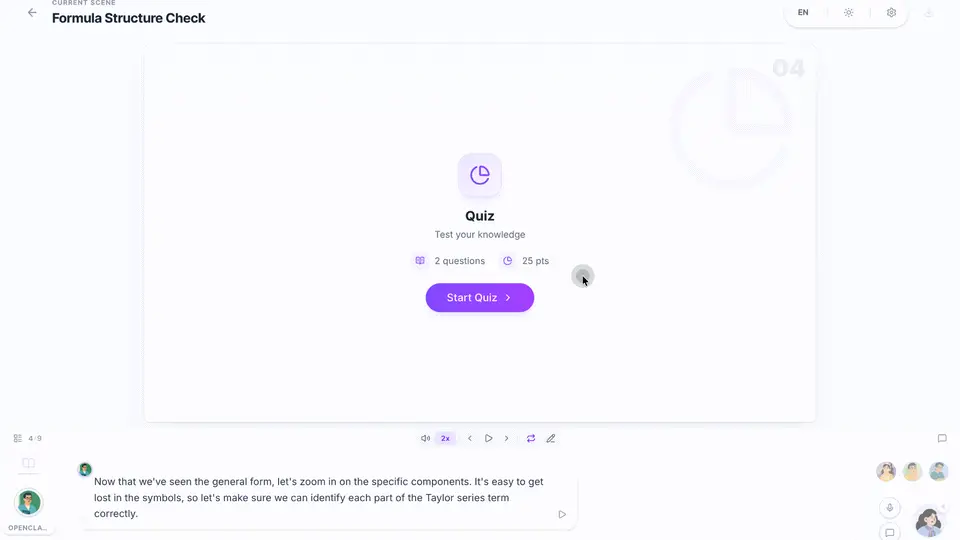
- Quizzes and interactive scenes — slides, interactive HTML simulations, 3D, games, mind maps, and inline programming — check understanding as you go instead of at the end.
Try interrupting the teacher. Ask a follow-up about a formula on the whiteboard, or ask a classmate to explain the same idea differently. That back-and-forth is what a PDF cannot do, and it is the fastest way to find out whether the generated lesson is actually correct — a wrong explanation argued with is easier to spot than a wrong paragraph skimmed past.
Step 5: Try project-based learning#
Version 1.4.0 added PBL v3, a different way into learning: instead of a lesson about a project, you build the project and understand how it works. An AI tutor guides you through requirements, design, and implementation, answering questions at any point, with milestones, staged feedback, and a personal learning report — and your work and progress are kept so you can continue at your own pace.
PBL v3 is opt-in and needs extra setup: configure a sandbox provider and checkpoint storage, then open /pbl-v3. The in-app setup guide is at lib/pbl/v3/README.md in the repo. If you skip it, nothing breaks — PBL v3 simply stays off. One caution from the 1.4.0 release notes: the upgrade to 1.4.x is one-way, so read the release's Breaking Changes before upgrading an existing deployment, and stop all 1.3.x instances first.
Step 6: Export the classroom#
A classroom you cannot take with you is a demo. OpenMAIC exports three ways from the classroom menu:
- PowerPoint (.pptx) — editable slides with images, charts, and LaTeX formulas. Interactive, quiz, and PBL scenes stay in place as placeholder slides with an Open online button and a QR code.
- Offline HTML — one file that plays the whole lesson without a network connection: narration with captions, spotlight and laser, slide video, quizzes, and interactive scenes.
- Classroom ZIP — the full classroom (structure plus media) for backup, sharing, or moving to another deployment: export from one, import into the other.
MP4 video export is opt-in and separate: it needs Chromium and FFmpeg on Node 22, so it runs in an isolated render-service container. Start it with the video-export Compose profile:
docker compose --profile video-export up --buildThe app auto-detects the service and enables one-click MP4 rendering. Without the profile, export degrades to downloading the project ZIP for local CLI rendering — the lesson still gets out, just not as a video.
What you built#
A self-hosted classroom generator: any topic or document in, a taught lesson out, with AI teachers and classmates, whiteboard and narration, quizzes, project-based learning, and exports that survive without the server. The same install also works as a team library — uploads are kept in each owner's knowledge base, the composer offers them through @, and the OpenMAIC Skill lets agent workbenches such as OpenClaw generate classrooms from Feishu, Slack, Telegram, or your IDE. If you want the same self-hosted pattern for a general assistant rather than a classroom, Tencent's Octop runs a multi-agent assistant at home the same way, and Open WebUI 0.13 turns the self-hosted chat front end into a full workspace.
Honest limitations#
- It is a server, not a static site. Since 1.2.0, course generation runs in a long-running Node.js process with PostgreSQL. Vercel and other serverless hosts are not supported, and the repo no longer ships a
vercel.json. Budget a small always-on machine or container. - Generation costs tokens. A full classroom with illustrations, narration, and video is several model calls per scene. A token plan keeps it to one key, but it is not free — check your provider's usage after the first few classrooms.
- The AI can teach the document wrong. The outline and content come from models reading your materials; a confident-sounding lesson can still misstate a detail. The classroom chat is your fact-checker — interrogate anything that matters before you trust it or share the export.
- Local models are a tradeoff. Lemonade and Ollama remove the API bill and keep everything on your machine, but a small local model writes a visibly weaker lesson than a frontier model. Start hosted, go local once you know what good output looks like.
- Upgrades are one-way in 1.4.x. Older replicas exit when a newer release migrates the database, and rolling back needs a database restore. Back up before upgrading.
The takeaway#
The useful test is not whether the classroom looks impressive — it does — but whether you learn faster from it than from the document alone. Run one real document through it, attend the lesson, argue with a classmate, and export the result. If the quiz catches a misunderstanding your skim would have missed, the classroom earned its keep. If it did not, you still have the document — and a PPTX to show for the experiment.
Frequently asked questions
Do I need a paid API key to use OpenMAIC?
No. You need one model provider, and a token plan such as DeepSeek's covers chat, image, video, TTS, and web search with a single key. If you want no key at all, run local models through Lemonade or Ollama and local transcription through FunASR — the tradeoff is a visibly weaker lesson from a small local model.
Can I run OpenMAIC fully offline?
The app itself runs on your own machine, and with local providers (Lemonade or Ollama for models, FunASR for transcription) the whole stack can stay local. Hosted models need a network connection. Either way, an exported classroom as offline HTML plays the full lesson with no connection at all.
Does it work without Docker?
Yes. With Node.js 22.19 or newer, pnpm 10 or newer, and PostgreSQL 16, run pnpm install, copy the two example config files, start the dev database with pnpm db:up, and run pnpm dev. Docker is the shorter path; the development path is the same app.
What happens to my classrooms if I upgrade?
Upgrades in the 1.4.x line are one-way: a newer release migrates the database, older replicas exit rather than run against it, and rolling back needs a database restore. Back up before upgrading, and read the release's Breaking Changes first.
Sources
- THU-MAIC/OpenMAIC — GitHub repository — README: quick start, configuration, providers, export; 42,969 stars, MIT; read November 8, 2026.
- OpenMAIC v1.4.1 release notes — November 5, 2026: background syncs keep edits and learner progress; v1.4.0 PBL v3 notes; read November 8, 2026.
- OpenMAIC live demo — try the classroom without installing; read November 8, 2026.
- OpenMAIC paper — JCST 2026 — the research paper behind the platform; read November 8, 2026.