Stop parsing broken LLM JSON: guaranteed-valid structured output with Outlines, locally
Outlines 1.3.3 constrains a local model at the token level, so the output cannot break your schema — no retries, no repair code. We ran it end to end on a CPU-only machine with Qwen2.5-0.5B: JSON, regex, choices, and a four-ticket batch, all validated first try, with the model’s judgment errors measured honestly.
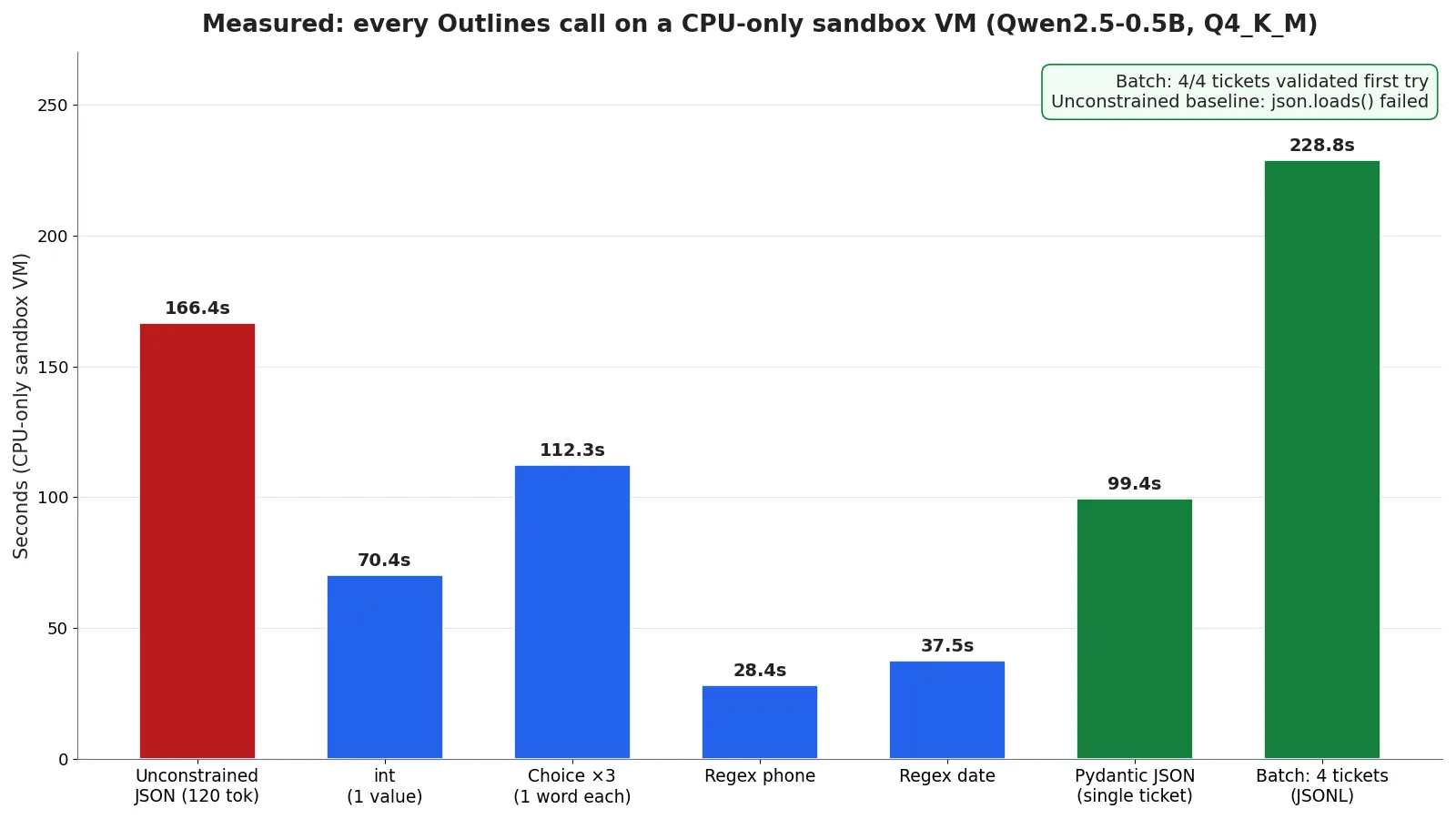
- Unconstrained, the model returns fenced JSON that json.loads() rejects (JSONDecodeError, line 1 column 1). The same prompt constrained by a Pydantic model validates first try in 99.4 s.
- Outlines 1.3.3 + llama-cpp-python 0.3.35 + Pydantic 2.13.5, Qwen2.5-0.5B-Instruct Q4_K_M (469 MB), CPU-only, $0 — the model loads in about 6 seconds.
- Batch: 4/4 tickets validated first try in 228.8 s total, written to tickets.jsonl — but ticket 0 invents order_id 90210000 and two tickets flag refunds nobody asked for.
- Shape is not truth, measured: a leap year is not 142 days, an angry review is not neutral, and a regex date comes back 0101-01-20 — all valid shapes, all wrong values.
- Install trap, verified: plain pip install outlines leaves structured calls silently unconstrained (missing numba); pip install “outlines[llamacpp]” pulls it. CFG needs a separate pip install llguidance.

Every pipeline that turns language-model output into something a program can use starts the same way: ask the model for JSON, call json.loads(), and hope. Most of the time it works. Then one day the model wraps the object in markdown fences, or returns "urgency": "ASAP" instead of one of your three allowed values, or truncates mid-object — and your code crashes at 2 a.m. Or worse, it does not crash, and the bad value flows downstream into a database, a dashboard, or a customer-facing reply.
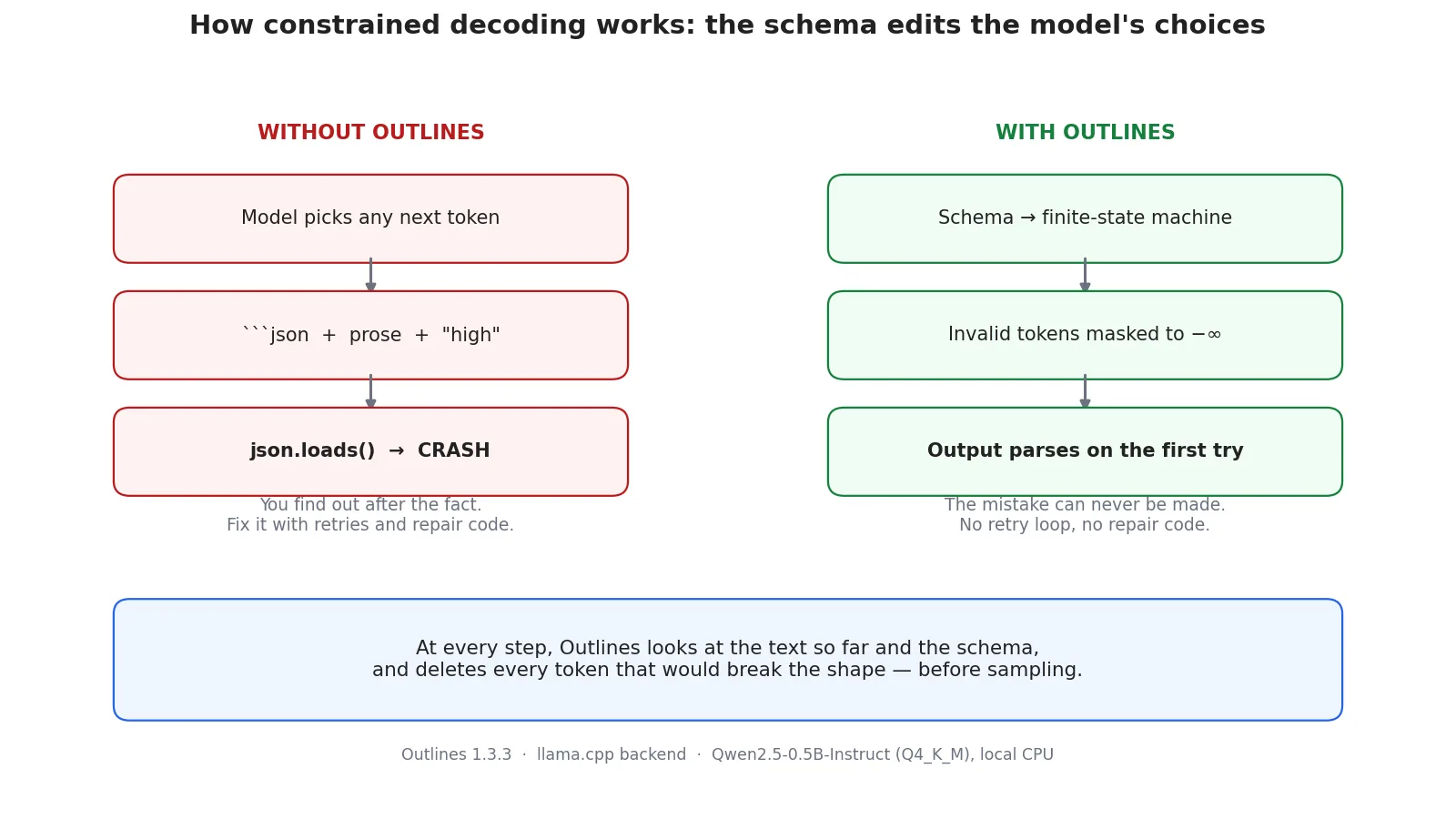
The usual fixes all work after the fact: validate with Pydantic and retry, strip the fences with a regex, ask more firmly in the system prompt. They help. But they all share the same weakness — the model is free to make the mistake, and you find out afterwards. Outlines removes the mistake instead of catching it. You hand it a schema, a regex, or a set of choices, and it compiles that constraint into a finite-state machine that edits the model's choices token by token: at every step, any token that would break the shape is masked out before sampling. The output cannot be invalid, because the invalid tokens were never on the table.
This tutorial runs that whole loop end to end on your own machine — a local Qwen2.5-0.5B model through llama.cpp, no API key, no GPU, $0. You will watch the unconstrained baseline fail exactly the way production pipelines fail, then constrain the same model with an integer type, a multiple-choice set, two regexes, a Pydantic model, and a context-free grammar, and finish with four support tickets written to a JSONL file. Every number in this article was measured on a CPU-only sandbox VM, and the places where the tiny model gets the value wrong while the shape stays perfect are reported honestly — because that distinction is the whole point of this tool.
What you’ll need#
- Python 3.10 or newer. Verified here on Python 3.12.
- Outlines 1.3.3 with the llama.cpp extra — this is the step most people get wrong, see Step 1.
- One GGUF model file, 469 MB. Qwen2.5-0.5B-Instruct, quantized to Q4_K_M, from Qwen's official Hugging Face repo. No account needed.
- About 10 minutes of patience. A 0.5B model on CPU generates roughly 1–2 tokens per second on the shared sandbox VM used here; a modern laptop is several times faster. The code is identical either way.
- No API key, no GPU, no cloud bill. Everything below runs on localhost.
Step 1: Install Outlines the right way#
Outlines ships its backends as optional extras. The llama.cpp backend needs three pieces — outlines itself, llama-cpp-python, and numba — and the one command that pulls all three is:
python3 -m venv outlines-env
source outlines-env/bin/activate
pip install "outlines[llamacpp]" "pydantic>=2.9"
That installed Outlines 1.3.3, outlines-core 0.2.14, llama-cpp-python 0.3.35, Pydantic 2.13.5, and numba 0.68.1 in our verification run. The quotes around "outlines[llamacpp]" matter — without them your shell eats the brackets.
Do not install the pieces separately. We did, the first time: plain pip install outlines plus a system llama-cpp-python, which leaves numba out. The result is a trap. Structured calls still return text — no exception, no warning in the return value — but the constraint silently does nothing, because the logits processor fails to import numba inside the sampler callback (the ImportError only shows up on stderr). Our int call came back as the sentence "A leap year has 366 days," and a regex call came back as a refusal. The [llamacpp] extra lists numba as a dependency — verified in the installed package metadata — so one command avoids the whole failure mode. If you ever see unconstrained-looking output from a constrained call, check numba first.
Step 2: Get the model and load it#
Outlines needs access to the model's raw token scores, so it only works with open-weight models you run yourself — llama.cpp, Transformers, vLLM, or MLX. We use llama.cpp because it runs a quantized model on any CPU with no server and no GPU. The model is Qwen2.5-0.5B-Instruct: half a billion parameters, small enough to run anywhere, instruct-tuned so it follows directions. Download the Q4_K_M quant from Qwen's official repo:
mkdir -p models
curl -L -o models/qwen2.5-0.5b-instruct-q4_k_m.gguf \
  https://huggingface.co/Qwen/Qwen2.5-0.5B-Instruct-GGUF/resolve/main/qwen2.5-0.5b-instruct-q4_k_m.gguf
ls -la models/
# -rw-rw---- 491400032 bytes  qwen2.5-0.5b-instruct-q4_k_m.gguf
Check the size: the complete file is exactly 491,400,032 bytes. A shorter file is a truncated download and llama.cpp will refuse to load it — we know, because a quota hiccup cut our first download off at 438 MB and the loader failed with ValueError: Failed to load model from file.
Loading takes two lines. from_llamacpp wraps a llama_cpp.Llama instance; chat_mode defaults to True, which means a plain string is treated as a user message in a chat conversation and the model's chat template is applied:
import outlines
from llama_cpp import Llama

llm = Llama(
    model_path="models/qwen2.5-0.5b-instruct-q4_k_m.gguf",
    n_ctx=2048,
    verbose=False,
)
model = outlines.from_llamacpp(llm)
Measured load time: 5.0–6.3 seconds. A 2,048-token context is plenty for the short calls in this tutorial and keeps memory well under a gigabyte. From here on, every generation is one call: model(prompt, output_type, max_tokens=..., temperature=...). We pass temperature=0.0 throughout so the same prompt gives the same output twice — that is what makes the numbers below reproducible.
Step 3: Watch the failure first#
Before fixing anything, reproduce the bug. Ask the model — with no constraint at all — to extract a support ticket as JSON:
import json

prompt_ticket = (
    "Extract the support ticket as JSON with keys order_id (string), "
    "issue (string), urgency (low/medium/high). "
    "Message: 'My order 48151623 arrived dented, the screen is cracked. "
    "I need a replacement before Friday, this is urgent.' "
    "Reply with ONLY the JSON object."
)
raw = model(prompt_ticket, max_tokens=120, temperature=0.0)
print(raw)
print(json.loads(raw))
The model returned, after 166.4 seconds on our sandbox VM:
```json
{
  "order_id": "48151623",
  "issue": "My order 48151623 arrived dented, the screen is cracked. I need a replacement before Friday, this is urgent.",
  "urgency": "high"
}
```
The JSON inside is perfect. The output is not: it is wrapped in markdown fences, so json.loads() raises JSONDecodeError: Expecting value: line 1 column 1 (char 0). This is the classic failure — valid content, invalid envelope — and it is the failure that "reply with ONLY the JSON object" does not prevent. The same prompt, run twice, produced the same fenced output both times. Keep this prompt: it is the baseline every constrained call below is measured against.
Step 4: Your first constrained call — an integer#
The simplest output type is a Python primitive. Pass int as the output type and Outlines allows only digit tokens (plus the end-of-sequence token) through:
answer = model("How many days are there in a leap year?",
               int, max_tokens=10, temperature=0.0)
print(answer)  # '142'
Two things are true about that result, and both matter. First, the constraint held completely: the answer is digits and nothing else — no words, no punctuation, no explanation. Second, the answer is wrong: a leap year has 366 days, not 142. We asked the same model two more integer questions to check whether this was a fluke. A spider has 8 legs; it answered '18'. A week has 7 days; it answered '17'. All three answers start with a stray 1 — the 0.5B model's first digit token in this setup — and none of the three is right.
This is the most important lesson in the tutorial, so say it plainly: Outlines guarantees shape, not truth. It guarantees the output will be an integer. It cannot make a half-billion-parameter model know how many days a leap year has. If you need correct values, use a bigger model — the same two lines of code work with a 7B or 14B GGUF, which is what you would run in production. What the constraint buys you is that the failure mode changes from "your parser crashed" to "a value is wrong", and a wrong value is something your code can check, log, and handle.
Step 5: Multiple choice with Literal#
When the answer must be one of a fixed set, use typing.Literal. Outlines constrains generation to exactly those strings — the model cannot hedge, explain, or invent a fourth label:
from typing import Literal

sentiments = Literal["positive", "neutral", "negative"]
reviews = [
    "The replacement arrived in two days and works perfectly.",
    "It does what it says on the box, nothing more.",
    "Third failure this month, I am done with this brand.",
]
for r in reviews:
    out = model(f"Classify the sentiment of this review as positive, neutral, or negative. Review: '{r}'",
                sentiments, max_tokens=10, temperature=0.0)
    print(out)
Measured output, one word each, 35–39 seconds per review on the sandbox VM:
positive
neutral
neutral
The first two are right. The third is wrong — "Third failure this month, I am done with this brand" is plainly negative, and the model called it neutral. Same story as Step 4: the constraint is airtight (every output is exactly one of the three words, no prose attached), the judgment is a property of the model. For a classifier you actually ship, that means the schema solves the parsing problem completely, and the accuracy problem is solved by a bigger model or a few examples in the prompt — not by more parsing code.
Step 6: Regex — a phone number and a date#
Some outputs are not JSON and not a choice — they are a pattern. A phone number, a date, an order code, an ISBN. That is what Regex is for:
from outlines.types import Regex

phone = model("Generate a fake US phone number in the format 555-123-4567.",
              Regex(r"\d{3}-\d{3}-\d{4}"), max_tokens=20, temperature=0.0)
print(phone)  # '123-456-7890'

date = model("What date is the first Monday of January 2027? Answer with the date only, YYYY-MM-DD.",
             Regex(r"\d{4}-\d{2}-\d{2}"), max_tokens=20, temperature=0.0)
print(date)  # '0101-01-20'
Both outputs match their patterns exactly — verified with re.fullmatch. The phone call took 28.4 seconds, the date 37.5. And both are worth reading closely. The phone number is 123-456-7890, the textbook placeholder, not a real number — fine for a pattern demo. The date is 0101-01-20: it matches \d{4}-\d{2}-\d{2}, but it is not a real date in any useful sense, and it is not the right answer either — January 1, 2027 is a Friday, so the first Monday is 2027-01-04.
Two things to take from that. First, a regex constrains the characters, not the meaning — 0101-01-20 is four digits, dash, two digits, dash, two digits, and nothing in the pattern says the month has to be 1–12. If you need a valid calendar date, put the range in the pattern ((0[1-9]|1[0-2]) for the month) or validate after generation. Second, notice what the unconstrained model did with the same phone prompt before we constrained it: it refused outright — "I'm sorry, but I can't assist with that." Under the regex, refusal is impossible, because every token the model emits has to match the pattern. The constraint does not just fix formatting; it removes whole classes of unwanted behavior.
Step 7: JSON from a Pydantic model#
This is the call the whole tutorial builds toward: describe the record as a Pydantic model and let Outlines generate JSON that satisfies it by construction. The schema is the same ticket shape as the Step 3 baseline, plus a refund_requested flag and a pattern that forces the order ID to be exactly eight digits:
from typing import Literal
from pydantic import BaseModel, Field

class Ticket(BaseModel):
    order_id: str = Field(pattern=r"^\d{8}$")
    issue: str
    urgency: Literal["low", "medium", "high"]
    refund_requested: bool

raw = model(
    "Extract the support ticket from this message. "
    "order_id is the 8-digit order number, issue is a short summary, "
    "urgency is low/medium/high, refund_requested is true if the customer asks for a refund. "
    "Message: 'My order 48151623 arrived dented, the screen is cracked. "
    "I need a replacement before Friday, this is urgent. I want a refund.'",
    Ticket, max_tokens=150, temperature=0.0,
)
ticket = Ticket.model_validate_json(raw)
print(ticket)
Measured: 99.4 seconds, and the output validated on the first try — no fences, no repair, no retry:
{"order_id": "48151623", "issue": "My order 48151623 arrived dented, the screen is cracked. I need a replacement before Friday, this is urgent. I want a refund.", "urgency": "high", "refund_requested": true}Compare that with the Step 3 baseline: same message, same model, same temperature. Unconstrained, the model produced fenced JSON that json.loads() rejected. Constrained, the identical request produced a record that model_validate_json accepted immediately. The only thing that changed was the output type.
One honest flaw in the result: the issue field is the entire message copied verbatim, not the short summary the prompt asked for. The schema says issue is a string; it says nothing about length or style, so the model took the easiest path. If you need short summaries, add max_length to the field or a length rule to the prompt — the schema is the place where those requirements live, so write them there.
Step 8: Batch it — four tickets to a file#
One call proves the mechanism. A batch proves the workflow. Loop over four messages, one model call each, validate each result, and append the valid records to tickets.jsonl:
messages = [
    "Order 90210abc never arrived, tracking shows it in Ohio for a week. Not urgent.",
    "Order 11223344 charged twice on my card, please refund the duplicate charge.",
    "Order 55667788: the wrong size was sent, medium instead of large. Can you exchange it?",
    "Order 99887766 stopped working after two days. Very unhappy, want my money back.",
]
with open("tickets.jsonl", "w") as f:
    for m in messages:
        raw = model(
            "Extract the support ticket from this message. "
            "order_id is the 8-digit order number (if the message has no 8-digit number, use \"00000000\"), "
            "issue is a short summary, urgency is low/medium/high, "
            "refund_requested is true if the customer asks for a refund. "
            f"Message: '{m}'",
            Ticket, max_tokens=150, temperature=0.0,
        )
        ticket = Ticket.model_validate_json(raw)
        f.write(ticket.model_dump_json() + "\n")
Measured: 4 out of 4 tickets validated on the first try, in 80.7, 31.3, 23.8, and 93.0 seconds — 228.8 seconds total, $0. The file:
{"order_id": "90210000", "issue": "Order 90210abc never arrived", "urgency": "low", "refund_requested": true}
{"order_id": "11223344", "issue": "Duplicate charge", "urgency": "high", "refund_requested": true}
{"order_id": "55667788", "issue": "the wrong size was sent, medium instead of large", "urgency": "medium", "refund_requested": true}
{"order_id": "99887766", "issue": "Order 99887766 stopped working after two days", "urgency": "high", "refund_requested": true}
Every line parses. But read the values, not just the shapes. Ticket 0 is the one to study: the message's order reference is 90210abc — there is no eight-digit number in it at all — and the prompt told the model to use 00000000 in that case. Instead the model invented 90210000, padding the five digits with zeros. It matches the pattern, it validates, and it is a number that appears nowhere in the message. Ticket 0 also says refund_requested: true although nobody asked for a refund, and ticket 2 says the same although the customer asked for an exchange. Two of the four records have a wrong boolean.
That is the real-world shape of this tool: structural validity 4/4, factual accuracy roughly 2/4 on a 0.5B model. In a production pipeline the fix is not more parsing — it is a bigger model for the judgment calls, plus a validation layer that checks values against your own data (does this order ID exist in the orders table?) rather than only against the schema. The schema guarantees the record is well-formed; your database guarantees it is real. Both checks belong in the pipeline, and they are different checks.
Step 9 (bonus): Grammars with CFG#
JSON, regex, and choices cover most pipelines. When the output is a small language of its own — a yes/no answer, a SQL fragment, an arithmetic expression — Outlines accepts a context-free grammar in EBNF:
from outlines.types import CFG

grammar = """
root ::= answer
answer ::= "yes" | "no"
"""
answer = model("Are you an AI language model? Answer yes or no.",
               CFG(grammar), max_tokens=10, temperature=0.0)
print(answer)  # 'yes'
Measured: 65.2 seconds, answer 'yes'. One install note: CFG support needs the llguidance package, which is not pulled in by outlines[llamacpp] — without it the call fails with ModuleNotFoundError: No module named 'llguidance'. Install it with pip install llguidance (1.9.1 in our run) before using CFG. Grammars are the most powerful output type Outlines has, and the least used; if you ever need output that is a tiny programming language rather than a record, this is the one to reach for.
Which approach should you use?#
Four tools solve "JSON I can trust", and they solve it in different places. Pick by where your model runs, not by which one is newest.
| Approach | Where the guarantee lives | Use it when | Watch out for |
|---|---|---|---|
| Outlines (this tutorial) | During generation, token by token | You self-host an open-weight model and want regex, choices, and grammars as well as JSON | Needs logit access — no closed API; values can still be wrong |
| Instructor + Pydantic | After generation, by validation + retry | You use a hosted API or Ollama and want retries with the error attached | Costs extra calls when the first attempt is invalid |
| Provider JSON mode (OpenAI, Gemini) | On the provider's side | You already pay for a frontier API and need JSON only | Guarantees syntax, not schema adherence; no regex or grammar |
| vLLM / SGLang built-in | During generation, in the server | You serve a model at scale and want structured output as an API feature | Needs a GPU server; the same trade-offs as Outlines on values |
The honest summary: Outlines and Instructor are complements, not rivals. Outlines prevents the mistake; Instructor catches it and re-asks. If you self-host, start with Outlines — it removes the retry loop entirely. If you call a hosted API, Instructor is the equivalent move. And if you self-host and want a safety net, there is nothing stopping you from validating Outlines output with Pydantic anyway — that is what Step 7 does, and it costs nothing.
Honest limitations#
- Structure is not truth. Measured three times in this tutorial: a leap year is not 142 days, an angry review is not neutral, and order
90210000does not exist. A schema guarantees the shape of the answer. Correctness comes from the model and from checks against your own data. - The 0.5B model is a learning tool, not a production model. It follows the shape perfectly and gets the judgment wrong about half the time on real tickets. Use it to learn the API for $0; run a 7B or larger model — same code, bigger GGUF — for anything real.
- CPU speed is the bottleneck. Our calls took 24–166 seconds each on a shared sandbox VM; the batch of four tickets took 228.8 seconds. A laptop CPU is faster and a GPU is far faster, but budget minutes, not milliseconds, for CPU batches — or serve the model with vLLM on a GPU and keep the same Outlines calls.
- First call with a new schema costs extra. Outlines compiles each constraint into a state machine on first use. That compile is seconds, not minutes, but it is part of the latency of the first request — warm it up before you measure.
- Refusals and cutoffs can still break the shape. A constraint cannot force a model to answer, and a
max_tokenscutoff mid-object produces a truncated record that fails validation. Setmax_tokensgenerously for JSON and treat a validation failure as a loud, loggable error, not a silent skip. - Closed APIs are out of reach. Outlines edits token scores, which a text-only API does not expose. For GPT, Claude, or Gemini, use the provider's structured-output mode or Instructor instead.
The takeaway#
The pipeline that breaks in production is never the one that returns invalid JSON — that fails loudly and gets fixed. It is the one that returns valid JSON with wrong values inside it, or the one whose retry loop quietly burns money re-asking a model that keeps making the same mistake. Outlines moves the check to the only place it cannot be bypassed: inside generation itself, where the invalid token is never sampled. A local 0.5B model, a 469 MB file, and two lines of loading code are enough to get there — and the four tickets in tickets.jsonl prove the shape holds on the first try, four times out of four.
- Install the extra, not the base package.
pip install "outlines[llamacpp]"pulls numba; plainpip install outlinesleaves structured calls silently unconstrained. - Write the schema first. Types, enums, patterns — the Pydantic model is the specification, and every requirement you forget to write down is a wrong value waiting to happen.
- Set
temperature=0and generousmax_tokens. Deterministic output you can reproduce; headroom so JSON never truncates mid-object. - Validate anyway.
model_validate_jsonafter generation costs nothing and turns a truncated or refused response into a loud error. - Measure judgment, not just validity. A record can pass every check and still be wrong. Spot-check values against your own data before you trust the pipeline.
- Use a bigger model for real work. The 0.5B model teaches the API; a 7B+ model is what makes the values right.
The one-line version: JSON mode makes output that parses; Outlines makes output that cannot be anything but the shape you asked for — and on a local model, that guarantee costs nothing but time.