Let an AI review your pull requests: hands-on with PR-Agent
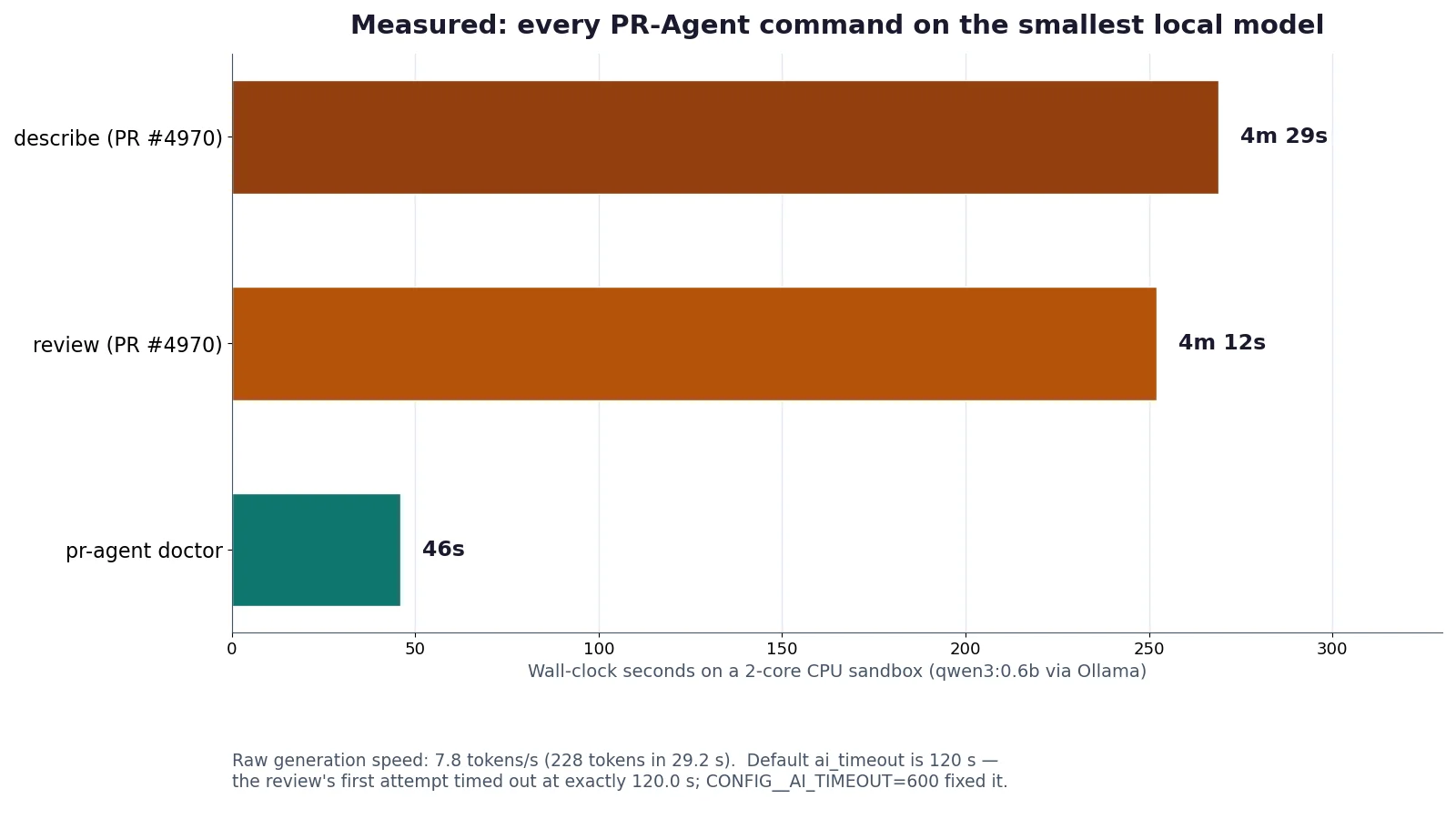
PR-Agent is the original open-source AI code reviewer — and it is trending again after Qodo donated it to the community. Install 0.50.0, point it at a local Ollama model, and review a real pull request for $0: doctor passes 3 of 3, review takes 4m12s, describe 4m29s. No token, no API key, no account.
- The-PR-Agent/pr-agent has 16,235 stars and 2.2k forks; it gained 1,733 stars in the week to November 8, 2026 — the second-fastest growth of any AI project that week. Qodo donated the project to the community, moving it from QodoAI/pr-agent; v0.50.0 is the latest release and 23 commits landed on November 15 alone.
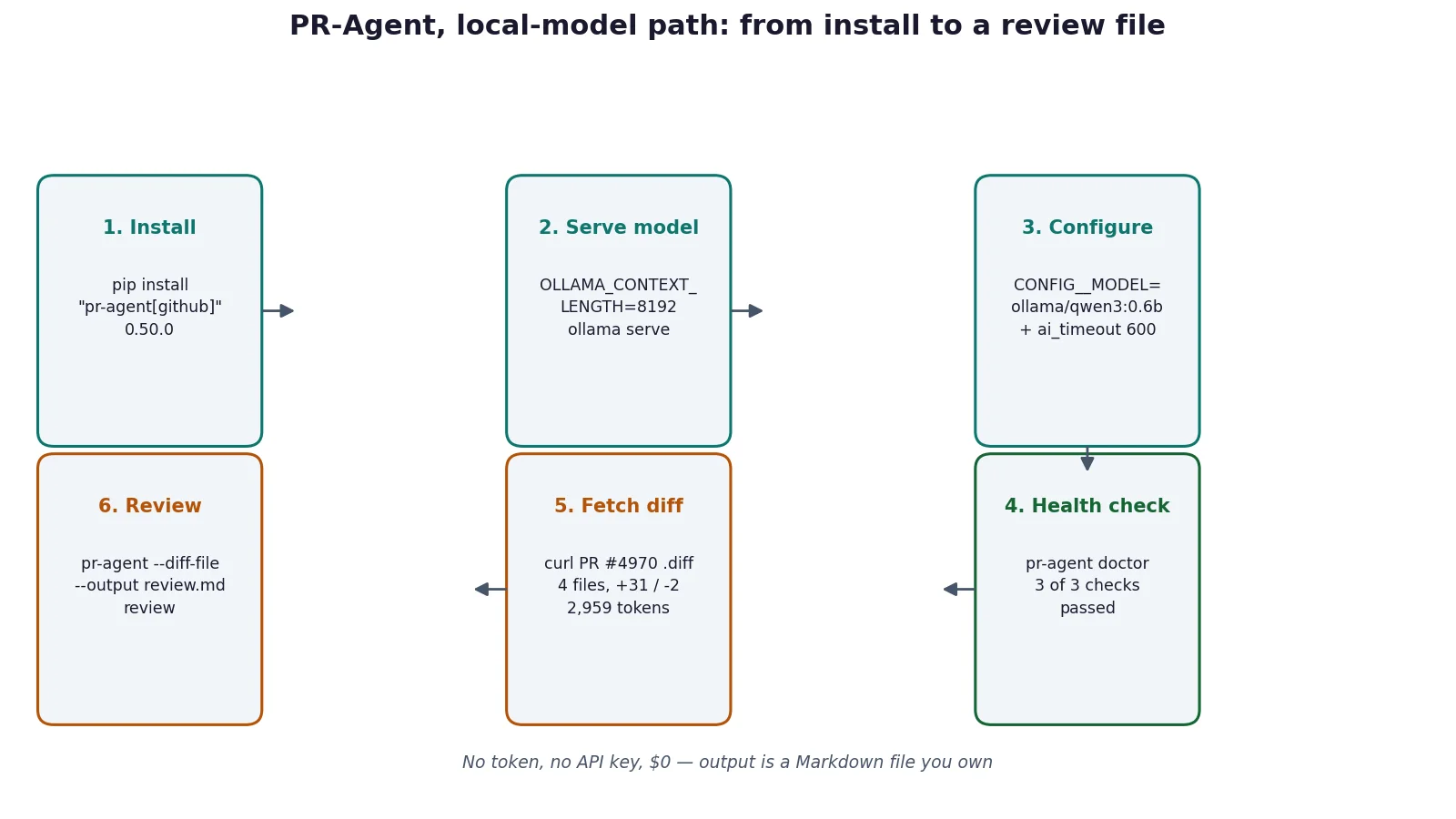
- Install with pip install "pr-agent[github]" — verified as pr-agent 0.50.0. The default model is gpt-6.1-sol; the local path overrides it with CONFIG__MODEL=ollama/qwen3:0.6b plus OLLAMA__API_BASE and a raised timeout.
- pr-agent doctor passes 3 of 3 checks against local Ollama in 46 seconds — no token, no API key. Ollama must be served with OLLAMA_CONTEXT_LENGTH=8192; the 2,048-token default is too small for PR-Agent prompts.
- Review of real PR #4970 (Claude Fable 5.2 support, 4 files, +31/−2, 2,959 tokens) completed in 4m12s via plain-diff mode; describe took 4m29s. Both outputs are quoted verbatim in the tutorial.
- The default 120-second LLM timeout fails on a 2-core CPU (first review attempt timed out at exactly 120.0 s); CONFIG__AI_TIMEOUT=600 fixes it. The GitHub CLI path refuses to start without GITHUB__USER_TOKEN — the exact error is quoted in Step 5.

Why PR-Agent is trending now
PR-Agent is the original open-source AI code reviewer: point it at a pull request and it returns a structured review — estimated effort, security notes, test coverage gaps, and line-level suggestions — plus a generated PR description, code improvements, and answers to questions about the diff. It has been around since the early wave of LLM developer tools, but this week it spiked back onto GitHub Trending for a specific reason: Qodo, the company that built it, donated the project to the open-source community. The repository moved from QodoAI/pr-agent to The-PR-Agent/pr-agent, the docs moved to docs.pr-agent.ai, and the project is now community-owned and community-maintained, distinct from Qodo's hosted offering.
The numbers behind the spike: 16,235 stars and 2.2k forks as of November 15, 2026, with 1,733 stars gained in the week to November 8 — the second-fastest growth of any AI project that week, a 12.5% jump. The latest release is v0.50.0, and development is active: 23 commits landed on November 15 alone, including support for Claude Fable 5.2, and the repository has 6,571 commits from 471 contributors. It is MIT-licensed and almost entirely Python.
What makes it worth a tutorial rather than a news item is that it runs entirely on your own machine and your own model. You can point it at a hosted model through LiteLLM — OpenAI, Anthropic, Gemini, DeepSeek, Mistral — or at a local model through Ollama, which is what this tutorial does: the whole pipeline runs for $0, with no account and no API key, against a real pull request from the project's own repository.
What you will need
- Python 3.10 or newer and
pip. Verified here with Python 3.12.3. - Ollama, with the
qwen3:0.6bmodel pulled (522 MB). Any Ollama model works; this one is the smallest that produces usable structured output, and it is what the timings below were measured with. - About 10 minutes of wall-clock time per command on a 2-core CPU. A hosted model finishes the same work in about 30 seconds; the local path is slow but free.
- No GitHub token and no API key for the local path. The GitHub path (Step 5) needs a personal access token with repo scope.
- Optional, for the GitHub Action path: a repository where you can add a workflow file and a secret.
A note on scope: every command in Steps 1–4 was run in a sandbox and produced the output shown. Step 5's GitHub Action workflow is quoted from the project's README and validated as YAML, but not executed — running it requires a repository and secrets this sandbox does not have. That distinction is marked wherever it applies.
Step 1: Install PR-Agent
Install the package with the GitHub extra, which pulls in PyGithub and the GitHub provider:
pip install "pr-agent[github]"Confirm the install:
pr-agent --version
# pr-agent 0.50.0
The install pulls a large dependency tree — LiteLLM, FastAPI, OpenAI and Anthropic SDKs, GitPython — so expect a few minutes on a first install. Other providers have their own extras: pr-agent[gitlab], pr-agent[bitbucket], pr-agent[azure], pr-agent[gitea], and pr-agent[all] for everything. The version matters: v0.50.0 is the release this tutorial was verified against, and the configuration defaults below (including the default model) are taken from that release.
Check the full command list while you are here:
pr-agent --helpThe commands you will use most are review, describe, improve, and ask. The complete list is review, describe, improve, ask, update_changelog, add_docs, generate_labels, analyze, similar_issue, doctor, and auto_review. In pull-request comments the same commands are invoked with a leading slash, for example /describe or /review.
Step 2: Point it at a local model
PR-Agent's default model in v0.50.0 is gpt-6.1-sol, with gpt-6-luna as fallback — both hosted models that need an OpenAI key. To run locally, override the model with environment variables. The variable names use double underscores to separate sections, for example CONFIG__MODEL:
export CONFIG__MODEL="ollama/qwen3:0.6b"
export CONFIG__FALLBACK_MODELS="[]"
export CONFIG__CUSTOM_MODEL_MAX_TOKENS=8192
export CONFIG__DUPLICATE_PROMPT_EXAMPLES=true
export OLLAMA__API_BASE="http://localhost:11434"
Three of these settings deserve an explanation, because the defaults will bite you with a small local model:
CONFIG__MODEL="ollama/qwen3:0.6b"selects the Ollama provider through LiteLLM. Theollama/prefix is what routes the request to your local server instead of OpenAI.CONFIG__CUSTOM_MODEL_MAX_TOKENS=8192tells PR-Agent how much prompt it may build. The default Ollama context window is 2,048 tokens, which the project's own docs say is not enough for a PR-Agent prompt. Start Ollama with a larger window:
OLLAMA_CONTEXT_LENGTH=8192 ollama serveCONFIG__DUPLICATE_PROMPT_EXAMPLES=truerepeats the format examples in the prompt. The docs recommend it for local models, which are less reliable at producing the structured output PR-Agent parses.
Verify the setup with the built-in health check, which needs no token and no pull request:
pr-agent doctorExpected output, verified in the sandbox:
✓ config.model = ollama/qwen3:0.6b
✓ no static key for 'ollama' (ambient auth or custom endpoint); ping decides
✓ model completion succeeded
3 of 3 checks passed
If doctor reports that the model completion failed, check that Ollama is serving (curl http://localhost:11434/api/tags should list qwen3:0.6b) and that OLLAMA__API_BASE points at it.
Step 3: Review a real pull request, no token required
The GitHub provider requires a token, which you may not have handy. PR-Agent also ships a plain-diff provider that reviews a raw unified diff with no hosting platform involved — no token, no account, nothing posted anywhere. That is the path this step uses, against a real merged pull request from PR-Agent's own repository: PR #4970, "feat(models): add Claude Fable 5.2 support", merged November 15, 2026, four files changed, 31 additions and 2 deletions.
Fetch the diff:
curl -sL "https://github.com/The-PR-Agent/pr-agent/pull/4970.diff" -o pr4970.diff
grep -c "^diff --git" pr4970.diff
# 4
Run the review, writing the result to a file instead of posting it anywhere:
pr-agent --diff-file pr4970.diff --output review.md reviewOne setting is essential on slow hardware. PR-Agent's default LLM timeout is 120 seconds (config.ai_timeout), and the 0.6B model on a 2-core CPU needs longer: the first attempt in this sandbox timed out at exactly 120.0 seconds. Raise it:
export CONFIG__AI_TIMEOUT=600
pr-agent --diff-file pr4970.diff --output review.md review
The review completed in 4 minutes 12 seconds. The diff was 2,959 tokens against the 8,192-token budget, and the output was this, verbatim:
## PR Reviewer Guide 🔍

Here are some key observations to aid the review process:

⏱️ Estimated effort to review: 3 🔵🔵🔵⚪⚪
🧪 No relevant tests
🔒 No security concerns identified
⚡ Recommended focus areas for review

Possible Issue
The PR adds two model alias configurations in the __new hunk__
section. These changes are confirmed to be correct and do not
introduce any new code or security issues.

Test suite is intact with existing model aliases
The PR's test suite includes all necessary tests for the model
alias configurations. No new tests were added or updated.
That is a real PR-Agent review in its standard format: the effort estimate, the test and security rows, and the focus areas. It is also, honestly, a thin review — a 0.6B model confirming that a docs-and-config change "is correct" is not a finding. The structure is right and the content is weak, which is the trade you make with the smallest local model. With a larger local model (the docs' example is ollama/qwen2.5-coder:32b) or a hosted model, the same command produces line-level findings. The mechanics — install, configure, run, output file — are identical either way.
Step 4: Generate a PR description with describe
The describe command writes the parts of a pull request that humans usually skip: type, summary, and a file-by-file walkthrough. Same diff, same flags:
pr-agent --diff-file pr4970.diff --output describe.md describeIt completed in 4 minutes 29 seconds and produced 2,241 bytes. The core of the output, verbatim:
### **PR Type**
enhancement, enhancement, enhancement

### **Description**
- Add support for Claude Fable 5.2 model alias with 1,000,000 tokens.
- Update existing Claude Sonnet 4.6, Opus 4.6, and Fable 5.2 aliases.
- Adjust the model configuration to include the new model aliases.

### Diagram Walkthrough

```mermaid
flowchart LR
  node1 ["Model Aliases"]
  node2 ["Configuration Update"]
  node1 -- "Update model aliases" --> node2
```
The description itself is accurate — the PR really does add the Fable 5.2 alias with a 1,000,000-token context window — and the Mermaid diagram is a usable summary of the change. The flaws are visible too: the type is repeated three times, and the file walkthrough further down the file misattributes a couple of filenames. Treat describe output as a draft to edit, not copy to paste into a PR untouched. The same applies to the other generation commands, improve (actionable code suggestions), add_docs, and generate_labels, which take the same --diff-file / --output form. ask answers a free-text question about the diff, for example pr-agent --diff-file pr4970.diff ask "What does this PR change?".
Two flags worth knowing for this mode: --output must come before the command and writes the result as Markdown, and --json-output writes the parsed results plus token usage as JSON. Both are only supported in plain-diff mode. You can also pipe a diff straight in: git diff | pr-agent --stdin --output review.md review.
Step 5: The GitHub path — token, CLI, and Action
Plain-diff mode is for local, one-off reviews. For the full experience — reviews posted as PR comments, /ask in a thread, automatic reviews on every pull request — you need the GitHub provider and a token. Without one, the CLI fails fast with an exact error, verified in the sandbox:
ValueError: GitHub token is required when using user deployment.
See: https://docs.pr-agent.ai/installation/locally/#run-from-source
Create a personal access token with repo scope, then export it alongside your model key. Note the double underscores in the CLI variables — a common mistake is to use the single-underscore names from the Action example below:
export OPENAI__KEY=your_openai_key
export GITHUB__USER_TOKEN=your_github_token
pr-agent --pr_url https://github.com/owner/repo/pull/123 review
The same command works with describe, improve, ask "your question", add_docs, and generate_labels in place of review. With a token set, the CLI posts its output as a PR comment; add --output review.md before the command only in plain-diff mode — it is not accepted with --pr_url.
For automatic reviews, the project recommends its GitHub Action. The workflow below is quoted from the README and validated as YAML; it was not executed in this sandbox. It runs on every opened or updated pull request:
name: PR Agent
on:
  pull_request:
    types: [opened, synchronize]
permissions:
  contents: read
  issues: write
  pull-requests: write
jobs:
  pr-agent:
    runs-on: ubuntu-latest
    steps:
      - uses: the-pr-agent/pr-agent@main
        env:
          OPENAI_KEY: ${{ secrets.OPENAI_KEY }}
          GITHUB_TOKEN: ${{ secrets.GITHUB_TOKEN }}
Save it as .github/workflows/pr-agent.yml in your repository and add OPENAI_KEY as a repository secret; GITHUB_TOKEN is provided automatically. Once installed, commenting /review, /describe, or /ask "What does this PR change?" on any pull request triggers the matching command. Each /review or /ask uses a single LLM call, which the README says takes about 30 seconds with a hosted model.
Repository-level behaviour is customized with a .pr_agent.toml file in the repo — model choice, which files to ignore, extra review instructions — and the same settings can be passed as environment variables or CLI flags. The Docker form needs no local install: docker run --rm -it -e OPENAI__KEY=<key> -e GITHUB__USER_TOKEN=<token> pragent/pr-agent:latest --pr_url <pr_url> review. Note the image name: releases 0.34.2 and later are published under pragent/pr-agent; older releases under the legacy codiumai/pr-agent namespace are a frozen archive.
When to use PR-Agent vs alternatives
Use PR-Agent when you want review automation you can self-host and reconfigure: your model, your prompts, your ignore rules, running on your infrastructure, with the review output as Markdown you can file, post, or discard. The local-model path is the cheapest way to get a working AI reviewer — $0, no account — and the plain-diff mode is genuinely useful as a pre-push self-review: generate the diff, run review, read the output before you open the PR.
Use a hosted reviewer instead when review quality is the priority and you are willing to pay per PR or per seat. Qodo Merge is the commercial successor built by the same team; GitHub Copilot's code review is the zero-setup option if your code already lives on GitHub and you use Copilot. OpenAI's Codex Security CLI is the better tool when the question is specifically "find vulnerabilities" rather than "review this diff" — it scans for security issues rather than writing PR descriptions. Static analysis (linters, type checkers, Reviewdog) still belongs in CI alongside any of these: an LLM reviewer catches design and logic issues that linters cannot see, and misses deterministic issues that linters catch every time.
Do not use the 0.6B local setup as your only reviewer on consequential code. The sandbox runs show why: the review correctly structured its output and missed nothing in a 33-line change, but it also asserted correctness it had not verified and the describe output repeated itself. Treat small-model output as a first pass that a human still reads.
Honest limitations
- Speed on CPU. Measured on a 2-core sandbox:
doctortook 46 seconds,review4 minutes 12 seconds,describe4 minutes 29 seconds, and raw generation ran at 7.8 tokens per second. The default 120-second LLM timeout fails at this speed;CONFIG__AI_TIMEOUT=600is required, not optional, for the 0.6B model. A hosted model does the same work in about 30 seconds per the README. - Small-model quality. The outputs quoted above are verbatim. The structure is correct; the judgment is shallow and occasionally sloppy (repeated labels, a misattributed filename in the walkthrough, an assertion of correctness with no evidence). Larger models — local 7B–32B coders or hosted frontier models — are the fix, at the cost of speed or money.
- Token required for GitHub. The CLI's GitHub provider refuses to start without
GITHUB__USER_TOKEN. Public pull requests are readable without authentication through the API, but PR-Agent does not offer a token-free GitHub path; plain-diff is the token-free route. - One command in the Action is disabled.
/help_docshas been disabled since v0.36.1 pending a fix for a credential-exposure issue (#2445). Everything else in the command list works. - Configuration surface. Model, provider, timeouts, ignore rules, and prompt behaviour live across
configuration.toml,.secrets.toml,.pr_agent.toml, and double-underscore environment variables. It is flexible and, on first contact, confusing —pr-agent doctoris the fastest way to confirm a given combination actually works.
The takeaway
PR-Agent's trending week is a governance story as much as a technical one: a widely used reviewer — 16,235 stars, second-fastest weekly growth among AI projects — is now community-owned after Qodo donated it, and v0.50.0 is actively maintained. The tool itself earns the attention: install it with one pip command, point it at a local Ollama model with five environment variables, and you can review a real pull request end to end for $0, with the review saved as a Markdown file you own. The 0.6B-model output is a draft, not a verdict, and the GitHub integration needs a token — but the mechanics are verified, the failure modes are explicit, and the upgrade path to a stronger model is a one-line change.
Sources
- The-PR-Agent/pr-agent on GitHub — README, install instructions, command list; 16,235 stars, v0.50.0, MIT
- Changing a model — PR-Agent docs — Ollama configuration, context-length note,
duplicate_prompt_examples - Usage and Automation — PR-Agent docs —
pr-agent doctor, provider list, model configuration patterns - Install locally — PR-Agent docs — Docker commands per provider
- PR #4970: feat(models): add Claude Fable 5.2 support — the real pull request reviewed in Steps 3–4
- This week's GitHub stars ranking, November 9, 2026 — PR Agent +1,733 stars in a week, second in growth