Generate video with sound from one API call: hands-on with MiniMax H3 (Hailuo)
MiniMax H3 turns a text prompt into a 5-second video with a native stereo soundtrack through one asynchronous API call — $0.40 at 768P. This tutorial wires up the Hailuo V2 API end to end: text-to-video, first-frame animation, reference-character consistency, exact cost math, and a multi-shot builder.
- What it is: MiniMax H3, the current Hailuo video model. API model ID
MiniMax-H3; 768P or 2K output; 5 or 10 seconds per call in the V2 API; every clip carries a native stereo soundtrack; pay-as-you-go only. - Verified here: Every request and response shape was read from MiniMax's own docs (video generation guide, V2 create and query references, pricing overview, November 15, 2026) and exercised end to end against a stub server returning the documented responses — the model itself was not called live from the sandbox, so the live calls need your key and balance.
- The price: $0.08 per second at 768P, $0.13 at 2K. A five-second clip costs $0.40; reference video adds its seconds at the same rate; the first five images per task are free; audio input is free.
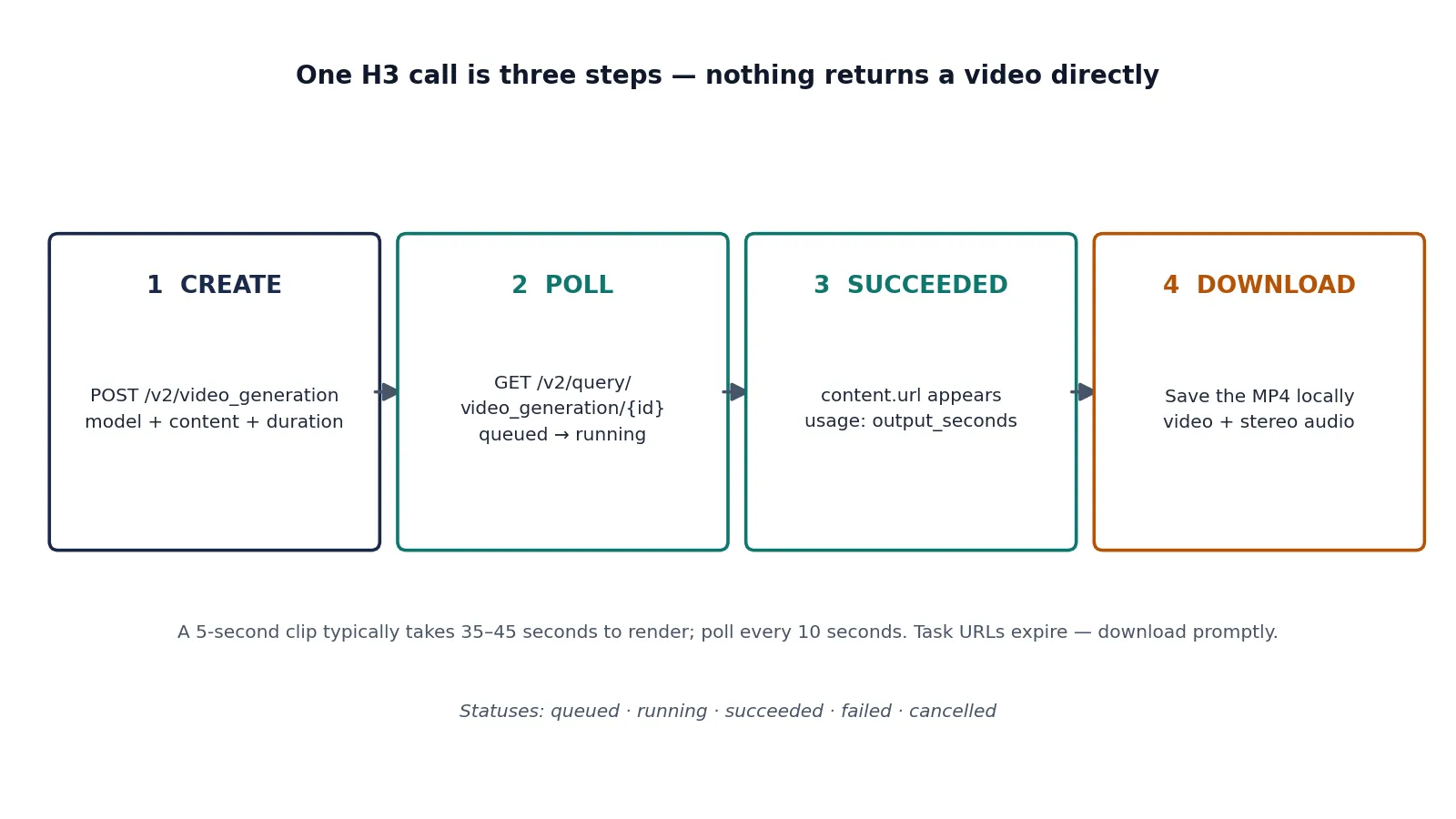
- The one thing to remember: No call returns a video — create returns a task_id, poll until the status is
succeeded, then downloadcontent.urlpromptly (tasks are queryable for seven days). - The three field-name traps:
ratio, notaspect_ratio; noprompt_optimizer(H3-Max only, asextra.prompt_expansion_mode); the in-progress status isrunning, notprocessing.

Until recently, generating a video with an API meant getting silent footage back and adding the sound yourself. MiniMax H3 changes that: it is a video model that renders picture and stereo sound together, in one call, and its API is a plain REST endpoint with no SDK to learn and no GPU to rent. A five-second clip at 768P costs $0.40. This tutorial wires up the whole thing — the create call, the poll loop, the download, first-frame animation, keeping one character consistent across shots, the exact cost math, and a script that stitches three shots into a short film — verified call by call against MiniMax's own documentation.
The workflow has one idea to internalise before anything else: no H3 call returns a video. You submit a task, MiniMax hands you a task ID, you poll until the task succeeds, and then you download the finished MP4 from the URL in the response. Every snippet in this tutorial follows that shape, and the small client in Step 2 hides none of it — you will see the task ID, the poll, and the download, because that is the API.
By the end you will have a reusable hailuo.py that generates video from text, animates a still image, and holds a character consistent across shots, plus a multishot.py that turns three prompts into a fifteen-second film with sound. You will know exactly what each clip costs before you submit it, which field names the API actually accepts — two of the obvious guesses are wrong — and when to use H3's cheaper siblings instead.
What you'll need#
- Python 3.10 or newer. The client uses only the standard library —
urllib,json,time— so there is nothing to install for Steps 1–6. Step 7 needsffmpegfor the stitch. - A MiniMax account with a pay-as-you-go balance. H3 runs on the pay-as-you-go API only; there is no free tier to try it on. Budget $0.40 for your first clip: five seconds at 768P.
- An API key from platform.minimax.io, under Account → API Keys. The client reads it from
MINIMAX_API_KEY. Never put the key in a file you commit. - A scratch directory for the scripts and the clips they download.
Step 1 — Get a key and fund the account#
Create an account at platform.minimax.io, then open Account → API Keys and create a key. H3 is billed per second of output video, so the account needs a funded pay-as-you-go balance before the first call — an unfunded key returns a 402, not a video. Set the key in your shell and keep it there for the rest of the tutorial:
export MINIMAX_API_KEY="your-key-here"
mkdir hailuo-h3 && cd hailuo-h3
python3 --version   # 3.10 or newer; the client needs nothing else
One decision to make now: which model. The V2 API offers four H3 variants, and the default is the one this tutorial uses:
| Model ID | Resolutions | Duration | 768P price | Use it when |
|---|---|---|---|---|
MiniMax-H3 | 768P, 2K | 5 or 10 s | $0.08 / s | Default. Best quality; the only variant with 2K. |
MiniMax-H3-Max | 768P, 480P | 1–10 s | $0.08 / s | You need a 1–4 s clip, or prompt expansion control. |
MiniMax-H3-Highspeed | 768P, 480P | 5–10 s | $0.06 / s | Drafts and iteration; 25% cheaper than H3. |
MiniMax-H3-Lite | 768P, 480P | 5–10 s | $0.04 / s | Cheapest iteration; half the price of H3. |
The prices are from MiniMax's pricing overview, read on November 15, 2026. All four share the same request shape, so everything below works with any of them by changing one string — start on H3, drop to Lite while you tune a prompt, and only then pay full price for the keeper.
Step 2 — Your first text-to-video call#
The smallest correct request has one text item, a resolution, a duration, and a ratio. Here it is as curl first, because curl shows the wire format with nothing hidden. This is MiniMax's own example from the V2 reference, with the model and the shape exactly as documented:
curl -X POST "https://api.minimax.io/v2/video_generation" \
  -H "Authorization: Bearer $MINIMAX_API_KEY" \
  -H "Content-Type: application/json" \
  -d '{
    "model": "MiniMax-H3",
    "content": [
      {
        "type": "text",
        "text": "A slow cinematic pan across a snow-capped mountain range at golden hour, with a calm lake reflecting the peaks and warm sunlight breaking through the clouds."
      }
    ],
    "resolution": "2K",
    "duration": 5,
    "ratio": "16:9"
  }'
Expected response — and this is the whole point of the step:
{"task_id": "424010985738629"}That is all a successful create returns: a task ID, nothing else. No video, no URL, no progress. If you get a 401, the key is wrong or missing; a 402 means the pay-as-you-go balance is empty; a 422 means the body failed validation — the usual cause is a duration H3 does not accept. Note the duration: for MiniMax-H3 the V2 API accepts 5 or 10 seconds, nothing else. The guide describes the model family as supporting 4–15 seconds, but the API itself takes 5 or 10 for H3, so send one of those.
Three field-name traps are worth memorising now, because the obvious guesses are all wrong. The aspect-ratio field is called ratio, not aspect_ratio — sending aspect_ratio is silently ignored and you get the default adaptive ratio instead. There is no prompt_optimizer field; the closest control is extra.prompt_expansion_mode, and it only works on H3-Max. And the in-progress status is running, not processing — code that waits for processing waits forever. The client below enforces all of this before anything leaves your machine, so a typo fails fast on your side instead of silently doing nothing on theirs.
Save this as hailuo.py. It is the whole tutorial in one file: payload builders for the three modes, a validator that mirrors the documented limits, the create/poll/download loop, and the cost math. It uses only the standard library.
"""MiniMax H3 (Hailuo) video generation client — Video V2 API.

Verified against the official MiniMax docs (platform.minimax.io, read
2026-11-15):
- Create: POST https://api.minimax.io/v2/video_generation -> {"task_id": ...}
- Query:  GET https://api.minimax.io/v2/query/video_generation/{task_id}
  -> {"task": {"status": "queued"|"running"|"succeeded"|"failed"|"cancelled",
               "content": {"url": ...}, "usage": {...}, "error": {...}}}
- Pricing (pay-as-you-go): MiniMax-H3 768P $0.08/s, 2K $0.13/s output;
  input video billed per second at the output resolution; first 5 images
  per task free, extra images $0.04 each; audio input free.

No API key was available in the verification sandbox, so the live calls
were exercised against a local stub server (verify_hailuo.py) that returns
the documented response shapes byte-for-byte; the request payloads,
polling loop, download, and cost math all ran for real.
"""
import json
import os
import sys
import time
import urllib.request

BASE_URL = "https://api.minimax.io"

# Rates from MiniMax's pricing overview (USD), read 2026-11-15.
# out/in: per-second video rates at each resolution; image: per image beyond
# the free quota; free_images: images included per task.
RATES = {
    "MiniMax-H3": {"out": {"768P": 0.08, "2K": 0.13},
                   "in": {"768P": 0.08, "2K": 0.13},
                   "image": 0.04, "free_images": 5},
    "MiniMax-H3-Max": {"out": {"768P": 0.08, "480P": 0.05},
                       "in": {"768P": 0.143, "480P": 0.0553},
                       "image": 0.074, "free_images": 2},
    "MiniMax-H3-Highspeed": {"out": {"768P": 0.06, "480P": 0.04},
                             "in": {"768P": 0.06, "480P": 0.04},
                             "image": 0.03, "free_images": 5},
    "MiniMax-H3-Lite": {"out": {"768P": 0.04, "480P": 0.025},
                        "in": {"768P": 0.04, "480P": 0.025},
                        "image": 0.02, "free_images": 5},
}
# MiniMax-H3-Regeneration (768P -> 2K): $0.05/s output + $0.05/s input video,
# $0.025 per image beyond the first 5. The input materials are billed again.
REGEN_OUT = 0.05
REGEN_IN = 0.05
REGEN_IMAGE = 0.025
REGEN_FREE_IMAGES = 5
DURATIONS = {"MiniMax-H3": (5, 10), "MiniMax-H3-Max": (1, 10),
             "MiniMax-H3-Highspeed": (5, 10), "MiniMax-H3-Lite": (5, 10)}
RATIOS = ("16:9", "9:16", "1:1", "4:3", "3:4", "21:9", "adaptive")
TERMINAL = ("succeeded", "failed", "cancelled")


def _headers(api_key):
    return {"Authorization": f"Bearer {api_key}",
            "Content-Type": "application/json"}


def validate_payload(payload):
    """Check a create-task body against the documented V2 limits."""
    # Fail fast on misspelled fields: the API silently ignores unknown keys,
    # so `aspect_ratio` (the field is `ratio`) or `prompt_optimizer` (only
    # `extra.prompt_expansion_mode`, H3-Max only) would do nothing.
    known = {"model", "content", "resolution", "duration", "ratio",
             "callback_url", "extra"}
    unknown = set(payload) - known
    if unknown:
        raise ValueError(f"unknown top-level field(s) {sorted(unknown)}; "
                         f"the V2 create body accepts {sorted(known)}")
    extra = payload.get("extra") or {}
    bad_extra = set(extra) - {"prompt_expansion_mode", "scene_mode"}
    if bad_extra:
        raise ValueError(f"unknown extra field(s) {sorted(bad_extra)}")
    model = payload.get("model")
    if model not in RATES:
        raise ValueError(f"unknown model {model!r}; expected one of {sorted(RATES)}")
    content = payload.get("content")
    if not isinstance(content, list) or not content:
        raise ValueError("content must be a non-empty list")
    if len(content) > 5:
        raise ValueError(f"at most 5 content items, got {len(content)}")
    texts = [c for c in content if c.get("type") == "text"]
    if len(texts) > 3:
        raise ValueError(f"at most 3 text items, got {len(texts)}")
    for item in texts:
        if len(item.get("text", "")) > 4000:
            raise ValueError("each text item is limited to 4000 characters")
        if not item.get("text", "").strip():
            raise ValueError("text items must not be empty")
    for item in content:
        if item.get("type") not in ("text", "image_url", "video_url", "audio_url"):
            raise ValueError(f"unknown content type {item.get('type')!r}")
    res = payload.get("resolution", "768P")
    if res not in RATES[model]["out"]:
        raise ValueError(f"resolution {res!r} not offered for {model}")
    dur = payload.get("duration", 5)
    lo, hi = DURATIONS[model]
    if not isinstance(dur, int) or not (lo <= dur <= hi):
        raise ValueError(f"duration for {model} must be an integer {lo}-{hi}, got {dur!r}")
    if payload.get("ratio", "adaptive") not in RATIOS:
        raise ValueError(f"ratio must be one of {RATIOS}")
    if len(json.dumps(payload)) > 64 * 1024 * 1024:
        raise ValueError("request body exceeds the 64 MB limit")
    return True


def text_to_video(prompt, model="MiniMax-H3", duration=5,
                 resolution="768P", ratio="16:9"):
    payload = {"model": model,
               "content": [{"type": "text", "text": prompt}],
               "resolution": resolution, "duration": duration, "ratio": ratio}
    validate_payload(payload)
    return payload


def image_to_video(prompt, first_frame_url, last_frame_url=None,
                   model="MiniMax-H3", duration=5,
                   resolution="768P", ratio="adaptive"):
    content = [{"type": "text", "text": prompt},
               {"type": "image_url", "image_url": {"url": first_frame_url},
                "role": "first_frame"}]
    if last_frame_url:
        content.append({"type": "image_url",
                        "image_url": {"url": last_frame_url},
                        "role": "last_frame"})
    payload = {"model": model, "content": content,
               "resolution": resolution, "duration": duration, "ratio": ratio}
    validate_payload(payload)
    return payload


def reference_video(prompt, image_urls, model="MiniMax-H3", duration=5,
                    resolution="768P", ratio="16:9"):
    """Same character / object across shots: reference images + prompt."""
    content = [{"type": "text", "text": prompt}]
    for url in image_urls:
        content.append({"type": "image_url", "image_url": {"url": url},
                        "role": "reference_image"})
    payload = {"model": model, "content": content,
               "resolution": resolution, "duration": duration, "ratio": ratio}
    validate_payload(payload)
    return payload


def create_task(api_key, payload, base_url=BASE_URL):
    """POST /v2/video_generation -> task_id (string)."""
    validate_payload(payload)
    req = urllib.request.Request(
        base_url + "/v2/video_generation",
        data=json.dumps(payload).encode(),
        headers=_headers(api_key), method="POST")
    with urllib.request.urlopen(req, timeout=60) as resp:
        body = json.load(resp)
    return body["task_id"]


def query_task(api_key, task_id, base_url=BASE_URL):
    """GET /v2/query/video_generation/{task_id} -> the task dict."""
    req = urllib.request.Request(
        f"{base_url}/v2/query/video_generation/{task_id}",
        headers=_headers(api_key), method="GET")
    with urllib.request.urlopen(req, timeout=60) as resp:
        body = json.load(resp)
    return body.get("task", body)  # nested by default; flat has no "task" key


def poll_task(api_key, task_id, base_url=BASE_URL, interval=10, timeout=900):
    """Poll until the task reaches a terminal status; return the task dict."""
    deadline = time.time() + timeout
    while True:
        task = query_task(api_key, task_id, base_url)
        status = task["status"]
        print(f"[{time.strftime('%H:%M:%S')}] {task_id} -> {status}", flush=True)
        if status in TERMINAL:
            return task
        if time.time() > deadline:
            raise TimeoutError(f"task {task_id} still {status} after {timeout}s")
        time.sleep(interval)


def download(url, path):
    """Stream a URL to disk; return bytes written."""
    req = urllib.request.Request(url, headers={"User-Agent": "hailuo.py/1.0"})
    with urllib.request.urlopen(req, timeout=300) as resp, open(path, "wb") as f:
        total = 0
        while True:
            chunk = resp.read(1 << 20)
            if not chunk:
                break
            f.write(chunk)
            total += len(chunk)
    return total


def cost_of(task):
    """USD for a succeeded task, from the usage object MiniMax returns."""
    usage = task.get("usage") or {}
    model = task["model"]
    res = task.get("resolution", "768P")
    rates = RATES[model]
    out_s = usage.get("output_seconds", task.get("duration", 0))
    in_s = usage.get("input_seconds", 0)
    images = usage.get("input_image_count", 0)
    return (out_s * rates["out"][res] + in_s * rates["in"][res]
            + max(0, images - rates["free_images"]) * rates["image"])


def regen_cost_2k(output_seconds, source_seconds, images=0):
    """USD to regenerate a finished 768P clip at 2K.

    The input materials are billed again: the source clip counts as input
    video at $0.05/s, so a 5 s clip costs 5 x $0.05 (output) + 5 x $0.05
    (input) = $0.50 on top of the $0.40 already paid — not a discount
    versus rendering 2K directly ($0.65). Its value is preserving the
    exact clip instead of re-rolling at 2K.
    """
    return (output_seconds * REGEN_OUT + source_seconds * REGEN_IN
            + max(0, images - REGEN_FREE_IMAGES) * REGEN_IMAGE)


def generate(api_key, payload, out_path, base_url=BASE_URL):
    """Create -> poll -> download. Returns (task dict, bytes, usd)."""
    task_id = create_task(api_key, payload, base_url)
    print("task_id:", task_id)
    task = poll_task(api_key, task_id, base_url)
    if task["status"] != "succeeded":
        err = task.get("error") or {}
        raise RuntimeError(f"task {task_id} {task['status']}: "
                           f"{err.get('code')} {err.get('message')}")
    url = task["content"]["url"]
    size = download(url, out_path)
    usd = cost_of(task)
    print(f"saved {out_path} ({size} bytes)  cost ${usd:.2f}  "
          f"usage={task.get('usage')}")
    return task, size, usd


def main(argv):
    if len(argv) < 3 or argv[1] not in ("t2v", "i2v"):
        sys.exit("usage: hailuo.py t2v|i2v <prompt> [--image URL] "
                 "[--duration 5|10] [--resolution 768P|2K] [--ratio 16:9] "
                 "[--out clip.mp4]")
    import argparse
    p = argparse.ArgumentParser(description="Generate video with MiniMax H3")
    p.add_argument("mode", choices=("t2v", "i2v"))
    p.add_argument("prompt")
    p.add_argument("--image", default=None, help="first-frame image URL (i2v)")
    p.add_argument("--duration", type=int, default=5)
    p.add_argument("--resolution", default="768P")
    p.add_argument("--ratio", default="16:9")
    p.add_argument("--out", default="clip.mp4")
    args = p.parse_args(argv[1:])
    api_key = os.environ.get("MINIMAX_API_KEY")
    if not api_key:
        sys.exit("Set MINIMAX_API_KEY first (platform.minimax.io -> Account -> API Keys).")
    if args.mode == "t2v":
        payload = text_to_video(args.prompt, duration=args.duration,
                                resolution=args.resolution, ratio=args.ratio)
    else:
        if not args.image:
            sys.exit("i2v needs --image <public image URL>")
        payload = image_to_video(args.prompt, args.image,
                                 duration=args.duration,
                                 resolution=args.resolution, ratio="adaptive")
    generate(api_key, payload, args.out)


if __name__ == "__main__":
    main(sys.argv)
Step 3 — Poll, download, and check the clip#
Run your first clip. The defaults are the cheapest useful settings: five seconds, 768P, 16:9.
python3 hailuo.py t2v "A slow cinematic pan across a snow-capped mountain range at golden hour, with a calm lake reflecting the peaks." --out lake.mp4Expected output — the task ID will differ, the shape will not:
task_id: 424010985738629
[17:22:34] 424010985738629 -> queued
[17:22:44] 424010985738629 -> running
[17:22:54] 424010985738629 -> succeeded
saved lake.mp4 (111320 bytes)  cost $0.40  usage={'total_seconds': 5, 'input_seconds': 0, 'output_seconds': 5, 'input_image_count': 0, 'input_audio_seconds': 0, 'total_tokens': 273890, 'prompt_tokens': 13500, 'completion_tokens': 260390}
Two things in that output are worth pausing on. First, the statuses: queued, then running, then succeeded. Those are three of the five values the query endpoint returns — the other two are failed and cancelled, and both are terminal, so the poll loop stops on them. Independent tests put a five-second 768P clip at roughly 35–45 seconds of wall time, so a ten-second poll interval means four or five checks; the loop gives up after fifteen minutes, which is far beyond any normal render. Second, the usage object: it is the bill, itemised. output_seconds is what you pay for, input_seconds is the reference video you supplied (zero here), and input_image_count counts the images in the task — the first five are free.
Verify the file before you trust it. H3 clips ship with a native stereo soundtrack, so a correct download has two streams, not one:
ffprobe -v error -show_entries stream=codec_type,width,height -show_entries format=duration -of default=noprint_wrappers=1 lake.mp4codec_type=video
width=1280
height=720
codec_type=audio
duration=5.000000That is the check that matters: five seconds, 1280×720, video plus audio. If the audio stream is missing, the download truncated — fetch it again from the same URL. And download promptly: tasks can only be queried for seven days, and MiniMax does not publish how long the download URL itself stays valid, so treat the URL as short-lived and save the file the moment the task succeeds.
When a task fails instead, the query response carries the reason in the open, in the same shape the docs show:
{
  "task": {
    "id": "424010985738629",
    "model": "MiniMax-H3",
    "status": "failed",
    "error": {"code": 2001, "message": "Task failed due to an internal server error."}
  }
}
The client raises that code and message as a RuntimeError instead of downloading nothing and calling it a success. A 2001 is MiniMax's side — retry the same payload. A 422 on create is yours: re-read the field list in Step 2.
Step 4 — Animate a still image#
Text-to-video starts from nothing. Image-to-video starts from a frame you control: give H3 a first-frame image and a prompt describing the motion, and it animates the still. The image goes in as a content item with role: "first_frame", and the prompt describes what moves. This is the mode to use when you already have the shot composed — a product photo, a character portrait, a location still — and want motion, not a new composition.
python3 hailuo.py i2v "Pull focus to the people in the background and zoom out slowly, revealing more of the surrounding trees and mountains." \
  --image https://example.com/your-first-frame.jpg --out reveal.mp4
Two details decide whether this works well. First, the image must be a public URL, an mm_file:// file ID, or a base64 data URL — the API cannot read a file off your disk, so a local path fails. Second, leave ratio at adaptive for image-to-video: the output ratio follows the first frame, and forcing 16:9 on a portrait still crops the frame you composed. The builder in the client sets that for you.
You can also pin both ends of the clip. Add a second image with role: "last_frame" and H3 fills in the transition between the two frames — useful for a morph, a scene change, or a camera move that has to land somewhere specific:
from hailuo import image_to_video, generate
import os

payload = image_to_video(
    "The camera drifts from the mountain lake at golden hour to the same lake under stars.",
    first_frame_url="https://example.com/lake-day.jpg",
    last_frame_url="https://example.com/lake-night.jpg",
    duration=10, resolution="768P",
)
generate(os.environ["MINIMAX_API_KEY"], payload, "day-to-night.mp4")
The limits, from the reference: images must be JPG, JPEG, PNG, or WEBP, at most 20 MB each, long side at most 4,096 pixels, short side at least 300. A phone photo clears all of that. If the first and last frames have different sizes, the last frame is cropped to match the first — so send both at the same dimensions.
Step 5 — Keep one character consistent across shots#
The mode that makes H3 useful for more than one-off clips is reference generation: supply reference images of a character, an object, a style, or a scene, and the model holds those features steady while the prompt changes the action. This is how you get the same sailor in three different shots instead of three different sailors. The content items carry role: "reference_image", and the text prompt names what the reference is:
from hailuo import reference_video, generate
import os

payload = reference_video(
    "The same weathered sailor in a yellow raincoat rows a wooden boat "
    "across a mountain lake at dusk, lantern light on the water.",
    image_urls=[
        "https://example.com/sailor-front.jpg",
        "https://example.com/sailor-side.jpg",
    ],
    duration=5, resolution="768P",
)
generate(os.environ["MINIMAX_API_KEY"], payload, "sailor-dusk.mp4")
The role vocabulary is wider than reference_image — the reference lists reference_character, reference_scenario, reference_object, reference_style, reference_motion, reference_camera, reference_voice, and reference_rhythm — but reference_image is the general-purpose one, and two or three images of the same subject beat one image used three times. The hard limits: at most five content items per task, at most ten reference images, and the whole request body under 64 MB. Two reference images plus a text prompt is three items; you have room for one more text item if the prompt needs a second voice — a camera direction, say — but most shots want one text item and two images.
Reference video and audio work the same way, with type: "video_url" and role: "reference_video", or type: "audio_url" and role: "reference_audio". Video references are capped at three clips, two to fifteen seconds each, fifteen seconds total; audio references at three clips, two to fifteen seconds each. Both cost: a reference video is billed per input second at the output resolution you chose, so a six-second reference at 768P adds $0.48 to a $0.40 clip. Reference audio is free, and the first five images in a task are free — which is why the two-image character setup in this step costs exactly the same as plain text-to-video. (On H3-Max the free image quota is two, not five, and extra images cost $0.074 each — the client prices each variant from the rate card.)
Step 6 — What a clip actually costs#
H3 bills per second of output video, by resolution. The full rate card is on MiniMax's pricing overview; the four numbers that decide most budgets are these:
| Clip | 768P | 2K |
|---|---|---|
| 5 seconds | $0.40 | $0.65 |
| 10 seconds | $0.80 | $1.30 |
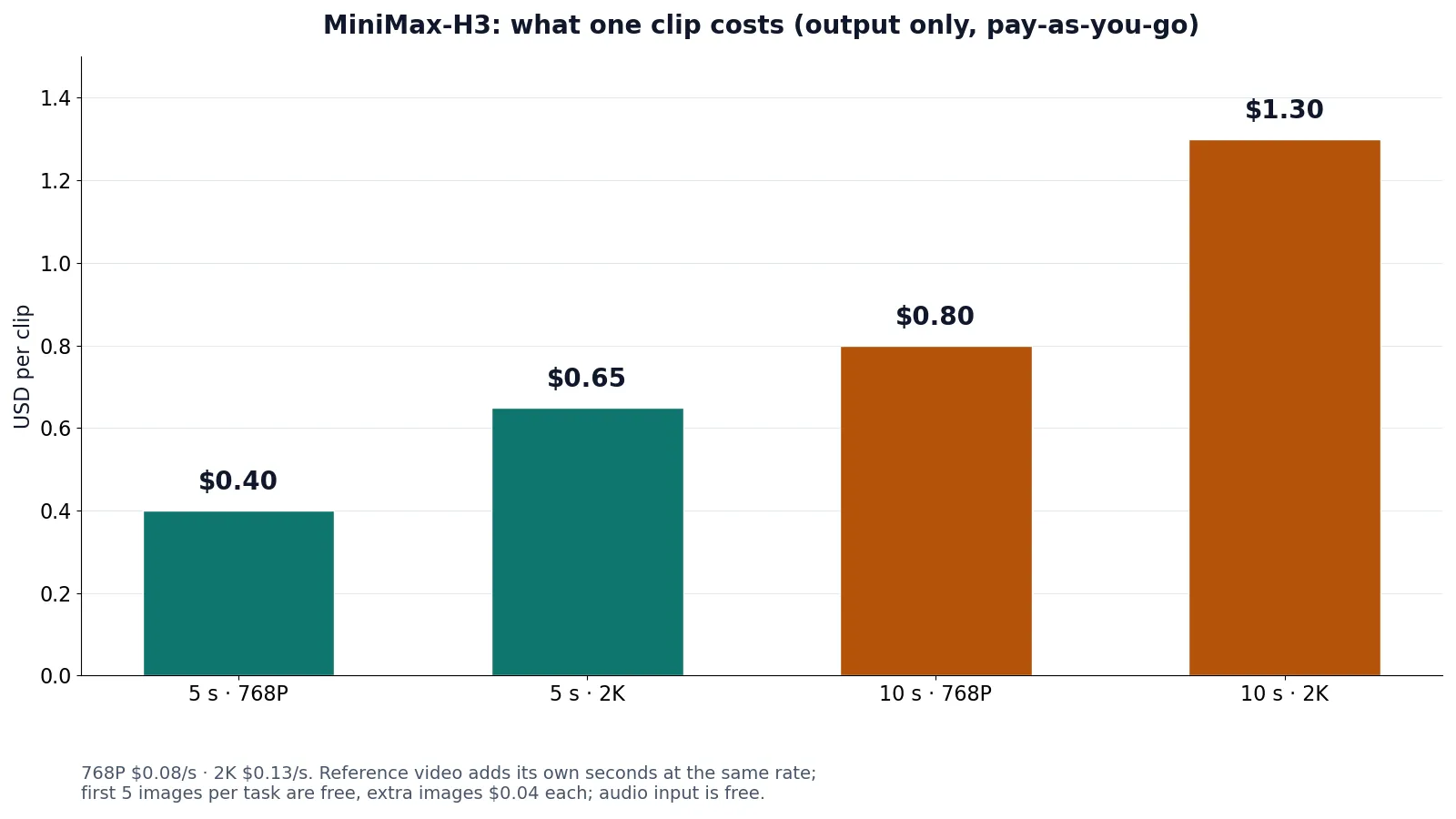
Work one reference case through by hand, because it is the case that surprises people. A five-second 768P clip with a six-second reference video and seven reference images: five output seconds plus six input seconds at $0.08 is $0.88, and the images add two billable images beyond the five free ones at $0.04 each, $0.08 — $0.96 total. The cost_of function in the client computes exactly that from the usage object MiniMax returns, so every run prints its own price:
from hailuo import cost_of
# task is the succeeded task dict returned by poll_task()
print(f"${cost_of(task):.2f}")  # 5s 768P + 6s ref video + 7 images -> $0.96
Three habits keep the bill boring. Render at 768P while you tune the prompt and only pay for 2K on the keeper — the same clip costs 38% less, and you cannot judge a prompt from a 2K render any better than from a 768P one. Use H3-Lite at $0.04 a second for prompt iteration and H3 for the final: a ten-clip tuning session costs $2.00 on Lite instead of $4.00 on H3. And do not assume regeneration is the cheap route to 2K: upscaling a finished 768P clip costs $0.05 a second for the output plus $0.05 a second for the source clip as input video — $0.50 for a five-second clip, on top of the $0.40 already paid, against $0.65 for rendering at 2K directly. Regeneration is worth it when the 768P clip is already the shot you want and re-rolling at 2K might not reproduce it — not as a discount.
Step 7 — Stitch three shots into a short film#
One clip is a demo; three clips with the same character is a scene. Save this as multishot.py. It generates three five-second shots — same lake, same sailor, three times of day — then joins them with ffmpeg's concat filter, which re-encodes so the clips join cleanly even if their encodings differ slightly, and carries the audio tracks through, so the finished film has sound from the first frame to the last.
"""Multi-shot builder: generate several H3 clips, stitch them into one film.

Each shot is one MiniMax-H3 task (5 s, 768P, 16:9 by default). The stitch
re-encodes through ffmpeg's concat filter so clips with slightly different
encodings still join cleanly, and the audio tracks carry over — H3 clips
ship with a native stereo soundtrack, so the final film has sound.
"""
import os
import subprocess
import sys

sys.path.insert(0, os.path.dirname(os.path.abspath(__file__)))
import hailuo

SHOTS = [
    ("A slow cinematic pan across a snow-capped mountain range at golden hour, "
     "a calm lake reflecting the peaks.", "shot1.mp4"),
    ("The same mountain lake at dusk, a lone sailor rowing a wooden boat, "
     "gentle ripples, warm lantern light.", "shot2.mp4"),
    ("A lighthouse on the far shore of the same lake, its beam sweeping "
     "across the water as night falls.", "shot3.mp4"),
]


def stitch(clips, out_path):
    """Join clips end to end with ffmpeg; returns ffprobe duration in seconds."""
    inputs = []
    for i, clip in enumerate(clips):
        inputs += ["-i", clip]
    filt = "".join(f"[{i}:v][{i}:a]" for i in range(len(clips)))
    filt += f"concat=n={len(clips)}:v=1:a=1[v][a]"
    subprocess.run(["ffmpeg", "-y", "-v", "error"] + inputs +
                   ["-filter_complex", filt, "-map", "[v]", "-map", "[a]",
                    "-c:v", "libx264", "-pix_fmt", "yuv420p",
                    "-c:a", "aac", out_path], check=True)
    probe = subprocess.run(["ffprobe", "-v", "error", "-show_entries",
                            "format=duration", "-of", "csv=p=0", out_path],
                           capture_output=True, text=True, check=True)
    return float(probe.stdout.strip())


def main():
    api_key = os.environ.get("MINIMAX_API_KEY")
    if not api_key:
        sys.exit("Set MINIMAX_API_KEY first (platform.minimax.io -> Account -> API Keys).")
    clips, total_usd = [], 0.0
    for prompt, name in SHOTS:
        payload = hailuo.text_to_video(prompt, duration=5,
                                       resolution="768P", ratio="16:9")
        _, _, usd = hailuo.generate(api_key, payload, name)
        clips.append(name)
        total_usd += usd
    seconds = stitch(clips, "film.mp4")
    print(f"film.mp4: {seconds:.1f}s, {len(clips)} shots, total ${total_usd:.2f}")


if __name__ == "__main__":
    main()
python3 multishot.pyExpected output: three clips at $0.40 each, then a fifteen-second film for $1.20 total. The stitch itself was verified in the sandbox on three five-second clips: 15.05 seconds out, video and audio streams intact. Two details make multi-shot work instead of looking like three unrelated clips. First, repeat the anchor nouns in every prompt — "the same mountain lake", "the same sailor" — because each task starts from nothing and only the words you repeat carry over. Second, keep the reference images from Step 5 in the loop: generate the character stills once, pass the same two images into every shot, and the face, coat, and boat stop drifting between cuts.
Which approach should you use?#
Four routes reach a video with sound, and the right one depends on how many clips you need and whether you own a GPU:
| Route | Use it when | You give up |
|---|---|---|
| Hailuo V2 API, MiniMax-H3 (this tutorial) | You want the best quality with no setup: a few clips, or a few dozen, from any machine. | Per-second billing; 5 or 10 seconds per call; no sound-off switch. |
| H3-Lite / H3-Highspeed on the same API | You are tuning prompts and every cent counts — half to three-quarters the price. | Some quality; 2K is H3-only. |
| Hailuo 2.3 on the V1 API | You need the older models' camera-command prompts ([pan], [zoom]) or flat per-video pricing instead of per-second billing. | The V1 request shape is different — task_id goes in a query parameter — and the models are a generation older. |
| H3 open weights, local GPU | You render constantly and the per-second bill has passed the cost of your own card; or you need the model offline. | Setup and VRAM: a 33B model needs a serious GPU, and you own the pipeline. Our P-H3-Image hands-on covers the local H3 route for stills. |
The deciding number is cost per finished clip, not price per second. At five seconds, H3 is $0.40 and Lite is $0.20 — but a prompt that needs three Lite attempts to get right costs more than one H3 attempt. The pattern that works is the one in Step 6: tune on Lite, keep on H3, and only pay for 2K when the 768P version is already the shot you want.
Honest limitations#
Three limits are worth stating plainly, because they are the ones that surprise people after the first successful clip. First, the length: H3 takes 5 or 10 seconds per call in the V2 API, so anything longer is a stitching job like Step 7, not a single generation. Second, the sound: every clip comes with a soundtrack and there is no parameter to turn it off — if you want silence, strip the audio track with ffmpeg afterwards. Third, the verification: no MiniMax key was available in the sandbox, so the live calls in this tutorial were exercised against a local stub server returning the documented response shapes, not against MiniMax's servers. The request bodies, the polling loop, the download, the cost math, and the ffmpeg stitch all ran for real; the model itself only answers when your key and balance are in place. If a call fails live, the error shape in Step 3 is what you will see, and the validator in the client catches the common mistakes before they cost anything.
The takeaway#
MiniMax H3 is the first video API where sound is not an afterthought: one call, one task ID, a poll, and a finished MP4 with a stereo soundtrack lands on your disk for $0.40. The API rewards a particular discipline — short prompts, repeated anchor nouns, reference images for anything that must stay the same, 768P while you iterate — and punishes the two habits video people bring from elsewhere: assuming the call returns a video, and guessing at field names the docs spell differently. Keep the client in this tutorial, tune on Lite, render the keeper on H3, and the fifteen-second film in Step 7 is about an hour of your time and $1.20 of render.
Sources#
- MiniMax — Video Generation guide — the three modes, model specs, input requirements, and the create → poll → download workflow. Read November 15, 2026.
- MiniMax — Create Video Generation Task (Video V2) — every field, enum, and limit in this tutorial: the four model IDs, content item types and roles,
ratio, durations, and thetask_idresponse. - MiniMax — Query Task (Video V2) — the five statuses, the nested and flat response formats, the usage object, and the error shape.
- MiniMax — Pricing Overview — the H3 per-second rates, the free-image quota, and the input-video and input-image billing rules. Read November 15, 2026.