Give your coding agent the whole repo: pack any codebase for an LLM with Repomix
Pasting files into a chat window one at a time is how context goes to die. Repomix packs a whole repo into one LLM-ready file — with token counts, a secret scan, and a compression mode. Every number in this guide was measured, not quoted.
- 1.19.0, verified November 11, 2026: about 29,230 GitHub stars, MIT licence, needs Node.js 22 or newer; no account, no API key, no GPU.
- Default pack: the demo project (10 files) came to 2,071 tokens; Flask's
src/flasktree (24 files) to 78,851 tokens. --compress: Tree-sitter signatures with bodies folded — measured 15.8% off the demo project and 32.2% off Flask.- Secret scan:
.envexcluded by default; a file of realistic-looking fake keys was excluded, while AWS documentation example keys passed through — read the pack before sending it. - MCP server: six tools verified over raw JSON-RPC; pack once, then grep the packed output instead of re-reading it.

A coding agent can only reason about the code it can see. Paste files into a chat window one at a time and the model fills the gaps by inventing them — wrong function names, imagined APIs, fixes for code that doesn't exist. Give it the whole repository, with structure intact, and it finds the bug in the right file on the first try.
Repomix is the tool for that handoff. It is an open-source CLI (MIT licence, maintained by Kazuki Yamada, about 29,230 stars on GitHub) that walks a repository, respects your .gitignore, scans for secrets, and writes everything into a single structured file — directory tree, per-file token counts, and full file contents — that a model can read in one pass. The current release is 1.19.0, verified on November 11, 2026. It needs Node.js 22 or newer, no account, no API key, and no GPU.
Everything in this tutorial was run, not quoted from docs. The numbers come from two repositories: a small Python task API written for this guide (10 files), and the real Flask source, packed straight from GitHub. Where a claim comes from the documentation rather than a run, the text says so.
What you'll need#
- Node.js 22 or newer. This guide ran on Node 24.22.1. Check yours with
node --version. - A repository to pack. Any language works; the examples use a Python project and Flask.
- No accounts, no keys, no paid plan. Packing runs entirely on your machine. The only step that touches the network is packing a remote repository, which clones it like git would.
- About 15 minutes. Most of that is reading the output, not running commands.
Step 1: Pack your first repo#
Run it from inside the project directory. No global install is needed — npx fetches the pinned release:
npx [email protected]The first run prints a harmless note that no custom config was found, then writes repomix-output.xml in the current directory. On the demo project — a small FastAPI task tracker with a store, models, tests, and a README — the summary read:
Total Files: 10 files
Total Tokens: 2,071 tokens
Total Chars: 8,285 chars
     Output: repomix-output.xml
   Security: ✔ No suspicious files detected
Open the file and it has four parts. A file summary explains the format to the reading model, including the warning that the file may contain sensitive information and should be handled like the original repository. Then repository information (remote URL, branch, commit when the directory is a git repo), the directory structure as a tree, and finally one <file> block per file with its path and full contents. XML is the default because models parse it reliably; Markdown, JSON, and plain text are one flag away (--style markdown).
Two details matter when you start pasting these into chat windows. First, files are sorted by git change frequency — the most-changed files come last, so the code you touch most often sits closest to your prompt. Second, the token count is computed with the o200k_base encoding (GPT-4o's tokenizer) by default; --token-count-encoding cl100k_base switches to the older GPT-3.5/4 encoding if that matches your model better.
Step 2: Count tokens before you paste#
A packed file is only useful if it fits in the window you are pasting into. Before sending anything, ask Repomix where the tokens actually are:
repomix --token-count-treeOn the demo project this prints a top-five list and then a tree with a token count on every file and directory:
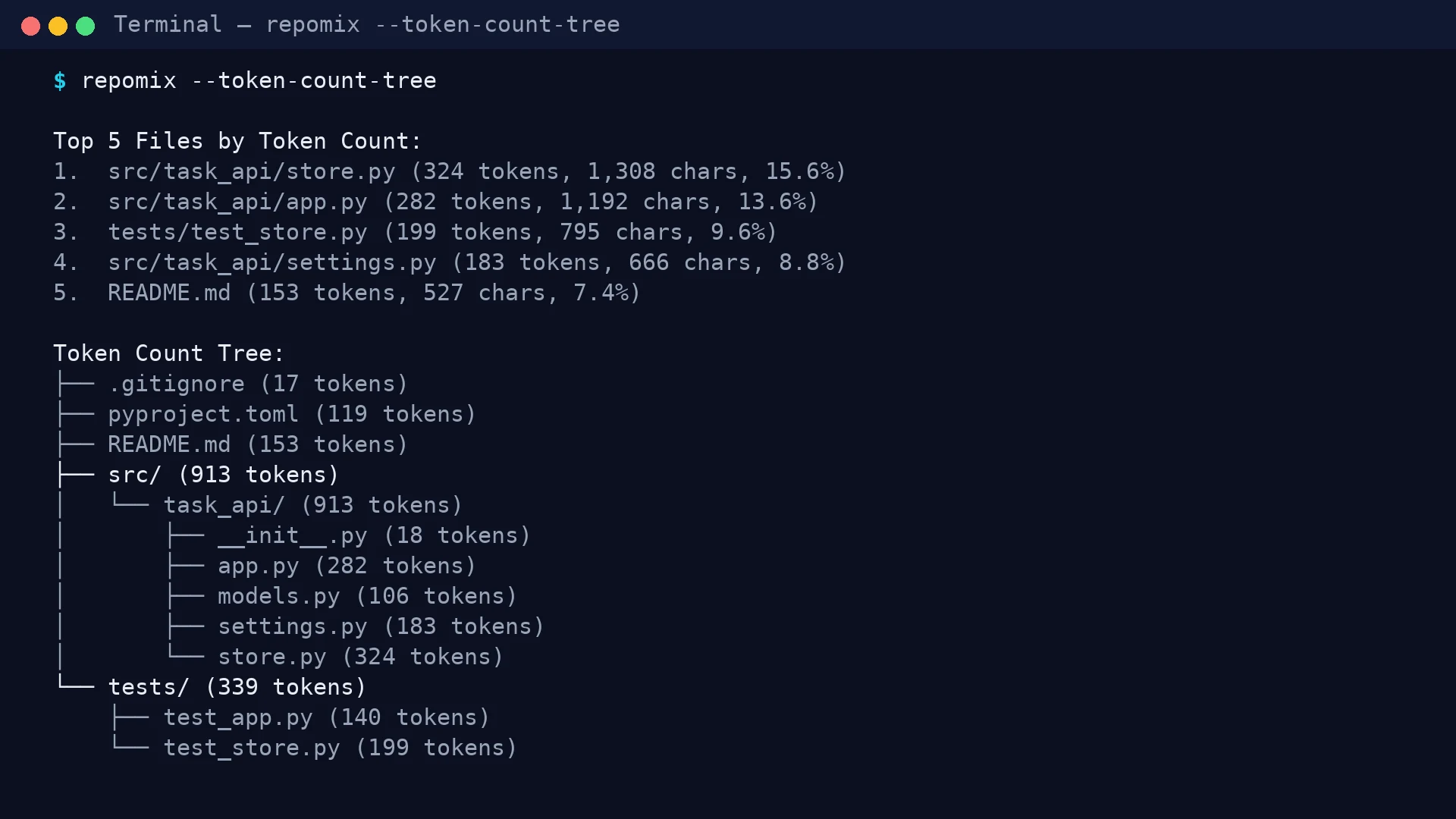
Read the numbers in the screenshot: store.py is the heaviest file at 324 tokens (15.6% of the pack), the whole src/ tree is 913 tokens, and the tests add 339. The tree's file tokens add up to 1,541 — less than the 2,071-token pack total, because the output file also carries the summary, repository info, and directory structure. Budget for that overhead: on this small project it is roughly a quarter of the total.
Two habits follow from this. When a pack is too big, the tree tells you which files to cut first — usually one generated file or one test fixture is eating a third of the budget. And when you are sizing a job for a model with a known window, add a threshold so the tree only shows the heavy files: repomix --token-count-tree 1000 hides everything under 1,000 tokens.
Step 3: Shrink the pack with --compress#
When the pack is too big to paste, --compress runs every file through Tree-sitter and keeps the structure — class and function signatures, interfaces, imports — while folding away the bodies, marked with ⋮----. It is the single most useful flag in the tool, and its effect is easy to measure:
repomix --compress -o repomix-output-compressed.xml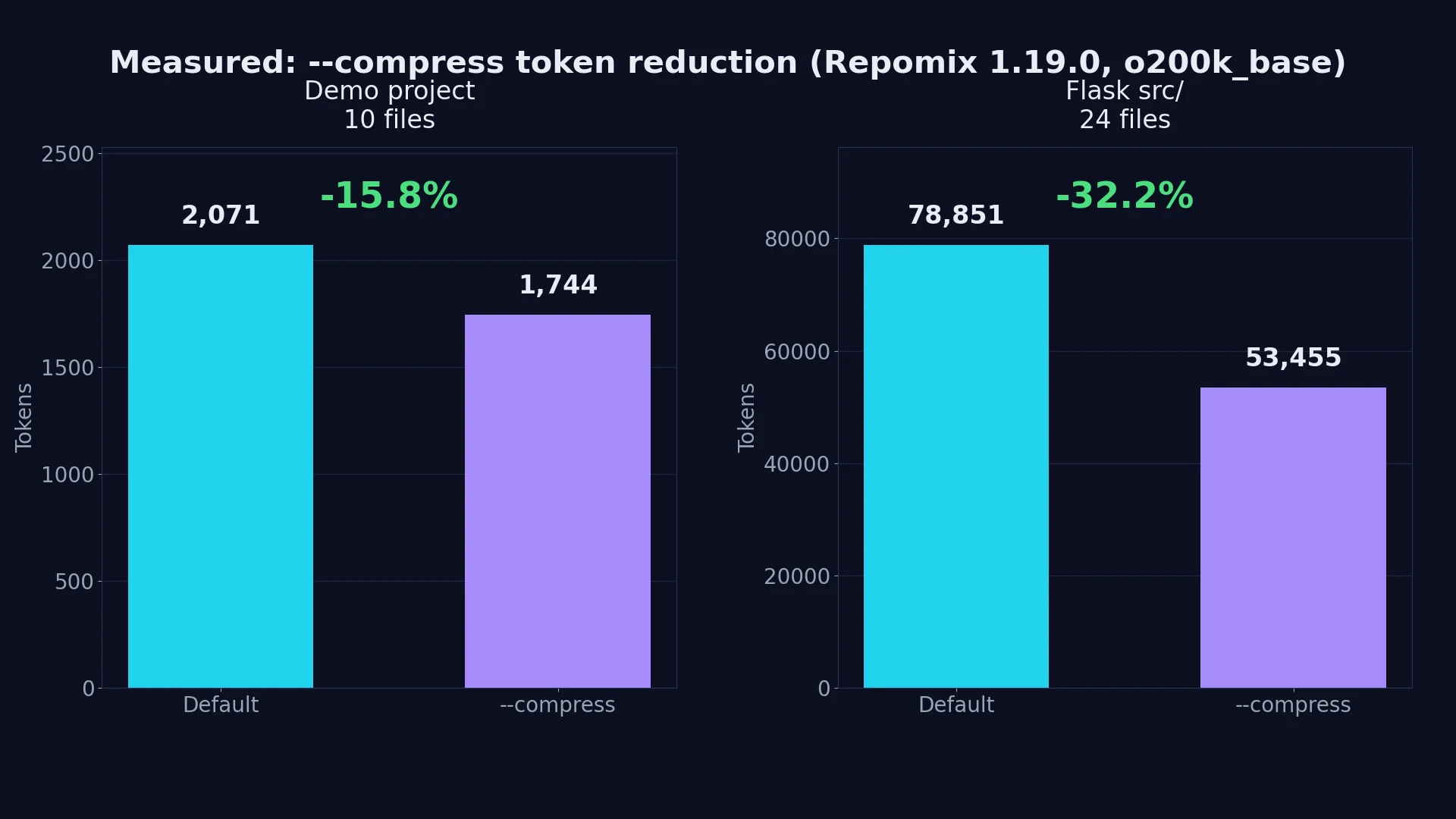
The demo project fell from 2,071 to 1,744 tokens (15.8%), and Flask's src/flask tree fell from 78,851 to 53,455 tokens (32.2%). The gap between the two is the point: compression pays off in proportion to how much implementation detail a codebase carries. A ten-file project of short functions barely compresses; a real framework, where most lines live inside function bodies, compresses by a third.
Use compressed output when the model needs orientation — "where is authentication handled?", "what does this module expose?", "review the structure before we refactor". Use the full pack when the model needs exact behaviour — debugging a failing function, reviewing logic line by line, or writing a test against a specific implementation. And don't take the "~70% reduction" figure from the docs at face value: it describes the best case, not the typical one. On real code I measured 16–32%.
Step 4: Pack exactly the slice you need#
Whole-repo packs are for small projects. For anything real, scope the pack to the slice the question is about:
# Only the source, not the tests or docs
repomix --include "src/**/*.py"

# Everything except generated files and fixtures
repomix --ignore "**/*.test.ts,dist/**"

# Exactly the files git tracks that match a pattern
git ls-files "*.ts" | repomix --stdin
On the demo project, --include "src/**/*.py" packed 5 files and 1,393 tokens instead of 10 files and 2,071. The include and ignore patterns are globs, comma-separated, and they compose with the rules Repomix already applies: your .gitignore is respected, as are .ignore files and the built-in list (which drops node_modules, .git, build output, lockfiles, and dotfiles such as .env). Add a .repomixignore file for exclusions that belong to packing but not to git — generated fixtures, vendored code, a giant seed-data file.
For pipelines, skip the file entirely. --stdout writes the packed output to standard output instead of a file, so it composes with other tools:
repomix --stdout --include "src/task_api/store.py" | head -5
repomix --stdout | llm "Please explain what this code does."
The first command was run here (it streams the packed file, exit code 0). The second is the documented pattern from the project's README for piping a pack straight into Simon Willison's llm CLI — handy when the question is a one-liner and you don't want a file lying around afterwards.
Step 5: Make it repeatable with a config file#
Flags are fine for one-offs; a checked-in config is what makes a pack reproducible across a team. Create repomix.config.json in the project root. This one was verified end to end — it packs only the Python source, drops the settings module, and writes Markdown:
{
  "output": {
    "style": "markdown",
    "compress": false,
    "fileSummary": true,
    "directoryStructure": true
  },
  "include": ["src/**/*.py"],
  "ignore": {
    "customPatterns": ["**/settings.py"]
  }
}
repomix --config repomix.config.jsonResult: 4 files, 1,188 tokens, Markdown output, and settings.py nowhere in it. Any flag on the command line overrides the same setting in the config file, so a checked-in config stays the default and a one-off --compress still works.
One gotcha: repomix --init, the command that scaffolds this file, is interactive. It opens a Yes/No prompt in the terminal, hangs waiting for input when there is no terminal attached, and a piped newline answered "No" in my test. Run it in a real terminal, or write the JSON by hand — for scripts and CI, the file is the interface, not the wizard.
Step 6: Check the security scan — and don't trust it blindly#
Every pack runs a Secretlint scan before writing the output. Files that look like they contain credentials are excluded, with a warning in the summary. I tested it with two planted files. The first held random-looking fake credentials — a plausible AWS key, a GitHub personal access token, an OpenAI key — and Repomix caught it:
🔎 Security Check:
──────────────────
1 suspicious file(s) detected and excluded from the output:
1. src/task_api/keys_probe.py
   - 1 security issue detected
The second file held the AWS documentation example keys (AKIAIOSFODNN7EXAMPLE and its companion secret) plus a fake GitHub token, and it was not flagged — the file packed normally, contents included. Those are publicly documented example values, so the scanner lets them through; a random-looking key in the same format was caught and the file excluded.
That is the behaviour to internalise. The scan is a net, not a guarantee: it catches realistic-looking secrets and it correctly ignores known example values, but it cannot know that a string in your codebase is a real credential if it doesn't match a known pattern. Two rules follow. First, .env files and anything in .gitignore never reach the output — the demo project's .env was excluded by the built-in patterns without any configuration. Second, read the packed file before you paste it anywhere, especially the first time you pack a new repo. If you are certain a pack is clean and the scan is a false positive, --no-security-check disables it — but treat that as an exception, not a default.
One related guard belongs in CI rather than in your head: --token-budget fails the command when a pack exceeds N tokens, while still writing the output. I verified it with a budget of 100 against the 2,071-token demo pack:
✖ Packed output exceeds the token budget: 2,071 > 100 tokens.
Reduce the output with --compress, narrow the scope with
--include/--ignore, or raise --token-budget.
Exit code 1. Put a real budget in a pre-commit hook or a CI step and a bloated pack can never silently become the context you send to a model.
Step 7: Pack a repo you don't own#
Sometimes the codebase you need to understand isn't yours. Repomix clones and packs a remote repository in one command — no manual clone, no cleanup:
repomix --remote pallets/flask --include "src/flask/**/*.py"That packed Flask's real source — 24 files, 78,851 tokens, 353,699 characters — straight from GitHub, and the compressed version of the same slice came to 53,455 tokens. A full URL works too (--remote https://github.com/yamadashy/repomix), as does a branch, tag, or commit (--remote-branch main, or a tree/commit URL). Scope it with --include the way you would locally; packing all of Flask would have produced a file no chat window accepts.
Note the security default here: config files inside a remote repository are not loaded unless you pass --remote-trust-config, because a config file is code and a stranger's repo is untrusted. Your own global config and CLI flags still apply. Leave that default alone unless you have read the remote config yourself.
Step 8: Split output that won't fit#
Some tools cap the file you can upload — Google AI Studio, for example, documents a 1 MB limit. --split-output cuts the pack into numbered parts grouped by top-level directory:
repomix --split-output 5kb -o pack.xml
# → pack.1.xml, pack.2.xml, pack.3.xml
On the demo project that produced three parts (2,799, 4,321, and 4,580 bytes). Two behaviours are worth knowing before you rely on it. First, a single file is never split across parts, so the limit must be larger than your largest file: a 2 KB limit failed outright with a clear error because pyproject.toml alone is 2,136 bytes. Second, every part repeats the file summary and directory structure, so the parts' token counts add up to more than the single file — 2,784 tokens across three parts versus 2,071 in one file. Split when a tool forces you to; don't split to save tokens, because it doesn't.
Step 9: Turn the repo into an agent skill#
A packed file is a one-off artifact. If the same repo gets questioned every day, generate an agent skill from it instead — a small directory an agent can load on demand:
repomix --skill-generate task-api-reference --skill-output ./skill-out --forceThe output is a skill package, not a single file:
skill-out/
├── SKILL.md
└── references/
    ├── summary.md
    ├── project-structure.md
    ├── files.md
    └── tech-stacks.md
SKILL.md is the entry point: it names the skill, describes when to use it, and points at the reference files — summary.md for purpose and format, project-structure.md for the tree with line counts, files.md for all file contents, tech-stacks.md for the detected languages and frameworks. By default the skill lands in .claude/skills/<name>/, where Claude Code picks it up; --skill-output puts it elsewhere and --force skips the overwrite prompt, which is what makes the command scriptable. The skill reports its own size — "10 files | 221 lines | 1697 tokens" for the demo project — but that counts the skill's reference files, not the packed XML, so don't compare it directly with the 2,071-token pack total.
One blemish to check for: the generated SKILL.md contains a canned example directory tree (src/index.ts, a utils/helpers.ts) that doesn't match the project it was generated from. It is template text, not your repo — read the generated skill once and delete the example before you ship it to a team.
Step 10: Let the agent pack for itself — the MCP server#
Everything so far has been you packing a file and handing it to a model. The last step removes you from the loop: run Repomix as a Model Context Protocol server and let the agent pack what it needs, when it needs it.
In Claude Code, one command registers it:
claude mcp add repomix -- npx -y repomix --mcpThe same server works in VS Code, Cursor, and Cline with a JSON block naming npx -y repomix --mcp as the command. I verified the server directly over raw JSON-RPC, without any client in between: it identifies as repomix-mcp-server 1.19.0 on protocol version 2025-03-26, and it exposes six tools — pack_codebase, pack_remote_repository, read_repomix_output, grep_repomix_output, generate_skill, and attach_packed_output.
The workflow that matters is pack-then-grep. The agent calls pack_codebase once, gets back an output ID, and then searches the packed file with grep_repomix_output instead of reading the whole thing into context. In my probe, packing the demo project's source and grepping for class TaskStore returned exactly one match — line 165, with a line of context on either side — without the agent ever seeing the other files. That is the difference between an agent that reads 2,071 tokens to answer one question and an agent that reads a dozen lines.
Confine it before you trust it. By default the server can read any path your user can; --sandbox pins it to one workspace directory, refuses absolute and parent paths, and disables remote packing, skill generation, and attaching external outputs. Run it sandboxed whenever the agent might pack a directory you haven't vetted — a cloned third-party repo, a shared drive, anything you didn't write. The project's docs also describe official Claude Code plugins (/plugin marketplace add yamadashy/repomix) that bundle the server with slash commands; those are documented, not something I installed in this run.
Which approach should you use?#
Five situations cover nearly every use. Pick by where the model lives and how often the question repeats:
| Situation | Approach | Why |
|---|---|---|
| One-off question in a chat window | Default pack, paste the XML | Fastest path; the model gets structure, tree, and contents in one file |
| Same repo, questions every day | --skill-generate, load the skill | The agent pulls the slice it needs instead of you re-packing by hand |
| Agent with file access (Claude Code, Cursor, Cline) | MCP server, sandboxed | The agent packs and greps on demand; pack once, read lines, not files |
| Repo bigger than the context window | --include slice + --compress + --split-output | Measured: 32% off Flask with compression; split only when a tool forces a size limit |
| Team or CI | Checked-in repomix.config.json + --token-budget | Reproducible packs; the build fails instead of silently growing the context |
Two honest limits. First, Repomix is the wrong tool when the agent already reads files itself — Claude Code working inside your repo will do a better job with grep and targeted reads than with a dumped snapshot, and a whole-repo pack of a monorepo will never fit. Pack the slice, not the universe. Second, if your workflow is Python-only and data-science-shaped, the project's own README points at Gitingest instead — same idea, built for that ecosystem.
The takeaway#
Context is the constraint in AI-assisted coding, and most of it is wasted before the model reads a word: files pasted without paths, tests and fixtures the question never needed, secrets that should never have left the machine. Repomix turns that mess into a repeatable step — one command, a token count you can check before you send anything, a secret scan you verify rather than trust, and a compressed or sliced variant when the full repo won't fit. Start with the default pack on your smallest repo, read the token tree, and only then decide whether you need compression, a skill, or the MCP server. The tool is free, local, and fifteen minutes is enough to know whether it earns a place in your workflow.