Stop your coding agent writing 2019 JavaScript: hands-on with Chrome's Modern Web Guidance
Chrome's Modern Web Guidance hit Hacker News' front page on November 10 with a simple pitch: 250 expert-written guides that stop coding agents writing 2019-era JavaScript. Install it, search it, scan a legacy codebase with it, and rewrite a dark-mode toggle the modern way — every command verified.
- 3,422 stars, 118 forks: GoogleChrome/modern-web-guidance, Apache-2.0, created March 23, 2026. It reached Hacker News' front page on November 10, 2026 (315 points) as a Show HN post.
- 250 features, 203 use-case guides: CSS and layout (140 features), HTML and DOM (36), JavaScript and APIs (74), plus accessibility, forms, performance, and built-in AI guides.
- Verified version: npm
[email protected], installed package about 17 MB on disk with 209 guide files. Search, retrieve, and legacy-scan all ran locally with no API key. - The evidence it works: the project's own evals (November 8) put Claude Code with Opus 5.5 at 57% unguided vs 88% guided on 215 real web tasks (+31 points); Codex went 54% to 82%, Antigravity 58% to 94%.
- The end-to-end result: a demo with a hand-rolled theme toggle and modal scores 1 legacy-scan finding; after rewriting both from the retrieved guides, it scores 0.
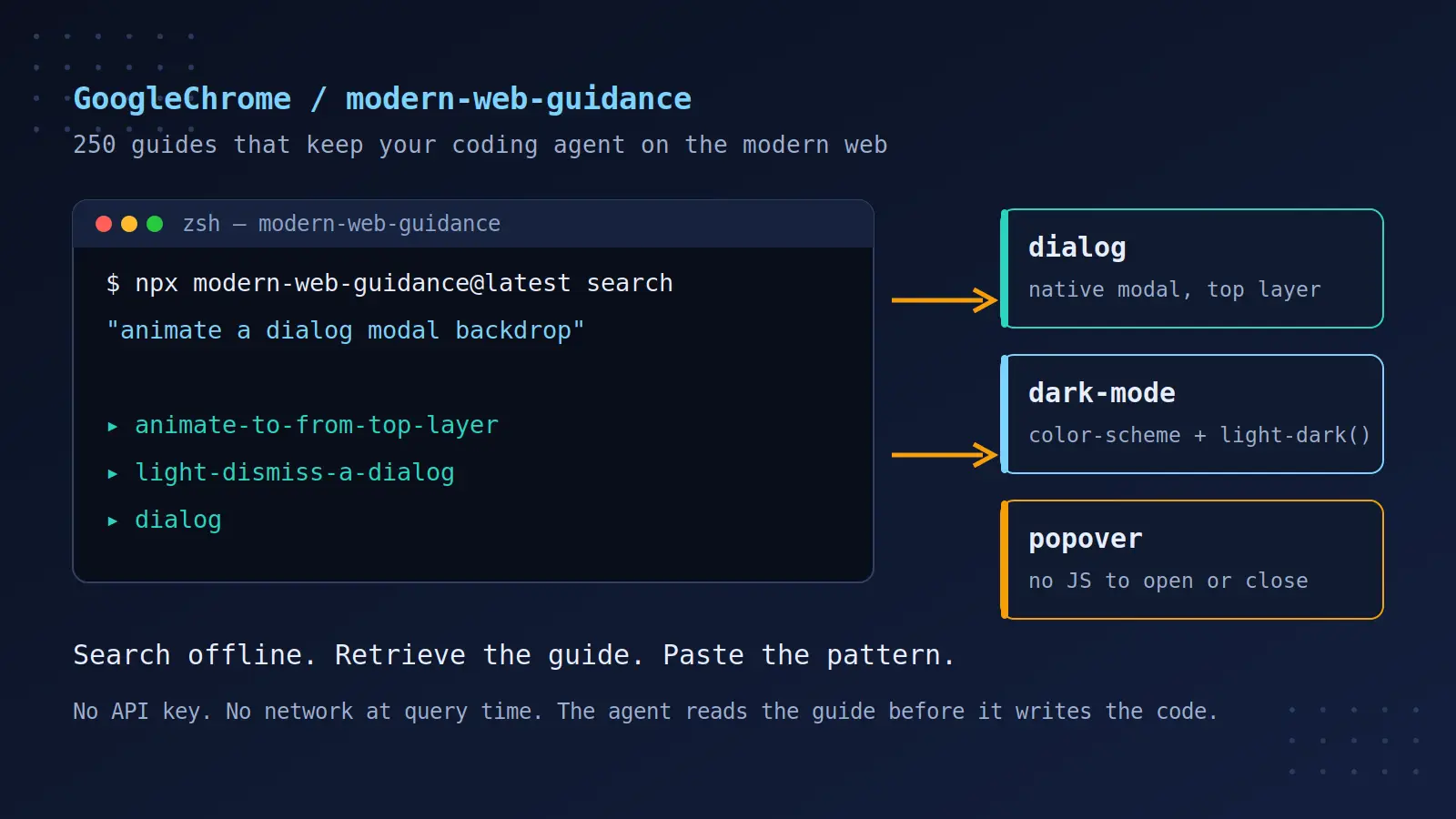
Ask a coding agent to build a modal, and it will probably write you a div, a click handler, an Escape-key listener, a focus trap, and a line that sets document.body.style.overflow = 'hidden'. It works. It is also, in 2026, the long way around: the browser has shipped a native <dialog> element, declarative command="show-modal" buttons, and the top layer for years. The agent writes the old version because its training data is full of it — the README puts it plainly: models default to older patterns because LLM training data contains vast amounts of legacy code, and even when a model knows an API exists, it often lacks the density of real-world, modern implementation patterns.
Modern Web Guidance is Google Chrome's answer to that specific failure. It is a set of skills — 250 expert-written guides covering the web platform of the last several years, up to the cutting edge — stewarded by the Chrome, Microsoft Edge, Mozilla Firefox, and MDN teams. A small CLI (npx modern-web-guidance@latest) lets an agent search the guides by plain-language query and retrieve the exact one it needs, offline, before writing code. The skill's own instruction is to run a search at the start of implementing any web feature. On November 10 it hit Hacker News' front page, which is why you are reading this now: the idea is simple enough to explain in one sentence, and the test of it is equally simple — install it, point it at legacy code, and see what changes.
This tutorial does the whole loop for real. You will try the CLI with no install, install the skill into an agent, scan a deliberately old-fashioned demo site, and rewrite its two worst offenders — a hand-rolled theme toggle and a hand-rolled modal — using exactly what the retrieved guides prescribe. Every command and output below was run on this machine against [email protected], and where the tool is honest about its own limits, that is stated rather than smoothed over.
What you will need#
- Node.js 18 or newer. The steps below were verified with Node.js 24. The CLI runs through
npx, so no global install is needed to try it. - A coding agent — Claude Code, Codex, GitHub Copilot, Google Antigravity, Grok Build, Kimi Code, or any agent that can load skills. Steps 1, 3, 4, and 5 need no agent at all; Step 2 wires the skill into one.
- No API key, no account, no network at query time. Search and retrieve run entirely offline once the package is downloaded. The install step clones the skill from GitHub, so it needs the network once.
- About 25 minutes. The commands take a couple of minutes; reading the two guides you retrieve takes the rest.
Step 1: Try it without installing#
The fastest way to understand the tool is to use it before installing anything. The CLI has three commands you will use constantly — search, retrieve, and legacy-scan — and all three work through npx with no setup. Start with a search, phrased as a goal rather than a feature name, exactly as an agent would:
npx modern-web-guidance@latest search "animate a dialog modal backdrop"The output is JSON — ten ranked guides, each with an id and a one-line description. This is the real output, trimmed to the top four:
[{"id":"animate-to-from-top-layer","description":"Animate elements such as dialogs, popovers, and tooltips as they're entering/exiting the top layer."},
{"id":"light-dismiss-a-dialog","description":"Create a modal dialog that can be closed via light dismiss (i.e. clicking or tapping outside of the dialog)"},
{"id":"prevent-page-scroll-under-modal-dialog","description":"Prevent the underlying page from scrolling while a modal dialog is open."},
{"id":"dialog","description":"Build a modal or non-modal dialog component that is accessible, manages focus appropriately, and can be dismissed the way users expect on each platform."}]
Now retrieve one. The guide is long — the dark-mode guide runs 347 lines and 16.8 KB — so read it in your editor rather than scrolling terminal output:
npx modern-web-guidance@latest retrieve "dark-mode"What comes back is not a blog post. It is a working spec: mandatory steps marked MANDATORY, code you can paste, and gotchas with their failure modes named. The dark-mode guide insists on a <meta name="color-scheme"> tag in the head to prevent a flash of un-themed content, color-scheme: light dark on :root (not body — the body does not control the window's rendering context), color tokens built with light-dark(), and a warning that Safari may preserve a white checkbox indicator over a dark accent color, so test important combinations in Safari. It even documents a WebKit bug (bugs.webkit.org #311752) that makes scrollbar-color flicker if you animate it. That density is the point: this is the material a model usually lacks, delivered in the exact moment it is about to write the code.
Two more commands complete the picture. list dumps every guide id and description — 250 features across CSS and layout, HTML and DOM, JavaScript and APIs, accessibility, forms, performance, privacy, PWA, security, and WebMCP. And --version confirms what you are running:
npx modern-web-guidance@latest --version
npx modern-web-guidance@latest list | head -c 6001.0.0Version 1.0.0, published as the project's first stable release. If npx asks whether to install the package, answer yes — it downloads once into the npm cache and runs from there afterwards.
Step 2: Install the skill into your agent#
Using the CLI by hand is the demo; the real use is the agent using it by itself. The interactive installer is one command:
npx modern-web-guidance@latest installIt runs a wizard: clone the repository, pick skill packs (the full modern-web-guidance pack at about 205 tokens, or the smaller chrome-extensions pack at about 175 tokens, via --choose), then pick which of 79 agents to install into. In a terminal that works. In a script, a CI job, or any non-interactive shell, the wizard stops with a clear error — this is the exact message, and it tells you the fix:
[SKILLS_PROMPT_REQUIRES_TTY] Interactive prompt required but stdin is not a TTY. Nothing was installed. Use --agent <name> (or --agent '*') and -y to run non-interactively.The non-interactive form is the one to put in your setup docs. This installs the skill project-locally into .claude/skills/ for Claude Code:
npx modern-web-guidance@latest install --agent claude-code -yVerified: the install completes and writes three things into the project — .claude/skills/modern-web-guidance/SKILL.md (9.8 KB, the skill instruction the agent reads), a guides/ directory with 209 Markdown guide files across 19 categories (2.3 MB), and a skills-lock.json pinning the source to GoogleChrome/modern-web-guidance with a content hash. Update later with npx modern-web-guidance@latest update.
If your agent is not Claude Code, the README lists the equivalent one-liners. The most portable is the Vercel skills CLI, which the Cloudflare security-audit skill also uses:
# Any agent via the skills CLI
npx skills add GoogleChrome/modern-web-guidance

# GitHub CLI
gh skill install GoogleChrome/modern-web-guidance

# Codex
codex plugin marketplace add GoogleChrome/modern-web-guidance
codex plugin add modern-web-guidance@googlechrome

# GitHub Copilot CLI
/plugin marketplace add GoogleChrome/modern-web-guidance
/plugin install modern-web-guidance@googlechrome

# Google Antigravity / Grok Build / Kimi Code
agy plugin install https://github.com/GoogleChrome/modern-web-guidance
grok plugin install https://github.com/GoogleChrome/modern-web-guidance --trust
/plugins install https://github.com/GoogleChrome/modern-web-guidance
One more thing makes the skill actually fire — and it is already in place. The installed SKILL.md opens with a direct instruction to the agent: MANDATORY: Execute FIRST for all HTML/CSS and clientside JS tasks. Do NOT skip — web APIs evolve rapidly and training weights contain obsolete patterns. It lists the triggers (modals, dialogs, popovers, dark mode, forms, accessibility, web components, and more) and the non-triggers (backend, infra, tooling). So once the skill is installed into the agent you use, the agent is told to search before it writes — you do not need an extra line in AGENTS.md. If your agent never searches, check that the skill installed into the agent you actually run, not a different one.
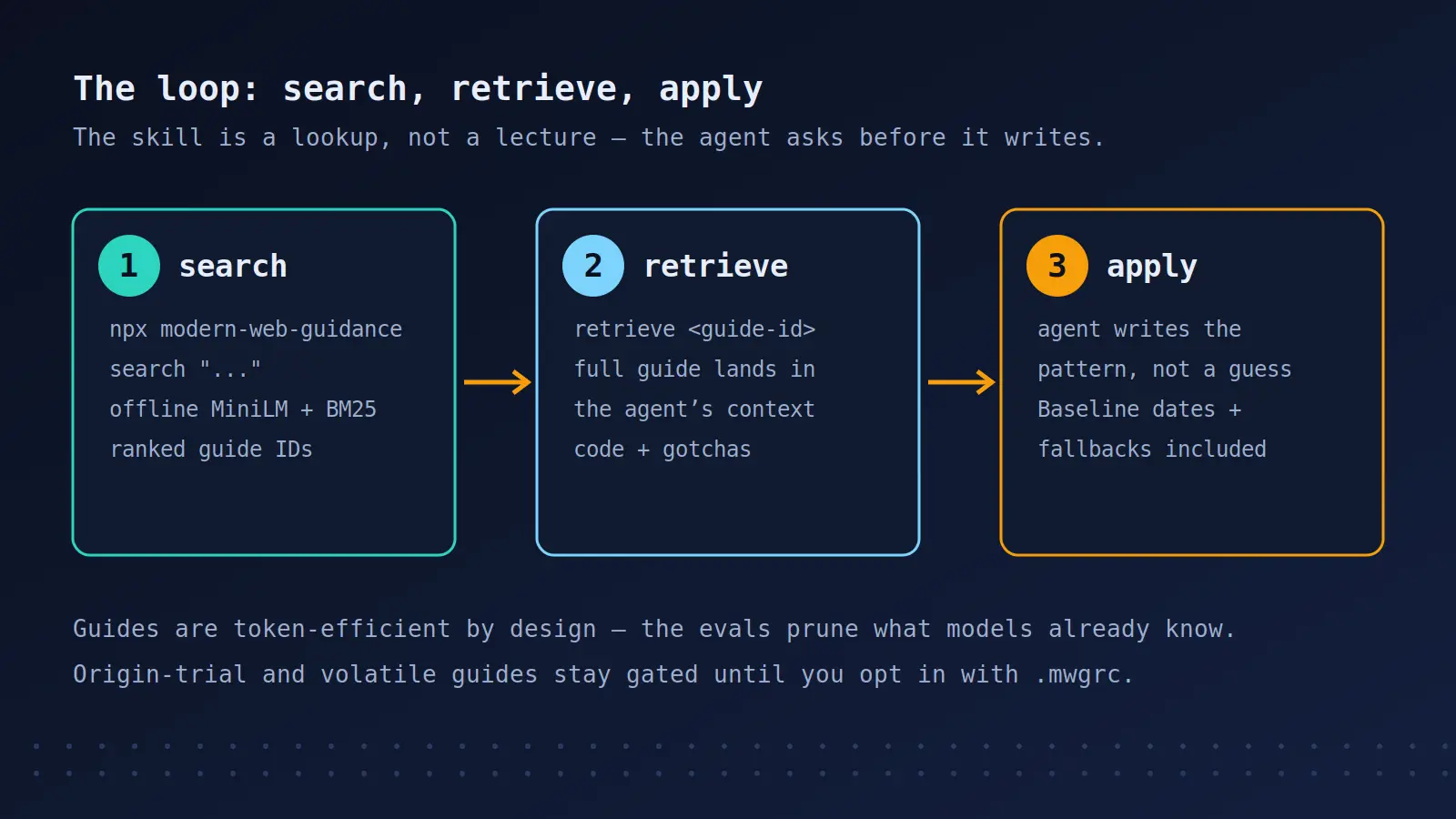
Step 3: How search actually works#
The search step deserves a closer look, because its design explains both its strengths and its limits. When you run search, nothing leaves your machine. The npm package is self-contained — about 17 MB installed — and most of that is a bundled sentence-embedding model (all-MiniLM-L6-v2) plus precomputed embeddings for all 250 guides. Your query is tokenized, embedded into a 384-dimension vector, and compared by cosine similarity against the guide vectors, combined with a BM25 keyword search. There are no network calls, no API keys, and no account.
That has two consequences worth knowing. First, the same query returns the same results from any directory — the search never reads your code, so it cannot validate your output. It is a pre-write lookup, not a post-write check: the guide tells the agent what to write before it writes it, and nothing in the tool checks afterwards that the agent followed it. (The skill itself tells the agent to cross-check its implementation against the retrieved guide before concluding — but that is the agent policing itself, not the tool verifying anything.) Second, the ranking is only as good as your query. The installed SKILL.md is specific here: use a 2–5 word action-oriented query for a single capability — "light dismiss dialog", not "dialog" (too terse) and not "close React settings modal on outside click" (framework and app noise). Describe the user-visible capability, split compound tasks into separate searches, and if a search comes back empty or unrelated, rephrase once with the concrete component noun before falling back to list. The long sentence query in Step 1 worked, but the short form is what the skill is tuned for.
Two guardrails are built into retrieval. Guides for experimental Origin Trial APIs and for volatile features — single-engine features shipped within the last three months or still stabilizing — are discoverable through search but gated on retrieve, so an agent cannot adopt an unstable API without explicit developer consent. Opt in per project with a .mwgrc JSON file in the project root (or ~/.mwgrc for your user-level default):
{
  "allowOriginTrials": true,
  "allowVolatileFeatures": true
}
The same two settings are toggled from the CLI with set-allow-origin-trials and set-allow-volatile-features. And on privacy: Google collects anonymous usage information — install counts, the calling agent name, guide retrieval IDs, and the search queries the agent generates. Raw user prompts are not collected. Set DISABLE_TELEMETRY=1 in your shell profile to opt out; every command in this tutorial ran with it set.
Step 4: Scan a legacy codebase#
Search and retrieve help before code is written. legacy-scan is the other direction: point it at code that already exists and it flags the patterns the guides would have prevented. To see it work, build a small demo the way an agent would have written it in 2019 — a theme toggle driven by localStorage and body classes, and a hand-rolled modal div with its own Escape handler:
<!-- index.html (the legacy demo) -->
<button id="theme-toggle">Toggle theme</button>
<button id="open-modal">Subscribe</button>
<div id="modal" class="modal hidden">
<div class="modal-content">
<span id="close-modal">×</span>
<h2>Join the newsletter</h2>
<form id="signup-form">
<input type="text" id="email" placeholder="Email address">
<button type="submit">Sign up</button>
</form>
</div>
</div>// app.js (the legacy demo)
var currentTheme = localStorage.getItem('theme') || 'light';
document.body.classList.add(currentTheme + '-theme');
document.getElementById('theme-toggle').addEventListener('click', function () {
currentTheme = currentTheme === 'light' ? 'dark' : 'light';
document.body.classList.remove('light-theme', 'dark-theme');
document.body.classList.add(currentTheme + '-theme');
localStorage.setItem('theme', currentTheme);
});
// Hand-rolled modal instead of <dialog>
var modal = document.getElementById('modal');
document.getElementById('open-modal').addEventListener('click', function () {
modal.classList.remove('hidden');
document.body.style.overflow = 'hidden';
});
document.getElementById('close-modal').addEventListener('click', function () {
modal.classList.add('hidden');
document.body.style.overflow = '';
});
window.addEventListener('click', function (e) {
if (e.target === modal) {
modal.classList.add('hidden');
document.body.style.overflow = '';
}
});Run the scan from the demo directory:
npx modern-web-guidance@latest legacy-scan .Modern Web Guidance Analyzer — .
Found 1 modernization opportunity across 1 guide (scanned 33 guides with deterministic rules; ~20% of the guidance corpus):
Note: Static analysis results are provisional — verify against the Keep/Drop criteria below.
* dark-mode-toggle (1 finding)
Dark mode toggles that persist theme overrides in localStorage and toggle root .dark classes or data-theme attributes should update <meta name="color-scheme"> ("light dark", "light", "dark") paired with CSS color-scheme and light-dark().
Keep when: JavaScript implements a user-facing dark/light theme override stored in localStorage and applies it by toggli…
Drop when: The code already updates <meta name="color-scheme"> content ("light dark", "light", "dark"); The code only re…
- app.js:6
document.body.classList.remove('light-theme', 'dark-theme');
Retrieve a guide: npx modern-web-guidance retrieve <guide-id>One finding, and it is the right one: the toggle persists an override in localStorage and swaps body classes, but never touches <meta name="color-scheme">, so the browser keeps rendering scrollbars, form controls, and the page canvas in light mode while the site claims to be dark. Note what the scan does not do: it found nothing about the hand-rolled modal. The scan covers deterministic rules for 33 of the 250 guides — about 20 percent of the corpus — and the modal patterns are not among them. A clean scan means none of the 33 rule-covered patterns fired; it does not mean the code is modern. The output says so itself ("results are provisional — verify against the Keep/Drop criteria"), and each finding ships with those criteria so you can judge whether it applies. Treat legacy-scan as a metal detector, not a survey: it finds what it is tuned for, and silence is not a clean bill of health.
Step 5: Rewrite the toggle the modern way#
The scan names the guide, so retrieve it — along with the dark-mode guide it builds on:
npx modern-web-guidance@latest retrieve "dark-mode-toggle"
npx modern-web-guidance@latest retrieve "dark-mode"
The dark-mode-toggle guide (141 lines) reframes the whole feature. The override is a three-state value — system (no stored value), light, or dark — stored in localStorage and reflected in <meta name="color-scheme">. Colors follow automatically through light-dark() once the meta is mapped back to the CSS color-scheme property, because any color-scheme declaration in author CSS overrides the meta — updating the meta alone is a no-op. The mapping uses :has():
:root {
  color-scheme: light dark;

  &:has(> head > meta[name="color-scheme"][content="dark"]) {
    color-scheme: dark;
  }
  &:has(> head > meta[name="color-scheme"][content="light"]) {
    color-scheme: light;
  }
}
Three rules in the guide are easy to get wrong without it. First, do not hardcode color-scheme: light or dark as the root default; the base declaration must stay light dark, and CSS must not depend on JS — if JS never runs, the meta stays light dark and the site follows the system. Second, prevent the flash of the wrong scheme with a tiny inline script placed immediately after the meta element (not type=module, not defer):
<meta name="color-scheme" content="light dark">
<script>
document.querySelector('meta[name="color-scheme"]').content =
  localStorage.getItem("color-scheme") ?? "light dark";
</script>
Third, the toggle logic itself has a subtlety the guide spells out: when the user toggles, the target is the opposite of the rendered scheme, and if that target matches the current system preference, you remove the stored value instead of storing it — otherwise the value invisibly pins the scheme against future system changes. Many operating systems switch schemes automatically by time of day; storing a value that happens to match the system would make pinning impossible later. The rewritten toggle, following the guide:
// app.js — rewritten from the dark-mode-toggle guide
const meta = document.querySelector('meta[name="color-scheme"]');
const toggle = document.getElementById('theme-toggle');

function systemScheme() {
  return matchMedia('(prefers-color-scheme: dark)').matches ? 'dark' : 'light';
}
function renderedScheme() {
  return localStorage.getItem('color-scheme') ?? systemScheme();
}
toggle.addEventListener('click', () => {
  const target = renderedScheme() === 'dark' ? 'light' : 'dark';
  if (target === systemScheme()) {
    localStorage.removeItem('color-scheme');
  } else {
    localStorage.setItem('color-scheme', target);
  }
  meta.content = localStorage.getItem('color-scheme') ?? 'light dark';
});
window.addEventListener('storage', () => {
  meta.content = localStorage.getItem('color-scheme') ?? 'light dark';
});
The guide also argues, bluntly, that most sites should not have a persistent toggle in the header at all: follow the system preference by default, and if an override is needed, put it in a settings surface. Persistent toggles belong on developer-facing sites, where switching schemes is a frequent task — not on every site just because developer sites do it. The demo keeps its toggle because it is a demo; your site probably should not.
Re-run the scan on the rewritten demo:
npx modern-web-guidance@latest legacy-scan .Modern Web Guidance Analyzer — .
0 findings from 33 qualified guides.
Note: legacy-scan covers legacy patterns for 33 guides (~20% of the guidance corpus). Use 'modern-web-guidance search <topic>' for general UI/platform guidance.One finding to zero, with the same 33 guides. That is the loop the whole tool is built around: scan, retrieve, rewrite, re-scan.
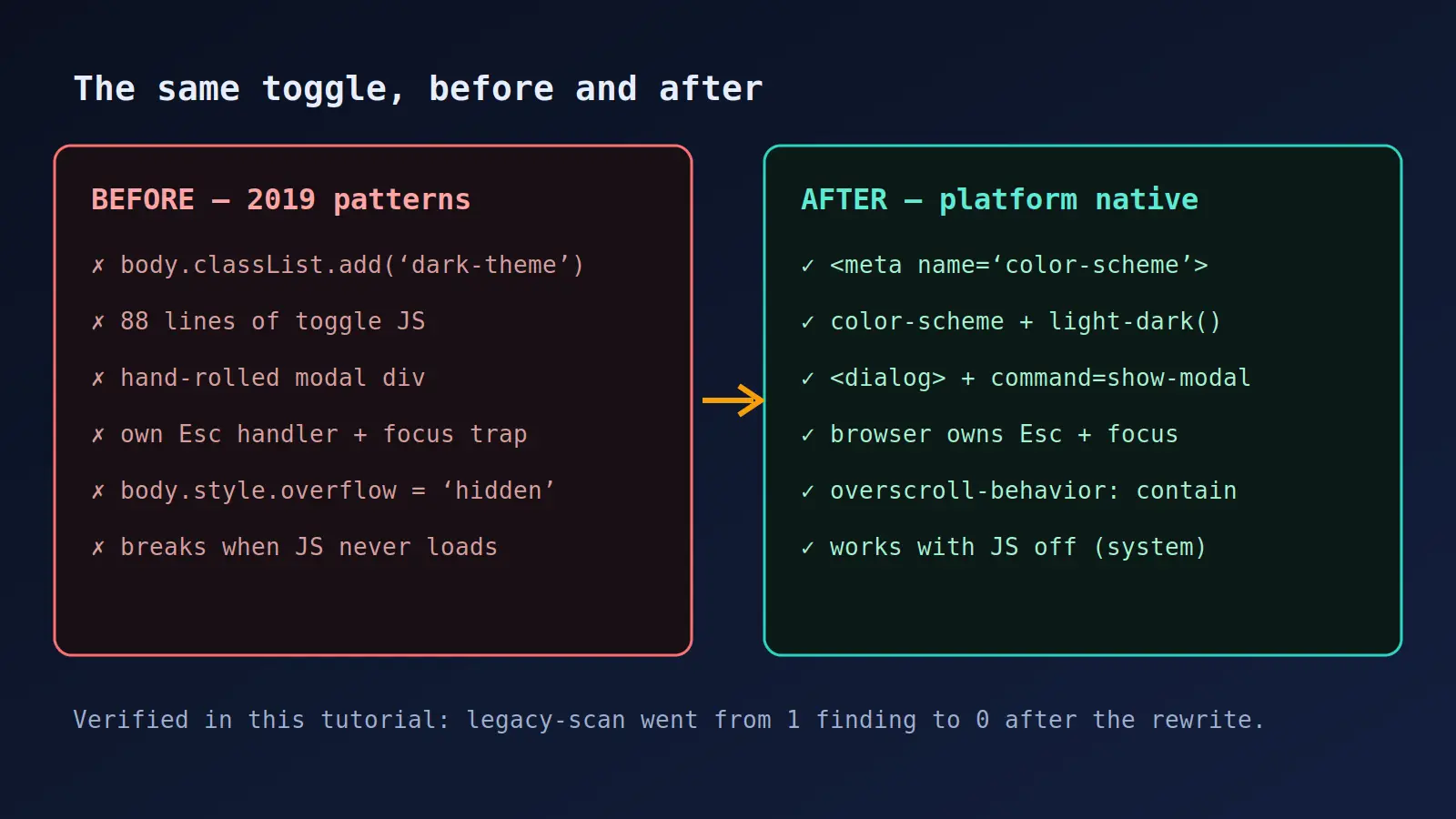
Step 6: Replace the modal with native <dialog>#
The modal is the case legacy-scan missed, so this step runs on search and retrieve alone — which is the normal path for the other 80 percent of the corpus. Retrieve the dialog guide:
npx modern-web-guidance@latest retrieve "dialog"The guide opens with a decision procedure. Rule 1 covers the common case — the overlay interrupts the user and blocks the page (confirmations, forms, sign-in, destructive actions) — and its answer is a modal <dialog>, opened declaratively with command="show-modal" on the button, no JavaScript at all:
<button type="button" command="show-modal" commandfor="subscribe">Subscribe</button>

<dialog id="subscribe" aria-labelledby="subscribe-title" closedby="any">
  <h2 id="subscribe-title">Join the newsletter</h2>
  <form method="dialog">
    <label>Email address
      <input type="email" name="email" autocomplete="email" required>
    </label>
    <button value="subscribe">Sign up</button>
    <button value="cancel" autofocus>Cancel</button>
  </form>
</dialog>
The browser then provides what the hand-rolled version rebuilt by hand: an inert page behind the modal, focus containment, top-layer rendering, ::backdrop, Escape and back-gesture dismissal, and focus returned to the invoker on close. The guide is explicit about what not to add: no role="dialog", no aria-modal, no focus trap, no inert toggling, no Escape handler. It also forbids the two mistakes that look like fixes: do not lock scrolling with overflow: hidden or position: fixed on html or body — use the two mandatory CSS rules instead:
/* MANDATORY: without them, scrolling over the backdrop or inside
   the dialog scrolls the page behind it */
dialog:modal {
  overscroll-behavior: contain;
}
dialog::backdrop {
  overflow: hidden;
  overscroll-behavior: contain;
}
Two details in the markup deserve attention. closedby="any" adds click-outside-to-close on top of Escape; without it, a modal opened with showModal() dismisses on Escape and back gesture only, and closedby="none" reserves dismissal for the developer (for example a form with unsaved changes, which needs a confirmation path). And method="dialog" on the form makes the submit button close the dialog with its value as the return value — no submit handler needed for the close itself. The email input also changed in the rewrite, from type="text" to type="email" with autocomplete="email" and required: that is the autofill guidance the forms discipline covers, and it is the kind of second-order fix an agent makes once the first guide puts it in the right frame of mind. Rules 2 and 3 in the dialog guide cover the cases that are not modals — a panel the user keeps working alongside (use <dialog popover>) and overlays that are not dialogs at all, like menus and tooltips (use a semantic element with the popover attribute, not <dialog>).
When to use this vs alternatives#
Modern Web Guidance is one entry in a crowded field of things that steer agents, and the honest comparison is about what each one is for. Anthropic's official Agent Skills — Word, Excel, PowerPoint, and PDF — are the same mechanism applied to document formats: a skill the agent loads before doing a task it would otherwise improvise. Cloudflare's security-audit-skill is the same mechanism applied to a workflow: six phases, coverage-led hunting, adversarial validation. Modern Web Guidance is the same mechanism applied to a knowledge gap: the web platform moves faster than training data, and the skill is the patch. Use it when the task is HTML, CSS, or client-side JavaScript; the skill itself says not to trigger it for backend work, infrastructure, or tooling.
| Approach | What it does | When it wins |
|---|---|---|
| Modern Web Guidance | Curated guides injected before the agent writes, plus a legacy scanner | Any web UI task; offline; no key; evidence-backed evals |
| Vendor Agent Skills (e.g. Anthropic's) | Same mechanism for a specific product surface | Document-format tasks in Claude Code |
| Workflow skills (e.g. security-audit-skill) | A multi-phase process the agent follows | Tasks where the process is the value, like audits |
| Linters (e.g. eslint-plugin-compat) | Static checks against browser support data | Catching unsupported API use in CI after the fact |
| Pasting MDN links into the prompt | Ad-hoc, one-off context | A single known question; does not scale to a codebase |
The linter row is the one to be clear about. A compat linter catches an API your target browsers do not support; Modern Web Guidance tells the agent which API to reach for in the first place, with the fallback and the gotcha attached. They complement each other — the skill prevents the 2019 code, the linter catches what slips through — but only the skill changes what the agent writes first. The eval numbers back the claim in the project's own terms: on November 8, across roughly 215 tasks and 1,700-plus assertions each, guided agents passed 82–94% of assertions against 54–58% unguided. Treat those as the vendor's numbers — the harness and per-guide dashboard are public, and the calibration loop (graders must pass 100% on golden solutions and fail 100% on the unmodified baseline) is at least a serious attempt at honesty. The effect size is large enough that the direction is believable even if you discount the exact points.
Troubleshooting: what to do when it misbehaves#
Three issues account for almost everything you will hit. The installer cancels with [SKILLS_PROMPT_REQUIRES_TTY] — you are in a non-interactive shell. Use the non-interactive form from Step 2: install --agent <name> -y, with --agent '*' for all detected agents. Search returns [] or unrelated guides — the query is too terse, too compound, or full of framework and app nouns. Rephrase once with the concrete component noun ("light dismiss dialog"), then fall back to list. legacy-scan finds nothing on code you know is old — expected: only 33 guides have deterministic rules. Use search per feature instead; the scan is a spot check, not an audit. One more: retrieve prints a path to a temp file instead of the guide — that is the CLI saving large output to avoid truncating your terminal. Read the file it names; the guide is there in full.
The takeaway#
Modern Web Guidance earns its front-page moment for a narrow, verifiable reason: it attacks the one failure mode every developer has watched an agent commit — writing the 2019 version of a solved problem — with the one remedy that fits how agents actually work, which is better context delivered before the code exists. The install is one command, the search runs offline with no key, the guides are specific enough to paste from, and the loop is checkable: scan, retrieve, rewrite, re-scan, watch the findings drop. The limits are stated on the tin — 33 of 250 guides scannable, no post-write verification, vendor-run evals — and none of them changes the recommendation. Install it, and the next time your agent reaches for a hand-rolled modal, it will have read the guide that says not to.
Sources
- GoogleChrome/modern-web-guidance — GitHub repository (README, quickstart, evals, telemetry, installation methods)
- Modern Web Guidance — Chrome developer documentation
- Hacker News front page — Show HN: Get your coding agent off ~2019 JavaScript, onto modern web primitives (November 10, 2026)
- modern-web-guidance on npm — version 1.0.0
- Modern Web Guidance eval dashboard — per-agent and per-guide results