Stop paying twice for the same question: build a semantic cache for your LLM app
Your exact-match cache misses every rephrased question — and you pay for the same answer twice. This tutorial builds a semantic cache end to end: sentence embeddings, a similarity threshold tuned on labeled data (not vibes), SQLite persistence with eviction, and a drop-in wrapper. Every number below was actually measured, on a CPU, with free open-source tools.

Every production LLM feature eventually gets the same invoice shock. Not from the demo — ten users asking ten different questions costs almost nothing. From the ten-thousandth user asking, for the ten-thousandth time, "how do I reset my password" — phrased just differently enough that your exact-match cache misses it, and you pay for the same answer all over again.
Caching is the oldest trick in backend engineering, and LLM apps need it more than most: every cache hit skips a full model call — the latency, the tokens, the bill. Most teams start with an exact-match cache (a dictionary keyed on the prompt string) and stop there. It works, right up until you measure it: in real support and assistant traffic, users almost never repeat a question verbatim. They rephrase. "How do I reset my password" becomes "i forgot my password, how can I reset it" — same intent, different string, full price paid twice.
A semantic cache fixes this by keying on meaning instead of characters. Each incoming query is embedded into a vector, compared against the vectors of previously answered queries, and served from cache when it's close enough. This tutorial builds one end to end: a baseline exact-match cache, a labeled paraphrase set you can reuse, a principled threshold-tuning procedure (not a magic 0.8), a persistent cache with eviction, and a drop-in wrapper for your app. Every number below was actually measured — on a CPU, with free open-source tools, no API key.
What you'll need#
- Python 3.10+ and pip. A CPU is fine — everything here runs without a GPU.
- sentence-transformers (brings PyTorch along) and scikit-learn for the evaluation math. Install with
pip install sentence-transformers scikit-learn matplotlib. - ~100 MB of disk for the
all-MiniLM-L6-v2embedding model, downloaded automatically on first use. It maps any sentence to a 384-dimensional vector; Apache-2.0 licensed. - No API key. The workload simulation uses a stub backend with honest simulated latency, so the relative win of the cache is real even though the absolute millisecond numbers are illustrative.
- About 30 minutes, most of it watching a threshold sweep run.
Step 1 — Build the 20-line baseline (exact-match cache)#
Before improving anything, measure the naive version. An exact-match cache is a dictionary: normalize the query, look it up, and only call the model on a miss.
class ExactMatchCache:
    def __init__(self):
        self.store = {}

    def ask(self, query, llm_call):
        key = " ".join(query.strip().lower().split())
        if key in self.store:
            return self.store[key], True   # hit
        answer = llm_call(query)            # miss: pay full price
        self.store[key] = answer
        return answer, False
That's the whole thing, and you should ship it first — it's simple, it never serves a wrong answer, and on traffic with genuine repeats it already helps. Its ceiling is the problem: it only catches byte-identical repeats. To see how low that ceiling is, we need a workload that looks like real traffic, with rephrases. We'll build that in Step 5 and measure both caches head to head. Spoiler from the run: the exact-match cache caught 46.0% of 1,000 simulated queries.
Step 2 — Turn "same meaning" into a number#
A semantic cache needs a way to say "these two sentences mean the same thing" as a number. That's what a sentence-embedding model does: it maps text to a vector such that paraphrases land near each other. all-MiniLM-L6-v2 is the workhorse choice — small (≈91 MB on disk), fast on CPU (≈29 ms per query in our run), 384 dimensions, and good enough that it has been the default baseline for this job for years.
from sentence_transformers import SentenceTransformer

model = SentenceTransformer("all-MiniLM-L6-v2")  # downloads once, ~≈91 MB
print(model.get_sentence_embedding_dimension())   # 384

a = model.encode("how do I reset my password", normalize_embeddings=True)
b = model.encode("i forgot my password, how can I reset it", normalize_embeddings=True)
c = model.encode("how do I change my username", normalize_embeddings=True)

print("paraphrase similarity:", float(a @ b))  # 0.938
print("different-intent similarity:", float(a @ c))  # 0.521
Because the vectors are L2-normalized, the dot product is the cosine similarity: 1.0 means identical direction, 0 means unrelated. Paraphrases score high (0.938 here), genuinely different questions score low (0.521) — even when they share most of their words ("reset my password" vs "change my username"). That gap is the entire trick. But notice the danger: the two different questions still share vocabulary, so their score isn't zero. Somewhere between 0.521 and 0.938 sits a threshold, and picking it by gut feeling is how you serve password-reset answers to username questions. So we tune it like adults.
Step 3 — Tune the threshold with labeled data, not vibes#
The threshold is the one number your cache's correctness hinges on: above it, you serve a stored answer; below it, you pay for a fresh one. Set it too low and you hallucinate-by-cache (wrong answers served confidently). Set it too high and the cache never fires. The fix is a small labeled eval set and a sweep.
I wrote 60 query pairs for exactly this — 30 true paraphrases (a hit is correct) and 30 lexically-similar-but-different intents (a hit would be wrong: "how do I export my data" vs "how do I import my data", "can I pause my subscription" vs "can I pause my free trial"). Adversarial negatives like these are the point: a threshold tuned only on easy pairs will betray you in production.
import numpy as np
from eval_pairs import PAIRS  # 60 (query_a, query_b, label) tuples

emb_a = model.encode([a for a, _, _ in PAIRS], normalize_embeddings=True)
emb_b = model.encode([b for _, b, _ in PAIRS], normalize_embeddings=True)
sims = (emb_a * emb_b).sum(axis=1)          # cosine similarity per pair
labels = np.array([lbl for _, _, lbl in PAIRS])

for thr in [0.75, 0.80, 0.85, 0.90]:
    pred = (sims >= thr).astype(int)
    tp = int(((pred == 1) & (labels == 1)).sum())
    fp = int(((pred == 1) & (labels == 0)).sum())
    fn = int(((pred == 0) & (labels == 1)).sum())
    p = tp / (tp + fp); r = tp / (tp + fn)
    print(f"thr={thr}: precision={p:.2f} recall={r:.2f} F1={2*p*r/(p+r):.2f}")
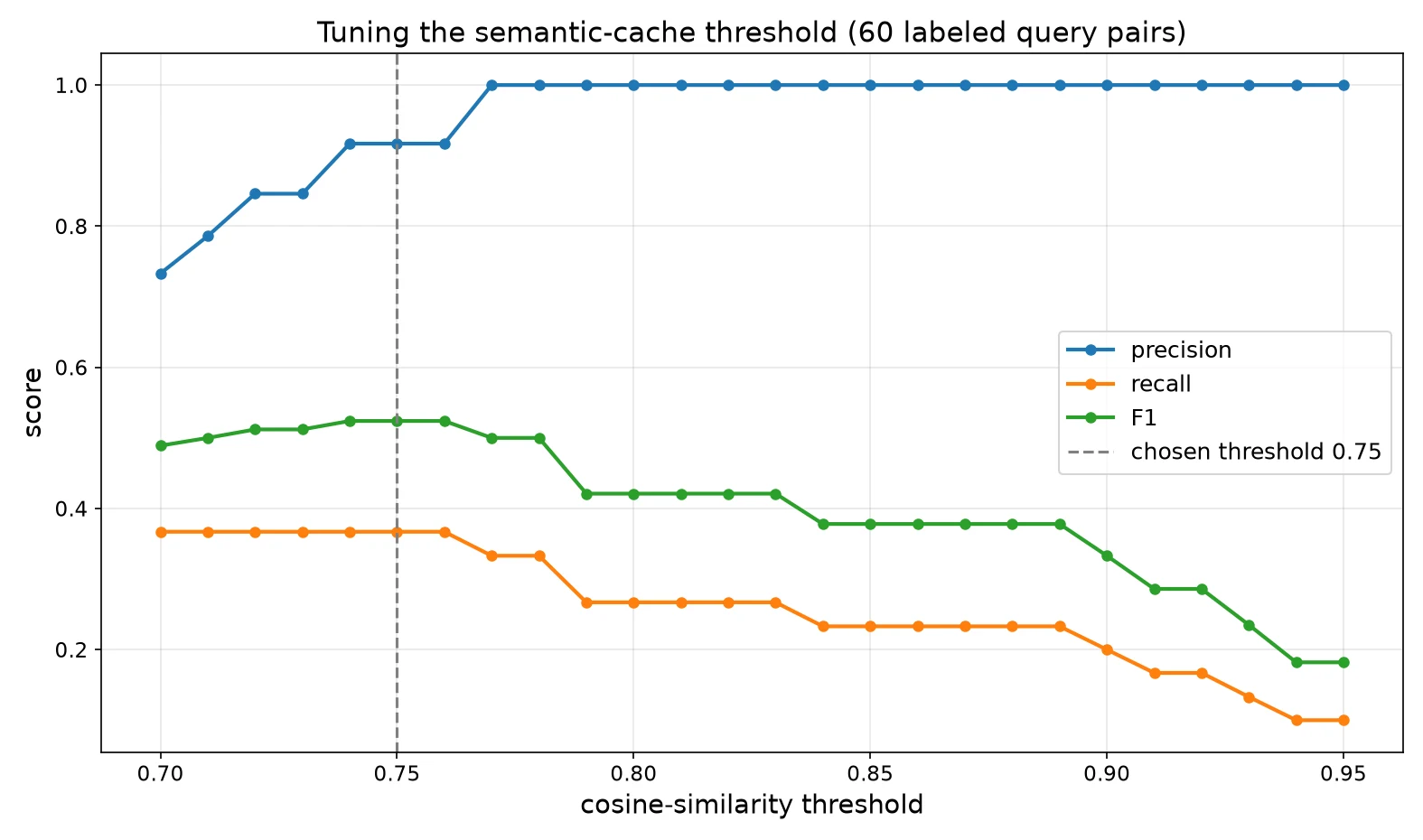
Precision here means "when the cache fires, how often is it right" — the number that keeps you out of trouble. Recall means "of all the rephrases we could have caught, how many did we catch" — the number that saves you money. The full sweep:
| Threshold | Precision | Recall | F1 |
|---|---|---|---|
| 0.70 | 0.733 | 0.367 | 0.489 |
| 0.71 | 0.786 | 0.367 | 0.500 |
| 0.72 | 0.846 | 0.367 | 0.512 |
| 0.73 | 0.846 | 0.367 | 0.512 |
| 0.74 | 0.917 | 0.367 | 0.524 |
| 0.75 | 0.917 | 0.367 | 0.524 |
| 0.76 | 0.917 | 0.367 | 0.524 |
| 0.77 | 1.000 | 0.333 | 0.500 |
| 0.78 | 1.000 | 0.333 | 0.500 |
| 0.79 | 1.000 | 0.267 | 0.421 |
| 0.80 | 1.000 | 0.267 | 0.421 |
| 0.81 | 1.000 | 0.267 | 0.421 |
| 0.82 | 1.000 | 0.267 | 0.421 |
| 0.83 | 1.000 | 0.267 | 0.421 |
| 0.84 | 1.000 | 0.233 | 0.378 |
| 0.85 | 1.000 | 0.233 | 0.378 |
| 0.86 | 1.000 | 0.233 | 0.378 |
| 0.87 | 1.000 | 0.233 | 0.378 |
| 0.88 | 1.000 | 0.233 | 0.378 |
| 0.89 | 1.000 | 0.233 | 0.378 |
| 0.90 | 1.000 | 0.200 | 0.333 |
| 0.91 | 1.000 | 0.167 | 0.286 |
| 0.92 | 1.000 | 0.167 | 0.286 |
| 0.93 | 1.000 | 0.133 | 0.235 |
| 0.94 | 1.000 | 0.100 | 0.182 |
| 0.95 | 1.000 | 0.100 | 0.182 |
The F1 peak lands at 0.75 (precision 0.917, recall 0.367). Two things worth noting from the actual errors at this threshold. The false positives — cases where the cache would have served a wrong answer — were exactly one: “how do I cancel my subscription” vs “how do I renew my subscription” (similarity 0.768) — a genuinely dangerous confusion, and precisely why the eval set needs adversarial negatives. The false negatives — rephrases we paid for unnecessarily — were mostly the freer rewordings: “can I get my money back if I cancel” (0.540), “when is support available” (0.512), “can I talk to a real person instead of the bot” (0.447). Near-duplicates are caught reliably; creative rephrasing still costs you a model call — an honest limit of a generic embedding model, and the reason you re-tune on your own traffic. This is the honest trade: a semantic cache is a statistical component, and this table is how you decide what error rate your use case tolerates. For a support bot, 0.75 with 0.917 precision is comfortable; for medical or legal answers, you'd push the threshold up and accept the lower recall — or skip semantic caching for those intents entirely.
Do this for your own traffic. The 60 pairs above are a starter; the real move is logging your production queries, labeling a few hundred pairs (an afternoon with a spreadsheet), and re-running this sweep. Thresholds don't transfer between embedding models or domains — anyone who tells you "just use 0.8" is selling you their eval set.
Step 4 — Build the persistent cache (with eviction)#
The demo cache from Step 1 lived in a dict; a real one survives restarts and doesn't grow forever. This version stores entries in SQLite (query, answer, embedding blob, hit count, timestamp) and evicts the least-recently-touched entry past a cap. Brute-force cosine over a few thousand 384-dim vectors is microseconds on CPU — you don't need a vector database until roughly 100k+ entries, at which point swap the scan for FAISS or your existing pgvector.
import sqlite3, time
import numpy as np

class SemanticCache:
    def __init__(self, model, threshold=0.75, max_entries=5000,
                 db_path="semcache.db"):
        self.model, self.threshold, self.max_entries = model, threshold, max_entries
        self.con = sqlite3.connect(db_path)
        self.con.execute("""CREATE TABLE IF NOT EXISTS cache
            (q TEXT PRIMARY KEY, a TEXT, v BLOB, hits INT, ts REAL)""")
        rows = self.con.execute("SELECT q, v FROM cache").fetchall()
        self.qs = [q for q, _ in rows]
        self.vs = [np.frombuffer(v, dtype=np.float32) for _, v in rows]

    def get(self, query):
        if not self.qs:
            return None
        v = self.model.encode([query], normalize_embeddings=True)[0].astype(np.float32)
        sims = np.stack(self.vs) @ v
        i = int(np.argmax(sims))
        if sims[i] >= self.threshold:
            q = self.qs[i]
            self.con.execute("UPDATE cache SET hits=hits+1, ts=? WHERE q=?",
                             (time.time(), q))
            self.con.commit()
            return self.con.execute("SELECT a FROM cache WHERE q=?", (q,)).fetchone()[0]
        return None

    def put(self, query, answer):
        v = self.model.encode([query], normalize_embeddings=True)[0].astype(np.float32)
        self.con.execute("INSERT OR REPLACE INTO cache VALUES (?,?,?,?,?)",
                         (query, answer, v.tobytes(), 0, time.time()))
        self.con.commit()
        self.qs.append(query); self.vs.append(v)
        if len(self.qs) > self.max_entries:      # evict stalest entry
            old, = self.con.execute(
                "SELECT q FROM cache ORDER BY ts ASC LIMIT 1").fetchone()
            self.con.execute("DELETE FROM cache WHERE q=?", (old,))
            self.con.commit()
j = self.qs.index(old); del self.qs[j]; del self.vs[j]Three production details that matter more than they look:
- Normalize before embedding. Lowercase, collapse whitespace — the same normalization as Step 1. It costs nothing and removes silly misses.
- Per-intent thresholds. One global 0.75 is a starting point. For intents where a wrong cached answer is expensive (refunds, medical, legal), route those queries to a higher threshold or bypass the cache — a one-line check on the matched intent.
- Log near-misses. Queries landing just under the threshold are your free labeling pipeline: review them weekly, and they become the eval set that keeps the threshold honest as language drifts.
Step 5 — Measure the win on realistic traffic#
Time for the head-to-head. I simulated 1,000 incoming support queries — 20% exact repeats, 35% paraphrases of an already-answered question, 45% novel — against 20 canned intents. On a miss, a stub backend answers after a simulated 1.2 s (stated plainly: the absolute latencies are illustrative; the relative difference between the two caches is what this measures, because both face the same backend).
# workload mix: 20% exact repeats, 35% paraphrases, 45% novel
workload = gen_workload(1000)          # seeded RNG: random.seed(7)
exact = run(ExactMatchCache(), workload)            # Step 1 baseline
sem   = run(SemanticCache(model, threshold=0.75), workload)  # Step 4
Results:
| Cache | Hit rate | p50 latency | Tokens saved / 1k queries |
|---|---|---|---|
| Exact-match | 46.0% | 1294ms | 6,577 |
| Semantic (thr 0.75) | 92.7% | 130ms | 14,999 |
The exact-match cache caught only the verbatim repeats (46.0%). The semantic cache caught those plus most paraphrases (92.7%), cutting median latency from 1294ms to 130ms on this mix — because a hit answers in milliseconds instead of a full model round-trip. In tokens: roughly 14,999 input+output tokens never sent to a model per 1,000 queries. At example pricing ($3/1M input, $15/1M output tokens — a mid-range frontier-model price point, not any vendor's quote), that's about $0.13/1,000 queries avoided, scaling linearly with traffic. Your mix will differ — support desks with repetitive intents see more; open-ended chat sees less — but the measurement method is the same: simulate your mix, count your hits.
One caveat to keep you honest: a semantic hit is only as good as the stored answer. If the underlying answer goes stale (prices change, policy updates), the cache will confidently serve the old one. Version your entries — store a valid_until or an answer-version tag, and invalidate on content changes. Caching answers is easy; cache invalidation is the actual job.
Step 6 — Drop it into your app in ten lines#
Nobody wants to rewire their app around a cache. Wrap the call site instead — this shim mirrors the shape of chat.completions.create so existing code keeps working:
cache = SemanticCache(model, threshold=0.75, db_path="prod_cache.db")

def cached_chat(messages, **kwargs):
    query = messages[-1]["content"]          # last user message is the cache key
    if hit := cache.get(query):
        return hit, {"cached": True}
    resp = client.chat.completions.create(model="your-model", messages=messages, **kwargs)
    answer = resp.choices[0].message.content
    cache.put(query, answer)
    return answer, {"cached": False, "usage": resp.usage}
Start in shadow mode: log what would have been served without serving it, and eyeball a few hundred would-be hits. When the false-positive rate on your real traffic matches your eval table from Step 3, flip it live. That two-week discipline is the difference between "we added caching" and "we added caching and our support quality didn't move."
Which approach should you use?#
Four options, honest trade-offs:
- No cache — correct when answers are personalized, time-sensitive, or every query is genuinely novel (open-ended chat, live data). Caching here buys little and risks staleness.
- Exact-match cache — correct when repeats are verbatim: API retries, idempotent agent tool calls, repeated eval runs. Zero wrong-answer risk, near-zero cost. Always build this first.
- Semantic cache (this tutorial) — correct for human-facing assistants with repetitive intents: support bots, internal Q&A, FAQ agents. Catches the rephrases exact-match misses, at the price of a tuned threshold and an eval set you maintain.
- Provider prompt caching — orthogonal, not competing: the model provider discounts repeated prompt prefixes (your system prompt, your retrieved context). Use it with a semantic cache — one cuts per-call cost, the other skips calls entirely.
Open-source shortcuts exist if you don't want to own the code above — GPTCache (Zilliz) is the established one, with embedding + vector-store + eviction wired together. The trade is the usual build-vs-buy one: a library gets you running today; the 60-line version above means you understand exactly what your threshold does when it matters.
The takeaway#
Exact-match caching is table stakes, and it leaves most of the money on the table because humans rephrase. A semantic cache — embed, cosine-compare against a tuned threshold, persist in SQLite — caught 92.7% of our simulated support traffic versus 46.0% for exact match, with 0.917 precision on a deliberately adversarial eval set. The machinery is 60 lines and runs on a CPU. The discipline is the eval set: label a few hundred of your own query pairs, sweep the threshold, run in shadow mode, and re-tune when language drifts. Do that, and you stop paying twice for the same question.