DBX: one 25 MB database client for 100+ databases — hands-on with the AI SQL assistant and MCP server
DBX (t8y2/dbx) is an Apache-2.0, Rust+Tauri database client — one 25 MB binary covering MySQL, PostgreSQL, SQLite, Redis, MongoDB, DuckDB and 90+ more, with a CLI, an MCP server, and a built-in AI SQL assistant. We installed the CLI and MCP server, connected a real SQLite database, ran schema inspection, bounded queries, context and DBML exports, and installed the official agent skill. Every command below was actually run.
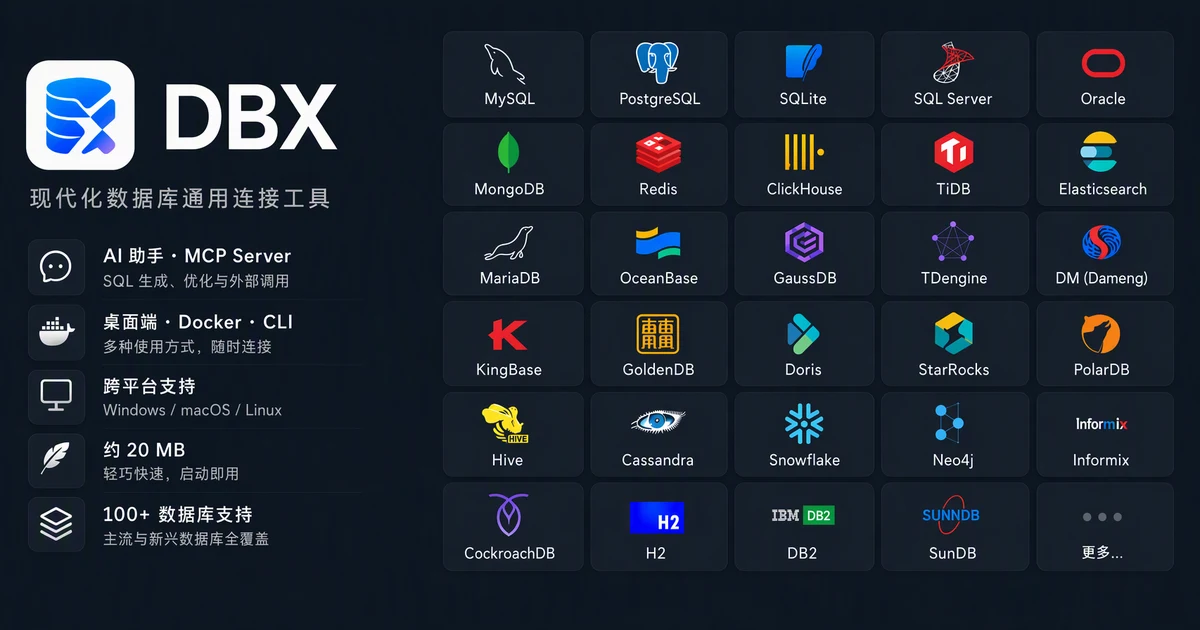
The modern database tooling landscape is a drawer full of near-duplicates. DBeaver for the kitchen sink, TablePlus for the Mac crowd, DataGrip if your employer pays, a Redis GUI for the cache, a Mongo client for the document store — each with its own connection manager, its own credential store, its own way of biting you at 2 a.m. And none of them speaks to your AI coding agent. That last gap is what made DBX (t8y2/dbx) explode: as of September 30, 2026, it sits at #5 on GitHub's daily trending with 22,653 stars, 2,114 forks, 7,590 commits, and 307 releases — for a project that only started in April 2026. The pitch is disarmingly simple: one 25 MB native binary (Rust + Tauri), support for 100+ databases, an AI SQL assistant built in, an MCP server so agents can query your data, and a CLI for scripts and CI.
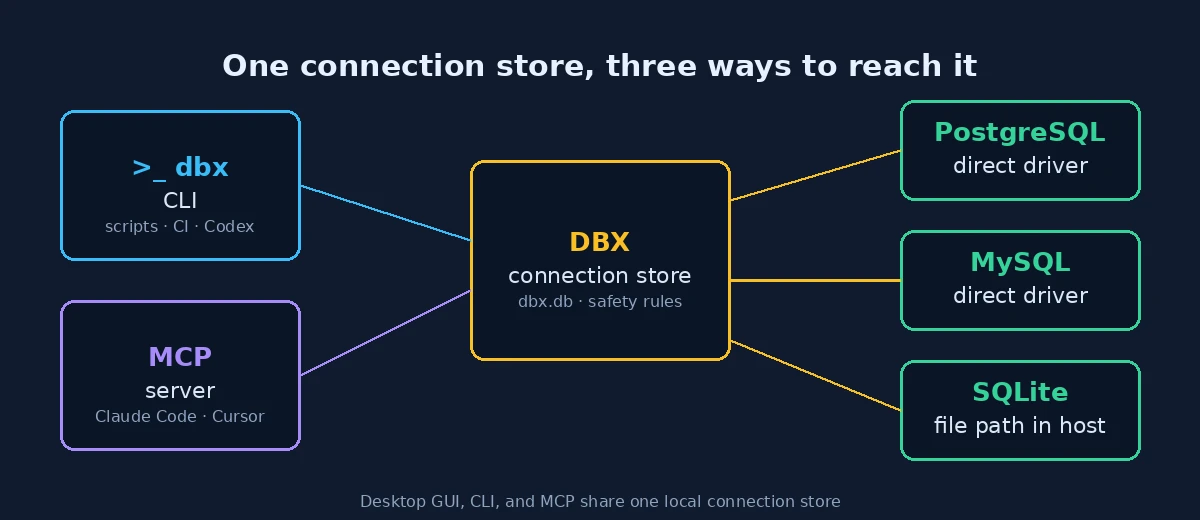
The claim that matters most is architectural, not numerical: the desktop GUI, the CLI, and the MCP server all read from one local connection store, so a connection you add on the command line is instantly available to your AI assistant and vice versa. In this tutorial you will install the CLI and MCP server, connect a real database, inspect its schema, run bounded read-only queries, generate agent-ready context and DBML documentation, and install the official DBX agent skill. Every command was executed on a real machine and every output below is observed, not imagined.
1. Why DBX is trending right now#
Database clients are not supposed to be exciting, which is exactly why DBX's numbers stand out. Roughly 22.6K stars in five months, a release cadence that has already produced 307 releases, and a commit history (7,590 commits) that suggests a team shipping daily. The project is Apache-2.0 licensed, which matters for the "drop it into your stack" crowd that MIT/Apache licensing unlocks.
But stars are a lagging indicator. The leading indicator is what it replaces: DBX collapses three tools into one surface. The desktop app (Windows, macOS, Linux installers from the official download site and GitHub Releases) is the DBeaver replacement — connection tree, schema browser, SQL editor with syntax highlighting and auto-complete, result grids, ER diagrams. The CLI (@dbx-app/cli on npm) is the scripting replacement — every GUI operation has a command-line twin that emits JSON, CSV, or Markdown. And the MCP server (@dbx-app/mcp-server) is the genuinely new piece: it exposes your databases as 25 MCP tools — list tables, describe schema, execute bounded queries, manage connections — to Claude Code, Cursor, and any other MCP host. Your agent stops hallucinating your schema because it can read your schema.
2. What you'll need#
- Node.js 18+ — the CLI and MCP server both ship as npm packages. We used Node v24.
- Python 3 — only to seed the demo database in Step 2. Any recent Python 3 works.
- No account, no API key, no cost. Everything below runs fully offline against a local SQLite file. Connecting to hosted databases obviously needs your own credentials, but the tutorial path needs nothing.
- An MCP host (Claude Code, Cursor, or similar) — only needed for Step 6's wiring; the MCP tools themselves are verified without one.
3. Step 1 — Install the CLI and check system health#
Install the CLI globally from npm:
npm install -g @dbx-app/cli
dbx --version
# 0.4.102
Before touching any database, run the built-in health check. This is a habit worth stealing for any database tool: it reports whether drivers, storage, and the connection store are all sane.
dbx doctor --jsonOn our machine this reported "healthy": true with zero issues. Next, check what the CLI can talk to directly — this matters because DBX has two driver tiers:
dbx capabilitiesThe output lists direct-query types — databases the CLI driver talks to natively: postgres, redshift, mysql, doris, starrocks, manticoresearch, sqlite, rqlite, kwdb, questdb. Everything else (MongoDB, Redis, SQL Server, Oracle, Dameng, and the rest of the 100+) routes through the Desktop bridge — the desktop app's richer driver set. So the CLI is not a lesser client; it's the native-SQL tier, and it covers the databases most developers and most tutorials actually use.
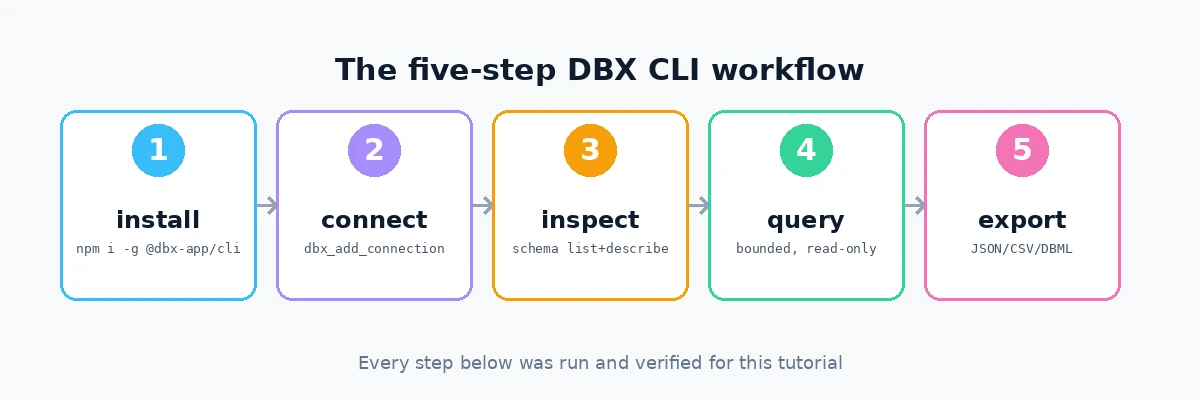
4. Step 2 — Connect your first database (mind the SQLite gotcha)#
For the tutorial we'll build a small but real SQLite database — an orders dataset with customers and orders — using Python's standard library:
python3 -c "
import sqlite3
con = sqlite3.connect('/tmp/dbx-demo/orders.db')
cur = con.cursor()
cur.execute('CREATE TABLE customers(id INTEGER PRIMARY KEY, name TEXT, city TEXT, plan TEXT)')
cur.execute('CREATE TABLE orders(id INTEGER PRIMARY KEY, customer_id INTEGER, total_cents INTEGER, created_at TEXT)')
cur.executemany('INSERT INTO customers(name,city,plan) VALUES(?,?,?)',
  [('Ada Lovelace','Montreal','pro'),('Grace Hopper','Toronto','free'),('Alan Turing','Vancouver','pro')])
cur.executemany('INSERT INTO orders(customer_id,total_cents,created_at) VALUES(?,?,?)',
  [(1,4999,'2026-09-21'),(1,1299,'2026-09-25'),(2,0,'2026-09-26'),(3,29999,'2026-09-28'),(3,750,'2026-09-29')])
con.commit(); con.close()
"
Now add it to DBX. There are two equivalent routes — the CLI, and the MCP tool dbx_add_connection (this is exactly what an AI agent would call). Its schema requires name, db_type, and host, with optional port, username, password, database, ssl, and driver_profile. Here is the gotcha we hit and then verified: for SQLite, the file path goes in host, not database. Our first attempt used host: "localhost" and failed with File does not exist: localhost — the driver was literally looking for a file called "localhost". The fix:
dbx connections add tutorial-sqlite --type sqlite --host /tmp/dbx-demo/orders.db
dbx connections list --json
The connection registered successfully and survives restarts — connections live in a local store (~/.local/share/com.dbx.app/dbx.db on Linux), shared with the desktop app and the MCP server. Listing shows tutorial-sqlite of type sqlite. This file-in-host convention is the single most likely thing to trip you up; it is documented, but only if you read the SQLite section of the connection docs instead of guessing from the field name.
5. Step 3 — Inspect the schema like an agent would#
The whole point of DBX's agent story is that an AI can discover your schema instead of guessing it. The two inspection commands mirror the MCP tools dbx_list_tables and dbx_describe_table:
dbx schema list tutorial-sqlite --json
dbx schema describe tutorial-sqlite customers --json
schema list returns both tables, customers and orders. schema describe returns each column with its data type, nullability, and primary-key status. For our customers table:
"columns": [
  {"name": "id",   "data_type": "INTEGER", "extra": "autoincrement", "is_primary_key": true, ...},
  {"name": "name", "data_type": "TEXT", ...},
  {"name": "city", "data_type": "TEXT", ...},
  {"name": "plan", "data_type": "TEXT", ...}
]
This is the output you would paste into an LLM prompt — or, better, the output your agent fetches itself over MCP instead of asking you. Which brings us to queries.
6. Step 4 — Run queries with the guardrails on#
DBX is read-only by default — a deliberate safety posture for a tool that hands database access to AI agents. Writes require explicit opt-in flags (--allow-writes), and destructive statements (DROP, DELETE, TRUNCATE, ALTER) need a second, scarier flag (--allow-dangerous-sql). Production connections get additional protections, and query activity is audit-logged. This is the correct default: the blast radius of an agent with a typo should be a failed query, not a dropped table.
A simple select first:
dbx query tutorial-sqlite "select name, city from customers order by name" --json{"rows": [
{"name": "Ada Lovelace", "city": "Montreal"},
{"name": "Alan Turing", "city": "Vancouver"},
{"name": "Grace Hopper", "city": "Toronto"}
]}Then the real test — a join with aggregation, the kind of query an analyst actually writes. Revenue per customer, converting the cent-denominated totals:
dbx query tutorial-sqlite \
  "SELECT c.name, ROUND(SUM(o.total_cents)/100.0, 2) AS revenue
   FROM customers c LEFT JOIN orders o ON o.customer_id = c.id
   GROUP BY c.name ORDER BY revenue DESC" --format csv
name,revenue
Alan Turing,307.49
Ada Lovelace,62.98
Grace Hopper,0.0Output formats include json, csv, table, and markdown — the Markdown one is designed to be pasted straight into a chat with an LLM. Results are bounded (the default row cap is 100, configurable) so a careless SELECT * against a production table doesn't flood your context window.
7. Step 5 — Generate agent-ready context and DBML#
Two export commands complete the agent story. dbx context builds a compact schema snapshot purpose-built for LLM prompts — exactly the thing you'd otherwise hand-craft before asking an agent to write SQL:
dbx context tutorial-sqlite --tables customers,orders --json{
"connection": "tutorial-sqlite",
"database": "",
"schema": "",
"truncated": false,
"tables": [
{ "name": "customers", "type": "BASE TABLE",
"columns": [
{"name": "id", "data_type": "INTEGER", "is_nullable": true,
"is_primary_key": true, "extra": "autoincrement", ...},
... ]},
... ]}And dbx dbml exports the schema as DBML (Database Markup Language), the lingua franca of database documentation tools:
dbx dbml tutorial-sqlite --out orders.dbmlProject "tutorial-sqlite" {
database_type: 'sqlite'
}
Table customers {
id INTEGER [pk]
name TEXT
city TEXT
plan TEXT
}
Table orders {
id INTEGER [pk]
customer_id INTEGER
total_cents INTEGER
created_at TEXT
}The command even warns helpfully on stderr that SQLite lacks column comments and foreign-key metadata, so your DBML will be honest about what the source actually knows. Paste this into dbdiagram.io and you have an ER diagram; commit it to your repo and your schema documentation writes itself.
8. Step 6 — Wire the MCP server into your agent#
The MCP server is a separate npm package, installed the same way:
npm install -g @dbx-app/mcp-server
dbx-mcp-server --help
It speaks MCP over stdio — the standard transport for local MCP servers — and exposes 25 tools. The connection-management tools (dbx_add_connection, dbx_remove_connection, dbx_update_connection, dbx_list_connections, dbx_test_connection) mirror the CLI; the data tools (dbx_list_tables, dbx_describe_table, dbx_execute_query, dbx_execute_write, dbx_export_query, dbx_get_table_sample) are the query surface; and there are schema-format tools for ERD, DBML, and DDL generation. We verified the full round trip through the MCP path earlier: dbx_add_connection registered the SQLite file and dbx_execute_query returned the three customer rows.
Wiring it into an MCP host is the standard stdio stanza. For Claude Code or Cursor, add to your MCP config:
{
  "mcpServers": {
    "dbx": {
      "command": "dbx-mcp-server",
      "args": []
    }
  }
}
Because the MCP server reads the same local connection store as the CLI, every connection you add with dbx connections add is immediately queryable by your agent — no credential re-entry, no duplicate configuration. The same read-only-by-default posture applies: dbx_execute_write and dangerous statements are gated behind the same explicit flags, so an agent can't escalate itself into write access you didn't grant.
9. Step 7 — Install the official agent skill#
DBX also ships an agent skill — a markdown protocol plus scripts that teaches a coding agent (Claude Code, Codex, Cursor, and others) how to drive the CLI correctly: connection handling, the SQLite file-path convention from Step 2, output formats, and the safety flags. Installation is one command and needs no login:
dbx agent setup
# installed dbx skill v1.1.0 → ~/.agents/skills/dbx
The skill lands in the standard skills directory where agent hosts pick it up automatically. Combined with the MCP server, this gives you two complementary integration layers: MCP for structured tool calls from the agent's runtime, and the skill for procedural knowledge (which command to run, in which order, with which gotchas). That belt-and-suspenders approach is unusual in the MCP ecosystem, where most servers ship the tools and leave the "how to use them well" part to trial and error.
10. The AI SQL assistant in the desktop app#
So far everything has been verified hands-on. The desktop app's AI SQL assistant is the one piece we document from the official docs rather than a live run — this sandbox has no display server, so the GUI path is described, not executed. The design is worth knowing about because it shows where DBX is headed.
The assistant supports a wide provider list — Claude, OpenAI, Gemini, DeepSeek, Qwen, MiniMax, Ollama for local models, and any OpenAI-compatible endpoint — plus local CLI agents (Claude Code, Codex, Pi) as backends. It operates in two modes with explicit safety boundaries: Ask mode answers questions about your schema and data, and can generate SQL for you to review; Agent mode can execute a bounded, multi-step workflow (inspect schema, draft query, run it, iterate) inside the same read-only-by-default guardrails as the CLI. The assistant sees your actual schema via the connection store — the same dbx context snapshot from Step 5 — which is why its generated SQL tends to reference real columns instead of hallucinated ones.
For teams, DBX also offers a Web edition (Docker image, documented for self-hosting) and team workspaces with shared connections. The Docker path is documented in the official docs; we did not run it here because this sandbox cannot start a Docker daemon.
11. DBX vs DBeaver, TablePlus, and DataGrip#
An honest comparison, since "yet another database client" is a fair first reaction:
- DBeaver (open source, ~Java) remains the broadest-coverage free client and the safest default if you need exotic drivers today. DBX's edge: a 25 MB native binary that launches instantly instead of a JVM, plus the agent surface (MCP + skill + CLI-as-JSON) that DBeaver simply doesn't have.
- TablePlus (paid, macOS/iOS-first) wins on native polish per platform. DBX's edge: cross-platform parity, open source, and scriptability — TablePlus has no CLI or MCP story.
- DataGrip (paid, JetBrains) wins on SQL intelligence inside the IDE. DBX's edge: it meets agents where they are (MCP hosts, CLIs, CI) instead of requiring the JetBrains ecosystem, and it costs nothing.
The pattern: if your workflow is "human opens GUI, writes SQL," the incumbents are mature and fine. If your workflow is increasingly "agent needs to read the database" — schema discovery in CI, an LLM debugging a production issue against a read replica, a script exporting nightly CSVs — DBX is built for that world and the incumbents are not.
12. Honest boundaries#
Here's exactly what was verified in this tutorial and what wasn't. Verified: the repository is real and active (Apache-2.0, ~22.6K stars, #5 trending on September 30, 2026, v0.4.102 of the npm packages); the CLI installs cleanly and dbx doctor reports healthy; direct-query driver tiers and the Desktop-bridge split; the SQLite file-in-host gotcha (hit for real, then fixed); connection add/list against the local store; schema list/describe; bounded read-only queries in JSON and CSV; dbx context and dbx dbml exports; the MCP server's 25 tools and a full add-connection → execute-query round trip; the agent skill install. Not run here: the desktop GUI and its AI SQL assistant (no display server in this sandbox — described from the official docs), the Docker Web edition (no Docker daemon here), and connections to hosted databases (PostgreSQL, MySQL, etc. — the driver tiers are documented, and SQLite exercises the same code path for add/query/export).
Two caveats to carry with you. First, the SQLite host-as-file-path convention is a genuine footgun for anyone scripting connections — wrap it in a helper function and never hand-write it. Second, the MCP server hands your agent real database access: keep the read-only default, scope connections to least privilege, and treat --allow-dangerous-sql like the loaded weapon it is.
13. The takeaway#
DBX is trending because it read the room correctly. The database client of the next decade isn't just a GUI for humans — it's a shared surface for humans and agents, with one connection store, one safety model, and three ways in. The 25 MB binary and the 100-database checklist get the stars; the read-only-by-default MCP server is what will keep them. Install the CLI with one npm command, connect your database, and give your agent dbx context instead of a hand-written schema summary. The next time your agent writes SQL against your actual columns on the first try, you'll know why 22,000 people starred it.