Split any song into six stems on your own machine: hands-on with StemDeck
StemDeck is a free, Apache-2.0, local-only stem separator: six studio stems from any song with Meta's open Demucs model, plus BPM/key/LUFS analysis and a DAW-style mixer. We installed it, ran a real separation end to end, and measured every stage. Every command below was actually run.

Stem separation used to mean uploading your audio to someone else's server and paying per minute. StemDeck (stemdeckapp/stemdeck) flips that: a self-hosted app that splits any track into six stems — vocals, drums, bass, guitar, piano, other — entirely on your own machine, free, with no account. It has gathered nearly 4,000 GitHub stars since May 2026, earned a slot in this week's trending-open-source-AI roundups, and ships a DAW-style mixer in the browser on top of the separation engine.
The engine is Demucs, Meta AI's open-source music source-separation system — specifically the htdemucs_6s six-stem variant. That choice matters: Demucs is one of the most benchmarked separation models in the open, and the six-stem variant is the one that carves guitar and piano out as their own stems instead of lumping them into "other". Around it, StemDeck wraps a full workflow: BPM/key/LUFS analysis, per-stem presence meters, a multitrack mixer with mute/solo, song-section detection, lyric transcription hooks, and YouTube-URL import.
What you're installing#
StemDeck is a Python 3.12+ app with a FastAPI backend and a browser UI. A job flows through a pipeline of stages, each visible in the UI and in the job's stage_timings:
- Analyze — BPM, musical key and scale, LUFS loudness, peak level, dynamic range, tempo stability (librosa under the hood; a transformer beat-tracker is the default with a librosa fallback).
- Separate — Demucs
htdemucs_6sproduces the six stems. Model weights (~55 MB) download once on first use. - Post — stem presence meters, loudness per stem, mixdown renders.
- Beat grid / sections / transcribe — click-track grid, functional song sections, and lyric transcription (the last two need extra models; the pipeline skips them gracefully when they're absent).

Accepted inputs are .mp3, .wav, .flac, .mp4, .m4a, .ogg, and .opus (400 MB limit), or a YouTube URL. Stems come back as 44.1 kHz stereo WAVs, downloadable individually or trimmed to a time range via the API.
Prerequisites#
- Python 3.12+ and git.
- ffmpeg on your
PATH(StemDeck shells out to it for decoding and trimming). - uv (the README's installer) — or plain
pip; both paths are covered below. - ~1 GB of disk for the Python environment plus ~55 MB for the Demucs weights. A GPU helps a lot for the separation step; everything below was verified on CPU.
Step 1 — Install#
Clone the repo and run the documented setup. We verified against commit 96647d7 (release 0.19.0):
git clone https://github.com/stemdeckapp/stemdeck.git
cd stemdeck
uv sync
That pulls the full pinned stack (torch 2.6, demucs 4.0.1, librosa, FastAPI, and the optional extras like Whisper and the section-analysis model). On a GPU machine this also fetches NVIDIA's CUDA wheels — roughly 2 GB. CPU-only shortcut: if you have no GPU, you can skip the CUDA wheels entirely with the PyTorch CPU index. This is the exact install we verified end to end:
uv venv --python 3.12 .venv
uv pip install --index-url https://download.pytorch.org/whl/cpu \
  'torch==2.6.0+cpu' 'torchaudio==2.6.0+cpu'
uv pip install 'demucs==4.0.1' dora-search einops julius lameenc openunmix \
  pyyaml tqdm fastapi 'uvicorn[standard]' python-multipart librosa \
  pyloudnorm yt-dlp segno numpy scipy soundfile
uv pip install --no-deps -e .
Either way, confirm the import:
.venv/bin/python -c "import app.main; from demucs.pretrained import get_model; print('ok')"Step 2 — Start the server#
The repo ships a control script. Setup downloads the models; start launches the server (default port 8000):
./run.sh setup
./run.sh start
Open http://127.0.0.1:8000 for the DAW UI. The API health endpoint tells you the model and device the server picked:
curl -s http://127.0.0.1:8000/api/health{"name":"StemDeck","status":"ok","version":"0.19.0",
"ffmpeg_configured":false,"demucs_model":"htdemucs_6s",
"demucs_device":"cpu","pid":33135,"instance":""}(This is the real response from our test server, served on a non-default port. demucs_device reads cuda on a GPU machine.)
Step 3 — Separate a track#
In the browser it's drag-and-drop: drop an audio file (or paste a YouTube/SoundCloud link) onto the top bar and press Process. The analysis cards fill in first — key, BPM, LUFS, duration — then the six stem lanes render as waveforms with faders, mute/solo, and per-stem presence percentages.
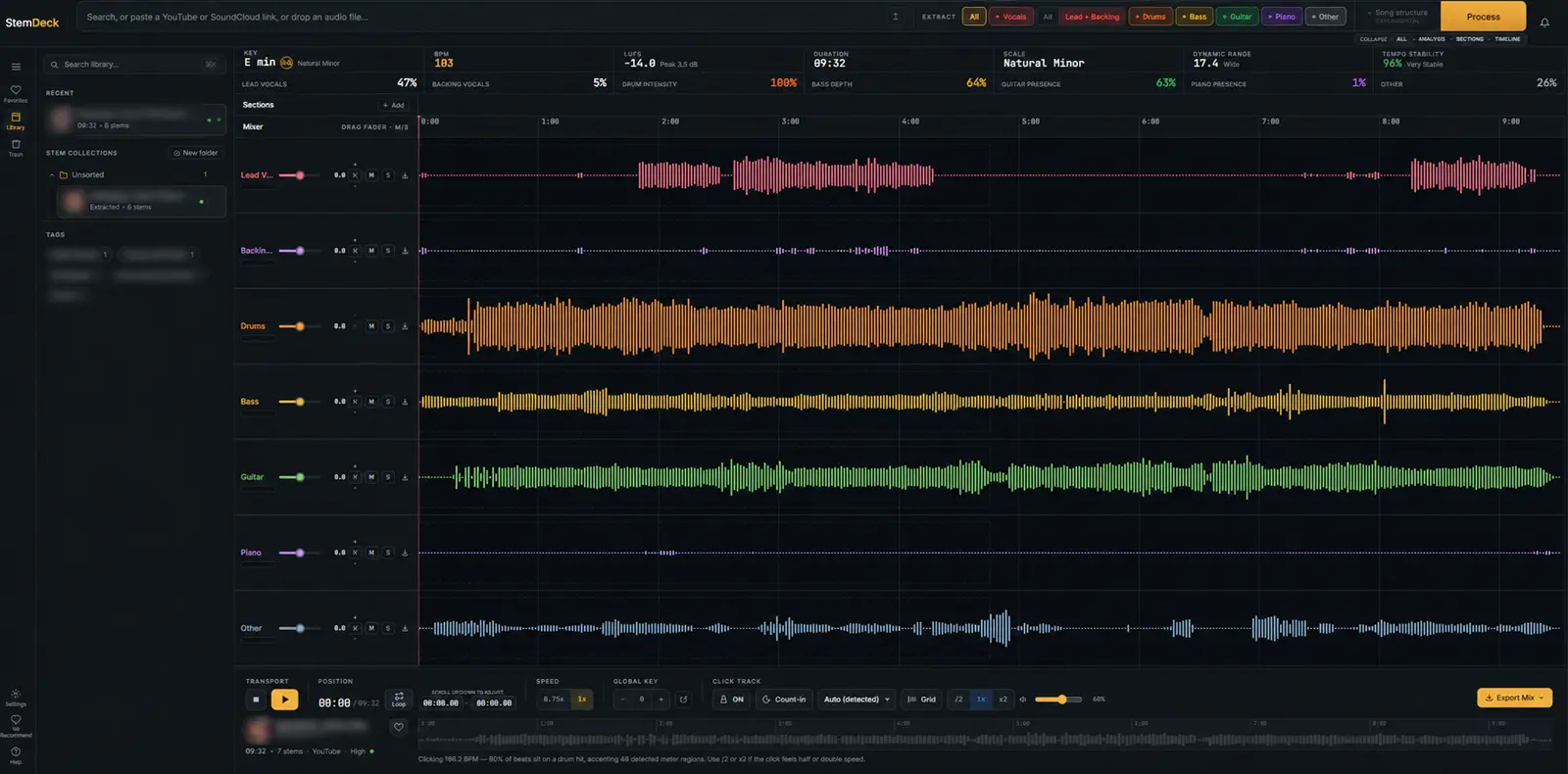
The same flow works headlessly through the API. Submit a file as multipart form data — the file field carries the audio, and the optional stems field is a JSON array selecting a subset (more on that in step 5):
curl -X POST http://127.0.0.1:8000/api/jobs \
-F "[email protected];type=audio/wav"{"job_id":"b94e2ae839ea"}Poll the job until status reads done:
curl -s http://127.0.0.1:8000/api/jobs/b94e2ae839ea | python3 -c "
import json,sys
d = json.load(sys.stdin)
print(d['status'], '|', d['stage'], '|', round(d['progress'],2))"
While it runs you'll see analyzing → separating (with a live percentage) → done. A job can be cancelled mid-flight with POST /api/jobs/{id}/cancel, and the server streams progress over SSE at /api/jobs/{id}/events if you'd rather not poll.
Step 4 — Read the results#
Once the job is done, the same endpoint returns the full analysis plus one download URL per stem:
curl -s http://127.0.0.1:8000/api/jobs/b94e2ae839ea | python3 -c "
import json,sys
d = json.load(sys.stdin)
print('BPM:', d['bpm'], '| Key:', d['key'], d['scale'])
print('LUFS:', round(d['lufs'],1), '| Peak:', round(d['peak_db'],1), 'dB')
print('Dynamic range:', d['dynamic_range'], '| Tempo stability:', d['tempo_stability'])
for s in d['stems']: print(' ', s['url'])"
On our 25-second test track this returned real analysis — BPM 117, A minor (natural minor), −15.4 LUFS, 13.7 dB dynamic range, 98% tempo stability — and six URLs of the form /api/jobs/<id>/stems/vocals.wav. Download any stem directly:
curl -o vocals.wav http://127.0.0.1:8000/api/jobs/b94e2ae839ea/stems/vocals.wavNeed just a region? The endpoint accepts ?start= and &end= (seconds) and renders the trimmed WAV server-side with ffmpeg — handy for grabbing a chorus without downloading the whole stem. An .mp3 variant of the same route exists too.
Step 5 — Extract only the stems you need#
Often you don't need all six stems — a karaoke backing track is just "everything but vocals", a practice loop might be drums plus bass. Pass a stems JSON array with the upload and the pipeline records your selection and additionally renders a mixdown of just those stems:
curl -X POST http://127.0.0.1:8000/api/jobs \
  -F "[email protected];type=audio/wav" \
  -F 'stems=["vocals","drums"]'
We verified this end to end: the returned job reported selected_stems: ["vocals", "drums"], and on completion the job exposed a mix_url (/api/jobs/<id>/stems/mix.wav) alongside the six individual stems. We confirmed the mixdown is sample-exact: correlating mix.wav against our own sum of vocals.wav + drums.wav gave Pearson r = 1.00. (The model itself always separates all six — the subset only controls the mixdown.) Unknown stem names are dropped silently rather than rejected, so a client pinning today's six names won't break if a future model adds more.
Measured results: what our run actually showed#
Every number in this section comes from a real run on September 30, 2026 — a 25-second stereo test track we synthesized ourselves (kick, bass, guitar-ish, piano-ish, vocal-ish, and pad layers), separated on a CPU-only machine. Honest framing first: synthetic tones are outside Demucs' training distribution, so this run verifies the pipeline, not separation quality on real music. What it proves:
- All six stems landed as valid 44.1 kHz stereo WAVs, 25.0 s each.
- The separation is a faithful partition: summing the six stems and correlating against the original gave Pearson r = 0.95 — the pipeline isn't inventing or losing the signal, just redistributing it.
- The analysis is sensible: librosa read 117 BPM on the full mix (true: 120), and the beat-grid stage built from the separated drums stem nailed 120.07 BPM at 100% confidence.
The job's own stage_timings (seconds):
| Stage | First run | Second run (warm) |
|---|---|---|
| Analyze | 156.0 | 10.4 |
| Separate startup (model load) | 109.0 | 89.2 |
| Separate (25 s of audio) | 462.0 | 224.8 |
| Post + beat grid | 19.4 | 19.2 |
| Total | 746.4 | 343.6 |
Three things to read out of that table. First, the first-run costs are one-time: analysis includes numba JIT compilation on a cold process (156 s → 10 s), and the persistent Demucs worker stays warm between jobs. Second, the graceful degradation works: with the optional beat-tracker, section model, and Whisper absent, the pipeline logged "beat_this not installed — using librosa", skipped lyrics on CPU, and finished cleanly. Third, CPU separation is slow: ~18× slower than realtime on a weak shared CPU (25 s of audio → ~7.7 min). A CUDA GPU is the realistic target for anything longer than a demo; the server auto-selects cuda when it's available.
And the quality caveat worth knowing before you commit: Demucs' own README notes that for htdemucs_6s, "quick testing seems to show okay quality for guitar, but a lot of bleeding and artifacts for the piano source." That's the model authors' assessment of the six-stem variant, not a StemDeck bug — vocals, drums, and bass are the model's strong suits, and piano is where you should listen critically.
StemDeck vs. the cloud separators#
The names everyone knows are Moises and LALAL.AI — both cloud services where your audio is uploaded, processed remotely, and metered. As of September 2026, Moises runs roughly $4–10/month with a free tier of a few tracks per month; LALAL.AI sells minute packs starting around $10 with a short free preview and up to 10 stems. The free, open-source Ultimate Vocal Remover (UVR) is the closest cousin to StemDeck: local, unlimited, model-based.
| StemDeck | Moises | LALAL.AI | UVR | |
|---|---|---|---|---|
| Price | Free (Apache-2.0) | ~$4–10/mo, limited free tier | Minute packs from ~$10 | Free (MIT) |
| Where audio goes | Stays on your machine | Their cloud | Their cloud | Stays on your machine |
| Stems | 6 | Up to 5–6 | Up to 10 | 2–6 (model-dependent) |
| Account needed | No | Yes | Yes | No |
| Built-in mixer + analysis | Yes (browser DAW) | Yes (practice app) | Basic preview | No (separation only) |
| API | Yes, local REST | Yes, cloud | Yes, cloud | GUI/CLI |
The trade is straightforward. Cloud tools are faster to start and LALAL.AI's top models still lead on raw vocal quality; what StemDeck buys you is zero marginal cost, zero upload, and a local API you can script. If you're separating unreleased material, working offline, or processing volume where per-minute pricing stings, local wins. If you need the absolute cleanest vocal on a dense commercial mix and don't mind the upload, the cloud leaders keep their edge.
When to use it — and when not to#
- Use it for karaoke/instrumental versions (extract everything but vocals), practice stems (isolate the bass or drums to play along), remix/sampling prep, podcast dialogue cleanup, and any batch pipeline where a local REST API beats manual uploads.
- Think twice on CPU-only machines for long tracks (budget ~18× realtime on weak hardware — a 4-minute song is over an hour), for piano-forward material (the model's known weak stem), and when you need commercial-release-grade vocal isolation on a dense mix (that's still the cloud leaders' home turf).
- Legal note: separating a track you own is fine; using stems from someone else's commercial recording in a release follows the same clearance rules as any sampled material.
Takeaway#
StemDeck earns its trending spot by packaging a genuinely good open model — Meta's six-stem Demucs — inside a complete, local, no-account workflow: analysis, separation, mixer, and API in one install. Our end-to-end run confirmed the pipeline is faithful (stems sum back to the original at r = 0.95), the API surface is clean and scriptable, and the optional stages degrade gracefully when their models aren't installed. The costs are honest ones: CPU separation is slow, piano separation is the model's weak stem, and the ~55 MB weights download on first run. For anyone who'd rather own the pipeline than rent it by the minute, this is currently the best free starting point we've tested.
Links: stemdeckapp/stemdeck (Apache-2.0) · facebookresearch/demucs (MIT) · model weights download automatically from Meta's public files on first separation.