Stop trusting the contract: ship an AI feature on Vercel AI Gateway with Audited ZDR
Vercel now audits zero-data-retention claims instead of taking providers' word for it — and runs canary traps that catch any provider reading your prompts. This tutorial wires Audited ZDR into a real AI SDK app: per-request flags, the team-wide toggle, headquarters filtering, and a canary check you can run yourself.
- Verified versions:
ai7.0.181,@ai-sdk/gateway4.0.154, Node 24.22.1. - The request path ran end to end against a local capture server: the SDK POSTs to
{baseURL}/language-modelwith a Bearer key and sendsproviderOptions.gatewayverbatim —zeroDataRetention,disallowPromptTraining,headquarters,order,tagsanduserall arrived intact. - Model IDs checked against the gateway’s public catalog (517 models):
anthropic/claude-sonnet-5carries ZDR on every provider serving it. - Honest scope: no live gateway call was made here — there is no API key on this machine — so the live call, the dashboard toggle, and the provider-metadata examples are verified against Vercel’s own docs, not executed. The canary listener ran locally end to end (hit vs no-hit).
- Why now: Audited ZDR and canary audits were announced November 23, 2026. Launch partners Baseten, Modal, and Wafer have begun audits, with reports expected by December 8, 2026.

Your app sends source code, customer records, and regulated data through inference providers. Until today, the only thing standing between that data and a provider's disk was a contract — a promise, in a PDF, that nobody outside the provider could check. On November 23, Vercel stopped asking you to take that promise on faith: AI Gateway now labels a provider Audited ZDR only after an independent security firm has tested its zero-data-retention claim against the provider's code, infrastructure, and live traffic — and published the report.
This tutorial wires that guarantee into a real app. You will make your first AI Gateway call with the AI SDK, add per-request zero data retention and read the receipt the gateway returns, flip the team-wide toggle with an escape hatch for the exceptions, add headquarters filtering and fallbacks, and run your own canary check — the same tripwire idea Vercel now runs continuously against its providers. Everything is verified against Vercel's own documentation as it stood on November 23, 2026, and every code block in this tutorial was run or typechecked in a sandbox before publication.
What Audited ZDR actually verifies#
Zero data retention (ZDR) means the provider does not keep your prompts or completions after the request is done. Until now, that was self-reported: each provider stated its ZDR commitment in its own policy or in its agreement with Vercel, and AI Gateway routed ZDR requests based on that commitment. Vercel's argument for changing this is simple — payment platforms, cloud infrastructure, and most other layers that handle sensitive data have a way to prove their controls to outside parties, and inference should follow the same path.
To earn the Audited ZDR label, a provider hires an independent security firm, chosen from respected third-party auditors, to test its ZDR policy across the serving path for every model, endpoint, feature, and tool that handles AI Gateway traffic. The audit confirms that customer data is never written or retained on durable storage in any system. "Customer data" is defined broadly: prompts, completions, system prompts, embeddings, files, images and audio, tool and function-call payloads, and any derived data that could identify them. The coverage spans request logs, traces, metrics, crash dumps, prompt caches, abuse monitoring, analytics, backups, support tools, and training, fine-tuning, and evaluation datasets. Once a response is returned to AI Gateway, that content must be deleted from the provider's systems — and where a request uses caching, such as a KV cache, the cache must stay in volatile storage only for the period of the request and never be written to durable storage.
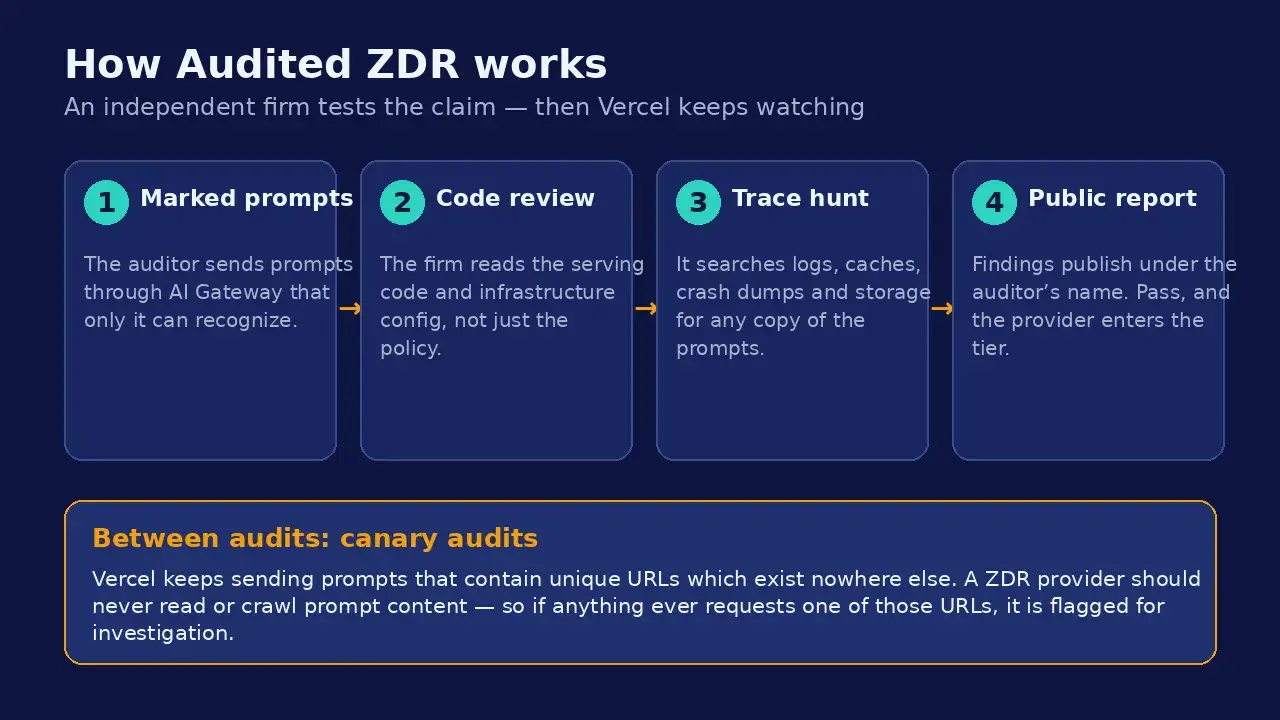
The audit also confirms four things that a contract alone cannot: that a request marked ZDR never fails over to a non-ZDR endpoint, tool, or feature; that no human or automated process accesses customer data outside handling the request itself; that sub-processors with access comply with all of the above; and that no training on customer data occurs. Auditors verify this by reviewing the inference provider's serving-path source code and infrastructure configuration, then running live tests — sending marked prompts through AI Gateway and searching the provider's logging, caching, and storage systems for any trace of them. Every passing provider publishes the report under the auditor's name, covering scope, methodology, dates, findings, and fix status, with any exceptions disclosed. AI Gateway links directly to the report.
Baseten, Modal, and Wafer are the launch partners. All three have begun audits, and each provider enters the tier as soon as its report is published — Vercel expects the launch-partner reports by December 8, 2026. That date matters for planning: today you can build on the per-request and team-wide ZDR controls below, and check back in two weeks to route only to providers whose audits are actually published.
An audit checks a provider's code and infrastructure at a point in time, and production systems change. So Vercel added a second layer the same day: canary audits. Each run mints unique URLs that exist nowhere else, each mapped privately to a specific provider, model, and audit run, and sends prompts containing those URLs through the normal inference path — with ZDR requested for covered providers and non-ZDR pairs included as positive controls. A ZDR provider should never retain, inspect, or crawl prompt content, so a canary URL should never receive a request. Any request to one triggers an investigation into the provider and model involved. Canary checks cannot detect prompts written to disk and never read, so they complement independent code and infrastructure audits rather than replacing them. Step 6 shows you how to run the same tripwire yourself.
What you'll need#
- A Vercel account with a paid path to ZDR. Per-request and team-wide ZDR both require a paid account: a Pro or Enterprise plan, or purchased AI Gateway credits. Hobby teams and teams on a Pro trial can use ZDR once they purchase credits — free credits do not count. With an active Token Pass you can also use per-request ZDR while the pass is active. Turning on team-wide ZDR in the dashboard still requires a Pro or Enterprise plan or purchased credits.
- Node.js 22 or newer. AI SDK 7 requires it. This tutorial was verified on Node 24.22.1.
- An AI Gateway API key (Step 1), or a Vercel deployment, where OIDC authentication works with no key at all.
- About 45 minutes. No GPU, no model download, no Hugging Face account: the models run on the providers' hardware behind the gateway.
Step 1: Get an AI Gateway key#
Open the AI Gateway dashboard, go to API Keys, and create a key for your team. Treat it like any other server-side secret: it authenticates as your team, it can spend your credits, and it never belongs in client-side code or a public repo.
If you deploy on Vercel, you can skip the key entirely. On Vercel deployments the gateway authenticates with an OIDC token that Vercel injects and refreshes automatically — no key to rotate, nothing to leak. For local development, run vercel env pull to download your project's OIDC token; note that OIDC tokens expire after 12 hours, so pull again before they lapse. If an API key or access token is present in the environment, it always takes precedence over OIDC, even if it is invalid — so do not leave a stale key lying around in .env while debugging auth.
Step 2: Make your first gateway call#
Create a project directory and install the AI SDK. The SDK is ESM-only, so set "type": "module" in package.json — importing ai from a CommonJS project fails.
mkdir zdr-demo && cd zdr-demo
npm init -y
npm pkg set type=module
npm install ai
Save this as zdr.mjs. It sends one request through the gateway to anthropic/claude-sonnet-5 — the model used in Vercel's own ZDR documentation, and one this tutorial checked against the gateway's public model list, where it carries ZDR on every provider serving it.
import { generateText } from 'ai';

const { text } = await generateText({
  model: 'anthropic/claude-sonnet-5',
  prompt: 'Summarize this support ticket in one sentence: the customer was charged twice for the same order.',
});

console.log(text);
Set your key and run it:
export AI_GATEWAY_API_KEY="<redacted>"
node zdr.mjs
You should get a one-sentence summary back. Two things are worth noticing before you add anything. First, you passed a bare model string — 'anthropic/claude-sonnet-5' — and the SDK resolved it through its default provider, @ai-sdk/gateway. There is no provider package to install and no base URL to configure; the gateway is the default. Second, the gateway passes provider list prices straight through with no markup and no platform fee on inference, so this call costs exactly what the serving provider charges for the tokens.
One honest note on scope: there is no API key on the machine this tutorial was verified on, so no live gateway call was made here. What was verified instead is everything around the call: the packages install cleanly (ai 7.0.181, @ai-sdk/gateway 4.0.154), the code typechecks against the real SDK types, the model IDs exist in the gateway's public catalog, and — by pointing the SDK at a local capture server — the exact request the SDK sends. That capture is what Step 3 relies on: the flags you set below arrive at the gateway verbatim.
Step 3: Turn on per-request ZDR — and read the receipt#
Per-request ZDR is one field in providerOptions.gateway. Add it to the call from Step 2, along with the no-training filter, which is a separate control: ZDR is about storage, disallowPromptTraining is about whether the provider may train on your prompts. ZDR is a superset — enabling it already covers training opt-out — but setting both makes the intent explicit for anyone reading the code.
import { generateText } from 'ai';

const { text, providerMetadata } = await generateText({
  model: 'anthropic/claude-sonnet-5',
  prompt: 'Summarize this support ticket in one sentence: the customer was charged twice for the same order.',
  providerOptions: {
    gateway: {
      zeroDataRetention: true,
      disallowPromptTraining: true,
    },
  },
});

console.log(text);

// The receipt: which providers were skipped, and why.
const gw = providerMetadata?.gateway;
console.log('ZDR enforced:', gw?.enabledZeroDataRetention);
console.log('Skipped providers:', gw?.routing?.skippedProviderAttempts);
If you write this in TypeScript, add a type guard so a typo fails at compile time instead of silently at runtime:
import type { GatewayProviderOptions } from '@ai-sdk/gateway';

providerOptions: {
  gateway: {
    zeroDataRetention: true,
    disallowPromptTraining: true,
  } satisfies GatewayProviderOptions,
},
When ZDR is enforced, a successful response carries enabledZeroDataRetention: true in the gateway metadata, and routing.skippedProviderAttempts lists every provider the gateway removed for ZDR, with the reason. The reasons are specific enough to act on:
| Reason | Meaning |
|---|---|
zdr_not_supported | The provider does not offer ZDR for this model. |
zdr_not_attested | Your BYOK key for this provider is not marked as ZDR-compliant. |
zdr_ineligible_model | The model retains data, so no provider can serve it with ZDR. |
That last row has a concrete example: the Claude Fable models retain data on every provider, so a ZDR request for one fails outright. That is the design working as intended — ZDR enforcement fails loudly instead of silently routing your data somewhere it will be kept.
The two failure modes to recognize:
- Your team is not eligible for ZDR — the gateway returns a
403telling you ZDR requires a paid account and pointing at the credit top-up or plan upgrade. Buy credits or upgrade, then retry; the gateway re-checks payment status before returning the error, so a purchase usually applies to your next request. - No ZDR provider can serve the model — the gateway returns a
400with typeno_zdr_providers_available, naming the providers it considered. Pick a different model or drop the flag for that call.
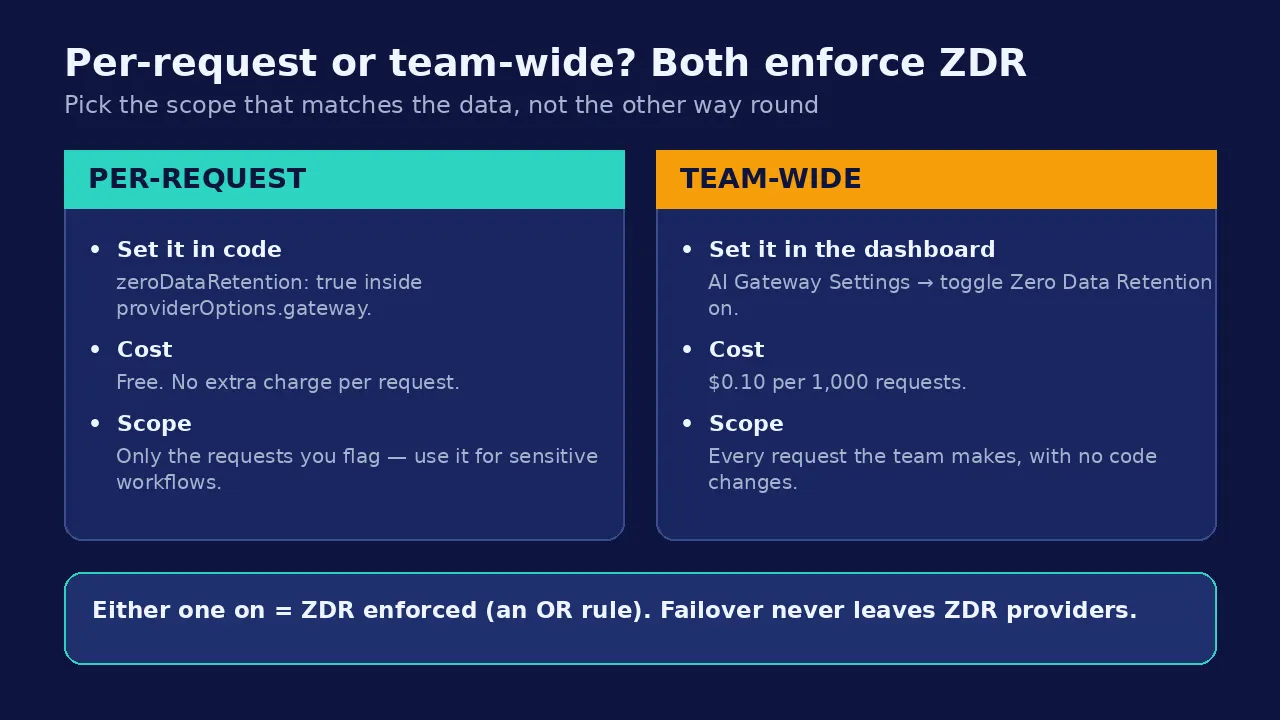
Per-request ZDR costs nothing extra. That is the key pricing fact: the flag is free; only the team-wide toggle (Step 4) carries a per-request fee.
Step 4: Enforce it team-wide (with the escape hatch)#
Per-request flags protect the calls you remember to flag. The team-wide toggle protects the ones you forget. Open the AI Gateway Settings tab and switch on Zero Data Retention. From then on, every request your team makes routes only to ZDR-compliant providers — no code changes, no per-call flags, no relying on every developer remembering.
Team-wide and per-request ZDR work as an OR: if either is enabled, ZDR is enforced for that request. Turning the toggle on even overrides an explicit zeroDataRetention: false in code, so a single careless call cannot opt the team out. Team-wide ZDR costs $0.10 per 1,000 requests, charged on each request the gateway bills — including a request the provider blocks on safety grounds but still charges for. Requests that fail and that the gateway does not bill are not charged.
There is one deliberate hole in the wall, and you should set it up now rather than when you need it. Some work genuinely needs a model without ZDR — the Claude Fable models are the live example. Team owners can create an API key that is exempt from the team's ZDR-only restriction, with an expiration so the exemption does not outlive the work:
vercel ai-gateway api-keys create --name escape-hatch --zdr-exempt --expiration 7dvercel ai-gateway api-keys inspect shows a zdr exempt row for these keys, so you can audit which keys carry the exemption. Give the exempt key a short expiration and a name that says what it is for; an exemption with no expiry is how a temporary workaround becomes a permanent policy hole.
Step 5: Add headquarters filtering and fallbacks#
Retention is one half of the compliance question; the other half is who the vendor is. AI Gateway lets you filter routing by the country the provider's parent company is headquartered in — useful when procurement rules say your AI vendors must (or must not) be based in certain countries. It works the same way as ZDR: a team-wide list in AI Gateway settings for Pro and Enterprise teams, or a per-request field on any plan.
import { generateText } from 'ai';

const { text } = await generateText({
  model: 'anthropic/claude-sonnet-5',
  prompt: 'Summarize this support ticket in one sentence: the customer was charged twice for the same order.',
  providerOptions: {
    gateway: {
      zeroDataRetention: true,
      disallowPromptTraining: true,
      headquarters: ['US', 'DE'], // allowlist: ISO 3166-1 alpha-2 codes
      order: ['anthropic'], // try Anthropic first, keep the rest as fallbacks
      models: ['openai/gpt-6-astra'], // if the primary model fails, try this one
      tags: ['support-summary'], // filter usage reports by feature
      user: 'user_123', // attribute spend to one of your users
    },
  },
});
Three details matter here. First, the headquarters list is either an allowlist or a denylist — never both. Prefix every code with ! to exclude countries instead, as in ['!US']. Providers without a recorded headquarters country are always excluded, and if no provider for the model is headquartered in an allowed country, the request fails. Second, order expresses a preference, not a restriction: unlisted providers remain available as fallbacks, so a ZDR request still fails over — just only across ZDR providers. Use only instead of order if you want to restrict routing to a named set of providers and nothing else. Third, every option in this block was verified against the installed SDK types (GatewayProviderOptions in @ai-sdk/gateway 4.0.154) and the request the SDK actually sends: pointed at a local capture server, the SDK posted all six fields verbatim in providerOptions.gateway.
Two more controls sit alongside these. Regional inference pins where a provider runs inference to the US, EU, Australia, or Japan; if the gateway cannot honor the region, the request fails rather than running elsewhere. And private inference connects your own self-hosted or fine-tuned model endpoints to the gateway, called as private/<slug> with the same SDKs, auth, and observability as catalog models. Together with ZDR and headquarters filtering, they cover the three questions a compliance review actually asks: is my data kept, who is the vendor, and where does the compute run.
Step 6: Run your own canary check#
Vercel's canary audits are a good idea you can steal for your own stack. The principle is simple: put something in a prompt that only you know, and watch whether anything outside the inference path ever touches it. If it does, something read your prompt. Here is a minimal version — a listener that mints a unique URL and logs every request to it.
// canary-server.mjs — run it somewhere with a PUBLIC url, not localhost:
// a provider cannot reach your laptop, so a localhost canary can never trip.
import { createServer } from 'node:http';
import { randomUUID } from 'node:crypto';

const id = randomUUID();
const canaryUrl = `https://your-public-host.example/canary/${id}`;
console.log('Canary URL (put this in a prompt, nowhere else):');
console.log(canaryUrl);

createServer((req, res) => {
  console.log(`HIT ${new Date().toISOString()} ${req.url} ua=${req.headers['user-agent'] ?? 'none'}`);
  res.writeHead(404);
  res.end('not found\n');
}).listen(8080, () => console.log('Listening on :8080 — watching for hits.'));
Start the server, copy the canary URL, and send it inside a prompt through the gateway — the same generateText call from Step 3, with a prompt like `Summarize this support ticket: ${canaryUrl}`. Then watch the server log. No hit means nothing outside the inference path fetched the URL. A hit means something read the prompt and acted on its contents — stop, find out what, and treat it as an incident, not a curiosity.
Two honest limits. First, a canary catches reads, not silent writes: a provider could write your prompt to disk and never look at it, and no URL would ever be requested. That is exactly why Vercel says canary audits complement independent audits rather than replacing them — and why your canary is a spot check, not a substitute for the audit reports. Second, the URL must be genuinely unique and unindexed: mint a fresh UUID per check, never reuse one, and never paste it anywhere except the prompt under test. A canary that appears in a log file, a dashboard, or a shared doc is a canary that can trip for innocent reasons.
The mechanics were verified end to end on this machine: a listener on a local port, one minted URL fetched (hit recorded with timestamp, path, and user agent) and one never fetched (zero hits). The detection logic is three lines of code; the discipline is in keeping the URL secret and the endpoint public.
Step 7: Verify in the dashboard — and know what ZDR doesn't cover#
Open the AI Gateway dashboard and check three things. First, the Logs view: the gateway records request metadata for billing, observability, and debugging — model, provider, token usage, cost, duration — while prompts and responses are immediately and permanently deleted after requests complete. If your team needs even the metadata minimized, body logging can be turned off. Second, the usage and spend views, filterable by the tags and user fields from Step 5, so you can confirm the sensitive workflow is actually routing where you think it is. Third, the provider list for your models: each model page shows which providers offer ZDR, so you can see at a glance whether your model has any ZDR route at all.
Then read the fine print, because ZDR has edges that will surprise you if you discover them in production:
- Tools the provider runs are not covered. Provider-specific web search or grounding runs on a separate service that can process and retain the data you send to the tool, under its own terms. The gateway does not block the request. If your retention requirements are strict, do not send sensitive data to provider-run tools — or check that tool vendor's policy first.
- Batch jobs and async video are rejected, not silently downgraded. Providers store batch inputs and results for the lifetime of the batch, so ZDR rejects batch submissions; send synchronous requests instead. Asynchronous video jobs do not support ZDR yet and are rejected the same way.
- Prompt caching is not counted as retention. Providers keep repeated prompt data in a short-lived cache — up to 24 hours — so they do not process it again. The gateway does not count that as retaining data. If your definition of zero retention rules out cached data, review the provider's policy before relying on caching.
- Your own keys are skipped by default. When ZDR is enabled, the gateway skips your BYOK keys, since they operate under your own agreements with providers. You can mark individual BYOK keys as ZDR-compliant to include them in the ZDR routing set — but that marking is your responsibility, and Vercel has no visibility into your agreements.
- Some models can never be ZDR. The Claude Fable models retain data on every provider. A ZDR request for one fails, every time, on every provider. Check the model page before you promise ZDR for a model you have not verified.
If you do not use the AI SDK, the same flag works in every API format the gateway speaks — Chat Completions, Responses, Anthropic Messages — as providerOptions.gateway.zeroDataRetention. The cURL form, from Vercel's own docs:
curl --fail-with-body https://ai-gateway.vercel.sh/v1/chat/completions \
  -H "Authorization: Bearer $AI_GATEWAY_API_KEY" \
  -H "Content-Type: application/json" -d '{
  "model": "anthropic/claude-sonnet-5",
  "messages": [{ "role": "user", "content": "Analyze this example business data: revenue grew by 5%." }],
  "providerOptions": { "gateway": { "zeroDataRetention": true } }
}'
Which approach should you use?#
| Situation | Use this |
|---|---|
| One sensitive workflow inside an otherwise ordinary app | Per-request zeroDataRetention: true on those calls, plus disallowPromptTraining. Free, and the rest of the app is unaffected. |
| Regulated data in every request the team makes | Team-wide ZDR toggle ($0.10 per 1,000 requests) with short-lived exempt keys for the genuine exceptions. |
| Procurement restricts which countries your vendors are based in | The headquarters allowlist or denylist, per request or team-wide — it composes with ZDR instead of replacing it. |
| You need proof, not a promise | Wait for the Audited ZDR tier: route only to providers whose audit reports are published (launch partners expected by December 8, 2026), and read the report, not the badge. |
| You run your own models | Private inference (private/<slug>) — your endpoints, the gateway's auth, routing, and observability. |
| You need a different catalog or pricing model | Another gateway, such as OpenRouter. Vercel passes provider list prices with no markup, so compare catalogs and retention guarantees, not gateway fees. |
The takeaway#
A contract is a promise you cannot test. An audit is a test someone else ran, in public, with the report attached — and a canary is a test that keeps running after the auditors go home. Vercel's Audited ZDR moves zero data retention from the first category to the second, and the integration cost is one boolean in your code and one toggle in your dashboard. The failure mode is the point: when no provider qualifies, the request fails loudly instead of routing your data somewhere it will be kept. Set the flag on your sensitive workflows today, flip the team toggle when your plan allows it, and check the launch partners' audit reports when they land on December 8 — then route only to the providers that passed.