Hands-on with Anthropic's official Agent Skills: Word, Excel, PowerPoint and PDF, done by Claude Code
Anthropic published the skills behind Claude's document work — Word, Excel, PowerPoint and PDF, plus twelve example skills — and the repo is the most-starred on GitHub this week. This guide installs them in Claude Code, builds a real briefing pack with them, and shows where they break.
document-skills plugin in Claude Code and you get four scripted skills — Word, Excel, PowerPoint, PDF — plus twelve example skills. This tutorial builds a real briefing pack with them and validates every output.- The repo: anthropics/skills — 190,998 stars, 22,444 forks, +22,371 stars in seven days, number one on GitHub trending. Nineteen skills in five plugins; the document skills are Apache 2.0.
- Install:
/plugin marketplace add anthropics/skills, then/plugin install document-skills@anthropic-agent-skills. No API key; the skills run locally. - Verified here: a Word report (docx 9.15.3, XSD validation passed), a spreadsheet with six live formulas (recalc passed, zero errors), a three-slide deck (pptxgenjs 4.0.1, validation passed), and a PDF read-back with pypdf 7.0.0 — all rendered and inspected.
- Honest limit: the README says these are demonstration and educational implementations, and Claude's built-in document behavior may differ from what the skills show.

Anthropic has published the skills that power Claude's document work — the actual instructions and scripts behind turning a prompt into a formatted Word report, a spreadsheet with live formulas, a slide deck, or a filled PDF form. The repository is anthropics/skills, and it is the most-starred repository on GitHub this week: 190,998 stars and 22,444 forks as of November 10, 2026, with 22,371 of those stars arriving in the previous seven days — the largest weekly gain of any AI repository — and the number-one spot on GitHub's daily trending page.
That matters because skills used to be folklore. Every coding agent has its own bundle of prompt files now, but this is the vendor's own reference implementation: nineteen skills, five plugins, and the document skills that Anthropic says power Claude's document capabilities in production. This tutorial installs them in Claude Code, builds a real briefing pack with them — a Word report, a pricing spreadsheet, a three-slide deck, and a PDF read-back — and shows exactly where they break. Every command below ran in a 2-core sandbox on November 10, 2026, and every output file was validated and rendered.
Why this repo is blowing up now#
The repository is small — 62 commits since September 22, 2025 — and that is the point. A skill is a folder: a SKILL.md file with a name and a description in YAML frontmatter, plus scripts and reference files. Claude loads the folder when the description matches what you asked for, reads the instructions, and runs the scripts. There is no server, no API key, and nothing to deploy.
Inside are five plugins, registered in .claude-plugin/marketplace.json under the marketplace name anthropic-agent-skills:
- document-skills — the four document skills:
docx,xlsx,pptx,pdf. These are the production skills behind Claude's document features, released under Apache 2.0. - example-skills — twelve demonstration skills, from
webapp-testingtomcp-buildertoskill-creator. - claude-api, academy-guide, and discernment-nudge — standalone plugins for API documentation, course recommendations, and a follow-up-question nudge.
Two honest limits, stated in the repository's own README before anything else. First, the skills are "provided for demonstration and educational purposes only," and "the implementations and behaviors you receive from Claude may differ from what is shown in these skills." Second, the install paths the README documents are Claude Code, Claude.ai, and the Claude API — nothing else. This tutorial follows the Claude Code path, and every script below was run standalone so you can see what the skill actually executes, not just what it promises.
What you'll need#
- Claude Code with an active plan. The skills themselves are free and open source (Apache 2.0); the agent that runs them is Anthropic's paid CLI.
- Node 16 or newer — the
docxpackage (verified: 9.15.3) requires it. Verified on Node 24.22.1. - Python 3 with openpyxl — the
xlsxskill runs on openpyxl (verified: 3.1.2) and pandas (verified: 2.1.4). Python 3.12.3 here. - LibreOffice — the skills use it to recalculate spreadsheets and to render documents to PDF for visual checks. Verified on LibreOffice 24.2.7.2.
- pypdf (verified: 7.0.0) for the PDF skill's quick-start path; pandoc for reading
.docxback as Markdown; markitdown for a quick look at spreadsheets and decks. The skills treat openpyxl, pandas, and markitdown as preinstalled in Claude Code's environment — install only the one that fails to import.
No API key is needed for any of this. The skills run locally; the only network use is fetching fonts, photographs, or brand icons when a skill explicitly asks for them.
Step 1 — Install the marketplace#
Inside Claude Code, register the repository as a plugin marketplace:
/plugin marketplace add anthropics/skillsThen install the plugin you want. The document skills are one plugin; the twelve example skills are another:
/plugin install document-skills@anthropic-agent-skills
/plugin install example-skills@anthropic-agent-skills
Both commands are quoted verbatim from the repository README, and both names check out against the marketplace manifest in the repo (.claude-plugin/marketplace.json, marketplace anthropic-agent-skills, version 1.0.0). The manifest lists exactly four skills under document-skills — xlsx, docx, pptx, pdf — and twelve under example-skills. After installing, you use a skill by mentioning it, in the README's own example: "Use the PDF skill to extract the form fields from path/to/some-file.pdf".
Confirm the install took by asking Claude Code to list its plugins, then move on. The rest of this tutorial is one end-to-end job: build a weekly model briefing pack — report, spreadsheet, deck — from the same verified numbers, so each skill's output can be checked against the others.
Step 2 — Your first document: the Word report#
The docx skill creates new documents with the docx npm package, edits existing ones by unzipping the .docx and editing word/document.xml directly, and reads them back with pandoc. Its SKILL.md is mostly a list of footguns — the kind of list that only exists because someone hit every one of them. The ones that matter for a first document:
- Page size defaults to A4. US Letter is 12,240 × 15,840 DXA (1,440 DXA per inch).
- Tables need dual widths:
columnWidthson the table and awidthon every cell, both in DXA — and the column widths must sum to the table width, which must fit the content area (6.5 inches on US Letter with 1-inch margins, or 9,360 DXA). Get this wrong and the table runs off the right edge of the page. I know because my first attempt did exactly that. - Table shading uses
ShadingType.CLEAR, neverSOLID— solid renders black. - Never insert a bullet character literally; use a
numberingconfig withLevelFormat.BULLET. Never useParagraphelements. APageBreakmust sit inside aParagraph. - Headings must use the built-in
HeadingLevelvalues, or they will not appear in a table of contents.
Here is the script, run verbatim in the sandbox. It builds a one-page briefing from the week's verified numbers — Fable 5.2 at $8/$40 per million tokens, Muse Ember at $0.10/$0.50 — with a title, headings, a bulleted list, and a shaded pricing table:
const {
    Document, Packer, Paragraph, TextRun, HeadingLevel, Table, TableRow,
    TableCell, WidthType, ShadingType, AlignmentType, PageBreak,
    PageOrientation, LevelFormat,
} = require("docx");
const fs = require("fs");
// Column widths sum to 9360 DXA = 6.5in, the US Letter content width
const COL_W = [3600, 2160, 2160, 1440];
const cell = (t, i, bold) => new TableCell({
    width: { size: COL_W[i], type: WidthType.DXA },
    children: [new Paragraph({ children: [new TextRun({ text: t, bold: !!bold })] })],
});
const headerCell = (t, i) => new TableCell({
    width: { size: COL_W[i], type: WidthType.DXA },
    shading: { type: ShadingType.CLEAR, color: "D9E2F3", fill: "D9E2F3" },
    children: [new Paragraph({ children: [new TextRun({ text: t, bold: true })] })],
});

const doc = new Document({
    numbering: {
        config: [{
            reference: "bullets",
            levels: [{ level: 0, format: LevelFormat.BULLET, text: "•", alignment: AlignmentType.LEFT }],
        }],
    },
    sections: [{
        properties: {
            page: { size: { width: 12240, height: 15840 }, orientation: PageOrientation.PORTRAIT },
        },
        children: [
            new Paragraph({ text: "Weekly Model Briefing", heading: HeadingLevel.TITLE }),
            new Paragraph({ text: "Week of November 9, 2026 — AI Frontier Post", heading: HeadingLevel.HEADING_2 }),
            new Paragraph({
                children: [new TextRun("Three releases defined the week: Anthropic shipped Claude Fable 5.2, Meta shipped Muse Ember, and Google announced its eighth-generation TPU lineup. This briefing records the verified numbers.")],
            }),
            new Paragraph({ text: "Claude Fable 5.2", heading: HeadingLevel.HEADING_1 }),
            new Paragraph({
                children: [new TextRun("Anthropic launched Fable 5.2 on November 9, 2026. Generation runs about 30 percent faster than the previous version, and pricing is $8 per million input tokens and $40 per million output tokens. The release formalized Fermat's Last Theorem in 30 hours and tops the Artificial Analysis Intelligence Index at 65.")],
            }),
            new Paragraph({ text: "What changed", heading: HeadingLevel.HEADING_2 }),
            new Paragraph({ text: "Faster generation", numbering: { reference: "bullets", level: 0 } }),
            new Paragraph({ text: "Lower per-token pricing", numbering: { reference: "bullets", level: 0 } }),
            new Paragraph({ text: "Fermat's Last Theorem formalized in 30 hours", numbering: { reference: "bullets", level: 0 } }),
            new Paragraph({ text: "The week in numbers", heading: HeadingLevel.HEADING_1 }),
            new Table({
                columnWidths: [3600, 2160, 2160, 1440],
                rows: [
                    new TableRow({
                        tableHeader: true,
                        children: ["Model", "Input $/M tokens", "Output $/M tokens", "Context"].map(headerCell),
                    }),
                    new TableRow({
                        children: ["Claude Fable 5.2", "$8.00", "$40.00", "—"].map((t, i) => cell(t, i)),
                    }),
                    new TableRow({
                        children: ["Meta Muse Ember", "$0.10", "$0.50", "1M tokens"].map((t, i) => cell(t, i)),
                    }),
                ],
            }),
            new Paragraph({ children: [new TextRun({ children: [new PageBreak()] })] }),
            new Paragraph({ text: "Sources", heading: HeadingLevel.HEADING_1 }),
            new Paragraph({
                children: [new TextRun("Anthropic Fable 5.2 announcement; Meta Muse Ember announcement; Google TPU announcement — all November 9, 2026. Prices are per million tokens as announced.")],
            }),
        ],
    }],
});

Packer.toBuffer(doc).then((buf) => {
    fs.writeFileSync("briefing.docx", buf);
    console.log("wrote briefing.docx", buf.length, "bytes");
});
Run it with docx 9.15.3 installed (npm install [email protected] — inside Claude Code the package is already available, so install only if require('docx') fails, exactly as the skill instructs):
node build_docx.js
# wrote briefing.docx 10354 bytes
Then validate it the way the skill prescribes. The skill ships its own XSD validator, scripts/office/validate.py, with the Office schemas bundled in the repo:
python3 skills/docx/scripts/office/validate.py briefing.docx
# Paragraphs: 25
# All validations PASSED!
Reading the file back with python-docx confirms the structure survived: the Title, two Heading 1s, three list paragraphs, and the pricing table with all three rows intact. Render it to PDF and look at it — the skill's own verify step — with the skill's LibreOffice wrapper (scripts/office/soffice.py; bare soffice hangs in sandboxed environments, so use the wrapper):
python3 skills/docx/scripts/office/soffice.py --headless --convert-to pdf briefing.docx --outdir pdfout
pdftoppm -jpeg -r 80 pdfout/briefing.pdf page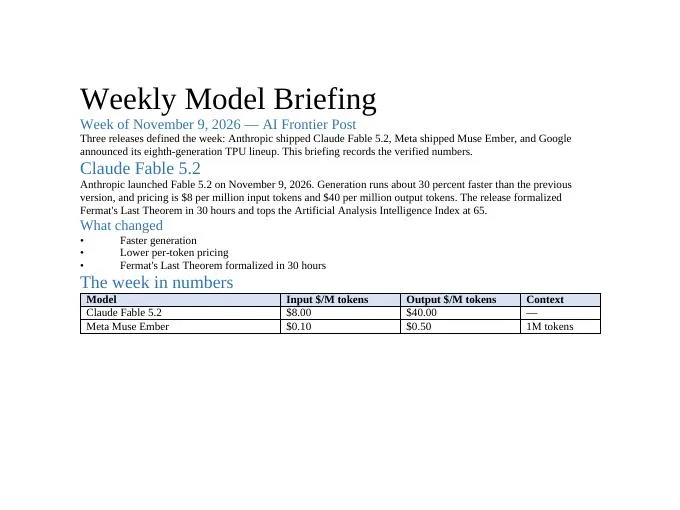
The first render caught a real mistake: with column widths summing to 11,520 DXA, the table ran off the right edge and the Context column was cut off. The fix is the 9,360 DXA total in the script above. Render and look — the skill says so, and it earned its place.
Step 3 — The spreadsheet: formulas that recalculate#
The xlsx skill's rules are stricter than the docx skill's, and they read like an editor's checklist: Arial throughout; zero formula errors; use formulas, never hardcoded results; follow the user's spec literally — exact tab names, exact headers; document every assumption and hardcoded number where the reader will see it. The reason for the formula rule is mechanical: openpyxl writes formulas as strings with no cached values, so until something recalculates, every formula cell reads back as None. The skill's answer is its own scripts/recalc.py, which runs LibreOffice over the file and rewrites it in place with computed values.
This script builds the pricing workbook — same two models, with a computed per-model cost and a total row:
import openpyxl
from openpyxl.styles import Font, PatternFill

wb = openpyxl.Workbook()
ws = wb.active
ws.title = "Model pricing"

header_font = Font(name="Arial", size=11, bold=True)
body_font = Font(name="Arial", size=11)
header_fill = PatternFill("solid", fgColor="D9E2F3")

headers = ["Model", "Input $/M tokens", "Output $/M tokens",
           "Cost: 1M in + 1M out ($)", "Cost: 10M in tokens ($)"]
for col, h in enumerate(headers, start=1):
    c = ws.cell(row=1, column=col, value=h)
    c.font = header_font
    c.fill = header_fill

rows = [("Claude Fable 5.2", 8.00, 40.00), ("Meta Muse Ember", 0.10, 0.50)]
for r, (model, inp, outp) in enumerate(rows, start=2):
    ws.cell(row=r, column=1, value=model).font = body_font
    ws.cell(row=r, column=2, value=inp).font = body_font
    ws.cell(row=r, column=3, value=outp).font = body_font
    # Formulas, not hardcoded results (skill requirement)
    ws.cell(row=r, column=4, value=f"=B{r}+C{r}").font = body_font
    ws.cell(row=r, column=5, value=f"=B{r}*10").font = body_font

tr = len(rows) + 2
ws.cell(row=tr, column=1, value="TOTAL").font = header_font
ws.cell(row=tr, column=4, value=f"=SUM(D2:D{tr-1})").font = header_font
ws.cell(row=tr, column=5, value=f"=SUM(E2:E{tr-1})").font = header_font

ws.cell(row=tr + 2, column=1,
       value="Legend: edit the blue input cells (columns B and C). Columns D and E are formulas.").font = body_font
for col in range(1, 6):
    ws.column_dimensions[openpyxl.utils.get_column_letter(col)].width = 26

wb.save("pricing.xlsx")
python3 build_xlsx.py
python3 skills/xlsx/scripts/recalc.py pricing.xlsx
# {"status": "success", "total_errors": 0, "error_summary": {}, "total_formulas": 6}Reading the recalculated file back with data_only=True gives the computed values: Fable 5.2 costs $48 for a million tokens in and out, and $80 for 10 million input tokens; Muse Ember costs $0.60 and $1.00; the totals are $48.60 and $81.00. Six formulas, zero errors. If recalc.py reports errors, the skill is explicit: do not ship the file — a formula error you introduced looks exactly like one you inherited, so prove which it is by loading the original with data_only=True first.
Step 4 — The deck#
The pptx skill creates decks with pptxgenjs (verified: 4.0.1), edits them by unzipping and editing slide XML, and reads them with markitdown. Its gotcha list is the longest in the repo, and two entries bit this tutorial's deck directly. First, the default canvas is LAYOUT_16x9 — 10 by 5.625 inches, not 13.3 wide — and coordinates past the edge are written, not clamped, so the shape simply is not on the slide. Second, hex colors never take a # and never take eight digits: "FF0000" is correct, "#FF0000" corrupts the file. Lists take bullet: true on each item, never a literal bullet, and letterSpacing is silently ignored — the real option is charSpacing.
The script builds three slides — a dark title slide, a stat slide, a dark closer — following the skill's "sandwich" structure and its palette guidance (one dominant color, one accent, no color-bar motif):
const pptxgen = require("pptxgenjs");

const NAVY = "1E2761";
const ICE = "CADCFC";
const WHITE = "FFFFFF";
const INK = "1A1A1A";

const pres = new pptxgen();
pres.layout = "LAYOUT_16x9";
pres.author = "AI Frontier Post";
pres.title = "Weekly Model Briefing — November 9, 2026";

// Slide 1 — title, dark background
let slide = pres.addSlide();
slide.background = { color: NAVY };
slide.addText("Weekly Model Briefing", { x: 0.6, y: 1.6, w: 8.8, h: 1.0, fontSize: 44, bold: true, color: WHITE, margin: 0 });
slide.addText("November 9, 2026 — Fable 5.2, Muse Ember, eighth-gen TPU", { x: 0.6, y: 2.8, w: 8.8, h: 0.6, fontSize: 20, color: ICE, margin: 0 });
slide.addNotes("Open with the three releases. Fable 5.2 is the headline: 30 percent faster, $8/$40 per million tokens.");

// Slide 2 — content: Fable 5.2 with stat callouts
slide = pres.addSlide();
slide.background = { color: WHITE };
slide.addText("Claude Fable 5.2", { x: 0.6, y: 0.4, w: 8.8, h: 0.7, fontSize: 32, bold: true, color: NAVY, margin: 0 });
slide.addText("30%", { x: 0.6, y: 1.4, w: 2.6, h: 1.0, fontSize: 60, bold: true, color: NAVY, margin: 0 });
slide.addText("faster generation", { x: 0.6, y: 2.4, w: 2.6, h: 0.4, fontSize: 14, color: INK, margin: 0 });
slide.addText("65", { x: 3.7, y: 1.4, w: 2.6, h: 1.0, fontSize: 60, bold: true, color: NAVY, margin: 0 });
slide.addText("Artificial Analysis Index — highest so far", { x: 3.7, y: 2.4, w: 2.6, h: 0.4, fontSize: 14, color: INK, margin: 0 });
slide.addText("$8/$40", { x: 6.8, y: 1.4, w: 2.6, h: 0.8, fontSize: 40, bold: true, color: NAVY, margin: 0 });
slide.addText("per million tokens, in / out", { x: 6.8, y: 2.4, w: 2.6, h: 0.4, fontSize: 14, color: INK, margin: 0 });
slide.addText(
    [
        { text: "Formalized Fermat's Last Theorem in 30 hours", options: { bullet: true, breakLine: true, paraSpaceAfter: 6 } },
        { text: "Mythos 5.2 ships alongside it", options: { bullet: true, breakLine: true, paraSpaceAfter: 6 } },
        { text: "Fast mode, $8/$40 per million tokens", options: { bullet: true } },
    ],
    { x: 0.6, y: 3.4, w: 8.8, h: 1.6, fontSize: 18, color: INK, margin: 0 }
);
slide.addNotes("Fermat in 30 hours is the proof point. Pricing is the practical point.");

// Slide 3 — content: Muse Ember + TPU, dark closer
slide = pres.addSlide();
slide.background = { color: NAVY };
slide.addText("Also this week", { x: 0.6, y: 0.5, w: 8.8, h: 0.7, fontSize: 32, bold: true, color: WHITE, margin: 0 });
slide.addText(
    [
        { text: "Meta Muse Ember — smallest Muse model, $0.10/$0.50 per million tokens, 1M-token context", options: { bullet: true, breakLine: true, paraSpaceAfter: 6 } },
        { text: "Google TPU, eighth generation — 8TX and 8i Max announced", options: { bullet: true } },
    ],
    { x: 0.6, y: 1.5, w: 8.8, h: 2.0, fontSize: 20, color: WHITE, margin: 0 }
);
slide.addText("Full briefing: aifrontierpost.com", { x: 0.6, y: 4.6, w: 8.8, h: 0.5, fontSize: 14, color: ICE, margin: 0 });
slide.addNotes("Ember is the efficiency story; the TPU lineup is the infrastructure story.");

pres.writeFile({ fileName: "briefing.pptx" }).then(() => console.log("wrote briefing.pptx"));
Note the third stat: it reads "$8/$40" at 40pt, not "$8 / $40" at 60pt. The first version wrapped onto two lines and collided with its own label — the render caught it, and the fix is to keep stat strings short or drop the font size. After writeFile(), the skill requires its validator:
node build_pptx.js
# wrote briefing.pptx
python3 skills/pptx/scripts/office/validate.py briefing.pptx
# All validations PASSED!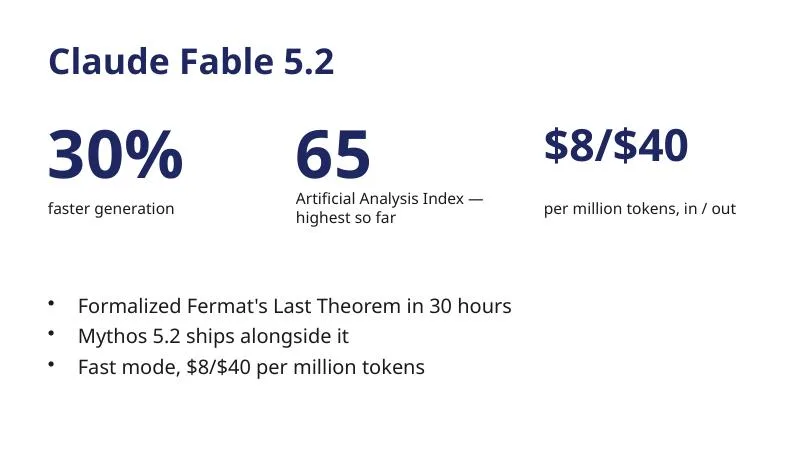
Reading the deck back with python-pptx confirms three slides at 10 by 5.625 inches, all text and all three speaker notes present. Two more rules from the skill worth remembering: never share one options object across two add* calls — pptxgenjs mutates them in place, converting values to EMU on first use — and never reorder the children of <p:presentation>; moving the notes-master element makes the deck unopenable in PowerPoint.
Step 5 — Reading a PDF back#
The pdf skill covers the reverse direction: reading, merging, splitting, rotating, watermarking, form-filling, and OCR on scanned PDFs. Its quick start is pypdf, and the same rendered PDF from Step 2 is the test file:
from pypdf import PdfReader

reader = PdfReader("briefing.pdf")
print(f"Pages: {len(reader.pages)}")
text = ""
for page in reader.pages:
    text += page.extract_text()
pip install pypdf==7.0.0
python3 extract.py
# Pages: 2
# Weekly Model Briefing ... Fable 5.2 ... 30 percent faster ... $8.00 ... $0.10The extraction returns the full text of both pages, including the table values — every check string present. For forms, the skill has its own playbook in forms.md with helper scripts (extract_form_field_info.py, fill_fillable_fields.py) and a reference document for the advanced operations. One caveat from the skill's own docs: scanned PDFs need OCR before any of this works — text extraction on an image-only page returns nothing, and that is a property of the file, not a bug in the skill.
Step 6 — The example-skills plugin#
Install it the same way:
/plugin install example-skills@anthropic-agent-skillsThe twelve skills are demonstrations, and their frontmatter descriptions say plainly what each one is for. Three are the most useful on a first pass:
- webapp-testing — a toolkit for interacting with and testing local web applications using Playwright: verify frontend functionality, debug UI behavior, capture browser screenshots, and read browser logs.
- mcp-builder — a guide for creating MCP servers in Python (FastMCP) or Node/TypeScript (MCP SDK) so LLMs can call external services through well-designed tools.
- skill-creator — create, modify, and measure skills: write one from scratch, run evals to test it, benchmark performance with variance analysis, and tune the description so it triggers at the right time.
The remaining nine cover frontend-design, algorithmic-art, canvas-design, theme-factory, brand-guidelines, internal-comms, doc-coauthoring, slack-gif-creator, and web-artifacts-builder. The three standalone plugins are narrower: claude-api carries the API and SDK documentation as a skill, academy-guide recommends Claude Academy courses, and discernment-nudge appends two or three follow-up questions after a substantive answer. Install those only if you want that specific behavior — discernment-nudge in particular changes every long answer, which gets old fast.
When to use this vs the alternatives#
| Approach | Use it when | Skip it when |
|---|---|---|
| Anthropic's official skills (this tutorial) | You already use Claude Code and want its document work to follow tested, scripted procedures with validation built in. | You want a standalone tool, or you do not use Claude Code. |
| GenOffice CLI | You want document generation from the terminal without a conversational agent in the loop, including an MCP server mode. | You need Claude Code's context — your repo, your files, your conversation — driving the document. |
| Claude.ai built-in skills | You work in the web app on a paid plan and want the same document capabilities with no setup at all. | You need the scripts, the validation, or the ability to modify how the skill works. |
| Community skill collections | You want engineering workflows — Matt Pocock's skills, Addy Osmani's agent skills — rather than document production. | Your deliverable is a formatted Office document. |
| Writing your own skill | Your document workflow has house rules — a template, a brand guide, a review gate — that no public skill encodes. | A public skill already covers the job; start from skill-creator and the template in this repo. |
The deciding factor is where the work lives. If the document is the output of a coding session — a report on the code you just wrote, a pricing model for the system you just designed — the skills win, because they run inside that session. If the document is a standalone job, a CLI built for it is the simpler tool.
The takeaway#
Install the marketplace, install document-skills, and ask Claude Code to build one real document from your own material. Then validate it with the skill's own tools — validate.py for the Office files, recalc.py for any spreadsheet with formulas, a rendered PDF you actually look at. The skills earn their keep in the validation step, not the generation step: any model can emit a .docx, but these skills ship the checks that catch a table running off the page, a formula that never computed, and a stat that wrapped into its own label. Keep the README's disclaimer in mind — these are demonstration and educational implementations, and Claude's built-in document behavior may differ — and treat the skills as the starting point they are: fork the repo, adjust the gotchas to your house style, and write your own skill with skill-creator when the public ones stop fitting.