Antigravity Dynamic Workflows: run a team of coding agents from one reviewable Python script
Google's Antigravity shipped Dynamic Workflows on November 13: type /run-workflow and the agent writes a short Python script that fans your task out across parallel subagents, collects schema-validated results, and hands you a summary. This tutorial runs three workflows end to end — and shows when to use them instead of a swarm.
- Dynamic Workflows shipped November 13, 2026, in the Antigravity App and CLI; available on Google AI Pro and Google AI Ultra plans, with no separate charge — workflows consume the plan’s existing model credits.
- /run-workflow makes the agent write a short Python script (phase, agent, parallel, pipeline, log) that coordinates many agents; you approve the script before it runs.
- Each workflow agent works in its own conversation and returns a structured result validated against a JSON Schema; file reads, searches, and test logs stay out of your main conversation.
- The four workflow scripts in this tutorial were executed against a local implementation of the documented API and produced the expected logs; the live run needs a Pro or Ultra account.
- If one item fails inside parallel(), the others are canceled — keep parallel phases to independent items and use pipeline() for shared state.

Ask one coding agent to review fifty changed files and it works through them in a single conversation, dragging every detail into one context window until the work degrades. The reviews get thinner as the list gets longer, the agent loses track of what it already checked, and the summary at the end is a guess dressed up as a verdict.
Dynamic Workflows, which Google shipped in Antigravity on November 13, 2026, take a different approach: instead of one long conversation, the agent writes a short Python script that coordinates a team of agents for you. The script names its phases, fans the work out across parallel subagents, collects a structured result from each one, and hands the main agent a summary. You read the script and approve it before anything runs — so the coordination is deterministic, reviewable, and repeatable in a way a conversation never is.
This tutorial runs three workflows end to end: a parallel review of changed files, a review-fix-verify loop where one reviewer keeps its notes across phases, and a parallel migration where each agent gets its own isolated Git worktree. Along the way you will learn to read the script the agent writes, choose model tiers and workspaces, and decide when a workflow is the right tool — and when a swarm or a single subagent is better.
What you'll need#
- The Antigravity App or the Antigravity CLI. Dynamic Workflows run in both, and every command in this tutorial is the same either way. Download the app from antigravity.google.
- A Google AI Pro or Google AI Ultra plan. Dynamic Workflows are available on Pro and Ultra only. There is no separate charge: a workflow consumes your plan's existing model credits.
- A Git repository with a branch to work on. The examples use a Python project; the same prompts work on TypeScript, Go, or anything else.
- No Python installation. The workflow script runs in a separate process on the Python runtime bundled with Antigravity. If you need a different interpreter, set the
ANTIGRAVITY_PYTHONenvironment variable. - No Python knowledge required to run a workflow — the agent writes the script. But knowing the building blocks lets you review what it will do, which is what Step 3 is for.
Step 1: How a workflow runs#
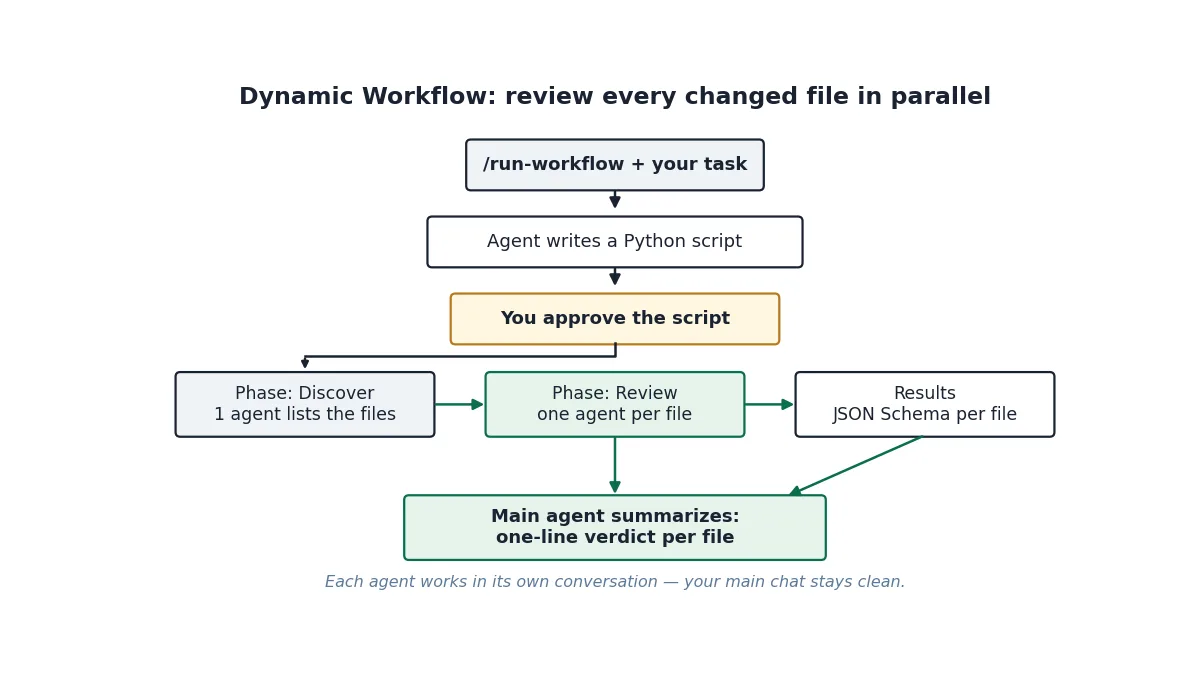
Every workflow follows the same four stages:
- The agent reads the built-in
run-workflowskill and writes a Python script for your task. You describe the outcome you want; the agent turns it into a program with named phases and explicit control flow. - Antigravity shows you the script and asks you to approve it, unless your permission preset already allows it (for example, Turbo). To change the plan, deny the request and tell the agent what to adjust.
- The workflow runs in the background, so you can keep working in the same conversation. The workflow step shows each phase, log line, and agent as the script progresses. The conversation shows 1 task running, and the workflow is listed under Background Tasks in the side panel's Overview.
- When the script finishes, the main agent receives the workflow's logs and output and summarizes the results for you.
Two properties of the design matter for everything that follows. First, agents started by a workflow are full agents with their own conversations — they don't see the script or each other, so the script gives each agent everything it needs in its prompt and asks for a short, well-defined result. Second, every result comes back as a structured value validated against a JSON Schema, so the script can act on it — log it, count it, feed it to the next phase — instead of parsing prose.
To launch one, type the command in any conversation. In the App, type /run-work, press Tab to insert the run-workflow command, then add your task:
/run-workflow Find every TypeScript file changed on this branch, review each one in parallel for missing error handling, and give me a one-line verdict per file.You can also ask in your own words — “Run a workflow that audits each package in parallel.” — and the agent turns it into the same kind of script.
Step 2: Your first workflow — review changed files in parallel#
The canonical first workflow is the one Google's own docs use: review every Python file changed since main, one reviewer per file, in parallel. It is the perfect shape for a workflow — one discovery step, then the same check repeated across many independent items.
/run-workflow List the Python files changed since main, then review each file in parallel for unhandled exceptions using the flash model, and log a one-line verdict per file.Before it runs, Antigravity shows you the script it wrote. It looks like this:
phase("Discover")

files = await agent(
    "List the Python files changed since main. Paths only.",
    schema={"type": "array", "items": {"type": "string"}},
)

phase("Review")

# parallel() runs one agent per file at the same time.
# role titles each agent's card.
reviews = await parallel(
    files,
    lambda f: agent(
        f"Review {f} for unhandled exceptions. Reply with a one-line verdict.",
        schema={"type": "string"},
        role=f"Review {f}",
        model="flash",
    ),
)

for r in reviews:
    log(r)
Read it top to bottom. phase("Discover") starts a named phase, and the first agent() call lists the changed Python files, returning them as an array of strings — the schema is the contract for what comes back. phase("Review") starts the second phase, and parallel() runs one reviewer per file at the same time, each with its own role (which titles the agent's card) and the flash model tier for fast, high-volume checks. Each reviewer returns one string; the loop at the end logs each verdict.
While it runs, the workflow appears as a single step in your conversation, titled with the workflow's description, the current phase, and how many of its agents have finished — for example, workflow · Review · 3/4 agents. Expand the step to see the phases, the logs, and one card per agent, with an icon for its state: running, waiting for your approval, or finished. Click a card to open that agent's conversation in the side panel, where you can read its prompt, watch its tool calls, approve a pending request, or send it a message. Workflow agents don't appear in your main conversation list; you open them from their cards.
When the last reviewer finishes, the main agent reads the logged verdicts and replies in your conversation with the summary — one line per file, each backed by an agent that actually read that file.
Step 3: Read the script before you approve it#
You don't need to write Python to use Dynamic Workflows. But because Antigravity shows you the script before it runs, knowing the building blocks helps you review what a workflow will do and ask for specific options in your prompt. Every workflow script can use these:
| Building block | What it does |
|---|---|
phase(name) | Starts a named phase. Later logs, tool calls, and agent cards are grouped under it. |
log(*args) | Adds a line to the current phase in the workflow step and to the result the main agent receives. |
agent(prompt, schema, role, type_name, workspace, model) | Defines an agent. await agent(prompt, schema) runs it once and returns its result. a = agent(...) followed by await a(prompt, schema) runs one turn of a conversation that lasts across calls. |
parallel(items, fn) | Runs fn(item) for every item at the same time and returns the results in item order. If one item fails, the others are canceled. |
pipeline(items, fn) | Runs fn(item) for one item at a time and returns the results in item order. |
await trajectory(...) | Returns earlier steps of the current conversation (before the workflow started), optionally filtered by step type, tool name, index range, or the last N steps. |
args | A dictionary of optional arguments the agent passes to the script (empty when there are none). |
CONVERSATION_ID, STEP_INDEX, WORKSPACES | The conversation ID, the index of the workflow step, and your workspace folders (primary first). The script runs in your primary workspace folder. |
The schema of an agent is a JSON Schema for its result. The agent returns its result through a finish tool that checks it against the schema, and the script receives the parsed value. Use {"type": "string"} for a free-form answer, and an object schema when the next phase needs fields it can rely on — file names, line numbers, a status enum.
Three options are worth asking for in your prompt:
- Model (
model). By default, workflow agents use your conversation's model (inherit). Ask for a lighter tier, such asflash_liteorflash, for fast, high-volume checks across many files, or forprofor deeper reasoning. An agent fails with the list of valid choices if a tier isn't available to you. - Agent type (
type_name).self(the default) uses the current agent's configuration and tools. You can also use the built-inresearchagent for read-only codebase research, or the name of one of your custom subagents. - Workspace (
workspace).inherit(the default) uses your current workspace.branchgives each agent its own isolated Git worktree — the right choice when agents edit code in parallel.sharegives each agent a new working copy that shares the underlying repository storage.
Step 4: The review-fix-verify loop#
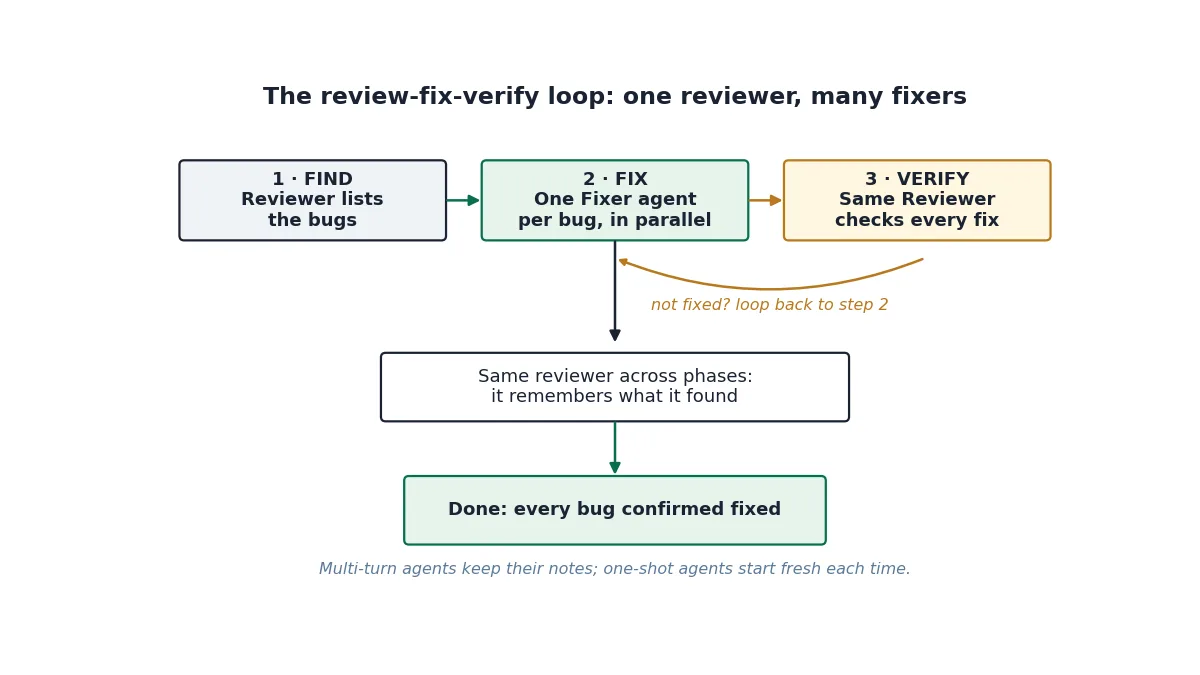
One-shot agents are fine for checks. The interesting workflows keep one agent across phases, so the same reviewer that found the bugs can later confirm they are fixed:
/run-workflow Have a persistent Reviewer agent list the bugs in src/billing, fan out one Fixer agent per bug in parallel, and then ask the same Reviewer to confirm that every bug it found is fixed.The script the agent writes for that prompt has three phases:
phase("Find")

reviewer = agent(role="Reviewer", model="pro")

bugs = await reviewer(
    "List every bug in src/billing. For each bug give a file, a line, and a one-sentence description.",
    schema={
        "type": "object",
        "properties": {
            "bugs": {
                "type": "array",
                "items": {
                    "type": "object",
                    "properties": {
                        "file": {"type": "string"},
                        "line": {"type": "integer"},
                        "description": {"type": "string"},
                    },
                    "required": ["file", "line", "description"],
                },
            }
        },
        "required": ["bugs"],
    },
)

phase("Fix")

fixes = await parallel(
    bugs["bugs"],
    lambda b: agent(
        f"Fix this bug in {b['file']} at line {b['line']}: {b['description']}. "
        "Edit the code, then run the tests for that file. Reply with a one-line summary.",
        schema={"type": "string"},
        role=f"Fix {b['file']}:{b['line']}",
        model="flash",
    ),
)

for f in fixes:
    log(f)

phase("Verify")

verdict = await reviewer(
    "Check every bug you listed earlier. For each one, say fixed or not fixed, with a one-line reason.",
    schema={
        "type": "object",
        "properties": {
            "results": {
                "type": "array",
                "items": {
                    "type": "object",
                    "properties": {
                        "file": {"type": "string"},
                        "line": {"type": "integer"},
                        "status": {"type": "string", "enum": ["fixed", "not fixed"]},
                        "reason": {"type": "string"},
                    },
                    "required": ["file", "line", "status", "reason"],
                },
            }
        },
        "required": ["results"],
    },
)

log(verdict)
The key line is reviewer = agent(role="Reviewer", model="pro"). Creating the agent without awaiting it defines a persistent agent; each await reviewer(prompt, schema) is one turn of the same conversation. The reviewer lists the bugs in the Find phase, and in the Verify phase it is asked to check its own list — the loop only closes because the same agent sees both the original findings and the fixes. The fixers in between are one-shot agents on the flash tier, one per bug, in parallel.
Note the shape of the schemas. The reviewer returns an object with a bugs array, each bug carrying a file, a line, and a description — fields the script then uses to build each fixer's prompt. The verify turn returns an object with a results array whose status is an enum, fixed or not fixed, so the script — and you — can count the outcome instead of reading prose. If a bug comes back not fixed, the honest move is to send it around again: the same reviewer already knows what it asked for.
Step 5: Parallel edits without collisions#
Parallel agents that edit code in the same checkout will step on each other — two agents editing the same file, two test runs fighting over the same database. The fix is to give each agent its own isolated workspace:
/run-workflow For each package under packages/, start one agent in an isolated branch workspace to replace the deprecated request() helper with fetchJson(), run npm test in that package, and log a diff summary and the test result.phase("Discover")
packages = await agent(
"List the package directories under packages/. Paths only.",
schema={"type": "array", "items": {"type": "string"}},
)
phase("Migrate")
results = await parallel(
packages,
lambda p: agent(
f"In {p}, replace every call to the deprecated request() helper with fetchJson(), "
f"then run npm test in {p}. Reply with a diff summary and the test result.",
schema={
"type": "object",
"properties": {
"diff_summary": {"type": "string"},
"tests": {"type": "string", "enum": ["passed", "failed"]},
},
"required": ["diff_summary", "tests"],
},
role=f"Migrate {p}",
model="flash",
workspace="branch",
),
)
for r in results:
log(f"{r['diff_summary']} — tests {r['tests']}")workspace="branch" gives each agent its own isolated Git worktree, so parallel edits and test runs can't collide. share gives each agent a new working copy that shares the underlying repository storage — cheaper, still isolated. inherit shares your workspace, which is fine for read-only work and risky for parallel edits; if the generated script uses inherit for a job that writes code, that is the first thing to ask the agent to change.
When the items touch shared files or test suites, don't parallelize at all — run them one at a time with pipeline():
/run-workflow Process BUG-1.md and BUG-2.md one at a time: for each bug, have one agent write a failing pytest test and a second agent fix the code until the new test passes.phase("Test, then fix")
def fix_bug(bug_file):
return agent(
f"Read {bug_file}. First write a failing pytest test that reproduces the bug, "
"then fix the code until the new test passes. Reply with a one-line summary.",
schema={"type": "string"},
role=f"Fix {bug_file}",
)
results = await pipeline(["BUG-1.md", "BUG-2.md"], fix_bug)
for r in results:
log(r)pipeline() has the same shape as parallel() — it runs fn(item) and returns the results in item order — but it processes one item at a time. Use it when the steps share state: one test suite, one database, one file that two fixes would both touch.
Step 6: Save a workflow and run it again#
If you run the same kind of workflow regularly, keep the script instead of having the agent regenerate it each time. Ask the agent to save the script to a .py file in your workspace — scripts/review-changes.py, say — then run it again with a prompt such as:
/run-workflow Run scripts/review-changes.pyAntigravity asks you to approve the script each time it runs, unless you have chosen to always allow it. A saved script is also the easiest thing to share with a team: the workflow becomes a file in the repo, reviewed like any other code, instead of a prompt only one person remembers.
Step 7: Permissions, approvals, and stopping#
Dynamic Workflows follow your permission settings, with two approval layers:
- Approving the script. Antigravity asks you to approve each workflow script before it runs, unless your permission preset already allows it. You can allow it once, for the rest of the conversation, or always. An approval covers that exact script; a command prefix rule can't cover a Python script.
- Agents ask in their own conversations. Each agent that a workflow starts follows your permission preset and asks for approval in its own conversation. The agent waits until you answer — open its card, approve or deny, and the workflow continues.
To stop a workflow early, stop the conversation. Stopping the parent conversation also stops every running workflow agent, so there is one kill switch for the whole tree.
Which approach should you use?#
Antigravity now offers several ways to split work across agents, and the shape of the job decides:
| Use | When you want |
|---|---|
| Orchestrator | A single conversation where a frontier planner model (Gemini 4 Carbon or Gemini 4 Argon) plans and reviews while routing routine tool execution to Gemini 4 Hydrogen. |
| Subagents | To delegate one task, such as a research question or a build, while you keep working. |
Dynamic Workflows (/run-workflow) | Predictable, scripted control flow: the same check across a list of files or packages, staged steps in sequence, or a reviewer-and-fixer loop where agents return structured results to a script instead of talking to each other. |
/swarm | Peers collaborating on a shared message board to split a feature, bug bash, or investigation and coordinate directly (@name). |
/boost | Deep reasoning on a hard bug, race condition, or algorithm, with independent verification. |
/teamwork | A collaborative agent team for a large, multi-milestone project, starting with a scoping interview. |
The rule of thumb: if the job is the same check across a list, staged steps in sequence, or a reviewer-and-fixer loop, use a workflow. If agents need to coordinate with each other while they work — to agree on interfaces, or review each other's diffs on a shared message board — use /swarm instead. Orchestrator is the middle option for a single evolving session: Google reports it reached near-Carbon task success on Terminal-Bench 4.1 while averaging 24% lower quota use and 19% faster completion, by switching between Carbon and Hydrogen as the trajectory develops. It is available to Google AI Ultra subscribers.
Gotchas worth knowing#
- One failure cancels the rest in
parallel(). If one item fails, the others are canceled. Keep parallel phases to independent, low-risk items, and put risky or stateful work inpipeline(). - Agents can't see each other or the script. A workflow agent only sees its own prompt, so give it everything it needs — the file, the line, the exact check — and ask for a short, well-defined result. Context the script has doesn't transfer for free.
- The schema is the only thing the script can rely on. If the next phase needs a field, put it in the schema with a type and a
requiredlist. A result that comes back as prose can't be counted, filtered, or fed to the next agent. - Model tiers fail loudly. If you ask for a tier that isn't available to you, the agent fails with the list of valid choices. Pick from that list rather than guessing another name.
- Your main conversation stays clean — and that's a trade-off. File reads, searches, and test logs stay out of your main conversation's context, which is the point. But when a verdict looks wrong, the evidence is in the agent's own conversation, not yours — open the card.
- Quota note. To mark the week of shipping, Antigravity's lead said the team is resetting everyone's Gemini quota on Antigravity. Neither announcement says how long the reset lasts, so treat it as a short window, not a new normal.
The takeaway#
The checklist:
- Use a workflow when the job splits. Same check across many files, staged steps, or a review-fix-verify loop — that's
/run-workflow. One delegation is a subagent; live negotiation between agents is a swarm. - Read the script before you approve it. Phases,
parallel()vspipeline(), the model tier, the workspace — four things to check, and the whole workflow is visible in one screen. - Make the schema the contract. Short, typed results — a verdict string, a bug object, a fixed/not-fixed enum — are what let a script coordinate agents instead of just chatting with them.
- Keep one reviewer across phases. A multi-turn agent remembers what it found; that memory is what turns a pile of parallel fixes into a verified result.
- Isolate parallel edits.
workspace="branch"when agents write code at the same time;pipeline()when they share state. - Save the scripts that work. A workflow in a
.pyfile is a repeatable check the whole team can run — and review — like any other code.
The one-line version: a long conversation drifts; a short script doesn't. Dynamic Workflows turn multi-agent coordination from something you hope the agent does well into something you can read, approve, and run again.
Sources#
- Google Antigravity Docs — Dynamic Workflows (/run-workflow)
- Google Antigravity Docs — Slash commands overview
- AlphaSignal — Google Antigravity Ships Dynamic Workflows to Run Parallel AI Coding Agents (November 13, 2026)
- Unite.AI — Google Antigravity Rolls Out Orchestrator for Dynamic Model Handoffs (November 12, 2026)
- Antigravity on X — Dynamic Workflows announcement (November 13, 2026)