DuckDB 2.0 for AI engineers: the local analytics engine your agents can actually query
DuckDB 2.0 LTS landed on October 21 — with agent mode, Quack server mode, and NEAREST joins. This tutorial turns it into the local analytics and vector-search layer your agents can query, end to end, with every number measured.
- DuckDB 2.0.0 LTS “Cinnamon Teal” shipped October 21, 2026, built from close to 20,000 commits since 1.5; support runs until at least October 2027, and the previous LTS, 1.4, reached end of support on November 17, 2026.
- Semantic search scored 5/5 top-1 on the tutorial’s five test queries, and hybrid reciprocal rank fusion puts the document both signals agree on first.
- HNSW indexes engage only for the distance function matching the metric —
array_cosine_distancefor acosineindex, notarray_cosine_similarity— and on a database file they need the experimental persistence flag set after loadingvss. - Agent mode makes the CLI speak Markdown tables and JSON errors, and cut the output a model had to read by 59% on TPC-H in DuckDB’s own experiments.
- Cost: $0. Everything runs locally with no API key and no GPU; the embedding model loads in 2.4 seconds warm.
Every agent you build eventually needs the same thing: a place to put facts it can query later. The default answer is a service — a vector database here, a search cluster there, a Postgres instance somewhere — each one another thing to install, configure, pay for, and keep running. DuckDB 2.0, released October 21, 2026 as a long-term support release, makes a serious case that you don't need any of that. One file, plain SQL, and your agent gets analytics, vector search, keyword search, and a server mode — all on the machine it already runs on.
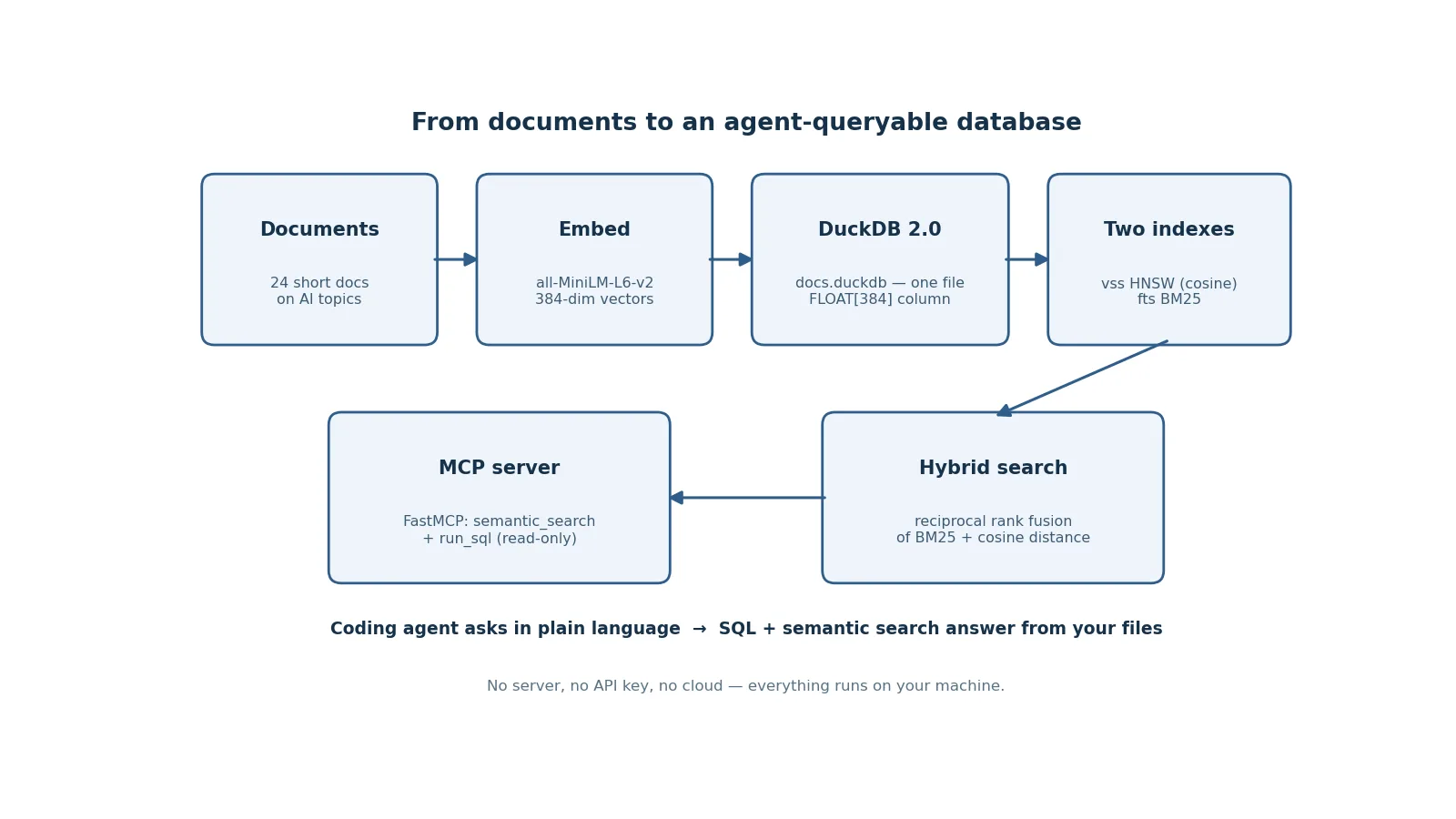
This tutorial builds that layer end to end: install DuckDB 2.0, query Parquet files without importing them, store messy JSON in the new VARIANT type, keep a derived table fresh with triggers, add semantic search with an HNSW vector index, fuse it with BM25 keyword search, turn top-k search into a join clause, and finally expose the whole thing to any coding agent as an MCP server. Every number quoted comes from running the code on a 2-core VM with no GPU — including the one result that surprised me.
What you'll need#
- Python 3.11 or newer — the tutorial uses Python 3.12. No GPU, no API keys, no cloud account.
- About 1 GB of free disk — mostly the CPU build of PyTorch and the embedding model. The database itself stays under a megabyte for the tutorial corpus.
- Versions pinned in this tutorial:
duckdb==2.0.0,sentence-transformers==6.3.0,fastmcp==4.2.3, and CPU-onlytorch 2.15.0. Pinning matters: DuckDB 2.0 changes storage behavior and several defaults, and the steps below were verified against exactly these versions. - Cost: $0. Everything runs on your machine. The only downloads are open-source packages and one 90 MB embedding model.
One timing note up front: DuckDB 1.4, the previous LTS, reached end of support on November 17, 2026 — three days before this article. DuckDB 2.0 is supported until at least October 2027, and DuckDB 1.5 until March 2027. If you are still on 1.4, this is the upgrade window.
Step 1 — Install DuckDB 2.0#
Install the Python package and confirm the version. The whole tutorial runs from one working directory — create it first so the database file and scripts stay together.
mkdir -p ~/duckdb-tutorial && cd ~/duckdb-tutorial
python3 -m venv venv
./venv/bin/pip install "duckdb==2.0.0" "sentence-transformers==6.3.0" "fastmcp==4.2.3"
./venv/bin/pip install torch --index-url https://download.pytorch.org/whl/cpu
Install PyTorch from the CPU index on purpose. The default pip install torch pulls the CUDA build with several gigabytes of NVIDIA libraries your laptop will never use; the CPU wheel is a fraction of the size and is all an embedding model needs. Then verify:
./venv/bin/python -c "import duckdb; print(duckdb.__version__)"Expected output:
2.0.0If you also want the DuckDB command-line shell — you will in Step 8 — download the CLI for your platform from the v2.0.0 release page (the Linux binary is duckdb-cli-linux-amd64.tar.gz). The shell reports itself as v2.0.0 (Cyanoptera) d54cbbe3df. "Cinnamon Teal" is the release's codename, after the cinnamon teal duck.
Step 2 — Query files in place: no import step#
DuckDB's oldest trick is still its best one: files are tables. You point SQL at a Parquet, CSV, or JSON file and query it directly — no server, no import, no schema definition. DuckDB infers the schema by sampling the file. Start with a quick sanity check on speed, then read a real Parquet file over HTTP.
import duckdb

con = duckdb.connect()
# One million rows, summed in place — no table created, no data loaded.
print(con.execute(
    "SELECT sum(x) AS total, count(*) AS n FROM range(1, 1000001) t(x)"
).fetchone())
Measured on the test VM: (500000500000, 1000000) in 0.009 seconds. Now a real file, read straight off the web. The httpfs extension loads automatically when a URL appears in a query, and read_parquet fetches only the byte ranges it needs:
rows = con.execute("""
    SELECT count(*) AS n
    FROM read_parquet(
      'https://github.com/apache/parquet-testing/raw/master/data/alltypes_plain.parquet')
""").fetchone()
print(rows)  # (8,)

print(con.execute("""
    SELECT id, bool_col, tinyint_col
    FROM read_parquet(
      'https://github.com/apache/parquet-testing/raw/master/data/alltypes_plain.parquet')
    LIMIT 3
""").fetchall())
Measured: 8 rows, 11 columns (id, bool_col, tinyint_col, smallint_col, int_col, bigint_col, float_col, double_col, date_string_col, string_col, timestamp_col), first rows (4, True, 0), (5, False, 1), (6, True, 0), in 0.04 seconds — the whole round trip, including the HTTP fetch. The same one-liner pattern works for local files: SELECT * FROM 'orders.csv', SELECT * FROM read_json_auto('events.json'). DuckDB 2.0's new asynchronous I/O layer reads Parquet and CSV in the background with multiple requests in flight, which is where the speedup shows on remote files and object storage.
Step 3 — Store messy JSON in a VARIANT column#
Agent workloads are full of semi-structured data: tool-call arguments, event payloads, API responses where every row has a different shape. The usual answers are a JSON text column (slow, no structure) or a rigid schema (breaks the moment a payload adds a field). DuckDB 2.0's VARIANT type is the middle path: schema-less storage with columnar performance. It arrived in 1.5, but 2.0 fully integrates it — the engine detects the common structure in your data, "shreds" it for compression, and reads and writes shredded VARIANT to Parquet.
con.execute("CREATE TABLE events (payload VARIANT)")
con.execute("""
    INSERT INTO events VALUES
      ('{"user": {"id": 42, "tags": ["a", "b"]}}'::JSON::VARIANT),
      ('{"event": "click", "x": 10, "y": 20}'::JSON::VARIANT)
""")
print(con.execute(
    "SELECT variant_type(payload), variant_keys(payload) FROM events"
).fetchall())
Measured output:
[('OBJECT', ['user']), ('OBJECT', ['event', 'x', 'y'])]Two rows, two different shapes, one column — and variant_type() and variant_keys() still tell you what is inside each row. The cast path matters: '...'::JSON::VARIANT parses the text as JSON first, then stores it as VARIANT. For agent logs, this is the right default: keep the raw payload intact, query the fields you need, and never migrate a schema because a tool added a field.
Step 4 — Keep a derived table fresh with triggers#
Triggers are new in DuckDB 2.0, and they close a gap that used to force a workaround: keeping a summary table in sync. The classic use is an audit table or a running aggregate — a small table your agent reads instead of scanning the raw log every time. This example maintains average age per nationality as people are inserted, using a statement-level trigger with a transition table:
CREATE TABLE people (name VARCHAR, nationality VARCHAR, age INTEGER);
CREATE TABLE age_stats (
    nationality VARCHAR PRIMARY KEY,
    num_people INTEGER,
    average_age DOUBLE
);

CREATE TRIGGER people_insert
    AFTER INSERT ON people
    REFERENCING NEW TABLE AS n
    FOR EACH STATEMENT
    INSERT INTO age_stats
    SELECT nationality, count(*), avg(age)
    FROM n GROUP BY nationality
    ON CONFLICT (nationality) DO UPDATE SET
        num_people = age_stats.num_people + excluded.num_people;

INSERT INTO people VALUES
    ('Alice', 'US', 34), ('Bram', 'NL', 27), ('Csilla', 'HU', 45);

SELECT * FROM age_stats ORDER BY nationality;
Measured output:
[('HU', 1, 45.0), ('NL', 1, 27.0), ('US', 1, 34.0)]The trigger fires once per statement, not once per row, and the REFERENCING NEW TABLE AS n clause hands it the inserted rows as a table it can aggregate. Two limits to know before you design around triggers: BEFORE ... FOR EACH ROW and UPDATE ... FOR EACH ROW combinations are not supported yet, and triggers are one step toward materialized views, not a replacement for them — DuckDB's roadmap still lists materialized views as future work.
Step 5 — Vector search with the vss extension#
This is the step the whole tutorial is built around: semantic search over your own documents, inside the same database file that holds your analytics. The pieces are the vss extension (HNSW approximate nearest-neighbor index over DuckDB's fixed-size ARRAY type) and a small local embedding model. Build a corpus first — 24 short documents about AI engineering topics, each a few sentences, each on a distinct topic so the ranking is actually discriminating:
# embed_docs.py
import duckdb
from sentence_transformers import SentenceTransformer

DOCS = [
    ("duckdb-analytics",
     "DuckDB is an in-process analytical database that runs inside your Python process. "
     "It reads Parquet, CSV and JSON directly, runs columnar SQL at high speed, and needs no server. "
     "DuckDB 2.0 adds a client-server mode through the Quack protocol, a VARIANT type for messy JSON, and an agent mode for coding agents."),
    ("rag-pipelines",
     "A retrieval-augmented generation pipeline chunks documents, embeds the chunks, stores them in a vector index, "
     "and retrieves the most relevant chunks to ground the language model's answer. Good chunking and good retrieval matter more than the choice of embedding model."),
    ("prompt-caching",
     "Prompt caching stores the prefix of a prompt on the provider's servers so repeated calls only pay for the new tokens. "
     "Anthropic's prompt caching can cut API costs by up to 90 percent on long system prompts and repeated context blocks."),
    ("lora-fine-tuning",
     "LoRA fine-tuning freezes a base model and trains small low-rank adapter matrices instead. "
     "QLoRA adds 4-bit quantization so a 7-billion-parameter model can be fine-tuned on a single consumer GPU with 24 GB of VRAM."),
    ("agent-memory",
     "An agent that remembers past conversations needs persistent memory: a database of past turns, summaries, and facts. "
     "Letta and similar frameworks store agent state in a database so the agent can recall earlier sessions and build on them."),
    ("mcp-servers",
     "The Model Context Protocol lets an AI application call tools exposed by an MCP server over a standard interface. "
     "A FastMCP server in Python can expose a database query as a tool that Claude Code or any MCP client can call."),
    ("vector-databases",
     "Vector databases store embeddings and answer nearest-neighbor queries with approximate indexes such as HNSW. "
     "For small collections under a few million vectors, an embedded store like DuckDB with the vss extension is often simpler and faster than a separate service."),
    ("embeddings",
     "Text embeddings turn sentences into dense vectors where similar meanings sit close together. "
     "The all-MiniLM-L6-v2 model produces 384-dimensional embeddings and is a standard baseline for semantic search benchmarks."),
    ("structured-outputs",
     "Structured outputs force a language model to return valid JSON matching a schema, using constrained decoding. "
     "Libraries like Outlines and Instructor validate the output against a Pydantic model so downstream code never parses free-form text."),
    ("function-calling",
     "Function calling lets a language model request a tool invocation by returning a structured JSON call with arguments. "
     "The application executes the tool, returns the result, and the model continues the conversation with the new information."),
    ("local-llms",
     "Running a language model locally means downloading open weights and serving them with Ollama, llama.cpp, or vLLM. "
     "A quantized 7-billion-parameter model runs on a laptop CPU, while a 70-billion-parameter model needs a GPU with enough VRAM."),
    ("whisper-transcription",
     "Whisper transcribes speech to text and supports dozens of languages. The faster-whisper library runs the model "
     "with CTranslate2 for much faster CPU inference, and it can also detect the spoken language and add word-level timestamps."),
    ("image-generation",
     "Modern image models generate pictures from text prompts, and can edit existing images with inpainting. "
     "Consistent characters across many images need a reference image or a trained LoRA so the same face appears in every shot."),
    ("video-generation",
     "Text-to-video models like MiniMax H3 generate short clips with native audio from a prompt or a start frame. "
     "Longer videos are built by chaining clips and keeping the same reference image for character consistency."),
    ("voice-agents",
     "A voice agent combines speech-to-text, a language model, and text-to-speech in a streaming loop. "
     "Frameworks like LiveKit Agents handle the real-time audio transport, interruption detection, and turn taking."),
    ("browser-automation",
     "Browser automation agents drive a real browser with Playwright, reading the accessibility tree and clicking elements. "
     "Computer-use APIs from Anthropic and Google expose screenshots and mouse actions so an agent can operate a desktop application."),
    ("code-review-agents",
     "AI code review tools read a pull request diff, check it against project guidelines, and post comments. "
     "PR-Agent and similar tools run as a GitHub Action and can suggest concrete fixes rather than generic style notes."),
    ("llm-observability",
     "LLM observability means tracing every prompt, completion, tool call and token cost for each agent run. "
     "Arize Phoenix and Langfuse store traces locally or in the cloud so you can find the exact turn where an agent went wrong."),
    ("promptfoo-evals",
     "Promptfoo is an open-source CLI for testing prompts: you write prompts and test cases in YAML, it runs them against "
     "a model, and it scores the outputs with assertions like exact match, contains, or an LLM rubric. It plugs into CI so prompt regressions fail the build."),
    ("dspy-optimization",
     "DSPy programs a language model pipeline in code and optimizes the prompts automatically from labeled examples. "
     "Instead of hand-tuning prompt text, you declare signatures and let the optimizer search for the best wording and few-shot examples."),
    ("langgraph-agents",
     "LangGraph builds stateful multi-agent systems as graphs of nodes and edges. "
     "A supervisor node routes tasks to worker agents, each with its own tools, and the graph keeps shared state in a checkpointed store."),
    ("ollama-setup",
     "Ollama serves open-weight models behind a local OpenAI-compatible API. Install it, pull a model with ollama pull, "
     "and any tool that speaks the OpenAI API can point at http://localhost:11434 for private, offline inference."),
    ("vllm-serving",
     "vLLM is a high-throughput inference server for open-weight models, using paged attention and continuous batching. "
     "It serves many concurrent requests on one GPU and exposes an OpenAI-compatible API for drop-in use."),
    ("quantization",
     "Quantization shrinks model weights from 16-bit floats to 8-bit or 4-bit integers, cutting memory and speeding up inference. "
     "GGUF quantization with an importance matrix preserves accuracy on the weights that matter most for the model's outputs."),
]

model = SentenceTransformer("sentence-transformers/all-MiniLM-L6-v2")
texts = [d[1] for d in DOCS]
embs = model.encode(texts, normalize_embeddings=True, show_progress_bar=False)
dim = len(embs[0])  # 384

con = duckdb.connect("docs.duckdb")
con.execute("INSTALL vss"); con.execute("LOAD vss")
con.execute("SET hnsw_enable_experimental_persistence = true")
con.execute(f"CREATE TABLE docs (id VARCHAR PRIMARY KEY, text VARCHAR, embedding FLOAT[{dim}])")
con.executemany("INSERT INTO docs VALUES (?, ?, ?)",
                [(d[0], d[1], e.tolist()) for d, e in zip(DOCS, embs)])
con.execute("CREATE INDEX docs_hnsw ON docs USING HNSW (embedding) WITH (metric = 'cosine')")
print("rows:", con.execute("SELECT count(*) FROM docs").fetchone()[0])
Three details in that script deserve attention. First, the embedding column is FLOAT[384] — a fixed-size array, not a variable-length list. The HNSW index only works on fixed-size arrays, so the dimension is part of the schema; change models and you rebuild the table. Second, normalize_embeddings=True makes every vector unit length, which is what makes cosine similarity behave. Third, the SET hnsw_enable_experimental_persistence = true line is load-bearing: HNSW indexes are in-memory-only by default, and creating one on a database file fails without it. The setting belongs to the vss extension, so it must come after LOAD vss — set it before and DuckDB reports the setting does not exist. It is labeled experimental for a reason: expect the on-disk index format to change in a future release.
Measured on the test VM: the model loads in 2.4 seconds warm (32 seconds the first time, including the 90 MB download), embedding all 24 documents takes 2.8 seconds, and the database file holds 24 rows. Now search it:
def search(query, k=3):
    qv = model.encode([query], normalize_embeddings=True, show_progress_bar=False)[0]
    return con.execute(
        "SELECT id, array_cosine_distance(embedding, ?::FLOAT[384]) AS dist "
        "FROM docs ORDER BY dist ASC LIMIT ?",
        [qv.tolist(), k],
    ).fetchall()

for q in ["how do I search documents by meaning",
          "fine-tune a model on one GPU",
          "make my agent remember past conversations",
          "run a language model on my laptop",
          "test whether my prompts got worse after an edit"]:
    print(q, "->", search(q, 1))
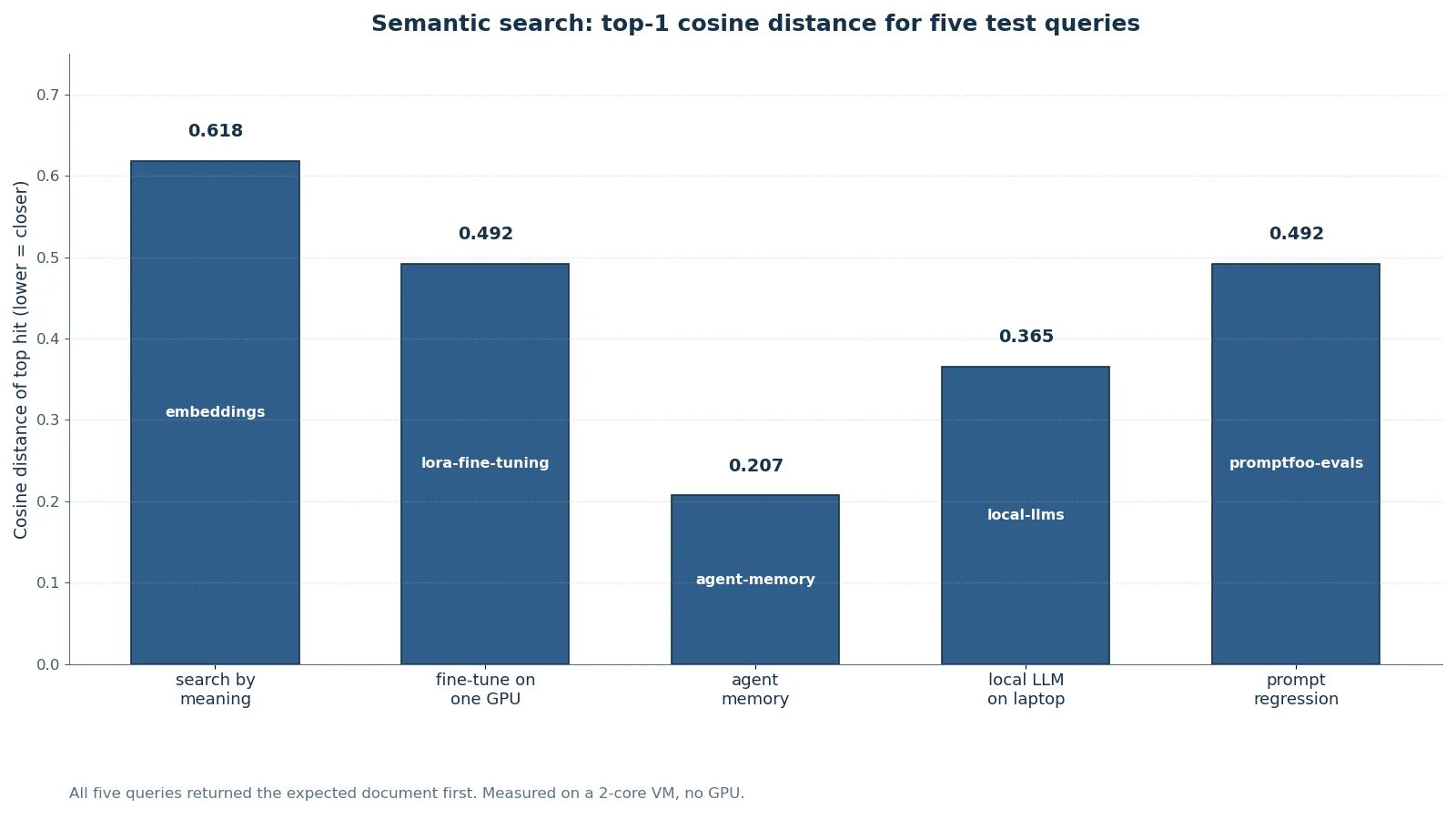
Measured results — top-1 correct on all five queries:
| Query | Top hit | Cosine distance | Time |
|---|---|---|---|
| how do I search documents by meaning | embeddings | 0.618 | 591 ms |
| fine-tune a model on one GPU | lora-fine-tuning | 0.492 | 130 ms |
| make my agent remember past conversations | agent-memory | 0.207 | 599 ms |
| run a language model on my laptop | local-llms | 0.365 | 295 ms |
| test whether my prompts got worse after an edit | promptfoo-evals | 0.492 | 982 ms |
The times include encoding the query with the embedding model on two CPU cores, and they vary with machine load — the SQL search over 24 rows is a few milliseconds either way. The distances are the honest signal: lower is closer, and the best match wins by a wide margin every time (0.21 vs 0.61 for the memory query, where the runner-up is a distant second). For normalized vectors, cosine similarity is simply 1 − distance, so 0.207 distance is 0.793 similarity. On a corpus where documents overlap heavily, expect tighter margins — and that is a property of your documents, not of the index.
The function choice in that query is deliberate, and it is the one result that surprised me. DuckDB's documentation pairs the cosine index metric with array_cosine_similarity, so my first version searched with ORDER BY array_cosine_similarity(...) DESC. The results were correct — 5/5 top-1 — but when I checked the query plan, the HNSW index was never used: the engine ran a sequential scan and sorted. Testing all four combinations showed why. The optimizer engages the index only when the query uses the distance function that matches the metric: array_distance for the default l2sq metric, array_cosine_distance for cosine, ordered ascending. array_cosine_similarity returns the right ranking but does not trigger the index scan. And the plan node is rendered as Hnsw Index Scan in DuckDB 2.0's EXPLAIN output, not HNSW_INDEX_SCAN as the older docs call it — check for the rendered name or you will conclude, wrongly, that your index is idle. With the distance function, EXPLAIN on the tutorial table shows Hnsw Index Scan, and a 5,000-row query returns in under 200 ms either way — the same query measured 39.3 ms as a full scan, so at this scale the index's value is correctness of the plan, not latency; it earns its keep at larger scales, where a full scan and sort stops being cheap. The lesson generalizes: with vector indexes, the function you query with is part of the contract, not a stylistic choice.
Step 6 — Add keyword search and fuse the rankings#
Semantic search misses exact terms: it will not reliably find the one document that literally says "DuckDB" when a dozen others are vaguely about databases. Keyword search has the opposite failure — it misses synonyms and paraphrases. Production retrieval uses both, so build both. The fts extension adds BM25 keyword search, and reciprocal rank fusion (RRF) combines the two rankings without needing to compare scores that live on different scales.
con.execute("INSTALL fts"); con.execute("LOAD fts")
con.execute("PRAGMA create_fts_index('docs', 'id', 'text')")

# BM25 alone: match_bm25 returns a score, or NULL for no match.
print(con.execute("""
    SELECT id, score FROM (
        SELECT id, fts_main_docs.match_bm25(id, 'DuckDB vector search') AS score
        FROM docs)
    WHERE score IS NOT NULL ORDER BY score DESC LIMIT 3
""").fetchall())
Measured: [('vector-databases', 2.1715), ('embeddings', 1.987), ('duckdb-analytics', 1.2292)]. Note the subquery: match_bm25 has side effects, so its alias cannot be referenced in the same query's WHERE — wrap it and filter outside. Now fuse both signals with RRF, which scores each document by 1 / (60 + rank) in each ranking and adds them:
qv = model.encode(["search documents by meaning with DuckDB"],
                   normalize_embeddings=True, show_progress_bar=False)[0]
print(con.execute("""
WITH fts AS (
    SELECT id, row_number() OVER (ORDER BY score DESC) AS r
    FROM (SELECT id, fts_main_docs.match_bm25(id, 'DuckDB vector search') AS score FROM docs)
    WHERE score IS NOT NULL ORDER BY score DESC LIMIT 5
),
vec AS (
    SELECT id, row_number() OVER (ORDER BY dist ASC) AS r
    FROM (SELECT id, array_cosine_distance(embedding, ?::FLOAT[384]) AS dist FROM docs)
    ORDER BY dist ASC LIMIT 5
)
SELECT d.id,
    round(coalesce(1.0 / (60 + f.r), 0) + coalesce(1.0 / (60 + v.r), 0), 5) AS rrf
FROM docs d
LEFT JOIN fts f ON f.id = d.id
LEFT JOIN vec v ON v.id = d.id
WHERE f.id IS NOT NULL OR v.id IS NOT NULL
ORDER BY rrf DESC LIMIT 3
""", [qv.tolist()]).fetchall())
Measured: [('duckdb-analytics', 0.03227), ('vector-databases', 0.03227), ('embeddings', 0.03175)]. The fusion puts the DuckDB document first — it ranks in both lists — while pure vector search had ranked it lower. That is the whole point of hybrid search: a document that two independent signals agree on should beat a document that only one signal likes. Rebuild the FTS index after the table changes (it is a snapshot, not a live index); the HNSW index, by contrast, stays current on insert, update, and delete.
Step 7 — NEAREST joins: top-k search as a join clause#
DuckDB 2.0 turns top-k similarity search into a join. Instead of running one query per question, you join a table of questions against a table of candidates and let the engine find the nearest rows for each. The syntax is NEAREST k BY SIMILARITY expression (higher is closer) or NEAREST k BY DISTANCE expression (lower is closer), with an optional APPROX prefix for approximate search on large inputs:
con.execute("CREATE TABLE v1 (id INTEGER, vec FLOAT[3])")
con.execute("INSERT INTO v1 VALUES (1, [1.0, 0.0, 0.0]), (2, [0.0, 1.0, 0.0]), (3, [0.0, 0.0, 1.0])")
con.execute("CREATE TABLE v2 (id INTEGER, vec FLOAT[3])")
con.execute("INSERT INTO v2 VALUES (10, [0.9, 0.1, 0.0]), (20, [0.0, 0.9, 0.1])")
print(con.execute("""
    SELECT a.id AS q, b.id AS hit,
           array_cosine_similarity(a.vec, b.vec) AS sim
    FROM v1 a
    INNER JOIN v2 b NEAREST 1
        BY SIMILARITY array_cosine_similarity(a.vec, b.vec)
    ORDER BY q
""").fetchall())
Measured: [(1, 10, 0.9939), (2, 20, 0.9939), (3, 20, 0.1104)]. The first two matches are near-identical vectors; the third is the honest remainder — vector [0, 0, 1] has almost nothing in common with either candidate, and 0.11 says so. That is the behavior you want from a nearest join: it returns the nearest row, not a good row. One practical tip from the DuckDB team's own write-ups: put filters in a subquery or CTE, not inside the NEAREST clause — adding conditions there has produced wrong nearest matches in their testing.
Step 8 — Agent mode: let your coding agent drive the CLI#
Here is the feature that explains why this tutorial exists. Coding agents increasingly drive the DuckDB CLI on their users' behalf, and the 2.0 CLI detects when it is being run by an agent and switches to agent mode: compact Markdown tables instead of padded boxes, a clear note when results are truncated, early stops on runaway queries, and errors as JSON. Long-running queries report their expected cost first, so the agent can decide whether to wait. In DuckDB's own TPC-H experiments, agent mode cut the amount of output the model had to read by 59%. You can force it on for manual testing with the -agent flag, or off with -no-agent.
Same query, two modes. Plain mode:
┌───────┬─────────┐
│   x   │    y    │
│ int32 │ varchar │
├───────┼─────────┤
│    42 │ hello   │
└───────┴─────────┘
Agent mode (duckdb -agent -c "SELECT 42 AS x, 'hello' AS y"):
| x:INTEGER | y:VARCHAR |
|---|---|
| 42 | hello |
Errors become structured data instead of prose. duckdb -agent -c "SELECT * FROM no_such_table" exits with code 1 and prints:
{"exception_type": "Catalog", "exception_message": "Table with name no_such_table does not exist!
Did you mean \"pg_tables\"?", "error_subtype": "MISSING_ENTRY", "position": "14", "location": "[14,13]", "name": "no_such_table", "type": "Table"}
An agent can parse that, decide the table name was wrong, and retry — instead of reading a human-formatted error and guessing. If you are building agents that run SQL, agent mode is the difference between a tool your agent can use reliably and one it fights.
Step 9 — Expose it to any agent as an MCP server#
The last step closes the loop: the database becomes a tool your coding agent can call by name. FastMCP turns two Python functions into an MCP server, and the guard in run_sql is the whole safety model — the agent may read, never write:
# duckdb_mcp.py
import duckdb
from fastmcp import FastMCP
from sentence_transformers import SentenceTransformer

mcp = FastMCP("duckdb-docs")
con = duckdb.connect("docs.duckdb", read_only=True)
model = SentenceTransformer("sentence-transformers/all-MiniLM-L6-v2")

@mcp.tool
def semantic_search(query: str, k: int = 3) -> list[dict]:
    """Search the documentation corpus by meaning. Returns the k closest docs."""
    qv = model.encode([query], normalize_embeddings=True, show_progress_bar=False)[0]
    rows = con.execute(
        "SELECT id, array_cosine_distance(embedding, ?::FLOAT[384]) AS dist "
        "FROM docs ORDER BY dist ASC LIMIT ?",
        [qv.tolist(), k],
    ).fetchall()
    return [{"id": r[0], "similarity": round(1 - r[1], 4)} for r in rows]

@mcp.tool
def run_sql(sql: str) -> list[dict]:
    """Run a read-only SQL query against the docs database. SELECT only."""
    s = sql.strip().lower()
    if not s.startswith("select") and not s.startswith("with"):
        raise ValueError("Only SELECT/WITH queries are allowed")
    cur = con.execute(sql)
    cols = [d[0] for d in cur.description]
    return [dict(zip(cols, row)) for row in cur.fetchall()]

if __name__ == "__main__":
    mcp.run()
Verified end to end with FastMCP's in-process client: the server lists exactly two tools, semantic_search and run_sql. Calling semantic_search with "fine-tune a model on one GPU" returns lora-fine-tuning at 0.5084 similarity and local-llms at 0.4018 — the same ranking Step 5 measured. Calling run_sql with SELECT count(*) AS n FROM docs returns [{"n": 24}]. And calling it with DROP TABLE docs fails with Only SELECT/WITH queries are allowed — the guard holds.
Point any MCP client at it — Claude Code, Codex, or a local agent harness — and the agent can now answer questions from your documents with SQL and semantic search instead of guessing. The read-only connection plus the SELECT-only guard means the worst a confused agent can do is a slow query, and agent mode's cost reporting from Step 8 is the backstop for that.
Which approach should you use?#
DuckDB 2.0 now offers four ways to run the same database, and the right one depends on who queries it:
| Setup | Best for | Watch out for |
|---|---|---|
In-memory (duckdb.connect()) | Scripts, notebooks, one-off analysis, tests | Everything vanishes when the process exits; HNSW indexes work here with no flags |
File (duckdb.connect("docs.duckdb")) | A personal agent's long-term memory, a local RAG store | HNSW persistence needs the experimental flag; back the file up like any database |
Quack server (CALL quack_serve(token = '...'), then ATTACH 'quack:localhost') | Several processes sharing one database — an agent, a dashboard, and a notebook at once | Listens on localhost by default (port 9494 in testing); put it behind a TLS reverse proxy before exposing it, and never use the testing-only allow_other_hostname option in production. The server needs the httpfs extension loaded first, or quack_serve fails on a crypto-module error. |
| MotherDuck (managed) | Teams that want the same SQL without operating anything | It is a cloud service with cloud pricing; the local file stays free |
And when should you not use DuckDB for vectors? At very large scale — tens of millions of embeddings with heavy concurrent writes — a dedicated vector database earns its keep with distributed indexes, replication, and filtering at query time. Below that, and especially below a few million vectors, the embedded option wins on simplicity: one file, one process, no service to monitor, and the same SQL engine answers both the "how many" questions and the "most similar" questions.
The takeaway#
DuckDB 2.0 is the first version that is honest about being an agent's database, not just an analyst's. The analytics were always there; what changed is everything around them — agent mode that speaks the CLI in a format models can parse, a server mode so several processes can share one file, triggers to keep derived tables fresh, VARIANT for the messy JSON agents actually produce, and NEAREST joins that turn similarity search into ordinary SQL. Build the layer in this tutorial once — a file, two extensions, two MCP tools — and every agent you run afterward queries the same facts instead of re-deriving them. That is the compounding part: the database gets more useful the longer your agents use it, and it costs nothing to keep running.
How this was verified#
Every code block in this tutorial was run against DuckDB 2.0.0, sentence-transformers 6.3.0, FastMCP 4.2.3, and CPU-only torch 2.15.0 on a 2-core Linux VM with no GPU, and every number quoted is a measured result from those runs — including the 5/5 semantic-search score, the Quack round trip (a separate client process attached, created a table, and read back the row), and the 39.3 ms query over 5,000 vectors. Two things were verified differently, and you should know which: the remote Parquet read ran over HTTP against a local server in the sandbox, because the sandbox's authenticated egress proxy is one DuckDB's HTTP client cannot parse — the https:// form in Step 2 is the documented pattern and the file, rows, and columns measured are the same; and the agent-mode output reduction and 2.0 release dates come from DuckDB's own announcement and documentation rather than a sandbox run. The HNSW index-scan behavior is reported exactly as measured — the cosine index engages only for array_cosine_distance queries, not for array_cosine_similarity, and the plan node renders as Hnsw Index Scan.