Build a realtime voice agent with OpenAI GPT Live 1.1
GPT Live 1.1 is in the API, and its headline feature is not the voice — it's the billing: idle minutes now cost $0.02 instead of $0.05. Here's how to build a working voice agent on it, end to end.
- Connect:
wss://api.openai.com/v1/live/sessionswith a Bearer key; sendsession.startwith the full configuration, then wait forsession.startedbefore streaming audio. - Pricing: voice time is $0.05 a minute active and $0.02 a minute on standby, billed per second; the backend model and tools are billed separately.
- Audio asymmetry: input appends carry base64 PCM in a field called
audio; output deltas carry it in a field calleddelta. Both are raw mono PCM16 at 24 kHz — no WAV headers. - Tool flow: the backend's function call arrives inside a
response.eventenvelope; execute it, return the result withresponse.item.create, then sendresponse.createto resume the backend. - Standby is WebRTC-only: set
wake_policy.typetospeechandidle_timeout_sto 5–60 seconds; the server emitssession.pausedandsession.resumedaround the quiet stretch.

On November 19, OpenAI put GPT-Live-1.1 in its API — the full-duplex voice model that has powered ChatGPT Plus and Pro voice since October 15. The version bump is the least interesting part. The interesting part is standby: idle WebRTC sessions now bill at $0.02 a minute instead of $0.05, a 60% cut on every minute a voice agent spends waiting. And voice agents spend most of a call waiting — a customer reading out a confirmation code, a form being filled in, a human doing work on their side of the line.
This tutorial builds a working voice agent end to end. You will create a restaurant booking assistant that takes a spoken request, hands the real work to a backend model, runs a function tool to check table availability, and speaks the answer — all over one WebSocket. Every request shape comes from OpenAI's Live API reference, and the client is tested against a mock server, so you can verify every line before you spend a cent.
By the end you will have a Python client that opens a Live session, streams audio in, saves the spoken reply to a WAV file, prints live transcripts, and executes a delegated tool call — plus the exact session fields standby needs in a browser deployment.
1. How GPT-Live works#
GPT-Live splits a voice agent into two layers. The voice layer — the gpt-live-1.1 model — runs the spoken conversation: it listens while it speaks, so a caller can interrupt mid-sentence, and it decides when a request needs real work. The backend does that work: reasoning, lookups, and tool calls. While the backend runs, the voice layer keeps talking, so the caller hears an acknowledgment instead of dead air.
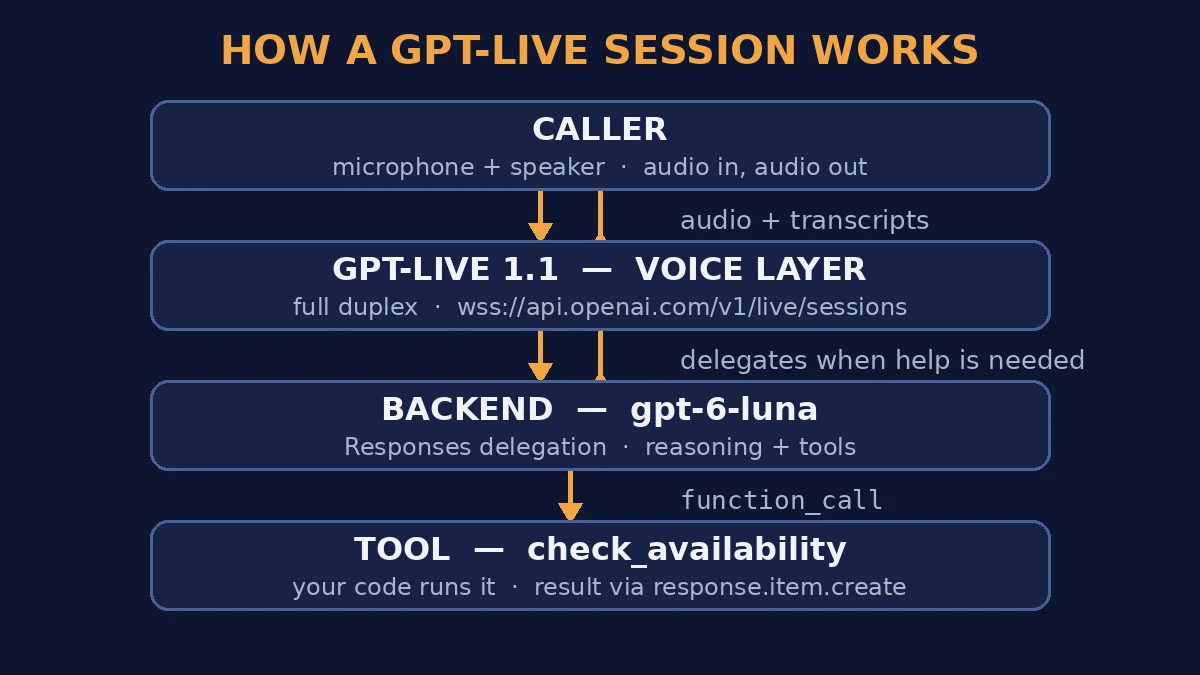
You choose where the backend lives when you create the session, and the choice is fixed for that session:
| Delegation mode | Backend runs | Use it when |
|---|---|---|
| Responses delegation | An OpenAI Responses model you pick, hosted by OpenAI | You want GPT-Live to manage the backend requests and return results to the conversation |
| Client delegation | Any model, agent, or service your application runs | You need your own workflow, multiple backends, or to review results before they reach the caller |
Either way, your application owns permissions, confirmations, business records, and task state. GPT-Live never executes your tools itself — it asks, your code runs them, and the result comes back through the session.
What changed in 1.1: OpenAI says the model transcribes speech more accurately, holds a steadier accent and voice across languages, follows instructions more reliably, and completes delegated tasks more reliably than GPT-Live-1. OpenAI has published no benchmark numbers for those claims, so treat them as vendor claims until you measure them on your own calls. The concrete, checkable change is standby, covered in step 7.
What you'll need#
- An OpenAI API key from a project with API access. Keep it on your server — never ship it in frontend code. The Live WebSocket takes it as a
Bearerheader. - Python 3.11 or newer and the
websocketspackage (pip install websockets). The client uses only the standard library besides that. - A WAV file to speak with — mono PCM16 at 24 kHz. Step 8 shows how to generate a test file; for a real call, record your microphone at 24 kHz or resample with ffmpeg.
- A few cents of credit. Voice time is $0.05 a minute active and $0.02 a minute on standby, billed per second. A 30-second test session costs about $0.03 of voice time, plus a few cents of backend tokens for the
gpt-6-lunamodel used here.
One decision before you start: this tutorial connects over WebSocket from a Python server. That is the easiest path to a working agent you can test from a terminal. The browser path uses WebRTC instead, and standby — the billing feature — only applies to WebRTC sessions. Step 7 shows the exact fields for that deployment, so you get both: a working agent today, and the cheaper idle rate when you ship the browser version.
2. Create the session#
Connect to wss://api.openai.com/v1/live/sessions with your API key in the Authorization header. The first thing you send is session.start — the whole session configuration in one event. Wait for session.started before sending audio; it returns the session ID, an expiry timestamp, and the resolved configuration.
Here is the configuration for the booking assistant, exactly as the client sends it. The model, the voice prompt, the audio format, and the delegation mode are all chosen here — the model, voice, audio format, and delegation mode cannot be changed mid-session, so get them right at startup.
SESSION = {
    "model": "gpt-live-1.1",
    "instructions": VOICE_INSTRUCTIONS,   # see step 6 for the full text
    "audio": {
        "format": {"type": "audio/pcm", "rate": 24000},
        "output": {"voice": "marin"},
    },
    "delegation": {
        "type": "responses",
        "responses": {
            "model": "gpt-6-luna",
            "instructions": BACKEND_INSTRUCTIONS,
            "tools": [CHECK_AVAILABILITY_TOOL],  # see step 5
            "tool_choice": "auto",
            "parallel_tool_calls": False,
            "max_output_tokens": 1024,
        },
    },
}
Field by field:
model— required.gpt-live-1.1is the current voice model; switching fromgpt-live-1is a model-name swap, but it requires a new session.instructions— the voice prompt: role, speaking style, and when to ask the backend for help. Up to 16,384 tokens.audio.format— WebSocket only.audio/pcmat 24,000 Hz applies to input and output alike for the session. WebRTC negotiates its format during connection setup, so leave this out of WebRTC requests.audio.output.voice— the default voice ismarin. GPT-Live also offers named voices such asquartz,vesper,willow,gleam, andbrise.delegation—type: "responses"hands the backend to the Responses model indelegation.responses. Omit it or set it tonulland you get client delegation instead. The backendmodelis required;max_output_tokensmust be at least 16 when set.
Two limits worth knowing now: the session holds a 128,000-token default context window, and startup history (input) accepts up to 128 messages and 8,192 combined tokens.
3. Stream audio in, capture audio out#
Audio goes over the same WebSocket as the JSON events. Input is base64-encoded raw PCM — no WAV header — sent as session.input_audio.append events. Chunk it into 100 ms frames (4,800 bytes at 24 kHz mono 16-bit) and pace the sends in real time, or the model receives the whole file at once and the turn timing breaks.
FRAME_BYTES = 4800  # 100 ms of mono PCM16 at 24 kHz

def load_wav_frames(path):
    """Read a mono PCM16 24 kHz WAV and split it into 100 ms frames."""
    with wave.open(path, "rb") as wav:
        if wav.getnchannels() != 1:
            raise ValueError(f"{path}: expected mono audio")
        if wav.getsampwidth() != 2:
            raise ValueError(f"{path}: expected 16-bit samples")
        if wav.getframerate() != 24000:
            raise ValueError(f"{path}: expected 24 kHz")
        pcm = wav.readframes(wav.getnframes())
    return [pcm[i:i + FRAME_BYTES] for i in range(0, len(pcm), FRAME_BYTES)]

async def stream_audio(ws, frames, state):
    """Send the WAV in 100 ms frames, paced in real time."""
    await state.started.wait()  # only after session.started
    for i, frame in enumerate(frames):
        await ws.send(json.dumps({
            "type": "session.input_audio.append",
            "event_id": f"audio_{i}",
            "audio": base64.b64encode(frame).decode("ascii"),
        }))
        await asyncio.sleep(0.1)
The reply comes back as session.output_audio.delta events. Watch the field name — this is the one asymmetry that bites everyone the first time: input appends carry their audio in a field called audio, but output deltas carry theirs in a field called delta. Decode each delta in delivery order and append it to a buffer; at the end, write it out as a WAV with the same format.
elif etype == "session.output_audio.delta":
    # Field is "delta", not "audio" (input appends use "audio").
    state.audio_out += base64.b64decode(event["delta"])
Output audio deltas on the primary WebSocket have no timing fields and no audio-done event — keep playback separate from transcript timing, and treat the byte stream as one continuous reply.
4. Read the conversation as it happens#
Everything the session does arrives as server events on the same socket. The five you need in a first agent:
session.input_transcript.delta/session.output_transcript.delta— text fragments for the caller and the assistant, each withstart_msandend_mson the session timeline. Append fragments exactly as received, preserving spaces. There is no event that marks a completed turn, so your application decides how to group them for display — and because GPT-Live is full duplex, update the two speakers' captions independently.session.delegation.created— fires when GPT-Live hands work to the backend. It carries metadata (id,target,response_id), not the task text; use the transcript and your application state to know what was asked.session.usage.updated— cumulative audio usage:seconds,active_seconds, andpaused_seconds. This is where standby shows up in your own numbers.session.closed— the terminal event, with the closereason(close_requested,expired,content,remote_hangup,connection_lost) and final usage. A connection closing without this event does not confirm successful finalization.error— includesclient_event_idwhen the error belongs to one of your commands, so you can match it to the send that caused it.
The receive loop is a single dispatch. Muting is a command, not a disconnect: send session.input_audio.mute to stop the model hearing input without ending the session, and wait for session.input_audio.muted before treating it as accepted.
async def receive_loop(ws, state):
    """Read server events until the session closes."""
    async for raw in ws:
        await handle_event(ws, state, json.loads(raw))
        if state.closed:
            return
When the session ends — either the time budget runs out or you send session.close — wait for session.closed before writing out the reply file, so the final usage figures land first.
5. Give it a backend that does real work#
The voice model is deliberately kept out of the business logic. The backend model — gpt-6-luna here, gpt-6-sol for heavier tasks — receives the conversation context, reasons, and picks tools. Your application still runs the custom functions, checks permissions, and returns results. Register the tool in the delegation config:
CHECK_AVAILABILITY_TOOL = {
    "type": "function",
    "name": "check_availability",
    "description": "Check which tables are free on a given date and party size.",
    "parameters": {
        "type": "object",
        "properties": {
            "date": {"type": "string", "description": "Date as YYYY-MM-DD."},
            "party_size": {"type": "integer", "description": "Number of guests."},
            "time": {"type": "string", "description": "Preferred time, e.g. '19:30'."},
        },
        "required": ["date", "party_size"],
        "additionalProperties": False,
    },
    "strict": False,
}

# In-memory table book for the demo. A real agent queries the booking system.
AVAILABILITY = {
    ("2026-11-27", 2): ["18:00", "19:30", "21:00"],
    ("2026-11-27", 4): ["18:30", "20:00"],
    ("2026-11-28", 2): ["19:00", "20:30"],
}

def check_availability(date, party_size, time=None):
    slots = AVAILABILITY.get((date, party_size), [])
    if time:
        slots = [s for s in slots if s == time]
    return json.dumps({"date": date, "party_size": party_size,
                       "available_slots": slots})
When the backend wants a tool, the call arrives wrapped in a response.event envelope: the outer event carries the delegation_id, and the nested event is a Responses streaming event. Collect completed calls from nested response.output_item.done events — the finished item carries call_id, name, and arguments. An arguments-done event alone is not enough to identify the call, and the forwarded lifecycle snapshots (including response.completed) carry empty output arrays, so read the individual output-item events.
async def handle_function_call(ws, state, item):
    """Execute a delegated function call and return its result."""
    call_id, name = item["call_id"], item["name"]
    args = json.loads(item["arguments"])
    output = check_availability(**args) if name == "check_availability" \
        else json.dumps({"error": f"unknown tool {name}"})
    state.tool_calls += 1
    await ws.send(json.dumps({
        "type": "response.item.create",
        "event_id": f"tool_result_{state.tool_calls}",
        "item": {"type": "function_call_output",
                 "call_id": call_id, "output": output},
    }))
    # Appending an item alone does not resume the backend; continue it.
    await ws.send(json.dumps({
        "type": "response.create",
        "event_id": f"continue_{state.tool_calls}",
    }))
Three rules govern this flow. First, submit a result for every pending call, then send response.create — appending the item alone does not resume the backend, and missing results produce a tool_outputs_required error. Second, match results to calls with call_id. Third, the Live response.create uses the backend configuration stored in the session; it does not accept a standalone Responses request body. Hosted tools — web search, file search, Code Interpreter, hosted shell, image generation — can also be registered in delegation.responses.tools, and Responses runs those itself without your code.
If your session config is invalid, Live validates Responses settings asynchronously after startup: session.started does not wait for validation, so listen for an error with code responses_validation_failed and fix the setting with session.update. The session stays open while you correct it.
6. Prompt it properly#
GPT-Live needs two prompts, and they do different jobs. The voice prompt (session.instructions) covers the assistant's role, speaking style, and when to ask the backend for help. The backend prompt (delegation.responses.instructions) holds the procedures, business rules, and tool workflows. Keep detailed instructions with the backend; keep the voice prompt short and conversational.
OpenAI's prompting guide supplies a template for gpt-live-1.1. Keep its three policy headings and customize the text beneath them:
You are Aria, a calm, friendly voice assistant for Bistro Lumiere,
a neighbourhood restaurant. Speak warmly and naturally, at an unhurried pace.
Be clear and direct, not overly cheerful.

Backchannel policy: Use moderate backchannels. Acknowledge naturally without
competing with the main response.

Interruption policy: Stop speaking when the user interrupts. Listen to what
they say.

Delegation policy:
Backend tools:
- Appointments: check table availability and hold a table.
Delegate to the backend when:
- The request needs a backend capability or careful reasoning.
- A correction changes work already requested.
Do not delegate when:
- You can answer from the conversation or a still-current result.
- You need a brief clarification to understand the request.
Delegate to the backend before giving an answer that depends on backend work.
Do not guess the result while waiting.
Two details matter. First, the plain-language "Delegate to the backend" wording is the 1.1 form — GPT-Live-1 used special tokens for the same instruction, so if you are migrating a 1.0 prompt, replace them. Second, describe the backend's capabilities in plain language in the voice prompt, but put the function names and tool schemas in the backend configuration (step 5) — the voice model uses the description to decide when to delegate, the backend uses the schema to decide how.
Mid-call, you can steer the conversation without starting a new session: session.instructions.append adds trusted instructions, session.thinking.append adds silent factual context, and session.commentary.append supplies information for the model to say aloud. Each takes plain-string content of up to 500 tokens and a delegation_id — use null for session-wide context. A transcript-based guardrail, for example, can append an instruction to redirect the conversation while speech continues.
7. Cut the idle bill with standby#
Standby is the one part of this release that changes your bill rather than your code path. When a WebRTC session goes quiet for a configured stretch, OpenAI pauses inference but keeps the connection, the session ID, and the conversation history. Speech wakes it again. Two session fields do the work:
{
  "model": "gpt-live-1.1",
  "wake_policy": {"type": "speech", "vad_threshold": 0.6},
  "idle_timeout_s": 30,
  "instructions": "Wait for the caller to speak before you respond."
}
wake_policy.type: "speech"— inference waits for voice activity before starting, and restarts on speech after each pause.idle_timeout_s— a whole number from 5 to 60. After that many seconds without an input or output transcript, the server emitssession.pausedand the session drops to the standby rate. Omit it and inference stays active after the first wake until the session ends.wake_policy.vad_threshold— optional, 0 to 1, default 0.5. Higher values need stronger evidence of speech, which cuts accidental wake-ups from background noise but can miss a quiet voice. It applies at the first wake and after every pause.
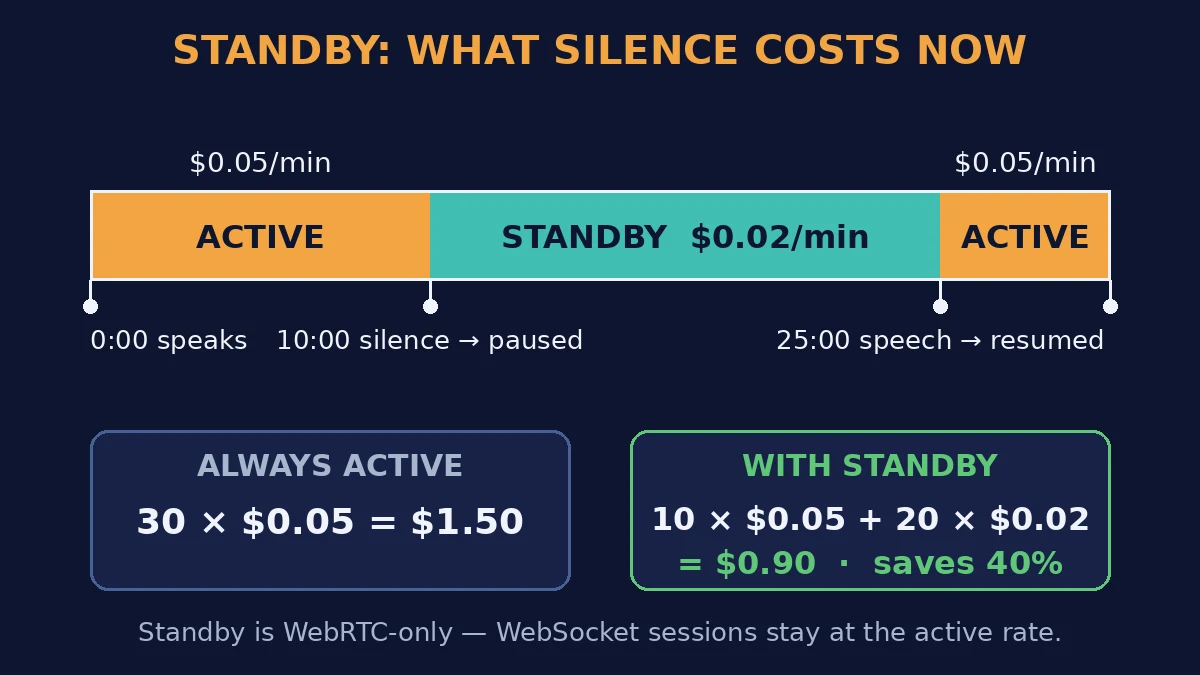
The arithmetic is straightforward. Take a 30-minute support session with ten minutes of real conversation and twenty minutes of quiet: kept active the whole time, it costs 30 × $0.05 = $1.50. With the quiet time in standby, it costs 10 × $0.05 + 20 × $0.02 = $0.90 — 40% cheaper overall, since the 60% applies to the idle minutes, not the whole call. Both rates are billed per second, and backend model and tool usage is billed separately either way.
Three caveats before wiring it up. First, standby applies to WebRTC sessions only — the WebSocket client in this tutorial bills the active rate for every second, quiet or not, so treat standby as a deployment decision, not a code change. Second, OpenAI warns the first reply after a short utterance may be slower coming out of standby, so measure the resume delay against your latency budget. Third, the microphone track must stay active during standby: the idle timer measures silence, not a muted microphone, and muting still bills at the active rate.
8. Test it without spending a dollar#
The client in this tutorial was verified against a local mock server that replays a canned Live session — it asserts the session.start payload (model, audio format, delegation, tool registration), then sends transcript deltas, a function call, reply audio, usage, and session.closed, and checks that the client answers the tool call correctly. That verifies every line of the client except the live handshake with OpenAI, which needs your key.
Run the same test yourself:
pip install websockets
python3 make_test_wav.py        # 2 s of 440 Hz sine, mono PCM16 24 kHz
python3 mock_live_server.py &   # replays a canned session on ws://127.0.0.1:8765
OPENAI_API_KEY="sk-test-dummy" python3 live_voice_agent.py \
    --wav question.wav --seconds 8 --url ws://127.0.0.1:8765 --out reply.wav
Expected output: the session starts, the caller transcript reads "Do you have a table for two on Friday?", the tool runs check_availability and returns the 19:30 slot, the assistant replies "Yes, Friday at 7:30 works. Shall I hold it?", and reply.wav holds the mock reply audio. Then swap the dummy key for a real one, drop the --url flag, and point --wav at a real recording:
export OPENAI_API_KEY="sk-..."
python3 live_voice_agent.py --wav question.wav --seconds 30
A 30-second live test costs about $0.03 of voice time plus the backend tokens. If the session fails to start, the first thing to check is the error event: a responses_validation_failed code means the delegation config needs fixing, not the connection.
Which approach should you use?#
| Choice | Pick this | Pick the other |
|---|---|---|
| GPT-Live vs. a chained pipeline (STT → LLM → TTS) | Natural turn-taking matters: interruptions, backchannels, and talking over each other are the product | You need full control over each stage, custom voices per stage, or an on-premise component |
| Responses vs. client delegation | Your workflow fits the Responses tools and settings; you want OpenAI to manage the backend loop | You need your own agent harness, multiple backends, or to validate results before the caller hears them |
| WebSocket vs. WebRTC | Server-side agent, terminal testing, telephony gateways, or any non-browser client | Browser or mobile app — and it is the only transport that gets standby billing |
gpt-6-luna vs. gpt-6-sol backend | gpt-6-luna for routine lookups and tool routing | gpt-6-sol when the backend task itself needs heavier reasoning |
Production checklist#
- Keys stay server-side. The browser path creates the session on your server and hands the browser an ephemeral key — the project key never reaches the client.
- Cap every session. A time budget (the
--secondsflag here) plus thesession.usage.updatedevents give you a cost kill-switch before a runaway call does. - Validate before you execute. The backend proposes the tool call; your code checks permissions and required confirmations, then runs it. GPT-Live speaks the result — it never sees your credentials.
- Handle the async validation error.
responses_validation_failedarrives aftersession.started; correct the setting withsession.updateinstead of restarting the call. - Respect the immutable fields. Model, instructions, audio, and delegation mode are set at startup.
session.updateonly changes the Responses delegation settings — to switch modes, start a new session. - Plan for the standby resume. If you ship on WebRTC with standby on, test the first-reply delay after a pause against your latency budget, and keep the microphone track live.
The takeaway#
GPT-Live-1.1's real change is architectural, not cosmetic: the voice model runs the conversation and a backend you choose does the work, over one WebSocket and one session configuration. Build the client in the order this tutorial did — session first, audio second, transcripts third, tools last — and test it against a mock before you spend anything. Then, when you ship the browser version, turn on standby: two fields, wake_policy and idle_timeout_s, and the quiet minutes that used to cost $0.05 each cost $0.02.
Sources#
- OpenAI API changelog — November 19, 2026 entry:
gpt-live-1.1in the API and standby for GPT-Live-1 and GPT-Live-1.1 WebRTC sessions. - OpenAI API docs — Getting started with GPT-Live — the two-layer architecture, delegation modes, and the WebRTC quickstart.
- OpenAI API docs — Managing GPT-Live sessions — configuration fields, voice options, transcript deltas, and the standby configuration.
- OpenAI API docs — Delegation and tools in GPT-Live — Responses delegation config, the tool-result flow, and validation errors.
- OpenAI API docs — Prompting GPT-Live — the instruction template and the 1.1 delegation wording.
- OpenAI API reference — Live primary WebSocket — the
session.startpayload, event shapes, and theaudiovs.deltafield asymmetry. - AI Frontier Post — OpenAI ships GPT-Live-1.1 to the API — and idle voice sessions now cost 60% less — our news coverage of the release, November 22, 2026.