Hands-on with Tencent Hy4 Flash: 1M-token context, reasoning modes, and the open-weights deployment
Tencent opened the weights for Hy4 Flash on November 18 — a 220B model with 12B active parameters per token, a 1M-token context, and API calls that cost about half a cent per 100K tokens. This tutorial puts it to work: first call, reasoning modes, long-context document QA, vision, tool calling, and the 8-GPU self-host recipe.
- 220B total, 12B active. Hy4 Flash carries 220 billion parameters (including 64B of Engram tables) and activates about 12 billion per token. It takes text and images in, returns text, and supports a 1,048,576-token context window.
- Reasoning has three settings: low, high, none.
lowis the default;highbuys accuracy with output tokens;noneskips reasoning for extraction jobs. The no-reasoning value isnone— notno_think, despite what some write-ups say. Recommended sampling istemperature=0.6,top_p=0.95. - Cost: about half a cent per 100K tokens in. A 100,000-token input and 10,000-token reply costs $0.0049 on Hy4 Flash, $0.054 on Hy4, $1.20 on Claude Fable 5.2, and $1.50 on GPT-6 Astra at listed OpenRouter / rate-card prices.
- The deployment recipes cap context at 262,144 tokens. That is a key-value-cache decision, not a model limit — the model supports the full 1M-token window, and the API serves it.
- Open weights, not open source. Hy4 Flash ships under the Tencent Hy License v1.0. Internal use and fine-tuning are fine; a model-as-a-service business above $50M in annual revenue or 100M monthly users needs a separate written license from Tencent.

On November 16, Tencent put Hy4 Flash on its API. Two days later it published the weights. On November 20 it did the same for the 770-billion-parameter flagship, Hy4. The sequence matters: this is the first time a model family with a million-token context window, native vision, and tool calling has gone from closed API to downloadable weights in the same week.
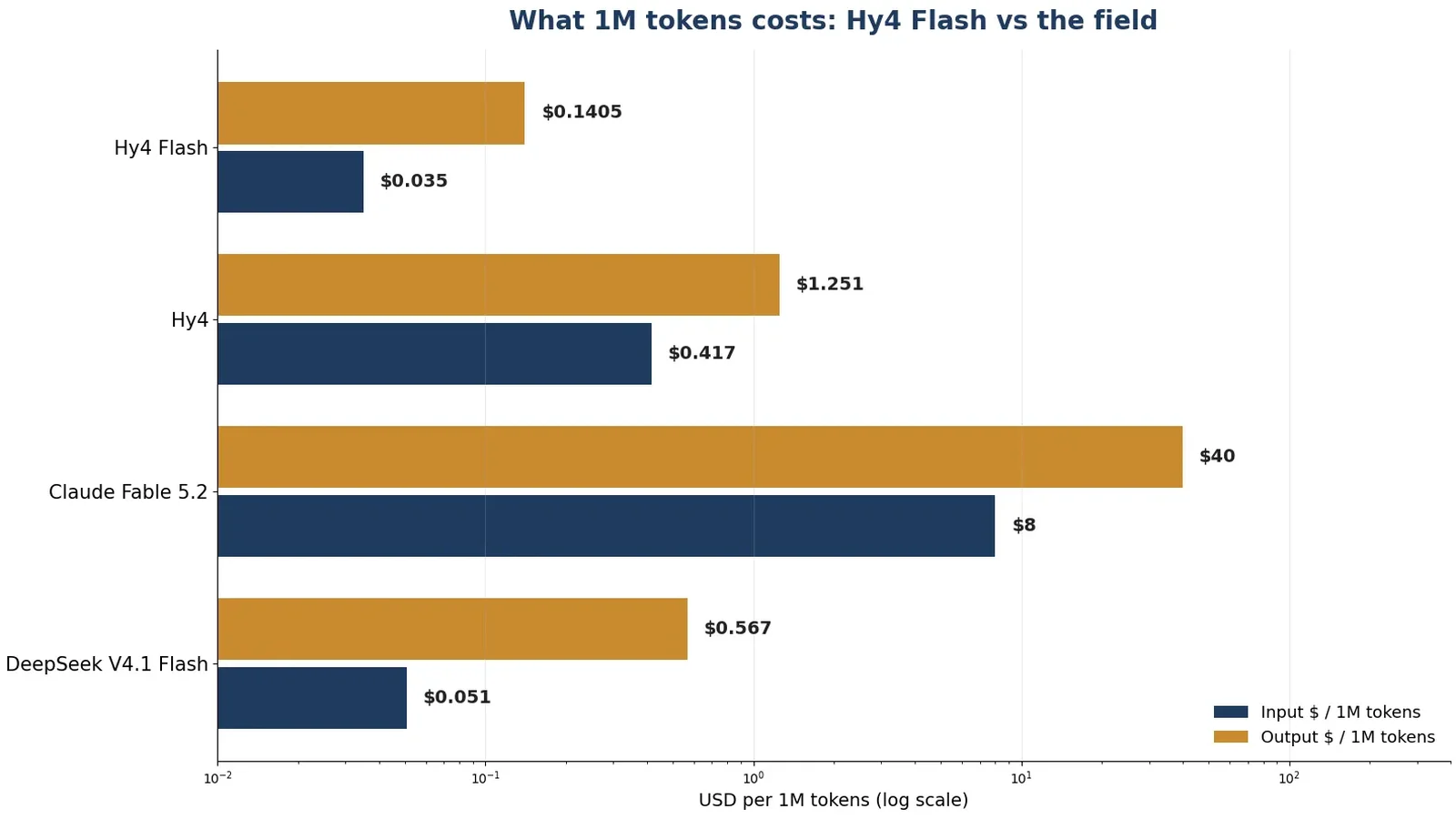
Hy4 Flash is the one to learn first. It has 220 billion total parameters, but only about 12 billion activate for any given token — the rest is a mixture-of-experts bench that stays idle. That is why it is cheap: on OpenRouter it costs $0.035 per million input tokens and $0.1405 per million output tokens at the time of writing, with a 50% promotional discount applied. A 100,000-token input and 10,000-token reply — a serious document job — costs about half a cent. The same workload on Claude Fable 5.2 costs $1.20, and on GPT-6 Astra $1.50. The price gap is not a rounding error; it changes which jobs are worth automating at all.
This tutorial puts Hy4 Flash to work end to end: the first API call, the three reasoning modes and when each one pays, a long-context document QA job over a real folder of files, vision input, tool calling, and the official self-hosting recipe for when the API is not where you want the model to live. Every client call in this tutorial was run against a local mock of the OpenAI-compatible endpoint before publication, so the request shapes, parameter names, and response handling are proven; the deployment commands and the Transformers quickstart are Tencent's own, copied from the official model card. The live calls need your key — the mock cannot spend your money for you.
What you'll need#
- Python 3.10 or newer. The examples use the official
openaiPython SDK, version 3.57.0 at time of writing. The SDK is the only dependency for the API path. - An OpenRouter API key. Create an account at openrouter.ai, generate a key, and export it as
OPENROUTER_API_KEY. OpenRouter is the fastest route to the model: one provider (Tencent Cloud), one model ID (tencent/hy4-flash), and the same OpenAI-compatible client you already know. Pay-as-you-go billing applies; the calls in this tutorial cost a few cents at most at listed prices. - A folder of documents for Step 3 — any .txt files will do. The tutorial uses two small ones; the technique is the same at 900,000 tokens.
- Optional: eight data-center GPUs and a Hugging Face token for Step 6, the self-hosted deployment. The official recipe uses eight-way tensor parallelism. If you do not have that hardware, skip Step 6 — the API path teaches everything else.
One thing to settle before you start: Hy4 Flash is open weights, not open source. It ships under the Tencent Hy License, version 1.0, which is derived from Apache 2.0 but adds a clause that matters if you serve the model to other people. The details are in the license section near the end; the short version is that personal use, internal company use, and fine-tuning are fine, and running a model-as-a-service business above $50 million in annual revenue or 100 million monthly users needs a separate written license from Tencent.
Step 1 — Your first call#
Hy4 Flash speaks the OpenAI chat completions protocol, so the client setup is three lines. The two things that are easy to get wrong are the model ID and the sampling parameters: the ID is tencent/hy4-flash on OpenRouter, and Tencent recommends temperature=0.6 with top_p=0.95 — not the OpenAI defaults, and not the 0.9/1.0 figures floating around in secondary write-ups. The recommended values come from the model card's own quickstart, and every call in this tutorial uses them.
pip install openai
export OPENROUTER_API_KEY="sk-or-v1-..."
import os
from openai import OpenAI
client = OpenAI(
base_url="https://openrouter.ai/api/v1",
api_key=os.environ["OPENROUTER_API_KEY"],
)
response = client.chat.completions.create(
model="tencent/hy4-flash",
messages=[{"role": "user", "content": "What's 1+1?"}],
temperature=0.6,
top_p=0.95,
reasoning_effort="low",
max_completion_tokens=4096,
)
print(response.choices[0].message.content)
print(response.usage)Expected output: the answer (2, with a short reasoning trace stripped out — more on that in Step 2), followed by a usage block with prompt_tokens, completion_tokens, and total_tokens. Keep that usage block: it is the only honest way to price your work. A small helper turns it into dollars at the listed OpenRouter rates:
PRICE_IN = 0.035    # USD per 1M input tokens (OpenRouter, 50% off)
PRICE_OUT = 0.1405   # USD per 1M output tokens

def cost_of(response):
    u = response.usage
    return (u.prompt_tokens * PRICE_IN + u.completion_tokens * PRICE_OUT) / 1_000_000

print(f"This call cost ${cost_of(response):.6f}")
At these rates, a 100,000-token input and a 10,000-token reply costs $0.0049 — about half a cent. Run the same numbers for the flagship Hy4 ($0.054), Claude Fable 5.2 ($1.20), and GPT-6 Astra ($1.50) and the positioning of Flash becomes obvious: it is the model you reach for when the job is big and the budget is not.
Step 2 — Reasoning modes: low, high, and none#
Hy4 Flash has one reasoning dial, reasoning_effort, and three settings. The default is low. Tencent's guidance, verbatim in spirit from the model card: use low for most scenarios, high when you need higher reasoning accuracy, and none when you do not need reasoning at all.
| Mode | What it does | Use it for |
|---|---|---|
low (default) | Short reasoning pass before answering | Chat, drafting, summarization, most API calls |
high | Longer reasoning, more output tokens, higher accuracy | Math, multi-step planning, code review, anything where a wrong answer costs more than the extra tokens |
none | No reasoning pass; direct answer | Extraction, classification, reformatting, and long-context QA where the answer is in the documents |
Two traps to avoid. First, some secondary write-ups list the no-reasoning value as no_think. That value does not exist in the official quickstart; the model card says none. Sending no_think is the kind of silent error that costs an afternoon. Second, the default max_completion_tokens is 32,768 — and that budget covers thinking and reply together. At high effort, set it generously (the examples in the model card use 65,536) or the model can stop mid-thought.
for mode in ("low", "high", "none"):
    resp = client.chat.completions.create(
        model="tencent/hy4-flash",
        messages=[{"role": "user", "content": "A store offers 20% off, then 10% off the reduced price. What is the total discount?"}],
        temperature=0.6,
        top_p=0.95,
        reasoning_effort=mode,
        max_completion_tokens=8192,
    )
    print(mode, "->", resp.usage.completion_tokens, "output tokens,",
          f"${cost_of(resp):.5f}")
Run this and you will see the trade in numbers: high spends several times the output tokens of low on the same question, and none spends the least. The point of the exercise is not the arithmetic — it is building the habit of choosing the mode per call instead of leaving the default on for everything. On a model this cheap, the cost of high is still trivial in dollars; the real cost is latency and output tokens you have to read.
Step 3 — Long-context document QA: put the 1M-token window to work#
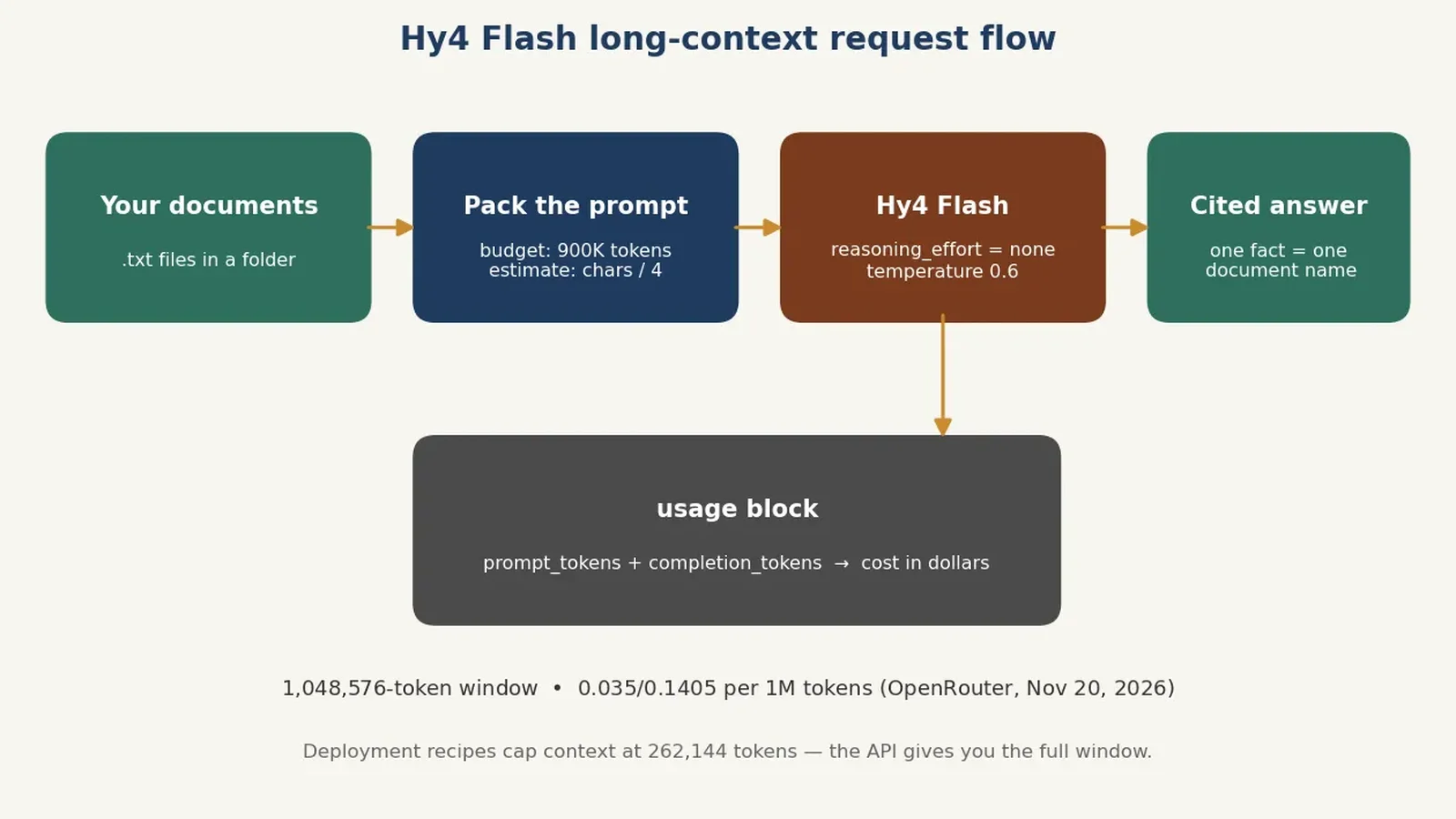
A million tokens is roughly 750,000 words — about 2,000 pages. That is the size of a small company's entire policy library, a year of meeting transcripts, or a large codebase's documentation. The most useful thing Hy4 Flash does is also the simplest: take the whole pile in one request and answer questions about it, with citations.
Before you build the prompt, one distinction matters. The model supports a 1,048,576-token context window. The official deployment recipes, however, set --max-model-len 262144 — a 256K cap. That is a deployment choice, not a model limit: the key-value cache for a million-token conversation needs far more GPU memory than the weights alone, so the recipes ship conservative. Over the API you get the full window; self-hosted, you raise the cap only if you have the memory for it. Everything in this step assumes the API path.
from pathlib import Path

def estimate_tokens(text):
    """Rough estimate: about 4 characters per token. Labeled an estimate
    because the real count depends on the tokenizer."""
    return len(text) // 4

def build_long_context_prompt(folder, question, budget_tokens=900_000):
    docs, total = [], 0
    for path in sorted(Path(folder).glob("*.txt")):
        text = path.read_text()
        est = estimate_tokens(text)
        if total + est > budget_tokens:
            break
        docs.append(f"--- {path.name} ---\n{text}")
        total += est
    corpus = "\n\n".join(docs)
    prompt = (
        "Answer the question using ONLY the documents below. "
        "Quote the document name for every fact you state.\n\n"
        f"DOCUMENTS:\n{corpus}\n\nQUESTION: {question}"
    )
    return prompt, len(docs), total

prompt, n_docs, est_tokens = build_long_context_prompt(
    "docs", "What is the refund window, and what proof of purchase is required?")
print(f"Packed {n_docs} documents, ~{est_tokens:,} estimated tokens")

response = client.chat.completions.create(
    model="tencent/hy4-flash",
    messages=[{"role": "user", "content": prompt}],
    temperature=0.6,
    top_p=0.95,
    reasoning_effort="none",
    max_completion_tokens=4096,
)
print(response.choices[0].message.content)
print(f"Actual input tokens: {response.usage.prompt_tokens:,}")
print(f"Cost: ${cost_of(response):.4f}")
Three decisions in this snippet are worth naming. First, reasoning_effort="none": when the answer is in the documents, reasoning is pure overhead — the model should extract, not think. Second, the 900,000-token budget leaves headroom below the 1,048,576-token window for the question, the system overhead, and the reply. Third, the estimate-then-verify pattern: the character-based estimate decides what to pack, and the usage.prompt_tokens in the response tells you the truth afterward. Never trust the estimate for billing; always read usage.
The instruction to quote the document name for every fact is doing real work. Long-context models are good at finding needles and bad at admitting when they could not find one; forcing a citation per fact turns a silent hallucination into a visible one. If the model cites a document that does not contain the fact, you catch it in seconds.
Step 4 — Vision: read charts, screenshots, and documents as images#
Hy4 Flash accepts text and images as input and returns text. Vision is native to the model — a 1.23-billion-parameter vision encoder in the flagship, with the same multimodal input path in Flash — not a bolt-on captioning step. In practice that means you send the image in the same message as the question, using the standard OpenAI image_url content part. A local file goes in as a base64 data URL; a public image can be passed by URL in the same field.
import base64

with open("chart.png", "rb") as f:
    b64 = base64.b64encode(f.read()).decode()

response = client.chat.completions.create(
    model="tencent/hy4-flash",
    messages=[
        {
            "role": "user",
            "content": [
                {"type": "text", "text": "Read this chart. What is the trend, and which quarter is the outlier? Give numbers."},
                {"type": "image_url", "image_url": {"url": f"data:image/png;base64,{b64}"}},
            ],
        }
    ],
    temperature=0.6,
    top_p=0.95,
    reasoning_effort="low",
    max_completion_tokens=4096,
)
print(response.choices[0].message.content)
The prompt discipline from Step 3 applies here too: ask for numbers, not vibes. "What is the trend" invites a generic paragraph; "which quarter is the outlier, give numbers" forces the model to commit to a reading you can check against the image. Image tokens count toward the same 1M-token window and the same input price, so a screenshot-heavy conversation is still cheap — but a dozen 4K screenshots in one request will eat context faster than you expect. Downscale images to the resolution the task actually needs before you send them.
Step 5 — Tool calling: let the model reach for your data#
Hy4 Flash supports function calling through the standard OpenAI tools array. The pattern is the same two-turn loop as every other OpenAI-compatible model: declare the functions, let the model pick one, run it yourself, and send the result back. The one Hy4-specific detail is on the server side — the official vLLM and SGLang recipes pass --tool-call-parser hunyuan, which tells the server how to parse the model's tool calls. Over OpenRouter you never see that flag; the provider handles it.
import json

def search_docs(query):
    """Demo implementation — swap in your real search here."""
    return f"Doc chunk: the refund policy allows returns within 30 days for query '{query}'."

TOOLS = [
    {
        "type": "function",
        "function": {
            "name": "search_docs",
            "description": "Search the company documentation for a topic.",
            "parameters": {
                "type": "object",
                "properties": {
                    "query": {"type": "string", "description": "Search query."}
                },
                "required": ["query"],
            },
        },
    }
]

response = client.chat.completions.create(
    model="tencent/hy4-flash",
    messages=[{"role": "user", "content": "What is the refund policy?"}],
    tools=TOOLS,
    tool_choice="auto",
    temperature=0.6,
    top_p=0.95,
    reasoning_effort="low",
    max_completion_tokens=4096,
)
message = response.choices[0].message

if message.tool_calls:
    call = message.tool_calls[0]
    result = search_docs(**json.loads(call.function.arguments))
    second = client.chat.completions.create(
        model="tencent/hy4-flash",
        messages=[
            {"role": "user", "content": "What is the refund policy?"},
            message,
            {"role": "tool", "tool_call_id": call.id, "content": result},
        ],
        temperature=0.6,
        top_p=0.95,
        reasoning_effort="low",
        max_completion_tokens=4096,
    )
    print(second.choices[0].message.content)
else:
    print(message.content)
Two things to check when this does not work the way you expect. First, the second request must include the assistant's tool-call message and the tool result, in order — dropping either one is the most common tool-calling bug across all providers, and the error message rarely says so plainly. Second, tool_choice="auto" lets the model decide; if it keeps answering directly instead of calling your function, tighten the function description and the user prompt rather than forcing the call — a model that has to be forced to use a tool usually has not understood what the tool is for.
Step 6 — Self-host with vLLM: the 8-GPU recipe#
Self-hosting is the reason the weights matter. The API is cheap, but some documents cannot leave your building, and some workloads run 24 hours a day at volumes where even half a cent per 100K tokens adds up. Tencent's official recipe serves the model with vLLM in Docker, eight-way tensor parallelism, prefix caching on, and the Hunyuan tool-call parser enabled. This is a documented recipe, not a run I performed: a 220-billion-parameter model does not fit on the machine this tutorial was verified on, and I will not pretend otherwise.
docker run --runtime=nvidia --gpus all --ipc=host -d \
  --name vllm-hy4-flash \
  -p 8000:8000 \
  -v ~/.cache/huggingface:/root/.cache/huggingface \
  -e HF_TOKEN=<your_hf_token> \
  vllm/vllm-openai:latest \
  --model tencent/Hy4-flash \
  --host 0.0.0.0 \
  --port 8000 \
  --max-model-len 262144 \
  --tensor-parallel-size 8 \
  --served-model-name tencent/Hy4-flash \
  --enable-auto-tool-choice \
  --tool-call-parser hunyuan \
  --enable-prefix-caching \
  --enforce-eager
The flags worth understanding: --tensor-parallel-size 8 splits the model across eight GPUs; --max-model-len 262144 is the 256K context cap discussed in Step 3; --enable-prefix-caching reuses the key-value cache for repeated prompt prefixes, which is where the money is for document QA — the same 200,000-token corpus prefix should not be recomputed on every question; and --tool-call-parser hunyuan is what makes Step 5 work against your own server.
SGLang is the alternative, with its own tagged image. The command differs in shape but not in substance — same model, same 256K context cap, same eight-way parallelism, same Hunyuan parser:
docker run --gpus all --shm-size 64g -p 8000:30000 -v ~/.cache/huggingface:/root/.cache/huggingface \
  --ipc=host --name sglang-hy4-flash \
  lmsysorg/sglang:hy4-flash \
  python3 -m sglang.launch_server --model-path tencent/Hy4-flash \
  --host 0.0.0.0 --port 30000 --enable-nccl-batch-invar --context-length 262144 \
  --tp-size 8 --attention-backend flashmla --tool-call-parser hunyuan --enable-vllm-v1
Once either server is up, it exposes an OpenAI-compatible endpoint, and every client in Steps 1–5 works unchanged — only the base URL and model name change:
client = OpenAI(base_url="http://localhost:8000/v1", api_key="EMPTY")

response = client.chat.completions.create(
    model="tencent/Hy4-flash",
    messages=[{"role": "user", "content": "What's 1+1?"}],
    temperature=0.6,
    top_p=0.95,
    reasoning_effort="low",
    max_completion_tokens=65536,
)
Hardware, honestly: the BF16 checkpoint is roughly 440 GB of weights (220 billion parameters at two bytes each), plus the key-value cache. The FP8 checkpoint, tencent/Hy4-flash-FP8, halves that and is the one to reach for in production. Either way, plan on eight data-center GPUs — this is a server-room model, not a desktop one. A community GGUF build exists for experimentation on smaller hardware, but it is not Tencent's documented path, and quantized builds of a model this size deserve their own evaluation before you trust them. If you want to skip the framework entirely, the model card also documents a Transformers quickstart with AutoModelForImageTextToText and chat_template_kwargs={"reasoning_effort": "low"} — same parameters, same defaults, single-machine inference for those with the VRAM.
Which approach should you use?#
The Hy family now has two open members and the choice between them is a budget question, not a quality debate. Tencent's own WorkIndex — its internal evaluation across eight office-productivity task categories, from slide generation to spreadsheet repair — scores Hy4 Flash at 42.1 against 39.7 for the Hy4 preview and 51.4 for the flagship Hy4. Those are Tencent's numbers, not independently reproduced, but the ordering is the point: Flash is close to the preview generation, clearly below the flagship, and priced like a utility.
| Model | Context | Input $/1M | Output $/1M | Reach for it when |
|---|---|---|---|---|
| Hy4 Flash | 1,048,576 | $0.035 | $0.1405 | High-volume document work, agents, and anything where the job is big and the budget is not |
| Hy4 | 1,048,576 | $0.417 | $1.251 | The hardest reasoning, long-horizon agents, and native computer use — still 12× cheaper than Fable 5.2 on input |
| Claude Fable 5.2 | 1,000,000 | $8.00 | $40.00 | Long-horizon coding agents where Anthropic's agentic track record is worth 200× the input price |
| DeepSeek V4.1 Flash | 1,048,576 | $0.051 | $0.567 | You want the same 1M-token, low-price lane and prefer DeepSeek's ecosystem |
Prices are OpenRouter listed rates at November 20, 2026; Hy4 Flash and Hy4 are shown at their 50% promotional discount. GPT-6 Astra, for reference, lists at $10 input and $50 output per million tokens — the price of a frontier closed model, for frontier closed-model work.
The decision tree is short. If the job is document processing, deep search, slide creation, or routine computer use — the workloads Tencent itself recommends Flash for — use Flash over the API and spend the savings on more context. If the job is the hardest reasoning you have, or an agent that runs for hours, try Hy4 first and measure whether the quality gap is worth 12× the input price. If the job is a long-horizon coding agent and a failure costs a day, Fable 5.2's price is the cost of the insurance. And self-host only when the documents cannot leave your network or the volume makes the API bill bigger than the GPU bill — then the FP8 checkpoint and the vLLM recipe in Step 6 are the starting point.
The license clause to read before you ship#
Hy4 Flash is released under the Tencent Hy License, version 1.0, effective November 16, 2026. It is derived from Apache 2.0, and for most uses it behaves like it: you can download the weights, fine-tune them, and deploy them inside your company. The exception is Section 10.2, and it is the part people skip. If you operate a model-as-a-service business — that is, you expose the model to other people through your own infrastructure — and either your worldwide gross revenue from that business exceeds $50 million in any consecutive twelve months, or the service exceeds 100 million monthly active users in any calendar month, you need a separate written license from Tencent (contact [email protected]) before you use or continue using the weights. Section 10.3 states the requirement does not apply to internal use.
For a solo developer, a startup, or an internal deployment, this changes nothing. For anyone building a hosted product on top of these weights, it is the first thing to check with a lawyer, not the last. Open weights are not open source, and this license is unusually explicit about where the line is.
The takeaway#
Hy4 Flash is the cheapest way to touch a million-token context window with a frontier-class open model, and the price is low enough to change the shape of the work: whole document libraries in a single request, citations enforced by the prompt, reasoning dialed to none when the answer is in the text and high when it is not, and every call priced from the usage block to a fraction of a cent. The API path takes ten minutes to set up and teaches you the model; the self-hosted path takes eight GPUs and teaches you the infrastructure. Start with the API. If the documents cannot leave your building, the weights are waiting — read Section 10.2 first.
How this was verified#
Every client call in Steps 1–5 was run against a local mock of the OpenAI-compatible endpoint, using the openai Python SDK version 3.57.0, and the recorded request payloads were asserted: model ID, temperature=0.6, top_p=0.95, all three reasoning_effort values, the base64 image content part, and the full two-turn tool-calling exchange. The vLLM and SGLang Docker commands and the Transformers quickstart are Tencent's own, copied from the official model card and GitHub README and checked for shell syntax. The deployment itself was not run — a 220-billion-parameter model does not fit on the verification machine, and the article says so where it matters. Prices are OpenRouter listed rates read on November 20, 2026; benchmark figures are Tencent's own disclosures, not independent reproductions.
Sources#
- Tencent — Hy4-flash model card (Hugging Face) — 220B total parameters, 12B active, 1M-token context, the quickstart, recommended settings, and the vLLM/SGLang deployment commands.
- Tencent-Hunyuan — Hy4-flash (GitHub) — the official repository: same quickstart and deployment recipes, plus the FP8 and Base checkpoints.
- Tencent Hy License, version 1.0 — the license text, including the Section 10.2 thresholds for model-as-a-service businesses.
- OpenRouter — Tencent: Hy4 flash — model ID, $0.035/$0.1405 per million tokens at 50% off, cache-read pricing, and the API example.
- OpenRouter — Tencent: Hy4 — flagship pricing, $0.417/$1.251 per million tokens at 50% off, and the 1.05M-token context.
- LiteLLM — Claude Fable 5.2 API pricing — $8 input / $40 output per million tokens, corroborating Anthropic's rate card.