Strip the noise, keep the voice: hands-on with Inworld's Voice Isolator and SAVA
Inworld open-sourced the voice-isolation and turn-taking models behind its realtime voice products. I installed both, ran them on the repo's own noisy sample, and measured what actually came out: silent gaps cut by about 50 dB, speech kept within a decibel, and a realtime twin that matches the offline model almost exactly.
- The release: Voice Isolator v1 plus SAVA, November 17-18, 2026. Code and weights are Apache-2.0; the voice-isolator repo was created November 16 and had 57 stars and 5 forks when read for this tutorial.
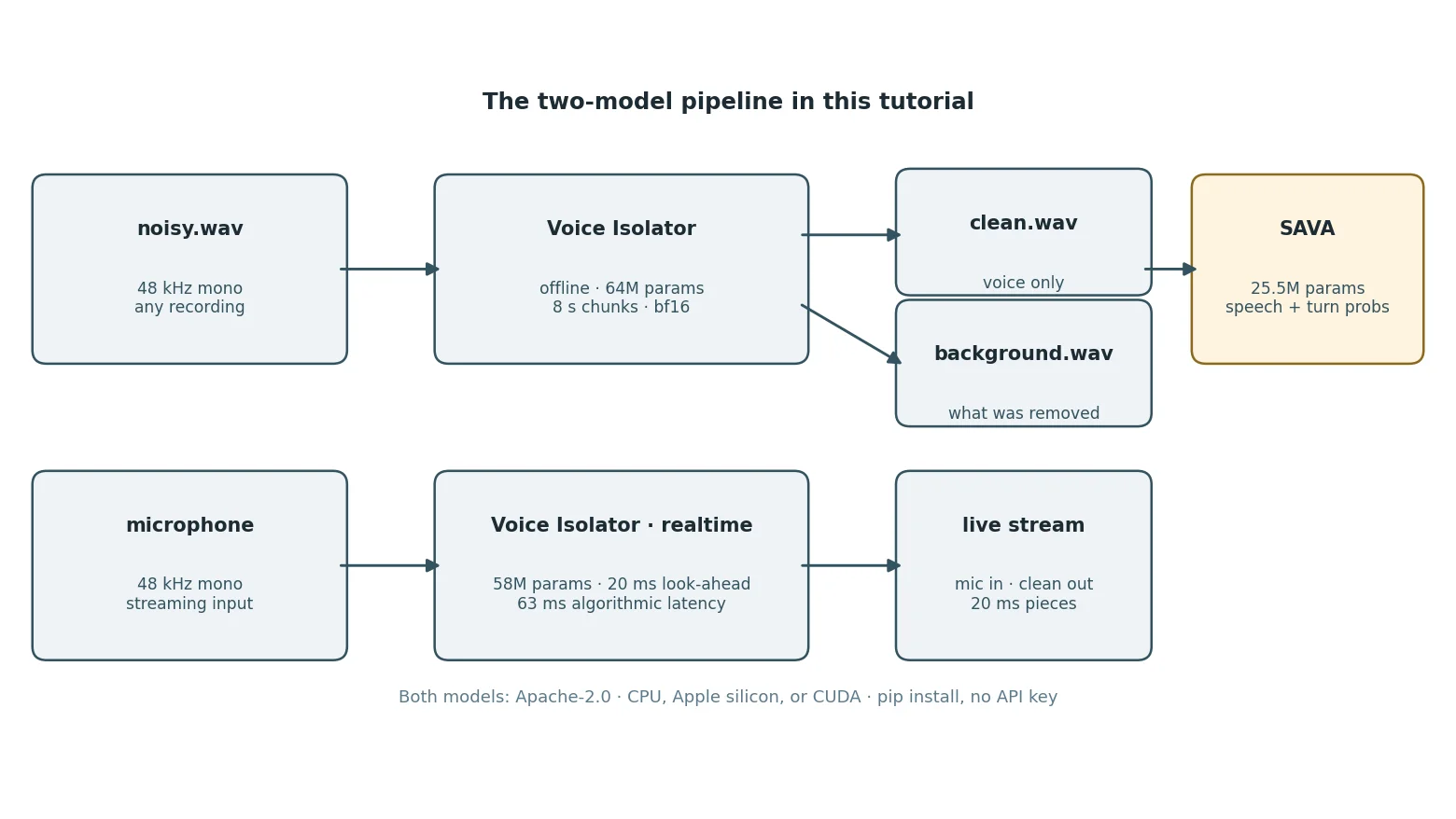
- The models: an offline isolator (64M parameters, 8-second chunks), a realtime twin (58M, 20 ms of look-ahead, 63 ms algorithmic latency), and SAVA (25.5M, one speech and one turn probability per 40 ms frame). The isolator runs at 48 kHz, SAVA at 16 kHz.
- Measured on the repo sample: silent gaps cut by 43-53 dB, speech kept within about 1 dB, and voice plus background reconstructs the input exactly.
- Streaming matches offline: on a 3-second excerpt the realtime model's output correlates 0.9992 with the offline model's, with a mean absolute difference of 0.0020.
- SAVA found 3 turns in the 10.8-second cleaned clip. On 5,043 real turn ends in the AMI meeting corpus it called 85.5% within 200 ms, against 30.8% for pipecat's smart-turn (vendor-run benchmark).

On November 17, Inworld — the voice-AI lab behind the TTS-2 voice models — open-sourced two pieces of the stack its own realtime voice products run on: Voice Isolator, a 48 kHz denoiser that strips background noise while keeping the speaker's laughs and breaths, and SAVA, a turn-taking model that tells a voice agent when the caller has actually finished speaking. A demo clip on r/LocalLLaMA drew 377 upvotes and 53 comments, and the release is three days old. This tutorial installs both, runs them on the repo's own noisy sample, and measures what actually comes out — no trust required.
The result is worth your time because the models are small and the setup is honest: a 64M-parameter offline isolator, a 58M-parameter realtime twin, and a 25.5M-parameter turn detector, all Apache-2.0, all runnable on a CPU with no account and no API key. By the end you will have cleaned a recording, measured the cleanup frame by frame, streamed the realtime model, and cut the result into turns a voice agent can act on.
What you will need#
Python 3.10 or later and pip. That is the whole list: no GPU, no account, no API key, no Docker. The install pulls PyTorch (CPU build, about 210 MB), the two Inworld packages, and three weight files on first use — roughly 250 MB for the offline isolator, 230 MB for the realtime twin, and 51 MB for SAVA. Budget about 1 GB of disk and ten minutes for the downloads.
Two things to know before you start. First, the offline model is hungry: on the 2-core sandbox used for this tutorial it peaked at 2.2 GB of RAM while isolating a 10.77-second clip. A normal laptop with 16 GB will not notice; a small VM will, and Step 2 gives you the flags that keep it under control. Second, everything below was run on CPU with one thread, so the timings are pessimistic — a machine with more cores will be several times faster.
Step 1 — Install it without the CUDA trap#
The obvious install fails on a CPU-only machine, and the failure is confusing, so get this right first. A plain pip install inworld-voice-isolation pulls PyTorch's CUDA build, and its audio library then refuses to load:
OSError: libcudart.so.13: cannot open shared object file: No such file or directoryThe CUDA build of torchaudio needs Nvidia's runtime libraries, which a CPU-only machine does not have. The fix is to install CPU-only PyTorch and torchaudio from PyTorch's own CPU index before the Inworld packages, so pip sees them as already satisfied and does not fetch the CUDA builds:
python3 -m venv voice-lab
source voice-lab/bin/activate
pip install torch --index-url https://download.pytorch.org/whl/cpu
pip install torchaudio --index-url https://download.pytorch.org/whl/cpu
pip install inworld-voice-isolation inworld-sava
Verified versions in this run: inworld-voice-isolation 1.0.0, inworld-sava 1.0.0, torch 2.15.0+cpu, torchaudio 2.11.1+cpu, Python 3.12. If you do have an Nvidia GPU, skip the CPU index lines — the plain install is the right one for you, and the CUDA kernels are an optional extra (pip install "inworld-voice-isolation[fast]").
Confirm the install with the bundled doctor command, which reports versions, device, and whether the weights are downloaded yet:
voice-isolate-doctorINFO package: inworld-voice-isolation 1.0.0
INFO python: Python 3.12.3 on Linux-7.0.0-44-generic-x86_64-with-glibc2.39
INFO torch: torch 2.15.0+cpu, torchaudio 2.11.1+cpu
INFO device: inference runs on cpu
INFO kernels: optional CUDA kernels not installed (CUDA only, not needed)
INFO voice-isolator-v1: not downloaded yet; run with --full
INFO voice-isolator-v1-realtime: not downloaded yet; run with --fullThe weights download from Hugging Face on first use and are checksum-verified. Nothing else is needed: no sign-in, no key.
Step 2 — Isolate your first file#
Grab the repo's own noisy sample — a 10.77-second, 48 kHz mono recording — and run the offline model on it. The documented quickstart is:
curl -LO https://raw.githubusercontent.com/inworld-ai/voice-isolator/main/demo/examples/sample_14.wav
voice-isolate sample_14.wav sample_14_clean.wav
On a memory-constrained machine, add the two flags used for every measurement in this tutorial. They shrink the processing window from the default 8 seconds to 2 seconds and compute in bf16, which held peak memory to 2.2 GB on the sandbox:
voice-isolate sample_14.wav sample_14_clean.wav --chunk-seconds 2 --precision bf16Expected output, with the weights already downloaded:
1 file(s), 1 to do
DONE 1/1  (78s)
That 78 seconds was for a 3-second excerpt on a single CPU thread; the full 10.77-second file took about 5 minutes the same way. Two files appear next to the input: sample_14_clean.wav (the isolated voice) and sample_14_clean_background.wav (everything the model removed). Both are float32 WAVs at 48 kHz with their original levels preserved — and, as Step 3 shows, the two sum back to the input exactly.
The same call works on a directory of files, and --no-background saves only the voice. If your input is not 48 kHz mono, the tool resamples and mixes it down on the way in; --output-sr 0 keeps the input rate instead of the default 48 kHz.
Step 3 — Measure what actually happened#
Listening is not measuring. The script below loads the three files, checks that voice plus background reconstructs the input, and prints the RMS level of every 100 ms frame for the input and the isolated voice:
import numpy as np, soundfile as sf

inp, sr = sf.read("sample_14.wav", dtype="float32")
out, _ = sf.read("sample_14_clean.wav", dtype="float32")
bg, _ = sf.read("sample_14_clean_background.wav", dtype="float32")

print("recon max abs err %.6f" % np.abs((out + bg) - inp).max())
F = sr // 10
for i in range(len(inp) // F):
    ei = np.sqrt((inp[i*F:(i+1)*F]**2).mean())
    eo = np.sqrt((out[i*F:(i+1)*F]**2).mean())
    print("t=%4.1fs in=%.4f out=%.4f out/in=%+.1fdB" % (
        i * 0.1, ei, eo, 20 * np.log10(eo / ei)))
Here is what the full sample measured, and what it means:
- Reconstruction is exact. Voice plus background equals the input to within floating-point rounding (max absolute error 0.000000). Nothing is invented and nothing is lost; the model only redistributes energy between the two tracks.
- The noise is a steady bed. The removed background sits at RMS ≈ 0.039–0.040 in every frame — the sample's noise is constant, not bursty. That is consistent with the demo's noise being synthetic, which the release coverage already flagged: treat this as a clean-room test, not a field trial.
- Silent gaps are cut by about 50 dB. Where nobody is speaking — the first 0.3 s, the 5.1–5.4 s pause, the 8.5–8.9 s gap, the final 0.4 s — the output falls to RMS ≈ 0.0001 against an input of 0.040. In decibels: −43 to −53 dB.
- Speech is kept within about a decibel. In frames where someone is talking, the isolated voice sits 0.1–1.5 dB below the noisy input — the difference is almost entirely the removed noise floor, not the voice. Overall the voice RMS is 0.0798 against the input's 0.0895.
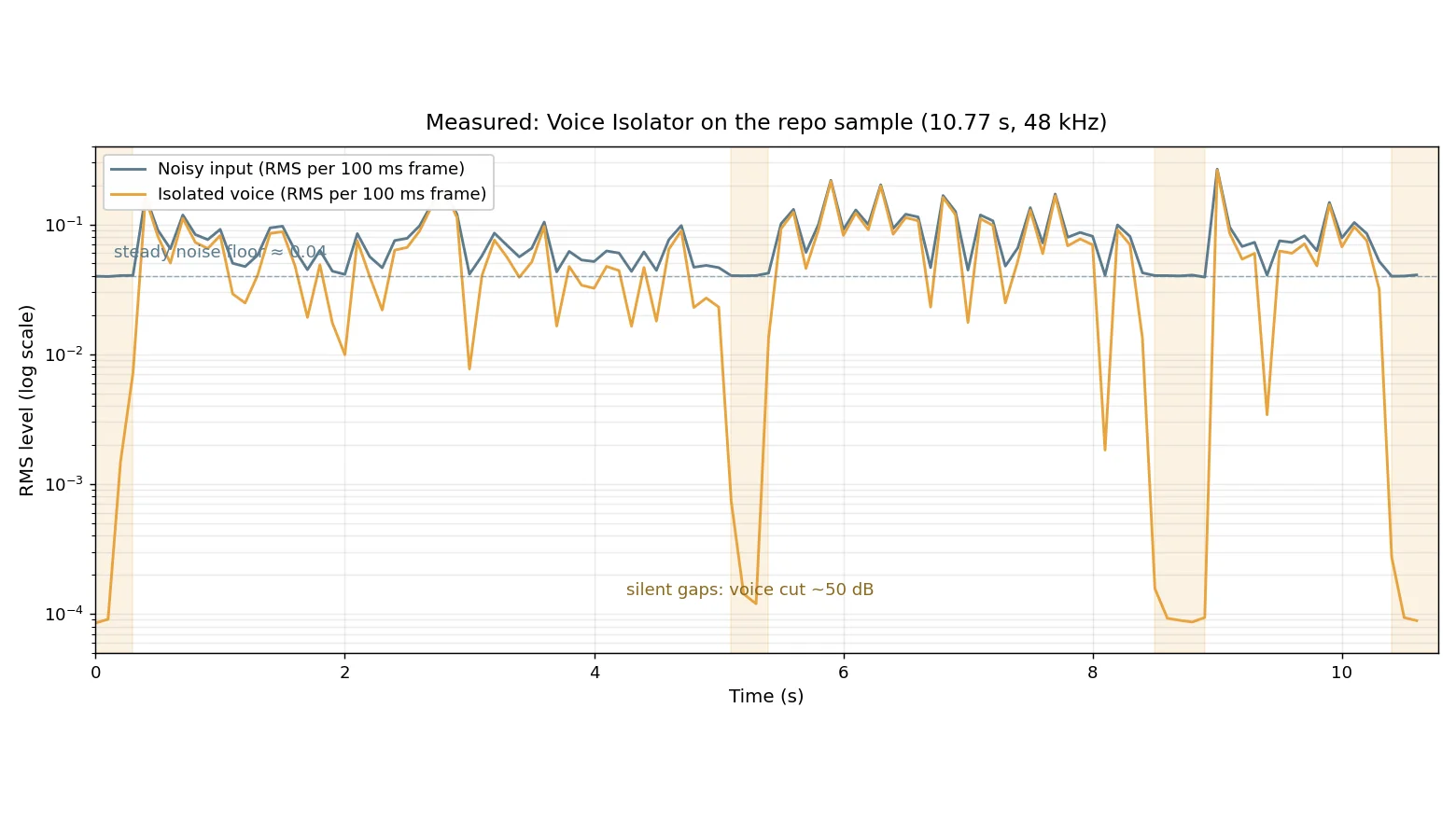
One honest limit: this sample's noise is steady and synthetic. A café, a car, or a second talker are harder, and the first independent tester in the demo thread found a rival model better on genuinely messy recordings. Use the measurement script above on your own audio before trusting the model with anything important — it takes a minute and it is the only claim that matters.
Step 4 — Run it live: the realtime model#
Voice Isolator ships as two checkpoints that share one architecture: the 64M-parameter offline model you just ran, and a 58M-parameter realtime twin that streams with 20 ms of look-ahead (63 ms algorithmic latency). Switch models with one flag:
voice-isolate sample_14.wav sample_14_streamed.wav --mode streaming --lookahead 2The realtime checkpoint (about 230 MB) downloads on first use. On the sandbox the 3-second excerpt finished in 45 seconds and produced a 48 kHz PCM_16 file. The interesting question is how much quality the causal model gives up, so compare the two outputs directly:
import numpy as np, soundfile as sf

off, sr = sf.read("cli_3s_clean.wav", dtype="float32")
stm, _ = sf.read("cli_3s_streamed.wav", dtype="float32")
print("correlation %.4f" % np.corrcoef(off, stm)[0, 1])
print("mean abs diff %.4f" % np.abs(off - stm).mean())
print("streamed silent 0.4 s RMS %.5f (input %.4f)" % (
    np.sqrt((stm[:int(0.4 * sr)]**2).mean()), 0.0401))
correlation 0.9992
mean abs diff 0.0020
streamed silent 0.4 s RMS 0.00093 (input 0.0401)The realtime model agrees with the offline model to a correlation of 0.9992, and it cuts the silent opening by a factor of 40 in level. For a live pipeline that is the right trade: the causal model sees only the past plus 20 ms, and on this sample it gives up almost nothing.
The Python streaming API follows the same shape — feed it 20 ms pieces as a microphone would deliver them, and play back whatever comes out as final:
import torch
from inworld import voice_isolation

live = voice_isolation.VoiceIsolator("inworld/voice-isolator",
                                     mode="streaming", lookahead_frames=2)
session = live.stream()  # 48 kHz mono, in pieces of any size
wav, sample_rate = voice_isolation.load_audio("sample_14.wav")
voice = []
for start in range(0, len(wav), 960):  # 20 ms at a time
    voice.append(session.push(wav[start:start + 960]))
voice.append(session.flush())
voice_isolation.save_audio("sample_14_streamed.wav", torch.cat(voice), sample_rate)
Two operational notes from the docs: the realtime model is causal, so a clip processed as a stream will differ slightly from the offline pass on the same audio, and live use needs a device that processes audio faster than it arrives — on this 2-core VM it ran about 15× slower than realtime with one thread, so treat the sandbox numbers as a correctness check, not a latency benchmark.
Step 5 — Cut the clean voice into turns with SAVA#
Clean audio is only half a voice agent. The agent also has to know when the caller has finished — and a pause mid-sentence is not an ending, while a breath before the next sentence is not a beginning. SAVA, released alongside Voice Isolator, is a 25.5M-parameter model that returns two probabilities for every 40 ms frame: P(speech) and P(the turn has ended). It runs on a single CPU thread, takes 16 kHz mono, and its weights are 51 MB.
Run it on the cleaned file with the CLI:
sava run sample_14_clean.wav --curves curves.json --turns_dir turns 0.00 5.32 speech 4920 ms closed by turn kept
4.60 8.68 speech 3120 ms closed by turn kept
8.16 10.80 speech 1480 ms closed by end kept
3 turns, 3 kept, 10.8 s of audioThe whole command took 12.8 seconds including the weight download. It wrote curves.json (270 frames at 0.04 s per frame, with speech and turn probability arrays) and one 16 kHz WAV per turn in turns/.
Notice the turns overlap: the first ends at 5.32 s and the second starts at 4.60 s. That is the reference policy working as documented — a turn opens on the first frame judged speech and starts 800 ms earlier, so a turn's reported start reaches back into the previous turn's tail. A turn closes when the end-of-turn probability crosses 0.9 after the speaker goes quiet, or after 1.6 s of silence whatever the model says; turns shorter than 400 ms of speech are dropped. The policy's defaults are inspectable and tunable:
from inworld import sava

model = sava.load("inworld/sava")  # downloads the weights on first use
curves = sava.run(model, sava.load_audio("sample_14_clean.wav"))
turns = sava.segment(curves, sava.Policy(), model.lookahead_frames)
for t in turns:
    print(round(t.start * 0.04, 2), round(t.end * 0.04, 2),
          t.speech_ms, t.reason, t.kept)
Turn.start and Turn.end are frame indices — multiply by 0.04 for seconds. The defaults are speech_threshold 0.5, turn_threshold 0.9, pre_roll_ms 800, max_silence_ms 1600, min_speech_ms 400. Two limits from the docs are worth knowing before you integrate: the speech verdict lags its frame by 120 ms, and the model is deliberately sensitive to quiet, distant speech, so a television in the next room can trigger it — which is exactly why Inworld suggests running Voice Isolator first.
How good is it? Inworld's own benchmarks, scored on public datasets against Silero VAD 6.2.1 for speech detection and pipecat's smart-turn v3.2 for turn detection: on 5,043 real turn ends in the AMI meeting corpus, SAVA detected 85.5% within 200 ms against smart-turn's 30.8%, with a median delay of 71 ms against 210 ms. It is weaker on Easy Turn (0.51 accuracy against 0.83), which Inworld attributes to that set's synthesized clips — read the benchmark README in the repo before quoting any of these numbers as your own.
Step 6 — Wire it together: a two-model intake script#
The two tools compose into a small intake pipeline: isolate a noisy recording, then hand the clean voice to SAVA and get back turn-sized clips ready for transcription or a voice agent. This is the same pair of calls from Steps 2 and 5, back to back:
import torch
from inworld import voice_isolation, sava

torch.set_num_threads(1)  # raise this on a real machine

wav, sr = voice_isolation.load_audio("noisy.wav")
cleaner = voice_isolation.VoiceIsolator("inworld/voice-isolator",
                                        precision="bf16")
voice = cleaner.isolate(wav, sr, chunk_seconds=2.0, overlap_seconds=0.5)
voice_isolation.save_audio("clean.wav", voice, sr, subtype="FLOAT")

turn_model = sava.load("inworld/sava")
curves = sava.run(turn_model, sava.load_audio("clean.wav"))
turns = sava.segment(curves, sava.Policy(), turn_model.lookahead_frames)
for i, t in enumerate(turns):
    print(f"turn {i}: {t.start * 0.04:.2f}s - {t.end * 0.04:.2f}s, "
          f"{t.speech_ms} ms of speech, {t.reason}, kept={t.kept}")
Run on the 3-second excerpt of the sample, this prints one turn — 0.00s - 3.00s, 2760 ms of speech, end, kept=True — because the excerpt has no 1.6-second silence for the policy to close on. On the full 10.77-second file the CLI found the three turns from Step 5. Peak memory for the combined run was 2.2 GB, dominated by the isolator; SAVA adds almost nothing.
From here the obvious next steps are all small: send each turn to a transcriber (the blog's faster-whisper tutorial runs locally), feed the turns to a voice agent's dialogue policy instead of a fixed silence timer, or use the background track as a noise profile for your own evaluation set. The demo in the repo (python demo/app.py after pip install -e ".[demo]") gives you a Gradio page with an offline tab and a live microphone tab if you want to try your own voice before wiring anything up.
When to use this vs the alternatives#
Voice isolation is a crowded shelf, and this model is not the answer to every recording. The honest comparison:
| Tool | Best for | Watch out for |
|---|---|---|
| Inworld Voice Isolator | Cleaning speech for playback, datasets, or a voice pipeline; keeping laughs, breaths, and level intact; live calls via the realtime twin | Denoising only — no restoration of lost bandwidth (planned for v2); not a speaker selector; 3 days old, thin track record |
| DeepFilterNet3 | Battle-tested realtime noise suppression; streaming-first design | Lower score on Inworld's VIBE board (0.510 vs 0.768); 48 kHz support varies by build |
| ClearerVoice MossFormer2 | Strong offline separation quality, including music | Heavier setup; the VIBE gap to Voice Isolator is small (0.695 vs 0.768) and vendor-measured |
| Silero VAD + smart-turn | Speech detection and turn-taking without isolation; tiny and fast | Two separate models to wire together; SAVA beat smart-turn on real AMI turn ends (85.5% vs 30.8% within 200 ms) but trails it on Easy Turn |
| resemble-enhance | Full enhancement including restoration | Generative — it can invent detail the recording never had, which is exactly what you do not want before transcription or training |
The VIBE scores in that table are Inworld's own, run on an internal evaluation set that is not distributed — treat them as the vendor's claim, not an independent result. The independent evidence so far is thin: one demo thread and the measurements in this tutorial. What is independently verifiable today is the part that matters most for a tutorial: the install works, the models run on a CPU, the outputs are measurable, and the code is Apache-2.0.
Choose Voice Isolator when the voice itself must survive untouched — dataset curation, voice-agent input, interview cleanup. Choose a generative enhancer when the recording is damaged and you need restoration, and accept that it will invent. Choose DeepFilterNet when you need the most proven realtime path and can live with its quality ceiling.
The takeaway#
Inworld's release is notable less for any single number than for the shape of it: a production voice stack — isolation plus turn-taking — open-sourced together, small enough to run on a laptop CPU, with the code, weights, benchmarks, and eval scripts in the open. The two models do one job each and compose cleanly, which is rarer than it should be.
What to do with it: install the CPU torch build first, isolate a file, and run the measurement script on your own audio. If the silent gaps in your recording drop by tens of decibels while the speech stays within a decibel, you have a denoiser worth keeping. If they don't, you have learned that in a minute, with numbers, instead of from a demo video. And if you build a voice agent, let SAVA — not a silence timer — decide when the caller is done: on real meeting audio it called 85.5% of turn ends within 200 ms, against 30.8% for the incumbent.