A 4 MB voice that runs anywhere: hands-on with Kitten-TTS-2 Pico, Nano and Mini
Four megabytes is smaller than most photos. It is also, as of last week, enough for a voice. KittenML's Kitten-TTS-2 Pico speaks eight languages from a 4 MB file, on a single CPU thread, with no server, no API key, and no account — and its two bigger siblings, Nano and Mini, cover the cases Pico can't. This tutorial installs all three, generates speech in three languages, and shows you which size is worth your megabytes.
- Pico: 4 MB. 7.2M parameters, 8 languages, 30 voices, 24 kHz output — Apache 2.0 licensed, models, voice packs, and text-processing files alike.
- Nano: 8.8 MB. 17M parameters, same eight languages, higher-quality voices; the best small voice for Western European languages on the project's own benchmark.
- Mini: 47.5 MB. 82M parameters, sixteen languages in a single pack — no per-language downloads.
- One call does it. The same KittenTTS constructor loads all three; generate() returns audio at 24 kHz. ONNX on CPU, no PyTorch, no Hugging Face login.
- Measured, not claimed. Int4 English character error rate is about 1.1% (Whisper large-v3), close to full precision; Nano leads in English, German, Spanish, and Italian, Pico leads in Russian and Hindi.
- The limits. No voice cloning or emotion control in the tiny models — those live in the 1.7B model. Mandarin is not supported yet, and early testers reported a punctuation bug, with a fix promised within two days of November 20.
Four megabytes is smaller than most photos. It is also, as of last week, enough for a voice. KittenML's Kitten-TTS-2 Pico speaks eight languages from a 4 MB file, on a single CPU thread, with no server, no API key, and no account — and its two bigger siblings, Nano and Mini, cover the cases Pico can't. This tutorial installs all three, generates speech in three languages, and shows you which size is worth your megabytes.
The release landed on November 19, when KittenML announced the three tiny models alongside the 1.7-billion-parameter Kitten-TTS-2 they belong to. The tiny ones are the interesting branch: Pico is about 7 million parameters, Nano about 17 million, Mini about 82 million. All three run on CPU through ONNX Runtime, all three output 24 kHz audio, and all three — models, voice packs, and the bundled text-processing files — are Apache 2.0 licensed. If you have ever wanted speech synthesis as a file you ship inside your app instead of a service you rent by the character, this is the smallest working version of that idea.
By the end you will have generated English, German, and French speech from the three models, compared them on size and measured quality, and built a small script that turns a long text into audio files. Everything runs on your own machine; nothing in this tutorial sends text to a server.
What you'll need#
- Python 3.10 or later. The package supports Linux, Windows, and Mac.
- A few hundred megabytes of free disk. The three English models together are under 75 MB in their smallest form; the Python packages and the small grapheme-to-phoneme files are the rest. (The project's "~2 GB" figure covers the 1.7B model and its decoder, which this tutorial does not use.)
- No GPU, no API key, no Hugging Face login. The install pulls the ONNX runtime, and the model files download automatically on first use. Only the files for the languages, backend, and weight format you actually use are downloaded.
- espeak-ng, if you want non-English languages. English text goes through a built-in pipeline (a lexicon, a pronunciation dictionary, and a small grapheme-to-phoneme model); the other languages are phonemized with espeak-ng. On most Linux systems it is one system-package install; if a German or French generation fails with an espeak error, that is the missing piece.
- A sentence or two of text in English, German, or French — or any of the eight languages Pico and Nano speak, or the sixteen Mini speaks.
1. Install KittenML#
One package covers the whole family — the tiny ONNX models and the big model share the same KittenTTS constructor. Install it in a virtual environment:
python -m venv .venv
source .venv/bin/activate
pip install kittenml
That pulls the ONNX runtime, which is what the tiny models run on. PyTorch is not required for them: the project ships the tiny models as ONNX graphs with int8 weights by default, plus int4 graphs at about half the size, and the float32 PyTorch weights as an option. If you later want the PyTorch backend, pass backend="torch" when you load a model — the package will need PyTorch then, and only then.
Check the import works:
python -c "from kittenml import KittenTTS; print('ok')"You should see ok. Nothing has downloaded yet — the weights arrive when you first construct a model.
2. Your first sentence with Pico#
Start with the smallest model, in its smallest form. weights="int4" loads the 4 MB-per-language graph instead of the 8 MB int8 one:
from kittenml import KittenTTS
import soundfile as sf

m = KittenTTS("KittenML/kitten-tts-2-pico", weights="int4")  # 4 MB per language
audio = m.generate("Hello there.")
sf.write("pico_hello.wav", audio, m.sample_rate)  # 24 kHz
Three things to notice. First, m.generate returns a NumPy array of audio samples — it does not write a file itself. sf.write from the soundfile package turns that array into a WAV file at the model's sample rate, which is 24 kHz. Second, with no voice argument, the model uses the first voice for the language — English, by default. Third, the first run downloads the English Pico weights (4 MB), the voice pack, and the small English text-processing files; later runs reuse them.
Play pico_hello.wav. It is two words, and that is the point: a 4 MB model just spoke, on your CPU, with nothing leaving your machine. The project says Pico generates speech faster than real time on a single smartphone CPU thread, with 40–50 MB of peak memory — the reason it fits in phones, Raspberry Pis, and apps that never touch the internet.
3. Pick a voice and switch languages#
Pico ships 30 voices across its eight languages. List what you have before you choose:
print(m.languages)         # ['en', 'de', ...]
print(m.available_voices)  # {'en': ['Eleanor', 'Ruth', ...], 'de': ['Anna', ...], ...}

for v in m.voices("de"):
    print(v["name"], v["description"])  # Anna Female 1, ...
m.languages gives the language codes the loaded model speaks. m.available_voices maps each code to its voice names. m.voices("de") returns each German voice with a short description, so you can pick by ear rather than by name.
Generate in another language two ways — by naming the language, or by naming a voice from that language:
audio = m.generate("Guten Morgen.", language="de")       # German, first voice (Anna)
audio = m.generate("Guten Morgen.", voice="Paul")         # a German voice: German
audio = m.generate("Hello there.", voice="Eleanor", speed=1.1)
Voice names are case-insensitive ("paul" works the same as "Paul"), and naming a voice implies its language — you don't need both. speed defaults to 1.0; larger is faster. A practical detail: Pico and Nano ship one model per language, so switching to German downloads the German weights (another 4 MB for Pico int4). Mini is different — it packs all sixteen languages into a single file, which is why it is the convenient choice for multilingual apps despite being the largest of the three.
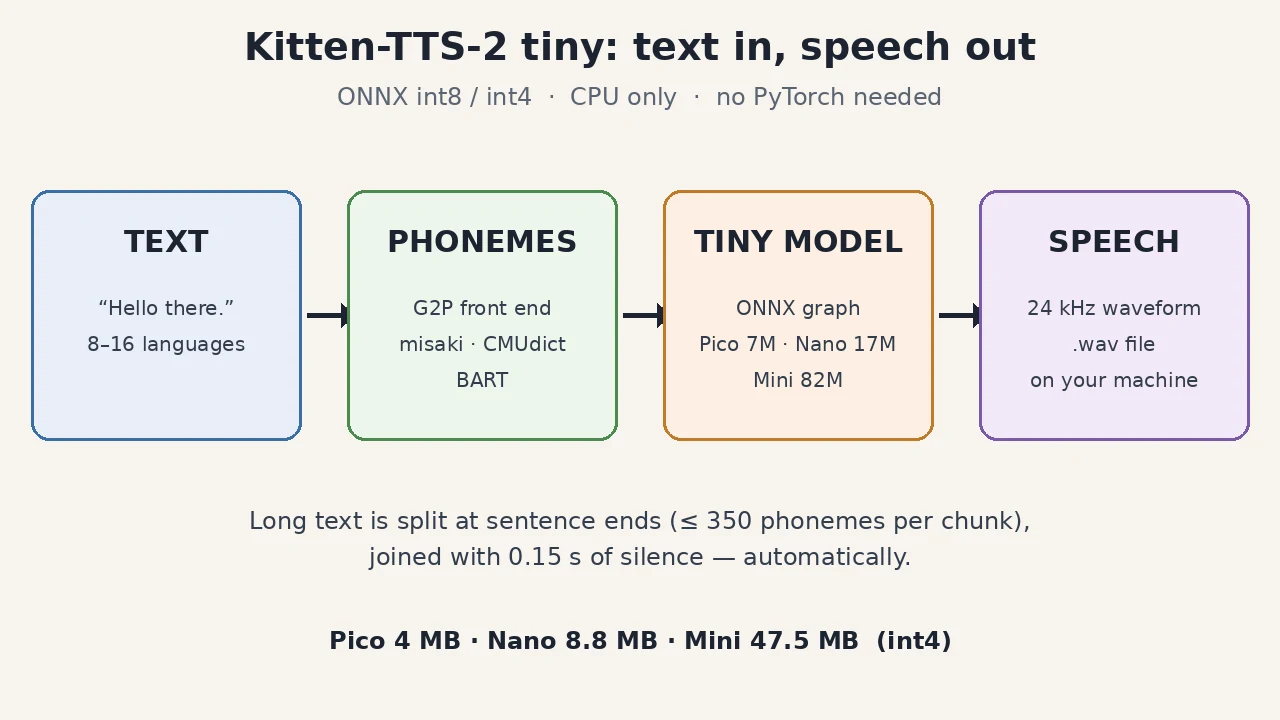
One more call is worth knowing before you go further: m.phonemize shows you what the model will actually say.
m.phonemize("Hello there.") # what the model will sayUse it when a word comes out wrong — if the phonemes are wrong, the problem is in the text front end, not the voice. For English, that front end is text normalization (numbers, dates, times, units), then a pronunciation lexicon, then a dictionary, then a 0.75-million-parameter grapheme-to-phoneme model for the words neither knows. The lexicon and that small model ship inside the model repository.
4. Load Nano and Mini, and compare#
The same constructor loads the other two sizes. Nano defaults to the int8 ONNX graph; Mini loads its single multilingual pack:
nano = KittenTTS("KittenML/kitten-tts-2-nano")   # ONNX, int8
mini = KittenTTS("KittenML/kitten-tts-2-mini")   # 16 languages, one pack
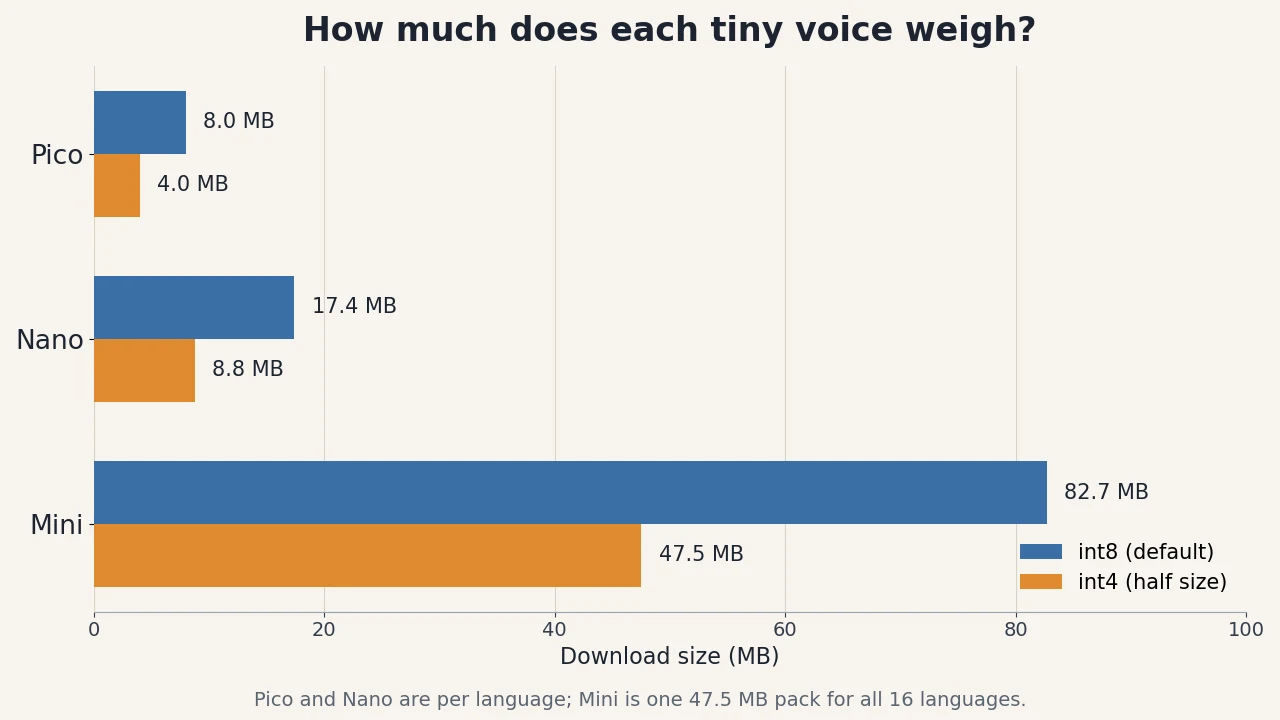
Here is the ladder, from the project's own model table:
| Model | Parameters | int8 size | int4 size | Languages |
|---|---|---|---|---|
| Pico | 7.2M | 8.0 MB per language | 4.0 MB per language | 8 |
| Nano | 17M | 17.4 MB per language | 8.8 MB per language | 8 |
| Mini | 82M | 82.7 MB, all languages | 47.5 MB, all languages | 16 |
The question is what the extra megabytes buy. The project answers it with a measurement rather than an adjective: for each model it ran 60 held-out sentences per language through Whisper large-v3 and reported the character error rate, with the full-precision model's rate in brackets. Lower is better. Here are the int4 numbers:
| Language | Pico int4 (fp32) | Nano int4 (fp32) |
|---|---|---|
| English | 1.17 (0.86) | 1.08 (1.08) |
| German | 1.64 (1.78) | 1.28 (1.63) |
| Spanish | 0.98 (0.91) | 0.89 (0.83) |
| Italian | 0.94 (0.66) | 0.69 (0.61) |
| Portuguese | 4.08 (4.10) | 3.93 (3.87) |
| Russian | 5.79 (5.87) | 6.48 (6.50) |
| Hindi | 10.72 (10.70) | 13.21 (13.13) |
| French | 2.13 (2.05) | 2.13 (1.94) |
Read that table carefully, because it does not say "bigger is always better." In English, German, Spanish, and Italian, Nano's int4 model is a little more intelligible than Pico's. In Russian and Hindi, Pico is actually ahead — and in both models the int4 numbers track the full-precision numbers closely, which is the point of the quantization: the int4 weights come from quantization-aware distillation, trained through the exact rounding the shipped graph uses, so the small file behaves like the big one. Speaker similarity to the full-precision model is 0.996–0.999, and 95–99% of phoneme durations are identical. The honest reading: for Western European languages, Nano earns its extra 5 MB; for Russian and Hindi, Pico is the better small model on this metric; and Hindi is the weakest language in both, at 10–13% character error — worth knowing before you ship Hindi narration.
Two practical notes on weights. First, int4 needs onnxruntime>=1.20; if your installed runtime is older, either upgrade it or drop weights="int4" and use the int8 default. Second, if you want bit-exact parity with the training code's inference, the PyTorch backend gives the same samples as the float32 model — the ONNX backends match it within quantization error:
m = KittenTTS("KittenML/kitten-tts-2-nano", backend="torch") # PyTorch, float32That needs PyTorch installed, and it loads the float32 weights, so it is the heaviest way to run Nano — use it when you are comparing against the project's numbers, not when you are shipping.
5. Long text and streaming#
Short inputs are the reliable case. The project is explicit that the model is reliable on short inputs but can truncate or drift into repetition when asked for a whole script in one pass — so long text is split for you, at sentence ends, into chunks of at most 350 phonemes, joined with 0.15 seconds of silence. That is automatic in generate: hand it a paragraph and it handles the chunking.
To start playing before the whole text is ready, stream it chunk by chunk:
long_text = (
    "The harbour was quiet before dawn. "
    "Fishing boats waited for the tide, and the gulls had not yet started their shift. "
    "By eight o'clock the market would be loud again, but for now the town belonged to the early risers."
)

for i, chunk in enumerate(m.generate_stream(long_text, language="fr")):
    sf.write(f"part_{i:02d}.wav", chunk, m.sample_rate)
Two consequences of streaming are worth knowing before you build on it. First, streaming is chunk-level, not token-level: a chunk is generated and vocoded in full before it is yielded, so the first chunk still costs its own generation time — you save the wait for the rest of the text, not for the first sound. Second, short text does not stream: input that fits in one chunk (under roughly 380 characters) yields exactly one chunk, so generate_stream behaves like generate. And the seams are rougher: generate trims each segment's edge silence, adds short fades, and sets one consistent pause, which a streaming caller cannot do without waiting for the next chunk. If you need the cleanest joins for a finished file, use generate; if you need the first sound fast in an interactive app, stream.
6. Know the limits#
The tiny models are deliberately small, and the size buys specific limits:
- No voice cloning, no emotion control. Zero-shot cloning and expression tags (
[joyful], laughter and emphasis markup) live in the separate 1.7B Kitten-TTS-2, not in Pico, Nano, or Mini. The team says a speaker encoder will not fit in 4–40 MB, and custom voice generation was promised for the weekend after the announcement — check the repo for whether it has landed. - Mandarin is not supported yet, and the "cute" voices are English-only for now. Mini covers sixteen languages, but they are the sixteen in the table above.
- A punctuation bug was reported on day one. The top comment on the announcement said the models ran sentences together, "almost completely (but not quite) ignoring commas and full stops," and the team replied within hours calling it a bug with a fix due within two days. That was November 20; before you ship narration, test a punctuated paragraph yourself and check the repo for the fix.
- The WebAssembly port was promised for the Monday after release (November 24), which would put the models in the browser with no install. Treat it as a roadmap item until you see it in the repo.
None of this disqualifies the models — it scopes them. They are narration and interface voices, not voice actors.
Which model should you use?#
- Pico, int4 — ship it inside an app. 4 MB per language, 40–50 MB peak memory, faster than real time on one CPU thread. This is the model for phones, Raspberry Pis, games, and anything offline. In English, German, Spanish, and Italian it gives up a little intelligibility to Nano; in Russian and Hindi it is ahead on the project's own metric.
- Nano, int4 — the best small voice for Western European languages. 8.8 MB per language buys the lowest character error rates of the three in English, German, Spanish, and Italian, and the highest-quality voices of the tiny set. If your app speaks one or two of those languages, Nano is the sweet spot.
- Mini, int4 — one pack, sixteen languages. 47.5 MB covers everything from Japanese and Korean to Swedish and Swahili, with no per-language downloads. Pick it when the product is multilingual and you would rather ship one file than manage eight.
- The 1.7B model — when you need cloning or expression. It is a different class: 115 built-in voices, zero-shot cloning from 5–30 seconds of audio, emotion and vocal-event tags, 20+ languages, and a 450–950 MB download. Reach for it when the voice itself is the product, not when you need speech inside a product.
If you only remember one rule: match the model to the constraint, not to the leaderboard. The constraint here is megabytes, memory, and languages — and on those, the three tiny models are three different answers, not three rungs of one ladder.
The takeaway#
A usable voice now fits in 4 MB, runs on a CPU thread, and is Apache 2.0 licensed — which means speech synthesis stops being a service you rent and becomes a file you ship. Install the package, load Pico, generate one sentence, and listen to it before you believe the size. Then pick your size by the constraint that actually binds you: Pico when the app must stay tiny, Nano when the language is Western European and quality matters most, Mini when the product speaks sixteen languages. The code in this tutorial is the whole integration — one constructor, one generate call, and a WAV file at the end.
Sources: KittenML/KittenTTS on GitHub; KittenTTS 2 nano, pico and mini (project docs); kitten-tts-2-pico, kitten-tts-2-nano and kitten-tts-2-mini model cards on Hugging Face; our coverage of the release.