Your own OpenAI-compatible LLM API: serve Gemma 4 on Modal's serverless GPUs with vLLM
Renting a frontier API is easy. Owning the endpoint is better — and this year it stopped being a DevOps project. One Python file and one deploy command put Google's Gemma 4 on a rented H200 behind vLLM, as a private OpenAI-compatible API that bills by the second and switches off when nobody is asking it anything.
modal deploy, and call it with any OpenAI client pointed at your new URL. The GPU scales to zero after 15 idle minutes, so you pay per second of actual use.- The model: Gemma 4 26B-A4B — 25.2B total parameters, only ~4B active per token, 256K context, Apache 2.0 license. MMLU Pro 82.6, AIME 2026 88.3 (no tools).
- The bill: one H200 costs $0.001261/second, about $4.54/hour while the container runs. Modal's Starter plan includes $30 of compute every month — roughly 6.6 H200-hours.
- The security fix that matters: Modal's official example pins vLLM 0.21.0, which is affected by an authentication-bypass flaw (CVE-2026-48746) fixed in 0.22.0. This tutorial pins vLLM 0.34.0 instead.
- The key fact about keys: vLLM's
--api-keyonly guards/v1,/v2and similar API paths./healthanswers without a key by design — that is what makes it a good liveness probe.
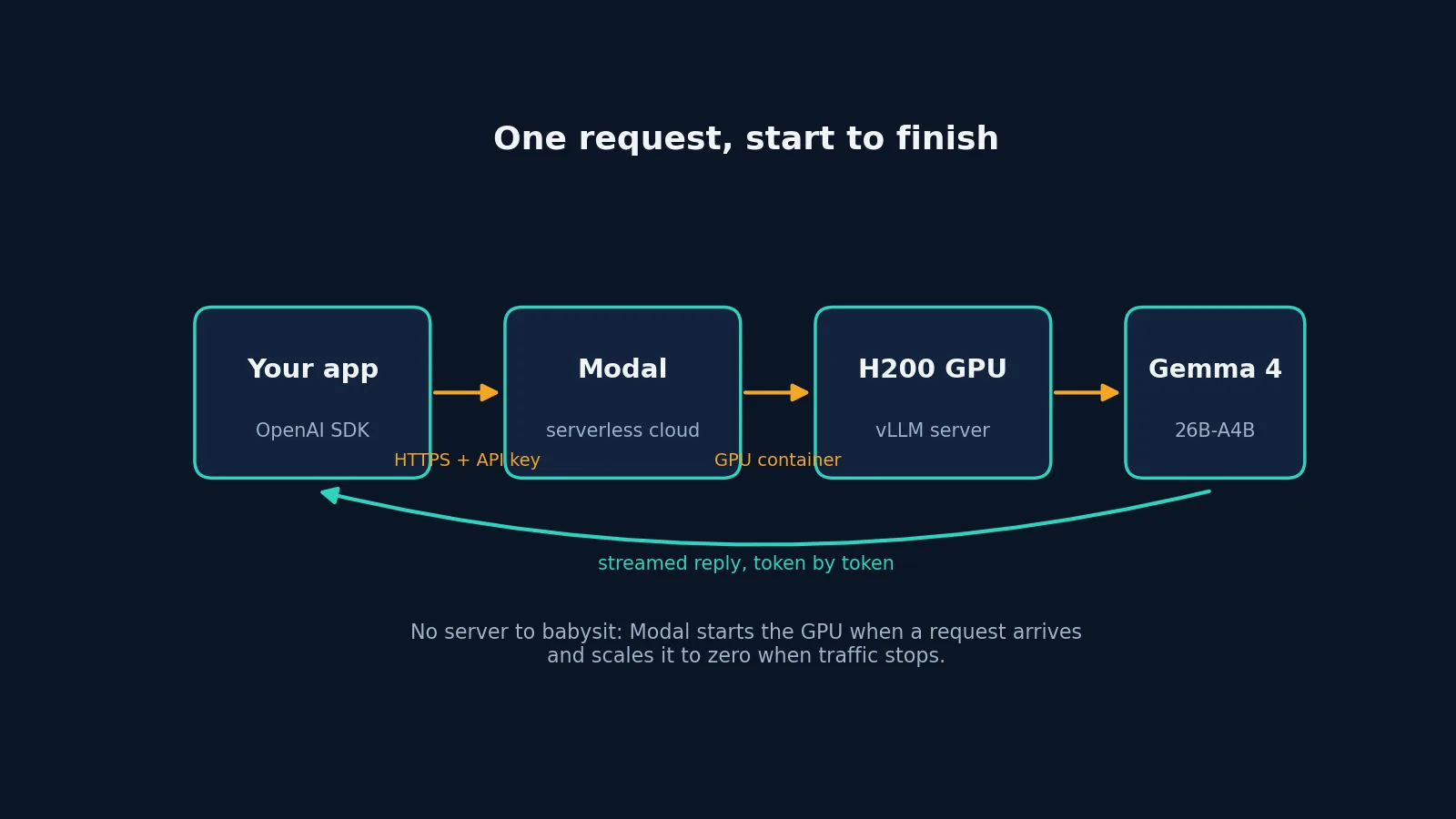
Frontier APIs are wonderful until they aren't: the model you want isn't on offer, your data can't leave your own cloud, or your bill scales with someone else's pricing page. The fix is to own the endpoint — and this year, that stopped being a DevOps project. One Python file, one deploy command, and you have a private, OpenAI-compatible API serving a 26-billion-parameter reasoning model on a rented H200, billed by the second and off entirely when nobody is asking it anything.
The stack is three pieces that each do one job well. Modal is the serverless GPU cloud: you describe the machine in Python and it builds the image, finds the GPU, and hands you a URL. vLLM is the inference engine: it turns the model weights into a fast OpenAI-compatible HTTP server with continuous batching and paged attention. Gemma 4 is the model: Google's 26B-A4B mixture-of-experts, Apache 2.0 licensed, with built-in thinking and tool calling — strong enough to be useful, small enough to fit on a single GPU with room to spare for a long context window.
By the end of this tutorial you will have a live HTTPS endpoint that answers /v1/chat/completions exactly like OpenAI's, a Python client that talks to it, and a clear picture of what it costs — about $4.54 an hour while the GPU runs, $0 while it doesn't, and nothing at all for the first ~6 hours each month on Modal's free credit.
What you'll need#
Three accounts, one install, and no GPU of your own:
- A Modal account — sign up at modal.com. The Starter plan costs $0 and renews $30 of compute credit every month. A payment method is required on file even on Starter: anything past the monthly credit is charged to it, so set a spend limit in the dashboard before you deploy (Step 7 shows the math).
- Python 3.12 on your laptop — the Modal client and the
openaipackage. Everything else runs in the cloud. - About 10 minutes of waiting — the first deploy downloads roughly 50 GB of model weights once, into a cache that survives between boots.
There is no Hugging Face account in the list. Gemma 4 is Apache 2.0 licensed and publicly downloadable, so no token or license acceptance is needed to fetch the weights. (If you later swap in a gated model such as a Llama, you will need an HF_TOKEN secret — see the troubleshooting section.)
Step 1 — Set up Modal#
Install the client and authenticate it. The setup command opens a browser window where you create a token; the client stores it locally.
pip install modal
modal setup
modal --version
Expected output: the setup flow finishes with a confirmation, and modal --version prints the client version (1.6.4 at the time of writing). If modal setup complains that no browser is available — common on a headless server — run it from your laptop instead; the token it creates is what matters, not the machine it was created on.
Two commands to know before you need them: modal deploy ships an app and prints its URL, and modal run executes a file's entrypoint locally while a fresh server spins up in the cloud. Both are used below, and both are verified against the installed CLI.
Step 2 — Create the API key secret#
The endpoint this tutorial builds is public on the internet — anyone who finds the URL can reach it. So it gets an API key, stored as a Modal Secret rather than written into the code. Generate a random one and store it:
modal secret create vllm-api-key VLLM_API_KEY=$(openssl rand -hex 16)Copy the key you generated into a safe place now: your shell history has it, and your password manager should too. Modal never prints a secret's value back to you — that is the point of a secret — so if you lose it, the fix is to recreate the secret with a new key and redeploy. You will need the same value in Steps 4 and 5 to call the endpoint. (On macOS, openssl rand -hex 16 works the same; on Windows, use PowerShell's [Convert]::ToHexString((1..16 | ForEach-Object { Get-Random -Maximum 256 })) or any password generator.)
Why a secret instead of an environment variable in the code? Because the file you are about to write is meant to be committed, shared, and reused. Secrets stay in Modal's encrypted store and arrive in the container as environment variables; the code only ever reads os.environ["VLLM_API_KEY"].
Step 3 — Write the server#
Create a file called vllm_inference.py. It is adapted from Modal's official vLLM example, with two deliberate changes: vLLM 0.34.0 instead of 0.21.0 (the CVE noted above), and the API-key secret wired in.
"""Serve Gemma 4 on Modal with vLLM as an OpenAI-compatible API."""

import json
import os
from typing import Any

import aiohttp
import modal

vllm_image = (
    modal.Image.from_registry("nvidia/cuda:12.9.0-devel-ubuntu22.04", add_python="3.12")
    .entrypoint([])
    .uv_pip_install("vllm==0.34.0", "transformers==5.16.1")
    .env(
        {
            "HF_XET_HIGH_PERFORMANCE": "1",  # faster model transfers
            "VLLM_LOG_STATS_INTERVAL": "1",  # more frequent metrics logging
        }
    )
)

MODEL_NAME = "google/gemma-4-26B-A4B-it"
MODEL_REVISION = "47b6801b24d15ff9bcd8c96dfaea0be9ed3a0301"  # pin it: repos update

hf_cache_vol = modal.Volume.from_name("huggingface-cache", create_if_missing=True)
vllm_cache_vol = modal.Volume.from_name("vllm-cache", create_if_missing=True)

FAST_BOOT = False  # True = faster cold starts, slower generation

SPECULATIVE_MODEL_NAME = "google/gemma-4-26B-A4B-it-assistant"
SPECULATIVE_MODEL_REVISION = "f188f476dc11dd5bb3014dc861529d316bce49d3"

app = modal.App("gemma4-vllm-api")

N_GPU = 1
MINUTES = 60  # seconds in a minute
VLLM_PORT = 8000
ROUTING_REGION = "us-east"


@app.server(
    image=vllm_image,
    gpu=f"H200:{N_GPU}",
    scaledown_window=15 * MINUTES,  # stay up 15 min after the last request
    startup_timeout=10 * MINUTES,  # max wait for container start
    volumes={
        "/root/.cache/huggingface": hf_cache_vol,
        "/root/.cache/vllm": vllm_cache_vol,
    },
    secrets=[modal.Secret.from_name("vllm-api-key")],
    port=VLLM_PORT,
    routing_region=ROUTING_REGION,
    target_concurrency=100,  # requests one replica handles; tune carefully
    unauthenticated=True,  # public URL; vLLM's own --api-key guards /v1
)
class Server:
    @modal.enter()
    def start(self):
        import subprocess

        cmd = [
            "vllm",
            "serve",
            MODEL_NAME,
            "--revision",
            MODEL_REVISION,
            "--served-model-name",
            MODEL_NAME,
            "llm",  # short alias: clients can ask for model "llm"
            "--host",
            "0.0.0.0",
            "--port",
            str(VLLM_PORT),
            "--uvicorn-log-level=info",
            "--async-scheduling",
            "--api-key",
            os.environ["VLLM_API_KEY"],
        ]
        # enforce-eager disables Torch compilation and CUDA graph capture
        cmd += ["--enforce-eager" if FAST_BOOT else "--no-enforce-eager"]
        # one GPU = no tensor parallelism beyond 1, but be explicit
        cmd += ["--tensor-parallel-size", str(N_GPU)]
        # Gemma 4 specifics: text-only serving, tool use + thinking on
        cmd += [
            "--limit-mm-per-prompt",
            json.dumps({"image": 0, "video": 0, "audio": 0}),
            "--enable-auto-tool-choice",
            "--reasoning-parser",
            "gemma4",
            "--tool-call-parser",
            "gemma4",
        ]
        # multi-token prediction: the assistant model drafts 4 tokens ahead
        cmd += [
            "--speculative-config",
            json.dumps(
                {
                    "model": SPECULATIVE_MODEL_NAME,
                    "revision": SPECULATIVE_MODEL_REVISION,
                    "num_speculative_tokens": 4,
                }
            ),
        ]
        print(*cmd)
        self.process = subprocess.Popen(cmd)

    @modal.exit()
    def stop(self):
        self.process.terminate()
What each piece is doing:
- The image starts from NVIDIA's CUDA 12.9 container and installs exactly two packages: vLLM 0.34.0 and transformers 5.16.1. The transformers pin is the floor of vLLM 0.34's supported range (5.16.1 to 5.23.0), and it also stays below versions where Gemma 4 startups were reported to fail. Pin both — an unpinned
pip install vllmdrifts, and a serving setup that drifts is a setup that breaks on a Tuesday. - The model revision is a commit hash, not a branch. Model repos update; a floating reference means the weights your server loads next month may not be the weights you tested today.
- The Volumes are the difference between a five-minute cold start and a twenty-five-minute one. The first boot downloads ~50 GB of weights into
huggingface-cache; every later boot reads them from the Volume at 1–2 GB/s instead of the network. The second Volume caches vLLM's compiled kernels for the same reason. FAST_BOOTis the one knob to understand.False(the default here) lets vLLM compile kernels and capture CUDA graphs: slower first boot, faster generation. Set it toTruewhile you are iterating on configuration, then back toFalsewhen you care about throughput.- The Gemma flags turn on what makes this model more than a text predictor:
--reasoning-parser gemma4exposes the model's thinking as a proper reasoning field,--tool-call-parser gemma4plus--enable-auto-tool-choiceenable native function calling, and--limit-mm-per-promptwith all zeros skips the vision and audio encoders to save GPU memory for text. The speculative decoding block lets the small assistant model draft four tokens ahead of the main model — free throughput at low concurrency. unauthenticated=Truelooks alarming and is deliberate: it turns off Modal's own proxy authentication so that any HTTP client can reach the endpoint, and the vLLM API key takes over as the gate. If you would rather have Modal's auth too, delete that line — but then only clients carrying a Modal token can call it, which defeats the point of an OpenAI-compatible API.
Before deploying, check the file the way you would check any Python: python -c "import ast; ast.parse(open('vllm_inference.py').read())" catches syntax errors in a second, and python vllm_inference.py should exit silently — defining a Modal app performs no network calls, so a failure there means the Modal client or the code is wrong, not your account.
Step 4 — Deploy it#
One command:
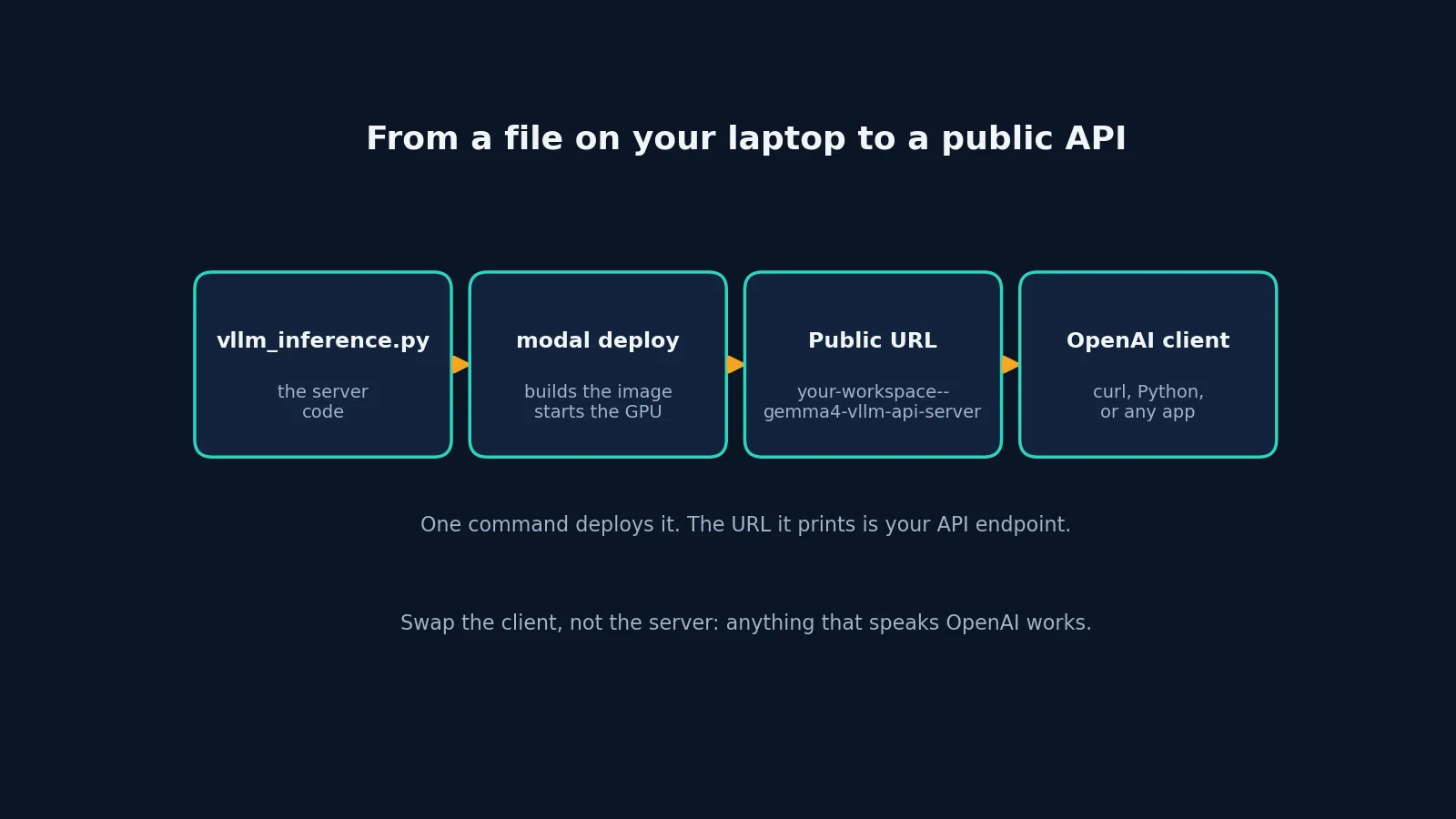
modal deploy vllm_inference.pyModal builds the container image (a few minutes the first time), creates the app, and prints a URL like this:
✓ App deployed in 6.7s! 🎉
└── 🔨 Created web function server => https://your-workspace--gemma4-vllm-api-server.us-east.modal.direct
That URL is your API endpoint. The your-workspace part is your Modal workspace name; us-east is the routing region from the file. Note that "deployed in 6.7s" means the app was registered — it does not mean the model is loaded. The first request (or the test in Step 5) triggers the real work: container start, weight download into the Volume, engine initialization. Plan on several minutes for the very first boot, and a much faster one afterwards.
Verify the deploy worked end to end without touching your own client code yet. The file's local_entrypoint does a health check and then sends two chat requests:
export VLLM_API_KEY="the-key-you-created-in-step-2"
modal run vllm_inference.py
What you should see: a health check that polls /health until it returns 200, then a streamed answer to "Explain the singular value decomposition" in the voice of a pirate who went to Harvard, then the same question answered as Jar Jar Binks. The silly system prompts are Modal's own test fixture — they exist to prove the system prompt is actually being honored, which is the fastest way to catch a misconfigured chat template. If both answers come back, your server is live, the key works, and the model is thinking.
Step 5 — Prove it works with curl#
Set the endpoint once, then three probes that each test a different layer:
export VLLM_BASE_URL="https://your-workspace--gemma4-vllm-api-server.us-east.modal.direct"

# 1. Liveness — no key needed, by design
curl -s -o /dev/null -w "%{http_code}\n" $VLLM_BASE_URL/health
# expect: 200

# 2. The model list — needs the key
curl -s $VLLM_BASE_URL/v1/models -H "Authorization: Bearer $VLLM_API_KEY"
# expect: {"object":"list","data":[{"id":"google/gemma-4-26B-A4B-it", ...}]}

# 3. A real completion
curl -s $VLLM_BASE_URL/v1/chat/completions \
  -H "Authorization: Bearer $VLLM_API_KEY" \
  -H "Content-Type: application/json" \
  -d '{"model": "google/gemma-4-26B-A4B-it",
       "messages": [{"role": "user", "content": "Write a haiku about GPU memory."}],
       "max_tokens": 60}'
Read the failures, not just the successes. A 503 from /health means the container is still booting or scaled to zero — wait and retry; Modal starts a fresh replica on demand. A 401 from /v1/models means the key is wrong: check that the secret name in the file matches the one you created, and that the key you are sending is the same one you stored. A connection error usually means the deploy hasn't finished or the URL has a typo — compare it character by character with what modal deploy printed.
Step 6 — Call it from Python#
The point of an OpenAI-compatible endpoint is that no client code needs to learn anything new. Save this as client.py:
"""Minimal client for your Modal vLLM endpoint (OpenAI-compatible)."""
import os

from openai import OpenAI

BASE_URL = os.environ["VLLM_BASE_URL"]  # .../v1, e.g. https://your-workspace--gemma4-vllm-api-server.us-east.modal.direct/v1
API_KEY = os.environ["VLLM_API_KEY"]

client = OpenAI(api_key=API_KEY, base_url=BASE_URL)

models = client.models.list()
print("Serving:", [m.id for m in models.data])

response = client.chat.completions.create(
    model=models.data[0].id,
    messages=[
        {"role": "system", "content": "You are a helpful assistant."},
        {"role": "user", "content": "Explain the singular value decomposition in one paragraph."},
    ],
    stream=True,
    extra_body={"chat_template_kwargs": {"enable_thinking": True}},
)

for chunk in response:
    delta = chunk.choices[0].delta
    content = (
        delta.content
        or getattr(delta, "reasoning_content", None)
        or getattr(delta, "reasoning", None)
    )
    if content:
        print(content, end="", flush=True)
print()
pip install openai
export VLLM_BASE_URL="https://your-workspace--gemma4-vllm-api-server.us-east.modal.direct/v1"
python client.pyExpected output: the served model id, then the answer streaming token by token — thinking first, then the final paragraph. Two details worth noticing. First, the client never mentions Modal, vLLM, or Gemma: base_url and the key are the only differences from calling OpenAI. Any tool that accepts an OpenAI-compatible base URL — LangChain, LiteLLM, the Vercel AI SDK, your own app — works the same way. Second, extra_body={"chat_template_kwargs": {"enable_thinking": True}} is what turns Gemma's thinking on; without it you get a direct answer, with it you get the reasoning trace in the stream. The getattr fallbacks in the loop exist because vLLM surfaces reasoning under different field names depending on the parser — the loop prints whichever one arrives.
Step 7 — Understand the bill#
Modal bills three resources separately, by the second, and only while a container runs: GPU time, CPU time, and memory. The GPU dominates, so here is the arithmetic that matters:
| GPU | VRAM | Per hour | What $30 buys |
|---|---|---|---|
| H200 | 141 GB | ~$4.54 | ~6.6 hours |
| H100 | 80 GB | ~$3.95 | ~7.6 hours |
| A100 80GB | 80 GB | ~$2.50 | ~12 hours |
| L40S | 48 GB | ~$1.95 | ~15 hours |
| L4 | 24 GB | ~$0.80 | ~37 hours |
| T4 | 16 GB | ~$0.59 | ~51 hours |
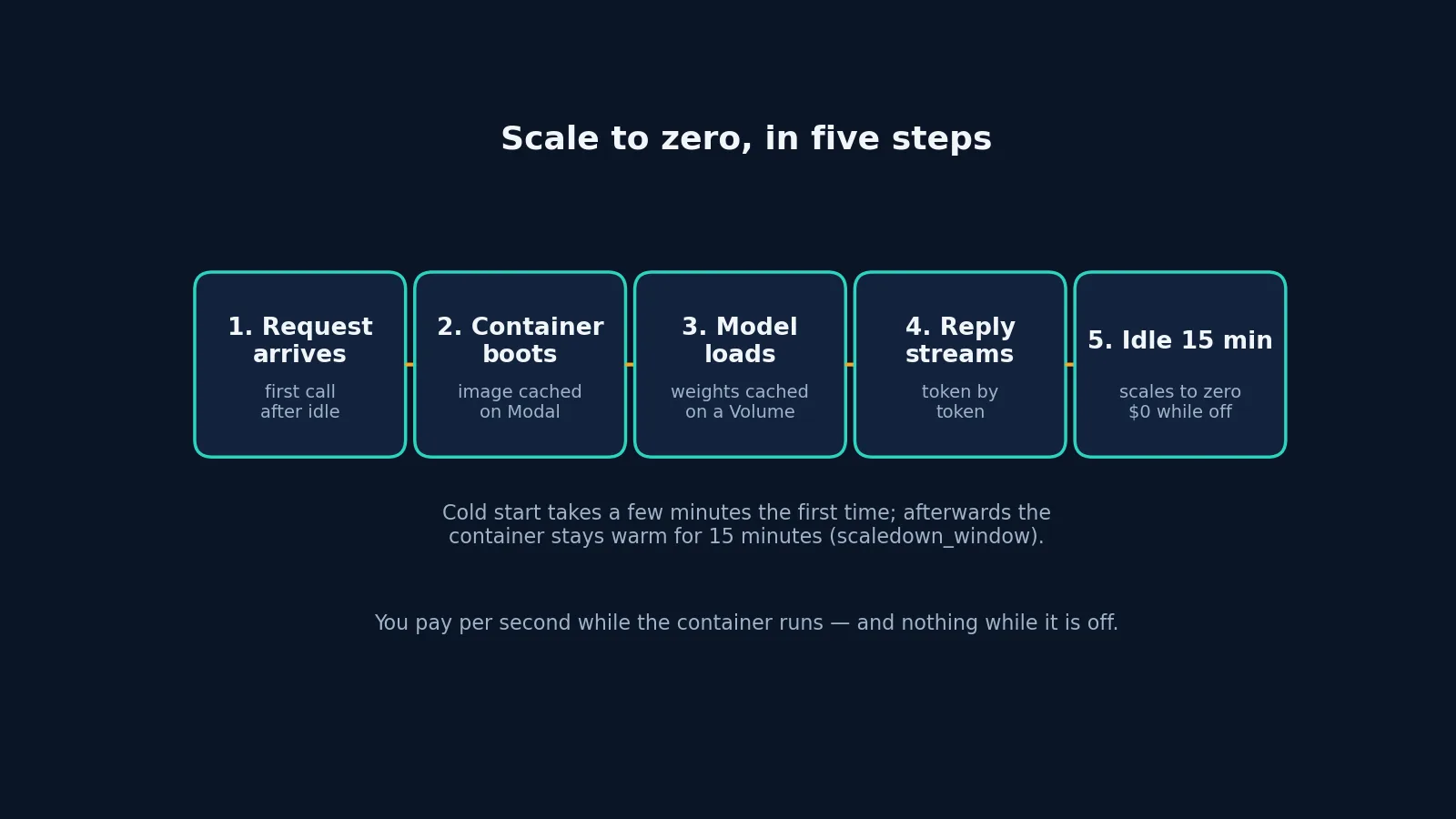
Three consequences follow. First, the free credit is real money for this workload: a few hours of H200 time a month covers a personal project, a demo, or an evaluation run. Second, the scaledown_window=15 in the server file is a cost decision disguised as a timeout: after the last request, the container idles for up to 15 minutes — still billing — before scaling to zero. Shorten it if your traffic is sparse, lengthen it if your users come in bursts and hate cold starts. Third, the bill has no ceiling unless you set one: put a spend limit on the workspace in the Modal dashboard before you share the URL anywhere. The $30 credit is applied first; everything past it lands on the card on file.
Which approach should you use?#
Serving your own model is one of four honest options, and the right one depends on what you are optimizing for:
| Approach | Best when | Watch out for |
|---|---|---|
| This tutorial: Modal + vLLM | You want a private endpoint with no servers to manage, and spiky or bursty traffic | Cold starts of a few minutes; per-second GPU rates above a reserved instance at sustained load |
| Hosted frontier API | You want the strongest model and zero operations, and your data may leave your cloud | Per-token pricing that grows with usage; no model choice beyond the provider's menu |
| Rented GPU (Vast, RunPod, a cloud VM) | Traffic is steady enough that a 24/7 instance beats per-second billing | You own patching, uptime, and scaling; idle time is still billed |
| Local machine (Ollama, llama.cpp) | Privacy is absolute or the model fits your own hardware | Throughput and context are bounded by your GPU; no sharing beyond your network |
The crossover rule is simple: if the GPU would run more than about half the time, a reserved instance is usually cheaper than serverless. Below that, scale-to-zero wins, and this tutorial is the cheapest way to find out which side of the line you are on — the experiment costs a few dollars of free credit.
Troubleshooting#
503on first contact. The container is booting or was scaled to zero. Wait a minute and retry;modal run vllm_inference.pyforces a fresh replica and shows you the startup logs.401 Unauthorizedon/v1/*. The key in your request doesn't match the key in thevllm-api-keysecret. Recreate the secret with a known value (modal secret create --forceoverwrites) and redeploy.- Deploy fails on image build. The usual cause is a version conflict in
uv_pip_install. Keep the two pins exactly as written: vLLM 0.34.0 requires transformers between 5.16.1 and 5.23.0, and 5.16.1 is the tested floor. - First boot is very slow. Expected once: ~50 GB of weights download into the Volume. If it is slow every time, check the Modal dashboard — the Volumes may not be mounting, in which case every boot re-downloads. The volume names in the file (
huggingface-cache,vllm-cache) must match whatmodal volume listshows. - Out of memory on the H200. The 26B model plus a large KV cache fits one H200, but only just if you raise
--max-model-lentoward the full 256K. Either lower the context with--max-model-len 131072or move to two GPUs with--tensor-parallel-size 2andgpu="H200:2". - Swapping in a gated model. Create an
HF_TOKENsecret (modal secret create huggingface-secret HF_TOKEN=<token>), add it to the server'ssecretslist, and accept the model's license on Hugging Face first — otherwise the download fails with a 401 from the Hub. - Removing the speculative block. If the server logs complain at startup, delete the
--speculative-configaddition first. It is the most model-specific piece; the server runs fine without it, just slightly slower at low concurrency.
The takeaway#
You now own an endpoint instead of renting someone else's. The same file, with the model name changed and the Gemma-specific flags adjusted, serves any open-weights model that fits the GPU you pick — Qwen3-8B on an L40S is the obvious next experiment, at about $1.95 an hour. And the same client code works against all of them, because the OpenAI interface is the contract and the model behind it is your choice.
The habit to keep: pin every version, pin the model revision, keep the key out of the code, and set a spend limit before you share the URL. The rest — scaling, patching, hardware — is Modal's problem now, and that is the whole point.