You have 20 Claude Code terminals open and you cannot say which one is doing what. A runaway loop burned through your token budget before lunch, and when the machine reboots every session is gone. Paperclip is the layer above the agents: a self-hosted, open-source Node.js server and React UI that turns your coding agents into an org chart with goals, budgets, and approval gates. The project's own pitch says it best: if OpenClaw is an employee, Paperclip is the company.
Paperclip (paperclipai/paperclip, ~98,000 stars on GitHub, MIT license) picked up over 10,000 stars in the week to October 4, 2026 — the loudest launch week of any agent tooling project this month. It works with the agents you already use: OpenClaw, Claude Code, Codex, Cursor and Cursor Cloud, Gemini CLI, OpenCode, Pi, Hermes, Grok Build, and Kimi Code. The README's hiring rule: if it can receive a heartbeat, it's hired. Here is the full walkthrough, verified against the project's own docs.
node --version — Paperclip requires a newer Node than most LTS setups ship.The fastest route works in any terminal:
npx paperclipai@latest onboard --yesThe CLI runs from npm's cache; your instance configuration and data persist locally. The quickstart defaults to trusted local loopback mode. If you use a private npm registry (for example GitHub Packages) via a global ~/.npmrc, npx may resolve paperclipai against it and fail with an E404 — force the public registry for this command:
npx --registry https://registry.npmjs.org paperclipai@latest onboard --yesTo expose the dashboard beyond localhost from the start, pick a bind preset:
npx paperclipai@latest onboard --yes --bind lan
# or:
npx paperclipai@latest onboard --yes --bind tailnet
Already configured? Rerunning onboard keeps your existing config; use npx paperclipai configure to edit settings. The package is published on npm as paperclipai (latest: 2026.1005.0, updated October 6, 2026).
Before you install anything persistent, run an isolated instance that is already initialized with a CEO agent. It stays in the foreground, never installs a service, and opens the browser once setup succeeds:
ANTHROPIC_API_KEY=sk-ant-... npx paperclipai test-drivePrefer a different harness or model:
OPENAI_API_KEY=... npx paperclipai test-drive --harness codex
OPENROUTER_API_KEY=... npx paperclipai test-drive \
  --harness opencode \
  --model openrouter/anthropic/claude-sonnet-4.5
Each run without --data-dir gets a unique, retained temporary directory — its absolute path is printed at startup. Pass --data-dir to reuse one, or --no-browser to leave the initialized instance unopened. When invoked from a linked Git worktree, test-drive also enables task execution in that worktree.
This is the step that makes Paperclip different from a pile of agent tabs. In the dashboard:
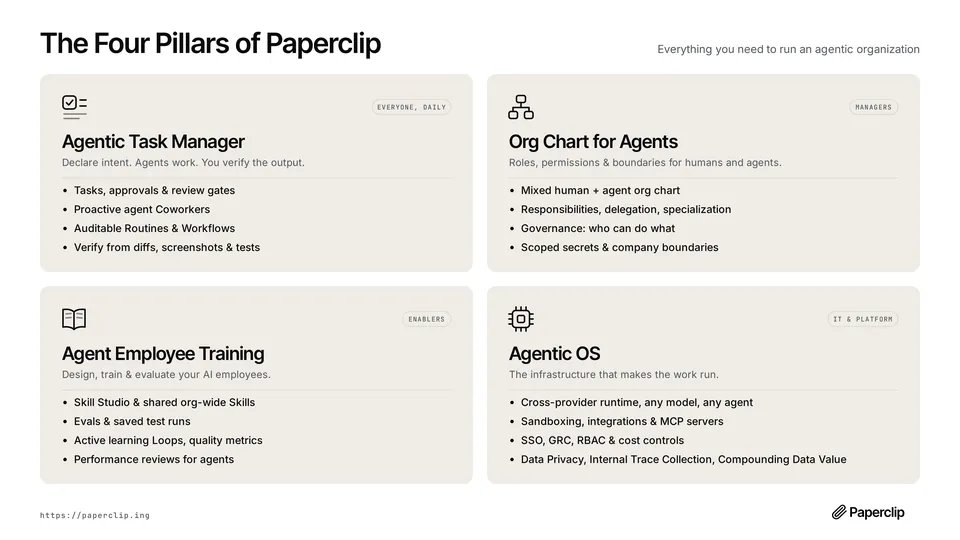
This is the feature that pays for the install. Paperclip tracks token and cost spend by company, agent, project, goal, issue, provider, and model, with scoped budget policies:
Scheduled routines run recurring work on cron, webhook, or API triggers. Each routine execution creates a tracked issue and wakes the assigned agent — no manual kick-offs, and every run keeps its output and history. Customer-support triage, social posts, weekly reports: define them once as routines with an owner.
Wire in GitHub, Notion, and Railway, or your own MCP server through the governed tool gateway. Each connection gets an action policy — Allowed, Ask first, or Off — and you control which agents can use which connections. Managed GitHub operations can even use the GitHub identity of the person directing the work, so commits land under the right name.
A persistent, ticket-based company for your agents. Tasks carry atomic checkout with execution locks, so two runs never claim the same work. Sessions survive reboots. Every mutation, heartbeat, cost event, and approval lands in a durable activity log you can audit. And because Paperclip is MIT-licensed and self-hosted — single Node.js process with an embedded Postgres locally, or your own Postgres and Docker in production — the company runs on your hardware, not someone else's cloud.
PAPERCLIP_TELEMETRY_DISABLED=1.