Plannotator: stay in the loop with your coding agents — hands-on with the review workspace for plans, diffs, and feedback
Plannotator is the No. 1 trending repo on GitHub today: a local review surface where you annotate your coding agent's plans, review its diffs, and send feedback back as its next turn. Install the 0.28.64 binary, review a real diff, annotate a document, and open the Inbox — no API key, no account, everything on localhost.
- Verified versions: Plannotator 0.28.64 (released November 13, 2026), installer script,
semsidecar 0.8.0, Python 3.12.3, Node 24.22.1, git. - The install ran clean:
--minimalinstall exited 0, SHA256 verified by the installer and again by hand against the release sidecar (sha256sum --checkOK). The full install's binary step also verified; its trailing agent-config steps hit this VM's disk quota, not a Plannotator bug. - Review, annotate, and the Inbox all ran live: a static diff served over
/api/diffwith the full patch text, an annotated document persisted to history, and the Inbox server up at localhost with Codex connected. - Gotcha 1 — the servers block: review, annotate, archive, and inbox keep running until you stop them with
Ctrl+C. Pass--browser noneto get the URL printed instead of a browser opening. - Gotcha 2 — PATH: the installer prints the
export PATHlines but does not add them. Add~/.local/binyourself or the command is not found. - Why now: No. 1 on GitHub trending daily, November 14, 2026; 10,871 stars, 817 forks, 8,801 commits, Apache-2.0, with the Inbox landing as the multi-agent review layer.

Your coding agent just finished a 40-file refactor while you were making coffee. It says the plan is sound, the tests pass, and everything is ready to merge. Do you believe it? That gap — between what the agent claims and what you have actually looked at — is where most agent-driven bugs are born. The fix is not to watch the agent work line by line. It is to put a review step between the agent and the merge, one that is fast enough to use every time.
That is what Plannotator does, and it is why it is sitting at number one on GitHub trending today. Plannotator is a local, browser-based review surface for AI coding agents: when your agent proposes a plan or finishes a change, a review UI opens in your browser, you annotate the plan or the diff, and your feedback goes back to the agent as its next turn. It works with Claude Code, Codex, Copilot CLI, Gemini CLI, OpenCode, Pi, Kiro, Droid, Amp, and the DeepSeek Harness. The project has 10,871 stars, 817 forks, and 8,801 commits behind it, it is Apache-2.0 licensed, and the current release is 0.28.64, published November 13, 2026. Everything runs on localhost. There is no account, no cloud, and no API key for the core loop.
This tutorial installs Plannotator 0.28.64, reviews a real diff, annotates a real document, and opens the Inbox that collects messages from your agents. Every command below was run in a sandbox and produced the output shown. Steps that need an agent subscription are marked as documented rather than run — the review, annotate, and inbox servers were all verified live.
What you'll need#
- A machine running macOS, Linux, WSL, or Windows. The installer covers all four; the walkthrough below ran on Linux.
curlandgit.curlfetches the installer;gitproduces the diff you review in Step 2.- About 250 MB of free disk. The installed binary is 214,747,312 bytes — roughly 205 MB. The full installer downloads a 57 MB archive; the minimal install downloads the raw 215 MB binary instead.
- A browser. Any modern browser works; the review UI is a local web app.
- No API key, no account, no subscription for Steps 1–4 and 6. A coding agent with its own subscription is only needed for the full plan-review loop in Step 5, and even there Plannotator itself charges nothing.
Step 1: Install Plannotator#
The installer is a single bash script. Download it, read it if you like — it is about 177 KB and its first job is resolving the latest release tag — then run it:
curl -fsSL https://plannotator.ai/install.sh | bashThat is the standard install. It downloads the binary from GitHub Releases, verifies its SHA256, installs it to ~/.local/bin/plannotator, auto-detects the coding agents you have installed, and configures hooks, skills, and slash commands for each of them. It also installs a small semantic-diff sidecar called sem (version 0.8.0), which powers the semantic diff view in code review.
If you only want the binary and nothing else, pass --minimal. This is the path verified end to end in the sandbox, because it touches nothing outside the binary install:
curl -fsSL https://plannotator.ai/install.sh | bash -s -- --minimal --version v0.28.64Expected output, exactly as observed:
Installing plannotator v0.28.64...
Downloaded plannotator-linux-x64.
SHA256 verified. For build provenance verification, see
https://docs.plannotator.ai/open-source/start/installation#pin-or-verify-a-release

plannotator v0.28.64 installed to ~/.local/bin/plannotator

~/.local/bin is not in your PATH. Add it with:

  echo 'export PATH="$HOME/.local/bin:$PATH"' >> ~/.bashrc
  source ~/.bashrc

To uninstall later: plannotator uninstall

Minimal install complete — only the plannotator binary was installed.
No skills, hooks, agent integrations, or config files were written.
Pin the version with --version v0.28.64 so a future release cannot change what you installed. The plain --minimal form without a version installs the latest release instead. On Windows PowerShell the equivalent is irm https://plannotator.ai/install.ps1 | iex.
Two things the installer prints but does not do for you. First, it does not add ~/.local/bin to your PATH — run the two export lines it prints, or the plannotator command will not be found. Second, the full install tries to fetch an optional agent-terminal runtime over npm; if that fails it prints a notice and skips it. Core review works without it. In the sandbox the full install's trailing steps hit the VM's disk quota while creating agent config directories, so the binary install was confirmed separately and the minimal install was run clean to exit 0. On a normal machine the standard install completes in one pass.
Confirm the install:
plannotator --version
# plannotator 0.28.64

plannotator update --check
# Plannotator 0.28.64 is installed. Up to date (checked just now).
Optional, but worth doing once: verify the binary against the release's SHA256 sidecar, the way the README documents it. Download only the 88-byte checksum file and check it:
gh release download v0.28.64 --repo backnotprop/plannotator \
  --pattern 'plannotator-linux-x64.sha256' --dir /tmp
cd ~/.local/bin
sha256sum --check /tmp/plannotator-linux-x64.sha256
# plannotator-linux-x64: OK
The installed binary's hash was 5db01f1f8085bdf9adbe52075407b003553c6ab3c0b997e59a7819087f42aa5d, identical to the sidecar. The installer already verifies this itself; the manual check is for readers who do not pipe install scripts to a shell on trust. For stronger proof, the installer accepts --verify-attestation, which checks the SLSA build-provenance attestation with the gh CLI (no login required). Releases carry SLSA attestations from v0.17.2 and a CycloneDX SBOM.
Step 2: Review a real diff#
Code review is the fastest way to see what Plannotator does, because it needs no agent at all. Make a small demo repo with a real change:
mkdir -p /tmp/review-demo && cd /tmp/review-demo
git init -q -b main .
cat > calc.py <<'EOF'
def add(a, b):
    return a + b
EOF
git add . && git commit -qm "initial calc"
cat > calc.py <<'EOF'
def add(a, b):
    """Add two numbers. Raises TypeError on non-numeric input."""
    if not isinstance(a, (int, float)) or not isinstance(b, (int, float)):
        raise TypeError("add() needs numbers")
    return a + b


def multiply(a, b):
    return a * b
EOF
git diff > demo.diff
cat demo.diff
The diff is one hunk: add() gains a type guard and docstring, and a new multiply() appears. Now hand that static diff to Plannotator:
plannotator review --patch-file demo.diff --browser none --no-git-remote-checkExpected output:
  Plannotator session ready: http://localhost:45585
  Not opening a browser (PLANNOTATOR_BROWSER=none).
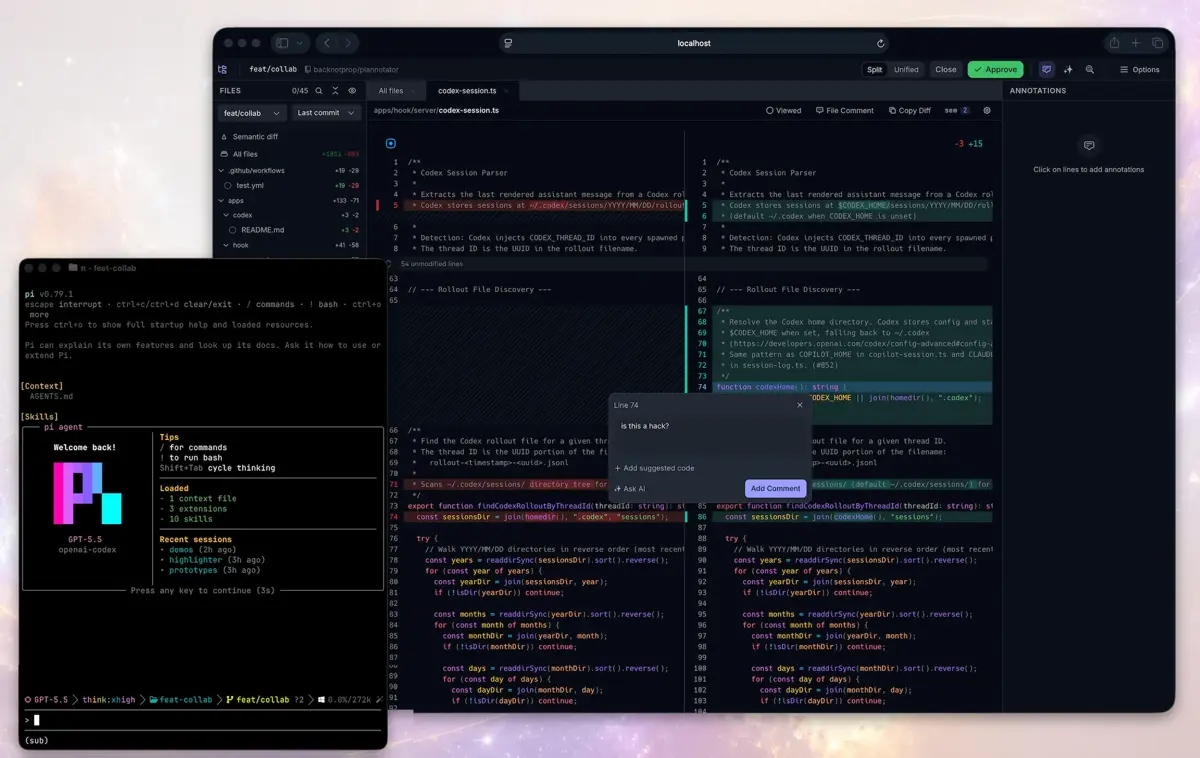
The port is random on every run — yours will differ. The server is now serving the code-review UI. Open the URL in a browser and you get a file tree on the left, a side-by-side diff in the middle, and an annotations panel on the right. Clicking a line opens a comment box; there is an Approve button at the top, and --gate makes the command wait for your sign-off instead of returning immediately.
The screenshot below is the project's own review UI, from its repository: the file tree with per-file +/- counts, the side-by-side diff, a line annotation asking "is this a hack?", and the Approve button. Your screen will look the same, with your diff in it.
That the UI is really serving your diff — and not just a shell page — is checkable from the terminal. The review app is a single-page app, so the HTML shell is small (4,472 bytes, title "Code Review"), and the diff arrives over an API call:
curl -s http://localhost:45585/api/diff | python3 -m json.tool | head -20In the sandbox run this returned a 1,914-byte JSON document whose rawPatch field held the complete diff: calc.py mentioned 8 times, TypeError 4 times, multiply twice. The server reads the patch file at startup and serves it to the UI; nothing is uploaded anywhere.
When you are done, stop the server with Ctrl+C. The review commands block the terminal by design — the session stays open while you work in the browser. Check what is still running any time with:
plannotator sessions
# No active Plannotator sessions.

plannotator sessions --open 1   # reopen a listed session in the browser
Three flags from this step are worth remembering. --patch-file takes a file path or - for stdin, so git diff | plannotator review --patch-file - works too. --no-git-remote-check stops the session from contacting the git remote (the default behaviour checks origin for the default branch and a "behind" banner). --browser none prints the URL instead of opening a browser, which is what you want on a remote machine or in a script.
Reviewing your own working tree is the same command without the patch file: plannotator review in a repo opens your uncommitted changes, and plannotator review <github-pr-url> opens a pull request — GitHub, GitLab, and Bitbucket Cloud URLs are all accepted, and --diff-type selects the comparison (uncommitted, staged, last-commit, branch, and others). PR review needs an authenticated CLI for the host, so it is documented here from the README rather than run in the sandbox.
Step 3: Annotate a document#
Review is for diffs. Annotate is for everything else: plans, specs, handoff notes, HTML artifacts, and URLs. Make a short document:
cat > /tmp/launch-checklist.md <<'EOF'
# Launch checklist

## Before the demo
- [ ] Rehearse the failure case first
- [ ] Keep the diff small: one idea per commit

## After the demo
- [ ] File the follow-ups as issues, not as chat messages
EOF

plannotator annotate /tmp/launch-checklist.md --browser none
Expected output:
Resolved: /tmp/launch-checklist.md

  Plannotator session ready: http://localhost:43295
  Not opening a browser (PLANNOTATOR_BROWSER=none).
Open the URL and the document renders with a contents sidebar, a markup toolbar (Select, Markup, comment, highlight), and an Annotations panel that collects every note you leave. Select text to comment on it, or use the toolbar to mark a passage. Press Send Annotations when you are done. The annotated document is saved back into Plannotator's history — in the sandbox run the checklist was persisted to history/.../annotate-demo-md-*/001.md inside the data directory, with the full text intact.
Annotate accepts more than local files. It takes a folder (browse and annotate the files inside it), a URL (fetched through Jina Reader by default, or directly with --no-jina), and HTML files with --render-html to render the page as-is instead of converting it to Markdown. The README ships a product-requirements-document template and a filled example if you want a realistic document to practise on. Two companion commands cover the agent's own words: plannotator annotate-last annotates the agent's last message, and plannotator last shows it.
There is also a terminal version of this workflow. Herdr Annotate brings Plannotator-style review into the terminal: install it with herdr plugin install plannotator/herdr-annotate, or run the standalone TUI with brew install plannotator/tap/plannotator-tui. Annotations made in the terminal land in the same Plannotator data directory, so terminal and browser reviews compound instead of living in two places. (Herdr itself — the terminal multiplexer this grew out of — is covered in our Herdr hands-on.)
Step 4: Open the Inbox#
Review and annotate cover one session at a time. The Inbox is the missing piece for multi-agent work: one local window where your agents leave you messages, questions, files, and guided reviews while they keep working. Start it with no arguments and no browser:
plannotator inbox --no-openExpected output in the sandbox run:
Plannotator Inbox: http://localhost:37735/
Connected Codex to the Inbox.
Agents use it from their next session. PLANNOTATOR_INBOX_CONNECT=0 skips this step; plannotator uninstall removes what it added.
Open the URL and you see threads grouped by project. An agent can ask you a question mid-run — answer it with a click, annotate a file it attached, and press Send when you are ready. Nothing holds the agent session open while you decide, and your reply goes back to the session that asked. Claude Code, Pi, and OpenCode connect through Plannotator's plugins; any other agent reaches the Inbox over MCP with plannotator inbox mcp, and plannotator inbox --help prints the full guide the agent reads.
The Inbox is a server, so it has lifecycle commands. plannotator inbox status only reads state — run it to check whether the Inbox is up (exit 0) or to find its address. plannotator inbox stop and restart exist, but the help text warns against using them casually: other agents' sessions share the same Inbox, and a restart drops their connection until they reconnect (replies wait in the meantime). plannotator inbox projects manages the project threads, including combining two projects into one. Everything the Inbox stores — threads by project, the versions of files you sent, and inbox.json — lives under the data directory, which defaults to ~/.plannotator and moves with PLANNOTATOR_DATA_DIR.
Step 5: Wire it into your agent#
Steps 2–4 work with no agent at all. The full loop — the agent proposes a plan, the review UI opens on its own, you approve or send it back — needs the installer to have wired Plannotator into your agent. The standard install does that automatically; the minimal install deliberately does not. This section is documented from the README and the CLI help, not run end to end in the sandbox, because the live loop needs an agent CLI with its own subscription, and none is installed here.
What the installer sets up, per agent:
| Agent | After the installer |
|---|---|
| Claude Code | /plugin marketplace add backnotprop/plannotator, then /plugin install plannotator@plannotator. Restart Claude Code. |
| Codex | Nothing. Plan review is enabled automatically via Codex's experimental Stop hook. |
| Gemini CLI | Nothing. Hook, policy, and slash commands are configured automatically. Requires Gemini CLI 0.36.0+. |
| OpenCode | Add "plugin": ["@plannotator/opencode@latest"] to opencode.json. Restart OpenCode. |
| Pi | Skip the installer. Run pi install npm:@plannotator/pi-extension, then start Pi with --plan. |
| Copilot CLI | /plugin marketplace add backnotprop/plannotator, then /plugin install plannotator-copilot@plannotator. Restart. |
| Kiro CLI | Nothing. Skills and an example agent are installed automatically; try kiro-cli chat --agent plannotator. |
| Droid | droid plugin marketplace add https://github.com/backnotprop/plannotator, then droid plugin install plannotator@plannotator. Commands only, no plan interception yet. |
| DeepSeek Harness | Add @plannotator/dsh on the Plugins page, or dsh plugin --profile <profile> add @plannotator/dsh. |
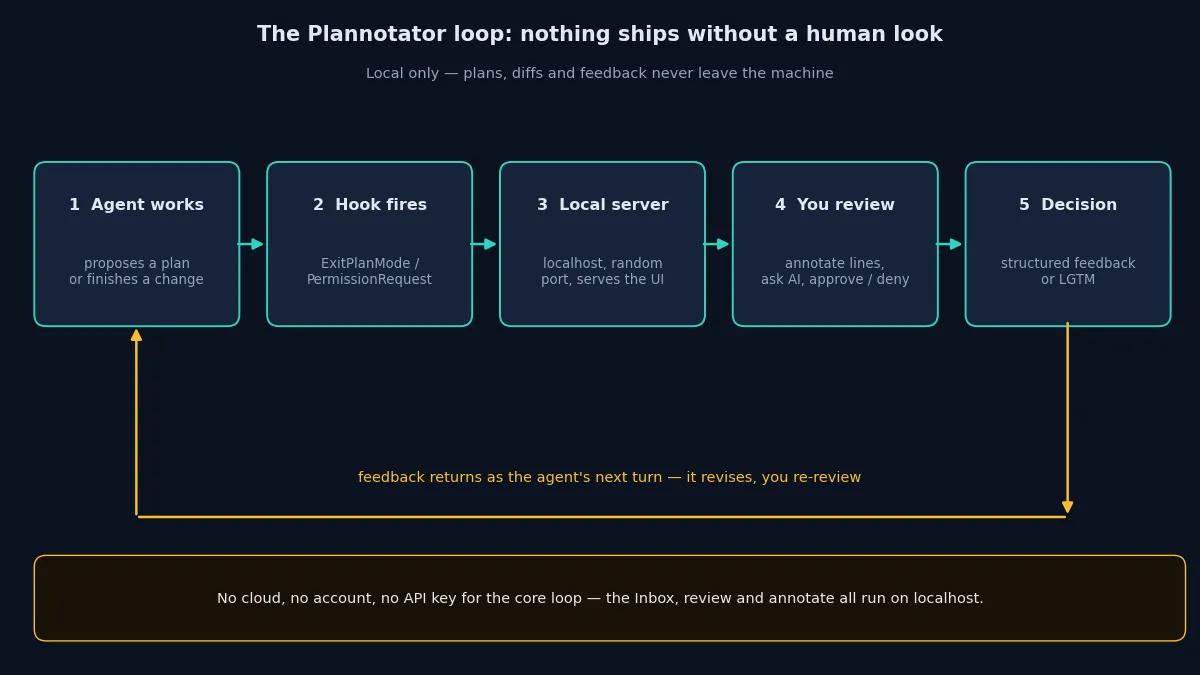
Once wired in, plan review needs no command at all. The flow, as the README diagrams it, is: the agent calls ExitPlanMode, the PermissionRequest hook fires, the local server reads the plan from the hook input, the browser opens with the review UI, you annotate and approve or deny, and the decision returns to the agent — approve and it proceeds, deny and your structured feedback arrives as its next turn, with a plan diff showing what changed on the next round. On Claude Code 2.1.287 or newer, the review does not even make Claude wait: it ends its turn and your decision arrives later as a message. Set PLANNOTATOR_CLAUDE_MOD=0 to go back to the classic blocking flow.
Inside an agent session, three slash commands cover the manual paths: /plannotator-annotate <file> for any file, folder, or URL, /plannotator-review for the current diff or a PR URL, and /plannotator-last for the agent's last message. On Codex the same commands are !plannotator … or the $plannotator-* skills. There is also built-in AI in the review UI itself: ask AI about anything you are reviewing, or launch an AI review that posts comments to the diff — those calls go to your configured provider, so they are the one part of the loop that is not free of keys.
Two more integrations are worth knowing about. VS Code gets an extension from the Marketplace that opens plans in editor tabs and adds annotations from the gutter. Approved plans can be saved automatically to Obsidian (with YAML frontmatter, tags from the plan title, and backlinks), Bear (as notes with nested tags), or Notion (as Markdown child pages under a shared parent page, with NOTION_TOKEN set in the environment that starts Plannotator).
Step 6: Remote, config, and cleanup#
Plannotator is a local server, so the remote case matters: most agent work happens on a machine you SSH into. Plannotator auto-detects SSH sessions and switches to a fixed port, 19432. For a different port, or in a devcontainer or Docker, set it explicitly:
export PLANNOTATOR_REMOTE=1
export PLANNOTATOR_PORT=9999   # forward this port
Forward it in ~/.ssh/config with LocalForward 19432 localhost:19432 (or your chosen port), or let VS Code devcontainers forward it automatically. One warning from the README, stated plainly: in remote mode the server listens on every interface (0.0.0.0) with no login, so anyone who can reach the port can use it. Keep it closed to networks you do not trust.
Configuration lives in ~/.plannotator/config.json, with environment variables as overrides. The useful ones:
PLANNOTATOR_DATA_DIR=/path/to/data     # move plans, history, and settings
PLANNOTATOR_GIT_REMOTE_CHECK=0         # never contact the git remote
PLANNOTATOR_SHARE=disabled             # turn off link sharing entirely
PLANNOTATOR_BROWSER=none               # never open a browser automatically
PLANNOTATOR_REMOTE=1                   # remote mode, fixed port 19432
Sharing deserves a sentence because its privacy model is specific. Small Markdown shares are compressed into the URL fragment — readable by anyone with the link, but never sent to the share portal in a request. Large Markdown and raw HTML shares use a short-link service: the payload is encrypted with AES-256-GCM before upload, the server stores only ciphertext, the key stays in the URL fragment, and hosted pastes expire after 7 days. Link sharing is moving to deprecated support in favour of Workspaces, a hosted team product, with no removal date announced.
Privacy in general: Plannotator collects no usage telemetry or analytics, and plans, diffs, annotations, drafts, and history stay local by default. Content leaves the machine only when a network feature needs it — URL annotation fetching the page, PR review talking to the host, Ask AI sending the selected question and context to your provider, sharing sending a link to whoever you send it to. One exception to note: every review surface checks GitHub for the latest release when it loads, and there is currently no opt-out for that check. It sends no plan or review content.
Cleanup is built in. plannotator uninstall removes the components it installed and keeps your local plans, history, drafts, and settings. Add --purge for a full removal of local data too — it requires typing purge at the prompt, refuses filesystem roots and the home directory, and explains that the data is local-only and cannot be recovered. --dry-run previews what would be removed, and --yes makes it non-interactive. The dry run was verified in the sandbox:
plannotator uninstall --dry-run
# Dry run complete; no changes were made.
To update, re-run the installer — it also updates an installed Claude Code plugin when the claude command is on PATH — or use plannotator update. Pin a specific version with --version vX.Y.Z if you need a stable integration point.
Troubleshooting#
plannotator: command not foundafter install. The installer does not edit your shell config. Add~/.local/binto PATH with the lines it prints, thensource ~/.bashrc(or open a new terminal).- A server keeps running after you close the browser tab. The server is a separate process and stays up until you stop it. Run
plannotator sessionsto list it, then stop the process withCtrl+Cin its terminal. plannotatorwith no arguments seems to hang. With no arguments it is a hook handler: it waits for JSON on stdin. Runplannotator --helpfor the command list instead.- The installer reports a failed npm step. The agent-terminal runtime is optional. The installer prints a notice and continues; review, annotate, and the Inbox all work without it.
- A review opens on a random port each time. That is by design — each hook invocation runs on a random port, and settings are saved in cookies for that reason. Use
PLANNOTATOR_REMOTE=1andPLANNOTATOR_PORTfor a stable port over SSH. - Install fails with a disk or write error. The binary is about 205 MB and the installer stages the download in the system temp directory. In the sandbox the first minimal-install attempt failed exactly this way because
/tmpwas 78% full; pointingTMPDIRat a directory with room fixed it. Make sure both/tmpand your home have a few hundred MB free.
When to use this vs alternatives#
| Approach | What it is for | Use it when |
|---|---|---|
| Plannotator | Human review of agent plans, diffs, and messages, local-first | You run coding agents and want a fast approve-or-send-back step before anything merges — especially with several agents at once. |
| GitHub / GitLab PR review | Reviewing hosted pull requests | The change already lives on the host and teammates need to see it. Plannotator's PR review is a complement for the local, pre-push pass. |
| Reviewing in the agent's chat | Reading what the agent says it did | Small changes you can hold in your head. It breaks down on large diffs, and the agent's summary is not the diff. |
| Herdr Annotate (terminal) | Terminal-native annotation of agent replies and Markdown | You live in the terminal and want the same feedback loop without a browser. Same data directory as Plannotator, so the two compound. |
| Editor diff + comments | Reading a diff in VS Code or your editor | You only need to read. Plannotator earns its keep when the feedback has to travel back to the agent as structured input. |
The honest boundary: Plannotator is a review layer, not a second agent. It does not write code, run tests, or judge correctness for you. Its value is that it makes the human check cheap enough to actually happen — one command, one browser tab, one decision — and that the decision reaches the agent in a form the agent can act on, instead of living in a chat message the agent never re-reads.
The takeaway#
Install the binary, review one real diff with --patch-file, annotate one real document, and open the Inbox once. That is the whole core loop, and it runs with no account and no API key. If you use a coding agent daily, wire in the plugin for your agent and let plan review open on its own — the next time the agent proposes a plan, the decision is yours before a line of code changes. The loop is the product: agent proposes, you review, feedback returns as the next turn, and nothing ships without a human look.
Links: the repository is github.com/backnotprop/plannotator, releases are at github.com/backnotprop/plannotator/releases, and the installation and verification docs are at docs.plannotator.ai.