Cut 90 ms off every voice-assistant turn: hands-on with RealtimeVAD
RealtimeVAD spots the end of your sentence about 90 ms before Silero VAD does — by watching the audio go quiet instead of waiting for a probability to fall. It installs with one pip command, needs no GPU and no API key, and I measured its lead on real speech before writing a word of this tutorial.
pause event — a median 92 ms before Silero on the author's close-microphone recordings, and 64–190 ms before Silero's VADIterator end on the three LibriSpeech utterances measured in this tutorial. Install 0.1.0 with pip, feed it a 16 kHz mono WAV, and start speculative work at pause — if your pipeline can cancel it.- The project:
KoljaB/RealtimeVAD— 86 stars, 3 forks, 92 commits; created November 7, 2026; front page of Hacker News November 12; MIT. - The install:
pip install realtimevad==0.1.0— NumPy and ONNX Runtime only; the Silero model ships inside the package; no PyTorch, no GPU, no key. - The measured lead: 64, 190, and 144 ms against the
VADIteratorend on three LibriSpeech utterances; 11–38 false pauses per file — the price of the early signal. - The cost: 0.15 s model load, then 11.7 ms of processing per second of audio on a two-core machine. One CPU thread, 16 kHz mono only.
- The limit: alpha, 0.1.0 — only pays off if your pipeline can start work at
pauseand cancel it fast. No lead on a distant microphone or in loud noise.

A voice assistant cannot answer until it knows you have stopped talking. Speech recognition, the language-model call, and the voice output all wait for that one decision, and the standard tool for making it — Silero VAD — takes a few hundred milliseconds to be sure. RealtimeVAD is a small Python library that gives you a second, earlier signal: it keeps Silero to decide what counts as speech, and every 10 ms it checks whether the audio has gone quiet. The moment it has, you get a pause event, and you can start the answer before Silero has finished deciding. If the speaker goes on, you cancel the work and try again at the next pause.
The project is six days old. Kolja Beigel published it on November 7, 2026, and it reached the Hacker News front page on November 12 with a Show HN post titled "RealtimeVAD – trading false positives for 110ms earlier end-of-speech." At the time of writing it has 86 stars, 3 forks, and 92 commits under an MIT licence. Beigel is not a newcomer to this problem: his RealtimeSTT and RealtimeTTS libraries have 10,238 and 4,052 stars respectively. The headline claim is a median 92 ms lead over Silero on close-microphone audio, and 238 ms over Silero's VADIterator end. This tutorial tests that claim instead of repeating it. You will install the library, feed it real recorded speech, print the actual event stream, measure the lead against Silero yourself with the project's own benchmark script, and build the speculative-generation loop the library is designed for. Every command and output below was executed while writing this article.
What you'll need#
- Python 3.9 or later. This tutorial used Python 3.12.3 on Linux.
- pip and about five minutes. The install is two small packages — NumPy and ONNX Runtime — plus the library itself. No PyTorch, no GPU, no model download: the Silero model ships inside the package.
- A 16 kHz mono WAV file of real speech. Step 3 shows how to fetch three short public-domain LibriSpeech utterances for testing, or convert your own recording with ffmpeg. The library accepts 16 kHz mono only.
- No account, no API key, no microphone. Everything in this tutorial runs offline on files. A microphone is only needed if you want to try the live demo in the repository.
Step 1: Install RealtimeVAD#
Install version 0.1.0 from PyPI and pin it. The project is six days old and labels itself alpha, so pinning matters: the API may still change, and every command in this tutorial was verified against 0.1.0.
python3 -m venv .venv
.venv/bin/pip install realtimevad==0.1.0
The install pulls in NumPy 2.5.4 and ONNX Runtime 1.32.0. That is the whole dependency list — the project's pyproject.toml declares exactly those two. Check the install and confirm the bundled model is present:
.venv/bin/python -c "from RealtimeVAD import VAD, VADIterator; import RealtimeVAD; print(RealtimeVAD.__version__)"
.venv/bin/python -c "from RealtimeVAD import VAD; import time; t=time.perf_counter(); VAD(); print(f'model load: {time.perf_counter()-t:.2f}s')"
Expected output:
0.1.0
model load: 0.15s
The first VAD() loads the bundled Silero model (silero_vad_v6.2.1.onnx, shipped inside the installed package) in 0.15 seconds. After that, feeding audio costs about 11.7 ms of processing per second of audio on this two-core machine — the README says about 8 ms, and the difference is the slower hardware. Either way, it runs on one CPU thread and is roughly a hundred times faster than real time, so the detector itself is never the bottleneck.
As a sanity check, run the project's own test suite. Clone the repository and run pytest against the installed package:
git clone --depth 1 https://github.com/KoljaB/RealtimeVAD.git
.venv/bin/python -m pytest RealtimeVAD/tests/test_vad.py RealtimeVAD/tests/test_silero.py RealtimeVAD/tests/test_iterator.py RealtimeVAD/tests/test_package.py -q
Expected output: 85 passed in 1.34s. The edge-case tests in tests/audio/ skip without about 100 MB of freely licensed audio that is not in git — they need a separate 1.3 GB download, which this tutorial does not use.
Step 2: Your first event stream#
The README's quick start feeds 16 kHz mono audio in chunks and reacts to four events. Save this as first_run.py and run it against the LibriSpeech sentence you will fetch in Step 3 — or any 16 kHz mono WAV you already have. The code is the README's example, with the microphone replaced by a file and a timestamp printed for each event:
import wave
import numpy as np
from RealtimeVAD import VAD

with wave.open("6930-75918-0000.wav") as w:
    assert w.getframerate() == 16000 and w.getnchannels() == 1 and w.getsampwidth() == 2
    audio = np.frombuffer(w.readframes(w.getnframes()), np.int16).astype(np.float32) / 32768

vad = VAD(resume_events=True)
for i in range(0, len(audio) - 512 + 1, 512):  # 32 ms chunks
    for event in vad.feed(audio[i:i + 512]):
        print(f"{event.kind:7s} at {event.time:.3f}s")
The four events mean:
start— speech has begun, after about 64 ms of confident speech, so clicks do not trigger it.pause— the speaker may have stopped. It fires within about 10 ms of the audio going quiet, and it fires often: on every breath, every short gap between words, and every stop consonant.resume— the speech went on after apause, about 20 ms after sound is back. Off by default; this script turns it on withresume_events=True.end— the segment is over, decided where Silero alone ends it. Onlyendcloses a segment; never treatpauseas the end of the turn.
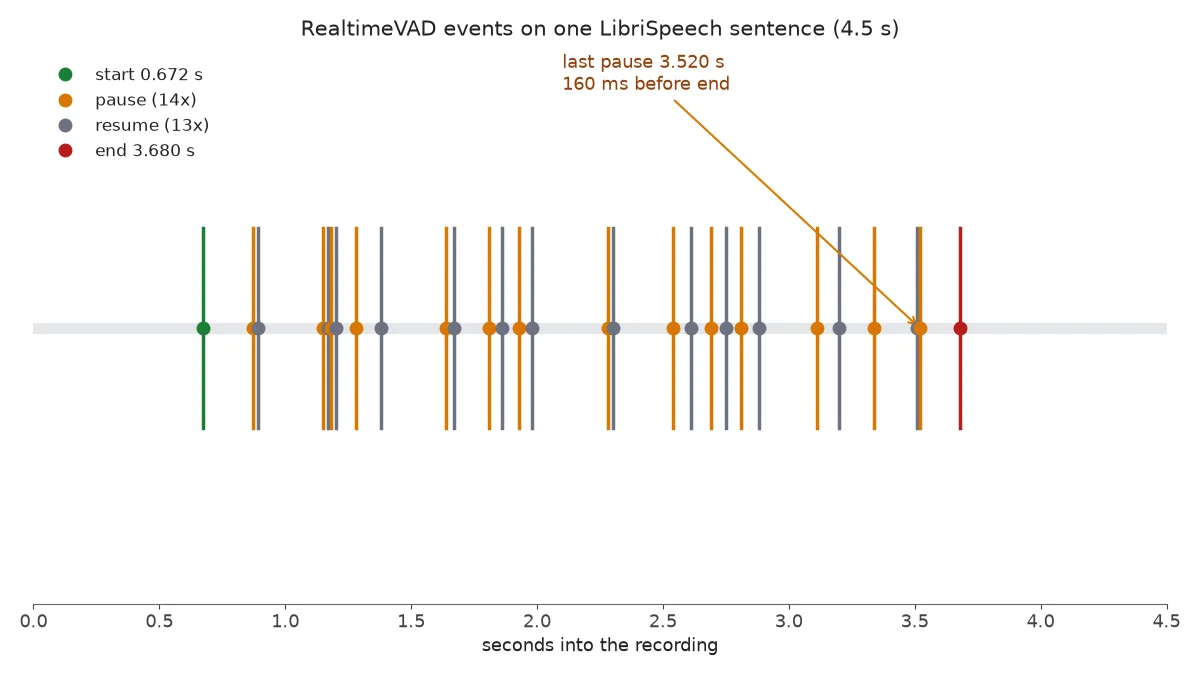
Run against the 4.5-second LibriSpeech sentence "CONCORD RETURNED TO ITS PLACE AMIDST THE TENTS", this tutorial's run produced 1 start at 0.672 s, 14 pause events, 13 resume events, and 1 end at 3.680 s. The first few lines:
start   at 0.672s
pause   at 0.870s
resume  at 0.890s
pause   at 1.150s
resume  at 1.170s
pause   at 1.180s
resume  at 1.200s
...
pause   at 3.520s
end     at 3.680s
Two details are worth noting. First, the last pause came at 3.520 s, 160 ms before the end at 3.680 s — that gap is the head start this library sells. Second, almost every pause was followed by a resume about 20–100 ms later. That is the design, not a bug: pause is early and often wrong on purpose, and the library's own README says so. The end event carries the finished segment with its audio — 3.30 seconds of audio here, from 0.672 s to 3.680 s — and vad.audio() returns the running segment at any time, starting about 0.3 s before the speech began (5,120 samples, or 0.32 s, at the start in this run), so audio sent only from start on has not lost the first sound.
Step 3: Measure the lead yourself#
Do not take the 92 ms headline on trust. The repository ships a benchmark script, benchmarks/speech_off_lead.py, that feeds each WAV through RealtimeVAD and compares its last pause against Silero on the same probabilities. First fetch three short public-domain LibriSpeech utterances (test-clean split) with this script, saved as fetch_samples.py. It calls the Hugging Face datasets-server API, which returns a fresh download link for each row:
import json, os, subprocess, urllib.request, wave

os.makedirs("audio", exist_ok=True)
req = urllib.request.Request(
    "https://datasets-server.huggingface.co/rows?dataset=openslr/librispeech_asr"
    "&config=clean&split=test&offset=0&length=3",
    headers={"User-Agent": "curl"})
data = json.load(urllib.request.urlopen(req, timeout=60))
for r in data["rows"]:
    row, fid = r["row"], r["id"]
    urllib.request.urlretrieve(row["audio"][0]["src"], f"audio/{fid}.flac")
    subprocess.run(["ffmpeg", "-y", "-v", "error", "-i", f"audio/{fid}.flac",
                    "-ar", "16000", "-ac", "1", "-sample_fmt", "s16", f"audio/{fid}.wav"],
                   check=True)
    with wave.open(f"audio/{fid}.wav", "rb") as w:
        n, frames = w.getnframes(), w.readframes(w.getnframes())
    with wave.open(f"audio/{fid}.wav", "wb") as w:  # 1 s of trailing silence
        w.setnchannels(1); w.setsampwidth(2); w.setframerate(16000)
        w.writeframes(frames + b"\x00\x00" * 16000)
    print(fid, row["text"][:50])
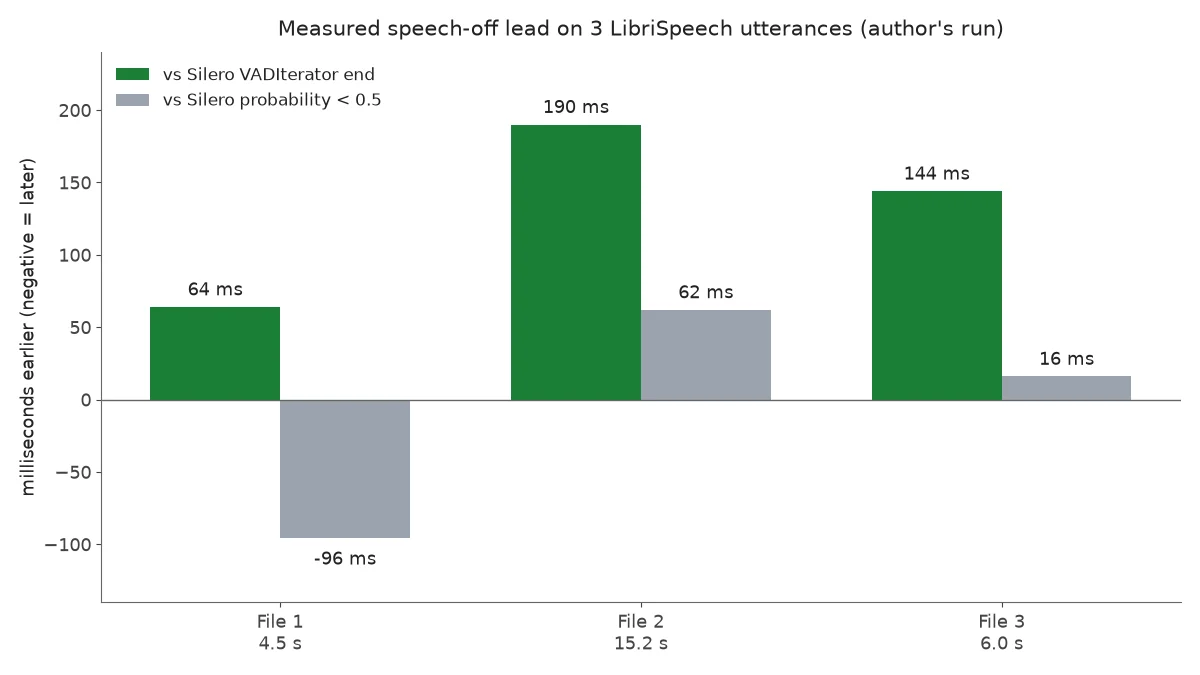
This downloads three utterances totalling about 460 KB: "CONCORD RETURNED TO ITS PLACE AMIDST THE TENTS" (4.5 s), "THE ENGLISH FORWARDED TO THE FRENCH BASKETS OF FLOWERS OF WHICH ..." (15.2 s), and "CONGRATULATIONS WERE POURED IN UPON THE PRINCESS EVERYWHERE" (6.0 s). The trailing second of silence matters: the benchmark needs one turn with trailing silence to find the final speech end. Now run the project's benchmark:
.venv/bin/python RealtimeVAD/benchmarks/speech_off_lead.py audio bench_out.json 2This tutorial's run measured:
| File | Speech | False pauses | Lead vs Silero prob. < 0.5 | Lead vs VADIterator end |
|---|---|---|---|---|
| File 1 — 4.5 s | 3.01 s | 13 | −96 ms | 64 ms |
| File 2 — 15.2 s | 14.02 s | 38 | 62 ms | 190 ms |
| File 3 — 6.0 s | 4.90 s | 11 | 16 ms | 144 ms |
Read the two lead columns as answers to two different questions. Against the moment Silero's speech probability first drops below 0.5, the lead on read speech is small and noisy: −96 ms on file 1, meaning the last pause came 96 ms after Silero's probability fell, and +62 and +16 ms on the other two. Against the VADIterator end — the timestamp a voice pipeline actually waits for before acting — the lead is consistent: 64, 190, and 144 ms. That is the number that matters in practice, because no pipeline acts on a raw probability; it acts on the iterator's end. The README's headline 92 ms was measured on 3,153 turns from one speaker on a close microphone with noise suppression; LibriSpeech is read speech from a different capture chain, and the lead shrinks accordingly. The README is candid about this — its own table gives 82–84 ms for LibriSpeech-style read speech — and the honest summary of my run is: the lead is real, it is smaller than the headline on read speech, and it shows up most clearly against the iterator's end. The false-pause column is the price: 11 to 38 pauses per file were followed by more speech. A pipeline that cannot cancel speculative work gets nothing from this library, and the README says exactly that.
Step 4: Tune how early pause fires#
One setting, pause_mode, trades how early pause comes against how often it comes too early, inside the last word. The default is "accurate"; "balanced" and "fast" count audio as quiet 3 dB or 6 dB sooner. Run the same three files under both modes and compare the pause counts and the time of the last pause:
import glob, wave
import numpy as np
from RealtimeVAD import VAD

def load(path):
    with wave.open(path) as w:
        return np.frombuffer(w.readframes(w.getnframes()), np.int16).astype(np.float32) / 32768

for path in sorted(glob.glob("audio/*.wav")):
    x = load(path)
    for mode in ("accurate", "fast"):
        vad = VAD(pause_mode=mode, resume_events=True)
        pauses = []
        for i in range(0, len(x) - 512 + 1, 512):
            pauses += [e for e in vad.feed(x[i:i + 512]) if e.kind == "pause"]
        print(f"{path} {mode:9s} {len(pauses)} pauses, last at {pauses[-1].time:.3f}s")
This tutorial's run:
audio/6930-75918-0000.wav accurate  14 pauses, last at 3.520s
audio/6930-75918-0000.wav fast       10 pauses, last at 3.340s
audio/6930-75918-0001.wav accurate  39 pauses, last at 14.050s
audio/6930-75918-0001.wav fast       52 pauses, last at 13.960s
audio/6930-75918-0002.wav accurate  12 pauses, last at 5.040s
audio/6930-75918-0002.wav fast       15 pauses, last at 5.040s
Fast mode moved the last pause earlier by 180 ms on file 1 and 90 ms on file 2, and not at all on file 3 — but it does not reliably mean fewer pauses. It fires more pauses on files 2 and 3 (52 vs 39, 15 vs 12) and fewer on file 1 (10 vs 14), because the faster modes report one pause per stretch of speech instead of repeating them. The cost is in the README's own table: in fast mode, the last pause lands more than 100 ms before the last word is over in 18–24% of turns, against 1–9% in accurate mode. Use fast only when what you start at pause copes with a missing word ending, or is redone at end. Other settings worth knowing: VAD(early_end=True) ends segments a median 16–70 ms sooner at the cost of more ends inside an utterance; VAD(repause_s=None) restores the one-pause-per-stretch behaviour of version 0.0.5; VAD(normalize_to_dbfs=-30) helps quiet or phone-line input. The full list, with what each setting costs, is in the repository's SPEC.md.
Step 5: Drop in where Silero already lives#
If your pipeline already uses Silero's VADIterator, the migration is one import. RealtimeVAD ships a compatible iterator with the same constructor and the same {'start': ...} / {'end': ...} results — and without a model argument it uses the bundled model, so it does not need PyTorch:
from RealtimeVAD import VADIterator

vad_iterator = VADIterator(sampling_rate=16000)
for i in range(0, len(audio) - 512 + 1, 512):
    speech_dict = vad_iterator(audio[i:i + 512], return_seconds=True)
    if speech_dict:
        print(speech_dict)
On the same three files this printed {'start': 0.5} {'end': 3.5}, {'start': 0.3} {'end': 14.1}, and {'start': 0.1} {'end': 5.1}. The iterator on its own gives you no speed — its end is decided where Silero's own count decides it. It is a migration path, not the feature: use VAD for the early signal, and keep the iterator only where you need Silero's exact interface. One note: the README's example imports load_silero_vad from the separate silero_vad package to pass an explicit model. You do not need that package; the no-argument form above worked as documented.
Step 6: The speculative-generation loop#
This is the end-to-end use case the library exists for. At pause, start the work — finalize the transcript, call the language model, prepare the voice output. At resume, cancel it. At end, finalize with the full segment. The script below is the skeleton; the "work" is a printed line where a real pipeline would make its calls. Save it as speculative_demo.py:
import wave
import numpy as np
from RealtimeVAD import VAD

with wave.open("6930-75918-0000.wav") as w:
    audio = np.frombuffer(w.readframes(w.getnframes()), np.int16).astype(np.float32) / 32768

vad = VAD(resume_events=True)
started = cancelled = 0
for i in range(0, len(audio) - 512 + 1, 512):
    for e in vad.feed(audio[i:i + 512]):
        if e.kind == "start":
            print(f"[{e.time:6.3f}s] start   -- stream audio to ASR")
        elif e.kind == "pause":
            started += 1
            print(f"[{e.time:6.3f}s] pause   -- SPECULATE: finalize transcript + start LLM call")
        elif e.kind == "resume":
            cancelled += 1
            print(f"[{e.time:6.3f}s] resume  -- speaker continued, CANCEL speculative work")
        elif e.kind == "end":
            print(f"[{e.time:6.3f}s] end     -- FINALIZE with {len(e.segment.audio) / 16000:.2f}s of audio")
print(f"\n{started} speculative starts, {cancelled} cancelled, 1 finalized")
Output on the 4.5-second sentence:
[ 0.672s] start   -- stream audio to ASR
[ 0.870s] pause   -- SPECULATE: finalize transcript + start LLM call
[ 0.890s] resume  -- speaker continued, CANCEL speculative work
...
[ 3.520s] pause   -- SPECULATE: finalize transcript + start LLM call
[ 3.680s] end     -- FINALIZE with 3.30s of audio

14 speculative starts, 13 cancelled, 1 finalized
Fourteen speculative starts, thirteen cancelled, one finalized — and the answer for the final turn was ready 160 ms before the segment ended. The whole 4.5 seconds of audio processed in 0.04 seconds of wall clock after the 0.15-second model load. That ratio is the point: thirteen wasted starts cost almost nothing when each start is a few milliseconds of local work, and the one that survives saves a real, human-perceptible slice of latency on every turn. The arithmetic flips if each start is expensive — a full language-model call per pause, with no cheap cancellation, costs up to 1.7 times as many speculative requests in the author's own LiveKit runs. Start cheap work at pause (transcript finalization, a small-model draft, TTS prebuffering) and keep the expensive call for the point where you are confident, or make sure your cancellation is measured in tens of milliseconds. And always redo at the next pause: the latest one is the best estimate of where the speech stopped, and a pause can land inside the last word when the level dips before a final consonant.
When to use RealtimeVAD vs Silero alone#
The README answers this question with unusual honesty, and it is worth repeating verbatim in spirit, because it is the difference between a library that helps and one that adds noise:
| Your pipeline | What you get |
|---|---|
Starts work at pause and cancels it within a few tens of milliseconds | The lead measured above, on every turn where the audio goes quiet |
| Waits for the end of the turn before doing anything | Nothing. end is Silero's end. Use Silero |
| Starts early but cannot cancel, or each start is expensive | More cost than gain: up to 1.7× as many speculative requests. Use Silero |
| Already answers faster than the end of the turn arrives | Little or nothing: 0 ms in the author's LiveKit run with a 0.1 s LLM |
The same logic applies to frameworks. The repository ships a LiveKit Agents plugin plus a wrapper that starts LiveKit's preemptive generation at pause; the author's numbers are 120 ms sooner on Whisper, 56 ms on a streaming recognizer, and 0 ms with a 0.1-second LLM, at the wrapper's default pause of 0.15 s. Those are the author's measurements, not this tutorial's — the plugin was not run here, and the LiveKit timings in the README are a single repetition on 10 to 16 sentences. Pipecat is not supported: its speech recognizers finalize only when the VAD reports the stop, so nothing can start at pause. If your stack is Pipecat, or any pipeline that treats the VAD as a gate rather than a signal, RealtimeVAD has nothing to offer you yet.
Limits and gotchas#
- It is alpha, and it says so. Six days old, version 0.1.0, 86 stars. The API may still change, and the headline number has already moved across releases — 110 ms at 0.0.4, 100 ms at 0.0.5, 92 ms now — because each release moved the default toward fewer mistakes, not because the detector got slower.
- 16 kHz mono only. For 8 kHz audio without resampling, use Silero. Resample with ffmpeg (
-ar 16000 -ac 1) before feeding anything else in. - No lead on a distant microphone or in loud noise. The README's own table gives 0 ms on a distant table microphone and none when steady noise is within about 11 dB of the speaker, or with babble, music, or street noise close under the speaker. Where there is no lead, RealtimeVAD behaves like Silero alone: correct, and no faster.
- Thin evidence in places. The headline numbers come from one speaker and one capture chain, mostly quiet rooms with browser noise suppression. The room-noise and phone-line rows are simulated. Treat the numbers as a starting point and measure on your own audio — Step 3 shows how.
- Whisper is mostly not detected; laughter, coughs, and sneezes often are. Those are Silero's limits, and RealtimeVAD inherits them. Very quiet and narrowband speech makes Silero unsure, and RealtimeVAD with it.
pauseis not the end of the turn. In 1 to 4% of clips the lastpauseis taken back by aresumeand no new one comes before theend. Keependas the fallback, always.- The first
pauseis not the best one. Several pauses can precede oneend, and the latest is the best estimate of where the speech stopped. Redo speculative work at each newpauseand drop the older result.
The takeaway#
RealtimeVAD does one small thing well: it notices the silence at the end of your sentence about a tenth of a second before the standard tool does, and it hands you that tenth of a second as an event you can act on. The cost is a pip install, two dependencies, and a design constraint — your pipeline has to be able to start work early and cancel it fast. On three real LibriSpeech utterances, this tutorial measured a lead of 64 to 190 ms against the moment a pipeline would otherwise act, with 11 to 38 false pauses per file that a cancelling pipeline throws away for free. That is smaller than the 92 ms headline on the author's own close-microphone recordings, and larger than nothing, which is what most voice assistants get today.
If you are building a voice assistant and its latency budget is measured in hundreds of milliseconds, install it, run the benchmark in Step 3 on your own recordings, and look at the lead column before you commit. If the lead is there and your pipeline can cancel, the 90 ms is yours on every turn. If either condition fails, Silero alone is the right call — and the library's own documentation will tell you so.