Diagrams your agent can defend: hands-on with Archify, the 73K-star skill for verifiable architecture diagrams
Archify turns system descriptions into interactive, self-contained HTML diagrams — and pins every box to a git citation the renderer verifies against real committed code. We rendered all five diagram types, watched the evidence gate catch three of our own bad citations, and diffed two architectures.
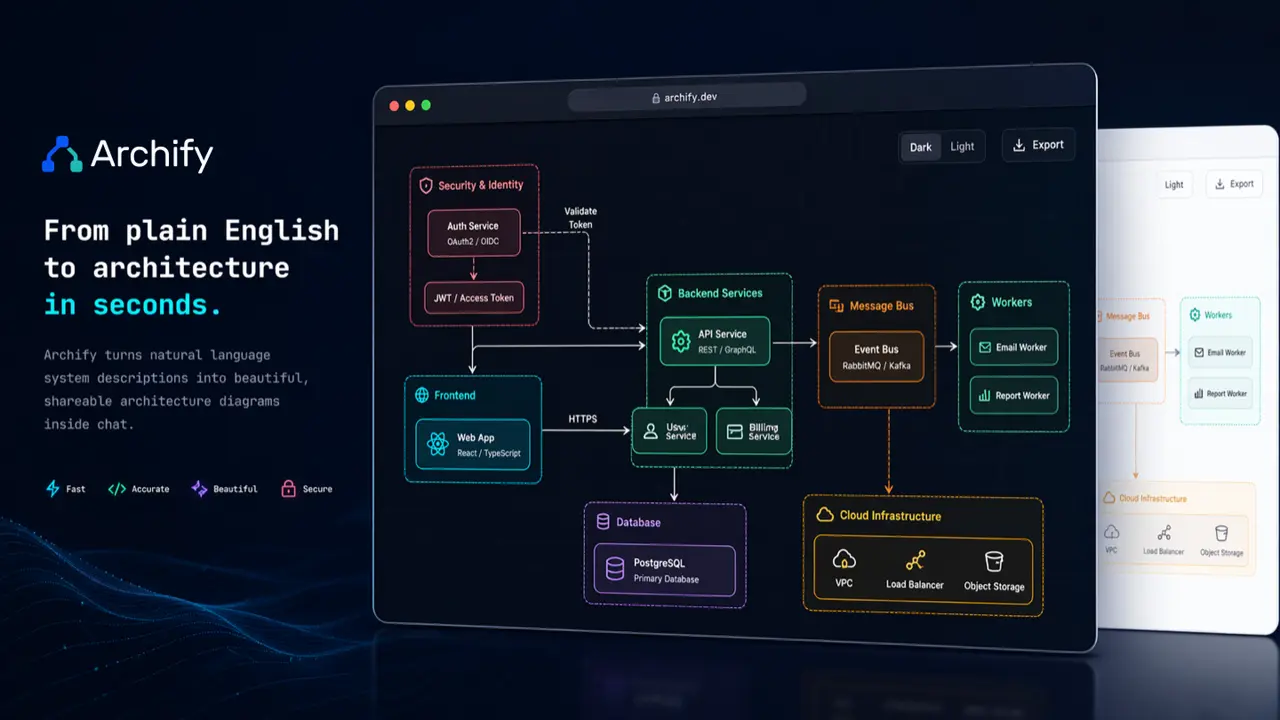
Architecture diagrams lie. Not on purpose — they rot. Someone draws the system in Mermaid or a whiteboard tool on day one, the code drifts for six months, and the diagram becomes a historical artifact that new hires learn not to trust. The usual fix is process: "update the diagram in every PR." It never survives contact with a deadline.
Archify takes the other route: make the diagram checkable by construction. It is an open-source agent skill (MIT, v3.0.1) that turns a typed JSON description into a polished, interactive, self-contained HTML diagram — architecture, workflow, sequence, data-flow, or lifecycle. And when the diagram claims to describe a real codebase, every component can carry citations to exact file-and-line ranges that the renderer verifies against the actual committed bytes at a pinned git revision. Cite a line that does not exist and the build fails. That last part is what separates it from every Mermaid renderer you have used, and it is a large part of why the project has pulled in over 73,000 GitHub stars, peaked at #1 on GitHub trending in late August 2026, and was still landing commits the morning we tested it.
We ran the whole thing hands-on: cloned the repo, rendered the demo, authored our own architecture JSON for a tiny demo repo, watched the evidence gate reject three of our own bad citations one by one, diffed two architectures, and rendered sequence and lifecycle diagrams. Every command below ran; every failure below actually happened.
What Archify actually is#
Archify ships as an agent skill — a SKILL.md plus a Node CLI that a coding agent invokes. The documented install is one line:
npx skills add tt-a1i/archify -gIt works with Cursor, Claude Code, Codex CLI, and OpenCode. The skill's operating loop is: the agent authors a candidate JSON diagram, then runs a finalize command that gates the output through validation, rendering, provenance checks, and a real-browser check, repairing failures in a bounded loop. You describe the system in plain language ("Browser calls the API, the API checks Redis, a cache miss queries Postgres"); the agent does the reading, authoring, and fixing.
The five diagram types and their schemas:
| Type | Use for | Example in the repo |
|---|---|---|
| architecture | Components, services, cloud/security boundaries, infrastructure | web-app.architecture.json |
| workflow | Processes, approval gates, tool calls, runbooks, CI/CD | agent-tool-call.workflow.json |
| sequence | API call chains, request lifecycles, async traces | cache-miss-request.sequence.json |
| dataflow | Pipelines, ETL/ELT, lineage, governance | product-analytics.dataflow.json |
| lifecycle | State machines, retries, waiting and terminal states | deployment-release.lifecycle.json |
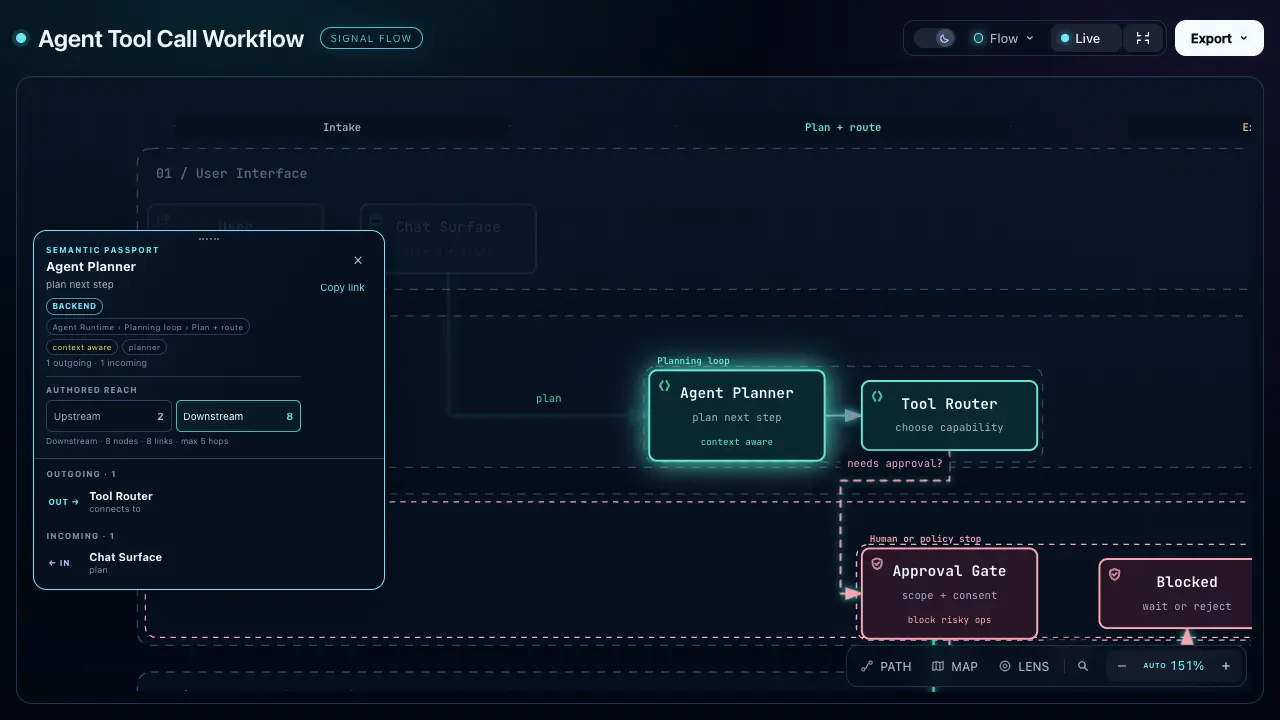
Output is a single HTML file: inline SVG, dark/light themes, optional trace motion, share cards, deep links, search/focus, presentation mode, and PNG/JPEG/WebP/SVG/WebM export from the viewer. When the scenario is ambiguous, archify guide "<scenario>" picks the type for you.
Two things Archify pointedly does not do, straight from the repo: automatic Mermaid parsing and general-purpose auto-layout are explicitly out of scope, as are hosted sharing and WYSIWYG editing. The skill will read your pasted Mermaid for topology and meaning — then it re-authors fresh Archify JSON rather than converting the styling. If you wanted a prettier Mermaid renderer, this is not it; that is the point.
Prerequisites#
- Node.js 18+ (we used Node v24.20.0 on Linux; the skill package needs no install step of its own)
- A terminal, about thirty minutes, no API keys, no GPU, no Docker
- Any git repo if you want the repository-evidence feature — we built a three-file demo app for it
- Optional: Chrome/Chromium (set
ARCHIFY_CHROME) for the browser-check gate — our sandbox had none, and we will be honest about what that cost us
Step 1 — Install and verify#
We tested the CLI straight from a repo clone, which is also the documented path inside the skill:
git clone https://github.com/tt-a1i/archify.git
cd archify
node archify/bin/archify.mjs doctor
doctor checks every runtime the skill needs — template, renderers, preview, visual-check, validators, all five diagram types. Ours came back clean:
[ok] Node.js v24.20.0 (requires >=18)
[ok] Core template
[ok] Example renderer
...
[ok] architecture renderer, schema, and example
[ok] workflow renderer, schema, and example
[ok] sequence renderer, schema, and example
[ok] dataflow renderer, schema, and example
[ok] lifecycle renderer, schema, and example

Archify is ready.
Step 2 — Render your first diagram#
node archify/bin/archify.mjs demo ./demo-out
# Demo ready: ./demo-out/archify-demo.html
One command, one 762 KB HTML file. We checked the claim that matters: the output contained zero external http script or stylesheet references — everything is inline, including the SVG. It works offline, it is emailable, it will still render in ten years. The demo shows the interactive viewer: theme toggle, export menu, and the explorable node cards.
Step 3 — Author your own diagram JSON#
A diagram is a small typed JSON document. Here is the complete architecture candidate we authored for a three-file demo app (an API layer, a background worker, a SQLite store) — every field below passed the repo's schema validator:
{
  "schema_version": 1,
  "diagram_type": "architecture",
  "meta": { "title": "Demo Job Pipeline", "quality_profile": "showcase" },
  "components": [
    { "id": "api", "type": "backend", "label": "API layer",
      "sublabel": "POST /jobs", "pos": [60, 220], "size": [150, 70] },
    { "id": "worker", "type": "backend", "label": "Worker",
      "sublabel": "queue drain", "pos": [300, 220], "size": [150, 70] },
    { "id": "store", "type": "database", "label": "Result store",
      "sublabel": "SQLite", "pos": [540, 220], "size": [150, 70] }
  ],
  "connections": [
    { "id": "api-to-worker", "from": "api", "to": "worker",
      "label": "enqueue_job" },
    { "id": "worker-to-store", "from": "worker", "to": "store",
      "label": "save_result" }
  ]
}
Component types are a closed enum (frontend, backend, database, cloud, security, messagebus, external), which is how the diagrams keep their consistent visual language instead of devolving into box-and-arrow soup. Positions are explicit coordinates — remember, auto-layout is deliberately out of scope; the agent (or you) places nodes using the authoring defaults.
Step 4 — Finalize: four gates before the HTML counts#
render makes HTML; finalize is the command the skill actually uses, because it refuses to hand you output that has not earned it:
node archify/bin/archify.mjs finalize architecture \
  demo-pipeline.architecture.json demo-pipeline.html \
  --quality showcase --json
The four gates, in order: validate (schema plus layout rules — overlaps, label collisions, viewport overflow), deliver (render the artifact), check (strict provenance: the HTML embeds the candidate's SHA-256 so the file can prove what source produced it), and browser-check (a real Chromium render pass). A non-zero exit is never success, and each run writes machine-readable receipts next to the artifact.
On our sandbox the first three gates passed and browser-check reported skipped with a clean diagnostic: viewer/chrome-unavailable — Set ARCHIFY_CHROME to its executable path. No Chrome exists in this environment, so we report automated checks only — which is exactly what the skill's own delivery contract demands: never claim visual inspection you did not perform.
Step 5 — Pin every box to real code: repository evidence#
This is the feature that justifies the star count. A diagram that claims to describe a real repository can carry source evidence: each component gets a sources array of {path, line, end_line, label} citations, and meta.repository pins the repo's URL and the full 40-character commit SHA. Pass --repo-root and the validator checks every citation against the committed bytes at that exact revision — read straight from git objects, ignoring replace refs. Uncommitted working-tree edits do not count as evidence.
We added citations to our demo candidate and ran it against our demo repo. The gate rejected us three times — and each rejection was correct:
repository-evidence/url-invalid— our firstmeta.repository.urlwas afile://path; the schema demands a credential-free HTTP(S) or SSH repository address.repository-evidence/git-command— the evidence repo must have anoriginremote; our fresh demo repo did not. Onegit remote add originlater, we moved on.repository-evidence/line-out-of-range— three times, one per file. We had citedapi.pylines 5–8; the file has 7 lines. Thenworker.py13–16 against a 14-line file. Thenstore.py7–10 against an 8-line file. Our hand-counted line numbers were wrong in all three files, and the verifier caught every one against the pinned revision6fb44090….
After fixing the citations, the full gate run passed — validate, deliver, check — and the 745 KB HTML embeds the verified citations. Clicking a node in the viewer surfaces its source references. This is the anti-rot mechanism: a diagram whose citations no longer match the code fails loudly at build time instead of decaying silently in a wiki.
Step 6 — Diff two architectures#
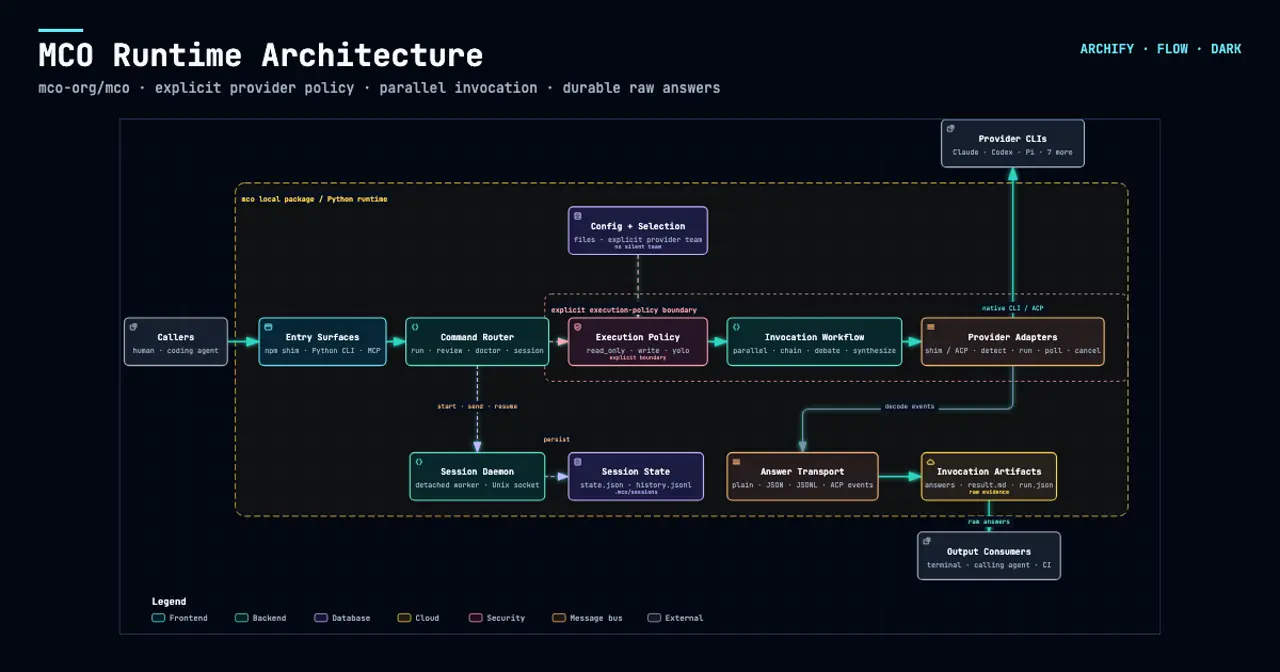
Diagrams change; Archify can show you how. The repo ships a base/head pair for a checkout platform, and compare produces a semantic diff plus a rendered delta page:
node archify/bin/archify.mjs compare architecture \
  checkout-platform.base.architecture.json \
  checkout-platform.head.architecture.json delta.html --json
The receipt reported exactly what changed between the two revisions: 1 component added, 1 changed, 1 removed, 1 moved; connections added, changed, removed, and rerouted — each keyed by semantic identity, not by raw JSON diffing. For architecture review in a large refactor, that is considerably more useful than eyeballing two pictures.
Sequences and lifecycles#
We also finalized the repo's cache-miss-request.sequence.json (API call chain: web app → cache → database) and agent-run.lifecycle.json — both passed validate/deliver/check. One honest blemish: the deployment-release.lifecycle.json example failed at the deliver stage in our environment with the same viewer/chrome-unavailable diagnostic — that particular example needs Chromium for layout where the others did not. On a normal dev machine with Chrome installed, the skill's repair loop would handle it; in a headless sandbox, it is a real limitation worth knowing about before you build automation on top of it.
When to use Archify vs the alternatives#
| Approach | What it solves | Where Archify fits |
|---|---|---|
| Archify | Polished interactive diagrams with build-time verification against real code | — |
| Mermaid / Mermaid Live | Fast text-to-diagram sketching, zero setup | Sketch in Mermaid, then have your agent re-author the meaning as Archify JSON when the diagram needs to survive and be checkable. There is no automatic Mermaid import — that is an explicit non-goal of the project. |
| Excalidraw / draw.io | Freeform whiteboarding, full manual control | Manual tools give you prettier one-offs; Archify gives you repeatability plus evidence. Different jobs. |
| Docs-as-code diagrams (D2, PlantUML in CI) | Versioned diagrams that render in pipelines | Closest in spirit. Archify's edge is the interactive viewer (search, focus, trace motion, deep links) and the git-byte evidence verification. |
Caveats before you commit#
- The browser gate needs a browser. Without Chrome/Chromium (
ARCHIFY_CHROME),browser-checkskips and one lifecycle example cannot deliver. Budget for that in CI. - Visual quality is opt-in. The skill treats perceptual review as advisory and off by default; automated gates passing is not the same as a human judging the layout good. We report automated checks only.
- It is agent-first. The authoring loop — write candidate, finalize, read the diagnostic, repair, rerun — assumes an agent doing the cycles. Hand-authoring small diagrams is perfectly fine, but the repair references are written for agents.
- Coordinates are manual. No auto-layout means the agent spends effort on placement; the repo ships layout-repair references for exactly this reason.
- Sponsored but MIT. The README carries sponsor placements (Kimi Work, Supercode, OpenLux), but the license is plain MIT — no additional commercial terms hiding in the LICENSE file.
The takeaway#
- The diagram is a build artifact. Typed JSON in, self-contained HTML out — inline SVG, zero external requests, dark/light themes, export to PNG/WebP/SVG and more.
- Evidence is the differentiator. Components cite
{path, line, end_line}against a pinned commit, and the renderer verifies the bytes with git. It caught three of our own wrong citations; that is the feature working as designed. - Finalize, don't just render. The four-gate pipeline (validate → deliver → check → browser-check) with machine-readable receipts is what makes agent-authored diagrams trustworthy.
- Diffs are first-class.
comparegives you semantic architecture diffs — added, removed, moved, rerouted — not pixel comparisons. - Know the boundaries. No automatic Mermaid import (explicit non-goal), no auto-layout, and the browser gate genuinely needs a browser. Everything else we tried worked exactly as documented.
If your team has ever been burned by a beautiful architecture diagram that described a system that no longer exists, Archify is worth the thirty minutes: it makes the diagram prove its claims at build time, or fail trying. That is a bigger idea than prettier boxes.