Turn your AI agent into a research scientist: a hands-on tutorial for Scientific Agent Skills
Scientific Agent Skills is a 168-skill, MIT-licensed library — roughly 47,000 GitHub stars — that teaches coding agents to do real science. We installed it, validated all 168 skill manifests, and ran one skill’s bundled tooling to produce a genuine figure. Every command verified.

Your coding agent can refactor a React component in its sleep. Ask it to run a differential-expression analysis on single-cell RNA-seq data, and it will improvise — inventing package APIs, skipping quality control, and presenting the result with total confidence. That gap between software fluency and scientific fluency is exactly what Scientific Agent Skills exists to close: a library of 168 ready-to-use, validated skills that teach any agent supporting the open Agent Skills standard how to do real research workflows, from bioinformatics and cheminformatics to clinical evidence review and publication-grade visualization.
The momentum is hard to ignore: roughly 47,000 GitHub stars, an MIT license, an arXiv paper describing the library's design, and a number-five slot on the September 28 ranking of the fastest-rising AI repositories. In this tutorial you will install the collection into a real agent skills directory, prove that all 168 skills are structurally valid, and run one skill's bundled tooling end to end to produce a genuine publication-style figure. Every command below was actually run on a fresh Linux machine against release 2.70.0. One honest boundary up front: the one-click npx installer shells out to a full repository clone, which timed out on our sandbox's network — so the install we verified is the installer's own suggested fallback (manual clone, then npx skills add <local-path>), which landed all 168 skills in ~/.agents/skills/.
1. What Scientific Agent Skills actually is#
Scientific Agent Skills is maintained by K-Dense (K-Dense Inc.) and lives at github.com/K-Dense-AI/scientific-agent-skills. Each skill is a directory under skills/ — the directory name is the skill name — containing a required SKILL.md with YAML frontmatter, plus optional references/ (long documentation loaded only when needed), scripts/ (executable helpers), and assets/ (templates and style files). The format follows the open Agent Skills specification, and the repository root doubles as a valid Agent Plugins 1.0.0 package (plugin.json plus the portable skills/ tree), so plugin-capable clients like Cursor and Codex can load the whole collection as one plugin.
The library is described in the paper Scientific Agent Skills: A Library of Procedural Knowledge for Research Agents (arXiv:2609.00065), and the repository enforces its own quality contract in CI: frontmatter conformance, a 500-line limit on SKILL.md, per-skill test suites under tests/<skill-name>/, and LLM-based security scans of every skill. Four of the skills — docx, pdf, pptx, xlsx — are vendored from Anthropic's own skills collection, with upstream tracked for updates. K-Dense also ships a free desktop app, K-Dense BYOK, that puts all 168 skills behind a bring-your-own-key research workspace with 40+ models — but this tutorial sticks to the skills themselves, which is what your agent actually consumes.
2. What you'll need#
- Node.js 18+ if you want the one-line installer (we used Node v24; the
npxroute needs no prior setup). - Git — for the manual install path, which is what we verified end to end.
- Python 3.11+ — several skills ship executable Python helpers; the visualization skill we demo needs only Matplotlib and Pillow.
- uv (recommended by the README) for installing per-skill Python dependencies in isolation.
- An agent host that reads the Agent Skills standard: Claude Code, Codex, Cursor, Gemini CLI, Google Antigravity, Pi, OpenClaw, NemoClaw, Hermes, and others. The skills themselves need no API keys to install; individual skills declare their own requirements (some need NCBI, Exa, Benchling, or Materials Project credentials) in their frontmatter.
3. Step 1 — Install it#
The README's headline install is a single command:
npx skills add K-Dense-AI/scientific-agent-skillsThis invokes Vercel's skills installer, which detects your installed agent hosts and links the collection into each one. Two things we learned running it: the bare command is interactive — it prompts for scope and confirmation — and the installer's own on-screen tip tells you to pass -y (skip prompts) and -g (install globally) for a hands-free run. The documented destination is the ~/.agents/skills/ convention, with project-scoped installs under .agents/skills/.
Here is the honest part. Under the hood, the installer performs a full git clone of the repository before linking anything, and on our sandbox's constrained network that clone hit the installer's own 300-second timeout — the CLI told us so itself, suggesting we raise SKILLS_CLONE_TIMEOUT_MS or "clone manually and pass the local path to skills add." We took its advice, and this is the install we verified end to end:
git clone --depth 1 https://github.com/K-Dense-AI/scientific-agent-skills.git /tmp/sas-src
npx skills add /tmp/sas-src --all -g -y
The second command scanned the local checkout and installed 168 of 168 skills into ~/.agents/skills/ — full copies with SKILL.md, references/, scripts/, and assets/ intact. (With --all it also tried a few auto-detected agent targets; one reported "Eve does not support global skill installation," which is a per-agent limitation, not a problem with the skills themselves — the ~/.agents/skills/ destination, the one the README documents, succeeded completely.) If your network is faster than our sandbox's, the plain npx skills add K-Dense-AI/scientific-agent-skills -y -g should just work; if the clone stalls, the two-step version above is byte-identical.
The README documents two further routes we did not need: gh skill install K-Dense-AI/scientific-agent-skills (GitHub CLI v2.90.0+, with per-skill and per-agent targeting plus --pin for reproducible installs), and the plugin route — symlink the checkout into ~/.cursor/plugins/local for Cursor, or codex plugins install . for Codex.
4. Step 2 — Prove it's alive#
Before trusting 168 skills, check the contract the repository promises. Its contributor guide is strict: the directory name must equal frontmatter name, a description is required, metadata.version must exist as a quoted string, and only six top-level frontmatter fields are allowed. We wrote a small validator and ran it over the installed tree:
168 skills checked: 168 valid, 0 problems
- SKILL.md present with parseable frontmatter: 168/168
- name matches directory name: 168/168
- description present: 168/168
- metadata.version present and quoted: 168/168
We also confirmed the root plugin.json is a well-formed Agent Plugins 1.0.0 manifest — name scientific-agent-skills, version 2.70.0, MIT license, author K-Dense Inc. — so plugin-capable hosts will discover the collection as a single package. This mirrors what the repo's own CI guard (tests/_meta) checks on every pull request, and it means your agent's skill loader will see exactly 168 loadable skills, no broken manifests.
5. Step 3 — Run a real skill end to end#
A skill is only as good as its tooling, so let's execute one. scientific-visualization promises to "create and audit truthful, accessible, publication-ready scientific figures with Matplotlib, Seaborn, or Plotly," and its frontmatter declares the bundled CLIs network-free — perfect for a sandbox. The skill ships six scripts; the smoke test is figure_export.py --demo:
cd ~/.agents/skills/scientific-agent-skills/skills/scientific-visualization
python3 scripts/figure_export.py --demo /tmp/sas-demo/export-smoke --manifest
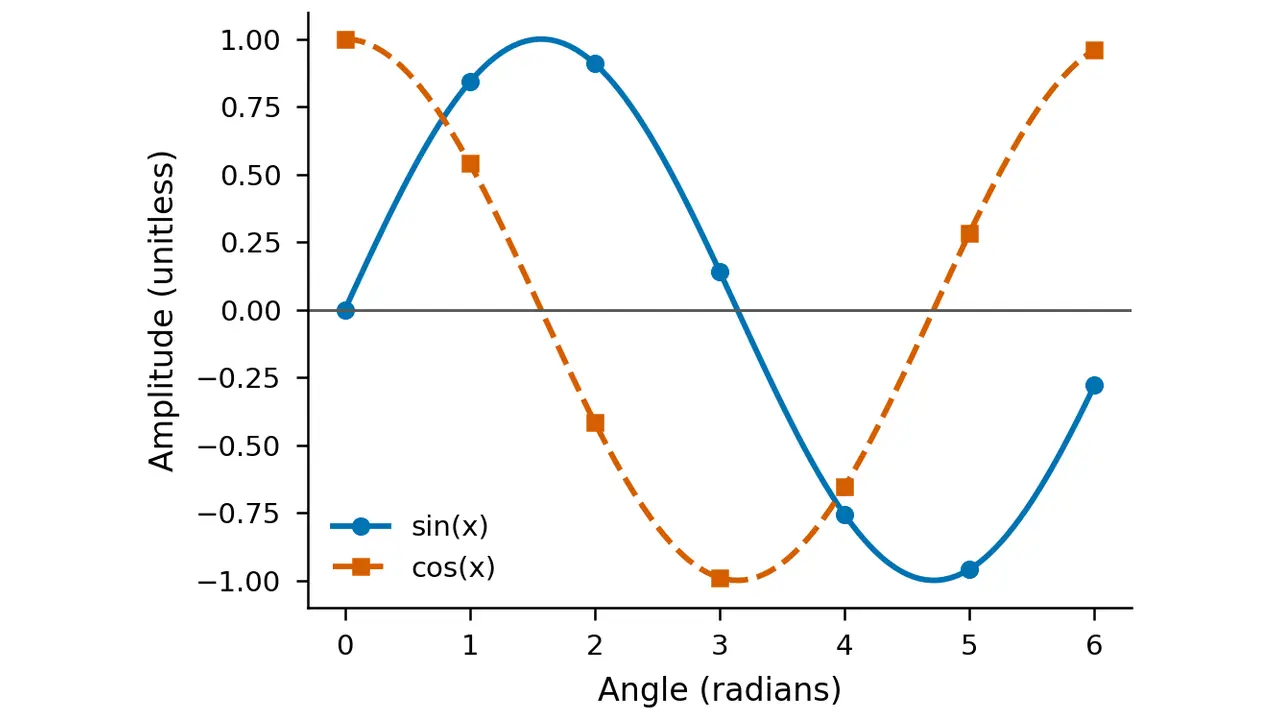
It ran in about two seconds and produced three files: export-smoke.png, export-smoke.pdf, and export-smoke.export.json — a manifest recording the Matplotlib and Pillow versions used and an empty warnings list. The figure itself is below: a deterministic sin/cos demo with labeled axes, a legend, and redundant encoding (color plus line style and marker shape, so the series survive colorblindness and grayscale printing).
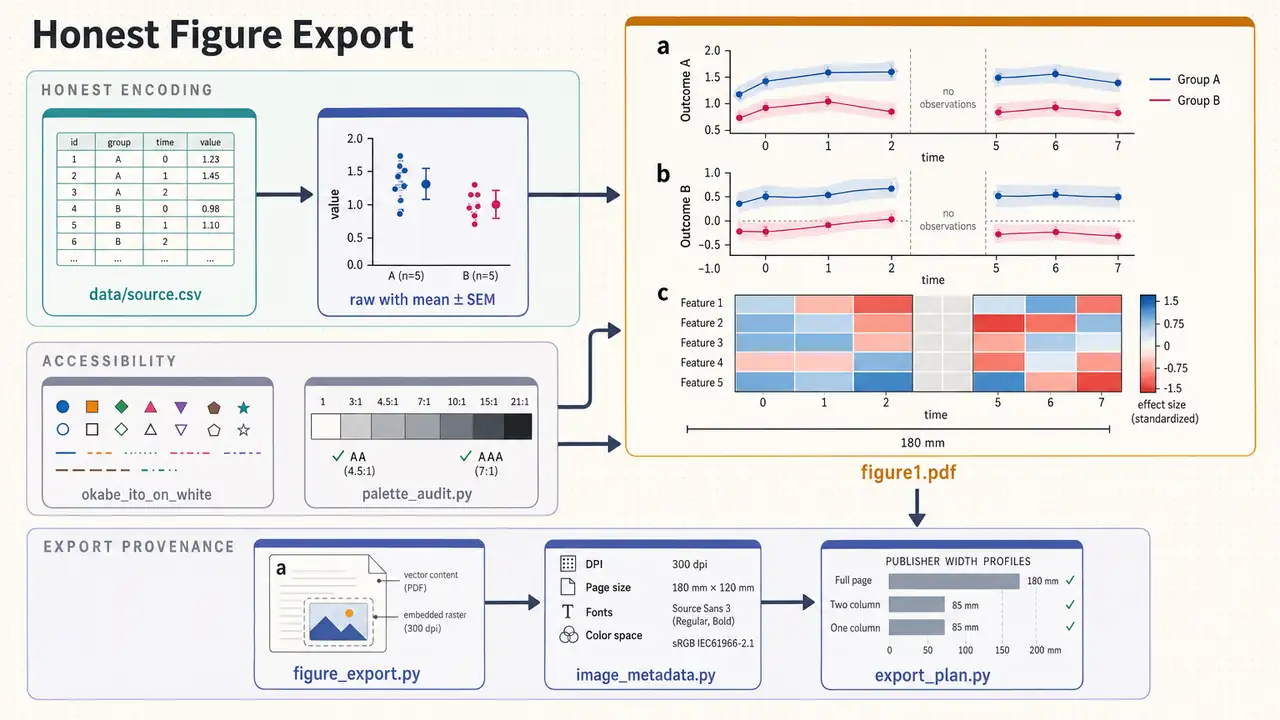
The demo is deliberately simple, but the skill around it is not. Its guardrails read like a journal's integrity checklist: never alter, hide, invent, or selectively enhance data; preserve raw tables, exclusions, missing-value codes, seeds, and transformations; never claim a palette or DPI value makes a figure compliant. The supporting CLIs cover the rest of the workflow — palette_audit.py checks contrast ratios and colorblind safety (the repo's own workflow diagram shows the Okabe–Ito palette audit), style_presets.py ships nature, science, cell, and minimal Matplotlib styles, image_metadata.py validates delivered files, and export_plan.py maps figures to publisher width profiles. This is the pattern across the library: the SKILL.md teaches the judgment, the scripts encode the mechanics.
6. The 168-skill landscape#
What else is in the box? The README organizes the collection into nineteen categories. The heavy hitters:
- Bioinformatics & Genomics (28 skills) — sequence analysis, single-cell RNA-seq (
scanpy), variant annotation, phylogenetics. - Scientific Communication (27) — evidence-traceable writing, literature synthesis, citation management, macro-free PPTX posters.
- Data Analysis & Visualization (22) — statistics, network analysis, time series, publication-quality figures.
- Machine Learning & AI (14) — deep learning, Bayesian methods, model interpretability.
- Scientific Databases (12 skills → 100+ databases) — one
database-lookupskill gives deterministic, provenance-rich access to 78 public databases: PubChem, ChEMBL, UniProt, NCBI Gene, and dozens more. - Cheminformatics & Drug Discovery (10) — RDKit property prediction, virtual screening, ADMET analysis, molecular docking.
- Clinical Research (8) — trials, pharmacogenomics, variant evidence review, PK/PD modelling.
The README's worked examples show the intended usage — long, skill-invoking prompts like "Query ChEMBL for EGFR inhibitors (IC50 < 50nM), analyze structure-activity relationships with RDKit, generate improved analogs with datamol, perform virtual screening with DiffDock against the AlphaFold EGFR structure, search PubMed for resistance mechanisms…" The agent follows the skill docs instead of improvising the APIs, which is the entire value proposition: procedural knowledge the base model doesn't reliably have.
7. Honest boundaries#
Four caveats, all from the project's own documentation. First, don't install all 168. The README says it explicitly: 168 skills add up to a lot of standing context, so install a topical subset for your field. (We installed everything only to validate the manifests.) Second, many skills need the network or credentials. Each skill declares requirements in its frontmatter — the NemoClaw note is blunt that skills calling Exa, NCBI, Benchling, or the Materials Project only work once the operator approves those domains or supplies keys. Third, review depth varies. K-Dense-authored skills went through internal review; community contributions were reviewed "to the best of our ability." The project's security page is refreshingly direct: skills can execute code and steer your agent, so read the SKILL.md before installing, and you can run Cisco's AI Defense Skill Scanner yourself (skill-scanner scan /path/to/skill --use-behavioral) — the repo publishes its scan results in docs/security-report.md, rescanning weekly. Fourth, the skills make your agent capable, not autonomous. You still need the model subscription, the data, and the judgment; what you stop needing is the model's confident improvisation of APIs it half-remembers.
8. The takeaway#
Most agent-skill collections optimize for software engineering. Scientific Agent Skills is the first large, validated, openly-licensed collection aimed at research engineering — and the structure shows it: strict manifests, per-skill test suites, executable helpers instead of prose-only advice, and guardrails written like a methods section. Install the five or ten skills for your domain, point your agent at a real workflow, and check its work the way you'd check a junior collaborator's. If the figures come back with provenance manifests and the database queries come back with citations instead of confabulations, the 47,000 stars will make sense.