ggml 1.0 hands-on: run a tiny neural net on the tensor library behind llama.cpp
ggml 1.0.0 shipped on November 13 — the first stable release of the tensor library that powers llama.cpp and Ollama. Build it from source in about two minutes, run a two-layer neural net on CPU, quantize the weights to Q8_0, save them as GGUF, and time a 1024×1024 matmul. No GPU, no API key, no account.
- ggml 1.0.0 was published November 13, 2026 — the first stable release after four years at 0.x. It prunes the deprecated API and the legacy DIAG_MASK ops, adds FP8 support and a YaRN truncation control, and ships backend performance work across CUDA, Metal, Vulkan, SYCL, and CPU. The repo has 15,880 stars and was number 8 on GitHub daily trending on November 15.
- Build from source with CMake: configure prints ggml version 1.0.0, commit 417a024; the Release build took 2m14s on a 4-vCPU sandbox. The bundled simple-backend example reproduces the README's matrix exactly.
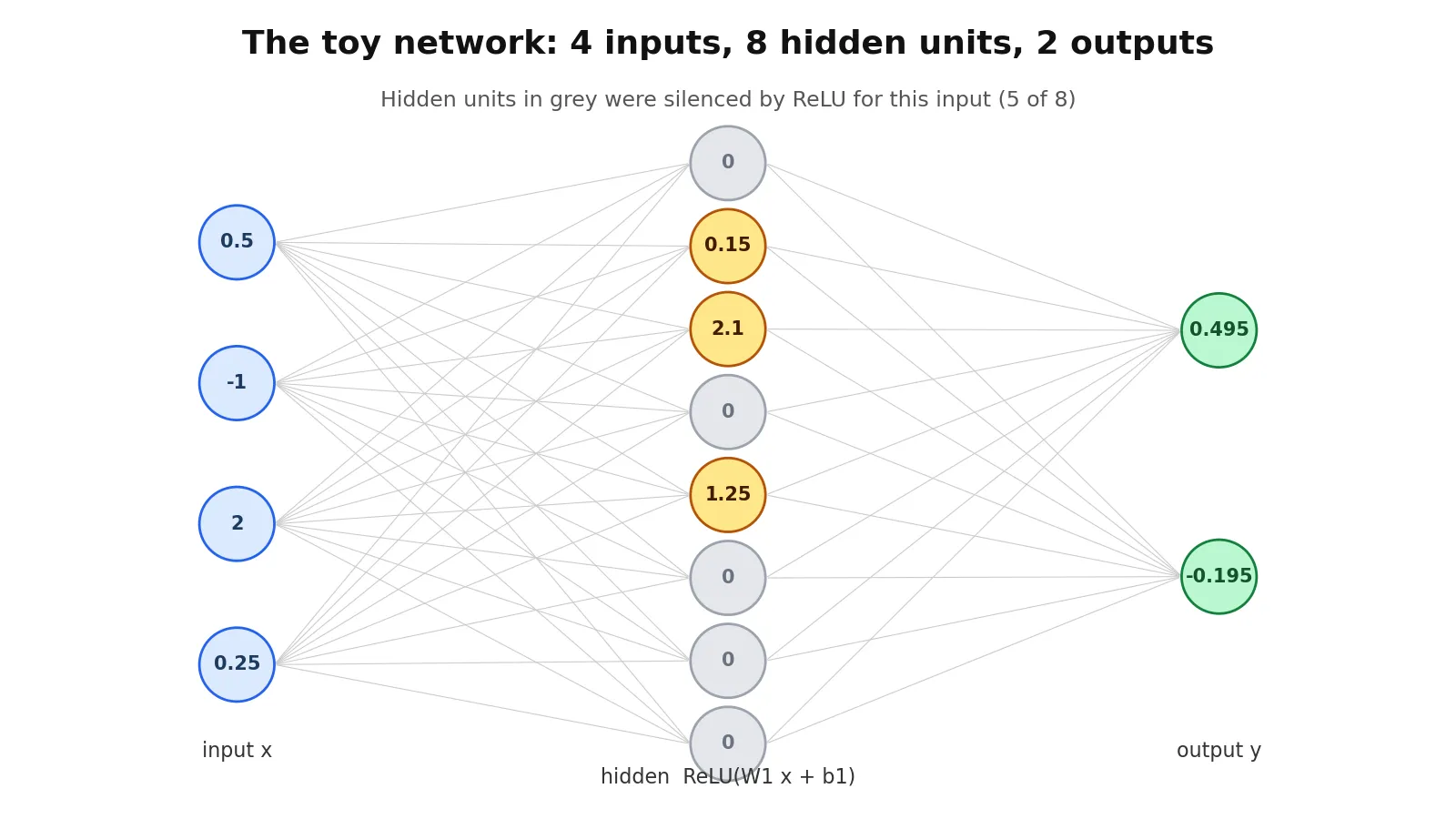
- The two-layer MLP (4 inputs, 8 hidden ReLU units, 2 outputs) returns [0.495000, -0.195000] — identical to the NumPy reference to five decimal places. Five of the eight hidden units output zero for this input.
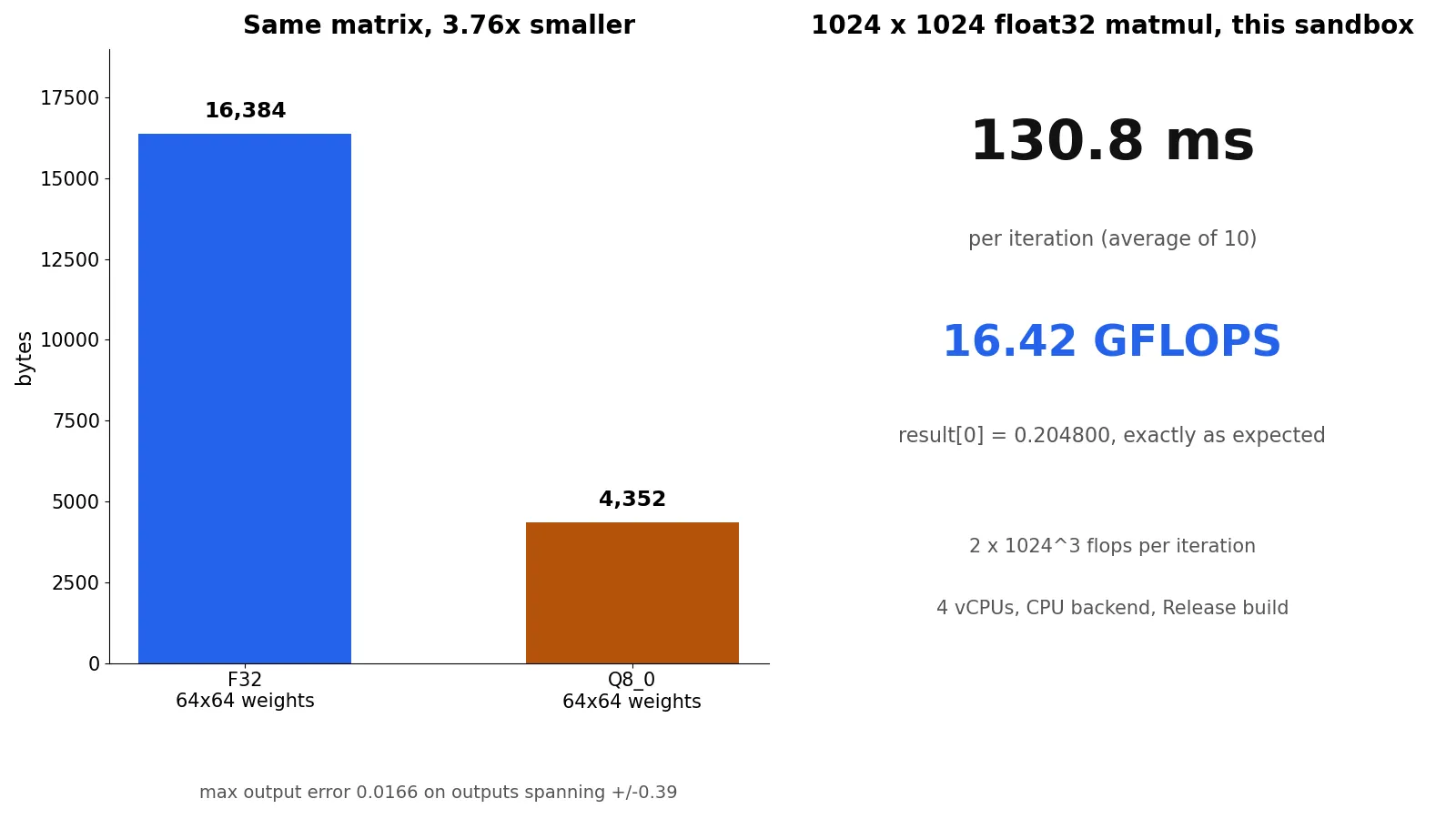
- Q8_0 quantization shrinks a 64x64 weight matrix from 16,384 to 4,352 bytes (3.76x) with a worst output error of 0.0166 on outputs spanning ±0.39. The GGUF roundtrip writes a 576-byte version-3 file with all four tensors and reads it back intact.
- A 1024x1024 float32 matmul runs at 130.8 ms per iteration — 16.42 GFLOPS on this sandbox — with result[0] = 0.204800, exactly the expected value.

Every local LLM you have ever run on a laptop sits on top of the same piece of C code. llama.cpp, Ollama, LM Studio, and a dozen inference engines all do their tensor math through ggml — a small, dependency-free tensor library that has lived at version 0.x since 2022. On November 13 it shipped ggml 1.0.0, its first stable release, and the same day it climbed to number 8 on GitHub's daily trending list. The repository has 15,880 stars and 2,018 forks, and the 1.0 release is the reason it is moving now: it prunes the deprecated public API, removes the legacy DIAG_MASK operators, adds FP8 tensor support and a configurable YaRN truncation control, and lands a round of backend performance work across CUDA, Metal, Vulkan, SYCL, and CPU.
This tutorial does the thing the release notes do not: it puts the library in your hands. You will build ggml 1.0.0 from source, run its bundled matrix-multiplication example, write a two-layer neural network against the 1.0 API, quantize its weights to Q8_0, save them as a GGUF file, and time a 1024×1024 matmul. Everything runs on CPU. There is no GPU, no API key, and no account anywhere in this tutorial, and every number below comes from a run on a plain Linux sandbox — the commands are given so you can reproduce each one.
What you will need
- A Linux or macOS machine. The steps below were run on Linux; macOS needs only the usual Xcode command-line tools in place of
apt. git,cmake3.28 or newer, and a C/C++ compiler (gcc13 orclang16 or newer). Check withcmake --versionandgcc --version.- Python 3 with NumPy, used once to cross-check the network's output. Any NumPy from the last three years works.
- About 60 MB of disk for the source and build, and roughly 3 minutes for the build on a 4-vCPU machine. No model weights are downloaded at any point — the largest file this tutorial creates is a 576-byte GGUF.
- Nothing else. No GPU, no Hugging Face account, no API key, no Docker.
One warning up front: 1.0 is a breaking release. Code written against the 0.x API — including anything that calls the removed DIAG_MASK_INF / DIAG_MASK_ZERO ops or a deprecated function — may not compile against 1.0.0. That is the point of a 1.0, and it is also why this tutorial pins the v1.0.0 tag everywhere instead of tracking master.
Step 1: Build ggml 1.0.0 from source
Clone the tagged release, not master, and configure a Release build with the tests off. The defaults build the CPU backend; CUDA, Metal, and the other backends stay off unless you ask for them.
git clone --depth 1 --branch v1.0.0 https://github.com/ggml-org/ggml.git
cd ggml
cmake -B build -DCMAKE_BUILD_TYPE=Release -DGGML_BUILD_TESTS=OFF
cmake --build build --config Release -j 8
Configure takes about two seconds. Look for these three lines in its output — they confirm you have the right code:
-- ggml version: 1.0.0
-- ggml commit:  417a024
-- Including CPU backend
The build itself took 2 minutes 14 seconds with -j 2 on a 4-vCPU sandbox (AMD EPYC, -march=native, OpenMP detected and enabled). With -j 8 on your own machine it will be faster. It produces three shared libraries in build/src/ — libggml.so, libggml-cpu.so, libggml-base.so — plus the bundled examples in build/bin/. If the build fails, the usual cause is an old CMake: ggml 1.0 needs 3.28 or newer, and Ubuntu 24.04 ships exactly 3.28.3.
Step 2: Run the bundled matmul example
Before writing any code, run the example the README points to. It multiplies a 4×2 matrix by a 2×3 matrix through the backend scheduler — the same code path your program will use in Step 3.
./build/bin/simple-backendExpected output, exactly:
mul mat (4 x 3) (transposed result):
[ 60.00 55.00 50.00 110.00
 90.00 54.00 54.00 126.00
 42.00 29.00 28.00 64.00 ]
If your numbers match, the library, the backend, and the scheduler all work on your machine. If they do not match, stop here — nothing later in this tutorial will work either, and the problem is in the build, not in your code. Keep this binary around: it is the fastest way to check whether a later change broke the install.
Step 3: Write a two-layer neural net
The network is deliberately tiny: 4 inputs, 8 hidden units with ReLU, 2 outputs. It is small enough to check by hand and big enough to exercise the four calls that make up most real ggml programs — create tensors, wire them into a graph, hand the graph to the backend scheduler, and read the result back.
Two ggml conventions trip up first-time users, so get them straight before you read the code. First, a tensor's shape is (ne0, ne1) where ne0 is the fastest-varying dimension, and data is filled row-major: a weight matrix with 8 output rows and 4 input columns is created as ggml_new_tensor_2d(ctx, GGML_TYPE_F32, 4, 8) and filled from an 8×4 row-major array. Second, ggml_mul_mat(A, B) computes A times B-transposed, so the call reads mul_mat(weights, input), not the other way round. Both conventions are visible in examples/simple/simple-backend.cpp in the repository.
Save this as mlp_ggml.cpp next to the checkout. It runs four small demos in one binary — the MLP forward pass, a Q8_0 quantization comparison, a GGUF roundtrip, and a matmul benchmark — so the later steps reuse this file instead of asking you to write three more programs.
// mlp_ggml.cpp — tiny 2-layer MLP on ggml 1.0.0 (CPU backend), Q8_0 quantization,
// GGUF roundtrip, and a 1024x1024 matmul timing. All API calls verified against
// the v1.0.0 headers and examples/simple/simple-backend.cpp.
#include "ggml.h"
#include "ggml-backend.h"
#include "gguf.h"

#include <cmath>
#include <functional>
#include <cstdio>
#include <cstring>
#include <vector>

static void log_cb(ggml_log_level level, const char * text, void * user_data) {
    (void) level; (void) user_data;
    fputs(text, stderr); fflush(stderr);
}

struct Runner {
    ggml_backend_t backend = nullptr;
    ggml_backend_t cpu = nullptr;
    ggml_backend_sched_t sched = nullptr;
    std::vector<uint8_t> buf;

    void init() {
        ggml_time_init();
        ggml_log_set(log_cb, nullptr);
        ggml_backend_load_all();
        backend = ggml_backend_init_best();
        cpu = ggml_backend_init_by_type(GGML_BACKEND_DEVICE_TYPE_CPU, nullptr);
        ggml_backend_t backends[2] = { backend, cpu };
        sched = ggml_backend_sched_new(backends, nullptr, 2, GGML_DEFAULT_GRAPH_SIZE, false, true);
    }

    // Build a no-alloc context + graph from a builder lambda; returns graph + ctx to free later.
    struct ggml_cgraph * build(std::vector<uint8_t> & buf_store, struct ggml_context *& ctx_out,
                                std::function<struct ggml_tensor *(struct ggml_context *)> build_fn) {
        size_t buf_size = ggml_tensor_overhead() * GGML_DEFAULT_GRAPH_SIZE + ggml_graph_overhead();
        buf_store.resize(buf_size);
        struct ggml_init_params params = { buf_size, buf_store.data(), true };
        struct ggml_context * ctx = ggml_init(params);
        ctx_out = ctx;
        struct ggml_cgraph * gf = ggml_new_graph(ctx);
        struct ggml_tensor * out = build_fn(ctx);
        ggml_build_forward_expand(gf, out);
        ggml_free(ctx);
        return gf;
    }

    void run(struct ggml_cgraph * gf) {
        ggml_backend_sched_reset(sched);
        ggml_backend_sched_alloc_graph(sched, gf);
        ggml_backend_sched_graph_compute(sched, gf);
    }
};

// ---- fixed weights (row-major: row = output neuron) ----
static float X[4]   = { 0.5f, -1.0f, 2.0f, 0.25f };
static float W1[32] = {  // 8x4
     0.1f,  0.2f, -0.3f,  0.4f,
    -0.5f,  0.6f,  0.7f, -0.8f,
     0.9f, -1.0f,  0.3f,  0.2f,
     0.4f,  0.4f, -0.4f, -0.4f,
    -0.2f, -0.3f,  0.5f,  0.6f,
     1.0f,  0.0f, -0.5f,  0.5f,
     0.3f,  0.3f,  0.3f, -0.9f,
    -0.7f,  0.8f,  0.1f,  0.2f };
static float B1[8]  = { 0.1f, -0.2f, 0.0f, 0.3f, -0.1f, 0.2f, -0.3f, 0.1f };
static float W2[16] = {  // 2x8
     0.5f, -0.4f,  0.3f,  0.2f, -0.1f,  0.6f, -0.2f,  0.1f,
    -0.3f,  0.2f, -0.5f,  0.4f,  0.7f, -0.6f,  0.1f, -0.2f };
static float B2[2]  = { 0.05f, -0.05f };

static struct ggml_tensor * g_x, * g_w1, * g_b1, * g_w2, * g_b2;
static struct ggml_tensor * mlp_build(struct ggml_context * ctx) {
    g_x  = ggml_new_tensor_2d(ctx, GGML_TYPE_F32, 4, 1);
    g_w1 = ggml_new_tensor_2d(ctx, GGML_TYPE_F32, 4, 8);
    g_b1 = ggml_new_tensor_2d(ctx, GGML_TYPE_F32, 8, 1);
    g_w2 = ggml_new_tensor_2d(ctx, GGML_TYPE_F32, 8, 2);
    g_b2 = ggml_new_tensor_2d(ctx, GGML_TYPE_F32, 2, 1);
    struct ggml_tensor * h = ggml_relu(ctx, ggml_add(ctx, ggml_mul_mat(ctx, g_w1, g_x), g_b1));
    return ggml_add(ctx, ggml_mul_mat(ctx, g_w2, h), g_b2);
}

int main() {
    Runner r; r.init();
    printf("backend: %s\n", ggml_backend_name(r.backend));

    // ---- Demo 1: MLP forward pass ----
    struct ggml_context * ctx = nullptr;
    std::vector<uint8_t> buf;
    struct ggml_cgraph * gf = r.build(buf, ctx, mlp_build);
    ggml_backend_sched_reset(r.sched);
    ggml_backend_sched_alloc_graph(r.sched, gf);
    ggml_backend_tensor_set(g_x,  X,  0, ggml_nbytes(g_x));
    ggml_backend_tensor_set(g_w1, W1, 0, ggml_nbytes(g_w1));
    ggml_backend_tensor_set(g_b1, B1, 0, ggml_nbytes(g_b1));
    ggml_backend_tensor_set(g_w2, W2, 0, ggml_nbytes(g_w2));
    ggml_backend_tensor_set(g_b2, B2, 0, ggml_nbytes(g_b2));
    ggml_backend_sched_graph_compute(r.sched, gf);
    struct ggml_tensor * y = ggml_graph_node(gf, -1);
    float y_out[2];
    ggml_backend_tensor_get(y, y_out, 0, ggml_nbytes(y));
    printf("MLP output: [%.6f, %.6f]\n", y_out[0], y_out[1]);

    // ---- Demo 2: Q8_0 quantization of a 64x64 matmul ----
    const int N = 64;
    std::vector<float> wbig(N * N), xbig(N);
    for (int i = 0; i < N; ++i)
        for (int j = 0; j < N; ++j)
            wbig[i * N + j] = 0.5f * sinf(i * 0.7f + j * 1.3f);
    for (int j = 0; j < N; ++j) xbig[j] = 0.7f * cosf(j * 0.9f);

    printf("Q8_0: block=%lld type_size=%zu bytes\n",
           (long long) ggml_blck_size(GGML_TYPE_Q8_0), ggml_type_size(GGML_TYPE_Q8_0));
    const size_t qbytes = (size_t) N * N / ggml_blck_size(GGML_TYPE_Q8_0) * ggml_type_size(GGML_TYPE_Q8_0);
    std::vector<uint8_t> wq(qbytes);
    size_t qn = ggml_quantize_chunk(GGML_TYPE_Q8_0, wbig.data(), wq.data(), 0, N, N, nullptr);
    printf("quantized 64x64 F32 (%zu bytes) -> Q8_0 (%zu bytes, ggml_quantize_chunk returned %zu)\n",
           (size_t) N * N * 4, qbytes, qn);

    // F32 reference graph
    struct ggml_tensor * q_w, * q_x;
    auto quant_f32 = [&](struct ggml_context * c) {
        q_w = ggml_new_tensor_2d(c, GGML_TYPE_F32, N, N);
        q_x = ggml_new_tensor_2d(c, GGML_TYPE_F32, N, 1);
        return ggml_mul_mat(c, q_w, q_x);
    };
    std::vector<uint8_t> buf2; struct ggml_context * ctx2 = nullptr;
    struct ggml_cgraph * gf2 = r.build(buf2, ctx2, quant_f32);
    ggml_backend_sched_reset(r.sched);
    ggml_backend_sched_alloc_graph(r.sched, gf2);
    ggml_backend_tensor_set(q_w, wbig.data(), 0, ggml_nbytes(q_w));
    ggml_backend_tensor_set(q_x, xbig.data(), 0, ggml_nbytes(q_x));
    ggml_backend_sched_graph_compute(r.sched, gf2);
    std::vector<float> y_f32(N);
    ggml_backend_tensor_get(ggml_graph_node(gf2, -1), y_f32.data(), 0, N * sizeof(float));

    // Q8_0 graph
    auto quant_q8 = [&](struct ggml_context * c) {
        q_w = ggml_new_tensor_2d(c, GGML_TYPE_Q8_0, N, N);
        q_x = ggml_new_tensor_2d(c, GGML_TYPE_F32, N, 1);
        return ggml_mul_mat(c, q_w, q_x);
    };
    std::vector<uint8_t> buf3; struct ggml_context * ctx3 = nullptr;
    struct ggml_cgraph * gf3 = r.build(buf3, ctx3, quant_q8);
    ggml_backend_sched_reset(r.sched);
    ggml_backend_sched_alloc_graph(r.sched, gf3);
    ggml_backend_tensor_set(q_w, wq.data(), 0, ggml_nbytes(q_w));
    ggml_backend_tensor_set(q_x, xbig.data(), 0, ggml_nbytes(q_x));
    ggml_backend_sched_graph_compute(r.sched, gf3);
    std::vector<float> y_q8(N);
    ggml_backend_tensor_get(ggml_graph_node(gf3, -1), y_q8.data(), 0, N * sizeof(float));

    double max_abs = 0, max_rel = 0;
    for (int i = 0; i < N; ++i) {
        double d = fabs((double) y_q8[i] - (double) y_f32[i]);
        if (d > max_abs) max_abs = d;
        double rel = d / (fabs((double) y_f32[i]) + 1e-9);
        if (rel > max_rel) max_rel = rel;
    }
    printf("Q8_0 vs F32 matmul: max abs diff %.6f, max rel diff %.6f\n", max_abs, max_rel);
    printf("y_f32[0..2] = %.6f %.6f %.6f | y_q8[0..2] = %.6f %.6f %.6f\n",
           y_f32[0], y_f32[1], y_f32[2], y_q8[0], y_q8[1], y_q8[2]);

    // ---- Demo 3: GGUF roundtrip ----
    {
        struct ggml_init_params p = { 16 * 1024 * 1024, nullptr, false };
        struct ggml_context * wctx = ggml_init(p);
        auto mk = [&](const char * name, int64_t ne0, int64_t ne1, const float * data) {
            struct ggml_tensor * t = ggml_new_tensor_2d(wctx, GGML_TYPE_F32, ne0, ne1);
            ggml_set_name(t, name);
            memcpy(t->data, data, ggml_nbytes(t));
            return t;
        };
        struct ggml_tensor * tw1 = mk("mlp.w1", 4, 8, W1);
        struct ggml_tensor * tb1 = mk("mlp.b1", 8, 1, B1);
        struct ggml_tensor * tw2 = mk("mlp.w2", 8, 2, W2);
        struct ggml_tensor * tb2 = mk("mlp.b2", 2, 1, B2);
        struct gguf_context * gctx = gguf_init_empty();
        gguf_set_val_str(gctx, "general.name", "tiny-mlp-ggml-1.0");
        gguf_set_val_str(gctx, "general.architecture", "tiny-mlp");
        gguf_add_tensor(gctx, tw1);
        gguf_add_tensor(gctx, tb1);
        gguf_add_tensor(gctx, tw2);
        gguf_add_tensor(gctx, tb2);
        bool ok = gguf_write_to_file(gctx, "mlp.gguf", false);
        printf("GGUF write mlp.gguf: %s\n", ok ? "ok" : "FAILED");
        gguf_free(gctx);
        ggml_free(wctx);

        struct gguf_init_params rp = { /*.no_alloc=*/ true, /*.ctx=*/ nullptr };
        struct gguf_context * rctx = gguf_init_from_file("mlp.gguf", rp);
        if (rctx) {
            printf("GGUF read back: version=%u n_tensors=%lld\n",
                   gguf_get_version(rctx), (long long) gguf_get_n_tensors(rctx));
            for (int64_t i = 0; i < gguf_get_n_tensors(rctx); ++i) {
                const int64_t * ne = gguf_get_tensor_ne(rctx, i);
                printf("  tensor %lld: %s type=%s ne=[%lld,%lld] size=%zu\n",
                       (long long) i, gguf_get_tensor_name(rctx, i),
                       ggml_type_name(gguf_get_tensor_type(rctx, i)),
                       (long long) ne[0], (long long) ne[1],
                       gguf_get_tensor_size(rctx, i));
            }
            gguf_free(rctx);
        } else {
            printf("GGUF read back: FAILED\n");
        }
    }

    // ---- Demo 4: 1024x1024 matmul timing ----
    {
        const int M = 1024;
        std::vector<float> a(M * M, 0.01f), b(M * M, 0.02f);
        struct ggml_tensor * t_a, * t_b;
        auto big = [&](struct ggml_context * c) {
            t_a = ggml_new_tensor_2d(c, GGML_TYPE_F32, M, M);
            t_b = ggml_new_tensor_2d(c, GGML_TYPE_F32, M, M);
            return ggml_mul_mat(c, t_a, t_b);
        };
        std::vector<uint8_t> buf4; struct ggml_context * ctx4 = nullptr;
        struct ggml_cgraph * gf4 = r.build(buf4, ctx4, big);
        ggml_backend_sched_reset(r.sched);
        ggml_backend_sched_alloc_graph(r.sched, gf4);
        ggml_backend_tensor_set(t_a, a.data(), 0, ggml_nbytes(t_a));
        ggml_backend_tensor_set(t_b, b.data(), 0, ggml_nbytes(t_b));
        const int iters = 10;
        int64_t t0 = ggml_time_us();
        for (int i = 0; i < iters; ++i) ggml_backend_sched_graph_compute(r.sched, gf4);
        int64_t t1 = ggml_time_us();
        double ms = (t1 - t0) / 1000.0 / iters;
        double gflops = 2.0 * M * M * M / (ms / 1000.0) / 1e9;
        printf("1024x1024 F32 matmul: %.3f ms/iter, %.2f GFLOPS (avg of %d)\n", ms, gflops, iters);
        float first = 0;
        ggml_backend_tensor_get(ggml_graph_node(gf4, -1), &first, 0, sizeof(float));
        printf("  result[0] = %.6f (expect %.6f)\n", first, (float)(M * 0.01 * 0.02));
    }

    ggml_backend_sched_free(r.sched);
    ggml_backend_free(r.backend);
    ggml_backend_free(r.cpu);
    ggml_quantize_free();
    return 0;
}
Compile it against the libraries you just built. Step 1 left your shell inside the checkout, so step back out first — the program lives next to the checkout, not inside it. Set GGML_DIR to the checkout directory — the build/src path holds the shared libraries, and the -rpath flag bakes that path into the binary so you do not need LD_LIBRARY_PATH every time you run it:
cd ..
GGML_DIR=$PWD/ggml
g++ -O2 -I$GGML_DIR/include mlp_ggml.cpp -o mlp_ggml \
  -L$GGML_DIR/build/src -lggml -lggml-cpu -lggml-base \
  -Wl,-rpath,$GGML_DIR/build/src -fopenmp -lm
./mlp_ggml
The first two lines of output are the MLP result:
backend: CPU
MLP output: [0.495000, -0.195000]
Verify that against NumPy before you trust anything else in this tutorial. The same weights, in float64:
import numpy as np
x  = np.array([0.5, -1.0, 2.0, 0.25])
W1 = np.array([
 [ 0.1,  0.2, -0.3,  0.4],
 [-0.5,  0.6,  0.7, -0.8],
 [ 0.9, -1.0,  0.3,  0.2],
 [ 0.4,  0.4, -0.4, -0.4],
 [-0.2, -0.3,  0.5,  0.6],
 [ 1.0,  0.0, -0.5,  0.5],
 [ 0.3,  0.3,  0.3, -0.9],
 [-0.7,  0.8,  0.1,  0.2]])
b1 = np.array([0.1, -0.2, 0.0, 0.3, -0.1, 0.2, -0.3, 0.1])
W2 = np.array([
 [ 0.5, -0.4,  0.3,  0.2, -0.1,  0.6, -0.2,  0.1],
 [-0.3,  0.2, -0.5,  0.4,  0.7, -0.6,  0.1, -0.2]])
b2 = np.array([0.05, -0.05])
h = np.maximum(W1 @ x + b1, 0)
print(W2 @ h + b2)   # [ 0.495 -0.195]
NumPy prints [ 0.495 -0.195]. The ggml output matches to five decimal places, which is the float32 rounding you should expect — the C++ side computes in float32, NumPy here in float64.
The hidden layer is worth a closer look, because it shows what ReLU actually does to a real input. The pre-activation values are [-0.55, 0.15, 2.1, -0.8, 1.25, -0.175, -0.075, -0.8]; after ReLU they become [0, 0.15, 2.1, 0, 1.25, 0, 0, 0]. Five of the eight hidden units are dead for this input — their weights contribute nothing to the output. That is normal for a randomly-initialized toy network, and it is the same dead-unit behaviour you would see in a real model, just small enough to inspect by eye.
Step 4: Quantize the weights to Q8_0
Quantization is the reason ggml exists in its current form: it is what lets a 7-billion-parameter model run on a laptop. The same binary already ran the quantization demo — look at the next block of output:
Q8_0: block=32 type_size=34 bytes
quantized 64x64 F32 (16384 bytes) -> Q8_0 (4352 bytes, ggml_quantize_chunk returned 4352)
Q8_0 vs F32 matmul: max abs diff 0.016559, max rel diff 0.217393
y_f32[0..2] = 0.041505 0.282341 0.390389 | y_q8[0..2] = 0.050275 0.281813 0.393775
Here is what happened. A 64×64 weight matrix (4,096 floats, 16,384 bytes) was quantized to Q8_0 with ggml_quantize_chunk. Q8_0 stores each block of 32 floats as one float scale plus 32 int8 values — 34 bytes per block, confirmed by the ggml_blck_size and ggml_type_size calls in the program. The quantized matrix is 4,352 bytes: 3.76× smaller than the float32 original. Then the same 64-element input was multiplied by both versions, and the outputs compared.
The error is the honest part, so read it carefully. The largest absolute difference across all 64 outputs is 0.0166. The outputs themselves span roughly ±0.39, so that worst-case error is 4.2% of the peak output magnitude. The "max rel diff" of 0.217 looks alarming until you notice it is a ratio against outputs near zero — an absolute error of 0.009 on an output of 0.04 is a 21% relative error that changes nothing. For a toy matrix this error is larger than you would see in a real model, where dot products run over thousands of terms and the per-element errors partly cancel; but the direction is right, and it is the same trade-off every GGUF model makes: roughly a quarter of the memory for a few percent of numerical noise.
Two practical rules fall out of this. First, Q8_0 rows must be a multiple of the 32-element block size — a 4-element row cannot be quantized, which is why the demo uses a 64×64 matrix instead of the MLP's 8×4 weights. Second, quantization is a property of the stored weights, not the computation: the program builds the same ggml_mul_mat graph with a Q8_0 tensor on one side and a float32 tensor on the other, and the backend handles the mixed types. That is exactly how llama.cpp serves a Q8_0 model.
Step 5: Save the weights as GGUF
GGUF is the file format ggml's tensors travel in — it is what you download from Hugging Face when you fetch a .gguf model. The program writes the MLP's four tensors to mlp.gguf and reads them straight back:
GGUF write mlp.gguf: ok
GGUF read back: version=3 n_tensors=4
  tensor 0: mlp.w1 type=f32 ne=[4,8] size=128
  tensor 1: mlp.b1 type=f32 ne=[8,1] size=32
  tensor 2: mlp.w2 type=f32 ne=[8,2] size=64
  tensor 3: mlp.b2 type=f32 ne=[2,1] size=8
The file is 576 bytes: a small header, two metadata strings (general.name and general.architecture), and the four tensors with their names, shapes, and types. The read-back uses gguf_init_from_file with no_alloc set, which parses the metadata without loading tensor data — the same call a model loader makes before deciding whether it wants the file at all. The write path follows the pattern in the repository's own examples/mnist/mnist-common.cpp: duplicate the tensors into an allocating context, name them with ggml_set_name, add them with gguf_add_tensor, and write with gguf_write_to_file.
This is the point where ggml stops being an abstract library and becomes infrastructure you can touch: the file you just wrote is structurally identical to the model files llama.cpp loads, minus a few thousand tensors and a few gigabytes. If you open it in a hex viewer, the first four bytes are the ASCII magic GGUF, followed by the version number 3.
Step 6: Time a 1024×1024 matmul
The last block of output is the benchmark:
1024x1024 F32 matmul: 130.800 ms/iter, 16.42 GFLOPS (avg of 10)
  result[0] = 0.204800 (expect 0.204800)
A 1024×1024 float32 matmul does 2 × 1024³ floating-point operations — about 2.15 GFLOP. At 130.8 ms per iteration that is 16.42 GFLOPS on this 4-vCPU sandbox, and the result[0] check confirms the math: every output element is the dot product of a row of 0.01s and a column of 0.02s over 1,024 terms, which is exactly 0.2048. Run it on your own machine and compare; the command is the same binary, and the number moves with your CPU, your thread count, and whether OpenMP was detected at configure time.
Do not over-read a single number. 16 GFLOPS is a reasonable CPU figure for a naive float32 matmul, and it is not the number that matters for real inference — production models run quantized weights through the same kernels, and the backend picks different code paths for different shapes. What the benchmark gives you is a baseline and a sanity check: if your build produces 1.6 GFLOPS instead of 16, something is wrong — usually a Release build that was accidentally configured as Debug, or OpenMP missing at configure time.
When to use ggml vs alternatives
ggml is the bottom of the stack, and most readers should not start here. Use this table to decide whether you are one of the exceptions.
| Tool | Use it when | Do not use it when |
|---|---|---|
| ggml 1.0 | You are building inference machinery, custom operators, or a new runtime, and you want a dependency-free C library with explicit control over memory and backends. | You just want to run or fine-tune a model. The API is verbose and there is no training framework attached. |
| llama.cpp / libllama | You want to run a GGUF model — chat, completion, embeddings — from C, Python, or the command line. This is the usual answer. | You need an operator ggml does not have, or you are embedding tensor math in a larger C program that is not an LLM. |
| PyTorch | You are training, prototyping, or researching. Autograd, optimizers, and the ecosystem are the point. | You are shipping a small native binary, or you need deterministic memory behaviour with zero runtime allocation. |
| ONNX Runtime | You need to deploy a trained model across platforms with a stable, versioned API and hardware execution providers. | You need ggml's quantized formats or its GGUF tooling, or you want the smallest possible dependency footprint. |
The honest summary: if your goal is "run Llama on my laptop", install Ollama or llama.cpp and never touch ggml directly. If your goal is "understand what Ollama is doing, or build something that does what Ollama does", ggml 1.0 is now the stable place to start — and that stability is the news. Before 1.0, the API moved under you; the 1.0 tag is a promise that the functions in this tutorial will still exist in a year.
Honest limitations
- The 1.0 break is real. Deprecated functions and the
DIAG_MASKops are gone. Tutorials, forks, and Stack Overflow answers written against 0.x may not compile. Pin the tag, as this tutorial does, and expect to port old code. - The C API is verbose. A two-layer network takes a scheduler, a graph, a no-alloc context, and explicit tensor uploads. That is the price of zero runtime allocation and backend portability, but it is a real cost next to three lines of PyTorch.
- CPU numbers here, GPU numbers elsewhere. Everything in this tutorial ran on CPU. The CUDA, Metal, and Vulkan backends exist and are where the 1.0 performance work landed, but they need their own toolchains and hardware, and their numbers will differ.
- No training framework ships with it. ggml has an optimizer API (
ggml-opt.h), and the MNIST example trains a small network with it, but there is no DataLoader, no checkpointing story, and no ecosystem. Do not pick ggml for training. - Documentation is the code. The README is a page long. The real reference is the headers in
include/and the examples inexamples/— both excellent, but you will read source, not docs pages.
The takeaway
In about fifteen minutes you built the tensor library that runs most local LLMs, verified it against its own example, ran a neural network whose output you checked independently in NumPy, shrank a weight matrix 3.76× with Q8_0 quantization, wrote a valid GGUF file, and measured 16.42 GFLOPS on a plain CPU. None of that required a GPU, an account, or a download larger than the 40 MB source tree. The 1.0 tag matters because it freezes the API you just learned: the functions in mlp_ggml.cpp are now stable enough to build on. From here, the natural next step is the layer above — load a real GGUF model with llama.cpp and watch the same ggml_mul_mat calls run at a scale where the quantization trade-off from Step 4 decides whether the model fits in memory at all.
Sources
- ggml releases — v1.0.0 notes (pruned deprecated API, YaRN truncation, FP8, backend performance work)
- ggml-org/ggml — README and examples/simple (build instructions, matrix-multiplication example)
- examples/mnist/mnist-common.cpp at v1.0.0 (GGUF save pattern used in Step 5)
- include/ggml.h at v1.0.0 (public API: tensors, ops, quantization, timing)