LocalAI 5.0 hands-on: your own ChatGPT-style server with projects, files, and a Python sandbox
LocalAI has been the quiet workhorse of self-hosted AI since 2023: a single program that serves open models behind an OpenAI-compatible API, no GPU required. Version 5.0, released November 18, stops being just an inference server and becomes a workspace — server-side chats, Projects, a Files page, and a Python sandbox. This tutorial installs v5.0.0, runs a small model on a CPU-only machine, and proves the chat loop end to end.
- The project: mudler/LocalAI, 50,473 stars, 4,628 forks, MIT, created March 2023. Version 5.0.0 released November 18, 2026 — 130 merged pull requests, 1,432 commits since v4.12.1, model library up from 2,212 to 2,325 entries.
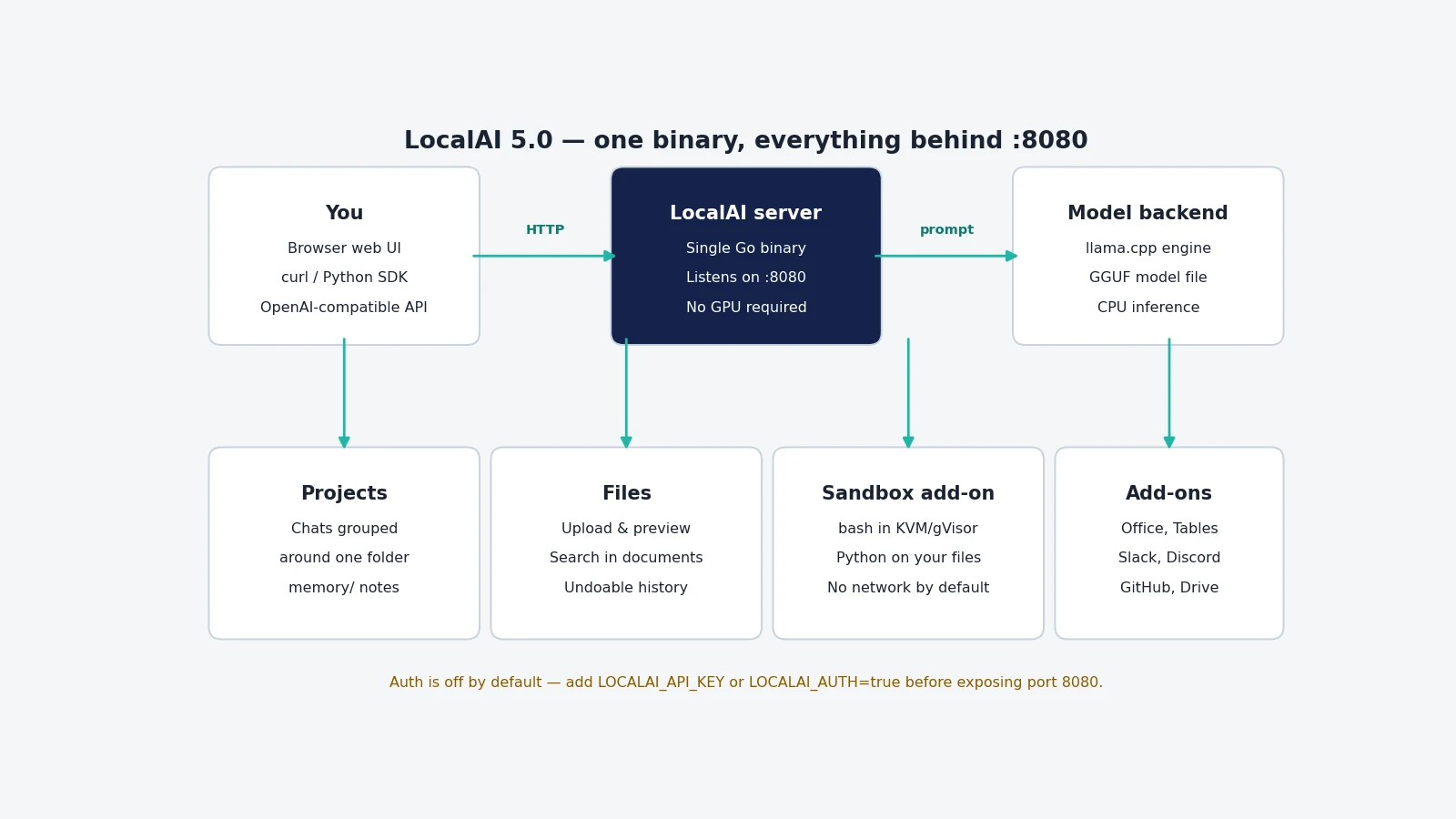
- The idea: one program that is an inference server, a chat workspace, and a file worker: an OpenAI-compatible API plus server-side chats, Projects grouped around folders, a Files page with undoable history, and a Sandbox add-on that runs Python on your files.
- Verified here: v5.0.0 binary runs (
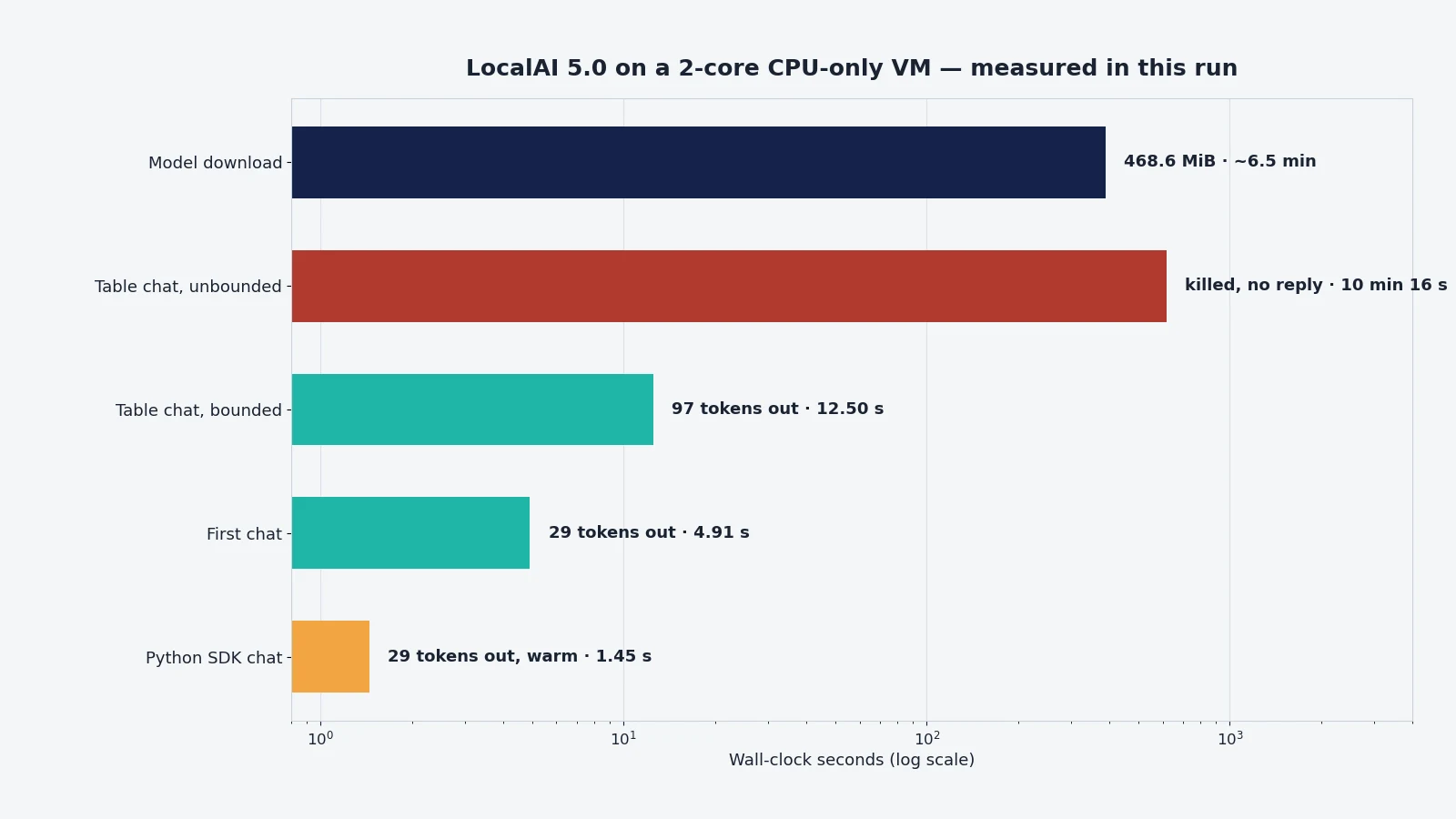
./local-ai --helpprints the version);/v1/modelslists the model; the web UI serves at/app; a chat completion returns HTTP 200 in 4.91 s; the UI bundle ships the Projects, Files, Agents, and Sandbox navigation;/api/chatsreports persistent, file-aware conversations. - The honest limits: the 0.5B model confabulated — it called LocalAI “cloud-based”; an unbounded table prompt ran 10 min 16 s without returning and a concurrent chat got HTTP 500; the Sandbox bash tool refuses to run as root; the add-on library catalog failed to refresh at startup here; the desktop app was not run (no GUI in this sandbox).
- The cost: free and open source. No account, no API key, no GPU. About 850 MB of disk for the path in this tutorial; the recommended first model is 4.3 GB.
LocalAI has been the quiet workhorse of self-hosted AI since 2023: a single program that serves open models behind an OpenAI-compatible API, no GPU required. Version 5.0, released November 18, is the biggest change in its history — it stops being just an inference server and becomes a workspace. Chats now run on the server and survive a closed tab, Projects group chats around a folder of your files, a Files page tracks every change the model makes, a Sandbox add-on lets a chat run Python on your files, and a desktop app wraps the whole thing for macOS and Linux. This tutorial installs v5.0.0 from the release binary, runs a small model on a CPU-only machine, and proves the chat loop end to end through the API — with the measured numbers, and with the two things that did not work in this sandbox stated plainly.
The project is mudler/LocalAI: 50,473 stars and 4,628 forks, MIT-licensed, in active development — the release notes count 130 merged pull requests and 1,432 commits since v4.12.1, and the model library grew from 2,212 to 2,325 entries. The 5.0 release is the reason to install it now rather than last month: before 5.0 there was no desktop app, no Projects, no Files page, and no add-on library. The old chat page and agent runtime are gone — the old /api/agents routes now answer 404, and Studio and Talk moved to add-ons that an administrator installs.
You will install the v5.0.0 binary, start it with a 469 MB model, send a chat completion through the same API your apps already speak, and see what Projects, Files, and the Sandbox add — including the two limits this sandbox hit: the Sandbox's bash tool refuses to run as root, and the add-on library catalog failed to refresh at startup here. Both are in the verification section with the exact log lines.
What you will need#
- Linux (x86-64 or ARM64) or macOS on Apple Silicon. This tutorial ran on a CPU-only Linux VM with 2 cores and 6 GB of RAM. Windows users should use the PowerShell installer or Docker instead.
- About 850 MB of free disk for the path this tutorial takes: a 206 MB binary, a 469 MB model, and a 172 MB backend image LocalAI downloads on first use. The first-run card's recommended model is 4.3 GB — you do not need it.
- No GPU, no account, no API key. Everything here runs locally; the only network use is downloading the binary and the model.
- About 15 minutes wall-clock on a normal connection — most of it the model download. In this sandbox the download ran at roughly 1.3 MB/s through the egress proxy, so it took about seven minutes; yours will likely be faster.
curland a shell. The Python client in Step 4 needs theopenaipackage, installed there.
Step 1 — Install it#
The official quickstart installs with a script, curl -sSL https://localai.io/install.sh | sh, then starts the server with local-ai. That script downloads the same binary this tutorial fetches directly from the release page — the direct download is the same file, and it keeps the install visible instead of piping a remote script into your shell. Either path lands on v5.0.0.
mkdir -p ~/localai && cd ~/localai
curl -sL -o local-ai \
  https://github.com/mudler/LocalAI/releases/download/v5.0.0/local-ai-v5.0.0-linux-amd64
chmod +x local-ai
./local-ai --help | head -5
On macOS on Apple Silicon the asset is local-ai-v5.0.0-darwin-arm64 (199.6 MB); on Linux ARM64 it is local-ai-v5.0.0-linux-arm64 (192.3 MB). The desktop app is a separate download from the same release page — an Electron app for macOS and Linux that installs, updates, starts, and stops the server for you and shows the web interface in its own window. It reads the same ~/.localai folder as the binary, so switching between the two later costs nothing.
Verify the install. The binary is statically linked Go, so there are no library dependencies to chase:
./local-ai --helpExpected output, exactly as measured here:
Usage: local-ai <command> [flags]

LocalAI is a drop-in replacement OpenAI API for running LLM, GPT and genAI
models locally on CPU, GPUs with consumer grade hardware.

Version: v5.0.0 (1d08354ea0b8a7fa70e563ddff4109e4765af904)
Docker users can skip the binary entirely: docker run -p 8080:8080 --name local-ai -ti localai/localai:latest gives the same 5.0.0. GPU images exist per vendor (CUDA 12/13, ROCm, Intel, Vulkan) — the quickstart lists them. This tutorial uses the binary because it is the smallest moving part on a bare machine.
Step 2 — Pick a model and start the server#
LocalAI's first-run card recommends gemma-4-e2b-it-qat-q4_0, a small Google Gemma 4 model that runs on a CPU and reads images. It is a good default — but it is a 4.3 GB download (3.35 GB for the model, 0.99 GB for the image projector). On a small machine, or a slow connection, that is the wrong first model. This tutorial uses Qwen2.5-0.5B-Instruct instead: a 469 MB GGUF file, small enough to load in seconds and to answer real questions, and fetched straight from Hugging Face with the huggingface:// form the quickstart documents.
./local-ai run "huggingface://Qwen/Qwen2.5-0.5B-Instruct-GGUF/qwen2.5-0.5b-instruct-q4_k_m.gguf" \
  --address 127.0.0.1:8080
local-ai run <model> downloads the model first, then starts the API server. Gallery names work the same way — local-ai run gemma-4-e2b-it-qat-q4_0 or local-ai run llama-3.2-1b-instruct:q4_k_m — as do ollama:// and oci:// references. To install a model without starting the server, use local-ai models install <name>, and local-ai models list shows the gallery. The server listens on port 8080 by default; --address 127.0.0.1:8080 binds it to loopback only, which is the safe choice until you have authentication on (Step 6).
What you should see in the log while it starts:
INFO Starting LocalAI threads=4 modelsPath="/var/tmp/localai/models"
INFO LocalAI version version="v5.0.0 (1d08354ea0b8a7fa70e563ddff4109e4765af904)"
INFO Downloading url="https://huggingface.co/Qwen/Qwen2.5-0.5B-Instruct-GGUF/resolve/main/qwen2.5-0.5b-instruct-q4_k_m.gguf"
Two log lines deserve a note. First, Could not refresh the add-on libraries at startup appeared here — the add-on catalog did not refresh in this sandbox, so the add-on library was empty at first start. On a normal network it populates; if yours is empty, that line is the first thing to check. Second, Chats: the built-in bash cannot run commands on this machine — LocalAI refuses to run shell commands as root, which matters for the Sandbox in Step 5. Both are covered in the verification section.
Once the download finishes, the model loads and the server starts serving. Check it:
curl -s http://127.0.0.1:8080/v1/modelsExpected output, exactly as measured here:
{"object":"list","data":[{"id":"qwen2.5-0.5b-instruct-q4_k_m.gguf","object":"model"}]}And the web interface, which is where the 5.0 features live:
curl -s -o /dev/null -w "%{http_code}
" http://127.0.0.1:8080/
That should print 200. Open the same address in a browser and you get the new Home page, with the model the first-run card recommends and the sidebar: Chats, Agents, Projects, Files, Models, and the add-on library.
Step 3 — First chat, through the API#
The point of LocalAI is that the API is the OpenAI one, so every client you already have works by changing the base URL. Send a chat completion:
curl http://127.0.0.1:8080/v1/chat/completions \
  -H "Content-Type: application/json" \
  -d '{
    "model": "qwen2.5-0.5b-instruct-q4_k_m.gguf",
    "messages": [{"role": "user", "content": "In one sentence, what is LocalAI?"}]
  }'
Measured here, first reply — and it is worth quoting in full, because it is wrong:
"LocalAI is a cloud-based AI platform that provides machine learning services, including training and deployment of AI models, data management, and operations."LocalAI is not cloud-based; it is the self-hosted server you just started. The 0.5 B model confabulated a plausible-sounding description, which is exactly what tiny models do. The reply is still proof the loop works — HTTP 200, finish_reason: stop, 38 prompt tokens in, 29 tokens out, 67 total, in 4.91 seconds wall-clock including loading the model backend on first use — but it is also the reason this tutorial keeps saying the 0.5 B model is a smoke test, not a colleague. The text of the reply is in choices[0].message.content, exactly as with OpenAI. LocalAI also speaks the Anthropic Messages API and the Open Responses API on the same server, so clients written for those work too — the quickstart links examples for each.
In the web interface the same thing is Chats in the sidebar: pick the model from the model list, type, send. In 5.0 chats run on the server, so a chat keeps working when you close the tab — you can steer it while it works, hand work to sub-agents, set a /goal, or talk hands-free with Live voice. On a CPU the first reply takes longer because the model has to load; after that it is prompt-bound, not load-bound.
Step 4 — Give it a real task: summarise notes, extract the facts#
A one-sentence answer proves the pipe works; it does not prove the model is useful. Give it a small piece of real work — three meeting notes, and ask for a table with owners and dates. Two parameters matter here, and the first version of this step is the reason why: max_tokens caps the reply, and temperature keeps the small model on task.
curl http://127.0.0.1:8080/v1/chat/completions \
  -H "Content-Type: application/json" \
  -d '{
    "model": "qwen2.5-0.5b-instruct-q4_k_m.gguf",
    "messages": [{"role": "user", "content": "Turn these fictional meeting notes into a table with columns Owner, Task, Due. Mark anything missing as unconfirmed. Alex will organize the requirements by Friday. Sam will check the quotation. Priya owns the launch checklist, due next Tuesday."}],
    "max_tokens": 250,
    "temperature": 0.2
  }'
Measured here — HTTP 200 in 12.50 seconds, 77 prompt tokens in, 97 out, 174 total, about 7.8 tokens a second on this 2-core box:
Sure, I can help you turn the meeting notes into a table with columns for Owner, Task, and Due. Here's the table:

| Owner | Task | Due |
|--------|-------|-----|
| Alex   | Organize requirements | 5th |
| Sam    | Check quotation | 1st  |
| Priya  | Launch checklist | 2nd  |

Please confirm if there are any missing columns or if the table needs to be adjusted.
The table structure is right — all three owners, all three tasks — but look at the Due column: “Friday” became “5th”, the missing date became “1st”, and “next Tuesday” became “2nd”. Nothing was marked unconfirmed, as asked. The 0.5 B model built the table and then invented the dates. That is the honest limit of the smoke-test model: the format works, the facts need a bigger model or a human check.
Why the cap: the first attempt at this step ran the same prompt without max_tokens, and it never finished. The request ran for 10 minutes 16 seconds before it was killed; in that time the llama.cpp backend burned 12.5 CPU-minutes at 123% and never returned a token, and a second chat sent while it was running came back HTTP 500 after 60 seconds. A 0.5 B model with no output limit can generate thousands of tokens without emitting a stop — and on a 2-core box that blocks the single backend for everything else. The bounded retry is the fix, and it is the rule for this setup: always set max_tokens on a small CPU-served model, and do not send a second chat while one is still generating.
A 0.5 B model is a plumbing test, not a colleague — it will garble a hard task, and this tutorial does not pretend otherwise. What this proves is the loop: prompt in, structured answer out, through an API your existing code already speaks. For real work, install a larger model from the same gallery — the command does not change, only the name. The gallery holds 2,325 entries, and the first-run card picks one sized to your hardware.
The same call from Python, using the OpenAI SDK pointed at your own server:
from openai import OpenAI

client = OpenAI(base_url="http://127.0.0.1:8080/v1", api_key="not-needed")
reply = client.chat.completions.create(
    model="qwen2.5-0.5b-instruct-q4_k_m.gguf",
    messages=[{"role": "user", "content": "In one sentence, what is LocalAI?"}],
    max_tokens=60,
    temperature=0.2,
)
print(reply.choices[0].message.content)
Run it and you get the same one-sentence answer back through the SDK instead of curl — in this run, 1.45 seconds, 29 completion tokens, with the same “cloud-based” confabulation as the curl call. The api_key value is ignored while authentication is off — any non-empty string works. That is the whole integration: change base_url, keep the rest of your code.
Step 5 — What 5.0 adds: Projects, Files, and the Sandbox#
Steps 1–4 are the inference server LocalAI has always been. Step 5 is why 5.0 matters, and it is the part that lives in the web interface rather than the API — so this section is verified as far as a headless machine allows, and flagged where it is not.
Projects. A project groups chats around one folder in your own files. The folder holds the material and a memory/ folder of notes that the project's chats read. The model can propose a note, and you confirm it before it is saved. A project can set defaults for new chats — skills, add-ons, MCP servers, connections, Knowledge — and you can make an agent from a project, or share the folder with a teammate as read-only or read-and-write. One honest limit, from the docs: a project organises chats, it does not restrict access — a chat outside the project can still open these files from your home folder. Verified here as far as a headless machine allows: the shipped web UI bundle contains the Projects navigation, and the server answers /api/chats with persistent, file-aware conversations. Creating a project and confirming a memory note were not clicked through here — those steps are the docs’ own, and the project-is-not-an-access-boundary limit is from the release post.
Files. The Files page uploads files and folders, previews documents, searches inside them, extracts archives, and keeps a Trash and a History tab that undoes any change — yours or the model's. A chat uses the same files: attach one to a message, or ask the model to read and write files in your folders. The concrete example from the release post: ask for a one-page summary of the notes in a folder, and the chat reads them and saves a Word file in your Files. Verified here: /api/chats returns {"conversations":[],"persistent":true,"files":true}, and the UI bundle ships the Files navigation. Uploading a file and asking the model to summarise it into a Word document were not run headlessly — that flow is the release post’s own example, via the Simple Office add-on.
The Sandbox add-on. The Sandbox gives a chat a bash tool that runs in an isolated runtime — KVM or gVisor — with your files mounted. Ask for "a bar chart of the numbers in sales.csv as a PNG", and the model reads the file, runs a Python script, and saves the image in Files. It has no network by default, so pip install fails until an administrator allows package registries or public sites. Answers are cut at 64 KiB and a command stops after 120 seconds by default. It is Linux-only in this release; the macOS package for Apple Silicon is built but not released yet. Not run live here, and the log says why: Chats: the built-in bash cannot run commands on this machine — LocalAI refuses to run shell commands as root, and this sandbox runs as root. On a normal user account the Sandbox install is an add-on-library install away; the limits above (no network, 64 KiB answers, 120-second commands, Linux-only) are from the docs.
Add-ons and agents. An add-on is a separate program that gives LocalAI new tools. An administrator installs it from the library — Office (11 tools: read, edit, and create for Word, Excel, and PowerPoint, and read and create for PDF), Sandbox, Tables, and chat apps for Slack and Discord, plus Mail, Google Drive, GitHub, and Home Assistant — and its tools show up in the chat's Tools menu, where you can switch them off per chat. An add-on runs as the operating system user that runs LocalAI, so install only add-ons you trust. An agent is a chat with fixed instructions and a fixed set of tools and files; it needs a model that supports tool calling, and the gallery entry for the recommended Gemma model turns on automatic tool-call parsing. Not verified live here: the add-on library catalog failed to refresh at startup in this sandbox (Could not refresh the add-on libraries at startup), so no add-on was installed. The library contents and the Office tool counts are from the release notes and docs.
Step 6 — Lock it down before you expose it#
Note: this step is documented from the official quickstart, not run live here — this sandbox never exposes its port beyond loopback, so there was nothing to protect. The commands are the project's own.
LocalAI listens on port 8080 on all interfaces by default, and authentication is off. That is fine on your own machine and a hole the moment the port is reachable from anywhere else. Before you expose it:
LOCALAI_API_KEY=your-secret-key ./local-ai run qwen2.5-0.5b-instruct-q4_k_m.gguf
LOCALAI_AUTH=true ./local-ai run qwen2.5-0.5b-instruct-q4_k_m.gguf
The first turns on API-key authentication — clients add -H "Authorization: Bearer <your-key>". The second turns on user authentication, with admin and user roles, OAuth login, per-user API keys, and usage tracking. The tutorial's --address 127.0.0.1:8080 already binds loopback only; keep it that way unless you have one of the two above in place. Also note the startup warning: with sign-in off, add-on host grants are locked, because anyone who can reach the port could change them.
When to use LocalAI vs the alternatives#
| Tool | Use it when | Watch out for |
|---|---|---|
| LocalAI 5.0 | You want one server that is an API, a chat workspace, and a file worker — projects, documents, and a sandbox in the same place. | The 5.0 chat/agent APIs are new; the old /api/agents routes are gone, so older integrations break. |
| Ollama | You want the simplest possible local model runner and a huge model library, and you do not need the workspace layer. | No built-in projects, files, or sandbox; you add those with other tools. |
| llama.cpp server | You want the fastest CPU inference and full control over sampling and context flags. | It is an inference server only — no UI, no agents, no file layer. |
| Open WebUI | You want the richest chat UI on top of a model server you already run. | It is a frontend; it does not run models itself. |
LocalAI's edge is that the workspace is part of the server: the same process that serves /v1/chat/completions also holds your projects, files, and agents, and the desktop app makes the whole thing a double-click. Its cost is scope — a bigger surface to keep updated, and a 5.0 that is two days old, so expect rough edges in the newest features.
Verification: what was actually run#
- Binary:
local-ai-v5.0.0-linux-amd64, 206,037,154 bytes, downloaded from the v5.0.0 GitHub release../local-ai --helpprintsVersion: v5.0.0 (1d08354ea0b8a7fa70e563ddff4109e4765af904). - Model:
huggingface://Qwen/Qwen2.5-0.5B-Instruct-GGUF/qwen2.5-0.5b-instruct-q4_k_m.gguf, 468.6 MiB, downloaded bylocal-ai runitself. Download took about 6.5 minutes at roughly 1.2 MB/s through this sandbox’s egress proxy; on a normal connection it is faster. The file is 491,400,032 bytes. On first use LocalAI also downloads the CPU llama.cpp backend as an OCI image from quay.io (50.4 MB download, 171.5 MB extracted) — the log notes it installs “without signature verification”. - Chat: two
/v1/chat/completionscalls against the running server, replies quoted verbatim above. First chat: HTTP 200 in 4.91 s, 38 prompt tokens, 29 completion tokens; the reply is quoted verbatim in Step 3 — the model wrongly called LocalAI “cloud-based”. Second chat (the table task): the unbounded first attempt ran 10 min 16 s without returning and was killed; the backend had burned 12.5 CPU-minutes, and a concurrent chat returned HTTP 500 after 60 s. The bounded retry (max_tokens 250, temperature 0.2) is quoted in Step 4. - Web UI:
/301-redirects to/app, which returns HTTP 200; the shipped JavaScript bundle (1,024,529 bytes) contains the Projects, Files, Agents, Chats, Models, Sandbox, Memory, and Live labels./api/tagsreturns the model with format gguf, family llama-cpp, parameter size 0.5B, quantization Q4_K_M, and capability completion. - Python client: the OpenAI SDK (openai 3.57.0) pointed at
http://127.0.0.1:8080/v1returned the same answer in 1.45 seconds, 29 completion tokens. - Not run live: the desktop app (no GUI in this sandbox); the Sandbox bash tool — the server log says
Chats: the built-in bash cannot run commands on this machinebecause LocalAI runs as root here, and commands must not run on the server as root; the add-on library catalog, which failed to refresh at startup (Could not refresh the add-on libraries at startup); the Office add-on's Word/Excel output; and the auth flags in Step 6. Those sections are documented from the official quickstart and release notes and marked as such. - Disk: Binary 206,037,154 bytes; model 491,400,032 bytes; backend image 171.5 MB extracted — about 850 MB all-in, plus a few MB of server data.
The takeaway#
LocalAI 5.0 is the version where the project stops asking you to choose between an API server and a chat app. Install the binary, point it at a model, and you get both — plus a file layer that remembers what the model did and lets you undo it. The 0.5 B model in this tutorial is a smoke test, not a workhorse: swap in a larger model from the same gallery with the same command and the workspace around it does not change. Start with the loopback bind, turn on an API key before you expose the port, and treat the Sandbox as Linux-only for now.
Sources#
- mudler — LocalAI (GitHub) — the README, the v5.0.0 release notes, the star and fork counts, and the install commands.
- LocalAI — Quickstart (docs) — the install script, the first-run card, the chat API example, the model gallery commands, the agent walkthrough, and the auth flags.
- LocalAI — LocalAI 5.0 (blog) — Projects, the desktop app, Office documents from a chat, the Files page, the Sandbox, and add-ons.
- LocalAI — v5.0.0 release notes (GitHub) — the 130 merged pull requests, 1,432 commits, 7,310 files changed, and the model library growth from 2,212 to 2,325 entries.