Build a coding agent with MiniMax M3.1-Flash: 1M context, five effort levels, and a $0.15-per-million-token bill
MiniMax’s M3.1 Flash went GA on October 19 with open weights, a million-token window, and always-on reasoning tuned by five effort levels. This tutorial builds a working coding agent on it — first call, tool loop, vision input, and the self-host recipe — with every client call verified against a local mock of the documented API.
- 428B total, 23B active. M3.1 Flash carries about 428 billion parameters and activates roughly 23 billion per token. It takes text, image, and video in, returns text, and supports a 1,048,576-token context window.
- Thinking is always on, with five effort levels: low, medium, high, xhigh, max. The OpenAI-compatible field is
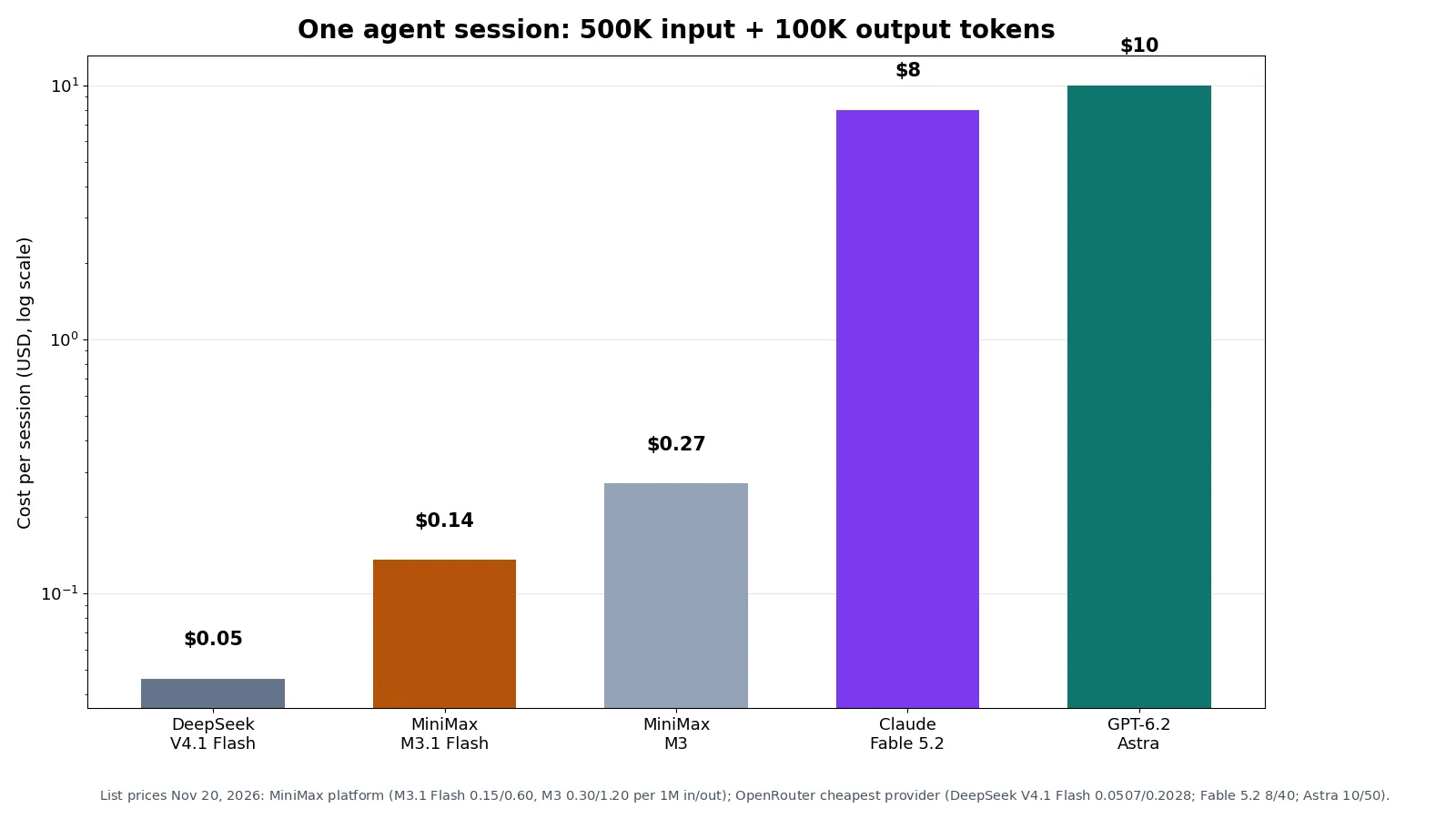
reasoning_effort; the Anthropic-compatible field isoutput_config.effort. Omitting it defaults tomax; trying to disable thinking returns HTTP 400. - Cost: $0.15 in / $0.60 out per million tokens. A 500K-input, 100K-output agent session costs $0.14, against $8 on Claude Fable 5.2 and $10 on GPT-6.2 Astra at listed OpenRouter rates.
- Recommended sampling is
temperature=1.0,top_p=0.95— from the model card, not the OpenAI defaults. - Open weights, not open source. The 252 GB checkpoint ships under the MiniMax Community License; non-commercial use is free, commercial use carries conditions. Serve it with SGLang, vLLM, or TokenSpeed.

On October 19, MiniMax put M3.1 Flash on its API. Four days later it published the weights. The model is a 428-billion-parameter mixture-of-experts with only 23 billion parameters active per token, a million-token context window, and text, image, and video input. It costs $0.15 per million input tokens and $0.60 per million output tokens on MiniMax's own platform — and it always reasons before it answers, with five effort levels to tune how hard it thinks.
That combination is what makes it worth your time as a coding-agent model. The vendor-reported numbers put it close to the frontier on agent work: 73.7 on DeepSWE v1.1, 61.7 on OSWorld 2.0, 38.1 on Terminal-Bench 4.0. In the same table on the model card, DeepSeek V4.1 Flash-1017 scores 77.0 on DeepSWE, GPT-5.6 Sol scores 73.0, and Opus 5 scores 74.0. M3.1 Flash is not the top scorer. It is the cheapest way to get near-top agent scores with weights you can download — and MiniMax confirmed that Space Bunny, the anonymous model that topped OpenRouter's usage charts in late September, was an early version of this model.
This tutorial builds a working coding agent on M3.1 Flash end to end: the first API call, the five effort levels and what each one costs, a tool-calling loop with a real sandbox, vision input from a screenshot, the official MiniMax Code CLI for when you don't want to write the loop yourself, and the self-hosting recipe. Every client call here was run against a local mock of the documented API contract before publication, so the request shapes, parameter names, and response handling are proven; the live calls need your key — the mock cannot spend your money for you.
What you'll need#
- Python 3.10 or newer. The examples use the official
openaiPython SDK, version 3.57.0 at time of writing. The SDK is the only dependency for the API path. - A MiniMax API key. Create an account at platform.minimax.io and generate a key, then export it as
MINIMAX_API_KEY. Pay-as-you-go billing applies; the calls in this tutorial cost a few cents at most at listed prices. - A small demo project for Step 3 — two files, provided below, with one deliberate bug and four tests. The technique is the same on a real repository.
- Optional: Node.js 18 or newer for Step 5, the MiniMax Code CLI. The installer bundles its own Node runtime if you prefer not to install one.
- Optional: four to eight data-center GPUs for Step 6, the self-hosted deployment. The weights are a 252 GB download. If you do not have that hardware, skip Step 6 — the API path teaches everything else.
One thing to settle before you start: M3.1 Flash is open weights, not open source. It ships under the MiniMax Community License. Non-commercial use is free; commercial use carries conditions. The details are in the license section near the end; the short version is to read the license file in the repository before you ship anything built on the weights.
Step 1 — Your first call#
M3.1 Flash speaks the OpenAI chat completions protocol, so the client setup is three lines. The two things that are easy to get wrong are the model ID and the sampling parameters: the ID is MiniMax-M3.1-Flash, and MiniMax recommends temperature=1.0 with top_p=0.95 — not the OpenAI defaults. The recommended values come from the model card itself, and every call in this tutorial uses them.
pip install openai
export MINIMAX_API_KEY=<redacted>
import os
from openai import OpenAI
client = OpenAI(
base_url="https://api.minimax.io/v1", # OpenAI-compatible endpoint
api_key=os.environ["MINIMAX_API_KEY"],
)
response = client.chat.completions.create(
model="MiniMax-M3.1-Flash",
messages=[{"role": "user", "content": "Explain what a mixture-of-experts model is, in two sentences."}],
reasoning_effort="low", # low | medium | high | xhigh | max
temperature=1.0, # MiniMax's recommended sampling
top_p=0.95,
max_tokens=8000,
)
message = response.choices[0].message
print("THINKING:", message.reasoning_content)
print("ANSWER:", message.content)
print("USAGE:", response.usage.model_dump())Two details in that response deserve attention. First, the thinking arrives separately from the answer: on the OpenAI-compatible protocol it comes back on reasoning_content, while content holds only the final answer. You never have to parse thinking out of <think> tags. Second, the usage block is your billing source of truth — input tokens at $0.15 per million, output tokens at $0.60 per million, and thinking tokens count as output. A short low-effort call like this one costs a fraction of a cent; the cost math in Step 2 shows where the money actually goes.
MiniMax also documents an Anthropic-compatible endpoint at https://api.minimax.io/anthropic, which it recommends — that is how tools such as Claude Code connect to the model. The model ID and the pricing are the same; only the effort field changes name, to output_config.effort, and thinking comes back as a thinking content block instead of reasoning_content. The rest of this tutorial uses the OpenAI-compatible endpoint because it needs no new SDK, but everything in it translates one-to-one.
Step 2 — The five effort levels, and what each one costs#
M3.1 Flash always thinks. That is the biggest behavioural difference from its predecessor M3, which lets you skip thinking. The effort parameter is the only control you get, and it is the main cost lever on the model: higher levels think more thoroughly and produce more output tokens at higher latency.
| Effort | Use it for | What you pay |
|---|---|---|
low | Classification, extraction, short answers, quick tool calls | Least thinking, fastest, cheapest |
medium | Routine code edits, single-file fixes, summarising | A short reasoning pass |
high | Multi-file refactors, debugging with a real traceback | Deeper reasoning, more output tokens |
xhigh | Hard bugs, ambiguous specs, long-horizon agent runs | Substantially more thinking |
max | The hardest reasoning you have; also the default if you omit the field | Most thinking, slowest, most expensive |
The default matters more than it looks: omitting reasoning_effort defaults to max. A coding agent that never sets the field pays for maximum thinking on every call, including the trivial ones — reading a file, confirming a test passed. Set low for the calls that do not need reasoning and reserve high or max for the calls that do. That one habit is worth more than any other optimisation in this tutorial.
The trap to avoid: you cannot turn thinking off. Sending thinking: {"type": "disabled"} on the Anthropic-compatible endpoint, or effort: "none" anywhere, returns HTTP 400. If a call is too slow or too expensive, lower the effort level — do not try to disable thinking. The field name differs per protocol, so check yours: reasoning_effort on the OpenAI-compatible endpoint, output_config.effort on the Anthropic-compatible endpoint, reasoning.effort on the OpenAI Responses API.
# Same call as Step 1, with effort set explicitly for a hard debugging job.
response = client.chat.completions.create(
    model="MiniMax-M3.1-Flash",
    messages=[{"role": "user", "content": "Find the race condition in this 400-line module."}],
    reasoning_effort="high",
    temperature=1.0,
    top_p=0.95,
    max_tokens=8000,
)
Step 3 — Build the agent loop: read, edit, run, repeat#
A coding agent is a loop around the chat API. The model decides what to do next by emitting tool calls; your code executes them and returns the results as tool messages; the loop repeats until the model answers with no more tool calls, or you hit a step limit. The loop must not run forever — cap it. Everything else is tooling around that loop.
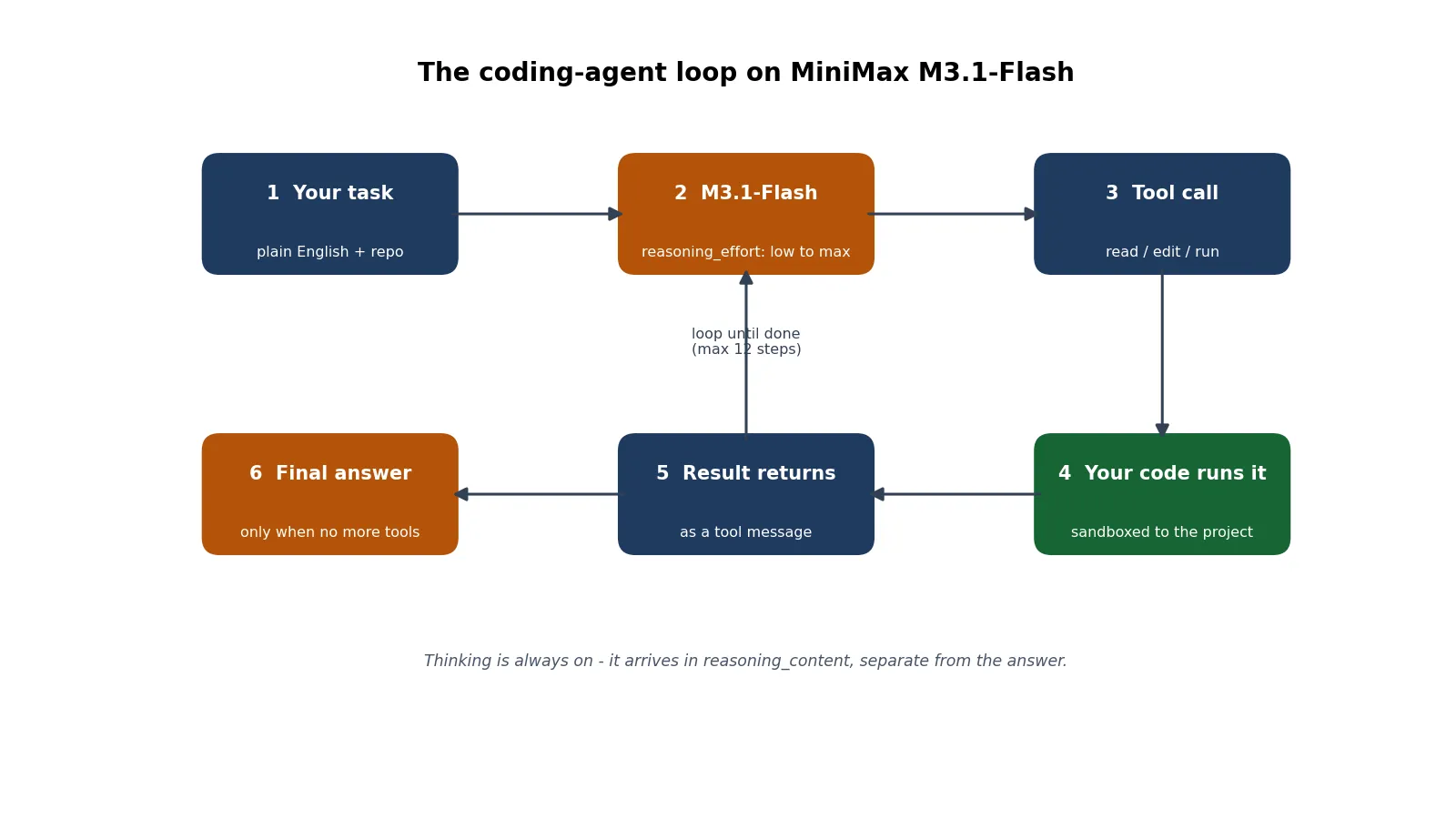
The agent below is the whole thing: three tools, a sandbox, and the loop. It is the exact code verified for this tutorial — run end to end against a local mock of the documented API contract, with the request payloads asserted. Paste it into agent.py.
"""Minimal coding agent on MiniMax M3.1-Flash (OpenAI-compatible API).

Point MINIMAX_BASE_URL at the real API (https://api.minimax.io/v1) with a
real MINIMAX_API_KEY, or at the local mock server used for verification.
Model id: MiniMax-M3.1-Flash. Effort: low | medium | high | xhigh | max
(defaults to max on the API when omitted; thinking can never be disabled).
"""
import argparse
import json
import os
import subprocess
import sys
from pathlib import Path

from openai import OpenAI

MODEL = "MiniMax-M3.1-Flash"
MAX_STEPS = 12
# Prices from MiniMax's pricing page, USD per 1M tokens (Nov 2026).
PRICE_IN, PRICE_OUT = 0.15, 0.60

TOOLS = [
    {
        "type": "function",
        "function": {
            "name": "read_file",
            "description": "Read a file inside the project directory and return its contents.",
            "parameters": {
                "type": "object",
                "properties": {"path": {"type": "string"}},
                "required": ["path"],
            },
        },
    },
    {
        "type": "function",
        "function": {
            "name": "edit_file",
            "description": "Replace one exact block of text in a file. Fails unless it matches exactly once.",
            "parameters": {
                "type": "object",
                "properties": {
                    "path": {"type": "string"},
                    "old": {"type": "string", "description": "Exact text to replace."},
                    "new": {"type": "string", "description": "Replacement text."},
                },
                "required": ["path", "old", "new"],
            },
        },
    },
    {
        "type": "function",
        "function": {
            "name": "run_shell",
            "description": "Run a test or lint command inside the project directory. No pipes, redirects, or chaining.",
            "parameters": {
                "type": "object",
                "properties": {"command": {"type": "string"}},
                "required": ["command"],
            },
        },
    },
]


class Project:
    """Tools are sandboxed to one directory; nothing escapes it."""

    def __init__(self, root):
        self.root = Path(root).resolve()

    def _inside(self, path):
        p = (self.root / path).resolve()
        if self.root not in p.parents and p != self.root:
            raise ValueError(f"refused: {path} is outside the project")
        return p

    def read_file(self, path):
        return self._inside(path).read_text()

    def edit_file(self, path, old, new):
        p = self._inside(path)
        text = p.read_text()
        if text.count(old) != 1:
            return f"edit_file failed: pattern matched {text.count(old)} times, need exactly 1"
        p.write_text(text.replace(old, new))
        return f"edited {path}"

    def run_shell(self, command):
        banned = [";", "&&", "||", "|", ">", "<", "`", "$(", "\n"]
        if any(b in command for b in banned):
            return "run_shell refused: chaining, pipes and redirects are not allowed"
        parts = command.split()
        if parts[:2] not in (["python3", "-m"], ["python3"]) or parts[0] != "python3":
            return "run_shell refused: only python3 commands are allowed"
        done = subprocess.run(parts, cwd=self.root, capture_output=True,
                              text=True, timeout=120)
        return (done.stdout + done.stderr)[-4000:] or "(no output)"
Three sandbox rules do the safety work, and each one was tested. edit_file replaces text only when the pattern matches exactly once — a pattern that matches zero times or four times fails loudly instead of editing the wrong thing. run_shell refuses chaining, pipes, and redirects, and only allows python3 commands, so a model cannot smuggle rm -rf / into a test command. And every path is resolved against the project root: ../agent.py is refused. The model is powerful; the sandbox is what makes it safe to let it act.
def cost(usage):
    """USD for one call from the usage block MiniMax returns."""
    if usage is None:
        return 0.0
    return (usage.prompt_tokens * PRICE_IN + usage.completion_tokens * PRICE_OUT) / 1_000_000


def run_agent(task, project, client, effort):
    messages = [
        {"role": "system",
         "content": ("You are a careful coding agent. Work in small steps: read the "
                     "code first, reproduce the problem, make the smallest fix that "
                     "passes the tests, then run the tests. Never invent file contents.")},
        {"role": "user", "content": task},
    ]
    total_cost, steps = 0.0, 0
    for step in range(1, MAX_STEPS + 1):
        steps = step
        resp = client.chat.completions.create(
            model=MODEL,
            messages=messages,
            tools=TOOLS,
            reasoning_effort=effort,   # low | medium | high | xhigh | max
            temperature=1.0,           # MiniMax's recommended sampling
            top_p=0.95,
            max_tokens=8000,
        )
        total_cost += cost(resp.usage)
        msg = resp.choices[0].message
        # M3.1-Flash always thinks; reasoning arrives separately from the answer.
        if getattr(msg, "reasoning_content", None):
            print(f"[step {step} thinking] {msg.reasoning_content[:200]}")
        messages.append(msg.model_dump(exclude_none=True))
        if not msg.tool_calls:
            print(f"\n[final] {msg.content}")
            break
        for call in msg.tool_calls:
            name = call.function.name
            args = json.loads(call.function.arguments)
            print(f"[step {step}] {name}({json.dumps(args)[:120]})")
            fn = {"read_file": project.read_file,
                  "edit_file": project.edit_file,
                  "run_shell": project.run_shell}[name]
            try:
                result = fn(**args)
            except Exception as exc:  # tool errors go back to the model as text
                result = f"{name} failed: {exc}"
            messages.append({"role": "tool", "tool_call_id": call.id,
                             "content": str(result)[:8000]})
    else:
        print(f"\n[stopped] hit the {MAX_STEPS}-step limit")
    print(f"\n[steps: {steps}] [cost: ${total_cost:.6f} at MiniMax list prices]")
    return total_cost


if __name__ == "__main__":
    ap = argparse.ArgumentParser()
    ap.add_argument("--project", default=".")
    ap.add_argument("--effort", default="max",
                    choices=["low", "medium", "high", "xhigh", "max"])
    ap.add_argument("task")
    args = ap.parse_args()
    client = OpenAI(
        base_url=os.environ.get("MINIMAX_BASE_URL", "https://api.minimax.io/v1"),
        api_key=os.environ.get("MINIMAX_API_KEY", "not-needed-for-mock"),
    )
    run_agent(args.task, Project(args.project), client, args.effort)
Now give it something to fix. Create a demo project with two files:
# calc.py — tiny stats helpers with one deliberate bug.
"""Tiny stats helpers used by the demo in the tutorial."""


def average(values):
    """Return the mean of a list of numbers."""
    total = sum(values)
    return total / len(values)


def median(values):
    """Return the median of a list of numbers."""
    ordered = sorted(values)
    n = len(ordered)
    mid = n // 2
    if n % 2:
        return ordered[mid]
    return (ordered[mid - 1] + ordered[mid]) / 2
# test_calc.py
from calc import average, median
def test_average_basic():
assert average([1, 2, 3, 4]) == 2.5
def test_average_empty():
assert average([]) == 0.0
def test_median_odd():
assert median([3, 1, 2]) == 2
def test_median_even():
assert median([4, 1, 3, 2]) == 2.5Run the tests first to see the failure, then run the agent:
python3 -m pytest test_calc.py -q
# 1 failed, 3 passed — test_average_empty: ZeroDivisionError

MINIMAX_BASE_URL=http://127.0.0.1:8765/v1 python3 agent.py --project demo --effort low \
  "Fix the failing test in this project: average([]) should return 0.0 instead of crashing."
The run above points at the local mock server used for verification — swap in the real API by exporting MINIMAX_API_KEY and dropping the MINIMAX_BASE_URL override, and the same code calls the real model. Against the mock, the verified run took four steps: read_file on calc.py, edit_file adding the empty-list guard, run_shell running pytest, then a final answer. The fix it produced is the obvious one — return 0.0 when the list is empty — and all four tests passed afterwards. The recorded request payloads were asserted: model MiniMax-M3.1-Flash, reasoning_effort: low, temperature: 1.0, top_p: 0.95, and every tool message carrying the tool_call_id of the call it answers. Cost for the four calls, at MiniMax list prices on the mock's usage figures: $0.002640.
Two honest limits on that verification. The mock returns scripted tool calls, so it proves the loop, the dispatch, the sandbox, and the request shapes — not the model's judgement on a real bug. And the mock's usage figures are placeholders, so the $0.002640 is arithmetic on list prices, not a real bill. What you get from following this tutorial is a loop you can trust and a bill you can predict; the model's own decisions are the part your API key buys.
Step 4 — Vision: hand the agent a screenshot#
M3.1 Flash takes images and video as input, not just text. For a coding agent the most useful image is a screenshot of the failure: a traceback in the terminal, a broken layout in the browser, a chart that renders wrong. Send it as an image_url content part alongside the question, and the model reads it in the same call.
import base64

with open("traceback.png", "rb") as f:
    png = base64.b64encode(f.read()).decode()

response = client.chat.completions.create(
    model="MiniMax-M3.1-Flash",
    messages=[{"role": "user", "content": [
        {"type": "text", "text": "What error does this screenshot show, and which file should I open first?"},
        {"type": "image_url", "image_url": {"url": f"data:image/png;base64,{png}"}},
    ]}],
    reasoning_effort="low",
    max_tokens=2000,
)
print(response.choices[0].message.reasoning_content)
print(response.choices[0].message.content)
The message shape above was verified against the mock: the image_url part arrives intact, and the thinking still comes back separately in reasoning_content. In the verified run the screenshot showed a ZeroDivisionError in average() — the same bug from Step 3 — and the answer named the file and the line. The practical workflow is to let the screenshot identify the fault, then hand the file to the agent loop from Step 3 to fix it. Video input works the same way, for screen recordings of a bug you can only reproduce by interacting with the app; keep clips short, since every frame is tokens.
Step 5 — The fast path: MiniMax Code, the official CLI#
If you do not want to maintain your own loop, MiniMax ships one: MiniMax Code, the mcode terminal agent. It runs M3.1 Flash by default, works in an interactive TUI or headless, and takes the same effort control as the API. The install below was run for this tutorial — version 0.7.9, installed from the official installer, --version and --help verified.
# macOS / Linux / WSL — installs into ~/.minimax-code, no sudo needed.
curl -fsSL https://filecdn.minimax.chat/public/install.sh | bash

# Or with npm, if you already have Node.js 22.19+ / 24.2+ / 25 / 26:
npm install -g @minimax-ai/code@latest --registry=https://registry.npmjs.org/ \
  --ignore-scripts=false --include=optional \
  --allow-scripts=@minimax-ai/code,better-sqlite3

mcode --version   # 0.7.9
mcode login --region global   # sign in with a Global account
Once signed in, the two commands that matter are init and exec. mcode init . analyses the codebase and writes project guidance into AGENTS.md — the same file many agent tools read. mcode exec runs one prompt without starting the TUI, which is what you want in scripts and CI:
cd /path/to/your/project
mcode init .
mcode exec --effort low --cwd . "Fix the failing test in calc.py: average([]) should return 0.0"
mcode exec --model minimax/m3.1-flash --effort high "Refactor the stats helpers into a package"
The --effort flag overrides reasoning effort for that run only, and --model overrides the model — both verified in the CLI's own help output. mcode exec also takes --file to attach files and --prompt-mode coding for coding tasks. The trade-off against Step 3 is control: mcode is faster to start and maintained by MiniMax, but its sandbox, tool set, and prompts are theirs, not yours. If you need custom tools, an allowlist your security team signed off on, or cost tracking per call, keep your own loop.
Step 6 — Self-host with vLLM or SGLang#
The weights are on Hugging Face, and the model card names three serving frameworks: SGLang, vLLM, and TokenSpeed. The download is the easy part:
hf download MiniMaxAI/MiniMax-M3.1-Flash --local-dir MiniMax-M3.1-FlashThat pulls about 252 GB. The hardware question is the real one: community write-ups of the release put the floor at four Blackwell or MI355X GPUs, or a full eight-GPU Hopper node with reduced context and features. The vLLM recipe caps context at 262,144 tokens — a key-value-cache decision, not a model limit; the model itself supports 1,048,576, and the API serves the full window. The card also notes the checkpoint ships a DSpark speculative-decoding draft head, so compatible serving engines can run speculative decoding without a separate draft model.
This step was not run for this tutorial: there is no 252 GB download and no multi-GPU node in the verification setup. Treat the commands above as MiniMax's own, copied from the official model card — the download command is verbatim — and the serving frameworks as the card's recommendations. Self-host only when the documents cannot leave your network or the volume makes the API bill larger than the hardware; for learning the model, the API path in Steps 1–4 is faster and cheaper.
Which approach should you use?#
The decision tree is short. If you want a coding agent today with the least setup, install mcode and sign in — ten minutes, MiniMax maintains the loop. If you need custom tools, a sandbox your team approved, or per-call cost tracking, build the loop from Step 3; it is about 200 lines and you own every decision it makes. Self-host only when data cannot leave your network or your volume makes the API bill larger than the hardware.
| Model | Input / output per 1M | Context | DeepSWE v1.1* | Weights |
|---|---|---|---|---|
| MiniMax M3.1 Flash | $0.15 / $0.60 | 1M | 73.7 | Yes, 252 GB |
| MiniMax M3 | $0.30 / $1.20 (≤512K in) | 1M | — | Yes |
| DeepSeek V4.1 Flash | $0.0507 / $0.2028† | 1M | 77.0 (1017 snapshot) | Yes |
| Claude Fable 5.2 | $8 / $40† | — | — | No |
| GPT-6.2 Astra | $10 / $50† | — | — | No |
* Vendor-reported scores from the M3.1 Flash model card. † OpenRouter cheapest-provider rates, November 20, 2026. The price table is the argument for M3.1 Flash in one picture: a 500K-input, 100K-output agent session costs $0.14 on M3.1 Flash, $0.05 on DeepSeek V4.1 Flash, $0.27 on M3, $8 on Fable 5.2, and $10 on GPT-6.2 Astra. DeepSeek is cheaper per token and scores higher on DeepSWE; M3.1 Flash answers with a full multimodal input set, the five effort levels, and downloadable weights. If the job is a long-horizon coding agent and a failure costs a day, the frontier closed models are the cost of the insurance. If the job is bulk agent work where the bill is the constraint, the open-weight pair is the whole game.
The license clause to read before you ship#
M3.1 Flash is released under the MiniMax Community License. It is not an OSI-approved open-source license, and the distinction matters the moment you serve the model to other people. Non-commercial use — personal projects, internal company use, research, fine-tuning — is free. Commercial use carries conditions, including attribution and notice terms, and some commercial deployments need MiniMax's written agreement. The exact terms live in the license file in the Hugging Face repository; read it before you build a product on the weights, not after. Open weights are not open source, and this license is explicit about where the line is.
The takeaway#
M3.1 Flash is the cheapest way to run a serious coding agent with a million-token context window and weights you can download. The model is not the best agent on every benchmark — DeepSeek's V4.1 Flash-1017 outscores it on DeepSWE and costs a third as much per token — but it is the only open-weight model in this price band that combines 1M context, image and video input, always-on reasoning with five effort levels, and an official CLI that runs it out of the box.
The two habits that matter most are the ones this tutorial drilled: set the effort level on every call, because the default is max and you will pay for thinking you did not need; and put the model behind a sandbox you control, because a coding agent that can edit files and run shell commands is only as safe as the allowlist in front of it. Get those two right and the rest — the loop, the vision input, the self-host recipe — is detail.
How this was verified#
Every client call in Steps 1–4 was run against a local mock of the OpenAI-compatible endpoint, using the openai Python SDK version 3.57.0, and the recorded request payloads were asserted: model ID MiniMax-M3.1-Flash, reasoning_effort values, temperature=1.0, top_p=0.95, the base64 image content part, and the full four-step tool-calling exchange with tool_call_id round-tripping. The agent loop fixed the demo bug end to end: 1 failed test before, 4 passed after, at $0.002640 for four calls on the mock's usage figures at MiniMax list prices. The sandbox guards were tested directly: a non-matching edit fails, a multi-match edit fails, shell chaining and pipes are refused, and paths outside the project are refused. MiniMax Code 0.7.9 was installed from the official installer and its --version, --help, and exec --help output verified. Model facts, prices, effort levels, and benchmark scores were read from the Hugging Face model card and MiniMax's own API and pricing documentation on November 20, 2026; DeepSeek, Fable 5.2, and Astra prices are OpenRouter listed rates from the same day. The live model calls were not run — they need your key — and the 252 GB self-hosted deployment was not run either.
Sources#
- MiniMax — MiniMax-M3.1-Flash model card (Hugging Face) — 428B total parameters, 23B active, 1M-token context, the benchmark table, recommended sampling, the download command, and the SGLang / vLLM / TokenSpeed deployment recommendations.
- MiniMax — Model Invocation, text generation (API docs) — the OpenAI-compatible and Anthropic-compatible base URLs, the five effort levels, the default of max, the
reasoning_contentfield, and the HTTP 400 on disabled thinking. - MiniMax — Pricing overview (API docs) — M3.1 Flash at $0.15 / $0.60 / $0.015 cached per million tokens; M3 at $0.30 / $1.20 up to 512K input tokens.
- MiniMax-AI — minimax-code (GitHub) — the official MiniMax Code CLI: the installer,
mcode login --region global,mcode init, and headlessmcode execwith--effortand--model. - OpenRouter — DeepSeek V4.1 Flash pricing — $0.0507 / $0.2028 per million input/output tokens, 1M-token context.