Run an Instagram account with Claude Code: hands-on with instagram-agent-skill
Thirteen Claude skills that run an Instagram account went from a September weekend project to 7,520 GitHub stars — 5,322 of them this month — by doing the parts a human cannot do reliably with code instead of vibes: scoring the hook, timing the script, linting the caption, and stripping the machine fingerprint out of the draft. This tutorial runs all five of its Python tools and reports the real numbers, including the ones that stay flagged.
- The project: Jakeschincariol/instagram-agent-skill, 7,520 stars, 1,425 forks, MIT, created September 13, 2026 — about 5,322 stars gained this month, on GitHub's monthly trending list. Version 1.0.0, two commits.
- The pack: 13 Claude Code skills — ig-reel, ig-viral, ig-caption, ig-carousel, ig-story, ig-profile, ig-plan, ig-human, ig-comment, ig-reply, ig-dm, ig-repurpose, ig-audit — plus 26 hook formulas, a 12-item 100-point profile rubric, and a 154-term slop lexicon.
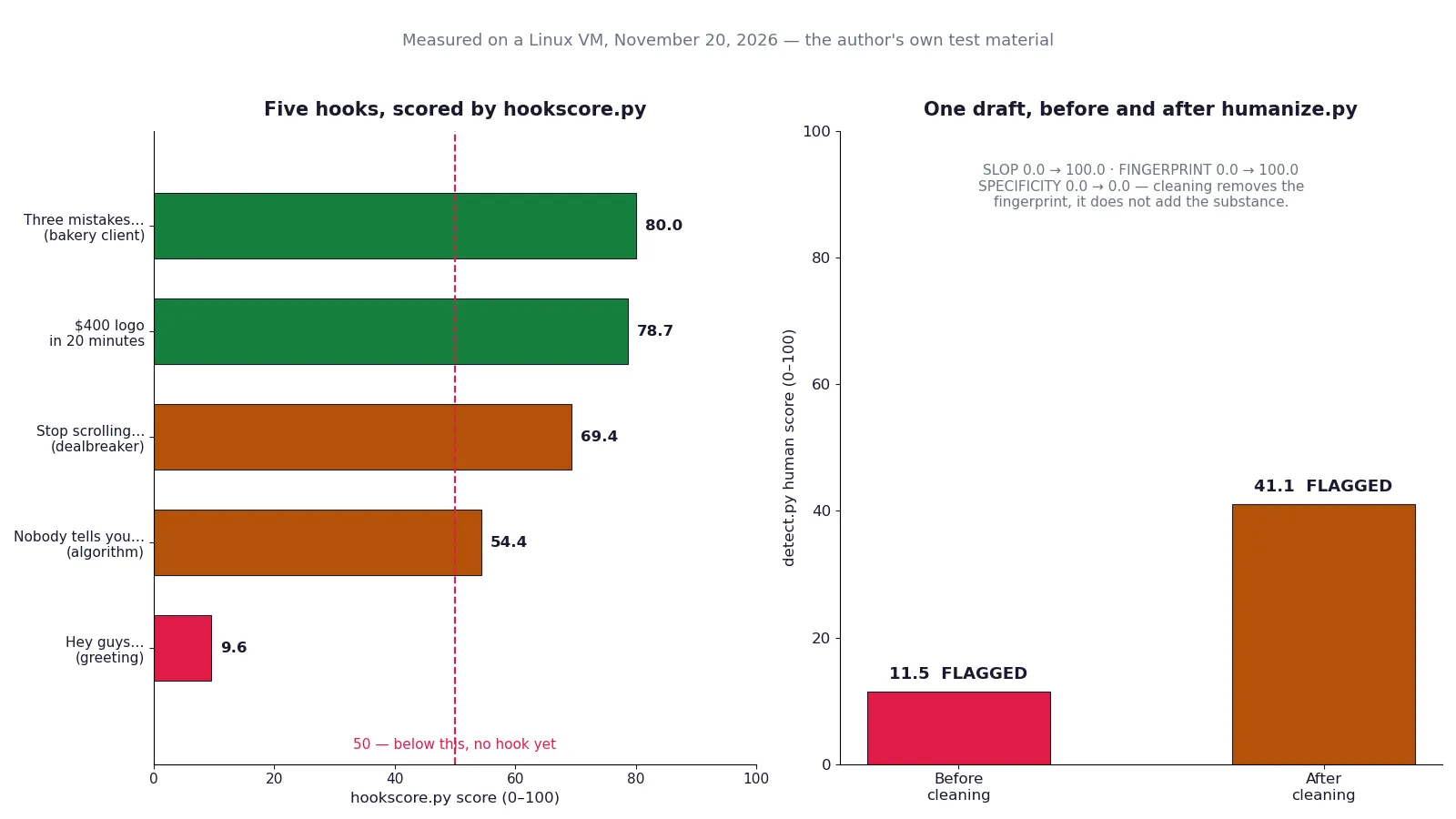
- Verified here: hookscore ranked 5 hooks 80.0 / 78.7 / 69.4 / 54.4 / 9.6; beats timed a 51-word script at ~18.6s against a 30s target; caption.py failed 7 hashtags against the cap of 5; humanize.py stripped 15 artefacts; detect.py moved 11.5 to 41.1, still FLAGGED; swipe.py ranked 4 reels 89.1x / 37.5x / 1.4x / 1.1x.
- The honest limit: the humanizer fixes the fingerprint, not the substance — specificity stayed 0.0 on a draft with no concrete numbers. The detection panel is local heuristics, not GPTZero or Originality, and cannot promise those verdicts.
- The cost: free, MIT, no API key, no account, no GPU. Needs Python 3 only for the five tools; Claude Code is optional for the slash commands. One real bug found: swipe.py --out with a bare filename crashes — give it a path with a directory.

Most Instagram advice is written for people who already have an audience. This project is for the opposite problem: you have something to say, a phone, and no idea what the first line should be. The instagram-agent-skill is a pack of thirteen skills for Claude Code that turns one raw idea into a Reel script, a caption, a week of posts, and a profile that scores out of 100 — and it does the parts a human cannot do reliably by running code instead of guessing.
The project (Jakeschincariol/instagram-agent-skill) was created on September 13, 2026, by Jake Schincariol. By November 20 it had 7,520 stars and 1,425 forks, with 5,322 of those stars gained this month — enough to land on GitHub's monthly trending list. It is MIT-licensed, version 1.0.0, free, with no signup, no API key, and nothing to connect. The reason it is worth a tutorial rather than a link is that five of its pieces are Python tools that actually run: a hook scorer, a script timer, a caption linter, a humanizer, and a swipe-file ranker. This tutorial runs all five on its own test material and reports the real numbers — including the places where the tools say no.
You will install the pack, write a voice profile, score five hooks and pick the winner, time a 30-second script, lint a caption against what the feed actually shows, strip the machine fingerprint out of a draft and prove the difference, rank four collected Reels by how far each beat its own account, and score a profile against the pack's 100-point rubric. No Instagram account is needed for any of it. Nothing in this tutorial posts anything.
What you will need#
- Python 3. The five tools use only the standard library. This tutorial was run with Python 3.12.3 on Linux; any Python 3.8 or newer will do. No packages to install, no virtual environment.
- Git for the one-line install. A browser download of the repository zip works too.
- Claude Code, optionally. The thirteen slash commands (
/ig-reel,/ig-viral, and the rest) run inside Claude Code. If you do not have it, the README's fallback works: paste any singleSKILL.mdat the top of a chat and it runs as a mode — you lose the five Python tools, which is most of the point of/ig-reeland/ig-human, but the rest works. Every command in this tutorial is run by hand in a terminal, with no agent and no API key. - About 20 minutes and under 1 MB of disk. The whole repository is a few hundred kilobytes of Markdown, JSON, and Python. There is nothing to download, no model, no GPU.
- No account and no API key. Nothing here calls a network service. The tools read your files and print to your terminal.
Step 1 — Install it#
Clone the repository and copy the thirteen skill folders into Claude Code's skills directory:
git clone https://github.com/Jakeschincariol/instagram-agent-skill.git
cp -r instagram-agent-skill/skills/ig-* ~/.claude/skills/
Verify the copy landed — thirteen directories, one per skill:
ls ~/.claude/skills/ | grep ig-Expected output:
ig-audit
ig-caption
ig-carousel
ig-comment
ig-dm
ig-human
ig-plan
ig-profile
ig-reel
ig-reply
ig-repurpose
ig-story
ig-viral
That is the whole install. As a plugin instead, inside Claude Code:
/plugin marketplace add Jakeschincariol/instagram-agent-skill
/plugin install instagram-agent
For one project instead of your whole machine, copy the same folders into that repo's .claude/skills/ directory. Either way, confirm the tools are where the skills expect them: each skill folder carries its own scripts, so ig-reel/hookscore.py and ig-human/detect.py travel with the skill that calls them.
Then spend ten minutes on the voice profile, before writing anything. Every skill reads it, and the README is blunt about why it matters more here than on other platforms: you have to say the words out loud, and a line you would never say is a retake, not a draft.
mkdir -p ~/.claude/instagram
cp instagram-agent-skill/templates/voice.md ~/.claude/instagram/voice.md
Open voice.md and fill it in: who you are, who you are talking to (specific — "photographers charging under $2,000", not "creatives"), what you sound like on camera, words you actually use, and words you would never say out loud. If you would rather not fill it in by hand, the README suggests sending Claude three of your own reels and asking it to write the file from them. Do this first; a script in the wrong voice is unusable, and every step below assumes the voice file exists.
Step 2 — Score the hook before you shoot it#
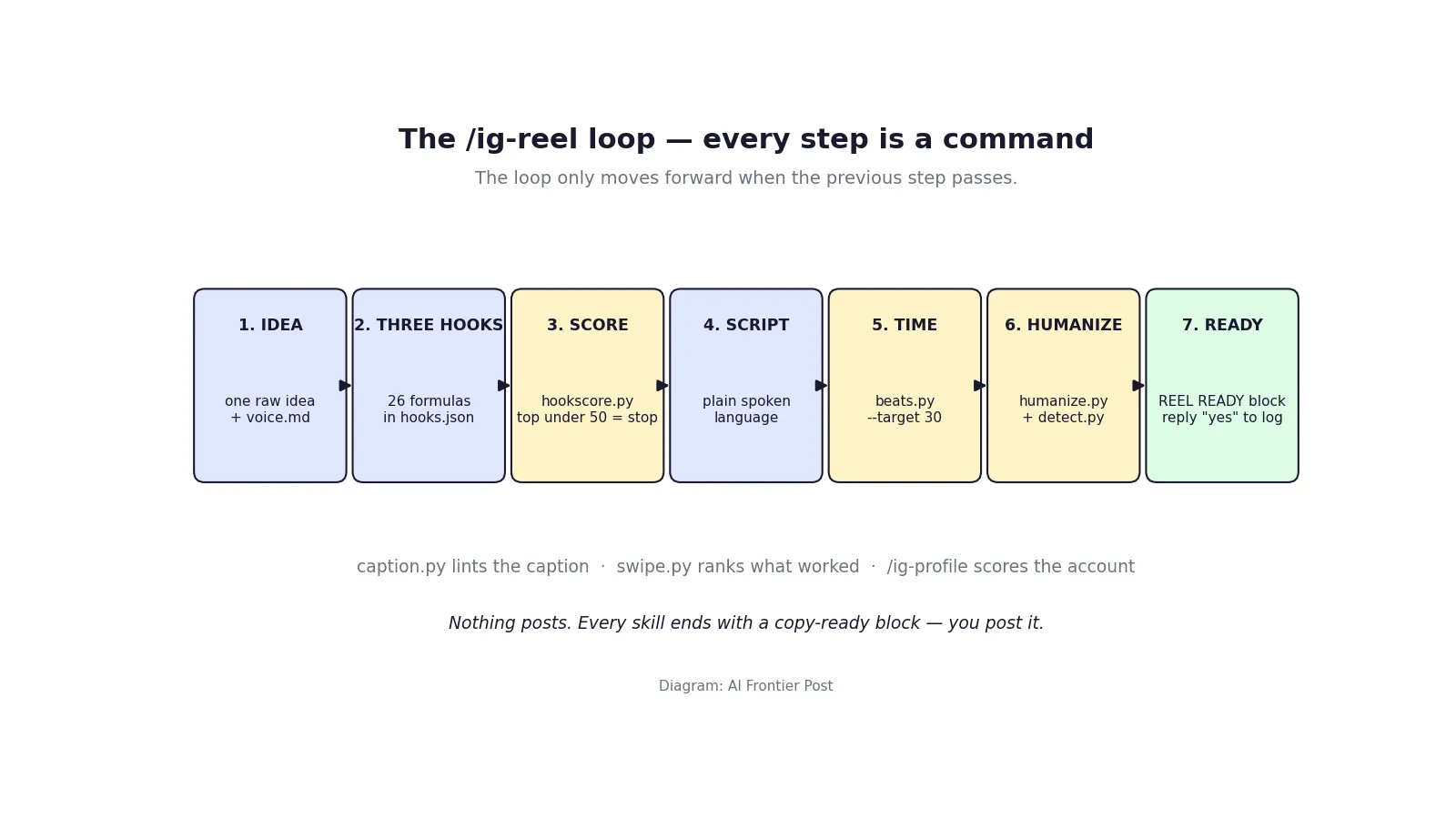
The Reel skill, /ig-reel, works in a fixed loop: pick three hooks from the 26 formulas in hooks.json, score them, write the script on the winner, time it, humanize it, print the block. The scoring is the step that makes the rest honest, and it is a real program: hookscore.py rates a hook on five properties — specificity, stakes, address, frontload, and length — and flags two dealbreakers, opening with a greeting and opening with "stop scrolling".
The 26 formulas each carry a template, a filled example, the on-screen version, what it is for, and how it gets ruined. Three examples from the file: "Cost Confession" ($18,000 is what one missing clause cost me), "Negative Command" (Stop posting three times a day. Post twice and reply to every comment for an hour), and "Nobody Tells You" (Nobody tells you that your first 30 reels are supposed to flop). Four formulas are in the set because they kept appearing in real hooks, not because they completed a pattern.
Write three or more candidate hooks, one per line, and rank them:
cd ~/.claude/skills/ig-reel
cat > hooks.txt <<'EOF'
My first client paid me $400 for a logo I drew in 20 minutes.
Hey guys, today I wanted to talk about content strategy
Stop scrolling if you want to grow on Instagram in 2026
Nobody tells you the algorithm rewards your second video, not your first.
Three mistakes that cost my bakery its biggest wholesale client
EOF
python3 hookscore.py hooks.txt
These are my own hooks, written for this tutorial. The output:
HOOK RANKING
==============================================================================
->  80.0 STRONG  Three mistakes that cost my bakery its biggest wholesale cl...
        weakest: ADDRESS (70)
    78.7 STRONG  My first client paid me $400 for a logo I drew in 20 minutes.
        weakest: LENGTH (66)
    69.4 OK      Stop scrolling if you want to grow on Instagram in 2026
        weakest: STAKES (70)
        dealbreaker: Opens with "stop scrolling". Asking for attention proves
                     you have not earned it.
    54.4 OK      Nobody tells you the algorithm rewards your second video, n...
        weakest: SPECIFICITY (15)
     9.6 WEAK    Hey guys, today I wanted to talk about content strategy
        weakest: FRONTLOAD (0)
        dealbreaker: Greeting. Nobody came to the feed to be greeted.

Shoot the top one. If the top one is under 50, none of these are the hook.
Two things worth noticing. First, the scorer caught both planted failures exactly as advertised: the greeting scored 9.6 with a frontload of zero, and the "stop scrolling" opener was flagged as a dealbreaker even though it still scored 69.4. Second, the "Nobody tells you" hook — built on a formula from the pack's own file — scored only 54.4, with specificity at 15: the formula alone does not save a hook with no concrete detail in it. The author's own measurement on a 74-hook corpus, stated in the README, is the same shape: the scorer catches bad hooks well (AUC 0.83 against deliberately bad hooks) but does not pick winners (AUC 0.56 separating one creator's hits from the same creator's misses). Use it to kill weak hooks before you shoot, then trust your own retention graph.
The rule the skill enforces: if the top hook scores under 50, you do not have the hook yet, and no amount of editing fixes that. Write a new one. My top hook, at 80.0 STRONG, is the one the rest of this tutorial shoots.
Step 3 — Time the script before you record it#
A Reel is decided in the first two seconds and kept by the next five. The skill's shape is explicit: 0:00–0:02 the hook, 0:02–0:07 the stake, then one idea per beat with the frame changing every beat, the payoff in the last three seconds, and a final line that echoes one word from the hook so the replay lands clean. The working length is 15 to 45 seconds; Reels run to 3 minutes, but almost nobody should use it.
beats.py turns a script into a timed beat sheet at 165 words per minute and flags four things that kill a Reel in the edit: a hook that runs past three seconds, a beat long enough for the viewer to leave, a run of lines with nothing concrete in them, and no loop back to the first line. Write the script on the winning hook and time it:
cat > script.txt <<'EOF'
My first client paid me $400 for a logo I drew in 20 minutes.
Here is the exact clause I now put in every single contract.
Section 4. Payment on delivery, not on approval.
Approval is a feeling. Delivery is a date.
That one word change is worth $18,000 to me.
EOF
python3 beats.py script.txt --target 30
Output:
BEAT SHEET  ·  51 words  ·  ~18.6s at 165 wpm  ·  target 30.0s
========================================================================
  0:00.0   5.1s  HOOK    My first client paid me $400 for a logo I drew in 20 minutes.
                         ^ hook runs 5.1s, past the 3s mark
                         ^ 5.1s on one beat
  0:05.1   4.4s  MID     Here is the exact clause I now put in every single contract.
                         ^ 4.4s on one beat
  0:09.4   2.9s          Section 4. Payment on delivery, not on approval.
  0:12.4   2.9s          Approval is a feeling. Delivery is a date.
  0:15.3   3.3s  CTA     That one word change is worth $18,000 to me.
------------------------------------------------------------------------
  - Beat 1 takes 5.1s to say. Cut it to 8 words or fewer, or the hook lands after the decision has been made.
  - Beat(s) 1, 2 run past 4s. Either split the line or change what is on screen inside it. A static frame is where people leave.
  - No loop. The last beat shares no word with the hook, so the video ends flat. Echoing one word from beat 1 is the cheapest replay you get.
  - 11.5s under target. Either add 31 words or shoot it short. Short is usually right.
The timer did its job on a script I wrote to be imperfect: the hook is 5.1 seconds, two beats run past four seconds, there is no loop, and the whole thing is 11.5 seconds under the 30-second target. The skill's instruction is to fix every flag and re-run until it is clean — cut the hook to eight words or fewer, split the long beats or change what is on screen inside them, and echo one word from the hook in the last line. The last flag is the one to take seriously as advice rather than arithmetic: the tool itself says to shoot it short rather than pad to 30 seconds. A 19-second Reel that ends is better than a 30-second Reel with eleven seconds of filler.
On-screen text is a separate script, and the skill insists on writing it separately every time: six words or fewer per card, the hook card up at frame one, nothing above y=230 or below y=1440 on a 1080x1920 frame, the right 230 pixels clear, and never put the hook where the caption sits at the bottom of the frame — it is covered. Burn in captions for the body; most people watch muted first.
Step 4 — Lint the caption against what the feed actually shows#
Instagram gives a caption about 125 characters in the feed and hides the rest behind a tap. Almost every caption that fails, fails there. caption.py prints that window as a box, the way a scrolling stranger reads it, then runs nine checks: length, first line, concrete hook, hashtags, tag placement, links, one ask, emoji, and search terms.
One of its checks carries a number most guides still get wrong. Instagram cut the hashtag cap from 30 to 5 on December 18, 2025, and its Help Center now says "You can use up to 5 tags on a post." The linter enforces five. I verified the date against Instagram's own announcement, reported by Social Media Today and others — the old 30-tag advice is a year out of date, and any tool still enforcing 30 is enforcing a limit that no longer exists.
Write a caption and lint it:
cd ~/.claude/skills/ig-caption
cat > caption.txt <<'EOF'
My first client paid me $400 for a logo I drew in 20 minutes, and the worst part is that I had read the contract twice before I signed it. Here is the clause I now put in every single contract I sign, and the one word that changed everything about how I get paid.
Comment CONTRACT and I will send you the exact wording.
#freelance #contracts #pricing #design #smallbusiness #clientwork #agencylife
EOF
python3 caption.py caption.txt --keywords "freelance pricing,client contracts"
Output:
CAPTION LINT  ·  397 / 2200 chars  ·  7 hashtags  ·  1 ask(s)
==============================================================

  WHAT THE FEED SHOWS
  +------------------------------------------------------+
  | My first client paid me $400 for a logo I drew in 20 |
  | minutes, and the worst part is that I had read the   |
  | contract twice before                                |
  +-------------------------------------------- ... more +

  PASS  LENGTH            397 / 2200 characters
  WARN  FIRST LINE        263 characters, so it gets cut at 125 mid-thought. Fine if the cut is a cliffhanger, bad if it is a subordinate clause
  PASS  HOOK IS CONCRETE  2 number(s) or name(s) in the visible window
  FAIL  HASHTAGS          7 tags, over Instagram's cap of 5. Tags past the fifth do not count and the block reads as old
  PASS  TAG PLACEMENT     tags are below the fold
  PASS  LINKS             no dead links in the body
  PASS  ONE ASK           one call to action: comment a keyword
  PASS  EMOJI             0 emoji, 0.0 per 100 characters
  FAIL  SEARCH TERMS      0/2 present. Missing: freelance pricing, client contracts
--------------------------------------------------------------
  VERDICT  FIX
My caption failed on two checks I planted deliberately: seven hashtags against a cap of five, and neither of my two search terms appearing anywhere in the text. The first-line warning is the useful one — 263 characters cut at 125 mid-thought, right in the middle of "before I signed it". The fix is mechanical: cut the first line to a complete thought under 125 characters, drop two hashtags, and work the two search terms into the visible window.
One thing to know before you script this into a workflow: caption.py exits with code 1 when the verdict is FIX, and 0 when it passes. That is a lint-style exit, not a crash — it is the tool telling you the caption is not ready. The same convention applies to the detector in the next step.
Step 5 — Strip the machine fingerprint, then prove the delta#
The humanizer is the reason the rest of the pack is usable, and it is the most honestly documented piece in the repository. It does three cleaning passes, all driven by slop.json — 154 stock words and phrases with plain-English replacements, 18 invisible character classes, 11 typographic substitutions, and 16 structural tells — and then scores what is left against a five-check panel. The lexicon is meant to be edited: if you have a word you always use that it strips, take it out of the file.
Write the worst draft you can, on purpose, and clean it:
cd ~/.claude/skills/ig-human
cat > draft.txt <<'EOF'
In today's fast-paced digital landscape, it's important to note that leveraging cutting-edge AI tools can unlock the power of your content strategy — and delve into new opportunities. Moreover, this game-changing approach will revolutionize how you connect with your audience. Don't miss out — follow for more tips and tricks!
EOF
python3 humanize.py draft.txt --report
That draft contains an em dash, a zero-width space, and nine stock phrases. The report:
HUMANIZE REPORT
---------------
15 machine artefacts removed, 0 structural tells flagged for rewrite

1. INVISIBLE CHARACTERS
-----------------------
    1x  U+200B ZERO WIDTH SPACE  -> delete

2. TYPOGRAPHY
-------------
    2x  — EM DASH  -> ,
    3x  ’ RIGHT SINGLE QUOTE  -> '

3. SLOP LEXICON
---------------
    1x  follow for more  -> (deleted)   [closers]
    1x  revolutionize  -> change   [verbs]
    1x  game-changing  -> big   [adjectives]
    1x  cutting-edge  -> new   [adjectives]
    1x  delve into  -> look at   [verbs]
    1x  leveraging  -> using   [verbs]
    1x  landscape  -> market   [nouns]
    1x  moreover  -> also   [connectives]
    1x  unlock  -> get   [verbs]
The cleaned draft reads: "In today's fast-paced digital market, it's important to note that using new AI tools can get the power of your content strategy, and look at new opportunities. Also, this big approach will change how you connect with your audience. Don't miss out, tips and tricks!" It is cleaner and still a bad draft — which is exactly what the detector is for. Score the draft before and after:
cp draft.txt before.txt
python3 humanize.py draft.txt -o after.txt
python3 detect.py before.txt after.txt
Before, the panel scored the draft 11.5 out of 100, FLAGGED: specificity 0.0 (no concrete markers at all), slop density 0.0 (10 stock terms, 18.5 per 100 words), fingerprint 0.0 (1 invisible character, 2 em dashes, 3 curly quotes), voice 46.2. After cleaning: 41.1, still FLAGGED, a gain of 29.6 points — slop density 100.0, fingerprint 100.0, voice 92.6 — but specificity still 0.0, and the tool's own verdict is "Weakest signal: SPECIFICITY. Fix that first."
That is the honest result, and it is the most important thing this tutorial can tell you about the humanizer: it removes the fingerprint, it does not add the substance. A draft with no numbers, no names, and no specific true thing in it scores 41.1 after cleaning because there is nothing concrete to score. The README says the same thing in its fine print: the five checks are local heuristics modelled on the signals public detectors key on, not GPTZero, Originality, Copyleaks, Winston, or Turnitin, and they cannot promise those verdicts. Nobody can honestly sell you "undetectable", and anybody who does is selling you something. What the tool can do is remove the invisible characters that survive copy-paste and strip the stock vocabulary — the rest is your job, and it is the job of putting a number in the sentence.
Run the detector on every caption, script, comment, reply, and DM before it goes out. The commands are python3 detect.py draft.txt to score one file, and python3 detect.py before.txt after.txt to prove the delta. Like the caption linter, it exits 1 while the draft is FLAGGED.
Step 6 — Find what is working in your niche#
Everything so far writes. /ig-viral is the one skill that goes and looks. Its single idea: raw views are not evidence. An account with two million followers doing 400,000 views had a quiet Tuesday; an account with four thousand followers doing 400,000 views found something, and that something is copyable. So everything ranks on the outlier multiple — views divided by that account's own recent median. Above 3x is a signal. Below 1.5x is that account's normal day, and it teaches you nothing no matter how big the number looks.
The collection is deliberately manual: pick 6 to 12 accounts within about 10x of your own size, browse them at human speed, and fill in a tab-separated file with one reel per row — account, followers, median, views, and the hook in their words. The skill is explicit that it never asks for your password, never logs in as you, and never scrapes: automated collection at volume is the thing that gets accounts restricted. Run it monthly, not daily; formulas last a season.
Here is a four-reel batch collected for this tutorial, ranked with swipe.py:
cd ~/.claude/skills/ig-viral
printf 'account	followers	median	views	hook
@smallbakery	4200	1100	98000	three mistakes that cost my bakery its biggest client
@bigagency	2100000	380000	420000	in this video i am going to show you my morning routine
@freelancefiona	48000	11000	412000	nobody tells you your first 30 reels are supposed to flop
@designdaily	95000	22000	31000	stop scrolling if you want to grow in 2026
' > captured.tsv
python3 swipe.py captured.tsv --out ./swipe.md
SWIPE FILE · 4 reels · 4 accounts · baseline: account median
==============================================================================
89.1x hook 81 #11 Numbered With A Favourite @smallbakery 98,000
"three mistakes that cost my bakery its biggest client"
37.5x hook 87 #3 Nobody Tells You @freelancefiona 412,000
"nobody tells you your first 30 reels are supposed to flop"
1.4x hook 66 #2 Negative Command @designdaily 31,000
"stop scrolling if you want to grow in 2026"
1.1x hook 13 - unclassified @bigagency 420,000
"in this video i am going to show you my morning routine"
------------------------------------------------------------------------------
WHAT IS WORKING IN THIS BATCH
top third by outlier: Numbered With A Favourite x1
median hook score: top 81 vs bottom 13
median hook length: top 9 words vs bottom 12 words
unclassified: 1 of 4. Read those by hand, they are where a formula you do not have yet is hiding.
A hand-collected batch is evidence, not proof. Twelve reels shows you nothing;
forty across six accounts shows you something. Collect more before you believe it.The ranking makes the point better than the explanation does. The biggest number in the batch — 420,000 views from the two-million-follower account — ranks last at 1.1x, barely above its own median. The smallest account in the batch, 4,200 followers doing 98,000 views, ranks first at 89.1x. And the hook scores track the ranking: the top third scores 81 against the bottom third's 13. The swipe file lands as Markdown in the file you name with --out, and /ig-reel reads it next time, so the loop compounds: what worked in your niche becomes the evidence your next hook is scored against.
One genuine bug to know about: --out swipe.md with a bare filename crashes with FileNotFoundError after printing the ranking — the script tries to create the file's parent directory, and a bare filename has no parent. Give --out a path with a directory in it, as in the command above (./swipe.md) or the README's own example (~/.claude/instagram/swipe.md), and it writes the file and exits 0. The ranking itself prints fine either way; only the file write fails.
Step 7 — Score the profile, then plan the week#
The last two skills in the loop are prompt-driven rather than script-driven, and the profile scorer is the one with a real artifact behind it: rubric.json scores a profile out of 100 across twelve items. The weighting is deliberate — the name field (12 points), the first bio line (12), the pinned three (10), and recent activity (10) are worth more than the photo (6), because they are what a stranger who arrived from one reel actually processes before deciding to follow. The rubric's own note says most first-pass profiles land in the 30s and 40s, and that a generous score helps nobody.
Run /ig-profile in Claude Code and answer its questions with your actual profile in front of you; it scores each item honestly, then rewrites in fix-first order — the highest-weight failures first, not the easiest. Then run /ig-plan, which plans the week: what to post, which format, when, and the ten accounts to engage with. The plan is only as good as the swipe file from Step 6, which is why the research skill comes before the planning skill.
The remaining skills fill out the rest of an account's week. /ig-carousel writes swipe posts with the cover that earns the swipe and 1080x1350 slide copy. /ig-story plans the daily story sequence, which sticker does which job, and the DM funnel that starts with the viewer moving first. /ig-comment writes comments on other people's posts in nine types, picked by what the post actually is — never "🔥🔥🔥". /ig-reply sorts the thread under your own post into keyword, lead, substance, question, support, and noise, then writes in that order. /ig-dm handles keyword delivery, the first message, the collab pitch, and two follow-ups — two, not more. /ig-repurpose turns one video, podcast, or newsletter into a week of reels and carousels that each stand alone. /ig-audit does the post-mortem on what you already posted, ranking by outlier multiple and judging per reach, not views; it reads the log /ig-reel appends on every "yes", so the history accumulates without you maintaining it.
Two boundaries run through all thirteen skills, and they are the design, not a limitation bolted on afterwards. First, nothing here posts to Instagram. There is a real Content Publishing API for professional accounts, and it needs a Meta developer app, a linked Page, a long-lived token, and app review — not a thing a skill can hand you. Everything else people use to automate posting, commenting, following, or DMing is browser automation or a third-party tool, and both violate Instagram's Terms of Use and get accounts action-blocked. Every skill ends the same way: a copy-ready block, and you post it. Second, nothing here fabricates. No invented metrics, clients, or outcomes go under your name; if a draft needs a number you have not given, it comes back with {{your number}} in it and a flag, every time.
When to use this vs the alternatives#
- Versus a scheduling tool (Buffer, Later, Hootsuite): different job. Schedulers queue finished posts; this pack writes them. Use both: the skills produce the copy-ready block, the scheduler holds it until post time. If you only have budget for one, the skills are the one that improves the content.
- Versus posting automation: use this pack. Automation that posts, comments, follows, or DMs for you violates Instagram's Terms of Use and gets accounts action-blocked. The approval gate here is real rather than a setting, and that is a feature.
- Versus a generic AI writing assistant: use this pack for Instagram specifically. A general assistant will write you a caption; it will not show you the 125 characters the feed actually shows, enforce the five-hashtag cap, time your script to 165 words per minute, or score your hook against 26 named formulas. The value is the domain knowledge encoded as runnable checks.
- Versus other Claude Code skill packs: this one is content operations, not engineering. The same repo family has a LinkedIn sibling (
linkedin-agent-skill) if that is your platform. For research across the web, the blog's last30days tutorial covers a skill that does the same evidence-first job for any topic. For design work, the taste-skill tutorial covers the equivalent pack for front-end design. - Versus doing it by feel: use the tools for the parts feel gets wrong. Feel does not know your hook runs 5.1 seconds, that your caption is cut mid-thought at 125 characters, or that your draft contains a zero-width space. Feel is for the idea; the tools are for the measurement.
Skip it if you do not post on Instagram — the whole pack is platform-specific, and none of it transfers to another network except the humanizer, which works on any draft. Skip the slash commands if you do not use Claude Code, but keep the five Python tools: they are the part that runs anywhere, and they are the part this tutorial verified.
The takeaway#
The instagram-agent-skill does not make you good at Instagram. It makes the craft checkable: score the hook before you shoot, time the script before you record, lint the caption against what the feed actually shows, strip the fingerprint and prove the delta, rank what worked by outlier multiple instead of raw views, and score the profile against a rubric that weights what strangers actually read. On my own test material the tools did what they claim — an 80.0 STRONG hook, a 5.1-second hook flagged before recording, a caption failed on seven hashtags and zero search terms, fifteen machine artefacts stripped from one draft — and they were honest where the claim stops: the humanizer moved my draft from 11.5 to 41.1 and still flagged it, because no tool can put a number in a sentence you have not given it. That honesty is the reason a two-month-old skill pack with two commits has 7,520 stars. Install the thirteen skills, fill in the voice profile, and let the tools say no before the feed does.
How this tutorial was verified#
Every command in this tutorial was run on a Linux VM on November 20, 2026, with Python 3.12.3, against a fresh clone of Jakeschincariol/instagram-agent-skill at commit d03c56b (version 1.0.0). The test material — five hooks, a 51-word script, a 397-character caption, a deliberately sloppy draft, and a four-reel swipe batch — is the author's own, written for this tutorial. Results: hookscore.py ranked the five hooks 80.0, 78.7, 69.4, 54.4, and 9.6, flagging the greeting and the "stop scrolling" opener as dealbreakers; beats.py timed the script at ~18.6 seconds against a 30-second target, flagging a 5.1-second hook, two beats over four seconds, no loop, and 11.5 seconds under target; caption.py returned verdict FIX with exit code 1, failing seven hashtags against the cap of five and zero of two search terms; humanize.py --report removed 15 machine artefacts (1 zero-width space, 2 em dashes, 3 curly quotes, 9 lexicon swaps); detect.py scored the draft 11.5 FLAGGED before cleaning and 41.1 FLAGGED after, with specificity at 0.0 in both cases; swipe.py ranked the four reels 89.1x, 37.5x, 1.4x, and 1.1x, and crashed with a FileNotFoundError on --out swipe.md while --out ./swipe.md wrote the file and exited 0. The install copy was verified in a scratch home directory: all thirteen skill folders land under .claude/skills/. The 26 hook formulas, the 12-item 100-point profile rubric, and the 154-term slop lexicon were read from the repository files, not quoted from memory. The five-hashtag cap was verified against Instagram's December 18, 2025 announcement and its Help Center. The author's own measurements quoted in this tutorial — the 74-hook corpus, AUC 0.83 and 0.56 — are the author's, stated in the repository README, and were not re-run here. No Instagram account, API key, or Claude Code subscription was used at any point; the thirteen slash commands were verified by reading their SKILL.md files, and the five Python tools were run directly.