One toolkit, every speech job, zero cloud: hands-on with sherpa-onnx
sherpa-onnx runs speech recognition, text-to-speech, and voice activity detection entirely on your CPU — no API key, no GPU, no uploads. I ran Whisper, Piper, and Silero VAD on a small VM: transcription at 0.2× real time, word-perfect on the project’s own test audio, and a full voice-memo pipeline in one script.
- What it is: sherpa-onnx 2.0.3, from the next-gen Kaldi team (k2-fsa) — Apache-2.0, 16,191 GitHub stars — bundling ASR, TTS, VAD, speaker diarization, language ID, and more in one ONNX Runtime library with APIs in 12 languages.
- Cost: $0. One pip install plus ~192 MB of model files. No account, no API key, no GPU, and no network after the downloads.
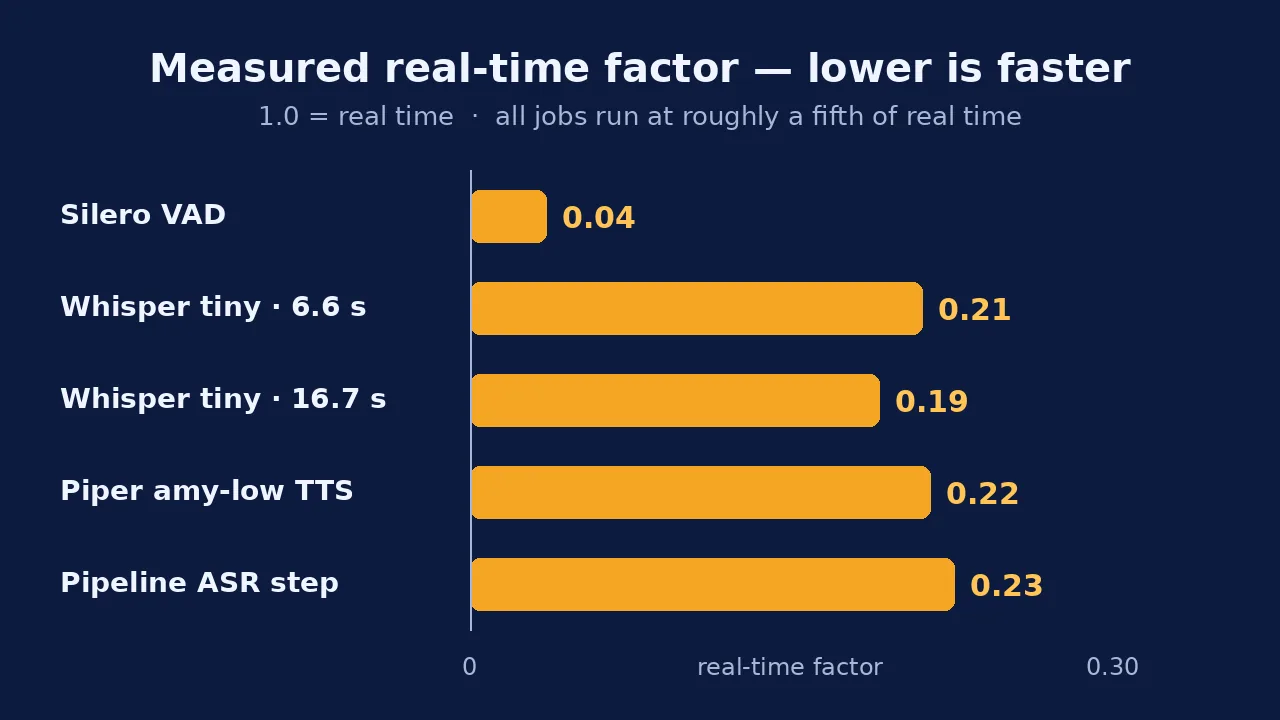
- Measured transcription: Whisper tiny.en (int8) transcribed 6.62s of audio in 1.40s (RTF 0.212) and 16.71s in 3.21s (RTF 0.192) — word-perfect against the ground truth in both cases.
- Measured synthesis and VAD: Piper amy-low generated 5.01s of 16 kHz speech in 1.08s (RTF 0.216); Silero VAD cut a 17.02s clip down to 14.79s of speech.
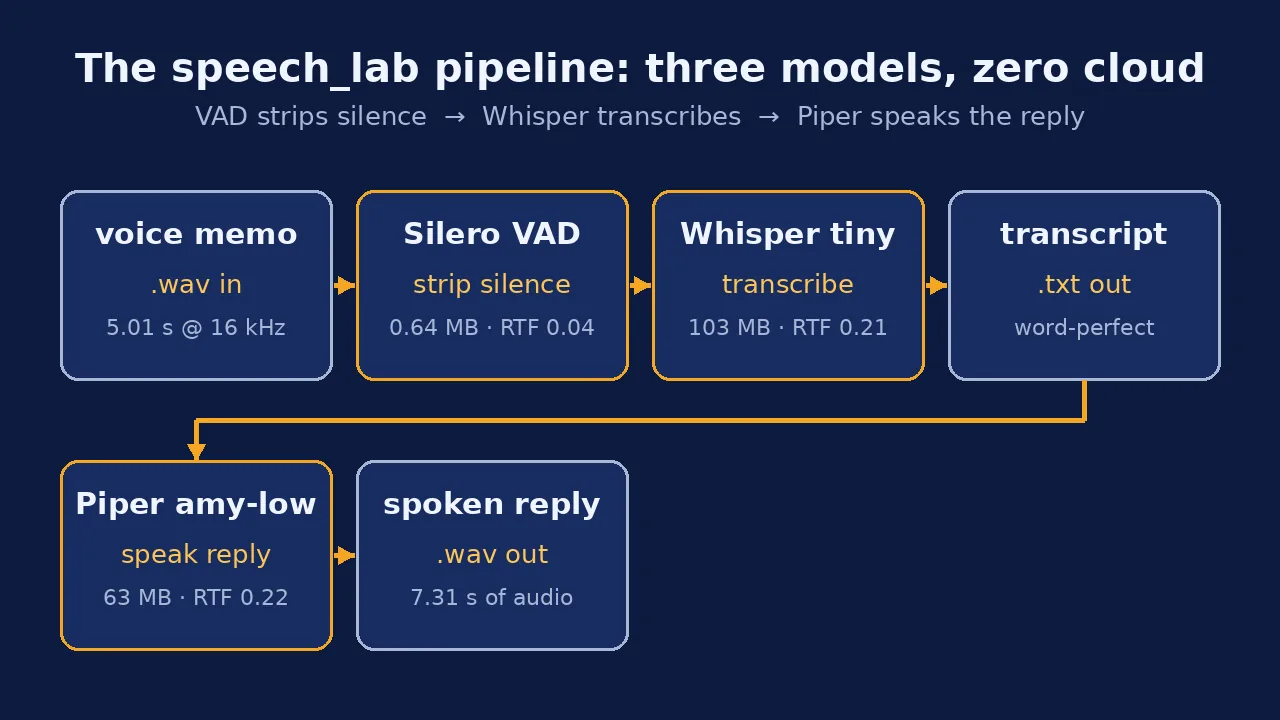
- The pipeline: speech_lab.py chains VAD → Whisper → Piper. A five-second voice memo goes in; a transcript, a cleaned clip, and a spoken reply come out — nothing leaves the machine.
Every speech feature in your apps today probably phones home. Transcription goes to a cloud API, text-to-speech goes to another one, and voice activity detection is a third service with a third API key. Each call costs money, leaks audio, and stops working the moment the network does.
sherpa-onnx is the local alternative: one open-source toolkit, from the next-gen Kaldi team (k2-fsa), that runs speech recognition, text-to-speech, voice activity detection, speaker diarization, language identification, and more — entirely on your own CPU, with no account, no API key, and no uploads. It is Apache-2.0 licensed, has over 16,000 GitHub stars, ships Python, C++, Go, Rust, and JavaScript APIs, and runs on everything from a Raspberry Pi to a server.
I ran it end to end on a small virtual machine with about 1.5 CPUs, 6 GB of RAM, and no GPU — the weakest hardware a tutorial can honestly claim. Whisper transcribed the project's own test audio word-perfect at about 0.2× real time. Piper synthesized clean 16 kHz speech at the same speed. Silero VAD stripped the silence out of a 17-second clip. Then I wired all three into one script: a voice memo goes in, a transcript and a spoken reply come out. Every number in this tutorial is measured, not quoted.
What you’ll need#
- Python 3.10 or newer. I used Python 3.12.3. No GPU, no CUDA, no Docker.
- About 250 MB of disk for the library, the three models below, and a few test files.
- ffmpeg (optional, only for building the VAD test file in step 6 — the pipeline itself never calls it).
- No accounts, no API keys, no network after the downloads. The total cost is $0, and the models run offline: once the files are on disk, you can unplug the network and everything still works.
- About 15 minutes, most of it downloads.
One honest caveat up front: the test audio in this tutorial is clean, read speech — the kind Whisper is best at. Noisy rooms, heavy accents, overlapping speakers, and music will all cost you accuracy, and the smallest Whisper model feels that first. I will show you exactly where the quality knobs are.
Step 1: Install sherpa-onnx#
The Python package is sherpa-onnx on PyPI (version 2.0.3 at the time of writing). It is a thin wrapper: the heavy lifting lives in sherpa-onnx-core, a ~11 MB wheel that bundles the compiled library and ONNX Runtime. The examples below also need soundfile for reading and writing WAV files.
python3 -m venv .venv && source .venv/bin/activate
python -m pip install sherpa-onnx==2.0.3 soundfile
Verify the install before going further:
python -c "import sherpa_onnx, soundfile, numpy; print(sherpa_onnx.__version__ if hasattr(sherpa_onnx, '__version__') else 'sherpa_onnx ok'); print('soundfile', soundfile.__version__); print('numpy', numpy.__version__)"On my machine this printed:
sherpa_onnx 2.0.3
soundfile 0.14.0
numpy 2.5.5
Pin the version. sherpa-onnx moves fast — the 2.x line changed the Python API surface (for example, the OfflineRecognizer.from_whisper constructor used below), and unpinned installs are how tutorials silently break six months later.
Step 2: Download three small models#
sherpa-onnx is a runtime, not a model. You bring the models, and the project publishes ready-made ones as GitHub release assets. For this tutorial you need three, all free, all Apache-2.0 or MIT licensed:
| Model | Job | Download | Size |
|---|---|---|---|
| Whisper tiny.en (int8) | Speech-to-text | asr-models release | 118 MB tarball |
| Silero VAD | Voice activity detection | asr-models release | 0.64 MB |
| Piper en_US-amy-low | Text-to-speech | tts-models release | 67 MB tarball |
| English lexicon | Pronunciation for Piper | tts-models release | 6.3 MB |
mkdir -p models && cd models
curl -SL -O https://github.com/k2-fsa/sherpa-onnx/releases/download/asr-models/sherpa-onnx-whisper-tiny.en.tar.bz2
curl -SL -O https://github.com/k2-fsa/sherpa-onnx/releases/download/asr-models/silero_vad.onnx
curl -SL -O https://github.com/k2-fsa/sherpa-onnx/releases/download/tts-models/vits-piper-en_US-amy-low.tar.bz2
curl -SL -O https://github.com/k2-fsa/sherpa-onnx/releases/download/tts-models/lexicon-en-us.txt
tar xjf sherpa-onnx-whisper-tiny.en.tar.bz2
tar xjf vits-piper-en_US-amy-low.tar.bz2
cd ..
Two details worth knowing. First, the Whisper tarball contains its own test audio — test_wavs/0.wav and 1.wav plus a trans.txt with the ground-truth transcripts — so you can check accuracy without recording anything. Second, the same files are mirrored on Hugging Face (csukuangfj/sherpa-onnx-whisper-tiny.en and csukuangfj/vits-piper-en_US-amy-low) if GitHub releases are blocked on your network.
After extracting, your layout should look like this:
models/
  sherpa-onnx-whisper-tiny.en/
    tiny.en-encoder.int8.onnx   # 12.9 MB
    tiny.en-decoder.int8.onnx   # 89.9 MB
    tiny.en-tokens.txt
    test_wavs/0.wav  test_wavs/1.wav  test_wavs/8k.wav  trans.txt
  silero_vad.onnx               # 0.64 MB
  vits-piper-en_US-amy-low/
    en_US-amy-low.onnx          # 63 MB
    tokens.txt
  lexicon-en-us.txt             # 6.3 MB
Why these three: Whisper tiny.en is the smallest English Whisper (39M parameters, quantized to int8), so it loads fast and runs at a fifth of real time on two CPU cores. Piper’s amy-low is a small, natural-sounding English voice, and the lexicon route means pronunciation comes from a text file — no espeak-ng data install, no external phonemizer. Silero VAD is a 0.64 MB model that answers one question well: is anyone speaking right now?
Step 3: Transcribe real audio with Whisper#
The core call is OfflineRecognizer.from_whisper() — you hand it the encoder, the decoder, and the tokens file, and it handles mel features, decoding, and detokenization internally. This script is adapted from the project’s own python-api-examples/offline-whisper-decode-files.py:
import datetime as dt
import sherpa_onnx
import soundfile as sf

rec = sherpa_onnx.OfflineRecognizer.from_whisper(
    encoder="models/sherpa-onnx-whisper-tiny.en/tiny.en-encoder.int8.onnx",
    decoder="models/sherpa-onnx-whisper-tiny.en/tiny.en-decoder.int8.onnx",
    tokens="models/sherpa-onnx-whisper-tiny.en/tiny.en-tokens.txt",
    language="en",
    task="transcribe",
)

for wav in ["models/sherpa-onnx-whisper-tiny.en/test_wavs/0.wav",
            "models/sherpa-onnx-whisper-tiny.en/test_wavs/1.wav"]:
    audio, sr = sf.read(wav, dtype="float32", always_2d=True)
    audio = audio[:, 0]  # first channel only
    t0 = dt.datetime.now()
    stream = rec.create_stream()
    stream.accept_waveform(sr, audio)
    rec.decode_stream(stream)
    el = (dt.datetime.now() - t0).total_seconds()
    dur = len(audio) / sr
    print(f"{wav}: {dur:.2f}s audio in {el:.2f}s (RTF {el/dur:.3f})")
    print("TEXT:", stream.result.text)
Run it. On that VM the output was:
test_wavs/0.wav: 6.62s audio in 1.40s (RTF 0.212)
TEXT: After early nightfall, the yellow lamps would light up here and there the squalid quarter of the brothels.
test_wavs/1.wav: 16.71s audio in 3.21s (RTF 0.192)
TEXT: God, as a direct consequence of the sin which man thus punished, had given her a lovely child, whose place was on that same dishonored bosom to connect her parent forever with the race and descent of mortals, and to be finally a blessed soul in heaven.
Both transcripts match the ground truth in trans.txt word for word — the only differences are casing and punctuation, which Whisper normalizes. RTF (real-time factor) is elapsed time divided by audio duration: 0.2 means a minute of audio takes about 12 seconds to transcribe. Two practical notes: the sample rate does not have to be 16 kHz (sherpa-onnx resamples internally), and task="transcribe" can be swapped for "translate" to get English translations of non-English speech with a multilingual Whisper model.
Step 4: Speak with Piper TTS#
Text-to-speech in sherpa-onnx goes through OfflineTts. The VITS config takes the model, the tokens file, and the lexicon — the lexicon is what makes this route simple: pronunciation is looked up in a text file, so there is no espeak-ng install and no system dependency beyond the library itself. This follows the project’s test-offline-tts-piper-lexicon.py:
import time
import sherpa_onnx
import soundfile as sf

tts = sherpa_onnx.OfflineTts(
    sherpa_onnx.OfflineTtsConfig(
        model=sherpa_onnx.OfflineTtsModelConfig(
            vits=sherpa_onnx.OfflineTtsVitsModelConfig(
                model="models/vits-piper-en_US-amy-low/en_US-amy-low.onnx",
                tokens="models/vits-piper-en_US-amy-low/tokens.txt",
                lexicon="models/lexicon-en-us.txt",
            ),
            num_threads=2,
        ),
    )
)

text = "Today as always, men fall into two groups: slaves and free men."
t0 = time.time()
gen = sherpa_onnx.GenerationConfig()
gen.sid = 0
gen.speed = 1.0
gen.silence_scale = 0.2
audio = tts.generate(text, gen)
el = time.time() - t0
dur = len(audio.samples) / audio.sample_rate
print(f"Generated {dur:.2f}s of {audio.sample_rate} Hz audio in {el:.2f}s (RTF {el/dur:.3f})")
sf.write("tts_out.wav", audio.samples, samplerate=audio.sample_rate, subtype="PCM_16")
Measured output:
Generated 5.01s of 16000 Hz audio in 1.08s (RTF 0.216)The knobs that matter: gen.speed scales the speaking rate (1.0 is normal, larger is faster), gen.silence_scale controls the pauses between sentences (0.2 keeps them short), and gen.sid picks the speaker for multi-speaker models — amy-low is single-speaker, so it stays 0. The output is 16 kHz mono PCM, which is exactly what the Whisper recognizer from step 3 expects. That is not a coincidence; it is what makes the next step work.
Step 5: The round trip — prove it to yourself#
Before building anything on top of these two models, close the loop: synthesize a sentence with Piper, then transcribe the result with Whisper, and compare. If the pipeline is wired correctly, the sentence comes back intact.
audio2, sr2 = sf.read("tts_out.wav", dtype="float32", always_2d=True)
stream = rec.create_stream()
stream.accept_waveform(sr2, audio2[:, 0])
rec.decode_stream(stream)
print("LOOPBACK:", stream.result.text)
LOOPBACK: Today as always, men fall into two groups, slaves and free men.
EXPECTED: Today as always, men fall into two groups: slaves and free men.Exact, except for one comma where the original had a colon — Whisper normalizes punctuation, it does not preserve it. That is the honest limit of this check: it proves the audio is intelligible and the two models agree, not that punctuation survives. Keep the loopback in your own projects as a smoke test: if a model upgrade or a config change breaks the round trip, you find out in seconds instead of from users.
Step 6: Cut the silence with VAD#
Real recordings are mostly silence: pauses between sentences, room tone, the two seconds before anyone starts talking. Transcribing silence wastes time and, worse, gives Whisper room to hallucinate words out of noise. Silero VAD fixes that by keeping only the segments where someone is actually speaking. The API is a streaming one — you feed it windows of audio and pop speech segments off as they are detected. Adapted from the project’s vad-remove-non-speech-segments-from-file.py:
import numpy as np
import sherpa_onnx
import soundfile as sf

samples, sr = sf.read("vad_in.wav", always_2d=True, dtype="float32")
samples = np.ascontiguousarray(samples[:, 0])

cfg = sherpa_onnx.VadModelConfig()
cfg.silero_vad.model = "models/silero_vad.onnx"
cfg.silero_vad.threshold = 0.5
cfg.silero_vad.min_silence_duration = 0.25
cfg.silero_vad.min_speech_duration = 0.25
cfg.silero_vad.max_speech_duration = 5
cfg.sample_rate = sr

vad = sherpa_onnx.VoiceActivityDetector(cfg, buffer_size_in_seconds=30)
win = cfg.silero_vad.window_size
speech = []
buf = samples
while len(buf) > win:
    vad.accept_waveform(buf[:win]); buf = buf[win:]
    while not vad.empty():
        speech.extend(vad.front.samples); vad.pop()
vad.flush()
while not vad.empty():
    speech.extend(vad.front.samples); vad.pop()
speech = np.array(speech, dtype=np.float32)
sf.write("vad_out.wav", speech, samplerate=sr)
To test it I built a 17.02-second file with ffmpeg: the 5-second Piper clip from step 4, played twice, with a 2-second silence inserted in the middle. VAD returned 14.79 seconds — the 2-second gap is gone, plus about 0.24 seconds of near-silent padding trimmed from the clip edges. The speech itself is untouched.
The thresholds are the tuning surface. threshold = 0.5 is the speech probability cutoff; raise it if breaths and keyboard clicks are leaking through as speech, lower it if quiet speakers get clipped. min_silence_duration = 0.25 is how long a pause must be before it counts as a break, and max_speech_duration = 5 caps segment length (past the cap, the detector internally raises the threshold to 0.9 to force a split). For meeting recordings, start with these defaults; for phone audio with long pauses, raise min_silence_duration to 0.5 so a thoughtful pause does not split one sentence into two segments.
Step 7: One script — the whole pipeline#
The three pieces compose into a voice-memo pipeline small enough to read in one sitting: VAD strips the silence, Whisper transcribes what remains, Piper speaks a confirmation back. Save this as speech_lab.py:
#!/usr/bin/env python3
"""speech_lab.py — one script, three sherpa-onnx jobs, zero cloud.
Usage: python3 speech_lab.py memo.wav
  1. VAD (silero-vad) strips silence from memo.wav -> memo.speech.wav
  2. Whisper tiny.en transcribes it -> memo.txt
  3. Piper amy-low speaks a confirmation -> memo.reply.wav
All models run locally on CPU. No API key, no network, no GPU.
"""
import sys, time
from pathlib import Path
import numpy as np
import sherpa_onnx
import soundfile as sf

M = "models"

def load_audio(path):
    data, sr = sf.read(path, always_2d=True, dtype="float32")
    return np.ascontiguousarray(data[:, 0]), sr

def vad_strip(samples, sr, model):
    cfg = sherpa_onnx.VadModelConfig()
    cfg.silero_vad.model = model
    cfg.silero_vad.threshold = 0.5
    cfg.silero_vad.min_silence_duration = 0.25
    cfg.silero_vad.min_speech_duration = 0.25
    cfg.silero_vad.max_speech_duration = 5
    cfg.sample_rate = sr
    vad = sherpa_onnx.VoiceActivityDetector(cfg, buffer_size_in_seconds=30)
    win = cfg.silero_vad.window_size
    out, buf = [], samples
    while len(buf) > win:
        vad.accept_waveform(buf[:win]); buf = buf[win:]
        while not vad.empty():
            out.extend(vad.front.samples); vad.pop()
    vad.flush()
    while not vad.empty():
        out.extend(vad.front.samples); vad.pop()
    return np.array(out, dtype=np.float32)

def main():
    src = sys.argv[1]
    stem = Path(src).stem
    samples, sr = load_audio(src)
    print(f"input: {src} ({len(samples)/sr:.2f}s @ {sr} Hz)")

    t0 = time.time()
    speech = vad_strip(samples, sr, f"{M}/silero_vad.onnx")
    sf.write(f"{stem}.speech.wav", speech, samplerate=sr, subtype="PCM_16")
    print(f"VAD: kept {len(speech)/sr:.2f}s of speech in {time.time()-t0:.2f}s")

    rec = sherpa_onnx.OfflineRecognizer.from_whisper(
        encoder=f"{M}/sherpa-onnx-whisper-tiny.en/tiny.en-encoder.int8.onnx",
        decoder=f"{M}/sherpa-onnx-whisper-tiny.en/tiny.en-decoder.int8.onnx",
        tokens=f"{M}/sherpa-onnx-whisper-tiny.en/tiny.en-tokens.txt",
        language="en", task="transcribe",
    )
    t0 = time.time()
    stream = rec.create_stream()
    stream.accept_waveform(sr, speech)
    rec.decode_stream(stream)
    text = stream.result.text
    dur = len(speech) / sr
    print(f"ASR: {time.time()-t0:.2f}s for {dur:.2f}s audio (RTF {(time.time()-t0)/dur:.3f})")
    print(f"TRANSCRIPT: {text}")
    Path(f"{stem}.txt").write_text(text + "\n")

    tts = sherpa_onnx.OfflineTts(
        sherpa_onnx.OfflineTtsConfig(
            model=sherpa_onnx.OfflineTtsModelConfig(
                vits=sherpa_onnx.OfflineTtsVitsModelConfig(
                    model=f"{M}/vits-piper-en_US-amy-low/en_US-amy-low.onnx",
                    tokens=f"{M}/vits-piper-en_US-amy-low/tokens.txt",
                    lexicon=f"{M}/lexicon-en-us.txt",
                ),
                num_threads=2,
            ),
        )
    )
    reply = f"Transcription complete. I heard: {text[:120]}"
    t0 = time.time()
    gen = sherpa_onnx.GenerationConfig()
    gen.sid = 0; gen.speed = 1.0; gen.silence_scale = 0.2
    audio = tts.generate(reply, gen)
    print(f"TTS: spoke {len(audio.samples)/audio.sample_rate:.2f}s of audio in {time.time()-t0:.2f}s")
    sf.write(f"{stem}.reply.wav", audio.samples, samplerate=audio.sample_rate, subtype="PCM_16")
    print(f"done: {stem}.txt, {stem}.speech.wav, {stem}.reply.wav")

if __name__ == "__main__":
    main()
Run it on the Piper clip from step 4 — a fair test, since the script has never seen that file as anything but input:
python3 speech_lab.py tts_out.wavinput: tts_out.wav (5.01s @ 16000 Hz)
VAD: kept 4.95s of speech in 0.18s -> tts_out.speech.wav
ASR: 1.12s for 4.95s audio (RTF 0.227)
TRANSCRIPT: Today as always, men fall into two groups, slaves and free men.
TTS: spoke 7.31s of audio in 1.91s
done: tts_out.txt, tts_out.speech.wav, tts_out.reply.wavThree files out, zero network calls. The three inference steps took 3.2 seconds combined, and the whole script — model loading included — finished in about 13 seconds. The obvious next steps from here are all small: point step 1 at a microphone instead of a file (the repo ships vad-microphone.py and streaming recognizers for exactly that), write the transcript out as SRT using the token timestamps the recognizer can return (see test-whisper-timestamps.py in the repo’s examples — it needs an attention-enabled model and the --enable-token-timestamps flag), or swap the models in the next section.
Which model should you use?#
The three models above are the smallest sensible choices, not the best ones. What to swap in depends on what you are optimizing for:
| Job | Start here (this tutorial) | Step up when… |
|---|---|---|
| Transcription | Whisper tiny.en int8 — 39M params, ~103 MB, RTF 0.2 | Accuracy matters more than speed: Whisper base.en or small, same API, same three files. Real-time streaming: the Zipformer or Paraformer streaming models with the online recognizer. |
| Transcription, multilingual | tiny.en is English-only | Multilingual Whisper (tiny/base) with language set, or SenseVoice, which the project packages for Chinese, English, Korean, Japanese, and Cantonese. |
| Speech synthesis | Piper amy-low + lexicon — small, no extra deps | Voice quality: Kokoro, a 320 MB download against Piper’s 67 MB; or Matcha, which needs a separate vocoder file. Multi-speaker: VITS models trained on VCTK, selected with sid. |
| Silence removal | Silero VAD — 0.64 MB, threshold 0.5 | Nothing to step up to; tune the thresholds instead. It is the same model the project uses inside its own streaming demos. |
Two rules of thumb. First, stay offline: every model in the project’s release pages is a file you download once and own — the moment a speech feature needs an account, you have left the thing that makes this toolkit worth using. Second, measure before upgrading: tiny.en was word-perfect on clean speech at 0.2 RTF, and a bigger model only earns its download when your audio proves tiny is not enough. Run the loopback from step 5 against your own recordings before deciding.
The takeaway#
Speech AI does not have to be a cloud service. With one pip install and three small model files, sherpa-onnx gives you transcription, synthesis, and voice activity detection that run on a small VM with no GPU, no key, and no network — at about a fifth of real time, with transcripts that matched ground truth word for word on the project’s own test audio. The same three calls compose into real tools: a voice-memo transcriber, a subtitle generator, a spoken confirmation loop. Start with tiny.en, Piper amy-low, and Silero VAD; let your own recordings tell you when to step up.