Run your job search like an agent workflow: hands-on with career-ops
career-ops turns your coding agent into a job-search system: it scans 227 company boards, scores each posting 1-5 against your CV, tailors an ATS-friendly resume, and tracks every application. Setup takes 20 minutes; the scan costs zero tokens.
- What it is: an open-source AI job-search agent that runs locally in Claude Code, Codex, Qwen, OpenCode, Copilot, Antigravity, or Grok — or as a Claude Code plugin.
- Scale: 84,472 stars and 15,456 forks on GitHub, MIT-licensed, version 1.40.0; 227 companies pre-configured for scanning, 54 modes, 155 provider modules.
- The scan is zero-token: pure HTTP against public ATS feeds, no account and no API key. Verified for this tutorial: 713 postings from the Anthropic and Vercel boards in one run.
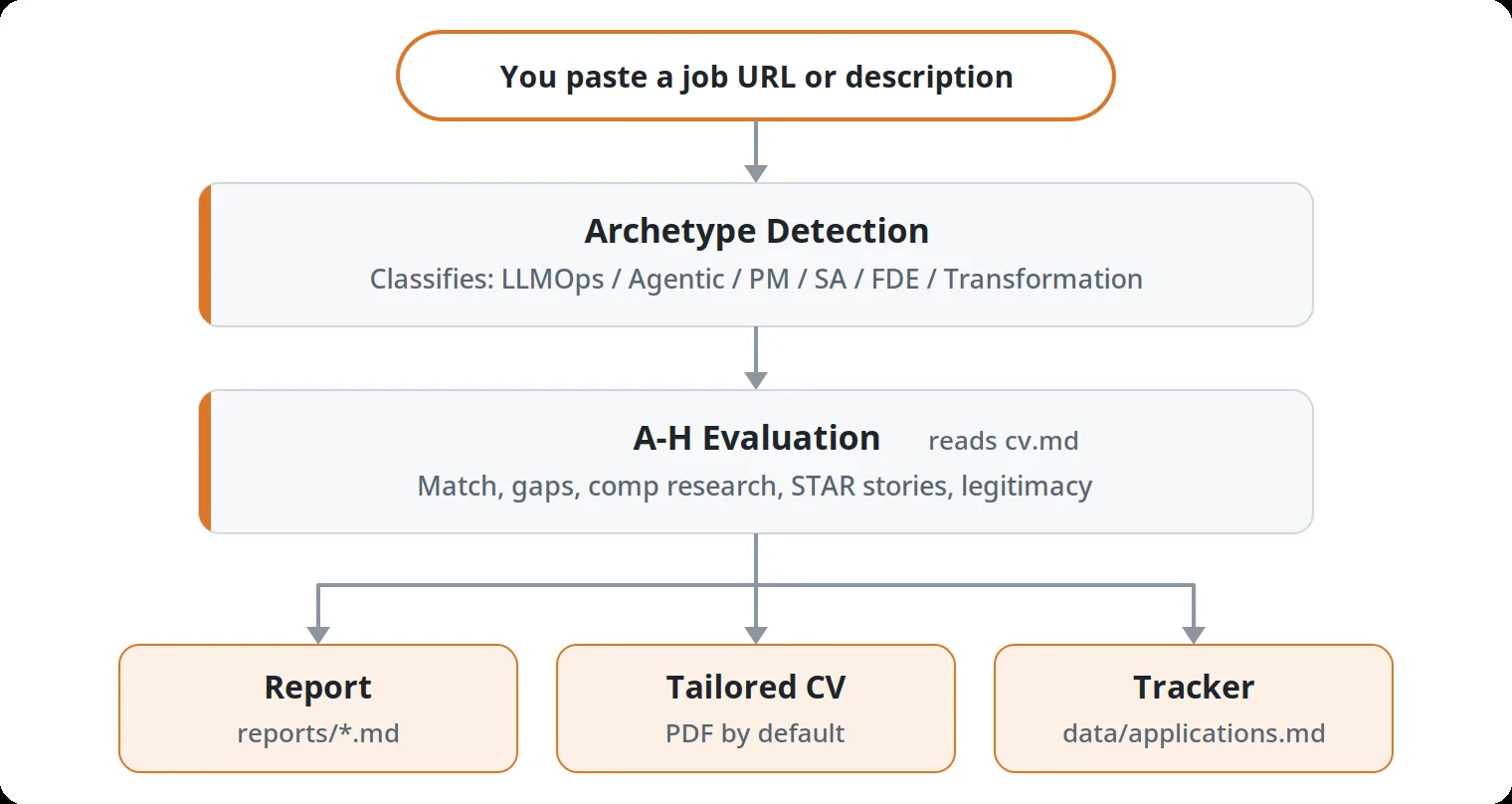
- Evaluation: paste a job URL or JD text and the auto-pipeline runs a liveness check, scores the role 1–5 against your CV, writes a report, tailors a CV (PDF by default), and adds a tracker row.
- Guardrails: it never sends, submits, or clicks anything — apply stops before Submit — and story-provenance rules keep invented numbers off your CV.
Job hunting is a pipeline problem, and most people run it by hand: twenty open tabs, a spreadsheet that goes stale, a CV rewritten from scratch for every role, and no memory of which version went where. career-ops turns that pipeline over to the coding agent you already use. It scans company job boards, scores each posting against your CV, tailors an ATS-friendly resume and cover letter, and tracks every application — while you stay the one who presses Submit.
The numbers explain why it is everywhere this week: more than 84,000 stars and 15,400 forks on GitHub, adding roughly 200 stars a day, with version 1.40.0 released and 61 releases behind it. It is MIT-licensed, has 4,752 commits behind it, and ships with 227 companies pre-configured for scanning. This tutorial installs it, runs its setup check, and executes a real zero-token scan — every command below ran in testing for this article, and the scan output shown is real.
What you'll need#
- Node.js 22.13 or newer. The setup check refuses anything older; Node 24 works. Check with
node --version. - An AI coding CLI. Claude Code, Codex, Qwen, OpenCode, Copilot, Antigravity, or Grok. The scoring, CV tailoring, and interview prep run inside your CLI, so evaluation costs whatever your CLI subscription already costs.
- No API key for scanning. The portal scanner is pure HTTP against public ATS feeds — zero tokens. Evaluation without a CLI is possible too, via standalone Gemini, Ollama, and OpenAI-compatible scripts (more on those below).
- Optional: a browser for PDFs. Tailored CVs come out as PDF by default, which needs
npx playwright install chromium. Optional: the dashboard TUI needs a Go toolchain.
1. Install it#
The fastest path is one command. It clones the latest release into a career-ops folder and installs dependencies:
npx @santifer/career-ops init
cd career-ops
claude   # or codex / qwen / opencode / agy / grok — open your AI CLI here
In testing, the installer pulled release 1.40.0 and installed its five runtime dependencies (@google/generative-ai, dotenv, js-yaml, playwright, undici) into a 24 MB node_modules. Prefer a global binary instead? npm i -g @santifer/career-ops gives you a career-ops init [folder] command; init is its only command — everything after setup happens inside your CLI, not through the binary. The manual equivalent is the same thing the installer does:
git clone https://github.com/career-ops-hq/career-ops.git
cd career-ops && npm install
npx playwright install chromium   # only needed for PDF generation
As a Claude Code plugin it also runs from any folder; the plugin guide is at docs/CLAUDE_PLUGIN.md in the repo.
2. Run the setup check#
Before anything else, run the doctor. It validates Node, dependencies, the Chromium install, and every file the system expects:
node doctor.mjsOn a fresh checkout it reports three things missing, and tells you exactly how to fix each one:
career-ops doctor
================

✓ Node.js >= 22.13 (v24.22.1)
✓ Dependencies installed
✗ Playwright chromium not installed
  → Run: npx playwright install chromium
✗ cv.md not found (user setup required)
  → Create cv.md in the project root with your CV in markdown
  → See examples/cv-example.md for the format
✗ config/profile.yml not found (user setup required)
  → Run: cp config/profile.example.yml config/profile.yml
  → Then edit it with your details
⚠ portals.yml not found (user setup required)
  → Run: cp templates/portals.example.yml portals.yml
  → Then customize with your target companies

Result: 3 issues found.
On first launch in your CLI, career-ops walks you through setup by chatting — your CV, profile, and target roles — and writes the files for you. The manual route is three copies plus edits:
cv.md— your CV in Markdown.examples/cv-example.mdshows the shape: contact block, professional summary, work experience with quantified bullets. This is the document every evaluation scores against, so keep the numbers honest: the system refuses to use a figure from your story bank that it cannot trace to evidence.config/profile.yml— the single source of truth for your personal data: name, email, phone, location, LinkedIn, portfolio, GitHub, plustarget_roles— your "North Star" roles (the example lists "Senior AI Engineer" and "Staff ML Engineer") and archetypes such as "AI/ML Engineer" at "Senior/Staff" level.portals.yml— the companies to scan. The template ships 227 of them, from Anthropic and OpenAI to ElevenLabs, Retool, n8n, and Vercel, plus 40+ search queries across the major boards.modes/_profile.md— your archetypes and targeting narrative, copied frommodes/_profile.template.md.
Fix the three doctor issues and it reports a clean bill of health. The check is worth running after every change: it also validates your portals file and title filters.
3. Run your first scan#
The scanner is the part you can verify in under a minute, with no account and no tokens. It reads portals.yml, hits each company's public ATS feed — Greenhouse, Lever, Ashby, Workday, and 150+ provider modules — and writes new postings to your inbox at data/pipeline.md. Start with a dry run so nothing is written:
node scan.mjs --dry-run
node scan.mjs                  # scan all enabled companies
node scan.mjs --company Cohere # scan a single company
node scan.mjs --since 7        # postings from the last 7 days
To keep the test small, this tutorial scanned two boards — Anthropic and Vercel — from a two-company portals file. The Anthropic board alone returned 630 jobs; the run wrote 713 postings to the pipeline file, each as a checkbox line with company, title, location, and posting date:
- [ ] https://job-boards.greenhouse.io/vercel/jobs/6122437004 | Vercel | DevRel Engineer, Agentic Infrastructure | Hybrid - San Francisco, New York City, Austin | posted: 2026-07-22
- [ ] https://job-boards.greenhouse.io/vercel/jobs/6230763004 | Vercel | Customer Support Engineer | Remote - Australia | posted: 2026-10-21
Two details matter here. First, the scan trusts what the ATS feed returns, and some companies leave closed postings in their public API. Pass --verify and it launches Playwright after the API pass and drops expired postings before they reach your pipeline. Second, the scanner dedupes against data/scan-history.tsv, so a re-run only surfaces genuinely new roles. Validate the config any time with node validate-portals.mjs — the two-company file above passed with 0 errors, 0 warnings.
Shape the intake with filters in portals.yml: title_filter.positive keeps only titles matching your target keywords, and location, employment-type, salary, workplace, and content filters narrow further. The defaults pass everything, which is the right starting point while you calibrate.
4. Evaluate a posting: score, tailored CV, tracker row#
This is the core loop, and it runs inside your coding CLI. Paste a job URL or a block of JD text into the CLI while you are in the career-ops directory, and the auto-pipeline runs: a liveness check on the link, an evaluation of the role against your cv.md (scored 1–5), a written report in reports/, a tailored CV (PDF by default), and a row in the application tracker. The slash commands are the same in every supported CLI; where a CLI has no slash commands, plain language works:
/career-ops scan       # scan portals for new postings
/career-ops pipeline    # work through the URLs waiting in the inbox
/career-ops tracker     # where every application stands
/career-ops followup    # which applications are due a follow-up, with drafts
/career-ops pdf         # ATS-optimized CV as a PDF
/career-ops cover       # cover letter from a pasted JD or an evaluated report
/career-ops apply       # fill an application form with you, field by field
The evaluation itself is structured, not a vibe check: it reads your CV, covers match and gaps, researches compensation, pulls STAR stories from your story bank, and checks the posting's legitimacy. High scores trigger a deeper pass. Two guardrails are built into the design and worth knowing before you trust it with real applications. First, it never sends, submits, or clicks anything — apply fills the form with you and stops before Submit; emails, cover letters, and proposals are drafts only. Second, the numbers stay honest: story provenance rules mean it will not put a figure on your CV that it cannot trace back to your evidence.
Beyond the headline loop there are 54 modes in the modes/ directory, one per job-search task: deep researches the company (AI strategy, recent moves, engineering culture), contacto finds the hiring manager or recruiter and drafts a short LinkedIn message, ofertas compares and ranks several offers side by side, interview-prep builds a company-specific prep document, and patterns analyses your rejection history for targeting mistakes. Ask for any of them by name — /career-ops deep, /career-ops interview-prep — and the shared router (.agents/skills/career-ops/SKILL.md) sends every CLI down the same path.
No coding CLI at all? The standalone scripts in docs/SCRIPTS.md evaluate a JD without one: npm run gemini:eval uses Google Gemini (free-tier friendly), npm run ollama:eval runs a local Ollama model, and npm run openai:eval talks to any OpenAI-compatible endpoint. The project's own budget guides (docs/RUNNING_ON_A_BUDGET.md, docs/FREE_TIER.md) cover running the whole system at zero cost on Antigravity's free tier.
5. Track, follow up, and prepare#
Applications rot quietly; the tracker is what prevents that. /career-ops tracker shows where every application stands, followup flags the overdue ones and drafts the chase email, and reply-watch classifies employer replies into tracker updates. After the interview, interview/debrief records what happened and predicts the next round, and outcome archives the artifacts when a process ends. The analytics scripts close the loop: node stats.mjs for lifetime funnel stats, node analyze-patterns.mjs for rejection patterns, and node detect-reposts.mjs to flag reposted roles — a possible sign of a ghost job.
For a visual view, npm run serve:dashboard launches the terminal dashboard: ten filter tabs, eight sort modes, grouped or flat views, and inline status changes. Note it is a Go program under the hood (cd dashboard && go run .), so it needs a Go toolchain installed — the scan, evaluation, and tracker all work without it.
When to use this vs alternatives#
| Approach | Best when | Watch out for |
|---|---|---|
| career-ops | You already live in a coding CLI, target specific companies, and want scoring plus tailored CVs from one system | Evaluation quality follows your CLI's model; setup is a real 20-minute investment |
| LinkedIn / Indeed alerts | You want maximum coverage with zero setup | No scoring, no tailoring, no memory — every role starts from zero |
| Teal, Simplify, Huntr | You want a polished hosted tracker and browser extension | Your data lives on someone else's server; AI features are usually paid tiers |
| Spreadsheet + manual CVs | Five applications, one dream company, total control | Does not scale past a dozen live applications |
The honest trade-off is scope. career-ops is strongest for targeted searches — a defined list of companies, roles you can name, a CV with real evidence behind it. It is not a spray-and-pray machine: it deliberately keeps you in the loop at every submission, and its own docs say the system is designed to be customized by your CLI, not to run unattended. If your search is "any remote backend role, anywhere," start with the board alerts and add career-ops once you have a target list. If you are aiming at twenty specific companies, this is the better tool — the scan alone, 713 live postings from two boards in one run, replaces an evening of tab-hopping.
The takeaway#
Install it with one command, let the doctor tell you what is missing, give it a real CV and a target list, and run the scan before you trust anything else — the two-board test in this tutorial returned 713 live postings with no API key and no tokens. Then evaluate one real posting end to end: paste the URL, read the 1–5 score and the report, check the tailored CV it produces, and decide for yourself whether the score predicts your interest. The system earns its keep when the scoring is honest and the tracker stays current; both depend on the quality of the CV and profile you feed it. Keep those truthful, keep the human on Submit, and the pipeline does the tedious half of the search.