Ship your own AI news desk in an afternoon: a hands-on guide to AIHOT
A self-running AI news site earned ~2,900 GitHub stars in its first day. AIHOT is its complete framework: six source types, double-scored LLM curation, event clustering, heat ranking, and a daily briefing — bootable with four commands. This tutorial runs it locally and retargets it to your own beat.
On September 28, 2026, a designer who goes by KKKKhazix open-sourced AIHOT — the complete framework behind the live site aihot.news. Within a day it had collected roughly 2,900 stars and 840 forks, MIT-licensed. The pitch is simple: a website that finds its own hot topics and writes its own daily report. Swap the sources and the selection criteria, and it becomes the hotspot site for your industry.
What makes it worth an afternoon is that it is not a scraper with an RSS widget. It runs a real editorial pipeline — collect, dedup, prescreen, score twice, write, cluster into events, rank by heat, publish — and every step's prompts and thresholds are files you can read and change. You don't build the newsroom; you configure its judgment.
In this tutorial you will clone the repo, boot it with four commands, watch the pipeline process its 18 demo sources, and then retarget it to your own beat. Every command and file below is verified against the project's README and repo layout on September 29, 2026.
What you'll need#
- Docker with
docker compose— the only hard requirement. - An OpenAI-compatible model API key. The README names DeepSeek, Qwen, and Zhipu. This is the one real cost: every curation pass is LLM calls on your key, so set the budget breaker (step 3) before you walk away.
- Node.js — only to run the one-time setup script (
scripts/init-env.ts). The app itself runs in Docker. - About an hour: minutes to boot, ~30 minutes for the first full import (the README's number), the rest is retargeting.
1. Know the pipeline before you boot it#
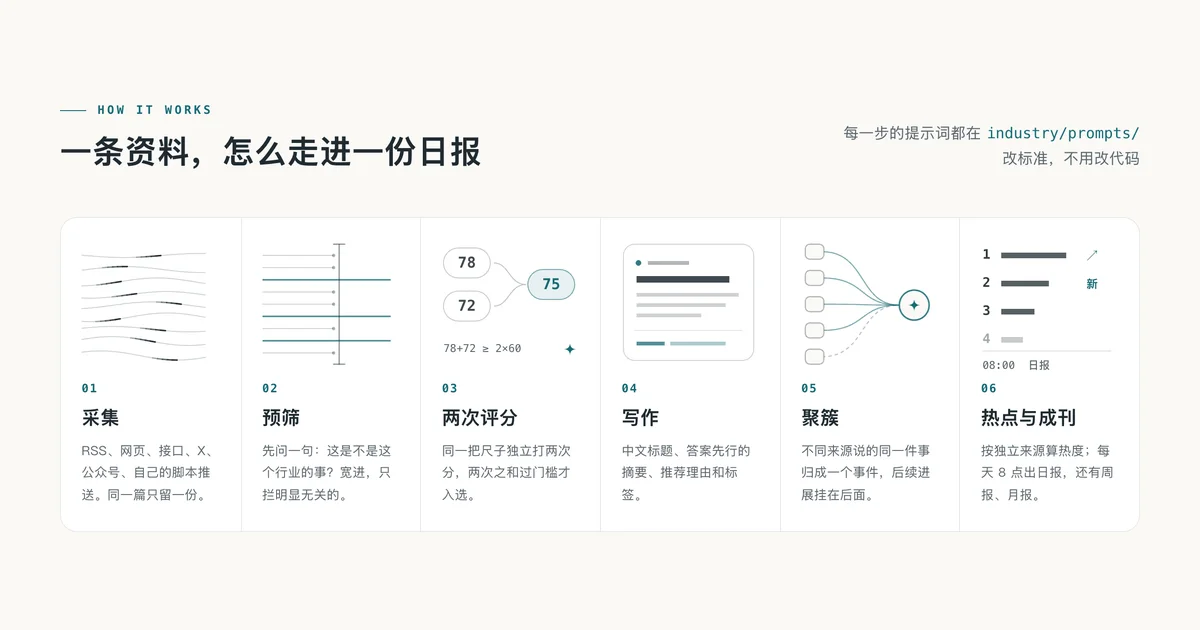
Every item flows through six stages. Learning them now saves you confusion in /admin later. 01 Collect: six source types — RSS, webpage lists, JSON APIs, X accounts, WeChat public accounts, plus pushes from your own scripts. Sources are tiered (first-hand official vs media/personal) and fetch frequency self-adjusts to output. Duplicates are dropped — one item, one copy. 02 Prescreen: one question — is this this industry's business? Deliberately lenient; it blocks only the obviously irrelevant. 03 Score twice: the same rubric applied independently, twice. An item is selected only if the sum passes the threshold — the repo's own diagram shows 78 + 72 ≥ 2 × 60. 04 Write: Chinese headlines, answer-first summaries, recommendation reasons, tags, and full translation of foreign articles — with an explicit guard so the model can't invent companies in headlines. 05 Cluster: reports of the same story merge into one event; follow-ups attach to it. 06 Heat + publish: heat computed per event, a daily report at 08:00, a weekly on Mondays, a monthly on the 1st.
The key design fact: every step's prompts live in industry/prompts/ and every threshold in industry/selection.ts. Changing what counts as "hot" is a prompt edit, not a code change.
2. Boot it#
Four commands, straight from the README:
git clone https://github.com/KKKKhazix/AIHOT.git myhot
cd myhot
node scripts/init-env.ts --llm-key <YOUR_API_KEY>
docker compose up -d --build
init-env.ts writes your .env — read it once; the admin password is the ADMIN_PASSWORD value in that file, per the README. Then open http://localhost:3000; the admin panel is at /admin. Content starts appearing within a couple of minutes; the README says the first full import takes about half an hour to process. The repo ships 18 public overseas AI news sources as demos (verified in industry/sources.json) — enough to see the machine work; your real sources come later.
Under the hood: Node.js 24, TypeScript, React Router with server-side rendering, Fastify, PostgreSQL 17, pg-boss, Tailwind CSS, Docker Compose — all from the README.
3. Watch the curation pass in /admin#
The admin panel is where you operate the desk: source management with test-fetch, content diagnostics, curation evals, per-step model swapping (each stage can run on a different model), a budget circuit breaker for paid services, and run logs with alerts. This is worth more than it looks — the circuit breaker is the control that keeps an unsupervised overnight run from spending your key balance.
The step worth understanding deeply is the gate. After the lenient prescreen, every candidate is scored twice, independently, against the same rubric in industry/prompts/selection-score.md; the thresholds live in industry/selection.ts. One score can be noise; two scores have to agree. The author's calibration recipe: label 100–200 items yourself, run scripts/eval-selection.ts (in the repo, verified), see how well the gate matches your judgment, then rewrite the rubric and the thresholds. The loop is documented in docs/selection.md. Treat the rubric like a style guide, not a config file — it encodes what your industry considers important.
4. The interesting part: events and heat#
One story, one entry. Candidate matching uses title-and-summary vectors against the last two weeks (plus the same link, or replies and quotes of the same X post); the model then judges whether two reports are the same event, a follow-up, or two different things. Uncertain merges are re-confirmed by a different model, and anything a human has fixed is never overwritten by the machine. That last rule is the one that makes the system trustworthy in practice.
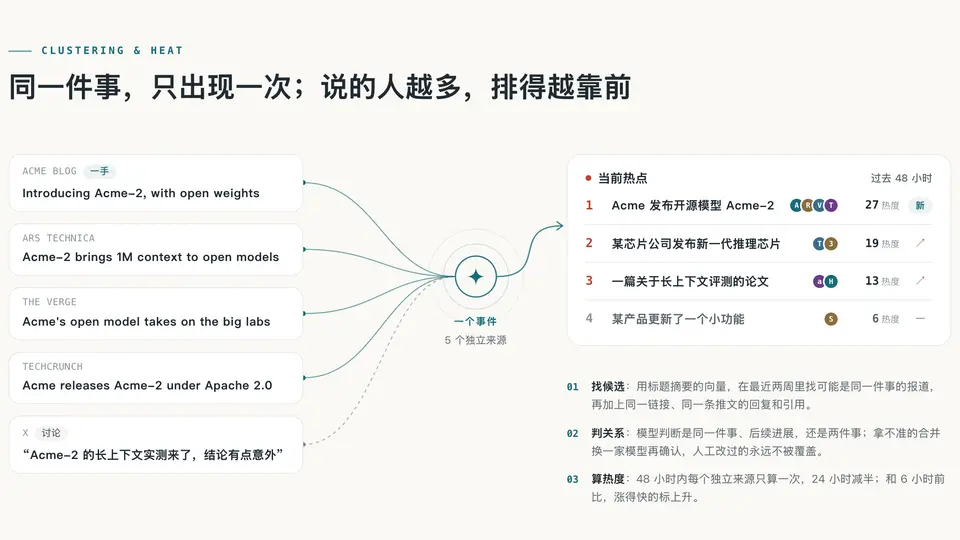
Heat is computed per event, not per article. Within 48 hours, each independent source counts once; after 24 hours its weight halves. Re-fetching the same item can't inflate the score, and one outlet publishing ten articles on the same story counts once — so what floats to the top is genuinely what many people are talking about. The board compares against six hours ago: fast risers get marked rising, brand-new events get marked new.
This is what makes the homepage not a feed: the same event appears exactly once, ranked by how many independent sources discuss it.
5. Make it your industry's site#
The author's own recipe for retargeting: hand the repo to your coding agent (Claude Code, Codex, anything) and say — read AGENTS.md and docs/customize.md, and turn this into a hotspot site for my industry. Be specific: which sources you care about, what counts as hot, what doesn't. Almost everything you need to touch lives in one folder:
| File | What you change |
|---|---|
industry/site.ts | Site name, industry terms, homepage copy, about page |
industry/taxonomy.ts, industry/topics.json | Categories, tags, topics |
industry/sources.json | Sources imported on first boot — swap in yours |
industry/prompts/ | Selection standards and writing requirements — your industry know-how goes here |
industry/selection.ts | Admission thresholds |
industry/features.ts | Toggles for the two AI-specific modules: the model leaderboard and the Codex reset monitor |
industry/brand/, industry/pages/ | Icons, terms of use, privacy notes |
The one legal note: the MIT license covers the code, but the AIHOT name and logo are explicitly excluded — the author asks you not to use them. Give the site your own name. The docs folder is your manual: docs/customize.md (the full retarget walkthrough), docs/sources.md (source types, tiers, the push API), docs/grouping.md (event relations, with its own evaluation set), docs/deploy.md (Docker, domain + HTTPS, mainland-China notes, updates, backups, costs), docs/architecture.md (the three processes, the directory layout), and docs/leaderboard.md.
6. What you get when it runs#
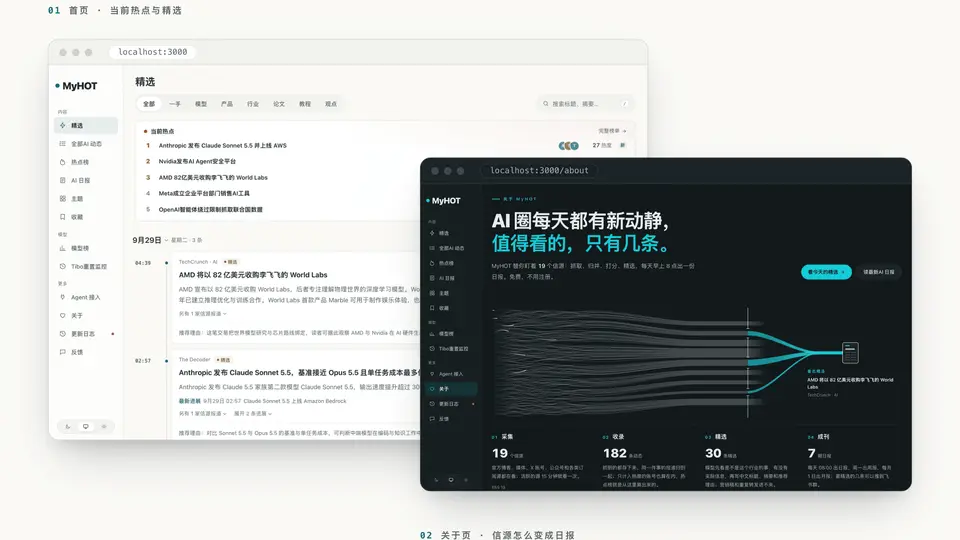
A site with the current-hotspots board, the curated feed, topic pages (companies, directions, content formats), title-and-summary search plus full-text related search. The daily lands at 08:00, the weekly on Mondays, the monthly on the 1st — sectioned by category, with a lede. And for agents: RSS feeds (curated, all, full-text, daily), a public API, MCP, and llms.txt — the same content served to humans and to machines.
Speed, measured by the author on the live site: page median 10 ms, 95% within 50 ms; API median 6 ms, 95% within 12 ms. His own footnote on the chart: how fast your site is depends on your server and your data volume.
What you built#
A self-running desk. Sources flow in, the double-score gate admits only what passes your rubric, reports merge into events, heat ranks them, and the briefing lands at 08:00. Your ongoing job is no longer reading nineteen feeds — it's maintaining the scoring rubric and the thresholds, calibrated against labels you produced yourself. The demo boots as MyHOT with 18 AI sources; the standing request from the author is simple: rename it and make it yours.
Honest limitations#
- The docs and prompts are in Chinese, and the writing step produces Chinese headlines and summaries by default. Building an English- or French-language site means rewriting
industry/prompts/— plan for that work, or add a translation pass downstream. - It's a snapshot of a live site's code, not a maintained framework. The author says upfront he's a designer who wrote this with AI, that the code is cleaner than before but still has weak spots, and that he can't guarantee every upstream change gets synced back. ~2,900 stars in a day means issues may pile up faster than one person answers them.
- It needs your key and your machine. No free-tier anything here: Docker host, an OpenAI-compatible API key, ~30 minutes for the first import, and a two-week candidate window that makes clustering dumber on day one than on day fourteen.
- Star counts and the performance numbers above were verified on September 29, 2026 and will move. The name and logo are not MIT-licensed — don't reuse them.